Showboard
Your coding agent answers with dashboards: charts and tables from read-only SQL, Excel and CSV.
Documentation

Ask in your terminal. Get a dashboard on your screen.
Showboard is an open-source MCP server that lets Claude Code, Codex, Cursor, Gemini CLI and other coding agents answer questions about your SQL database, or a folder of Excel and CSV files, with charts, tables and headline numbers: in your browser, inside your own app, or beside your terminal.



Live demo · Quick start · How it works · Benchmark · Docs

2.7× cheaper · 3.5× fewer output tokens · 3.2× faster
Claude Code with Showboard against Claude Code on its own, on the same questions and the same files. See the benchmark
[!NOTE] Built with AI assistance. Showboard is developed with help from AI coding agents, mostly Claude Code. A test suite and a measured benchmark keep it honest. It is young, so issues and pull requests are welcome.
Why Showboard
Ask a coding agent for a chart of your data and watch what it does. It writes Python to read your files and work out the numbers, checks the results over several steps, then writes an HTML page, chart code and all. It gets there, but every answer is a small software project, paid for in tokens and minutes, and the numbers live in code you have to read to trust.
Showboard gives the agent a shorter path. The agent writes a few SQL queries and a short layout. Showboard runs the queries read-only, picks a chart for each result, lays out the board and puts it on your screen.
| Claude Code on its own | Claude Code + Showboard | |
|---|---|---|
| You get | Paragraphs, or an HTML file it wrote | A board of charts, tables, headline numbers and notes |
| You see it | In the terminal, or in a file you open | In your browser, inside your app, or beside your terminal |
| The numbers come from | Python it wrote and ran | Read-only SQL, one click away under every chart |
| 24 answers, measured | $4.77 and 24.3 minutes | $1.78 and 7.5 minutes |
Benchmark

Five questions about the sample spreadsheets (one with a follow-up), each asked four times over two runs: 24 answers each way, in Claude Code with Opus 5.5 at medium effort. On its own, Claude worked the numbers out in Python, then wrote an HTML page of charts. With Showboard, it wrote SQL and a short layout.
- 2.7× cheaper: $1.78 against $4.77, at API list price. On Pro and Max plans the same tokens count against your usage limit instead.
- 3.5× fewer output tokens: 36,659 against 128,929, and 2.3× fewer new input tokens (99,200 against 231,443).
- 3.2× faster: 7.5 minutes against 24.3.
- Cheaper on all 24 answers, by 1.6× to 4.4×, with the same figures both ways.
Most of what an answer costs is steps, because each step re-reads the whole conversation. On its own, Claude writes the analysis as code, checks it over several turns, then writes the page. With Showboard, a board is one call, and a board worth repeating becomes a recipe. In the demo shop, at API list prices, "Top 5 products of 2025" was one recipe call ($0.26), and "Each channel's revenue by quarter, 2025 vs 2026" one draw call ($0.37) that saved itself as a recipe.
To be fair to the other side: the pages Claude wrote on its own were more designed, each made to measure, where Showboard's boards are plainer and consistent. This is two runs on one dataset, and other agents have not been measured yet. The questions, every turn's results and how to rerun it on your own files are in bench/.
Quick start
You need Node.js 22.13 or later and a coding agent. The demo uses Claude Code. Showboard is on npm as showboard.
Claude Code: install the plugin
At the prompt of a Claude Code terminal session:
/plugin install showboard --marketplace rohanbeingsocial/showboard
When it asks, set Data to a folder of spreadsheets, one spreadsheet or a SQLite file (or Database URL to a Postgres URL), then ask Claude about your data. Boards appear in a pane beside the chat and at http://localhost:4711, in every project. A project where you ran showboard init keeps its own. See plugins/claude-code.
Claude desktop app: install the extension
Download showboard-<version>.mcpb from the latest release and install it in Settings, Extensions, Advanced settings, Install Extension…. Pick your spreadsheet folder (or give a database) when it asks, and boards open at http://localhost:4712. No Node.js needed: the app brings its own. See plugins/claude-desktop.
Let your agent set it up
In your project, ask your coding agent:
Set up Showboard in this project: run
npx showboard guideand follow it.
The guide (SETUP.md) has the agent pick the path that fits the project: spreadsheets, a database, or your own app (with server code for Next.js, Express, Hono and node:http). The agent then checks its own work with showboard doctor, which starts Showboard the way each agent will and says how to fix anything that fails.
Try the demo
A small furniture shop's admin app, with its orders in SQLite:
git clone https://github.com/rohanbeingsocial/showboard.git
cd showboard
npm install
npm run demo        # builds, seeds the shop's database and serves http://localhost:4710
Open http://localhost:4710, then start Claude Code in the demo's folder from a second terminal:
cd examples/sales-demo
claude              # the .mcp.json here connects Claude Code to the demo
Approve the folder's showboard server when Claude Code asks, then try:
- "Show me my best seller of 2026, and how it compares with last year."
- "Top 5 products of 2025." This one is a recipe the demo ships, so the board takes a single tool call.
- "Open the Aero Standing Desk's orders from October." Claude runs the shop's own Orders filter.
Your spreadsheets
cd my-reports          # a folder of .xlsx, .xlsm, .csv or .tsv files
npx showboard init .   # Claude Code; --agent codex,cursor,gemini… for others
claude                 # then open http://localhost:4710, or run: npx showboard pane
Each sheet becomes a table the agent can query and join. Loading copes with the usual mess: title rows above the header, blank rows, "Total" rows (skipped, so sums do not double count), N/A in number columns, ₹1,23,456 and $1,234.50 typed as text, Excel dates, and 15-Mar-2026 or 25/04/2026 text dates. Amounts print in the files' own currency, ₹ in lakh and crore for rupee sheets. Your files are only read, and they reload when you save them. To try it on sample files: cd examples/spreadsheets, run claude and open http://localhost:4720.
A database, no app
npx showboard init --db ./shop.sqlite   # a SQLite file or a Postgres URL
claude                                  # boards appear at http://localhost:4710
A Postgres URL with a password is better kept out of the settings files: leave --db out, and set SHOWBOARD_DB in your environment before you start your agent.
Your own app
Mount Showboard in your Node server and React pages: see Put boards in your own app.
How it works

- You ask your agent a question, like "Which regions are behind their 2026 targets?"
- The agent calls Showboard over MCP: a saved recipe if one fits, or
drawwith one SQL query per chart. - Showboard draws the board. It runs each query read-only, picks a chart from the shape of each result and lays out the board.
- The board appears on your screen and joins the saved boards. The agent gets the rows back, so it can check what it tells you.
The agent never types a figure into a chart: every number comes from a query, and every chart can show its SQL. Think of Showboard as a pen for your agent, with two limits on purpose: in your app it draws only where you give it room, and it acts only through the actions you register, never by clicking around your screen.
For the full picture, with where each part lives in the code, see How Showboard works.
Excel and CSV, no app needed

A folder of spreadsheets is all it needs. Here Claude Code compares 2026 orders in an Excel workbook with targets in a CSV file, amounts in rupees, and Show sources opens the SQL behind a chart.
In a real app

It works on real data too. Meridian, a private investing app, has Showboard inside. Here Claude Code is asked whether silver rose each time the gold/silver ratio crossed above 90. It reads two years of MCX gold and silver prices from the app's own API and draws one board: the ratio and silver side by side, each stretch above 90 marked in orange, and silver's moves 1, 3 and 6 months after each cross.
Inside your own app

Mount Showboard in your React app and the agent can also see what is on screen and run the actions you register. Here Claude reads the demo shop's screen with get_screen, then runs the shop's own filter_orders action, and the app opens its Orders page, filtered.
Beside your terminal
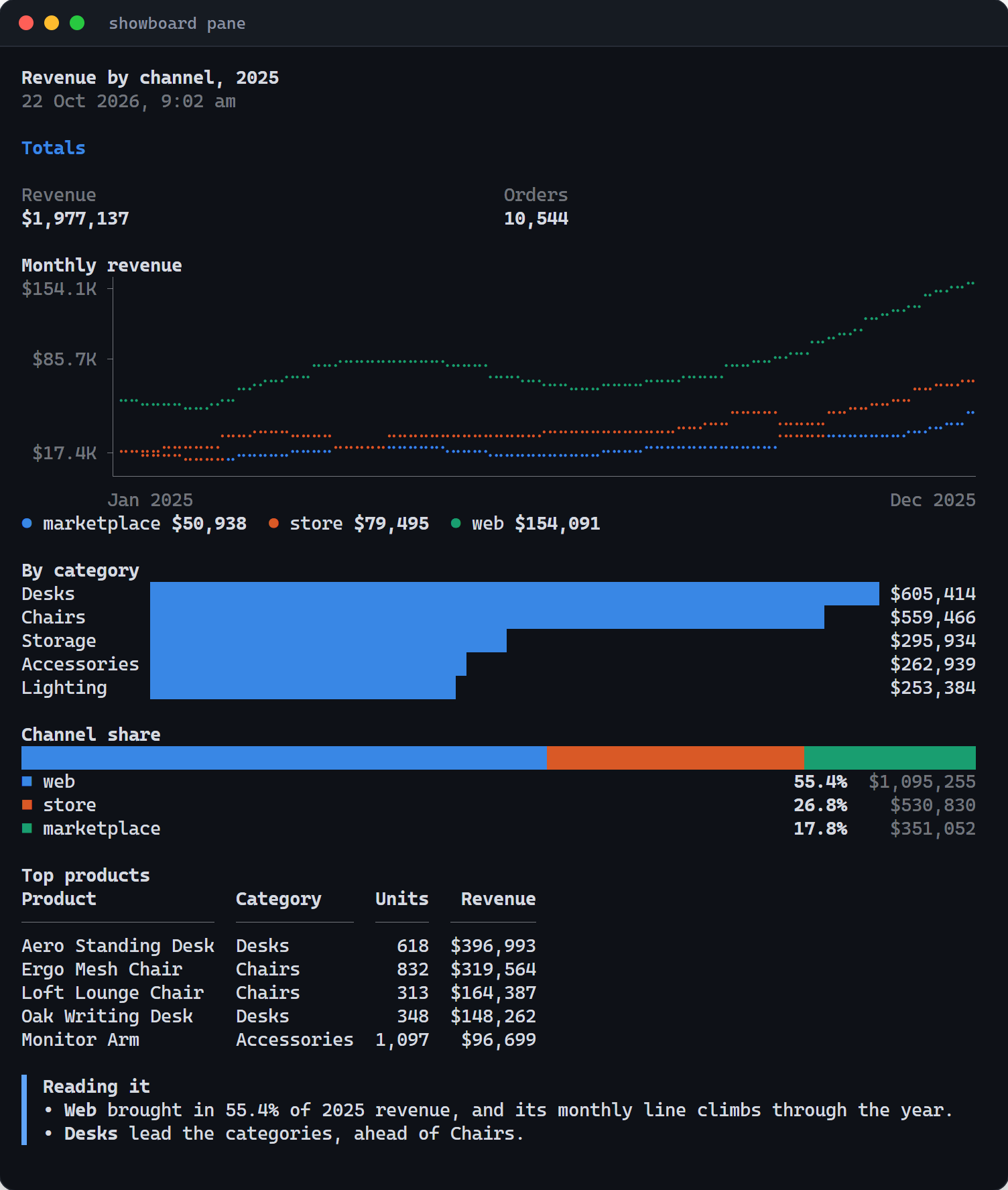
No browser needed: showboard pane draws each board as text in a terminal split beside your agent, and follows each new board as the agent draws it.
npx showboard pane                                         # Showboard on port 4710
npx showboard pane --url http://localhost:3000/showboard   # one your app mounts
Lines become braille, bars become blocks, shares become one stacked bar with a legend, and tables, notes and headline numbers print as they are, every figure read from the board's data. Keys: ← → older and newer boards, s sources, 1–9 the board's buttons (they run in your app), o the browser, q quit. --once prints the board and exits.
In Claude Code, the same view sits beside the chat: the plugin brings it along with a Showboard of its own. It opens by itself when a board arrives and the terminal has room, and /board opens it anywhere. Install it at the prompt of a Claude Code terminal session:
/plugin install showboard --marketplace rohanbeingsocial/showboard
Features
- Read-only by design. Postgres queries run in a
READ ONLYtransaction with a time and row limit; SQLite files and spreadsheets are opened read-only. - Charts picked from the data. Dates become lines, labels become bars, a single row becomes headline numbers, anything else a table. The agent can still choose every chart itself.
- One call per board.
drawfetches and lays out a whole board, with notes, side-by-side rows and titled sections, in a single tool call. - Recipes. A board worth repeating becomes a one-call recipe with parameters. Your app ships its own, and the agent saves new ones.
- Show sources. Every chart, table and number can show the query behind it.
- Messy spreadsheets welcome. Title rows, "Total" rows,
N/A, amounts typed as text and text dates are all handled. - Your app, your components. Boards can use your own React components and run your app's actions, and the agent can see what is on screen.
- Any MCP agent.
showboard init --agentwrites the settings for Claude Code, Codex, OpenCode, BharatCode, Gemini CLI, Cursor, VS Code, Antigravity and Windsurf. - A pane beside the terminal.
showboard panefor any agent. In Claude Code, one plugin install brings the server and a pane beside the chat. - A cheaper model for new boards. In Claude Code, a
board-builderagent on Sonnet builds new kinds of board in its own small context. - No extra API key. It runs on the agent you already use.
Works with your agent
Showboard is an MCP server, so any coding agent that speaks MCP can use it. showboard init --agent <names> writes the settings for each one you name (comma separated, or all); with no --agent, it sets up Claude Code plus any agent the folder already has settings for.
| Agent | init writes | Notes |
|---|---|---|
| Claude Code | .mcp.json | Approve the server when Claude Code first asks. Also gets the board-builder agent. |
| Codex | .codex/config.toml | Codex reads it only in a trusted project. |
| OpenCode | opencode.json | opencode mcp list shows it connected. |
| BharatCode | opencode.json | A fork of OpenCode, so it reads the same entry. Sign in with bharatcode auth login; bharatcode mcp list shows it connected. |
| Gemini CLI | .gemini/settings.json | Trust the folder when Gemini CLI asks; gemini mcp list shows it connected. |
| Cursor | .cursor/mcp.json | Names the project folder with --root, since Cursor starts servers elsewhere. |
| VS Code | .vscode/mcp.json | Uses ${workspaceFolder}; start it under MCP Servers, then use agent mode. |
| Antigravity | ~/.gemini/config/mcp_config.json | User-wide, so the entry names the project folder. Named only on purpose: not part of all. |
| Windsurf | ~/.codeium/windsurf/mcp_config.json | User-wide, like Antigravity. |
Boards have been drawn end to end in Claude Code. For the other agents, the settings init writes have been checked to load and connect, and the server answers their MCP requests; a live session in each is still to come.
Put boards in your own app
npm install showboard zod
The React parts need React 19. Postgres support (pg) comes with the package.
Server. The handler takes a fetch Request and returns a Response, so any Node server can mount it.
import { createShowboard } from "showboard/server";

const showboard = await createShowboard({
  db: process.env.DATABASE_URL,      // a Postgres URL, a SQLite file, or { pool } with your own pg Pool
  boardsDir: ".showboard/boards",    // keep boards across restarts
});
const handle = showboard.handler({ basePath: "/showboard" });

app.all("/showboard/*", (c) => handle(c.req.raw));            // Hono
// node:http and Express: toNodeListener(handle) from "showboard/server"
Browser.
import { Board, BoardList, ShowboardProvider } from "showboard/react";
import "showboard/styles.css";

<ShowboardProvider url="/showboard" onBoard={() => navigate("/board")}>
  <App />
</ShowboardProvider>;

// On the page that holds the agent's answers:
<Board />        {/* the board shown last */}
<BoardList />    {/* saved boards; click one to open it */}
Your agent. In your project folder, then start your app and your agent:
npx showboard init --url http://localhost:3000/showboard --agent claude,codex
Your agent's own login covers your own and internal dashboards; putting Showboard in front of your customers needs a model API key instead.
More examples: a whole board in one call, recipes, your own components, actions and state, rows your server computes
A whole board in one call. What the agent sends to draw. Each part brings its own SQL; the first part becomes a line per channel, the second asks for a pie:
{
  "title": "Orders by channel, {year}",
  "params": { "year": "2026" },
  "items": [
    { "note": "Paid orders only.", "tone": "info" },
    { "row": [
      { "title": "By month",
        "sql": "SELECT substr(ordered_at, 1, 7) AS month, channel, count(*) AS orders FROM orders WHERE status = 'paid' AND substr(ordered_at, 1, 4) = :year GROUP BY 1, 2" },
      { "title": "Share", "show": "pie",
        "sql": "SELECT channel, count(*) AS orders FROM orders WHERE status = 'paid' AND substr(ordered_at, 1, 4) = :year GROUP BY 1" }
    ] }
  ],
  "save_as": { "name": "channel_orders", "about": "Paid orders by channel for one year." }
}
The same board for another year is now one recipe call of a few hundred tokens:
{ "name": "channel_orders", "params": { "year": "2025" } }
Recipes your app ships. :year and :limit become real query parameters, never text pasted into the SQL:
createShowboard({
  db,
  recipes: [{
    name: "top_products",
    about: "A year's best-selling products by paid revenue.",
    title: "Top products of {year}",
    params: { year: { default: "2026" }, limit: { default: 10 } },
    items: [{
      title: "Revenue by product",
      sql: `SELECT p.name AS product, round(sum(i.qty * i.unit_price), 2) AS revenue
            FROM order_items i JOIN orders o ON o.id = i.order_id JOIN products p ON p.id = i.product_id
            WHERE o.status = 'paid' AND substr(o.ordered_at, 1, 4) = :year
            GROUP BY p.name ORDER BY revenue DESC LIMIT :limit`,
      formats: { revenue: "currency" },
    }],
  }],
});
Your own components next to the built-in ones:
import { z } from "zod";
import type { ShowboardComponent } from "showboard/react";

const props = z.object({ sku: z.string().describe("Product SKU, e.g. DSK-AERO") });

export const ProductCard: ShowboardComponent<typeof props> = {
  description: "The shop's product card: name, price and units sold this year.",
  props,
  render: ({ props }) => <ProductTile sku={props.sku} />,   // a component you already have
};

const COMPONENTS = { ProductCard };   // a module constant: a new object redraws every board
<ShowboardProvider url="/showboard" components={COMPONENTS}>…</ShowboardProvider>;
Actions the agent can run, and state it can see:
import { useShowboardAction, useShowboardState } from "showboard/react";

const filterOrdersInput = z.object({ month: z.string().describe("YYYY-MM") });   // outside the component

function ClaudeHooks({ page, setPage, setFilters }) {
  useShowboardState("page", page);   // the agent reads it with get_screen
  useShowboardAction({
    name: "filter_orders",
    description: "Open the Orders page for one month.",
    input: filterOrdersInput,
    run: ({ month }) => {
      setFilters({ month });
      setPage("orders");
    },
  });
  return null;
}
The agent runs an action with ui_act, and a board can carry an ActionButton that runs one.
Rows your server computes, offered to the agent by name:
createShowboard({
  db,
  sources: [{
    name: "stock_levels",
    description: "Units in stock per product, from the warehouse system.",
    input: z.object({ category: z.string().optional() }),
    run: ({ category }) => warehouse.stockLevels(category),   // an array of plain objects
  }],
});
Tools your agent gets
| Tool | What it does |
|---|---|
describe_data | Lists the tables and columns, the app's sources and the recipes |
recipe | Draws a ready-made board for new values, in one call |
draw | Fetches and draws a whole board in one call |
query_data | Runs one read-only SELECT and keeps the rows as a named dataset (with a database) |
use_source | Gets rows your server computes (when your app has sources) |
show_board | The long form: a json-render layout the agent writes element by element; also reopens a saved board |
list_boards | Lists the saved boards |
get_screen | What the browser shows: the page's state, its actions and its components |
ui_act | Runs one of the page's actions |
Showboard tells the agent to reach for a recipe first, then draw. New recipes reach the agent without a restart where it listens for tool-list changes, as Claude Code does; describe_data lists them for the rest.
API
| Export | Kind | Purpose |
|---|---|---|
createShowboard | fn | Opens your database or files; returns the tools and the HTTP handler. |
toNodeListener, serve | fn | Mount the handler on node:http or Express, or serve it on its own. |
ShowboardProvider (/react) | component | Connects the page to the handler and holds the board on screen. |
Board, BoardList (/react) | component | The board shown last, and the saved boards. |
useShowboardAction, useShowboardState (/react) | hook | Actions the agent can run, and state it can see. |
formatValue (/react) | fn | Prints numbers the way boards do, for your own components. |
boardToText (/text) | fn | A board as lines of styled text, for a pane of your own. |
showboard serve | mcp | init | pane | CLI | Showboard's own board page, the MCP server, setup for each agent, and the terminal pane. |
showboard guide | doctor | CLI | Setup steps written for coding agents, and a check of the setup as each agent will meet it. |
The full reference, with every option, prop, tool, flag and the chart-picking rules, is in docs/reference.md.
Safety
Your agent can read your data. It cannot change it, and in your app it can do only what you let it.
- Postgres: each query runs in a
READ ONLYtransaction as a single statement, with a time limit (5 s) and a row limit (5,000). - SQLite: the file is opened read-only, with the same row limit.
- Spreadsheets: loaded into an in-memory copy that refuses writes. Your files are only read.
- SQL: only
SELECT(andWITH … SELECT,VALUES,TABLE) is accepted. - Actions: the agent can run only the actions your app registers with
useShowboardAction, each with an input your schema checks; it cannot click or type anywhere else. - HTTP: the handler answers only
localhostand127.0.0.1, and refuses requests from other sites' pages, so a website open in your browser cannot run the tools.
Use a read-only database role anyway.
Limits
- Notes are the agent's own words. Charts, tables and headline numbers read their values from query results. A note is text the agent writes: it is told to quote only figures it has read, but its conclusions can still be wrong. In testing, Claude once named the wrong product as the units leader, because it had only queried the top 10 by revenue. Tick Show sources to check.
- The pane draws charts as text. Its braille lines and block bars carry the same figures, at a terminal's resolution; the board page has the full charts.
- A board is a snapshot. It keeps the rows it was drawn from, so opening it next week shows the numbers as they were then. Ask again, or run its recipe, for fresh ones.
- Big results are cut. A query keeps at most 5,000 rows, and a chart draws at most 6 lines, or 4 bars per label. The agent is told what was left out, so it can aggregate or filter in SQL.
FAQ
Does my data leave my computer?
Showboard itself runs on your computer, answers only localhost, and sends nothing anywhere. The rows a query returns go to your agent, and so to the agent's model, like anything else your agent reads.
Do I need an API key?
No. Showboard runs on the coding agent you already use, with the login it already has. Putting Showboard in front of your customers is different: that needs a model API key.
Can the agent change my data, or click around my app?
No. Every query is read-only, and in your app the agent can run only the actions you register, with inputs your schema checks. See Safety.
Does it work with agents other than Claude Code?
Yes, with any agent that speaks MCP. showboard init --agent writes the settings for Codex, OpenCode, BharatCode, Gemini CLI, Cursor, VS Code, Antigravity and Windsurf. Claude Code is the one tested end to end so far; see Works with your agent.
Roadmap
- A pane beside the terminal:
showboard panefor any agent, and a Claude Code mod - Settings for Codex, OpenCode, BharatCode, Gemini CLI, Cursor, VS Code, Antigravity and Windsurf
- Publish to npm
- A leaner launch that trims Claude Code's fixed prompt, the biggest share of what a board costs
- A
board-builderagent for the agents besides Claude Code that have subagents
Contributing
Contributions are welcome, AI-assisted ones included. Read your diff before you send it, and make sure the tests pass. For anything bigger than a fix, open an issue first. CONTRIBUTING.md has the details.
npm install
npm run build        # the package, its board page and the Claude Code mod's renderer
npm test             # SHOWBOARD_TEST_PG=<postgres url> also runs the Postgres tests
npm run test:pane    # the Claude Code mod, in Claude Code's own plugin test kit
npm run typecheck
npm run demo
| Folder | What is in it |
|---|---|
packages/showboard/src/server | createShowboard, the tools, read-only database access, spreadsheet loading, the HTTP handler |
packages/showboard/src/react | ShowboardProvider, Board, the built-in components and the hooks |
packages/showboard/src/spec | The component catalog, number formats and board checks |
packages/showboard/src/text | Boards drawn as text, for the panes |
packages/showboard/src/cli | The serve, mcp, init and pane commands, and each agent's settings |
packages/showboard/src/viewer | Showboard's own board page |
plugins/claude-code | The Claude Code plugin: a Showboard server and the pane beside the chat, listed for /plugin install in .claude-plugin/marketplace.json |
plugins/claude-desktop | The Claude desktop extension: manifest.json and build.mjs, which writes showboard-<version>.mcpb |
examples/ | The demo shop and the sample spreadsheets |
bench/ | The cost benchmark |
License
MIT. See LICENSE.
Star history
If Showboard saved you some tokens, a ⭐ helps other people find it.