LubeLogger MCP
MCP server to help you manage vehicle maintenance and history with LubeLogger.
Documentation





A self-contained Model Context Protocol (MCP) server that connects a self-hosted LubeLogger vehicle maintenance instance to AI assistants, including Claude Desktop, Cursor, Google Gemini, and custom agents.
Overview
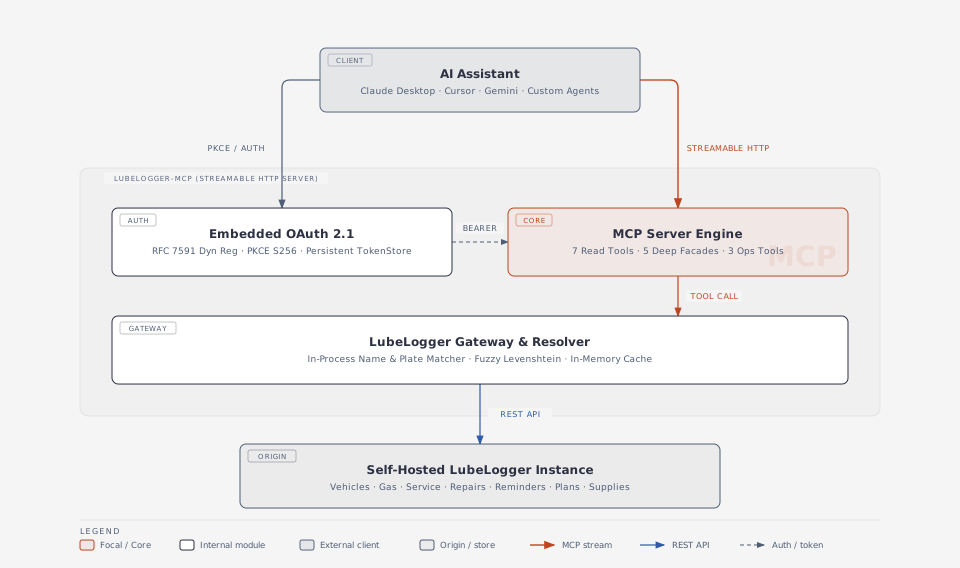
lubelogger-mcp exposes your personal or family automotive records to AI models over Streamable HTTP (POST /mcp) with an embedded OAuth 2.1 server that supports PKCE (S256) and RFC 7591 dynamic client registration.
Designed for self-hosted VPS deployments alongside LubeLogger, lubelogger-mcp features in-process vehicle name resolution, consolidated Resource Facades with standardized result envelopes, in-memory vehicle caching, and safety annotations on all operations.
Architecture
MCP Tools Reference
lubelogger-mcp provides 15 MCP tools organized into 3 clear categories:
- 7 Read Tools (
readOnlyHint: true,destructiveHint: false) - 5 Deep Resource Facades (
readOnlyHint: false,destructiveHint: true) - 3 Operational Write Tools (
readOnlyHint: false,destructiveHint: false)
1. Read Tools (readOnlyHint: true, destructiveHint: false)
| Tool | Description | Parameters |
|---|---|---|
get_server_info | Inspect LubeLogger server version, instance details, and health status. | checkForUpdate? (boolean) |
list_vehicles | List all vehicles in the garage with ID, year, make, model, license plate, fuel type, and tags. | forceSync? (boolean) |
get_vehicle_info | Detailed metrics and costs for a vehicle (resolved by ID, plate, or name) including total service cost, repair cost, upgrade cost, gas cost, tax cost, and pending reminder counts. | vehicle (string | number, required), forceSync? (boolean) |
get_records | Query records across all vehicles or for a single vehicle by type ('service' | 'repair' | 'upgrade' | 'gas' | 'odometer' | 'tax' | 'note' | 'reminder' | 'plan' | 'supply' | 'equipment'). | recordType (enum, required), vehicle? (string | number), startDate? (YYYY-MM-DD), endDate? (YYYY-MM-DD), tags? (string), limit? (1..500) |
get_maintenance_summary | Aggregate maintenance, repair, fuel, and operating spend across categories for a vehicle or for the entire garage. | vehicle? (string | number) |
list_reminders | Query active or upcoming maintenance reminders across all vehicles or for a specific vehicle with urgency and due status. | vehicle? (string | number), urgency? ('NotUrgent' | 'Urgent' | 'VeryUrgent'), forceSync? (boolean) |
get_extra_fields | List user-defined custom extra fields configured for vehicles and records. | none |
2. Deep Resource Facades (readOnlyHint: false, destructiveHint: true)
| Tool | Destructive | Description | Parameters |
|---|---|---|---|
manage_vehicles | true | Consolidated Resource Facade for vehicle lifecycle (action: 'create' | 'update' | 'delete'). Supports in-process name and plate resolution on update/delete. | action ('create' | 'update' | 'delete', required), vehicle? (string | number), year? (number), make? (string), model? (string), licensePlate? (string), fuelType? (string), isElectric? (boolean), tags? (string | string[]) |
manage_records | true | Consolidated Resource Facade for maintenance records (recordType: 'service' | 'repair' | 'upgrade' | 'gas' | 'tax' | 'note' | 'odometer', action: 'create' | 'update' | 'delete'). Automatically resolves vehicle names in-process. | recordType (enum, required), action (enum, required), vehicle? (string | number), id? (string | number), date? (YYYY-MM-DD), odometer? (number), description? (string), cost? (number), notes? (string), tags? (string | string[]), fuelConsumed? (number), isFillToFull? (boolean), missedFuelUp? (boolean), startingSoc? (number), endingSoc? (number), noteText? (string), pinned? (boolean) |
manage_reminders | true | Consolidated Resource Facade for scheduled reminders (action: 'create' | 'update' | 'delete'). | action ('create' | 'update' | 'delete', required), vehicle? (string | number), id? (string | number), description? (string), urgency? ('NotUrgent' | 'Urgent' | 'VeryUrgent'), metric? ('Date' | 'Odometer' | 'Both'), dueDate? (YYYY-MM-DD), dueOdometer? (number), notes? (string), tags? (string | string[]) |
manage_plans | true | Consolidated Resource Facade for planned tasks and future upgrades (action: 'create' | 'update' | 'delete'). | action ('create' | 'update' | 'delete', required), vehicle? (string | number), id? (string | number), description? (string), priority? ('Critical' | 'Normal' | 'Low'), progress? ('Backlog' | 'InProgress' | 'Testing' | 'Done'), cost? (number), notes? (string) |
manage_supplies | true | Consolidated Resource Facade for garage spare parts and supplies inventory (action: 'create' | 'update' | 'delete'). | action ('create' | 'update' | 'delete', required), vehicle? (string | number), id? (string | number), partNumber? (string), partSupplier? (string), partQuantity? (number), description? (string), cost? (number), notes? (string) |
3. Operational Write Tools (readOnlyHint: false, destructiveHint: false)
| Tool | Destructive | Description | Parameters |
|---|---|---|---|
trigger_reminders | false | Trigger automated reminder checks and notification emails on the LubeLogger server. | urgency? ('NotUrgent' | 'Urgent' | 'VeryUrgent') |
recalculate_odometer | false | Recalculate distance and odometer timeline across all records for a vehicle. | vehicle (string | number, required) |
create_backup | false | Trigger a database backup on the LubeLogger server. | outputName? (string) |
Quick Start
1. Interactive Setup Wizard
To install on your server, run the setup wizard:
mkdir -p lubelogger-mcp && cd lubelogger-mcp
bash -c "$(curl -fsSL https://raw.githubusercontent.com/PedroLiu1999/lubelogger-mcp/main/scripts/setup-wizard.sh)"
The wizard will:
- Configure
.envwith yourPUBLIC_URLandPORT. - Configure your LubeLogger server URL (
LUBELOGGER_URL). - Launch the server via Docker Compose.
2. Manual Docker Compose Setup
- Copy
.env.exampleto.envand fill in your values:
cp .env.example .env
- Start the service:
docker compose up -d
- Check container health:
curl http://127.0.0.1:3000/healthz
Configuration (.env)
| Variable | Description | Default |
|---|---|---|
PUBLIC_URL | Public HTTPS base URL (e.g. https://lubelogger-mcp.example.com). | Required |
PORT | Local host port bound to container. | 3000 |
DATA_DIR | Directory inside container for persistent OAuth token storage. | /data |
OAUTH_ALLOWED_REDIRECT_URIS | Comma-separated list of allowed OAuth redirect URI prefixes. | Localhost & Gemini |
LUBELOGGER_URL | Base URL of self-hosted LubeLogger instance. | http://host.docker.internal:8383 |
LUBELOGGER_API_KEY | Optional server-wide default API Key. (Omit to use pure dynamic per-user auth). | Optional |
CACHE_TTL_SECONDS | In-memory vehicle cache TTL in seconds. | 30 |
Connecting AI Clients
Authentication & Security (Zero-Password Architecture)
lubelogger-mcp implements an API-Key-First Branded Consent Screen (the "Home Assistant Pattern"):
- Zero Plaintext or Decodable Passwords: Your primary LubeLogger account password is never collected, transmitted, or stored.
- Revocable Capability Tokens: Authentication relies on disposable LubeLogger API keys (
x-api-key). If ever rotated or deleted in LubeLogger under Settings ➔ Profile ➔ API Keys, access is instantly revoked without risking your master account login. - Branded Dark Theme: The
/authorizepage features native LubeLogger dark styling (#0F172A/#1E293B), the official LubeLogger MCP logo (docs/logo-dark.svg), and direct deeplinks to your LubeLogger instance settings. - OAuth 2.1 Compliant: Fully implements RFC 7636 PKCE (
S256), RFC 7591 dynamic client registration, and RFC 6750 Bearer token lifecycles.
For deeper architectural analysis, see docs/spec-api-key-first-auth.md and docs/research-ha-mcp-auth.md.
Claude Desktop
Add to your claude_desktop_config.json:
{
  "mcpServers": {
    "lubelogger": {
      "url": "https://lubelogger-mcp.example.com/mcp"
    }
  }
}
When connecting for the first time, your browser will open to /authorize. Authorize access by pasting your LubeLogger API Key (generated under Settings ➔ Profile ➔ API Keys with Editor or Manager permissions).
Cursor & Google Gemini
- Add a Custom MCP Server.
- Select Server URL / Streamable HTTP.
- Set the endpoint:
https://lubelogger-mcp.example.com/mcp. - Enter your LubeLogger API key when prompted on the branded authorization screen.
Development & Testing
# Install dependencies
npm install

# Run test suite
npm test

# Build TypeScript
npm run build
License
MIT