Opus Growth | The MCP Connector for Ad Platforms
Opus Growth turns your AI assistant into a full ad operator across Google, Meta, Microsoft, TikTok and LinkedIn Ads — plus Google Analytics, Search Console, Business Profile, YouTube and Tag Manager. Audit accounts, cut wasted spend, build and optimize campaigns, and manage conversion tracking — all by chatting. Every change is previewed and applied only on your approval. Works with Claude, ChatGPT, Cursor, Windsurf, Codex and any MCP client. 200+ tools.
Documentation

Manage Google, Meta, Microsoft, TikTok & LinkedIn Ads from ChatGPT & Claude, the MCP Connector for Ad Platforms
Manage Google, Meta, Microsoft, TikTok & LinkedIn Ads from ChatGPT, Claude & any MCP-compatible app.
Paste one URL, no terminal, no API keys, no developer token.
Ads, websites & SEO data in one connector · real write actions with preview & approval · five ad platforms live.




opus-growth.com → · Free trial, 75 credits that never expire, no card
What · Quickstart · How it works · Platforms · Pricing · Security · FAQ
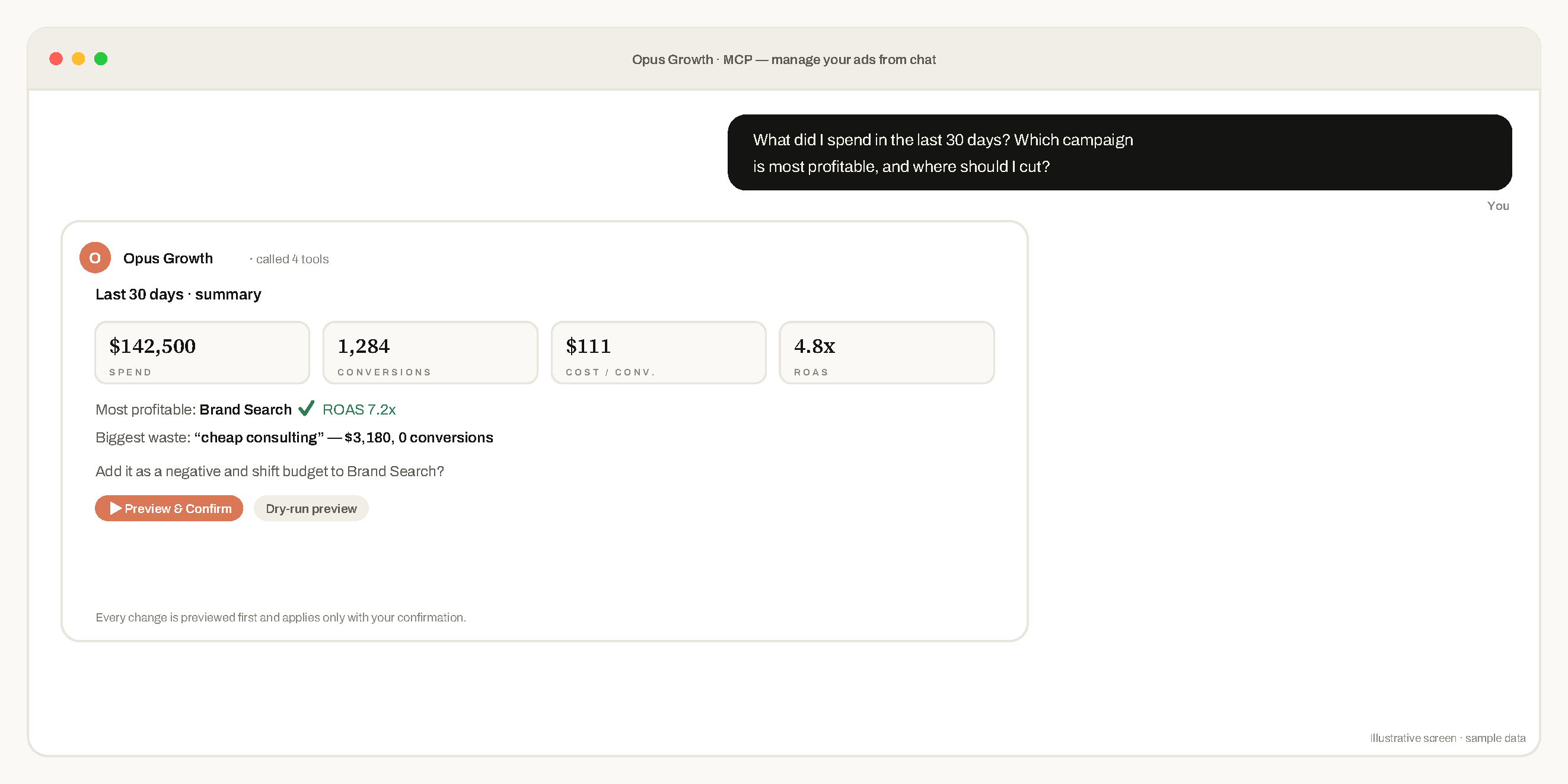
What is Opus Growth?
Opus Growth is a hosted MCP (Model Context Protocol) connector that lets you manage Google Ads, Meta Ads, Microsoft Advertising, TikTok Ads and LinkedIn Ads, plus Search Console, GA4, Tag Manager, Business Profile and YouTube, directly from ChatGPT, Claude and any MCP-compatible AI assistant. Connect once, then manage everything in plain language:
“How much did I spend in the last 30 days, and which campaign is profitable?” “Find the search terms burning budget and add them as negatives.” “Increase the budget of my best-converting campaign by 20%.”
In one line: a hosted MCP connector that lets you manage five live ad platforms. Google Ads, Meta Ads, Microsoft Advertising, TikTok Ads and LinkedIn Ads, from ChatGPT or Claude in plain language, with every change previewed before it runs. No code, no API keys.
The AI reads your reports, finds waste, and even builds campaigns, but never changes anything without showing you a preview and asking for your confirmation first.
Manage Google Ads with AI, see it in action
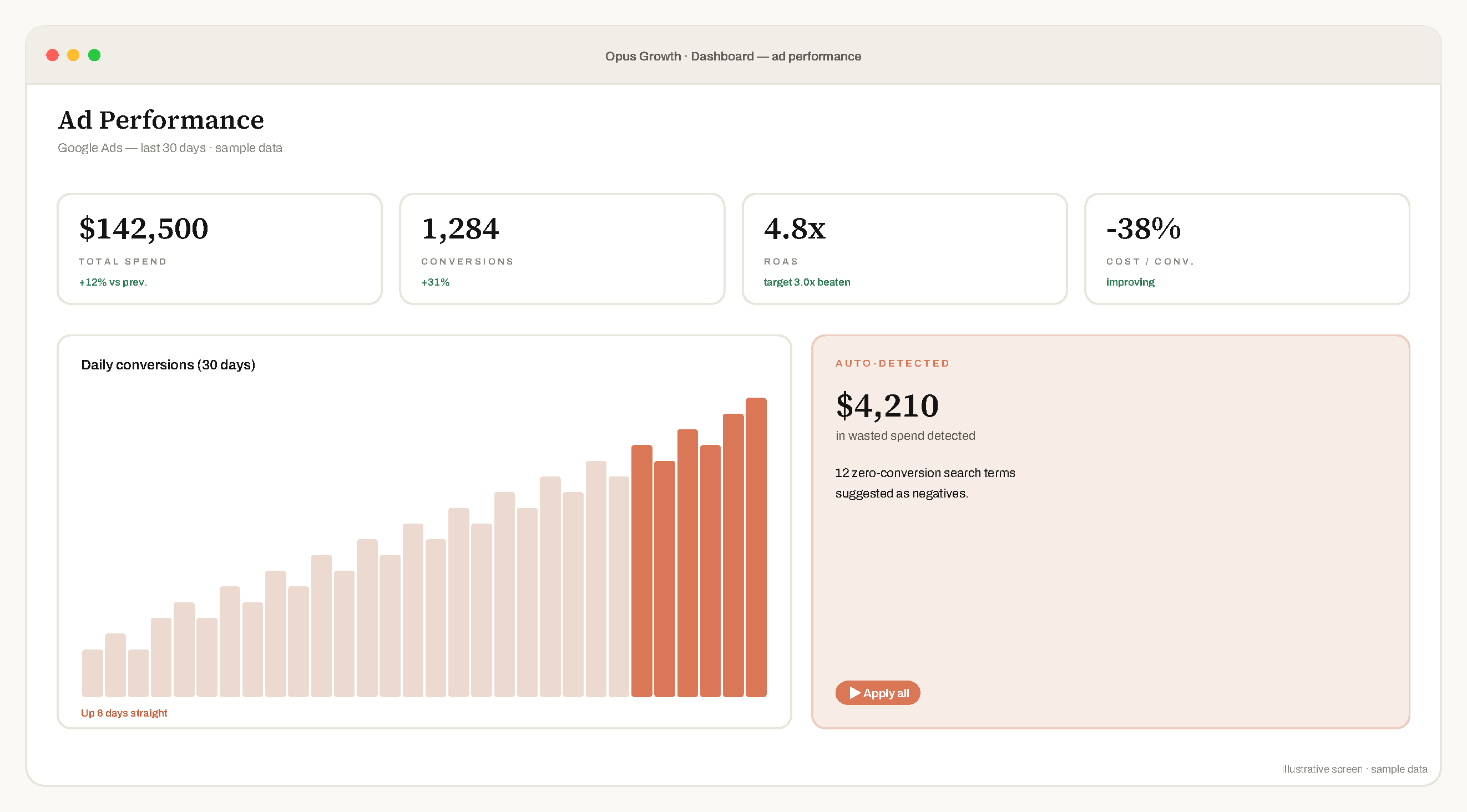
Illustrative screen · sample data.
Quickstart
In ChatGPT or Claude: open Settings → Connectors (MCP) → Add, paste your connector URL, then sign in with Google.
As a Cursor plugin: this repository is a Cursor plugin (.cursor-plugin/plugin.json). It adds the connector and a skill that explains how to read reports and apply changes safely.
In config-based clients (Cursor, Claude Code):
{
  "mcpServers": {
    "opus-growth": {
      "url": "https://mcp.opus-growth.com/mcp"
    }
  }
}
Your connector URL is https://mcp.opus-growth.com/mcp, setup takes about 60 seconds.
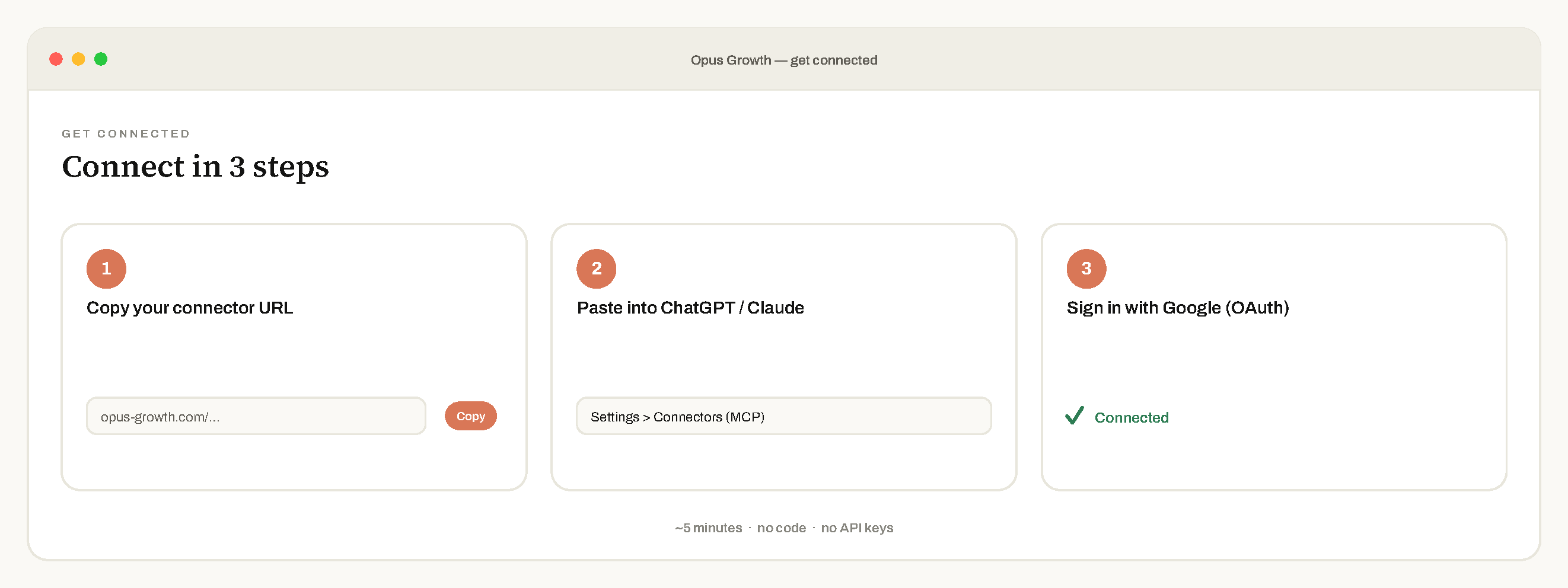
How do I connect Google Ads to ChatGPT or Claude?
- Copy the connector URL:
https://mcp.opus-growth.com/mcp - Paste it into ChatGPT / Claude → Settings → Connectors (MCP)
- Sign in with Google (official OAuth), done in about 60 seconds
No code. No Google Cloud project. No developer token.
Which ad platforms does Opus Growth support?
| Platform | Status |
|---|---|
| Google Ads | ✅ Live |
| Meta Ads (Facebook / Instagram) | ✅ Live |
| Microsoft Advertising (Bing) | ✅ Live |
| TikTok Ads | ✅ Live |
| LinkedIn Ads | ✅ Live |
Connected Google data sources (live): Search Console · Analytics (GA4) · Tag Manager · YouTube · Business Profile.
Tools
Opus Growth exposes MCP tools across:
- Google Ads
- Meta Ads (Facebook / Instagram)
- Microsoft Advertising (Bing)
- TikTok Ads
- LinkedIn Ads
- Google Analytics (GA4)
- Google Search Console
- Google Tag Manager
- Google Business Profile
- YouTube
Every write tool runs as a dry-run preview first and is applied only after you approve it.
What can Opus Growth do with Google Ads?
- Reporting, spend, ROAS, conversions and cost-per-conversion across accounts
- Account audits, automated health checks that flag issues
- Search-term waste analysis, find zero-conversion terms and add them as negatives
- Campaign creation. Search, Performance Max, Demand Gen and App campaigns
- Bidding & conversions, manage strategies and conversion actions
- Keyword research, keyword planner and keyword reports
- Budget reallocation, shift budget to your best-converting campaigns
Google Ads, Meta Ads, Microsoft Advertising, TikTok Ads and LinkedIn Ads, plus the Google data sources: every connected surface and operation in one connector. Every write action is preview-and-confirm.
Beyond ads, websites and SEO, in the same chat
Opus Growth isn't only for ads. The same connector also handles the work around your campaigns, so the whole loop stays in one conversation:
- Builds and hosts your website. Describe what you want and the AI builds an SEO-ready site on your own domain, edits it and publishes it, on isolated per-customer hosting. (AI Server: included in All-in-One with 30 GB of space, or added from the customer panel. No credits used.)
- Gives your AI the SEO data it can't see on its own. Keyword research (volume + difficulty), competitor keyword gaps, backlink profiles, live SERP analysis, ranked keywords, keyword trends, site-technology lookups, and brand-citation tracking across AI answer engines (Google AI, ChatGPT). (SEO/GEO credits: 1,000 a month on Agency, 15,000 a month on All-in-One, extra packs from the customer panel.)
- Measures real performance. Core Web Vitals and PageSpeed for any page, free.
Because it's one connector, you can research the keywords, build the landing page, check its Core Web Vitals and launch the Google Ads campaign that points to it, all in the same chat, without switching tools.
Pricing
| Plan | Price | For | What you get |
|---|---|---|---|
| Free | $0 | Anyone who wants to try first | 75 credits that never expire · every ad tool, live changes included · preview and approval on every change · email support |
| Pro | $49 / month | One business running its own ads | 5,000 credits renewed every month · one ad account per platform · Data Studio (Looker Studio) reports under your own brand · priority support from a person |
| Agency | $99 / month | Agencies and freelancers managing several clients | Unlimited credits · every client account through your manager account (MCC) · 1,000 SEO/GEO credits every month · a dedicated account manager and priority support |
| All-in-One | $149 / month | Running ads, websites and SEO/GEO on one subscription | Everything in Agency · an AI Server with 30 GB for your websites · 15,000 SEO/GEO credits every month · one WordPress site managed from the chat |
| Enterprise | Contact us | Teams with several members | Seats, roles and central billing, priced for your team. Contact us or write to support@opus-growth.com |
What the credits mean: 75 credits are, for example, 37 performance reports or 25 account audits; when they run out usage pauses and nothing is charged. 5,000 credits are about 2,500 performance reports or 625 Search campaign setups a month. 1,000 SEO/GEO credits are about 25 keyword research runs or 5 full SEO/GEO analyses; 15,000 are about 375 keyword research runs. Unused SEO/GEO credits do not carry over to the next month.
Yearly billing: Pro $490, Agency $990, All-in-One $1,490 (two months free). Billed in USD via Paddle (merchant of record), cancel in one click. Start free at opus-growth.com, no credit card for the trial.
Why teams manage PPC with ChatGPT & Claude
| Managing ads the old way | With Opus Growth |
|---|---|
| Log into the Google Ads UI + Editor + spreadsheets | Ask one question in your AI chat |
| Export to spreadsheets for reports | Instant, formatted reports |
| Hunt for wasted spend by hand | Waste flagged automatically |
| Risky bulk edits | Preview + one-tap confirm on every change |
| A terminal, API keys, a dev token | One URL, one login, ~60 seconds |
How is this different from Google Ads Editor or an agency?
- vs. the Google Ads UI / Editor. No dashboards to learn. You ask in plain language and get an answer or an action; the AI writes the query, you approve the change.
- vs. building your own API integration. No Google Cloud project, no developer token, no OAuth code. Opus Growth is a hosted connector, paste one URL.
- vs. a marketing agency or freelancer. Instant answers 24/7 from $49/month, and you keep full control, every change is preview-and-confirm.
Built for agencies
Manage multiple client accounts (Google MCC and Meta ad accounts) from one AI chat. The Agency plan ($99/mo) adds multi-account switching and unlimited AI actions.
Is it safe to connect my ad account?
- 🔒 Preview + confirm on every write, the AI can’t touch your account on its own
- 📉 Budget guardrails, every increase is capped per change
- 🧾 Full audit log of every change
- 🔑 Official OAuth, tokens encrypted at rest, revoke access anytime
See SECURITY.md for our full security posture and disclosure policy.
Works with ChatGPT, Claude & any MCP-compatible app
ChatGPT · Claude · Claude Code · Cursor · Codex · and any other MCP-compatible app.
Roadmap
- Deeper cross-platform budget optimization across all five live networks
- Scheduled reports & alerts delivered to email/Slack
- Meta lead form creation, which needs a Meta permission we have not requested yet. Attaching an existing form to an ad already works.
Get started, connect your ad accounts in 5 minutes
👉 opus-growth.com
Free trial: 75 credits that never expire, no card required.
FAQ
Do I need to code?
No. One URL and one login. No terminal, no API keys, no developer token.
How do I connect Google Ads to ChatGPT?
Copy your connector URL from opus-growth.com, open ChatGPT → Settings → Connectors (MCP) → Add, paste the URL, and sign in with Google. It takes about 5 minutes.
Is it safe to connect my account?
Yes. Access is via official OAuth (we never see your password), tokens are encrypted at rest, every change is preview-and-confirm, and you can revoke access anytime.
Which AI assistants work?
ChatGPT (connectors), Claude, Claude Code, Cursor, Codex, and any other MCP-compatible app.
How much does it cost?
Free to start (75 credits, no card), then Pro $49/month, Agency $99/month for multi-client teams, or All-in-One $149/month with websites and SEO/GEO included. Enterprise pricing is on request. See Pricing.
Does it support Turkish? / Türkçe destekliyor mu?
Yes, the interface and support are fully available in Turkish. Evet, arayüz ve destek tamamen Türkçe. Details / Detaylar →
Google Ads MCP ·
Microsoft Ads MCP ·
TikTok Ads MCP ·
LinkedIn Ads MCP ·
Meta Ads MCP ·
Best MCP for ads ·
Windsor.ai alternative
Made with ☕ in Türkiye · opus-growth.com · Privacy · Security · Changelog