rhizome-mcp
Crash-safe task tracking and coordination for AI coding agents — expiring lease claims, resumable attempts, version-pinned reviews; one Go binary with SQLite.
Documentation









When a coding agent dies mid-task, the task frees itself.
rhizome-mcp gives autonomous coding agents crash-safe task coordination over MCP: claims are renewable expiring leases, in_progress is derived — never stored — and an interrupted attempt hands its checkpoint to whichever session picks the work up next. One static Go binary, one SQLite database per project. No daemon, no accounts, no cloud.
It works with agents from different products at once — Claude Code, Codex, GitHub Copilot, VS Code, and any other MCP-compatible client — giving them one shared, durable view of project work.
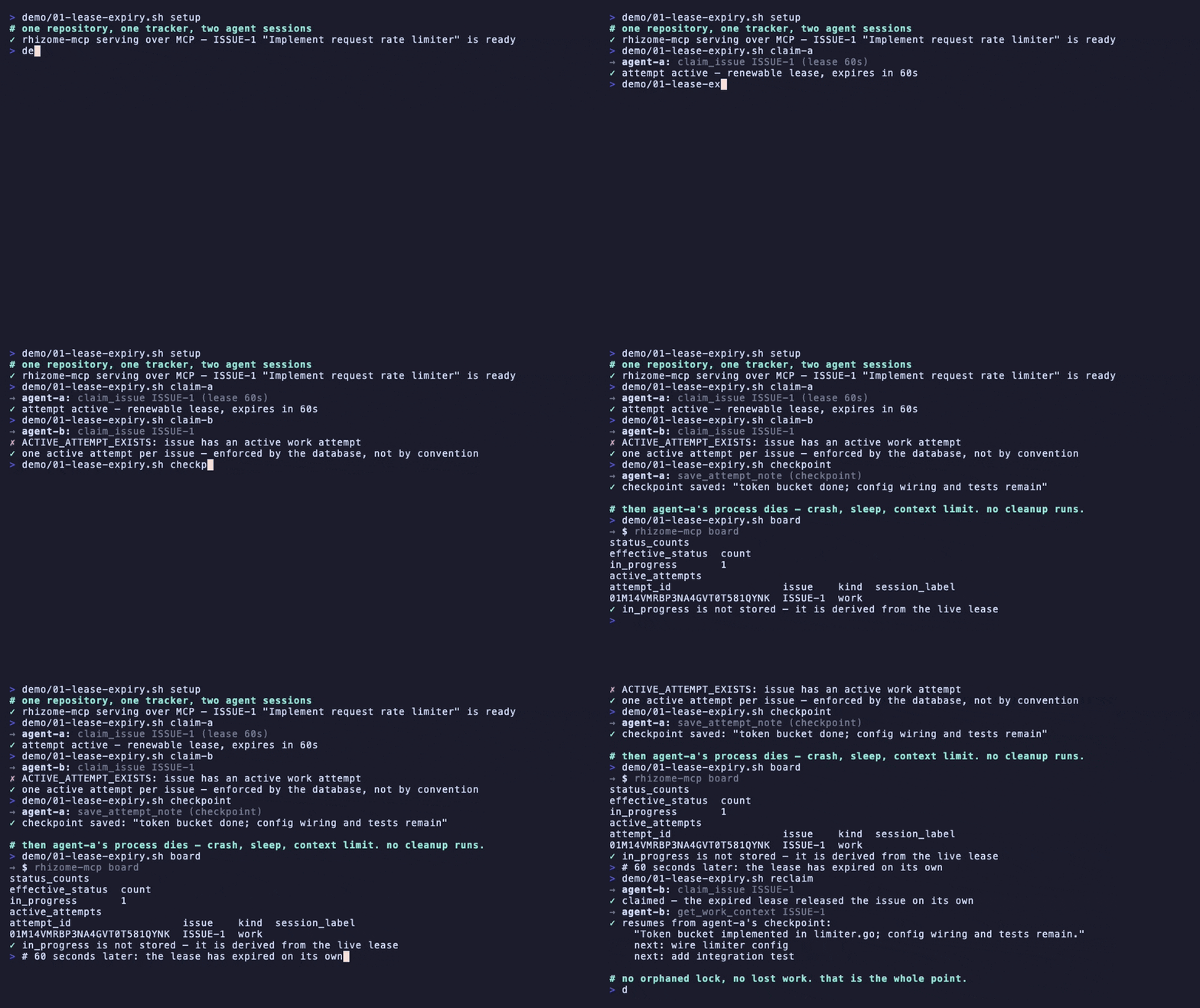
Recorded from real server output by demo/record.sh — nothing staged.
Why · How it compares · Quick start · Monitor your project · MCP surface · Documentation
Why
AI coding agents are concurrent, context-limited, and interruptible. A TODO.md or a single chat context doesn't survive that. rhizome-mcp is built around those failure modes:
-
Crash-safe claiming. Issues are claimed atomically with renewable leases.
in_progressis never a stored status — it is derived from an active lease, so a vanished agent can't lock an issue forever. When the lease expires, the issue becomes claimable again. A partial unique index guarantees at most one active attempt per issue at the database level. -
Token-efficient by contract. Compact list projections (a 100-issue page stays under 64 KB — enforced by an integration test), graph nodes that exclude free-text bodies at the SQL layer, snippet-only search, delta sync via event IDs, and a bounded single-call work-context package.
-
Durable project memory. Checkpoints with next steps, supersedable decision records, append-only event history, and FTS5 full-text search across issues, comments, decisions, and notes. A fresh session resumes from the last checkpoint instead of re-deriving state.
-
Planning and dependency graphs. Cycle-checked
blocksrelations, epics, claimable entry-point highlighting, and atomic batch planning (up to 50 issues, 100 relations, and 20 decisions in one all-or-nothing transaction). -
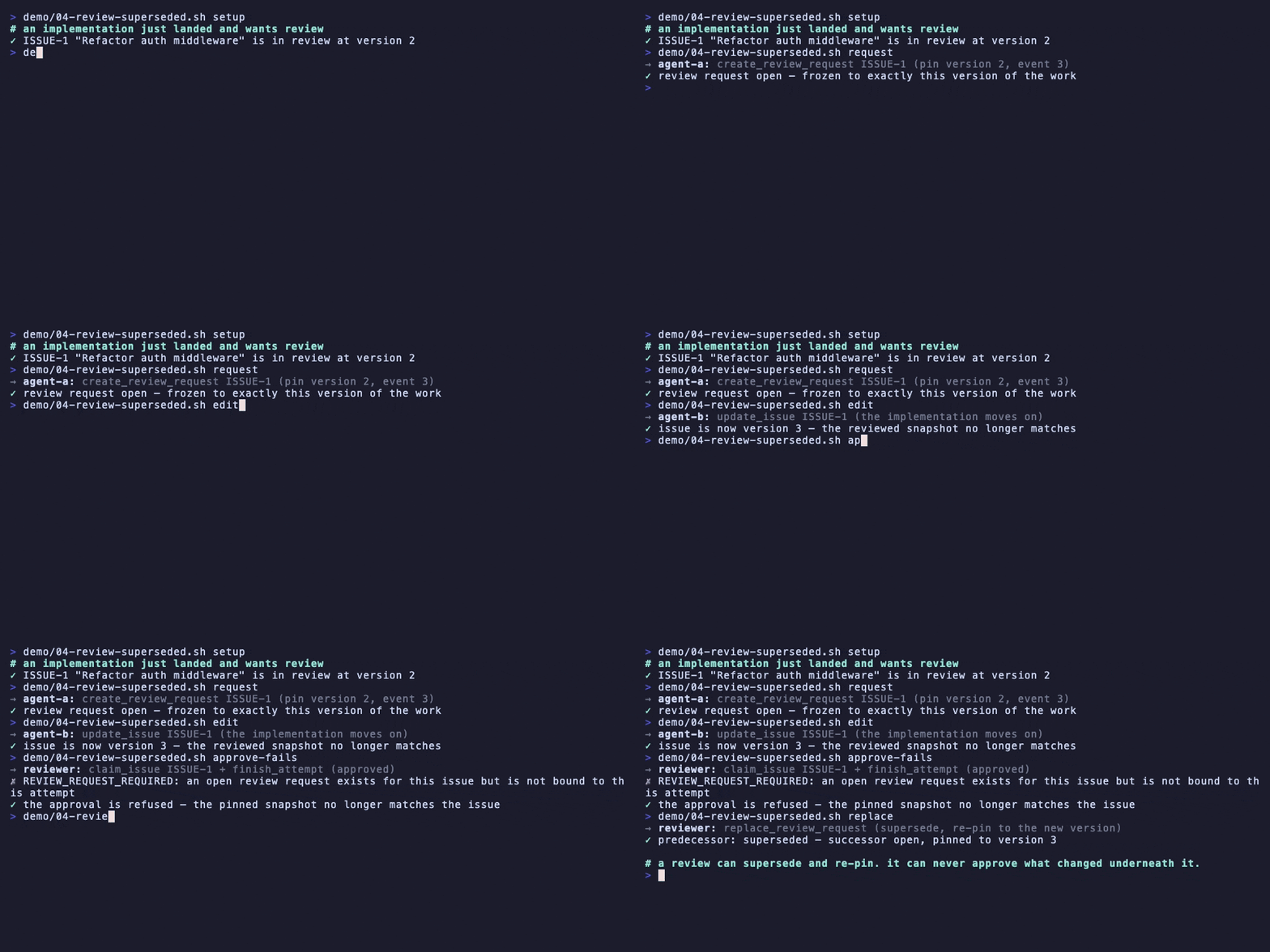
Review workflow. Review requests pin an exact issue version and event position; approving changed code is structurally impossible — a stale request can only be superseded and re-pinned.
Watch a stale approval get refused
-
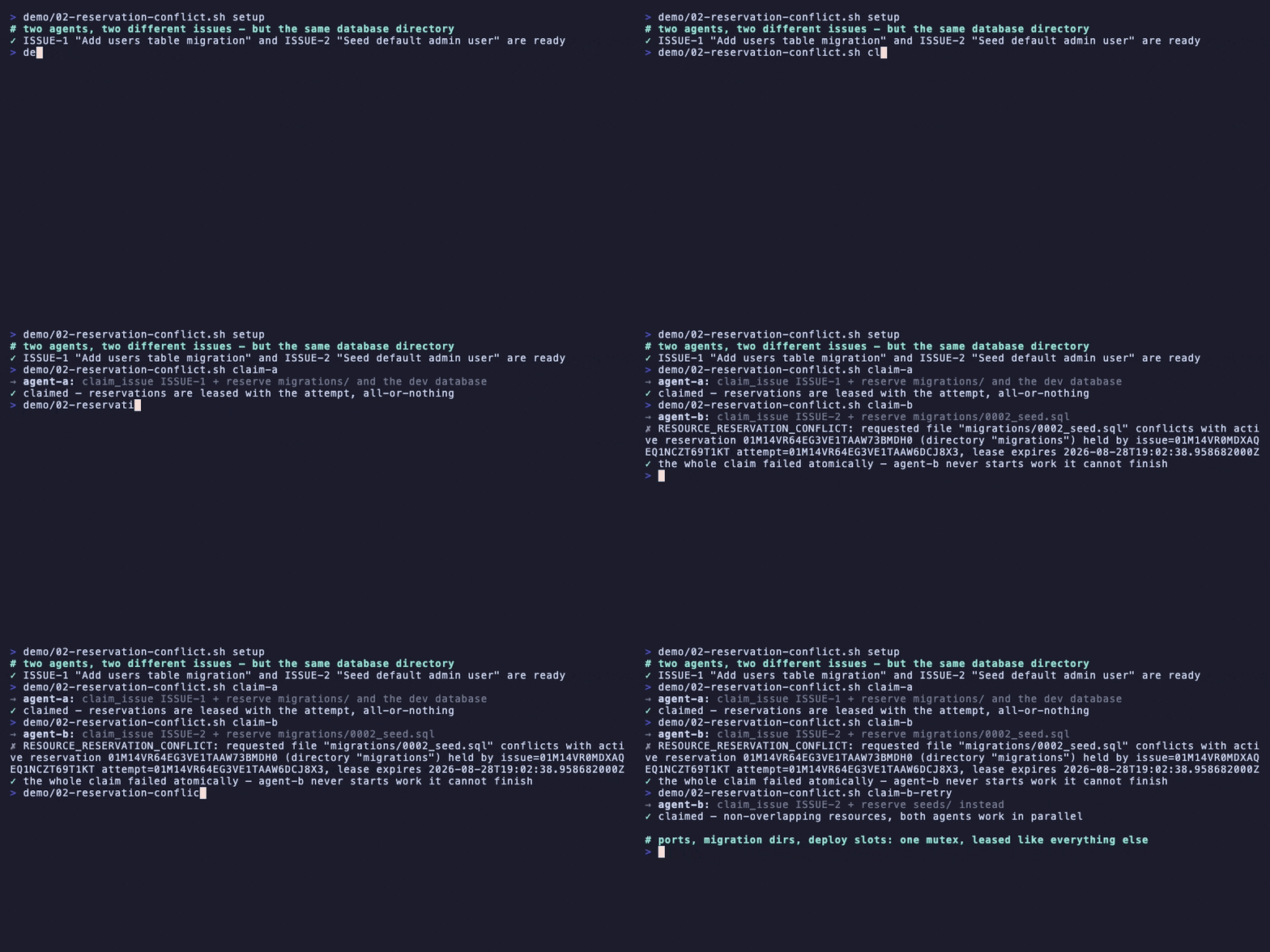
Resource reservations. A claim can atomically reserve files, directories, globs, or logical resources (a port, a migration window, a deploy slot); an overlapping claim fails fast with the holder and its lease expiry named, instead of two agents colliding later.
Watch a reservation conflict fail a claim atomically
-
Concurrency discipline throughout. Optimistic versioning on mutations, replay-safe idempotency keys, stable machine-actionable error codes.
-
Human observability without a server.
rhizome-mcp boardprints live leases, blockers, and the review queue, or writes a self-contained HTML snapshot; the CLI reads everything as tables, JSON, or Mermaid.
This repository tracks its own backlog through the server it ships — work is selected, claimed, checkpointed, and reviewed via rhizome-mcp itself (AGENTS.md).
Use it when several agent sessions (or several agent products) work the same repository over time and you need handoffs, parallel work, and recovery after crashes or context limits.
Skip it if you need a hosted multi-user tracker with auth, permissions, and a web UI — this is a local single-developer tool by design.
How it compares
Compare agent task trackers on guarantees under failure, not on feature lists — local-first SQLite storage and MCP support are table stakes in this category.
| When things go wrong | rhizome-mcp | beads | Kata | Guild |
|---|---|---|---|---|
| Task frees itself after a crash | Yes — expiring lease | No | No | No |
| Double-claim prevented at the storage layer | Yes | Atomic claim | Atomic claim | Atomic claim |
| Stale review approval impossible | Yes — version-pinned | No | No | No |
| Response sizes bounded by a tested contract | Yes — ≤ 64 KiB / 100 issues | No | No | No |
| Interrupted attempt resumable by another session | Yes — checkpoints | No | No | Note only |
Full comparison with sources, pinned versions, and honest "choose X if" guidance: How rhizome-mcp compares.
Quick start
Install and run
Choose the approach that matches your workflow:
Zero-install trial via npm
Try rhizome-mcp immediately with no separate binary install, no Go toolchain:
npx rhizome-mcp serve
Works with any MCP client. See packages/npm/README.md for platform coverage. Great for quick evaluation.
Claude Code plugin
/plugin marketplace add Odrin/rhizome-mcp
/plugin install rhizome-mcp@rhizome
Registers the MCP server (via npx, no binary install) and adds the rhizome-task-workflow and rhizome-execution-plan skills. Each repository you track still needs a one-time npx rhizome-mcp init in its root.
VS Code
Install Rhizome MCP (odrin.rhizome-mcp) from the Marketplace or Open VSX. The extension bundles the platform binary, registers the MCP server automatically, and adds Rhizome: Initialize Project to the Command Palette. No terminal, no mcp.json editing. Details: docs/10-vscode-extension.md.
Prefer a standalone binary with a plain mcp.json entry instead? Install the binary below and use this one-click link: Add to VS Code.
Native binary installer
Download and install a release binary for your platform. Verifies checksums, installs to ~/.local/bin by default:
curl -fsSL https://raw.githubusercontent.com/Odrin/rhizome-mcp/main/scripts/install.sh | sh
irm https://raw.githubusercontent.com/Odrin/rhizome-mcp/main/scripts/install.ps1 | iex
Official MCP Registry
Use rhizome-mcp via the official MCP Registry, available in the Model Context Protocol registry as io.github.Odrin/rhizome-mcp for clients that consume the registry.
Initialize and connect
Initialize tracking inside your repository:
rhizome-mcp init
Then register the server with your MCP client. Automated setup for common clients:
rhizome-mcp connect claude    # Claude Code
rhizome-mcp connect codex     # Codex
rhizome-mcp connect vscode    # VS Code (if using standalone binary instead of extension)
rhizome-mcp connect json      # Template for any other client
Use --print for a dry run. connect discovers your project's actual root
(walking up from the current directory the same way serve does) and pins
it with --project-root, so the written config works regardless of which
subdirectory an MCP client later launches the server from. All four targets
(claude, codex, vscode, json) agree on this. The manual equivalent
for any MCP client, matching connect's own server key:
{
  "mcpServers": {
    "rhizome-mcp": {
      "command": "/absolute/path/to/rhizome-mcp",
      "args": ["serve", "--project-root", "/absolute/path/to/your/repository"]
    }
  }
}
or, via npx, without installing a binary at all:
{
  "mcpServers": {
    "rhizome-mcp": {
      "command": "npx",
      "args": ["-y", "rhizome-mcp", "serve", "--project-root", "/absolute/path/to/your/repository"]
    }
  }
}
connect detects when it is itself running through the npx rhizome-mcp
wrapper and automatically emits this npx form instead of the wrapper's
resolved binary path, which lives in the npx cache and goes stale on
eviction or a version bump. A config written with a resolved absolute path
(the default otherwise) is machine-specific and not meant to be checked in
and shared across machines; pass connect TARGET --command to instead emit
a bare rhizome-mcp command name that relies on PATH, for a portable
config you do intend to share, provided every machine that uses it has
rhizome-mcp on PATH.
Stdio is the default transport; protocol output goes to stdout, logs to stderr.
That's it — connected agents start with open_project using the absolute repository root, retain its project_ref, and pass that reference to later project-scoped calls. See the agent workflow guide for the complete workflow. The returned metadata links the rhizome://guides/agent-workflow, rhizome://guides/issue-lifecycle, and rhizome://guides/multi-agent-handoff resources, and repository agents can load the rhizome-task-workflow skill from .github/skills/.
Install the agent workflow skill
For agents that support the open Agent Skills format, install rhizome-task-workflow with the npm-distributed skills CLI:
npx skills add Odrin/rhizome-mcp --skill rhizome-task-workflow
Run the command in a project for a project-scoped installation, or add --global to make the skill available across projects. The skill teaches compatible agents how to select, claim, checkpoint, hand off, and finish Rhizome work. It complements the MCP server; it does not install the rhizome-mcp binary or configure an MCP connection.
Monitor your project
rhizome-mcp board                        # status counts, active leases, blockers, review queue
rhizome-mcp board --serve                # interactive local board UI at a loopback URL
rhizome-mcp board --output board.html    # self-contained HTML snapshot with the planning graph
rhizome-mcp issue list --status ready
rhizome-mcp graph ISSUE-42 --format mermaid
rhizome-mcp doctor --full
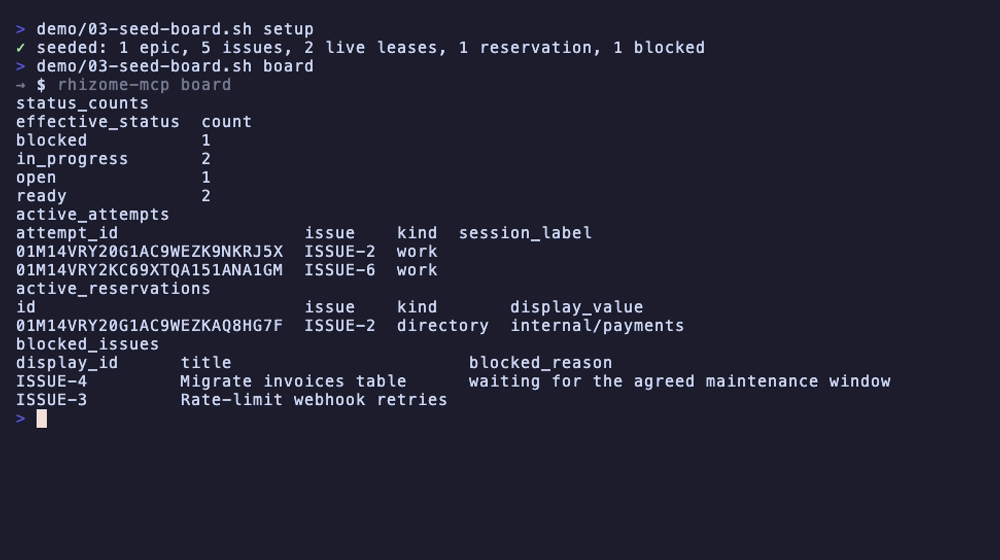
The status board reports live lease counts, blocked issues and their reasons, open review requests, and the project-wide planning graph. The planning graph excludes finished work (done, cancelled) from the node budget, so the entry-point count always reflects claimable work. When the graph is truncated due to the 100-node budget, the board marks it as truncated and reports the retained node count in both table and JSON formats.
Optional: local HTTP transport
rhizome-mcp serve --http-address 127.0.0.1:0
The bound endpoint is logged to stderr; the Streamable HTTP endpoint is http://127.0.0.1:<port>/mcp. The transport is loopback-only, unauthenticated, and enforces strict Host/Origin validation plus a 1 MiB outer request body limit. Modern MCP 2026-07-28 clients call server/discover and then send direct requests with protocol metadata; legacy 2025-11-25 clients can still use initialize and notifications/initialized without relying on a persistent transport session. If you want durable audit attribution, create an explicit agent_session_handle with create_agent_session, pass it to the relevant mutating tools, and end it later with end_agent_session; transport closure never ends it.
How it works
init writes exactly one file into the repository:
{
  "version": 1,
  "project_id": "01J..."
}
stored as .agent-tracker.json. The SQLite database lives outside the repository in the platform application-data directory, resolved through project_id:
<application-data>/rhizome-mcp/projects/<project-id>/tasks.db
Use --data-root PATH to select an explicit data root for any command. Nothing else touches your repository, and the database is never committed to Git.
Design principle: an issue must never remain permanently stuck in in_progress. Effective status is computed from stored status plus the presence of an active leased attempt; if the agent disappears and the lease expires, the attempt becomes expired and the issue is available again when its stored state permits it.
Core constraints (by design): Go, SQLite (modernc.org/sqlite, pure Go, CGO-free), stdio as the primary transport, one database per project, no hosted or authenticated web UI (a loopback-only local status board is included), no authentication, minimal CLI. Deferred features are listed in docs/06.
CLI reference
| Command | Purpose |
|---|---|
init | Create .agent-tracker.json and the project database |
serve [--http-address ADDR] [--profile full|agent|read-only|migration] [--toolsets GROUP[,GROUP...]] [--project-root PATH] | Run the MCP server (stdio; --http-address for local HTTP; --profile to narrow the advertised tool catalog to a named profile, or --toolsets to compose one from capability groups; --project-root to serve a project other than the working directory) |
connect TARGET [--print] [--command] | Register the server with an MCP client (claude, codex, vscode, json) |
board [--output PATH] [--serve [--http-address ADDR]] | Status board: counts, leases, blockers, review queue; optional HTML snapshot; --serve runs a temporary HTTP server |
issue list / issue show ISSUE-ID | Inspect issues with filters |
search QUERY | Full-text search across issues, comments, decisions, notes |
graph ISSUE-ID | Dependency graph as table, JSON, or Mermaid |
project info / project export / project import | Project metadata; logical JSON export; logical JSON import (`--input PATH |
backup --output PATH | WAL-safe online backup |
doctor [--full] | Integrity, schema, and invariant checks |
maintenance release-attempt / rebuild-search-index / normalize-issue-timestamps --backup PATH | Administrative recovery; timestamp normalization requires a new validated backup |
Run rhizome-mcp without arguments for complete usage, rhizome-mcp version for build information.
MCP surface
The server exposes 44 tools covering the full lifecycle: project discovery, issue CRUD with labels and relations, archive/unarchive visibility transitions, planning and dependency graphs, batch plan validation/apply, comments and decisions, claim/renew/checkpoint/finish work attempts with optional atomic resource reservations, work-context assembly, review requests, full-text search, delta changes, logical project export/import, and workflow-policy administration with gate evidence and diagnostics. The complete contract, including the MCP tool annotation matrix and the full/agent/read-only/migration exposure profile matrix, is in docs/03-mcp-tools.md.
By default serve advertises the complete full catalog. Pass --profile agent|read-only|migration (or set RHIZOME_TOOL_PROFILE) to narrow it — for example serve --profile read-only for a client that should never see a mutating tool. When no named profile fits, pass --toolsets (or set RHIZOME_TOOLSETS) with a comma-separated list of capability groups instead — for example serve --toolsets issues,planning — to advertise exactly those groups plus the always-on core pair (open_project, get_project); the two flags are mutually exclusive. Profiles and toolsets are an exposure and prompt-size control, not an authorization boundary: every tool still enforces its own server-side validation regardless of what a client can see in tools/list. See docs/04-storage-runtime.md §17.1 for the full environment-variable set and precedence, including the deprecated unprefixed fallback names.
Documentation
The modular files under docs/ are the canonical specification; SPEC.md is the index. Agents should load only the sections relevant to their current task (AGENT_BRIEF.md explains how).
- Product goals and scope
- Domain model
- MCP tools
- Storage and runtime
- Implementation requirements
- Deferred features and non-goals
- Logical interchange format
- Local HTTP transport contract
- Review workflow contract
- VS Code extension
- Project routing contract
- Resource reservations
- Status board
Guides for humans (quick start, workflow, CLI) live in site/ and are published via GitHub Pages. Release history is in the CHANGELOG.
Development
Build and test (no CGO, no external services):
CGO_ENABLED=0 go build -o rhizome-mcp .
go test ./...
go test -tags=integration ./...
The integration tag runs real-process MCP smoke and workflow tests: they build a temporary server binary, initialize a fresh repository and SQLite data root per test, and speak to serve over stdio or HTTP. Beyond single-process smoke coverage, the suite also exercises cross-process scenarios on one shared SQLite data root — concurrent claim and update-version races, an ungraceful process kill and restart, and a backup taken while a server is writing — to catch defects a single-process test structurally cannot see. Most live in the dedicated integration package; tests that need unexported package-main internals stay at the repository root.
CI runs go vet, all non-race unit and integration tests, and npm launcher tests on Ubuntu, macOS, and Windows for every push and pull request targeting main. Linux also runs the existing fuzzing budgets, while a separate coverage job enforces unit and integration coverage thresholds. A parallel Linux Race smoke job runs an explicit selection of claim, reservation, transaction-admission, project-router, and HTTP-lifecycle tests with the race detector; its selection is maintained in .github/workflows/ci.yml.
Full race checks runs the complete unit and integration race suites against the latest main daily at 02:17 UTC. GitHub may delay scheduled runs. It can also be started from the Actions tab using Run workflow and selecting a branch, including a feature branch before merging. The workflow records the tested commit, retains JSON test logs for 14 days, and uses a cache separate from ordinary CI and race smoke. Nightly and smoke tests use -count=1 so successful cached test results cannot bypass execution.
Full race checks are not a PR gate: a green PR confirms the selected race checks, not the full race suite. Race regressions outside that selection may be discovered after merge, at the next scheduled run; monitor nightly failures and fix or revert them promptly. For local full-race verification (requires CGO and a C compiler):
go test -race -count=1 ./...
go test -race -count=1 -tags=integration -run '^TestIntegration' ./...
The integration harness builds the real server subprocess with -race whenever the harness is race-instrumented.
Releases (.github/workflows/release.yml) publish CGO-free binaries with SHA-256 checksums for linux/amd64, linux/arm64, darwin/amd64, darwin/arm64, and windows/amd64; release binaries embed the version, commit, and build timestamp (local builds report git VCS info or dev, and the VERSION environment variable overrides both).
Release verification steps are documented in CONTRIBUTING.md.
This repository tracks its own backlog in rhizome-mcp: work is selected, claimed, and finished through the MCP server, and durable choices are recorded as decisions. Markdown holds specification only, not task status. See AGENTS.md and CONTRIBUTING.md.
License
Apache-2.0. Security policy: SECURITY.md.