Teukhos
Spawn production-ready MCP servers from a single YAML file
Documentation
Teukhos




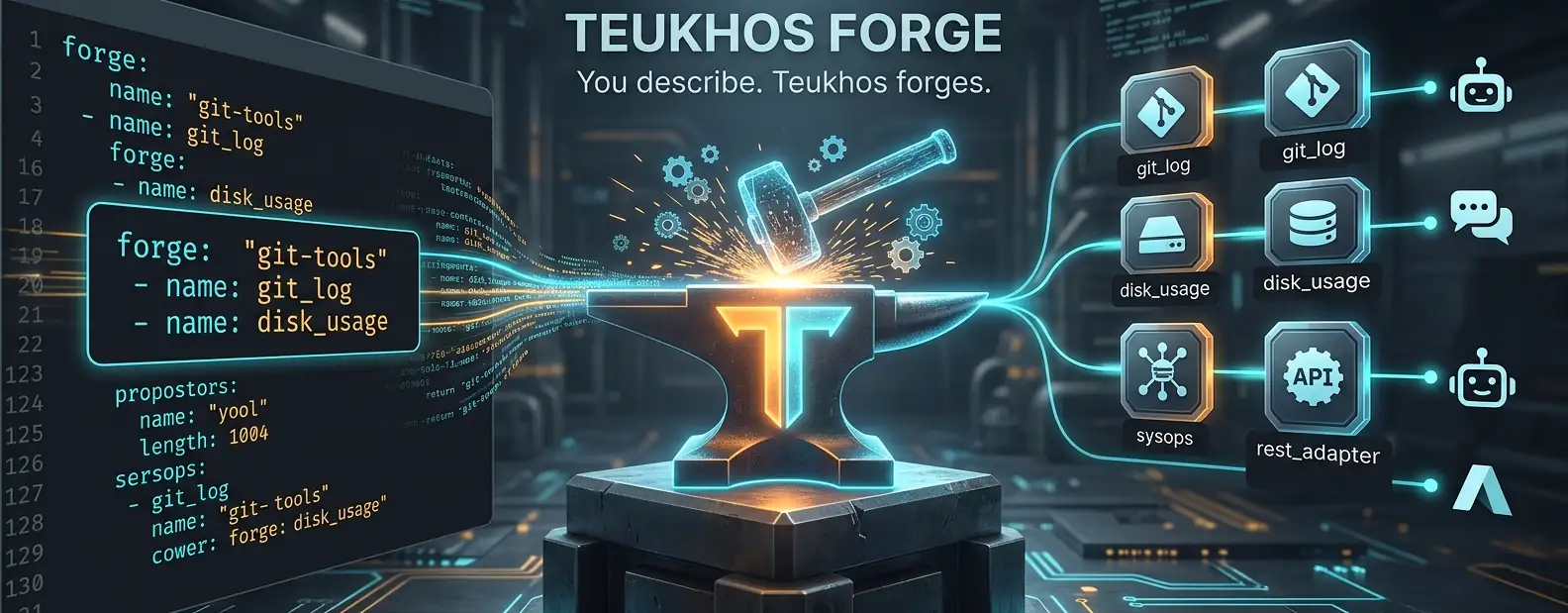
You describe the tool. Teukhos forges it as MCP.
Spawn production-ready MCP servers from a single YAML file. No Python programming required.
Status: Beta — Core features are stable and tested. API may change before v1.0.
pip install teukhos
teukhos serve git-tools.yaml
That's it. Your CLI tools are now callable by any AI agent.
The Problem
The MCP ecosystem has a critical gap:
| What exists | What's missing |
|---|---|
| Raw FastMCP — write Python | Config-as-code → running MCP server |
any-cli-mcp-server — scrapes --help | Structured, typed CLI → tool mapping |
| Enterprise gateways (Bifrost, MCPX) | Lightweight, developer-owned, open-source |
| Visual builders (Langflow, n8n) | CI/CD-native, GitOps-friendly runtime |
Teukhos fills this gap. Define your tools in YAML. Run one command. Done.
30-Second Quickstart
Install:
pip install teukhos
# or: uvx teukhos
Create teukhos.yaml:
forge:
  name: "my-tools"

tools:
  - name: git_log
    description: "Show recent git commits"
    adapter: cli
    cli:
      command: git
      subcommand: [log, --oneline]
    args:
      - name: count
        type: integer
        flag: "-n"
        default: 10
    output:
      type: stdout
Register with your AI client:
teukhos install teukhos.yaml                           # auto-detect & prompt
teukhos install teukhos.yaml --client cursor            # specific client
teukhos install teukhos.yaml --client claude-code --project  # project-level
teukhos install teukhos.yaml --dest .github/mcp.json   # any JSON file
Ask Claude: "Show me the last 5 commits" — it uses the tool.
How It Works
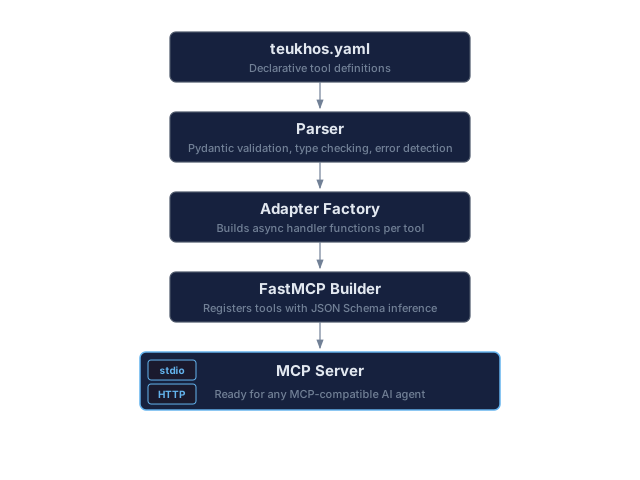
CLI Reference
teukhos serve [config]            Start the MCP server
teukhos validate [config]         Validate config, exit 0/1 — use in CI
teukhos install [config]          Register with MCP client(s)
teukhos uninstall <server-name>   Remove from MCP client(s)
teukhos clients                   List supported clients & detection status
teukhos wait-ready                Poll /health until ready — use in CI
teukhos version                   Print version
teukhos discover <binary>         Auto-generate config from --help
Options for serve:
--transport  -t    Override transport: stdio | http  (default: from config)
--port       -p    Override HTTP port                (default: 8765)
Options for install:
--client  -c    Target a specific client by slug (e.g., cursor, claude-code)
--all           Install for all detected clients
--project       Use project-level config (e.g., .cursor/mcp.json in cwd)
--url           Remote server URL — enables HTTP mode
--key           API key for HTTP mode (default: "env:TEUKHOS_API_KEY"; --key "" for a server without auth)
--dest          Write to an arbitrary JSON config file (bypasses client detection)
--config-key    JSON key for server entries: "mcpServers" (default) or "servers"
Options for uninstall:
--client  -c    Target a specific client by slug
--all           Remove from all detected clients
--project       Target project-level config
Options for discover:
--output        -o    Output file path (default: <binary-name>.yaml)
--dry-run             Print generated YAML to stdout instead of writing a file
--max-depth     -d    Max recursion depth for subcommands (default: 2)
--timeout       -t    Timeout in seconds for each --help call during discovery [default: 15]
--exec-timeout  -e    Timeout in seconds for tool execution; sets timeout_seconds in generated YAML
--filter        -f    Only discover subcommands under this prefix (e.g. "vm" for "az vm")
Config file names: Teukhos looks for teukhos.yaml by default. Legacy mcp-forge.yaml is accepted automatically with a deprecation note.
Supported Clients
Teukhos can register with these MCP-compatible AI clients:
| Client | Slug | Project Scope | Config Format |
|---|---|---|---|
| Claude Desktop | claude-desktop | — | JSON (stdio only; no --url) |
| Claude Code | claude-code | Yes | JSON |
| Cursor | cursor | Yes | JSON |
| GitHub Copilot / VS Code | github-copilot | Yes | JSON |
| Gemini CLI | gemini-cli | Yes | JSON |
| Codex | codex | Yes | TOML |
| Windsurf | windsurf | Yes | JSON |
| Cline | cline | — | JSON |
| Roo Code | roo-code | Yes | JSON |
| Continue.dev | continue | Yes | JSON |
| Kiro | kiro | Yes | JSON |
| Augment Code | augment | — | JSON |
| CodeBuddy | codebuddy | Yes | JSON |
| OpenCode | opencode | Yes | JSON (mcp key) |
| Trae | trae | Yes | JSON |
teukhos clients              # see which are detected on your system
teukhos install --all         # register with all detected clients
Claude Desktop's config file only accepts local (stdio) servers, so install --url refuses it; a public HTTPS server can be added in Claude Desktop under Customize > Connectors. OpenCode entries use its own format ("mcp", type: local/remote, {env:VAR} in headers).
serve vs install — When to Use Which
teukhos install is the main command for most users. It registers your config with an AI client (Cursor, Claude Code, etc.). The client then spawns teukhos serve automatically via stdio when it needs your tools. You don't run teukhos serve yourself.
teukhos serve is used in two scenarios:
- Testing/debugging — verify your YAML config starts without errors before registering it
- HTTP server mode — run a persistent network-accessible MCP server that remote clients connect to
# Most users: just install, the client handles the rest
teukhos install git-tools.yaml --client cursor

# Testing: verify config works
teukhos serve git-tools.yaml

# HTTP server: run persistently for remote access
teukhos serve git-tools.yaml --transport http --port 8765
Installing to Custom Paths (--dest)
Use --dest to write MCP config to any JSON file, bypassing client detection entirely. This is useful for .github/mcp.json, custom setups, or clients Teukhos doesn't know about yet.
# Write to .github/mcp.json (uses "mcpServers" key by default)
teukhos install git-tools.yaml --dest .github/mcp.json

# Use "servers" key (GitHub Copilot / VS Code format)
teukhos install git-tools.yaml --dest .vscode/mcp.json --config-key servers

# HTTP mode to custom path
teukhos install --dest /path/to/config.json --url http://host:8765/mcp

# Absolute path
teukhos install git-tools.yaml --dest C:\projects\myapp\.cursor\mcp.json
The --config-key option controls the JSON key used for server entries:
mcpServers(default) — used by Claude Desktop, Claude Code, Cursor, and most clientsservers— used by GitHub Copilot / VS Code
Running Multiple Servers
You can run multiple Teukhos servers in parallel on the same machine. Each config gets a unique server name derived from its forge.name, so they don't overwrite each other in client configs.
stdio (no conflicts — each is a separate subprocess spawned by the client):
teukhos install git-tools.yaml --client cursor       # registers teukhos-git-tools
teukhos install dev-tools.yaml --client cursor        # registers teukhos-dev-tools
# Cursor now has two independent MCP servers, each spawned as its own process
The client's config will contain separate entries:
{
  "mcpServers": {
    "teukhos-git-tools": {
      "command": "teukhos",
      "args": ["serve", "C:/path/to/git-tools.yaml"]
    },
    "teukhos-dev-tools": {
      "command": "teukhos",
      "args": ["serve", "C:/path/to/dev-tools.yaml"]
    }
  }
}
HTTP (use different ports):
teukhos serve git-tools.yaml --transport http --port 8765 &
teukhos serve dev-tools.yaml --transport http --port 8766 &
teukhos serve media-tools.yaml --transport http --port 8767 &

# Connect clients to each
teukhos install --client cursor --url http://localhost:8765/mcp
teukhos install --client cursor --url http://localhost:8766/mcp
Full Config Reference
forge:
  name: "my-toolset"          # MCP server identity
  version: "1.0.0"
  description: "What this server does"

server:
  transport: stdio             # stdio | http
  host: "127.0.0.1"           # use 0.0.0.0 for remote (add auth!)
  port: 8765
  cors_origins: ["http://localhost:6274"]  # browser origins allowed over HTTP (default: none); "*" only with auth

auth:
  mode: none                   # none | api_key
  api_keys:
    - "env:TEUKHOS_API_KEY"    # reads from environment variable (recommended)
    - "env:MY_CUSTOM_KEY"      # any env var name with env: prefix
    - "literal-key-here"       # or use a literal string directly

tools:
  - name: tool_name            # snake_case — used as MCP tool ID
    description: "What the LLM reads to decide when to call this tool"
    adapter: cli               # cli is the only adapter in v0.2

    cli:
      command: "mybinary"      # must be on PATH or absolute path
      subcommand: []           # e.g. ["log", "--oneline"] for git
      timeout_seconds: 30
      working_dir: null        # defaults to the server's cwd (chosen by the MCP client); ~ is expanded
      env: {}                  # extra env vars, added to the server's environment
      max_output_bytes: 1000000  # stdout/stderr beyond this are truncated (default 1 MB)

    args:
      - name: arg_name
        type: string           # string | integer | number | boolean
        description: "Shown to the LLM"
        required: false
        flag: "--flag"         # CLI flag: -f or --flag
        positional: false      # true = append at end of command
        default: null
        enum: []               # allowed values: shown to the LLM and enforced
        secret: false          # with a default: hidden from the LLM and redacted from output

    output:
      type: stdout             # stdout | stderr | json_field | exit_code
      field: null              # for json_field: dot-notation path e.g. "data.items"
      exit_codes:              # for exit_code type: map codes to messages
        0: "Success"
        1: "Not found"
Unknown keys are rejected, so a typo like secert: true fails teukhos validate instead of being silently ignored.
Security Model
A teukhos.yaml is executable configuration: it decides which binaries run. Read a downloaded config before you install or serve it. Argument values come from the LLM and are treated as untrusted:
- No shell. Commands run as an argument list, so
;,|and$(...)are passed literally. - No
-option injection. A positional or flag-less value that starts with-is rejected, so the LLM can't turnpathinto--output=/etc/x. Enum values and the configured default are exempt. Pass dash-prefixed input through aflag:instead. Windows tools that take/Xswitches (robocopy, findstr, reg) are not covered; give themenumor flag-bound args. enumis enforced. The allowed values are published in the tool schema and anything else is refused before the command runs. Quote YAML words like"on"/"yes", which would otherwise be booleans.- Interpreters need their own safe mode. A free-form argument to
sqlite3,psql,python -cornode -eis code.examples/database-tools.yamlrunssqlite3 -safe -readonlyand pins dot-commands withenum;psqlhas no safe mode, so only fixed queries are exposed. secretdefaults stay with the operator. A secret arg with adefaultis not offered to the LLM, and a string default is replaced with[REDACTED]in tool output. Redaction matches the literal value only, so prefercli.envfor real credentials.- Errors are returned as-is. On a non-zero exit the tool's stderr (or stdout) goes back to the LLM.
json_field/stderr/exit_codeonly shape a successful result; don't rely on them to withhold fields. - Output is capped at
max_output_bytesper stream.json_fieldneeds the whole JSON, so raise the limit for tools with large JSON output. - Windows batch files. A bare name like
npxorazthat has no.exefalls back to its.cmd/.batshim. Becausecmd.exere-parses batch arguments, values containing" % ! ^ & | < > ( ) , ; =or line breaks are rejected for those tools; pointcommandat the real.exe(e.g.nodeplus the script path) if you need them. - Windows command lookup. Bare command names are never resolved from the server's current directory. Tool processes inherit this (
NoDefaultCurrentDirectoryInExePath=1), so a tool's own batch files must call helpers by path ("%~dp0helper.cmd"). MSYS/Cygwin tools getnoglob, so*reaches them literally.
Example Configs
Git Tools
forge:
  name: "git-tools"

tools:
  - name: git_log
    description: "Show recent git commits"
    adapter: cli
    cli:
      command: git
      subcommand: [log, --oneline]
    args:
      - name: count
        type: integer
        flag: "-n"
        default: 10
    output:
      type: stdout

  - name: git_status
    description: "Show working tree status"
    adapter: cli
    cli:
      command: git
      subcommand: [status, --short]
    output:
      type: stdout

  - name: git_diff
    description: "Show diff of current changes"
    adapter: cli
    cli:
      command: git
      subcommand: [diff]
    args:
      - name: staged
        type: boolean
        description: "Show staged changes only"
        flag: "--staged"
    output:
      type: stdout
System Tools (Cross-Platform)
forge:
  name: "sysops"

tools:
  - name: disk_usage
    description: "Show disk usage for a path"
    adapter: cli
    cli:
      command: python
      subcommand:
        - "-c"
        - "import shutil,sys,os; p=sys.argv[1] if len(sys.argv)>1 else '.'; p=os.path.abspath(p); u=shutil.disk_usage(p); print(f'Total: {u.total/1024/1024:.0f} MB  Used: {u.used/1024/1024:.0f} MB  Free: {u.free/1024/1024:.0f} MB')"
    args:
      - name: path
        type: string
        positional: true
        default: "."
    output:
      type: stdout

  - name: ping_host
    description: "Check if a host is reachable"
    adapter: cli
    cli:
      command: python
      subcommand:
        - "-c"
        - "import subprocess,platform,sys; h=sys.argv[1]; flag='-n' if platform.system()=='Windows' else '-c'; r=subprocess.run(['ping',flag,'3',h],capture_output=True,text=True); print(r.stdout); exit(r.returncode)"
      timeout_seconds: 15
    args:
      - name: host
        type: string
        required: true
        positional: true
    output:
      type: exit_code
      exit_codes:
        0: "Host is reachable"
        1: "Host is unreachable"
JSON Output
  - name: get_video_info
    description: "Get video metadata as JSON"
    adapter: cli
    cli:
      command: ffprobe
      subcommand: ["-v", "quiet", "-print_format", "json", "-show_format"]
    args:
      - name: input_file
        type: string
        required: true
        positional: true
    output:
      type: json_field
      field: "format.duration"   # extract a specific field
Remote Server / HTTP Transport
Run Teukhos as a network-accessible server:
# remote-server.yaml
server:
  transport: http
  host: "0.0.0.0"
  port: 8765

auth:
  mode: api_key
  api_keys:
    - "env:TEUKHOS_API_KEY"
# Start the server
export TEUKHOS_API_KEY="your-secret-key"
teukhos serve remote-server.yaml

# Connect a client (from any machine)
teukhos install --client cursor --url http://server-ip:8765/mcp
API Key Resolution
Keys in config use the env: prefix convention:
| Config Value | Resolved To |
|---|---|
"env:TEUKHOS_API_KEY" | Value of $TEUKHOS_API_KEY environment variable |
"env:MY_CUSTOM_KEY" | Value of $MY_CUSTOM_KEY environment variable |
"my-literal-key" | Used as-is (not recommended for production) |
With mode: api_key, every HTTP path except /health needs Authorization: Bearer <key>. If none of the configured keys resolves (for example the env var isn't set), serve refuses to start instead of running unauthenticated.
Browser Access (CORS and Origin)
Requests that carry an Origin header (i.e. from a browser) are rejected with 403 unless the origin is listed in server.cors_origins. This blocks DNS-rebinding and other websites calling a local server; non-browser MCP clients send no Origin and are not affected. "*" allows every origin and turns that check off, so it needs api_key auth: over HTTP with auth.mode: none, serve refuses to start.
Deployment Behind a Reverse Proxy
For production, run behind nginx or Caddy for TLS termination:
# nginx example
server {
    listen 443 ssl;
    server_name mcp.example.com;

    ssl_certificate /etc/letsencrypt/live/mcp.example.com/fullchain.pem;
    ssl_certificate_key /etc/letsencrypt/live/mcp.example.com/privkey.pem;

    location / {
        proxy_pass http://127.0.0.1:8765;
        proxy_set_header Host $host;
    }
}
CI/CD Integration
GitHub Actions
- name: Install Teukhos
  run: pip install teukhos

- name: Validate config
  run: teukhos validate teukhos.yaml

- name: Start MCP server
  run: |
    teukhos serve teukhos.yaml --transport http --port 8765 &
    teukhos wait-ready --timeout 30

- name: Run agent tasks
  run: |
    claude --mcp http://localhost:8765/mcp \
      "Analyse the git log and summarise what changed this week"

- name: Teardown
  if: always()
  run: pkill -f "teukhos serve" || true
Docker
FROM python:3.12-slim
RUN pip install teukhos
# teukhos.yaml needs server.host: "0.0.0.0" to be reachable through -p, and api_key auth
COPY teukhos.yaml .
EXPOSE 8765
HEALTHCHECK CMD teukhos wait-ready --timeout 5
CMD ["teukhos", "serve", "--transport", "http"]
Run it with the key set, e.g. docker run -e TEUKHOS_API_KEY=... -p 8765:8765 my-mcp-server; without it the server refuses to start.
Manual Client Configuration
If you prefer manual setup, add to your client's MCP config:
stdio (local):
{
  "mcpServers": {
    "teukhos-my-tools": {
      "command": "teukhos",
      "args": ["serve", "/path/to/teukhos.yaml"]
    }
  }
}
HTTP (remote):
{
  "mcpServers": {
    "teukhos-remote": {
      "url": "http://server:8765/mcp",
      "headers": {
        "Authorization": "Bearer ${TEUKHOS_API_KEY}"
      }
    }
  }
}
Or use the install command: teukhos install teukhos.yaml --client cursor
Recipes
Copy-paste examples for common tasks. Adjust paths and names to your setup.
Install & Register
# Install Teukhos
pip install teukhos

# Register git-tools with Cursor (global)
teukhos install git-tools.yaml --client cursor

# Register git-tools with Claude Code (project-level, in current folder)
teukhos install git-tools.yaml --client claude-code --project

# Register with Claude Desktop
teukhos install git-tools.yaml --client claude-desktop

# Register with GitHub Copilot in VS Code (project-level)
teukhos install git-tools.yaml --client github-copilot --project

# Register with Gemini CLI
teukhos install git-tools.yaml --client gemini-cli

# Register with Windsurf
teukhos install git-tools.yaml --client windsurf

# Register with all detected clients at once
teukhos install git-tools.yaml --all

# Auto-detect clients and pick interactively
teukhos install git-tools.yaml
Custom Destination (--dest)
# Write to .github/mcp.json for GitHub Copilot in a repo
teukhos install git-tools.yaml --dest .github/mcp.json --config-key servers

# Write to .vscode/mcp.json with "servers" key
teukhos install git-tools.yaml --dest .vscode/mcp.json --config-key servers

# Write to .cursor/mcp.json in another project
teukhos install git-tools.yaml --dest /home/user/myproject/.cursor/mcp.json

# Write to any path with default "mcpServers" key
teukhos install git-tools.yaml --dest /etc/mcp/shared-tools.json
Multiple Servers on One Machine
# Register two different configs with the same client (stdio, no conflicts)
teukhos install git-tools.yaml --client cursor
teukhos install dev-tools.yaml --client cursor

# Run two HTTP servers on different ports
teukhos serve git-tools.yaml --transport http --port 8765 &
teukhos serve dev-tools.yaml --transport http --port 8766 &

# Connect a client to both remote servers
teukhos install --client cursor --url http://localhost:8765/mcp
teukhos install --client cursor --url http://localhost:8766/mcp
Remote / HTTP Server
# Start an HTTP server on localhost (for testing)
teukhos serve git-tools.yaml --transport http

# Start on all interfaces (for network access; set the key first, serve refuses to start without it)
export TEUKHOS_API_KEY="my-secret-key-abc123"
teukhos serve remote-server.yaml

# Connect a client to a remote server
teukhos install --client claude-code --url http://192.168.1.50:8765/mcp

# Connect with a custom API key
teukhos install --client cursor --url http://myserver:8765/mcp --key "env:MY_SERVER_KEY"

# Connect with a literal key (not recommended for production)
teukhos install --client cursor --url http://myserver:8765/mcp --key "s3cret-t0ken"

# Write remote config to a custom file
teukhos install --dest .vscode/mcp.json --config-key servers --url http://myserver:8765/mcp
Validate & Test
# Validate a config (exits 0 if valid, 1 if not — good for CI)
teukhos validate git-tools.yaml

# Test-run a server locally (Ctrl+C to stop)
teukhos serve git-tools.yaml

# Start HTTP server and wait until ready (CI pipelines)
teukhos serve git-tools.yaml --transport http --port 8765 &
teukhos wait-ready --port 8765 --timeout 30
Uninstall
# Remove from a specific client
teukhos uninstall teukhos-git-tools --client cursor

# Remove from a specific client (project-level config)
teukhos uninstall teukhos-git-tools --client claude-code --project

# Remove from all detected clients
teukhos uninstall teukhos-git-tools --all
Discover Tools from a Binary
# Auto-generate a config (writes <binary-name>.yaml by default, e.g., my-tool.yaml)
teukhos discover my-tool.exe

# Preview without writing a file
teukhos discover my-tool --dry-run

# Scope to a subtree for large CLIs (e.g., Azure CLI)
teukhos discover az.cmd --filter vm

# Limit recursion depth
teukhos discover az.cmd --filter vm --max-depth 1

# Discover, then install in one flow
teukhos discover my-tool -o my-tool.yaml
teukhos install my-tool.yaml --client claude-desktop
List & Discover
# See all supported clients and which are installed on your system
teukhos clients

# Print Teukhos version
teukhos version

# Enable shell tab-completion (PowerShell)
teukhos --show-completion >> $PROFILE

# Enable shell tab-completion (bash)
teukhos --show-completion >> ~/.bashrc

# Enable shell tab-completion (zsh)
teukhos --show-completion >> ~/.zshrc
Docker
# Build
docker build -t my-mcp-server .

# Run with API key
docker run -e TEUKHOS_API_KEY=my-secret -p 8765:8765 my-mcp-server

# Connect a local client to the container
teukhos install --client cursor --url http://localhost:8765/mcp
Roadmap
v0.3 — Current
- Multi-client installer: 15 MCP clients supported
- Project-level and global-level installation scope
teukhos installwith auto-detect,--client,--all,--project,--urlteukhos install --destto write to any arbitrary JSON config fileteukhos install --config-keyto choosemcpServersorserversJSON formatteukhos uninstallto remove registrationsteukhos clientsto list supported clients- HTTP Streamable transport with startup banner
env:prefix API key resolution- CORS configuration for HTTP transport
- Full authentication middleware (Bearer token)
- Cross-platform example configs (Windows, Linux, macOS)
- Ping health check tool on all example servers
- Comprehensive integration test suite (62 tests across 20 servers)
teukhos discover <binary>— auto-generate config from--helpwith--max-depth,--filter, and--timeoutoptions
v0.4 — Production Ready
restadapter (wrap any HTTP endpoint)shelladapter (inline bash/pwsh scripts)- Hot reload — save YAML, tools update without restart
- Streaming output support
- Lock file (
teukhos.lock) for reproducible deployments
v0.5 — The Platform
- OAuth 2.1 + JWT auth
- mTLS support for enterprise deployments
- Tool-level RBAC
- Append-only audit log
- Embedded web UI — dark glass, real-time tool call visualization
- Bidirectional YAML to visual editor sync
- OpenAPI auto-import adapter
- Tool composition / mini pipelines
- Prometheus metrics at
/metrics - Public registry:
teukhos install registry://community/git-tools
Why Teukhos?
You provide the MCP specification. Teukhos does the forging.
Contributing
git clone https://github.com/MihaiCiprianChezan/teukhos
cd teukhos
python -m venv .venv
Activate the virtual environment:
# Windows
.venv\Scripts\activate

# Linux / macOS
source .venv/bin/activate
Install in dev mode and run tests:
pip install -e ".[dev]"

# Run all tests (stdio + cross-transport, skips HTTP subprocess tests if no servers running)
pytest tests/ -v

# Run only stdio server tests (fast, no external dependencies)
pytest tests/test_all_servers.py::TestStdioServers -v

# Run only unit tests
pytest tests/ -v -k "not all_servers"
The test suite covers:
- Unit tests — config loading, CLI adapter, output mapping, auth, installers
- MCP protocol tests — full JSON-RPC round-trips via FastMCP Client
- Integration tests — all 11 example configs: ping, tool listing, schema validation, concurrency
Pull requests welcome.
Contributors
License
MIT — see LICENSE.
See CHANGELOG for version history.
Built by Mihai Ciprian Chezan