ynab-mcp
MCP server for YNAB. Reconcile bank statements, itemize receipts, manage transactions — all through natural language.
Documentation
YNAB MCP Server
Connect YNAB to any AI assistant. Manage your budget in plain English.




Demo
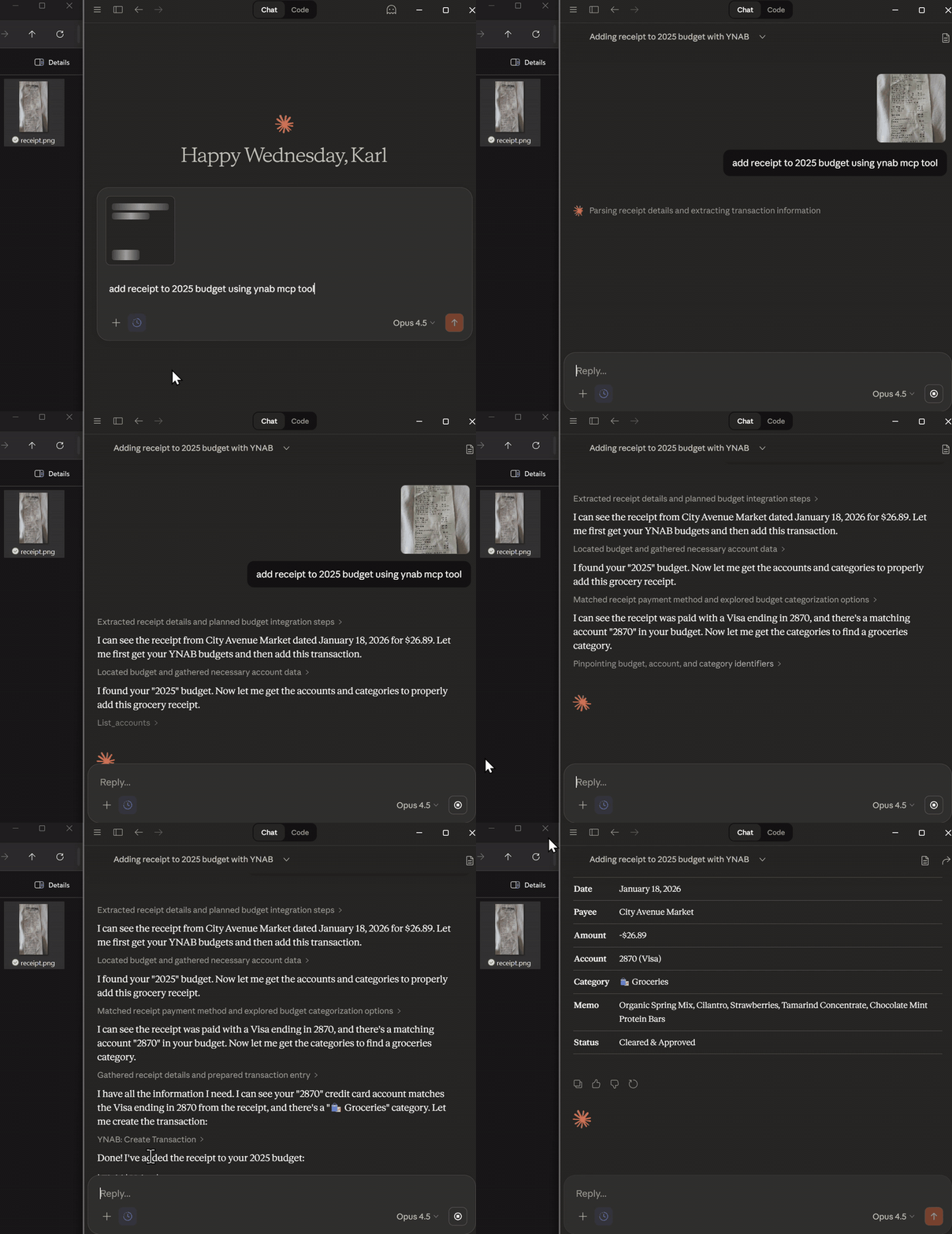
Paste a receipt → itemized split transaction in seconds
What you can do
| Workflow | Example prompt |
|---|---|
| Receipt split | "Create a split transaction for this receipt and allocate tax." |
| Bank reconciliation | "Reconcile my checking account using this CSV." |
| Spending analysis | "What did I spend on takeout this month?" |
| Scheduled cash flow | "What scheduled bills and income are due this month?" |
| Transaction creation | "Create a transaction: $42.18 at Trader Joe's yesterday." |
| Month overview | "Show my budget summary for January." |
How it works
graph LR
    U(You) -->|Plain English| C[Claude Desktop<br/>or any MCP client]
    C -->|MCP protocol| S[YNAB MCP Server<br/>35 tools]
    S -->|YNAB API| Y[(Your Budget)]

    style S fill:#2563EB,color:#fff,stroke:#1d4ed8
    style Y fill:#16a34a,color:#fff,stroke:#15803d
    style C fill:#7c3aed,color:#fff,stroke:#6d28d9
Features
- Receipt itemization — Paste a receipt, get an itemized split transaction with tax allocation automatically distributed across line items.
- Bank reconciliation (beta) — Import a bank CSV, fuzzy-match against YNAB, detect missing or mismatched transactions, and apply bulk fixes.
- 35 YNAB tools — Full coverage plus scheduled transactions and deterministic period analytics.
- Write safety by default — Preview mode requires a short-lived, single-use confirmation bound to the exact validated request.
- Smaller tool profiles — Choose
core,read-only, orfullat startup without dynamic registration. - Delta sync — Fetches only changed data since the last request, keeping things fast.
- Markdown or JSON — All read tools support
response_format: human-readable markdown tables (default) or structured JSON. - MCP-native — Structured outputs, annotations, completions API, and resource templates.
How reconciliation works
Show workflow diagram
sequenceDiagram
    participant You
    participant Claude
    participant MCP as YNAB MCP Server
    participant YNAB

    You->>Claude: "Reconcile my checking<br/>with this CSV"
    Claude->>MCP: reconcile_account(csv_data)
    MCP->>YNAB: Fetch transactions
    YNAB-->>MCP: YNAB transactions
    MCP->>MCP: Parse CSV<br/>Fuzzy-match payees & dates<br/>Detect missing / mismatched
    MCP-->>Claude: Matches + recommendations
    Claude->>You: "Found 47 matches, 3 missing.<br/>Apply changes?"
    You->>Claude: "Yes"
    Claude->>MCP: Apply recommended changes
    MCP->>YNAB: Create / update transactions
    MCP-->>Claude: Done
    Claude->>You: "3 transactions created,<br/>account reconciled."
Setup (2 minutes)
1 — Get a YNAB token
- Open YNAB Web App
- Go to Account Settings → Developer Settings → New Token
- Copy it (shown once only)
2 — Install
Claude Desktop — MCPB file (recommended)
- Download the latest
.mcpbfrom Releases - Drag it into Claude Desktop
- Enter your
YNAB_ACCESS_TOKENwhen prompted - Restart Claude Desktop
Claude Desktop — npx
Add to your Claude Desktop config:
{
  "mcpServers": {
    "ynab": {
      "command": "npx",
      "args": ["-y", "@dizzlkheinz/ynab-mcpb@latest"],
      "env": {
        "YNAB_ACCESS_TOKEN": "your-token-here"
      }
    }
  }
}
Cline (VS Code)
{
  "mcpServers": {
    "ynab": {
      "command": "npx",
      "args": ["-y", "@dizzlkheinz/ynab-mcpb@latest"],
      "env": {
        "YNAB_ACCESS_TOKEN": "your-token-here"
      }
    }
  }
}
Codex
[mcp_servers.ynab-mcpb]
command = "npx"
args = ["-y", "@dizzlkheinz/ynab-mcpb@latest"]
env = {"YNAB_ACCESS_TOKEN" = "your-token-here"}
startup_timeout_sec = 120
Any other MCP client
- Command:
npx - Args:
["-y", "@dizzlkheinz/ynab-mcpb@latest"] - Env:
YNAB_ACCESS_TOKEN=<your token>
3 — Try these prompts
List my budgets and set the default to my main budget.
Show recent transactions in my checking account.
How much did I spend on groceries in the last 30 days?
Create a transaction: $42.18 at Trader Joe's yesterday.
Tools (35)
See all tools by category
| Category | Tools |
|---|---|
| Budgets | list_budgets get_budget get_default_budget set_default_budget |
| Accounts | list_accounts get_account create_account |
| Transactions | list_transactions get_transaction create_transaction create_transactions update_transaction update_transactions delete_transaction export_transactions compare_transactions create_receipt_split_transaction |
| Categories | list_categories get_category update_category |
| Payees | list_payees get_payee |
| Months | list_months get_month |
| Reconciliation | reconcile_account |
| Scheduled transactions | list_scheduled_transactions get_scheduled_transaction create_scheduled_transaction update_scheduled_transaction delete_scheduled_transaction |
| Analytics | analyze_spending compare_spending_periods |
| Utilities | get_user diagnostic_info clear_cache |
All read tools accept response_format ("markdown" or "json", default: "markdown").
Full reference: docs/reference/API.md
Configuration
| Variable | Default | Description |
|---|---|---|
YNAB_ACCESS_TOKEN | — | Required. Your YNAB personal access token. |
YNAB_EXPORT_PATH | ~/Downloads | Directory for exported transaction files. |
YNAB_MCP_ENABLE_DELTA | true | Enable delta sync (only fetch changed data). |
YNAB_MCP_WRITE_MODE | preview | read-only hides YNAB mutations; preview requires exact confirmation; enabled permits direct writes. |
YNAB_MCP_TOOL_PROFILE | full | core, read-only, or full startup tool surface. |
YNAB_MCP_CACHE_DEFAULT_TTL_MS | 300000 | Cache TTL in milliseconds (5 min). |
YNAB_MCP_CACHE_MAX_ENTRIES | 1000 | Maximum cache entries before LRU eviction. |
See .env.example for all options.
Write modes and compatibility
preview is the conservative default. A mutation call first runs its existing dry_run path and returns a confirmation token. That token expires after two minutes, can be used once, and only authorizes the same canonical tool name and validated arguments. read-only does not register YNAB mutation tools. enabled preserves the pre-safety direct-write behavior for users who explicitly opt in.
Transaction amounts now prefer amount_decimal (for example, -12.34) or the explicit raw field amount_milliunits (-12340). Category funding similarly prefers budgeted_decimal or budgeted_milliunits. The old amount and budgeted fields remain accepted as deprecated milliunit aliases for backward compatibility; their meaning is never guessed.
Tool profiles
Profiles are selected once at server startup, so clients receive a stable tools/list response:
corekeeps common reads, transaction safety workflows, reconciliation, receipt splitting, scheduled review, and spending analytics.read-onlyexposes every tool explicitly annotated read-only.fullexposes the complete 35-tool surface, subject to the selected write mode.
Privacy and trust
- The server process runs locally and communicates with YNAB over YNAB's API.
- Your YNAB personal access token is sensitive. Store it in your MCP client's secret configuration and never paste it into a conversation, issue, fixture, or log.
- Financial data returned by tools and included in a conversation may be processed by the AI provider selected in your MCP client. Review that provider's data controls before sharing sensitive details.
- Transaction exports remain on local disk at
YNAB_EXPORT_PATH(or the platform default). The server does not upload exported files elsewhere. - Use
read-onlyfor no YNAB writes,previewfor exact request confirmation, orenabledonly when direct writes are an intentional compatibility choice. - This independent open-source project is not affiliated with or endorsed by YNAB.
Troubleshooting
| Symptom | Fix |
|---|---|
npx fails | Install Node.js 24+, then restart your MCP client. |
| Auth errors | Regenerate your YNAB token and update YNAB_ACCESS_TOKEN. |
| Tools not detected | Restart the MCP client after any config change. |
| Reconciliation issues | Open an issue with an anonymized CSV sample. |
For developers
git clone https://github.com/dizzlkheinz/ynab-mcpb.git
cd ynab-mcpb
npm install
cp .env.example .env   # add YNAB_ACCESS_TOKEN
npm run build
npm test
Architecture and contributor guidance: CLAUDE.md
Reconciliation architecture: docs/technical/reconciliation-system-architecture.md
Contributing
Bug reports and CSV edge-case repros are very welcome, especially for bank reconciliation: Open an issue
PRs welcome — run npm test and npm run lint before submitting.