Helio MCP Governance Proxy
Sits between your AI agents and their MCP servers and governs every tool call: policy rules, cross-server spend caps, human approval for risky actions, and a full audit trail. No changes to agent code or MCP servers.
Documentation
Helio
Open-source governance for MCP agents: useful autonomy without unlimited authority.






Getting Started · Docs · Contributing
Helio is an MCP proxy that sits between your AI agents and the tools they use. Every tool call passes through Helio, which enforces policies, requires prerequisites, checks evidence, routes approvals, caps cumulative spend, and records everything - without changing your agent code or your MCP servers.
The 2026-07-28 MCP revision made the protocol itself stateless: no handshake, no
protocol-level sessions, cross-call state carried as handles the model passes between
tools. That pattern works for application state and fails for governance state,
because a budget key the model can see is a budget key the model can change. Helio
keeps session identity, budgets, and evidence in the proxy, outside the agent's
context, which is why those controls still mean something after the protocol
stopped tracking sessions. See
stateless protocol, stateful governance.
npx @gethelio/proxy init
@gethelio/proxy is the only Node package you install. It ships the proxy runtime and bundled dashboard UI assets together.
ALLOW      read_customer
APPROVE    refund > £50
DENY       production.delete
BUDGET     £500/day across matching paid tools
REQUIRE    order.lookup succeeded before refund
Why Helio?
Your agent just called an API you didn't expect. It spent money you didn't authorize. It modified a production record you can't easily undo.
Model providers are building governance for their own platforms but your agents run across Claude, ChatGPT, LangChain, CrewAI, and custom frameworks. No single platform governs the full picture. And none of them govern what happens in downstream systems like Stripe, Salesforce, or GitHub.
Helio governs what agents do to the rest of the world across any MCP-compatible agent, any tool, any platform.
A rule in Helio cannot be forgotten and cannot be weakened silently. It is not in the model's context, so a long session cannot evict it and an injection cannot argue it away, and enforcement is in the path rather than in the prompt: a tool call routed through Helio is decided before it is forwarded, whatever the model has been told. Every attempt to reload the policy file, including one that removes a rule, is an audit record, and every record carries the hash of the config in force when it was written, so a change shows against the decisions made under it. The "cannot be weakened silently" claim has one condition, stated under Enforcement grades.
How It Works
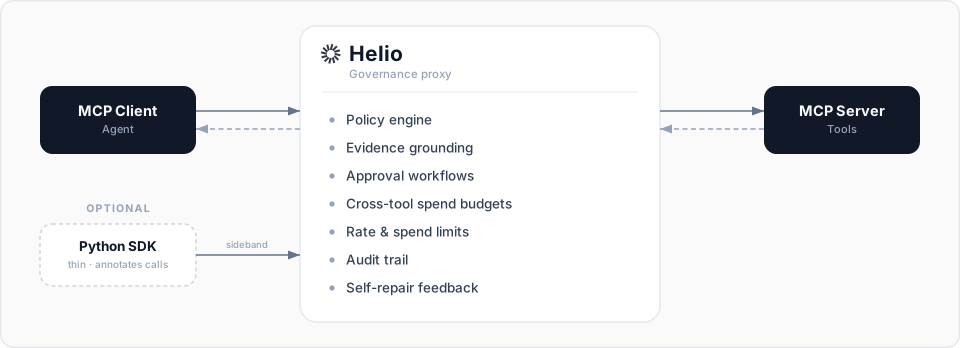
Two integration paths:
- Proxy only: Point your MCP client at Helio instead of your MCP server. Zero code changes. Immediate governance.
- Proxy + SDK: Add the thin Python SDK to annotate tool calls with evidence context and action dependencies. Richer governance, under 500 lines of code.
Enforcement grades
Helio governs at the strongest grade each path physically allows, and records it per call:
- Structural (stdio MCP) — Helio owns the child process it spawned, so nothing on the MCP path routes around it; a co-located process that can run the same command line is outside this grade (see the note below).
- Network (HTTP MCP) — structural given you control the upstream's egress.
- Host-enforced (hook adapters via the adapter API, e.g. OpenClaw) — for frameworks that run tools in-process and expose hooks rather than an MCP transport. The framework's hook gate enforces; Helio decides. This is a cooperative, lower grade than the proxy path, and Helio labels it as such rather than overclaiming. Helio's decisions still cannot be evicted from the agent's context or prompt-injected, and any attempt to route around them is visible in the audit trail.
All three grades assume the proxy's config, secret, and audit store are outside the agent's reach. In the default local install they are not: the proxy runs as the same user as the agent. SECURITY.md states the boundary and the deployments that close it. That install is also the condition on "cannot be weakened silently": a same-user agent can restart the proxy without the config pin and can edit or delete the audit file, so the reload record and the hash on every record are durable only while the agent cannot write the audit file, and the event stream and stderr are the channels that leave the box before that. Run the proxy as its own user or in its own container, as the recipes there do, and the condition falls away.
Quick Start (5 minutes)
1. Install
npx @gethelio/proxy init
This single package includes the built-in dashboard UI bundle.
Running your agent in a container? npx @gethelio/proxy init --sandbox writes the sidecar layout instead; see Running Helio as a Sidecar.
Nothing governed yet? npx @gethelio/proxy init --demo writes a directory of sample traffic so every surface can be tried before the first real call; see Sample traffic.
2. Configure
npx @gethelio/proxy init already created a helio.yaml in your project root. Open it (e.g. nano helio.yaml, or in your editor) and point upstream.url at your existing MCP server. The singular upstream: form stays fully supported; to govern more than one MCP server, declare a named upstreams: list in its place (set exactly one of the two). Tool sets are never merged: each named upstream is served at its own /mcp/<name> door. See the Configuration Reference.
Not sure what the server exposes? npx @gethelio/proxy scan --upstream http://localhost:8080/mcp prints every tool, whether the server marks it destructive or leaves the MCP default, and the arguments a rule could match, before you write a rule and without starting the proxy.
Heads up — Helio starts in audit-only mode.
initscaffolds thepoliciessection commented out, so out of the box Helio runs withdefault: allowand zero rules: it records every tool call to the audit trail but blocks nothing. Uncomment and editpolicies(or paste your own rules) to start enforcing. See the Policy Guide for rule syntax.
The block below is an illustrative target — not the file init writes — showing policies, budgets, audit, and a dashboard secret:
version: '1'

upstream:
  url: 'http://localhost:8080/mcp' # Your existing MCP server
  transport: streamable-http # streamable-http (default), sse, or stdio

listen:
  port: 3000 # Helio listens here

session:
  identity: # Ordered identity sources; first match wins
    - source: header
      name: x-helio-session-id # Agent harnesses set this once per run
    - source: legacy_header # Verbatim Mcp-Session-Id (deprecation window)
  on_unresolved: deny # deny | anonymous

policies:
  default: allow

  # These rules match on tool-name globs (deny / rate-limit / spend-limit):
  rules:
    # Block destructive operations
    - match:
        tool: 'delete_*'
      action: deny
      feedback:
        message: 'Destructive operations are disabled'

    # Rate limit expensive API calls
    - match:
        tool: 'search_*'
      action: rate_limit
      limits:
        max_calls: 100
        window: 1h
        key: tool

    # Spend limit on payment tools
    - match:
        tool: 'create_payment'
      action: spend_limit
      limits:
        max_spend:
          field: '$.amount'
          limit: 5000
          currency: 'GBP'
          window: 24h

budgets:
  # One depleting pot shared by every tool that spends.
  - name: agent-payments
    limit: 50
    currency: USD
    window: session
    key: session
    on_exceed: deny # or require_approval for a break-glass ticket
    contributors:
      - match:
          tool: 'stripe_*'
        field: '$.amount'
      - match:
          tool: 'paypal_*'
        field: '$.total'

audit:
  storage: sqlite
  retention: 90d
  include_responses: true

dashboard:
  enabled: true
  port: 3100
  api_secret: '${HELIO_DASHBOARD_SECRET}'
Omitted fields like listen.host, dashboard.host, and audit.path fall back to safe defaults (127.0.0.1 for both hosts — loopback only — and ./helio-audit.db). The Configuration Reference is the authoritative list of every field, its default, and the canonical section order.
If your upstream requires a static credential (for example Authorization: Bearer … on a hosted MCP server), set upstream.headers — values support ${VAR} interpolation so secrets stay out of the file.
No MCP server to test against? Helio ships a zero-dependency echo server you can run in one command — see the Getting Started guide.
About dashboard.api_secret:
-
If you ran
npx @gethelio/proxy init, yourhelio.yamlalready contains the SHA-256 digest of a generated secret, andinitprinted the secret itself once. Keep the printed value; it is what you log in with. Skip this step. -
If you authored
helio.yamlby hand using the${HELIO_DASHBOARD_SECRET}placeholder shown above, set the variable beforestart:export HELIO_DASHBOARD_SECRET="$(openssl rand -hex 32)"
3. Start Helio
npx @gethelio/proxy start
4. Point your agent at Helio
{
  "mcpServers": {
    "my-tools": {
      "url": "http://localhost:3000/mcp"
    }
  }
}
No agent handy? You don't need one to see Helio work. Point the official MCP Inspector at http://localhost:3000/mcp (run npx @modelcontextprotocol/inspector, transport: Streamable HTTP — Inspector connects through its own local backend, which sends no Origin header; a browser-sent Origin is rejected by design), or send a call straight through the proxy from the terminal:
curl -s -X POST http://localhost:3000/mcp \
  -H 'Content-Type: application/json' \
  -d '{"jsonrpc":"2.0","id":1,"method":"tools/call","params":{"name":"get_weather","arguments":{"city":"London"}}}'
Either way the call appears in the dashboard with its policy decision. (get_weather is one of the demo tools in Helio's echo server.)
5. Open the dashboard
http://localhost:3100
If prompted, log in with the dashboard secret that init printed (the file holds only its digest).
That's it. Every tool call now passes through Helio with a full audit trail, rate limits, and spend controls.
Want human-in-the-loop approvals for write operations? See docs/approvals.md for the full Slack and dashboard approval flow, or copy examples/slack-approvals/ as a starting point.
Features
Policy Engine
Declarative YAML rules that match on tool name, annotations, input parameters, environment, and cumulative state. Irreversible actions are flagged, and dry-run mode runs the full pipeline without forwarding to the MCP server. Policies hot-reload without restart.
policies:
  rules:
    - match:
        tool: 'create_payment'
        input:
          '$.amount': { gt: 1000 }
      action: require_approval
Multi-Upstream Governance
One proxy governs several MCP servers. A named upstreams: list takes the place of the singular upstream: (a config carries one form or the other, never both; the singular form stays supported), and each named upstream is served at its own /mcp/<name> and /sse/<name> door with no merged tool set.
Governance is unified across the doors: one policy file, in which a rule can scope itself with match.upstreams, one budget engine, one approval queue, one audit trail, and one dashboard. See upstreams in the configuration reference, upstreams in the policy guide, and the multi-upstream example.
upstreams:
  - name: files
    url: 'http://localhost:8081/mcp'
  - name: payments
    url: 'http://localhost:8082/mcp'
Cross-Tool Spend Budgets
One budget across tools and servers: one depleting pot aggregates spend across every tool that feeds it, on whichever MCP server the tool sits behind and whichever argument field carries the amount (Stripe and PayPal into one cap). Deterministic at the MCP gate, persistent across restarts via a durable spend ledger, with break-glass approvals for overages and a live dashboard view.
budgets:
  - name: daily-cap
    limit: 50
    currency: USD
    window: 24h
    on_exceed: require_approval # a breach becomes a human decision
    contributors:
      - match:
          tool: 'stripe_*'
        field: '$.amount'
      - match:
          tool: 'paypal_*'
        field: '$.total'
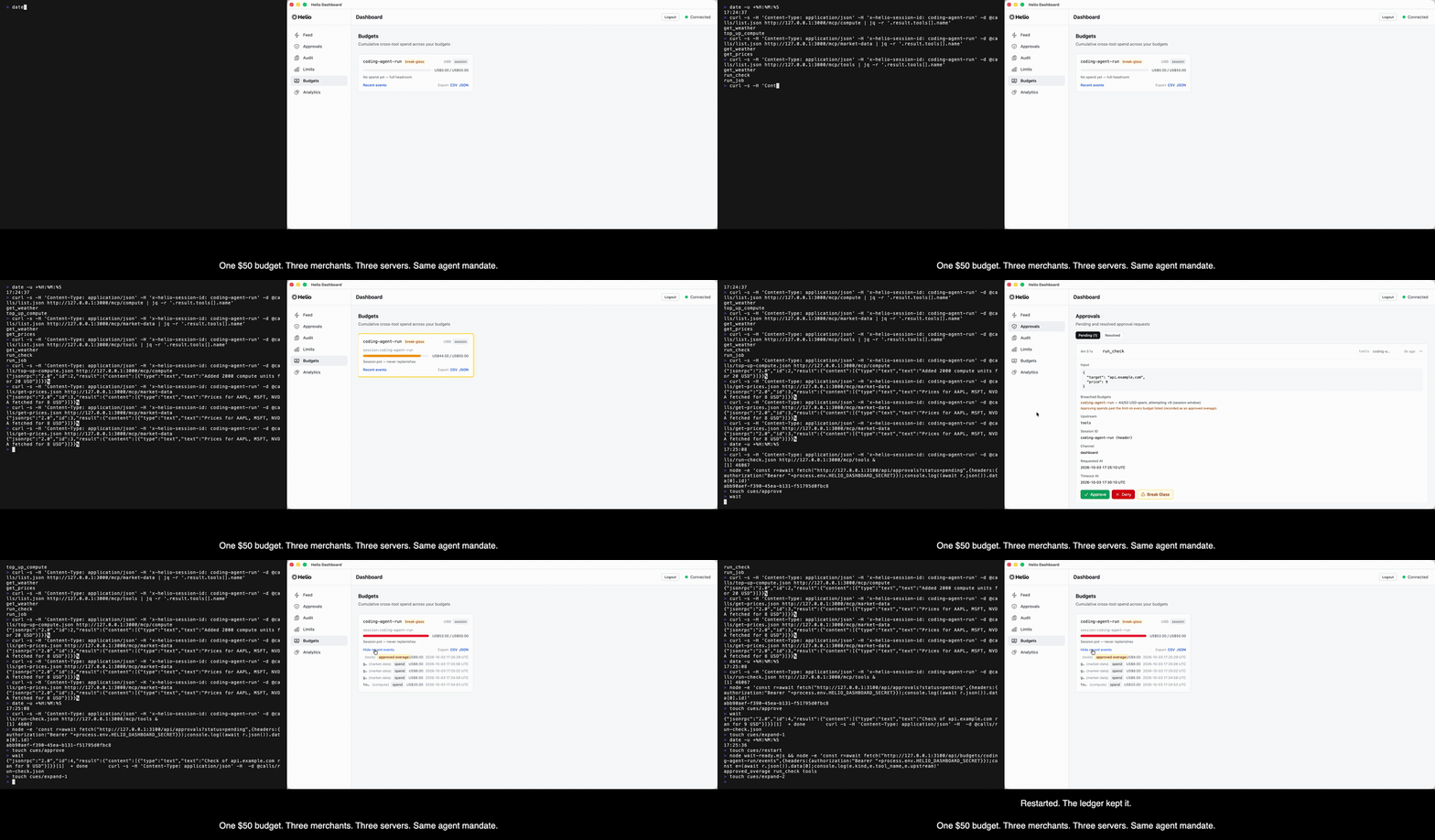
Budgets govern tools that expose what they are spending in an argument field. Watch the full flow — live depletion, breach, break-glass approval, the approved overage landing in the ledger — in the Docker quickstart demo or the runnable budgets example. The agent budget example records the same flow as one $50 pot across three MCP servers, a held overage approved on the dashboard and the ledger surviving a restart: watch it as a GIF or an mp4.
Evidence Grounding
Require fresh application-provided evidence. The optional SDK posts an evidence key for the session; the proxy checks that the key is on the policy allowlist, present, and not expired (the caller sets a TTL per entry; the SDK default is 300 seconds). Helio verifies the presence and freshness of the evidence signal, not what it contains, and the SDK token lives in the agent's process, so treat an evidence gate as a guard against a step skipped by mistake, not against an agent that intends to skip it. See SECURITY.md.
policies:
  rules:
    - match:
        tool: 'process_refund'
      action: allow
      evidence:
        requires: ['orders.lookup']
# Optional SDK enrichment
from helio import HelioContext

# Mark a tool output as evidence
with HelioContext() as ctx:
    result = orders.lookup(order_id)
    ctx.mark_evidence("orders.lookup", "order_data", result)
The SDK talks to the proxy over the sideband API (default 127.0.0.1:3200; bind host is configurable via sdk.host). When the SDK sideband is enabled (sdk.enabled: true, off by default), the proxy generates a fresh 32-byte hex token on every helio start and prints it to stderr:
SDK sideband listening on http://127.0.0.1:3200
SDK token (generated per-boot HELIO_SDK_TOKEN; pass as HELIO_SDK_TOKEN env var to your SDK clients):
  3f9c2b...d8a1
Pass the same value to the SDK process via HELIO_SDK_TOKEN and the SDK automatically attaches Authorization: Bearer <token> to every sideband call. The sideband also rejects any request carrying a non-null Origin header, so a malicious local HTML file cannot talk to it through a browser. Operators who need a stable token across restarts can set HELIO_SDK_TOKEN explicitly in the proxy's environment — the proxy respects a pre-set value instead of regenerating one, and does not echo it to stderr.
Self-Repair Feedback
When Helio blocks an action, it returns structured feedback explaining what failed and what the agent should do next. The agents can then self-correct and retry.
{
  "blocked": true,
  "reason": "evidence_missing",
  "missing_evidence": ["orders.lookup"],
  "suggestion": "Call orders.lookup with the order ID before retrying"
}
Action Dependency Chains
Require a successful prerequisite action. No refund unless orders.lookup already succeeded this session. The proxy observes the call itself: by default a dependency is satisfied only by a routed tool call that returned an upstream result rather than an error. Set requires_success: false to count any attempt.
policies:
  rules:
    - match:
        tool: 'process_refund'
      action: allow
      requires: ['orders.lookup', 'customer.verify']
Approval Workflows
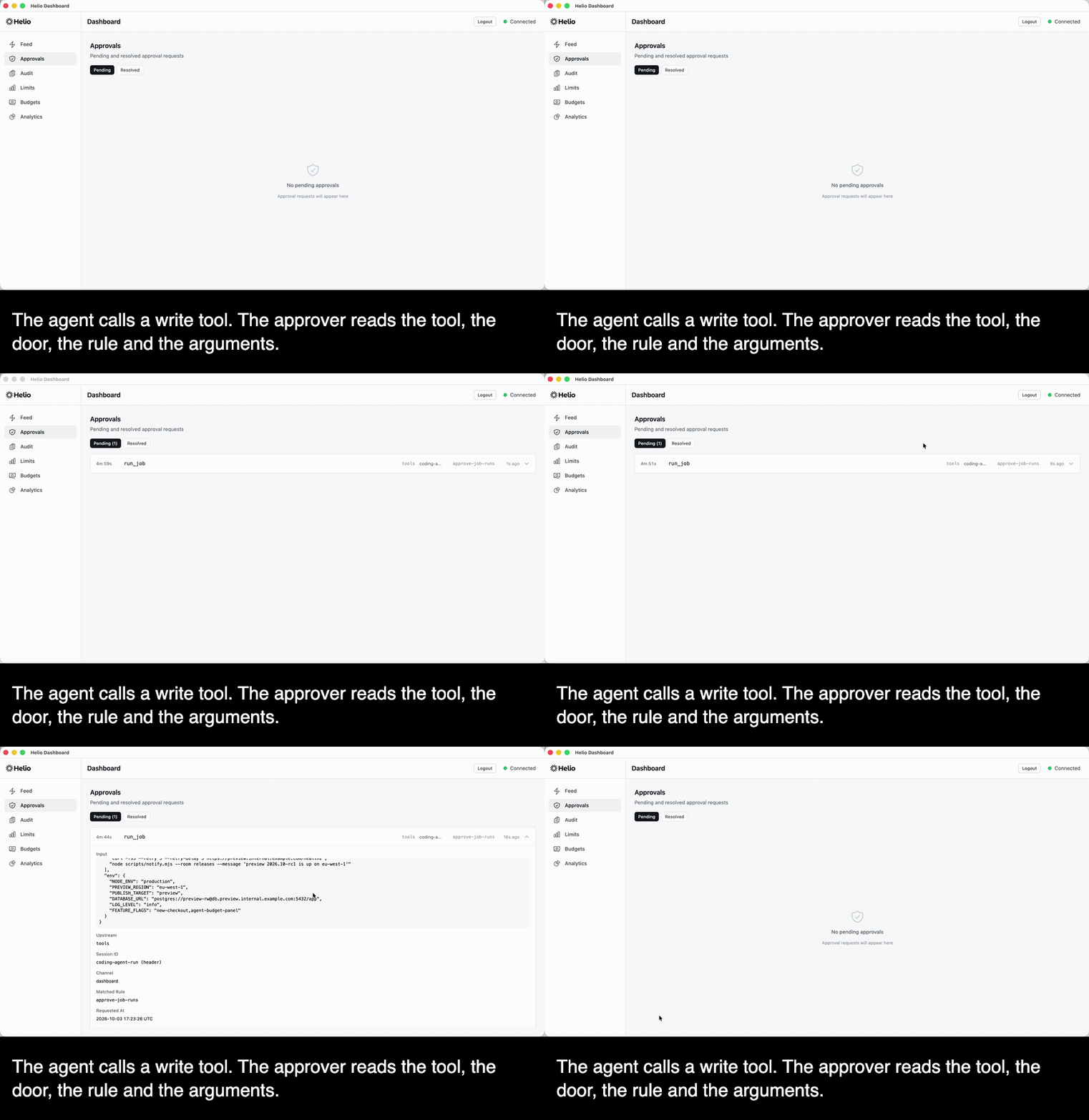
Escalate only what needs you, and show the approver the arguments. Route a sensitive call to Slack, a webhook, or the Helio dashboard; the ticket carries the tool, the upstream, the rule that fired, and the call's arguments, and the call goes nowhere until a human decides. Configurable timeout and escalation, plus a dashboard-only break-glass override (REST API and dashboard UI; not exposed as a Slack button).
Rate & Spend Limits
Rate limits per tool and per session. Per-rule spend limits that block a matched tool at its own cap - for a cumulative cap that spans tools, see Cross-Tool Spend Budgets.
Audit Trail
Every tool call recorded: timestamp, agent identity, tool name, inputs, policy decision, evidence chain, approval status, downstream response, latency, and the hash of the config in force when the record was written. Searchable dashboard. Export to JSON or CSV. helio report activation writes a redacted activation report (the timeline, the windowed decision counts and the running proxy's coverage snapshot, names excluded by default) that you can hand to someone else; Helio itself transmits nothing.
How Helio Compares
| Helio | Obot | Cerbos | Built-in (Anthropic / OpenAI) | Framework (LangChain / CrewAI) | |
|---|---|---|---|---|---|
| What it governs | Per-call actions with cross-call state | Which tools/MCPs are reachable | App-level authorization decisions | Agent permissions inside one platform | Agent behavior inside one framework |
| Architecture | Out-of-process MCP proxy | Out-of-process MCP gateway | Sidecar / library | In-platform | In-framework |
| Open source | ✅ Apache 2.0 | ✅ Apache 2.0 | ✅ Apache 2.0 | ❌ | Varies |
| Time to value | 5 minutes | Setup-dependent | Hours | Built-in | Built-in |
| No agent code changes | ✅ | ✅ | ❌ | ✅ (within platform) | ❌ |
| Governs agents you didn't build | ✅ Any MCP agent | ✅ Any MCP agent | ✅ (any app) | ❌ One platform only | ❌ One framework only |
| Evidence grounding | ✅ Cumulative across calls | ❌ | ❌ | ❌ | Limited |
| Self-repair feedback | ✅ Structured retry hints | ❌ | ❌ | ❌ | Limited |
| Stateful spend / rate limits | ✅ Cross-tool budgets + per-rule limits¹ | Basic | ❌ | ❌ | Limited |
| Approval workflows | ✅ Slack, webhook, dashboard | ✅ | ❌ | Limited | Limited |
| Audit trail (incl. downstream responses) | ✅ Captures upstream MCP responses | Decision logs | Decision logs | Platform telemetry | Framework logs |
¹ Per-rule rate and spend limits, plus named cross-tool budgets: persistent depleting pots with break-glass approvals for overages.
Works With
Helio works with any MCP-compatible agent or framework:
- Claude (Anthropic)
- ChatGPT (OpenAI)
- LangChain / LangGraph
- CrewAI
- AutoGen
- Custom agents using any MCP client SDK
Helio is listed in the official MCP registry as so.helio/helio. The entry runs npx @gethelio/proxy start and points the client at http://127.0.0.1:3000/mcp, the listen defaults. helio start reads helio.yaml from the working directory and writes the audit database there; an absolute --config still writes ./helio-audit.db to the process working directory, and a working directory that is not writable refuses startup with the audit.path line. A helio.yaml that sets another listen.port, or a named upstreams: list (one door per upstream at /mcp/<name>), changes the URL the client must use.
Documentation
- Getting Started: Install and configure in 5 minutes
- Configuration Reference: Every YAML option explained
- Policy Guide: How to write rules with examples
- Scanning an upstream:
helio scanprints an MCP server's real tool surface, with hint provenance, coverage and argument candidates, before the proxy runs - Approval Workflows: Slack, webhook, and dashboard approvals
- Audit Trail: What's recorded, how to search, how to export
- Kill Switch:
helio killhalts every governed call without editing policy;helio resumelifts it - Running Helio as a Sidecar: Deploy next to a coding agent or dev container with the upstream and the config out of its reach and Helio off its network
- Running Helio as its own user: The separate-user tier on Ubuntu 24.04, run end to end
- Sample traffic:
helio init --demowrites a directory of sample history to try every surface before the first real call - Policy simulation:
helio policy simulatereplays the audit trail against a candidate policy and reports what would change, with a CI example the repository's own CI re-runs
Examples
Ready-made configurations for common patterns:
- Basic: Deny destructive operations, allow everything else
- Slack Approvals: Route destructive actions to Slack
- Spend Limits: Govern payment tool usage
- Budgets: A cross-tool budget across Stripe and PayPal tools with break-glass overage approvals, paired with a category cap that only charges calls declaring their spend category
- Multi-Upstream: Two named upstreams behind one proxy, with a door-scoped rate limit and budget
- Agent Budget: One $50 session pot drawn down by three MCP servers behind three doors, a held overage approved as break-glass, a write tool held by a rule, and the ledger surviving a restart. Recorded: the budget demo as a GIF or mp4, the approval card as a GIF or mp4
Contributing
We welcome contributions. See CONTRIBUTING.md for setup instructions, coding standards, and PR process.
Good first issues are labeled good-first-issue.
Community
- GitHub Issues: Bug reports and feature requests
- Twitter/X: Updates and announcements
License
Apache 2.0 - see LICENSE.