Engineering docs
22 composable, auto-triggering skills that turn your coding agent into a principal engineer - from raw idea to production-ready documentation.
Documentation
Engineering Docs
22 composable, auto-triggering skills that turn your coding agent into a principal engineer - from raw idea to production-ready documentation.



Why Engineering Docs?
Your coding agent is powerful, but it doesn't know your project's architecture, your users, or your constraints. Engineering Docs gives it principal-level documentation skills — so it can:
- Turn raw ideas into complete blueprints — business concept → technical spec → architecture → deployment plan
- Ask the right questions — tool-call interviews with 2-3 targeted questions per skill (no repeated questions)
- Generate production-ready documents — ISO/IEC/IEEE 29148, C4 Model, STRIDE, Google SRE standards
- Work across 14+ agents — Claude Code, Copilot, Cursor, Gemini CLI, Goose, Pi, and more
How It Works
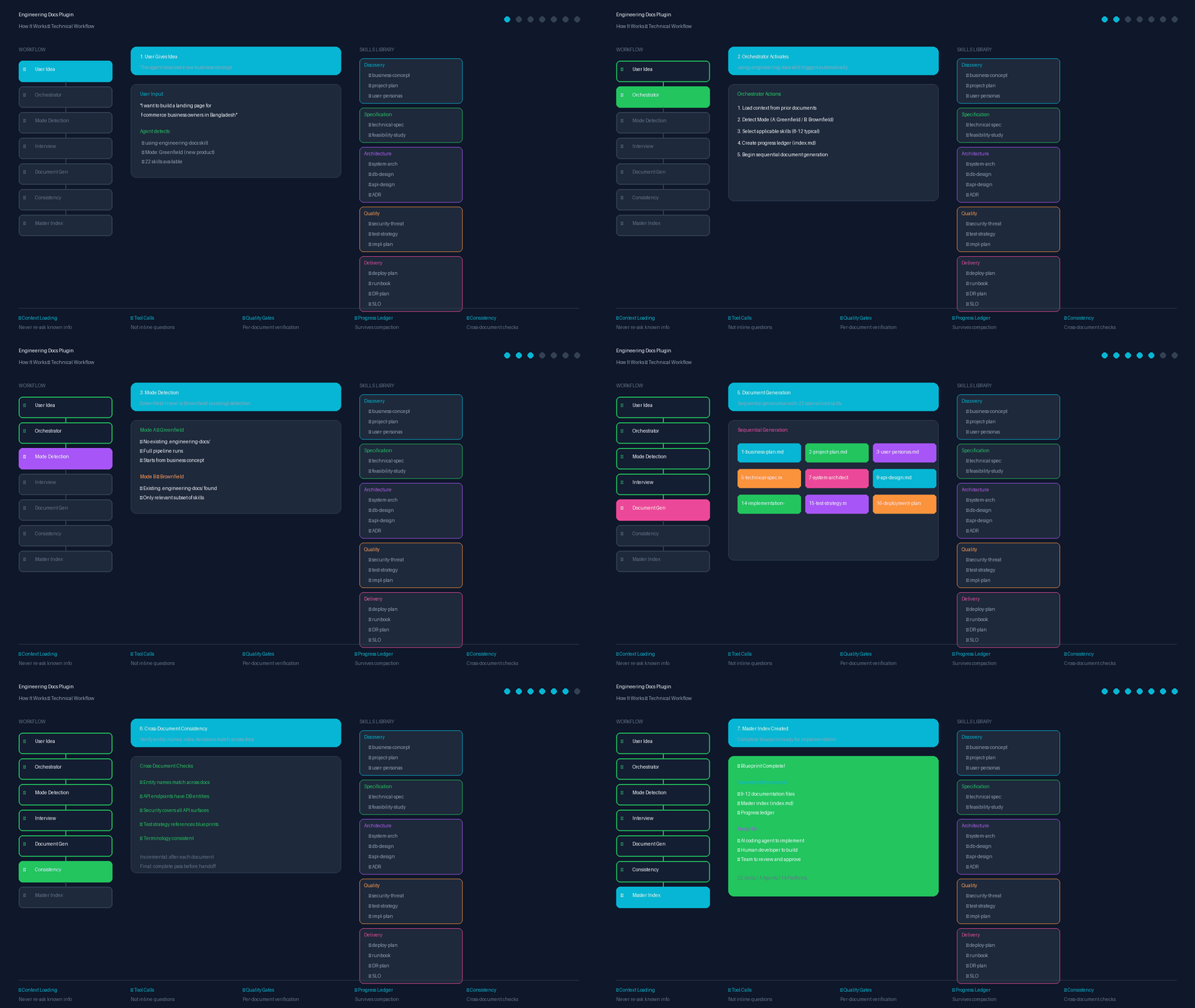
The plugin works through a structured workflow:
- User gives idea → Orchestrator skill activates automatically
- Mode detection → Greenfield (new) vs Brownfield (existing)
- Interview phase → Tool-call questions with context loading
- Document generation → Sequential generation with 22 specialized skills
- Consistency checks → Cross-document verification
- Master index → Complete blueprint ready for implementation
Quickstart
npx engineering-docs
Or install for your specific agent:
| Agent | Install Command |
|---|---|
| Claude Code | /plugin marketplace add fattain-naime/engineering-docs/plugin install engineering-docs@engineering-docs |
| Gemini CLI | gemini extensions install https://github.com/fattain-naime/engineering-docs |
| Cursor | npx engineering-docs --cursor |
| Goose | npx engineering-docs --goose |
| Pi | npx engineering-docs --pi |
| OpenCode | npx engineering-docs --opencode |
| Kilo Code | npx engineering-docs --kilo |
| Roo Code | npx engineering-docs --roo |
| Cline | npx engineering-docs --cline |
| Kimi Code | /plugins install https://github.com/fattain-naime/engineering-docs |
| Codex | npx engineering-docs --codex |
| Copilot CLI | npx engineering-docs --copilot |
| Factory Droid | npx engineering-docs --factory |
See Installation for detailed instructions.
How It Works
graph LR
    A[Your Idea] --> B[Orchestrator]
    B --> C[Interview]
    C --> D[Business Concept]
    D --> E[Project Plan]
    E --> F[Technical Spec]
    F --> G[System Architecture]
    G --> H[API Design]
    H --> I[Implementation Plan]
    I --> J[Test Strategy]
    J --> K[Deployment Plan]
    K --> L[Master Index]
- Give it your idea — "I want to build X"
- Answer 2-3 questions per skill — via tool calls, not inline chat
- Review each document — approve or request changes
- Get your blueprint — complete, cross-consistent documentation set
Smart features:
- Context loading — reads prior documents before asking questions (never repeats)
- Tool-call interviews — clean input capture, no conversation pollution
- Right-sizing — skips documents that don't apply to your project
- Cross-document consistency — verifies entity names, roles, decisions match
What's Inside
Skills Library (22 Skills)
Discovery & Planning
| Skill | What It Produces |
|---|---|
using-engineering-docs | Orchestrator — routes to all other skills automatically |
business-concept | Problem, users, value proposition, monetization, constraints |
project-plan | Scope, milestones, RACI, timeline, work breakdown |
user-personas-behavior | User personas, JTBD, success metrics, analytics plan |
Specification & Feasibility
| Skill | What It Produces |
|---|---|
technical-specification | SRS/TSD with EARS syntax, traceability matrix |
technical-feasibility-study | Go/no-go recommendation with evidence |
Architecture & Design
| Skill | What It Produces |
|---|---|
system-architecture-document | C4 diagrams, 4+1 views, tech stack, NFRs |
architecture-decision-record | Immutable ADR log (MADR format) |
database-design-document | ERD, schema, indexing, migration plan |
api-design-document | REST/OpenAPI 3.1 contract, RFC 7807 errors |
admin-access-control-specification | RBAC matrix, audit logging, break-glass |
technical-blueprint | Google/Stripe-quality TDD per feature |
ux-flow-specification | User journeys, screen flows, UI states |
design-system-specification | Design tokens, components, accessibility |
Quality & Risk
| Skill | What It Produces |
|---|---|
security-threat-model | STRIDE analysis, attack surface, mitigations |
test-strategy-document | Testing pyramid, CI gates, coverage targets |
implementation-plan | Dependency-ordered build sequence, phase gates |
Delivery & Operations
| Skill | What It Produces |
|---|---|
deployment-plan | Release strategy, go/no-go gate, rollback |
slo-error-budget-document | SLI/SLO targets, burn-rate alerts |
technical-runbook | On-call operations manual (Google SRE) |
disaster-recovery-plan | RTO/RPO, backup strategy, failover |
incident-postmortem | Blameless RCA with Five Whys |
Custom Agents (4 Agents)
| Agent | Purpose |
|---|---|
documentation-generator | Generate comprehensive documentation for software projects |
architecture-reviewer | Review system architecture for scalability, security, and maintainability |
api-designer | Design RESTful APIs following best practices |
test-strategist | Create comprehensive test strategies for software projects |
Utility Scripts
| Script | Purpose |
|---|---|
generate-dependency-graph.js | Mermaid dependency visualization |
validate-documents.js | Document validation |
calculate-error-budget.js | SLO error budget calculator |
generate-test-cases.js | Test case generator from specs |
generate-ddl.js | SQL DDL generator from schema |
check-consistency.js | Cross-document consistency checker |
MCP Integration
.mcp.json          # MCP server configuration
scripts/validate.js    # Validation server (validate_document_set, check_consistency, generate_index)
Hooks
hooks/hooks.json          # SessionStart hook configuration
hooks/check-progress.js   # Check for in-progress documentation
hooks/run-hook.cmd        # Windows compatibility
Eval Framework
evals/evals.json           # Test cases for orchestrator and key skills
evals/README.md            # How to run evals
evals/test-prompts/        # Sample test prompts
Plugin Structure (Claude Compatible)
engineering-docs/
├── .claude-plugin/
│   ├── plugin.json        # Plugin manifest
│   └── marketplace.json   # Marketplace manifest
├── .kimi-plugin/
│   └── plugin.json        # Kimi Code plugin manifest
├── gemini-extension.json  # Gemini CLI extension manifest
├── GEMINI.md              # Gemini CLI extension context file
├── skills/                # 22 skills (SKILL.md files)
├── agents/                # 4 custom agents
├── hooks/                 # Event handlers
├── .mcp.json              # MCP server configuration
├── scripts/               # Installer, validator, test runner, and utility scripts
├── evals/                 # Test framework
└── integrations/          # Other agent platform configs
    ├── agents/            # Agent instruction files (AGENTS.md, CLAUDE.md)
    └── plugins/           # Cline rules source (.clinerules/)
Claude Guidelines Compliance:
- ✅ Components at plugin root (not inside
.claude-plugin/) - ✅ Skills in
skills/directory withSKILL.md - ✅ Agents in
agents/directory with frontmatter - ✅ Hooks in
hooks/hooks.json - ✅ MCP in
.mcp.json - ✅ Kebab-case naming
- ✅ Validation passes:
claude plugin validate .
Installation
CLI Installer (Recommended)
npx engineering-docs
Automatically detects and copies the plugin to your agent's directory.
Per-Agent Installation
Claude Code
/plugin marketplace add fattain-naime/engineering-docs
/plugin install engineering-docs@engineering-docs
Gemini CLI
gemini extensions install https://github.com/fattain-naime/engineering-docs
Or with the CLI installer (installs to ~/.gemini/extensions/engineering-docs/):
npx engineering-docs --gemini
The extension layout follows the Gemini CLI extension spec: gemini-extension.json + GEMINI.md context file + skills/.
Cursor / Windsurf
npx engineering-docs --cursor
Writes each skill to .cursor/rules/engineering-docs-*.mdc with Cursor's documented frontmatter (description, globs, alwaysApply).
Goose
npx engineering-docs --goose
Installs skills to ~/.agents/skills/ (the shared Agent Skills directory Goose reads).
Pi
npx engineering-docs --pi
Safe-writes AGENTS.md to ~/.pi/agent/AGENTS.md.
OpenCode
npx engineering-docs --opencode
Installs skills to .opencode/skills/.
Kilo Code
npx engineering-docs --kilo
Safe-writes AGENTS.md to ~/.config/kilo/AGENTS.md.
Codex
npx engineering-docs --codex
Safe-writes AGENTS.md to ~/.codex/AGENTS.md.
Copilot CLI
npx engineering-docs --copilot
Installs to ~/.copilot/installed-plugins/engineering-docs/ (Copilot CLI reads .claude-plugin/plugin.json).
Cline
npx engineering-docs --cline
Creates .clinerules/engineering-docs.md (rules directory) and .cline/skills/ in your project root, matching Cline's documented workspace layout.
Factory Droid
npx engineering-docs --factory
Installs skills to ~/.factory/skills/.
Roo Code
npx engineering-docs --roo
Writes ~/.roo/rules/engineering-docs.md.
Kimi Code
npx engineering-docs --kimi
Or install inside Kimi Code:
/plugins install https://github.com/fattain-naime/engineering-docs
The repo-root .kimi-plugin/plugin.json manifest follows Kimi Code's plugin spec.
Cross-Platform Scripts
# Windows (PowerShell)
pwsh scripts\setup.ps1
pwsh scripts\setup.ps1 -Target gemini
pwsh scripts\setup.ps1 -Target claude

# Linux / macOS (Bash)
chmod +x scripts/setup.sh
./scripts/setup.sh
./scripts/setup.sh --gemini
./scripts/setup.sh --claude
Supported targets: gemini, claude, local, cursor, kimi, codex, goose, pi, opencode, kilo, roo, cline, factory, copilot
Safe-Write Behavior
All install methods use safe-write for agent instruction files:
AGENTS.md— Created only if it doesn't existCLAUDE.md— Created only if it doesn't existGEMINI.md— Created only if it doesn't exist
Your customizations are always preserved.
Multi-Agent Compatibility
| Platform | Manifest / Layout | Installation Path |
|---|---|---|
| Claude Code | .claude-plugin/plugin.json | ~/.claude/plugins/engineering-docs/ |
| Gemini CLI | gemini-extension.json + GEMINI.md + skills/ | ~/.gemini/extensions/engineering-docs/ |
| Cursor / Windsurf | .cursor/rules/*.mdc (frontmatter: description, globs, alwaysApply) | ./.cursor/rules/engineering-docs-*.mdc |
| Kimi Code | .kimi-plugin/plugin.json | ~/.kimi-code/plugins/engineering-docs/ |
| Codex | AGENTS.md instructions file | ~/.codex/AGENTS.md |
| OpenCode | Agent Skills (SKILL.md per skill) | ./.opencode/skills/ |
| Goose | Agent Skills (SKILL.md per skill) | ~/.agents/skills/ |
| Pi | AGENTS.md instructions file | ~/.pi/agent/AGENTS.md |
| Kilo Code | AGENTS.md instructions file | ~/.config/kilo/AGENTS.md |
| Roo Code | Markdown rule file | ~/.roo/rules/engineering-docs.md |
| Cline | .clinerules/*.md + .cline/skills/ | ./.clinerules/engineering-docs.md |
| Factory Droid | Agent Skills (SKILL.md per skill) | ~/.factory/skills/ |
| Copilot CLI | .claude-plugin/plugin.json | ~/.copilot/installed-plugins/engineering-docs/ |
Testing
# Run plugin validation
claude plugin validate .

# Run skill tests
npm test

# Test MCP server
node scripts/validate.js
Testing Claude Code plugins
Validate manifests and run behavioral evals with the official Claude Code CLI:
claude plugin validate .
claude plugin eval init --bare first-case
claude plugin eval . --trust-plugin
See docs/claude-plugin-testing.md for the
full command surface, the Plugin Developer Toolkit, and CI. This repository
gates pull requests on validate with
.github/workflows/claude-plugin-ci.yml;
copy that file into your own repo's .github/workflows/ to get the same
gate. The eval step only runs on manual dispatch and needs an
ANTHROPIC_API_KEY secret (or gateway variables).
Philosophy
- Systemic over Ad-hoc — Rigorous, reproducible processes yield safer and cleaner software
- Traceability — Every requirement links to a business goal and a test case
- Visual-First — Complex architectures mapped with Git-trackable Mermaid diagrams
- Operational Safety — No feature is complete without deployment runsheet, monitoring, rollback
- Blameless Learning — Production failures are data points for system hardening
Contributing
We welcome community skills! Please review CONTRIBUTING.md for guidelines.
Community
- GitHub: fattain-naime/engineering-docs
- Issues: Report bugs or request features
Author
- Fattain Naime — iamnaime.info.bd
- Repository: https://github.com/fattain-naime/engineering-docs
License
MIT. See LICENSE.