Odoo Devkit
Token-efficient MCP server for Odoo 17/18/19 development. It gives AI assistants structured access to your Odoo codebase for discovery, search, model/view analysis, XML checks, and scaffolding patches.
Documentation
odoo-devkit
Token-efficient MCP server for Odoo 17/18/19 development.
odoo-devkit gives AI assistants structured access to your Odoo codebase for discovery, search, model/view analysis, XML checks, and scaffolding patches.
Highlights
- Fast module and code discovery across addons roots
- Model surface inspection (fields, methods, views, actions, menus, security)
- View inheritance navigation (
find_view_chain, inherited views, field usage) - Patch scaffolding for common Odoo tasks (models, views, actions, menus, security, wizards, reports)
- XML validation for view structure and field references
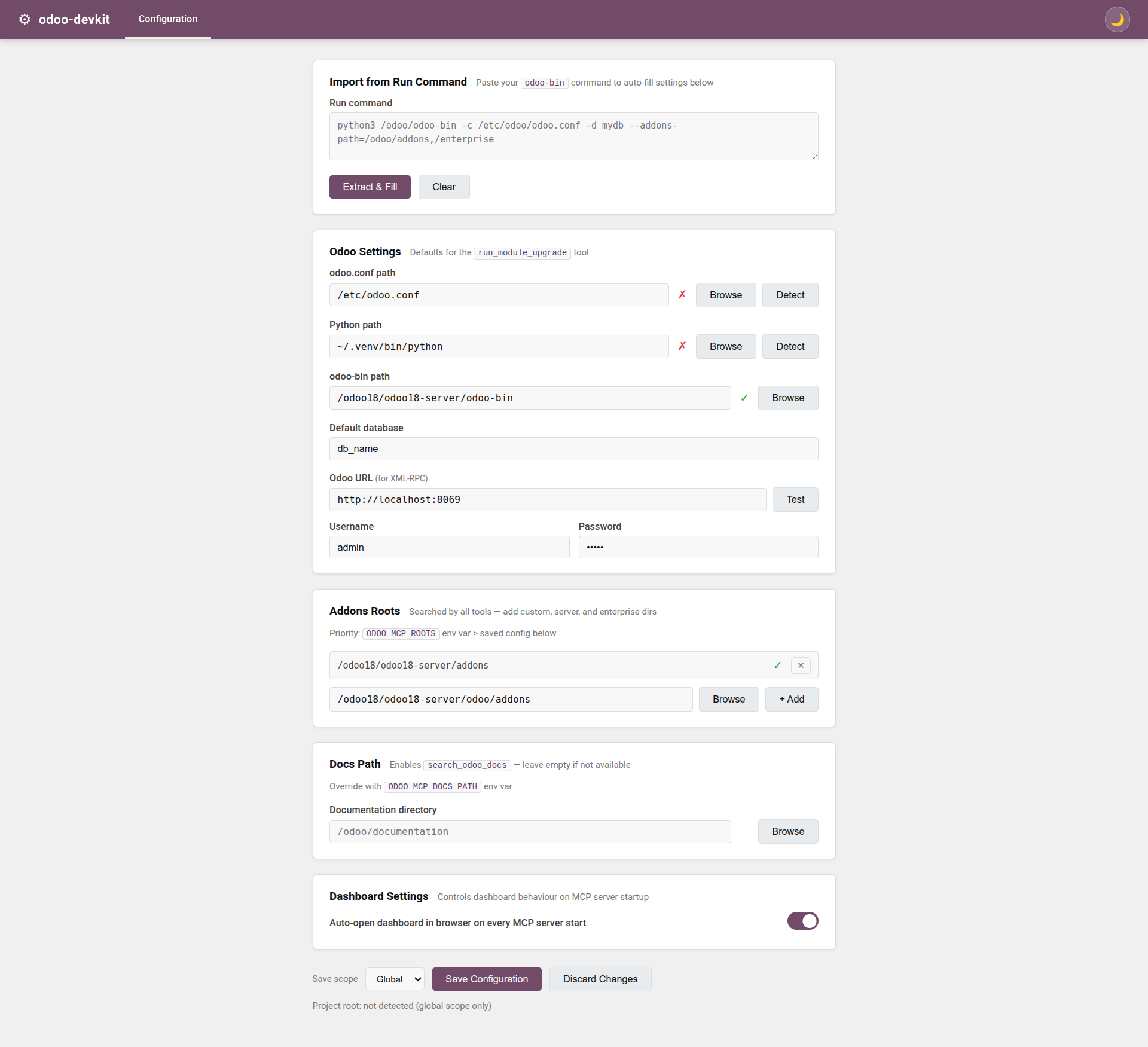
- Web dashboard that starts with the MCP server (Serena-style flow)
- Layered config: global + project override
Requirements
- Python 3.10+
uv(recommended)ripgrep(rg) for fast search
Install examples:
# Ubuntu/Debian
sudo apt install ripgrep

# macOS
brew install ripgrep
Installation
git clone https://github.com/VatsalChauhan36/odoo-devkit.git
cd odoo-devkit
uv sync
uv run odoo-devkit --help
Configuration
You can configure roots and defaults via environment variables, global config, and project config.
Config files (Serena-like)
- Global config:
~/.odoo-devkit/config.json - Project config:
<project-root>/.odoo-devkit/project.json
Effective config resolution:
- Global config
- Project override (if project root is detected)
Project root detection order:
ODOO_MCP_PROJECT_ROOT- nearest ancestor containing
.odoo-devkit/project.json - nearest ancestor containing
.git
Root paths priority
Addons roots are resolved with this priority:
ODOO_MCP_ROOTS- saved config (
rootsin global/project config)
Typical roots order:
- Custom addons
- Odoo server addons
- Odoo base addons
Example:
export ODOO_MCP_ROOTS="/path/to/custom-addons:/path/to/odoo/addons:/path/to/odoo/odoo/addons"
Windows PowerShell:
$env:ODOO_MCP_ROOTS = "C:\custom-addons;C:\odoo\addons;C:\odoo\odoo\addons"
Optional docs search
To enable search_odoo_docs, set:
export ODOO_MCP_DOCS_PATH="/path/to/odoo/documentation"
Dashboard flow
The dashboard starts with the MCP server by default.
Saved settings include:
open_browserenable_dashboarddashboard_host
CLI overrides:
uv run odoo-devkit --no-dashboard
uv run odoo-devkit --dashboard-host 0.0.0.0
uv run odoo-devkit --no-open-browser
uv run odoo-devkit --project-root /path/to/project
If browser auto-open is skipped (for example, headless Linux), use the MCP tool open_dashboard.
Screenshots
Then this preview will render automatically:
Deprecated CLI flags
These flags are intentionally kept for backward compatibility and are ignored:
--roots--config
They emit warnings and do not affect runtime behavior.
MCP client setup
Claude Code
{
  "mcpServers": {
    "odoo-devkit": {
      "type": "stdio",
      "command": "uv",
      "args": [
        "run",
        "--directory", "/path/to/odoo-devkit",
        "odoo-devkit",
        "--project-root", "/path/to/your/project"
      ]
    }
  }
}
Cursor
{
  "mcpServers": {
    "odoo-devkit": {
      "command": "uv",
      "args": [
        "run",
        "--directory", "/path/to/odoo-devkit",
        "odoo-devkit",
        "--project-root", "/path/to/your/project"
      ]
    }
  }
}
Tool overview
Discovery & search
list_moduleslist_custom_modulesget_module_manifestget_module_structureglob_odoo_filesread_file_linessearch_odoo_codesearch_odoo_docs
Model and view analysis
inspect_model_surfacefind_model_definitionget_model_fieldsfind_method_definitionfind_view_definitionfind_inherited_viewsfind_view_by_modelfind_view_chainfind_field_in_viewsvalidate_view_xml
Actions, menus, and security
find_action_by_modelfind_menu_hierarchyfind_security_access_for_model
Scaffolding (patch generation)
scaffold_model_patchscaffold_inherit_model_patchscaffold_view_inherit_patchscaffold_views_patchscaffold_action_patchscaffold_menu_patchscaffold_security_access_patchscaffold_record_rule_patchscaffold_wizard_patchscaffold_report_patchmanifest_update_patchinit_update_patch
Runtime helpers
run_module_upgradeexecute_rpccheck_rpc_connectionopen_dashboard
Recommended usage pattern
- Start with
list_custom_modulesandget_module_structure - Narrow with
search_odoo_code(module_filter,glob) - Use
inspect_model_surfacefor model-level orientation - Use view tools for inheritance-aware XML navigation
- Use scaffold tools to generate safe patches before applying
Troubleshooting
No valid roots found
Set ODOO_MCP_ROOTS or save roots in dashboard config (global/project).
rg: command not found
Install ripgrep (ripgrep package).
Dashboard did not open
- Check
open_browsersetting - Use
--open-browserto force when supported - On headless Linux, open URL manually or call
open_dashboard
MCP client cannot connect
- Verify path in
--directory - Re-run
uv sync - Run
uv run odoo-devkit --helplocally
License
MIT. See LICENSE.