Dynobase MCP Server
Local MCP server built into the Dynobase DynamoDB desktop app. Lets Claude Code, Cursor and Codex list tables, read schemas and run queries through your existing AWS profiles; read-only by default.
Documentation
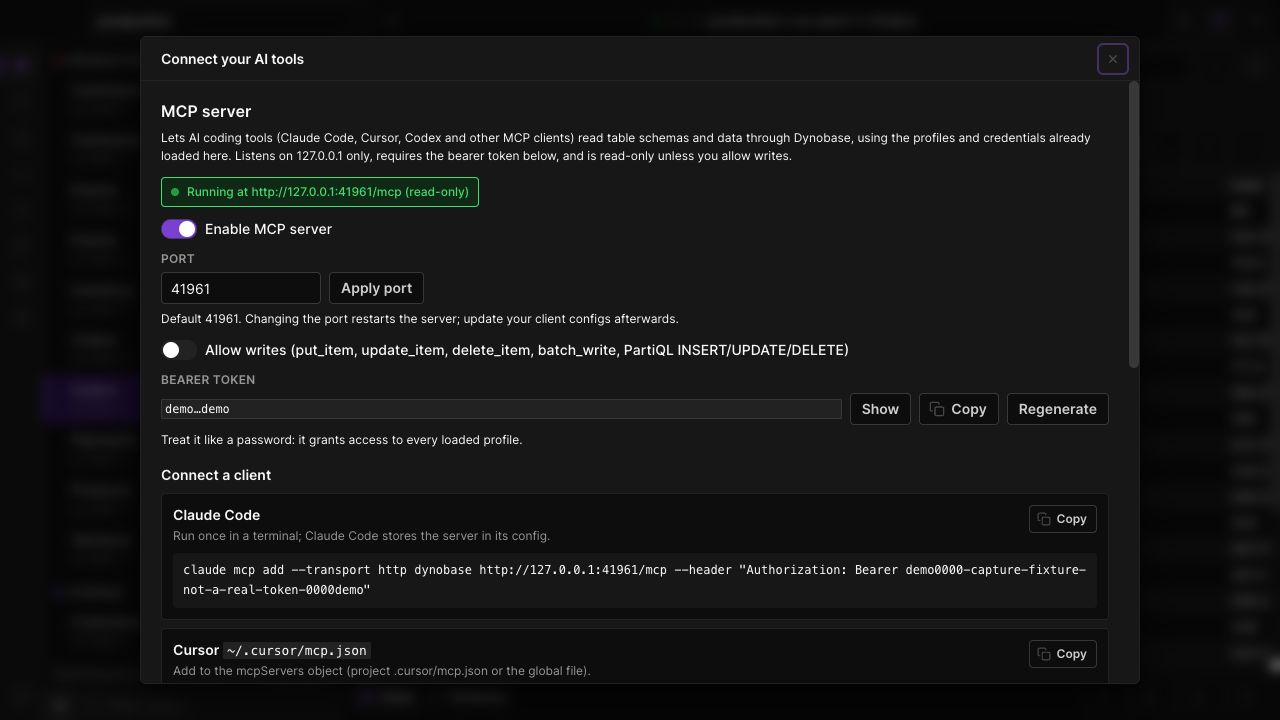
MCP server settings and client setup snippets with a clearly marked demo token. Dynobase 3.0 with demo data.
Reuse your AWS profiles
Clients can discover loaded profiles, list tables, inspect schema and request data through Dynobase. You do not need to copy AWS keys into each client: it sees tool results, never your credentials.
Start with read access
Clients can describe tables, run a Scan, Query, GetItem or PartiQL SELECT, and ask which index a key condition would use. Item writes, batch writes and PartiQL INSERT, UPDATE and DELETE stay blocked until Allow writes is enabled. AWS permissions continue to apply to every request.
Connect locally, undo from History
The token-protected HTTP server listens on 127.0.0.1, and you can regenerate the token at any time. Every item write a client makes is recorded in Dynobase's History with the previous version, so it can be reverted.
How it works
Open Dynobase and follow these steps to use mcp server for ai tools.
- 01
Enable the server
Open Settings, AI, then MCP server. Enable it and check that the status line shows the local server's address. - 02
Configure your client
Copy the bearer token and the snippet for your client: a claude mcp add command for Claude Code, an mcp.json entry for Cursor, or the mcp-remote bridge for clients that only launch stdio servers, such as Codex and Claude Desktop. - 03
Set the access you need
Leave Allow writes off for inspection and read queries. Enable it only for workflows that should be able to modify items.
Questions, answered.
Which tools can connect?
Any MCP client. Claude Code and Cursor connect to the HTTP endpoint directly. Clients that only launch stdio servers, such as Codex, Windsurf and Claude Desktop, connect through the mcp-remote bridge. The settings panel has a ready snippet for each.
Does read-only mean there are no AWS costs?
No. Read operations can still consume DynamoDB capacity. Read-only blocks supported item writes; it does not make queries free.
Can an AI tool bypass my IAM permissions?
No. Requests use the credentials held by Dynobase and remain subject to AWS authorization. Enabling writes does not grant missing IAM permissions.
Can I undo a change an AI tool made?
Item writes, yes: each one appears in History with the item's previous version, marked as coming from an MCP client, and can be reverted. PartiQL writes are listed but cannot be undone, because DynamoDB does not return the previous item for them.
Your DynamoDB workflow, in one app.
Explore the tools in Dynobase 3.0.
