Postgres DBA MCP
Bounded, read-only PostgreSQL access for AI assistants: nine DBA tools, compact CSV output, one static Go binary. Drop-in replacement for crystaldba/postgres-mcp
Documentation

Bounded, read-only PostgreSQL access for AI assistants.
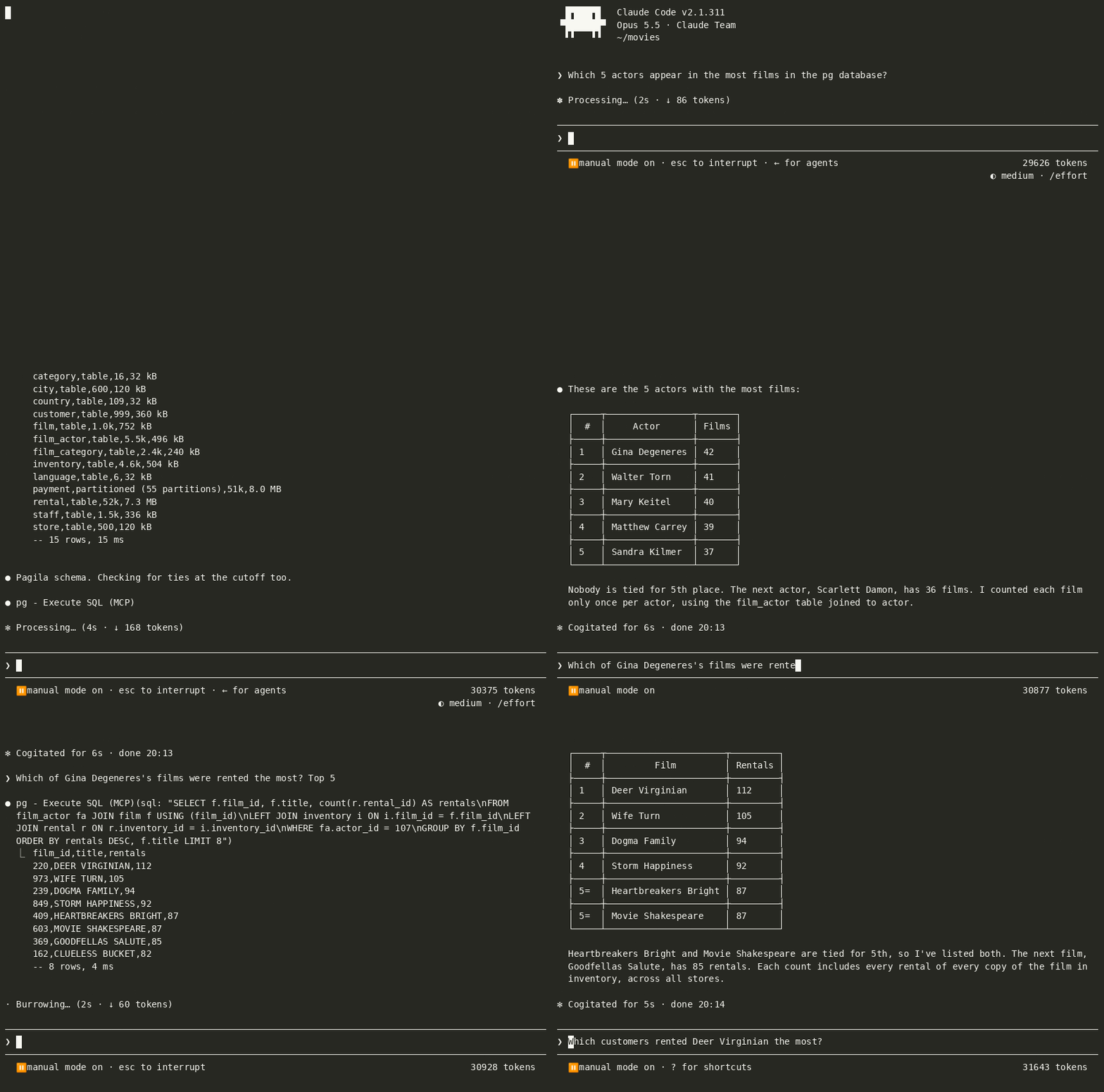
Let Claude Code, Codex or any MCP client explore a PostgreSQL database, run SQL, read query plans, test hypothetical indexes, find the slowest queries and check the database's health, without flooding the model's context or escaping read-only mode.
A Model Context Protocol server that gives an AI client compact, bounded access to one PostgreSQL database. It replaces crystaldba/postgres-mcp 0.3.0 with the same nine tools and the same parameters, in one static binary. Switching is one line of client configuration; what the model receives changes (compact CSV, bounded results, one statement per call), as listed in MIGRATION.md.
Why
crystaldba/postgres-mcp gives an assistant the right DBA tools: schema, SQL, plans with hypothetical indexes, top queries, health checks, index advice. Three things got in the way of using it every day:
- Unbounded, verbose results. Rows come back as Python
reprwith no size limit. A plainSELECTon a big table returns hundreds of thousands of tokens, or fails. - A restricted mode that can be bypassed. Function names are not checked in
FROM, so a "read-only" call can still run functions such aspg_read_fileorpg_advisory_lock(CVE-2026-85620). - Weight. A Python container of about 300 MB that sits at about 250 MB of memory.
What the model receives changes:
- compact CSV with an explicit footer, every result capped in rows, bytes and cell length, and every cut announced;
- a restricted mode, on by default, that parses each statement with PostgreSQL's own parser (libpg_query) and checks every function call anywhere in it, inside a read-only transaction;
- one static Go binary that starts in milliseconds.
Measured
Against crystaldba/postgres-mcp 0.3.0 on the same PostgreSQL 17 database and the same read-only role:
- 61 % fewer tokens per
execute_sqlresponse: median of the 4 scenarios both servers answered (S01, S04, S05, S06). Every result is capped at 32 kB, where crystaldba returns up to 268k tokens or fails; - 131 of 131 attack statements refused in restricted mode, where crystaldba executes 10;
- 16 MB of memory against 248 MB, both in a Linux container; cold start of 11 ms for the binary run directly, against 1.4 s for crystaldba including
docker run; - 27 of 27 agent tasks solved with Claude Code, against 25 of 27, measured on 0.1.0, before the volatility gate.
The other side: the nine tool definitions are 25 % larger (2459 tokens against 1965), and the tokens of a whole agent task are comparable.
Method, every number (including where postgres-dba-mcp does worse) and charts: BENCHMARK.md. The bench harness is not published. Its inputs are, so the measures can be redone with any client: the data set in bench/data, the attack and legitimate corpora in testdata/safesql, and the scenarios and tasks listed in BENCHMARK.md.
What the model receives
The same SELECT * FROM types through both servers. crystaldba 0.3.0:
[{'id': 1, 'txt': 'hello', 'empty': '', 'num': Decimal('532.10'), 'arr': [1, 2], 'iv': datetime.timedelta(days=1, seconds=7200), 'ts': datetime.datetime(2026, 3, 2, 10, 14, tzinfo=zoneinfo.ZoneInfo(key='Etc/UTC')), 'bin': b'\xde\xad\xbe\xef'}, {'id': 2, 'txt': None, 'empty': None, 'num': None, 'arr': None, 'iv': None, 'ts': None, 'bin': None}]
postgres-dba-mcp:
id,txt,empty,num,arr,iv,ts,bin
1,hello,"",532.10,"{1,2}",1 day 02:00:00,2026-03-02 10:14:00+00,\xdeadbeef
2,\N,\N,\N,\N,\N,\N,\N
-- 2 rows, 2 ms
Values keep their PostgreSQL text form, NULL (\N) stays distinct from an empty string, and the footer says how many rows came back and whether anything was cut.
Install
With Homebrew (macOS and Linux):
brew install a-lafon/tap/postgres-dba-mcp
With the install script (macOS and Linux, amd64 and arm64): it downloads the release archive, checks it against checksums.txt and puts the binary in ~/.local/bin (POSTGRES_DBA_MCP_INSTALL_DIR to change it, POSTGRES_DBA_MCP_VERSION=v0.1.0 for a given release):
curl -fsSL https://raw.githubusercontent.com/a-lafon/postgres-dba-mcp/main/install.sh | sh
With Docker (linux/amd64 and linux/arm64, non-root, no shell):
docker run -i --rm -e DATABASE_URI ghcr.io/a-lafon/postgres-dba-mcp:latest
localhost in the URI then means the container itself: on Docker Desktop use host.docker.internal, on Linux --network=host (see below).
From a release archive, Windows included: download the archive for your system from the releases page (darwin, linux and windows on amd64; darwin and linux also on arm64), check it against checksums.txt (SHA-256), and put the postgres-dba-mcp binary on your PATH.
With the Go toolchain (Go 1.26 or later): go install github.com/a-lafon/postgres-dba-mcp/cmd/postgres-dba-mcp@latest.
The Linux binaries and the image parse SQL with the native PostgreSQL parser (about 20 MB at start). The macOS and Windows binaries, and a plain go install, use a WASM copy of it, which peaks near 300 MB of memory at start and hands it back afterwards. With a C compiler, CGO_ENABLED=1 go install -tags pgquery_cgo,netgo,osusergo github.com/a-lafon/postgres-dba-mcp/cmd/postgres-dba-mcp@latest builds the native one.
Check the install with postgres-dba-mcp --version. When the shell does not find it, ~/.local/bin is not on your PATH: add it, or register the server with the full path.
Quick start with Claude Code
Register the server with the database URI in its environment:
claude mcp add pg --env DATABASE_URI=postgres://pgdba_ro:secret@localhost:5432/pgdba -- postgres-dba-mcp
Or put it in .mcp.json:
{
  "mcpServers": {
    "pg": {
      "command": "postgres-dba-mcp",
      "env": { "DATABASE_URI": "${DATABASE_URI}" }
    }
  }
}
The URI can also be the first argument (postgres-dba-mcp postgres://...). When both are given, DATABASE_URI wins. The server starts without connecting: the first tool call opens the connection.
Connection options in the URI (sslmode, sslrootcert, connect_timeout, …) are honoured, and so is search_path, which is applied to every transaction rather than sent at connection time, because a transaction pooler refuses it there. A server setting such as timezone is reported as ignored for the same reason. A misspelled TLS option is refused at startup instead: left alone it would read as a server setting, and the connection would fall back to an unchecked certificate.
Through Docker, localhost inside the container is the container itself, and the image does not rewrite it. On Docker Desktop use host.docker.internal in the URI; on Linux use --network=host or the address of the host on the bridge network.
{
  "mcpServers": {
    "pg": {
      "command": "docker",
      "args": ["run", "-i", "--rm", "-e", "DATABASE_URI", "ghcr.io/a-lafon/postgres-dba-mcp:latest"],
      "env": { "DATABASE_URI": "postgres://pgdba_ro:secret@host.docker.internal:5432/pgdba" }
    }
  }
}
Quick start with Codex
Register the server with the database URI in its environment:
codex mcp add pg --env DATABASE_URI=postgres://pgdba_ro:secret@localhost:5432/pgdba -- postgres-dba-mcp
Or put it in ~/.codex/config.toml:
[mcp_servers.pg]
command = "postgres-dba-mcp"
env = { DATABASE_URI = "postgres://pgdba_ro:secret@localhost:5432/pgdba" }
Codex stops waiting for a tool after tool_timeout_sec (60 s by default). If you raise --statement-timeout above that, raise tool_timeout_sec in the same entry too.
Several databases
One process serves one database. To use several, add one server entry per database. Each entry gets its own tools, so you can write permission rules per server. Use a read-only role everywhere, and --access-mode=unrestricted only where writes are intended.
{
  "mcpServers": {
    "pg-prod": {
      "command": "postgres-dba-mcp",
      "env": { "DATABASE_URI": "${PROD_DATABASE_URI}" }
    },
    "pg-staging": {
      "command": "postgres-dba-mcp",
      "args": ["--access-mode=unrestricted"],
      "env": { "DATABASE_URI": "${STAGING_DATABASE_URI}" }
    }
  }
}
In Claude Code, permission rules name the server, so the two entries above can be treated differently. For example, in .claude/settings.json, allow every tool of pg-prod and ask before each execute_sql on pg-staging:
{
  "permissions": {
    "allow": ["mcp__pg-prod"],
    "ask": ["mcp__pg-staging__execute_sql"]
  }
}
Credentials outside the URI
You do not have to put the password in the URI or in .mcp.json. The driver (pgx) reads the standard libpq sources itself; this server adds no option for them.
A URI without a password, with the password read from ~/.pgpass (or the file named by PGPASSFILE) or from PGPASSWORD:
DATABASE_URI=postgres://pgdba_ro@db.example.com:5432/pgdba
A ~/.pgpass line has the form host:port:database:user:password, and the file must not be readable by others (chmod 600). PGPASSWORD=... postgres-dba-mcp works the same way.
A named service from pg_service.conf (or the file named by PGSERVICEFILE):
DATABASE_URI="service=prod"
[prod]
host=db.example.com
port=5432
dbname=pgdba
user=pgdba_ro
sslmode=verify-full
The password never appears in the server's log: the startup line shows user@host:port/db only.
Read-only role
In restricted mode the server refuses writes, but the Postgres role is the real barrier. Give the server a role that can only read:
CREATE ROLE pgdba_ro LOGIN PASSWORD 'change-me';
GRANT pg_read_all_stats TO pgdba_ro;                      -- pg_stat_statements text and other sessions' statistics
GRANT USAGE ON SCHEMA public TO pgdba_ro;
GRANT SELECT ON ALL TABLES IN SCHEMA public TO pgdba_ro;
ALTER DEFAULT PRIVILEGES IN SCHEMA public GRANT SELECT ON TABLES TO pgdba_ro;   -- tables created later
Repeat the USAGE, SELECT and ALTER DEFAULT PRIVILEGES lines for every other schema the agent should see. After the first connection the server warns on stderr when the role is a superuser, bypasses row-level security, owns tables, or belongs to a powerful built-in role (pg_read_server_files, pg_write_server_files, pg_execute_server_program, pg_signal_backend, rds_superuser, azure_pg_admin). It also warns when PostgreSQL is newer than 18, the newest version whose built-in functions the restricted-mode denylist was checked against.
Sensitive columns
Restricted mode prevents writes, not reads: any column the role can read can end up in the model's context. If some columns must stay out of reach, the role is the barrier. Create a dedicated role and grant it only what it may see, instead of SELECT ON ALL TABLES.
With column-level grants (SELECT * is then refused by Postgres with SQLSTATE 42501, and the agent must name the columns it may read):
CREATE ROLE pgdba_agent LOGIN PASSWORD 'change-me';
GRANT pg_read_all_stats TO pgdba_agent;
GRANT USAGE ON SCHEMA public TO pgdba_agent;
GRANT SELECT (id, name, created_at) ON public.accounts TO pgdba_agent;   -- not the email column
Or through a view without the sensitive columns:
CREATE VIEW public.accounts_safe AS SELECT id, name, created_at FROM public.accounts;
GRANT SELECT ON public.accounts_safe TO pgdba_agent;
Keep in mind that pg_read_all_stats shows the text of statements run by other users in pg_stat_statements, which can contain literal values.
Flags
Flags can come before or after the database URI, as --name=value or --name value.
| Flag | Default | Meaning |
|---|---|---|
--access-mode | restricted | restricted (read-only, with the SQL checks) or unrestricted (execute_sql can modify the database) |
--transport | stdio | stdio, streamable-http, or sse (deprecated) |
--tools | all | Comma list of tool groups: schema, query, explain, stats, health, index, or all |
--max-rows | 100 | Default row limit of a result (at least 1, at most --max-rows-limit) |
--max-rows-limit | 1000 | Highest max_rows a client may ask for |
--max-bytes | 32768 | Size cap of one tool result in bytes (at least 1024) |
--max-cell | 200 | Default longest cell in characters before it is shortened (at least 16, at most --max-cell-limit) |
--max-cell-limit | 10000 | Highest max_cell a client may ask for |
--statement-timeout | 30s | Server-side timeout of every statement (a Go duration, above 0) |
--allow-function | none | Function name or pattern to allow in restricted mode; repeatable, schema.name and * wildcards accepted |
--deny-function | none | Function name or pattern to refuse in restricted mode; repeatable, same syntax |
--host | 127.0.0.1 | HTTP transports: address to bind |
--port | 8000 | HTTP transports: port to listen on |
--allow-remote | false | HTTP transports: allow binding a non-loopback address |
--allowed-hosts | none | HTTP transports: extra Host values to accept (host or host:port, comma list) |
--allowed-origins | none | HTTP transports: extra Origin values to accept (scheme://host[:port], comma list) |
--sse-host | none | Alias of --host (crystaldba compatibility) |
--sse-port | none | Alias of --port (crystaldba compatibility) |
--version | Print postgres-dba-mcp <version> and exit |
Environment: DATABASE_URI (the connection string), plus the libpq variables the driver reads (PGPASSWORD, PGPASSFILE, PGSERVICEFILE, PGSSLMODE, and so on).
Tools
Tools belong to a group, which --tools can switch off.
list_schemas(schema): list the schemas with their owner, type and table count. A first line-- 2 schemas not readable by <role>: a, bnames the listed schemas the role has no USAGE on.list_objects(schema): list the tables, views, sequences or extensions of a schema. Table row counts are planner estimates and start with~. A first line-- 1 table not readable by <role>: tnames the listed tables or views the role cannot SELECT from (up to 5 names, then…).get_object_details(schema): show a table, view, sequence or extension in a compact form (columns, keys, indexes, constraints, triggers).execute_sql(query): run one SQL statement, read-only in restricted mode, with a bounded result.explain_query(explain): summarize the plan of a query, optionally withanalyze(SELECT only),verbosetext, or hypothetical indexes.get_top_queries(stats): rank the statements of the current database frompg_stat_statementsby resources, total time or mean time. Withoutpg_read_all_stats, the query text of other roles is masked by PostgreSQL and the output says so.analyze_db_health(health): check indexes, connections, vacuum and dead rows, sequences, replication, cache hit rates and constraints, and report the problems only.analyze_query_indexes(index): recommend indexes for up to 10 given queries.analyze_workload_indexes(index): recommend indexes for the frequent slow statements ofpg_stat_statements.
Hypothetical indexes and the index tools need the hypopg extension; get_top_queries and analyze_workload_indexes need pg_stat_statements (also listed in shared_preload_libraries).
Output format
Tools return plain text, never structured JSON.
- Tables are CSV with a header row. A field is quoted when it contains a comma or a double quote, has a leading or trailing space, or is empty.
NULLis written\N. Newlines, carriage returns and tabs inside a value are written\n,\rand\t, so every record is one line.- A cell longer than
--max-cellcharacters is cut and ends with…[+<n> chars]; this includesbyteavalues (hex text).execute_sqlacceptsmax_cell(default--max-cell, at most--max-cell-limit) and, when a cell is shortened, adds a footer line such as-- 1 cell shortened (txt); pass max_cell (up to 10000) to read more. - A
tsvectorvalue is summarized as[tsvector: <n> lexemes]([tsvector: 1 lexeme]for one). Selectcol::textto read its content. - Every table ends with a footer starting with
--(list_schemasandlist_objectsmay also start with one--note line, before the header):-- 12 rows, 38 ms,-- 100 rows, truncated (more than 100), 38 ms, or-- 57 rows, truncated (32768-byte limit), 38 ms. Truncated results add a line suggesting to refine the query. Statements with no rows end with their command tag (-- UPDATE 3, 3 ms). explain_queryends with a footer-- plan, <duration>, the wall time of the whole call.- A result never exceeds
--max-bytes, and rows never exceedmax_rows(default--max-rows). - Errors come back as a tool error (
isError: true) whose text starts withERROR:, followed by(SQLSTATE <code>),DETAIL:,HINT:andPOSITION:lines when Postgres provides them. A statement timeout, which Postgres reports without the limit, gets aHINT:naming--statement-timeoutand how to bound the query.
Example:
id,name,created_at
1,account-1,2026-03-02 10:14:00+00
2,account-2,2026-03-02 10:14:00+00
-- 2 rows, 4 ms
Security model
Layers, from the outside in:
- The database role. It decides what can be read. Use the read-only role above.
- A read-only transaction. Every tool except
execute_sqlin unrestricted mode runs insideBEGIN TRANSACTION READ ONLY, which is always rolled back. Postgres itself refuses writes. - The statement check (restricted mode).
execute_sqlaccepts exactly one statement of the kindSELECT(includingVALUES,TABLEandWITH ... SELECT),EXPLAINof one of those, orSHOW. It refusesSELECT ... INTO, row locking (FOR UPDATE), data-modifyingWITH, transaction control,SET,COPYand everything else, and it says why. A refusal that--access-mode=unrestrictedwould have run names that flag, except for a function of the denylist below: that mode is what denies it. - A function denylist, checked on the whole statement. Every function the statement names is checked, wherever it stands: in
FROM, in a subquery, in a CTE, in an argument. A function the statement does not name, because an operator, a cast or a view reaches it, is not checked (see the limits below). The built-in list covers large objects (lo_*),set_config, advisory locks,pg_notify, backend cancel and terminate, server file reads (pg_read_file,pg_ls_*), replication slot and WAL control, statistics resets, index maintenance (brin_summarize_*,gin_clean_pending_list), planner statistics writes (pg_restore_*_stats,pg_clear_*_stats),pg_upgradeandinitdbhelpers,dblink*,query_to_xml*,ts_rewrite, the SQL-string functions oftablefuncandxml2(crosstab*,connectby,xpath_table), and the file or HTTP functions of risky extensions. Every volatile function ofpg_catalogin PostgreSQL 14 to 18 is either on this list or reviewed as safe, and a test fails on any new one. - A volatility gate on every other function (restricted mode). A read-only transaction refuses SQL writes, but not what an extension does in C, in another session, or outside the database. So a call that no rule above settles is resolved against
pg_proc, in the transaction that is about to run the statement, and refused when it reaches aVOLATILEfunction that PostgreSQL does not ship and that no review cleared.IMMUTABLEandSTABLEfunctions pass, which keeps PostGIS, pgvector and your own read-only functions usable. A function leftVOLATILE, the default ofCREATE FUNCTION, is refused with a message naming it: declare itSTABLEif it only reads, or pass--allow-function. Resolution follows the search path, and since the overload the server picks depends on argument types the catalog query cannot know, a name is refused as soon as one function it can reach is volatile and unreviewed: redefining a built-in name in a schema on the search path makes calls to that name refused, not allowed. Only a statement that evaluates its functions pays for the lookup. - Server-side limits. Every transaction sets
statement_timeout(--statement-timeout),lock_timeout(10 s) andidle_in_transaction_session_timeout(60 s). A pool of at most 5 connections is cleaned (DISCARD ALL,hypopg_reset()) when a connection returns to it, so session state does not leak from one call to the next. - Bounded output. Rows, bytes and cell length are capped (see Output format).
--allow-function and --deny-function adjust both the denylist and the gate: a user deny pattern wins over a user allow pattern, which wins over the built-in list, which wins over the gate. An allowed pattern that re-enables a built-in denial is announced on stderr at startup.
What restricted mode does not protect against:
- Reads. Any table or column the role can read is readable. Use the role (see Sensitive columns).
- Functions you vouch for. The gate refuses a
VOLATILEfunction it does not know, but a function you declareSTABLEor pass to--allow-functionis trusted on your word,SECURITY DEFINERincluded. MarkSTABLEonly what reads. - Functions reached without being named. A view's body, an operator and a cast all run functions that the statement never names, so no check sees them; the same holds for a
STABLEfunction that calls a volatile one, since PostgreSQL refuses a direct write there but not an indirect side effect. Each case needs someone to have created that object in the database, so the role is the defence. - Expensive queries. A heavy but legal
SELECTruns until--statement-timeout. - Unrestricted mode.
--access-mode=unrestrictedletsexecute_sqlrun any single statement with the role's rights and commits it. Truncation bounds what you read, not what runs: a statement that names a function is run to its end, so the database sees all of it and not only the rows you were shown. A statement whose function calls are hidden behind a view, an operator or a cast stops at the rows that were fetched. The statement runs inside a transaction, so commands that refuse one (VACUUM,CREATE INDEX CONCURRENTLY,REINDEX CONCURRENTLY,ALTER SYSTEM,CREATE DATABASE) fail with "cannot run inside a transaction block", as they did in 0.3.0. The server warns on stderr at startup. - The HTTP transports have no authentication (see below).
HTTP transport
--transport=streamable-http serves MCP on http://<host>:<port>/mcp. --transport=sse serves the deprecated SSE endpoint on /sse for crystaldba clients. By default the server binds 127.0.0.1:8000.
postgres-dba-mcp --transport=streamable-http --port=8000 postgres://pgdba_ro@localhost:5432/pgdba
There is no authentication. The server therefore:
- binds loopback only. A non-loopback
--hostis refused unless--allow-remoteis given, and then a warning is logged; - refuses a request whose
Hostheader is notlocalhost,127.0.0.1or[::1]with the listening port, the bind host, or an--allowed-hostsentry (403); - refuses a request whose
Originheader is nothttp://localhost:<port>,http://127.0.0.1:<port>,http://[::1]:<port>or an--allowed-originsentry (403). Requests withoutOrigin(native clients) pass; - caps request bodies at 1 MiB.
In Docker, the server must listen on all interfaces of the container, which needs --host=0.0.0.0 --allow-remote. Publish the port on the host loopback only, since anyone who can reach the port can use the database with this role:
docker run --rm -p 127.0.0.1:8000:8000 \
  -e DATABASE_URI=postgres://pgdba_ro:secret@host.docker.internal:5432/pgdba \
  ghcr.io/a-lafon/postgres-dba-mcp:latest \
  --transport=streamable-http --host=0.0.0.0 --allow-remote --port=8000
On Linux, replace host.docker.internal by the address of the host on the bridge network, or run with --network=host. The Host header the client sends contains the host port, so the published host port must equal --port (-p 8000:8000). With a different mapping, such as -p 9000:8000, add --allowed-hosts=localhost:9000.
Migration and security policy
- Coming from crystaldba/postgres-mcp 0.3.0: MIGRATION.md lists every difference you can observe.
- Reporting a vulnerability: SECURITY.md.
- Working on the code: CONTRIBUTING.md.
- Maintained by one person on a best-effort basis; issues and pull requests are welcome.
License
MIT, see LICENSE. Some SQL is adapted from crystaldba/postgres-mcp (MIT, Crystal Corp.), part of it from PgHero (MIT, Andrew Kane); both licenses are reproduced in NOTICE.