codeDB Lens
Read-only health check for SQL Server and PostgreSQL: A-F grade with evidence and next actions, 24-hour recordings, schema tools and guarded SELECT queries.
Documentation
codeDB Lens
See what your database isn't showing you.
Free, read-only health check for SQL Server and PostgreSQL.
Website · English · Português (Brasil)





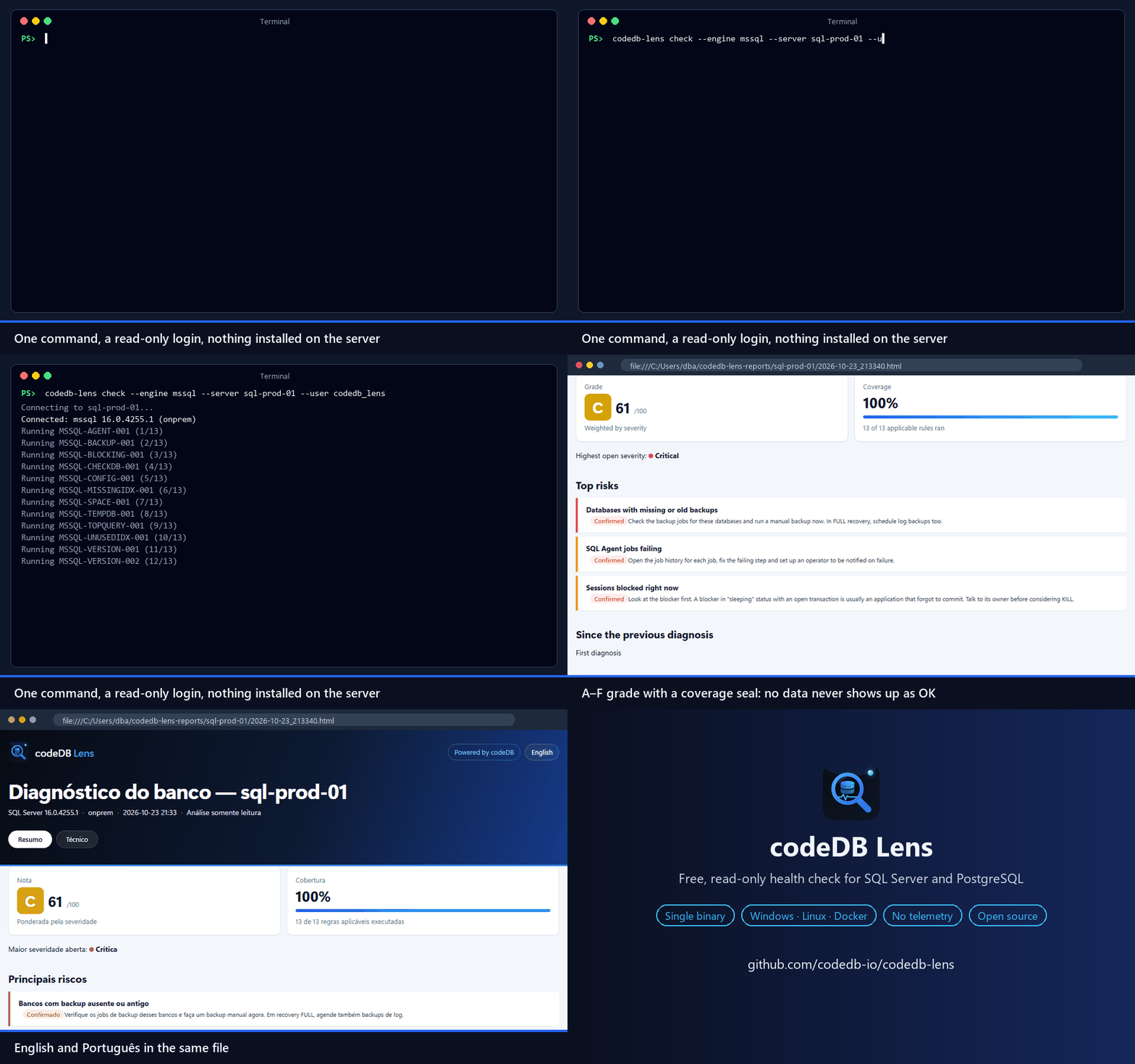
Real run against a test SQL Server (host renamed). Open a demo report.
v0.8:
check(with an executive summary and--redactfor sharing),compare, andrecord+reportto watch an instance for up to 24 hours (how). 26 rules plus 8 for recordings. FAQ and more on the website.
codeDB Lens connects to your instance with a read-only login, runs a catalog of evidence-based rules and writes a self-contained HTML + JSON report with an A–F grade and a coverage seal (the share of rules that could actually run). Nothing about your database leaves your machine.
Install
| Where | How |
|---|---|
| Windows | Installer (per user, no admin) or portable .zip |
| Windows (Scoop) | scoop bucket add codedb https://github.com/codedb-io/codedb-lens then scoop install codedb/codedb-lens |
| Linux | .deb / .rpm from the latest release, or the tarball for x64 / arm64 |
| Docker | docker run --rm -e PG_DSN -v "$PWD:/out" ghcr.io/codedb-io/codedb-lens check --engine pg --dsn-env PG_DSN --out /out |
The Windows binaries are open source but not code-signed yet, so SmartScreen may show a warning. Why, and how to verify the download.
Why another tool?
- Evidence, not opinions. Every finding shows the collected values, the query that produced them and when.
- Honest confidence. Each finding is Confirmed, Hint or No data. A rule that lacks permission never shows up as a false "OK"; it lowers the coverage instead.
- Read-only, always. No DDL, no DML, no agent, no installation on the server.
- Rules are data. Each rule is a YAML file plus a SQL query. Contributions don't touch the engine.
- English and Portuguese (Brazil), in the app, the CLI and the report.
What it checks
| SQL Server | PostgreSQL |
|---|---|
| Missing or old backups | Version out of support |
| No recent clean DBCC CHECKDB | pg_stat_statements not available |
| Failing SQL Agent jobs | A single query dominating execution time |
| Disk or transaction log running out of space | Long and idle-in-transaction sessions |
| Dominant waits, translated | Sessions blocked by locks |
| Sessions blocked right now | Transaction ID wraparound risk |
| A single query dominating CPU | Dead rows and autovacuum falling behind |
| Instance settings left at defaults | Replication slots retaining WAL, replica lag |
| TempDB file layout | Connections near the limit, no pooler |
| Version out of support | Unused, duplicate and invalid indexes |
| High-impact missing indexes | Estimated table bloat |
| Unused and duplicate indexes | Largest tables |
Each rule has a documentation page with what it checks, why it matters, what to do and its limits.
Quick start
On Windows, open codeDB Lens from the Start menu. Pick the engine, enter the server and run the diagnosis. Connection profiles are saved; passwords go to the Windows Credential Manager.
Command line (Windows and Linux):
codedb-lens check --engine mssql --server prod01 --auth windows
codedb-lens check --engine pg --dsn-env PG_DSN
Passwords are never accepted as command-line arguments. Use integrated auth, an environment variable or a saved profile.
Use with AI (MCP)
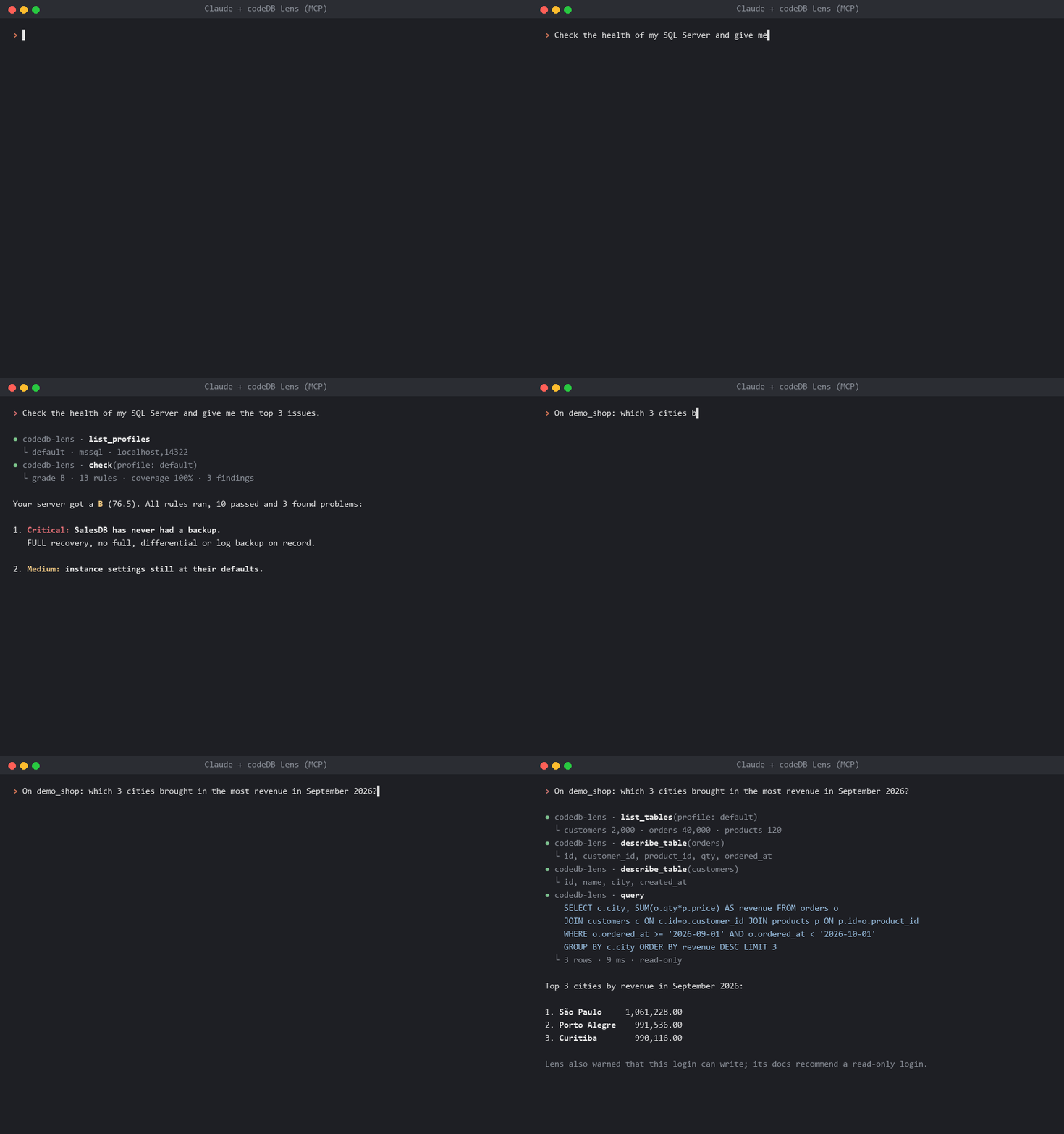
Real Claude Code sessions against test databases; answers shortened.
Ask Claude, GitHub Copilot or Cursor about your database. codedb-lens mcp is a read-only MCP server that your AI
client starts on your computer, with your saved profiles:
- Diagnosis: with the Lens's minimal login, the AI runs the health check, reads recordings and explains what to fix, without reading business data.
- Data: with a login that reads the tables you choose, the AI lists and describes them and answers questions with
one
SELECTat a time, within row and time limits.
codedb-lens mcp install --client claude-desktop --profile prod # or vscode, cursor, claude-code
The app's AI (MCP) screen has the commands ready to copy. Guide: lens.codedb.com.br/mcp.
Minimum permissions
-- SQL Server
CREATE LOGIN codedb_lens WITH PASSWORD = '<strong password>';
GRANT VIEW SERVER STATE TO codedb_lens;
GRANT VIEW ANY DEFINITION TO codedb_lens;
GRANT CONNECT ANY DATABASE TO codedb_lens;   -- per-database rules (indexes); no data access
USE msdb;
CREATE USER codedb_lens FOR LOGIN codedb_lens;
ALTER ROLE db_datareader ADD MEMBER codedb_lens;
ALTER ROLE SQLAgentReaderRole ADD MEMBER codedb_lens;
-- PostgreSQL (repeat GRANT CONNECT for each database)
CREATE ROLE codedb_lens LOGIN PASSWORD '<strong password>';
GRANT pg_monitor TO codedb_lens;
GRANT CONNECT ON DATABASE app TO codedb_lens;
Supported versions
| Engine | Supported | Best-effort |
|---|---|---|
| SQL Server | 2017, 2019, 2022, 2025 (Windows and Linux), Azure SQL Managed Instance, Amazon RDS | 2016 and older; Azure SQL Database (6 of 13 rules apply, see permissions) |
| PostgreSQL | 15, 16, 17, 18, Amazon RDS, Aurora, Azure Flexible Server | 14 |
Privacy
No telemetry. Lens makes two kinds of network calls: an optional, once-a-day version check against GitHub Releases
that sends no data (--no-update-check or CODEDB_LENS_NO_UPDATE=1 turns it off), and, only when you ask for the free
key, one registration request with the name and e-mail you type (or, when renewing, only the current key). See SECURITY.md.
Need continuous monitoring?
Lens shows a snapshot. codeDB watches your SQL Server and PostgreSQL instances around the clock, with history, baselines and alerts on Teams, Slack and e-mail.
Windows code signing
Windows binaries are built by GitHub Actions from this repository and are not code-signed yet (certificates are paid and this is a free project). Details, how to verify a download and warning-free alternatives: Why Windows shows a warning.
Contributing
New rules are especially welcome. A rule is a YAML file plus a SQL query, so you don't need to touch the Go code: see CONTRIBUTING.md, or just open an issue with a rule idea.
License
Apache 2.0. The codeDB SaaS and its API are separate, closed-source products.