Cat Burglar
Stealth browser MCP with three engines, diff observations, site memory, and a human CAPTCHA handoff.
Documentation
Cat Burglar
Three browsers. One MCP. Only the changes.





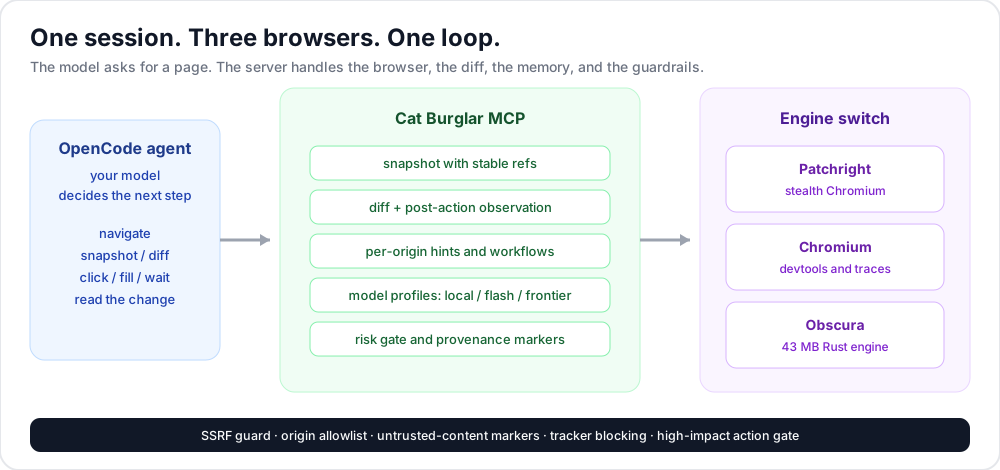
Cat Burglar plugs a real browser into your agent. It can run patched stealth Chromium, stock Chromium for devtools, or Obscura's 43 MB Rust engine behind one session. It sends diffs instead of full DOM dumps, remembers per-site workflows, and gates high-impact actions. When a CAPTCHA appears, it opens the page in a browser window and waits for a person to finish it, then continues.
What you get
| Feature | Why it matters |
|---|---|
| Three engines, one server | Pick stealth, devtools fidelity, or a 43 MB footprint for the task. Switch without changing clients. |
| Diffs, not dumps | Stable refs, diff snapshots, and bounded change observations after every action. Less context, fewer round trips. |
| Site memory | Per-origin hints and workflows learned after a successful run. Repeated tasks get shorter. |
| Any residential proxy | HTTP, HTTPS, and SOCKS5 pools with auth, sticky or rotating sessions, geo matching, and on-demand health checks. |
| Remote CDP and cloud | Attach to Browserbase, Steel, Browserless, Obscura Cloud, or a local logged-in Chrome. No local browser process. |
| Deep DevTools on demand | HAR, CPU profiles, heap snapshots, coverage, and network/CPU throttling, captured only while you ask. |
| Human CAPTCHA handoff | The agent pauses, opens the page in a browser window, and waits. You finish the challenge, then it continues on the same session. |
| Guardrails on by default | SSRF protection, origin lists, untrusted-content markers, tracker blocking, and a confirmation gate for destructive actions. |
| Works with your agent | Claude Desktop, Claude Code, Cursor, Codex, Gemini CLI, VS Code, Windsurf, Cline, OpenCode, Docker, and any stdio client. |
| Measured | A 12-task local suite with state verification. Adaptive observation cuts text by 29.9% and calls by 15% at the same success rate. |
Coverage
| Area | What you get |
|---|---|
| Interaction | Clicks, forms, typing, selects, uploads, drag-free scrolling, tabs, waits |
| Reading | Snapshots, diffs, Markdown, links, tables, JSON-LD, meta, CSS maps |
| DevTools | HAR, CPU profiles, heap snapshots, JS coverage, network/CPU throttling |
| Stealth | Patchright, fingerprint self-check, tracker blocking, WebRTC leak flags, proxy geo matching |
| Logged-in and remote | Persistent profiles, storage state, local Chrome CDP, Browserbase, Steel, Browserless |
| Proxies | HTTP, HTTPS, SOCKS5, auth, pools, sticky/random/round-robin, health and geo checks |
| Memory | Per-origin hints and workflows, learned after success, agent-authored only |
| Security | SSRF guard, origin lists, untrusted markers, risk gate, audit log |
| Evaluation | 12-task benchmark, full-vs-adaptive comparison, cross-server LLM runner |
| OpenCode | Code Mode namespace, 35 tools, 14-tool slim mode, server instructions |
Install
One line:
curl -fsSL https://raw.githubusercontent.com/DrMkdaddy/cat-burglar/main/scripts/install.sh | bash
From the official MCP Registry: io.github.DrMkdaddy/cat-burglar (OCI image).
From GHCR: docker run -i --rm ghcr.io/drmkdaddy/cat-burglar:latest.
The installer adds a cat-burglar binary to your PATH. Install globally with pnpm if you prefer:
pnpm add -g https://github.com/DrMkdaddy/cat-burglar/releases/download/v0.5.2/cat-burglar-mcp-0.5.2.tgz
cat-burglar doctor
The install command prints a ready config for: claude-code, claude-desktop, cursor, codex, gemini, vscode, windsurf, cline, opencode, or generic.
Works with
| Client | Setup |
|---|---|
| Claude Code | claude mcp add catburglar -- cat-burglar |
| Claude Desktop, Cursor, Windsurf, Cline | Paste the mcpServers JSON from docs/install.md |
| Codex | codex mcp add catburglar -- cat-burglar |
| Gemini CLI | Add the mcpServers entry to ~/.gemini/settings.json |
| VS Code | Add the servers entry to .vscode/mcp.json |
| OpenCode | Add catburglar under mcp.servers |
| Docker | docker run -i --rm ghcr.io/drmkdaddy/cat-burglar:latest |
Do not name the server browser. OpenCode has a built-in browser toolset with that name, and Code Mode hides overlapping tools.
Copy this prompt into your agent
Quick version:
Install Cat Burglar from https://github.com/DrMkdaddy/cat-burglar as a local MCP server named catburglar.

Run:
curl -fsSL https://raw.githubusercontent.com/DrMkdaddy/cat-burglar/main/scripts/install.sh | bash

Then run `cat-burglar doctor`.

Add the server with command `cat-burglar` (add `--slim` if the client loads every tool schema), restart or reconnect the client, and verify by navigating to https://example.com and taking a snapshot. Report the tool count, engine, and page title.
Full base prompt with client-specific steps, verification, and security rules: docs/agent-prompt.md.
<system_context>
You are installing Cat Burglar, a local browser MCP server, for this project.
</system_context>

<goal>
Add Cat Burglar to the current MCP client and verify that it can drive a browser.
</goal>

<install_steps>
1. Run:
   curl -fsSL https://raw.githubusercontent.com/DrMkdaddy/cat-burglar/main/scripts/install.sh | bash
   Then run `cat-burglar doctor` and report the output.
2. Add a local stdio MCP server named `catburglar` that runs `cat-burglar`.
   If the client loads every tool schema into context, add `--slim`.
3. Do not use the name `browser`. It collides with OpenCode's built-in browser tools.
4. Enable `BROWSER_MCP_ALLOW_PRIVATE_NETWORK=1` only if the user needs localhost.
5. Restart or reconnect the MCP client.
6. Verify with `navigate` to https://example.com, then `snapshot`, then `close`.
</install_steps>

<verification>
Report the server name, the tool count, the engine, and the title returned by the test page.
</verification>

<constraints>
Do not commit secrets. Do not enable private-network access without asking. Use the measured
12-task local numbers if numbers are needed. Do not invent a head-to-head result.
</constraints>

<user_prompt>
Install and verify Cat Burglar for my agent.
</user_prompt>
Example prompts
Research:
Use catburglar. Open https://news.ycombinator.com, take a snapshot, read the top five stories with markdown, and give me the titles and links.
Forms and workflows:
Use catburglar. Open the staging signup page, fill the form with test data, submit it, and tell me exactly what changed on the page.
Local app testing:
Use catburglar with engine chromium. Open http://localhost:3000, log in with the seeded test user, open the billing page, capture a screenshot, and report console errors.
Performance:
Use catburglar with engine chromium. Open the product page, start a performance trace, reload, stop the trace, and summarize the long tasks and the three slowest scripts.
Three browsers
| Engine | Best for | Footprint |
|---|---|---|
patchright | Protected sites, logins, anti-bot work | Full Chromium |
chromium | Devtools, console, traces, PDF, local app testing | Full Chromium |
obscura | High-volume reads and low-memory work | About 43 MB |
{ "engine": "obscura", "restart": true }
A running browser cannot change engines in place. Call open with restart: true.
Remote CDP and cloud browsers
Attach to any Chrome DevTools Protocol endpoint instead of launching a local browser:
{
  "engine": "remote",
  "cdp_url": "wss://connect.browserbase.com?apiKey=YOUR_KEY"
}
This covers Browserbase, Steel, Browserless, Obscura Cloud, or any other CDP provider. For a local logged-in Chrome, start it with a separate profile:
google-chrome --remote-debugging-port=9222 --user-data-dir=/tmp/cat-burglar-chrome
Then call open({ "engine": "remote", "cdp_url": "http://127.0.0.1:9222" }). The local browser process is not duplicated, so this path uses no extra browser memory.
Residential proxies
Cat Burglar accepts any HTTP, HTTPS, or SOCKS5 proxy, with or without authentication. A pool can rotate, stay sticky, or be selected per session.
{
  "proxyPool": [
    { "id": "us-1", "url": "http://user:pass@us.proxy.example:8000", "geo": { "timezone": "America/New_York", "locale": "en-US" } },
    { "id": "de-1", "url": "socks5://user:pass@de.proxy.example:1080", "geo": { "timezone": "Europe/Berlin", "locale": "de-DE" } }
  ],
  "proxyOptions": {
    "mode": "sticky",
    "matchGeo": true,
    "testOnLaunch": false,
    "rotateOnError": true
  }
}
You can also pass host:port:user:pass and Cat Burglar normalizes it. Use the proxy tool to inspect, test, rotate, add, or remove entries:
{ "action": "test", "force": true }
{ "action": "rotate" }
{ "action": "add", "url": "http://user:pass@proxy.example:8000", "label": "us-residential" }
Proxy URLs are redacted in output and audit logs. When a proxy is active, Chromium gets WebRTC leak protection flags, and matchGeo aligns the browser timezone and locale with the proxy exit. Health checks run through curl on demand, so they add no browser process.
The loop
navigateto a page.snapshotto get URL, title, controls, and stable refs.click,fill, orselectby ref.- Read the change observation returned by the action.
- Use
markdownto read,extractfor structured data, andperffor traces. - Run
memory learnafter a successful repeatable workflow.
Refs stay valid while the element remains in the DOM. If an element leaves the page, the action fails with a stale-ref error instead of clicking a clone.
DevTools on demand
The devtools tool captures Chrome internals only while an action is running. Nothing is recorded in the background.
| Action | Result |
|---|---|
har_start / har_stop | HAR 1.2 file with request and response metadata, optional bodies |
cpu_start / cpu_stop | .cpuprofile plus the hottest functions |
heap | .heapsnapshot file |
coverage_start / coverage_stop | Unused JavaScript by URL |
throttle | Network latency, bandwidth, offline mode, and CPU throttling |
{ "action": "cpu_start" }
{ "action": "cpu_stop" }
CAPTCHA handoff
The captcha tool detects reCAPTCHA, hCaptcha, Turnstile, DataDome, PerimeterX, Arkose, and common text challenges. It does not solve challenges.
When a challenge appears, call:
{ "action": "handoff" }
On a local desktop, Cat Burglar relaunches the same profile in headed mode, navigates back to the current page, and opens a real browser window. You solve the challenge directly in that window, then call captcha with action: "wait" and the agent continues on the same session. Cookies, storage, and the current URL survive the switch.
navigate https://accounts.hcaptcha.com/demo
  captcha: hcaptcha

captcha action=handoff
  mode: window
  url: https://accounts.hcaptcha.com/demo

[a real Chromium window opens on that page]

# you solve the widget

captcha action=wait
  detected: false

snapshot
  [e4] button "Submit"
The server has no solver integration. It polls the page until the challenge disappears.
If there is no display, or the engine is Obscura, handoff falls back to a loopback live-view page. Force that fallback with:
{ "action": "stream", "open_window": false, "timeout_ms": 300000 }
For remote CDP providers, pass the provider live-view URL when opening:
{
  "engine": "remote",
  "cdp_url": "wss://connect.browserbase.com?apiKey=YOUR_KEY",
  "live_view_url": "https://browserbase.com/sessions/YOUR_SESSION"
}
captcha handoff returns that URL instead of opening a local window. Stream handoffs are token-protected, bind to 127.0.0.1 only, and stop on Done, timeout, or close.
Benchmark
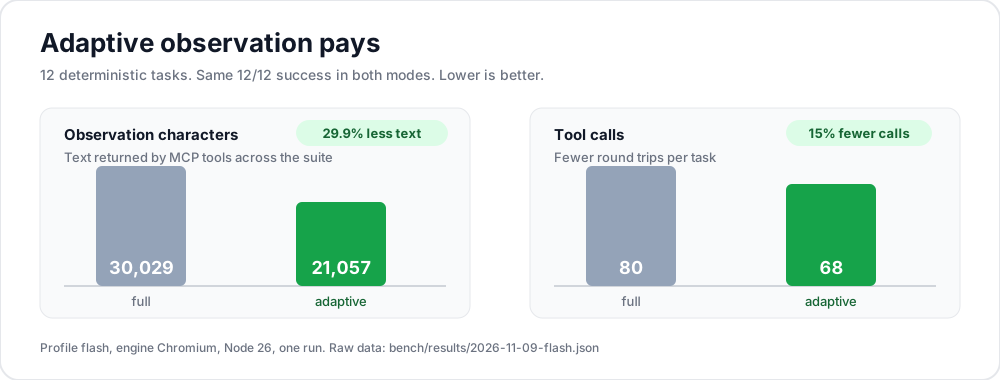
| Mode | Success | Tool calls | Observation chars | Wall time |
|---|---|---|---|---|
| Full snapshots | 12/12 | 80 | 30,029 | 15.37 s |
| Diff + change observation | 12/12 | 68 | 21,057 | 13.86 s |
Measured on a 12-task local suite with server-side state checks. Profile flash, engine chromium, Node 26. Raw JSON: bench/results/2026-11-09-flash.json.
pnpm bench
pnpm bench:compare
Tools
35 tools by default. 14 in --slim mode.
| Group | Tools |
|---|---|
| Lifecycle | open, close, navigate, back, forward, reload, status, tabs |
| Reading | snapshot, markdown, extract, evaluate, screenshot, pdf |
| Interaction | click, fill, type, press, select, hover, scroll, upload, wait, captcha |
| State | cookies, storage, stealth, memory, proxy |
| Diagnostics | network, console, perf, devtools, resources, audit |
extract covers links, tables, JSON-LD, meta tags, text, and CSS field maps. perf covers web vitals, CDP metrics, slow resources, and full Chrome traces.
Safety
- SSRF protection on navigation and every request, with DNS checks and redirect coverage.
- Private, loopback, link-local, CGNAT, multicast, and reserved ranges are blocked unless explicitly allowed.
- Cloud metadata endpoints stay blocked even with private-network access on.
- Origin allow and block lists with wildcard hosts.
- Page-derived output carries an untrusted-content marker.
- High-impact targets such as delete, pay, transfer, send, publish, and deactivate are flagged. Set
BROWSER_MCP_RISKY_ACTION_POLICY=askto require explicit confirmation. - Site memory is agent-authored only. Page text is never ingested, refs are dropped, and typed values become placeholders.
- Tracker blocking uses Obscura's 3,520-domain PGL list plus common analytics hosts.
Use these as layers in a defense-in-depth setup. For sensitive accounts, run with the ask policy and review the confirmation before approving.
Resource efficiency
The default is full Chromium for fidelity. The server does not stack browsers, record in the background, or run proxy checks unless asked.
| Choice | Memory impact |
|---|---|
obscura engine | About 43 MB, versus roughly 1 GB for Chromium |
remote engine | No local browser process; uses the remote CDP provider |
--slim | 14 tools instead of 35; lower schema cost |
| On-demand DevTools | HAR, CPU, heap, and coverage run only during the action |
| Proxy tests | curl only, no browser process |
idleTimeoutMs | Closes the browser after inactivity when set |
| Flash profile | Smaller snapshots, markdown, and change observations |
Use the resources tool to see process-tree RSS, process count, open pages, and buffer sizes. Background networking, component updates, sync, pings, and metrics are disabled at launch.
Research
The design follows a review of 2023 to 2026 web-agent work: evaluation error, observation alignment, change observation, memory, planning, and prompt injection. Full review with 40 sources: docs/research/2026-11-browser-agent-research.md.
The LLM harness can run the same 12 tasks against ours, playwright, chrome-devtools, or obscura:
pnpm bench:llm -- --server ours
Develop
pnpm install
pnpm build
pnpm test
pnpm smoke
pnpm bench
pnpm bench:compare
node dist/index.js doctor
node dist/index.js install --client claude-desktop
Config file: ~/.config/browser-mcp/config.json. Example: cat-burglar.config.example.json. Environment variables override it.
Credits
| Source | License | What we used |
|---|---|---|
| Obscura | Apache-2.0 | Ref-token snapshot ideas, markdown and extract semantics, SSRF posture, tracker list data |
| Playwright MCP | Apache-2.0 | Accessibility-first snapshots, persistent profiles, origin and file policy |
| Chrome DevTools MCP | Apache-2.0 | Performance metrics and traces, network and console inspection |
| Patchright | Apache-2.0 | Stealth Playwright driver |
| browser-use | MIT | Agent action vocabulary and humanized interaction ideas |
The tracker list is the only copied data asset. See NOTICE.
Status
Version 0.5.2. Benchmarked on a 12-task local suite with raw JSON in the repo. The LLM harness can run the same tasks across four servers. Issues and counterexamples are welcome.
License
MIT. See LICENSE.