mssqlcl
SQL Server and Azure SQL MCP server & CLI (.NET 10) with zero-config connection discovery from VS Code and Antigravity IDE (ms-mssql.mssql / SecretStorage), read-only lexical T-SQL guard by default, and token-efficient CSV output.
Documentation

mssqlcl
SQL Server MCP Server & CLI with zero-config connection discovery for VS Code and Antigravity IDE.





Features • Prerequisites • Installation • MCP Setup • Tools (11) • CLI • Security
Configure your SQL Server connections once in VS Code, Antigravity IDE (ms-mssql.mssql), or via mssqlcl conn save, and expose them safely to any MCP-compatible AI client (Antigravity, Claude Desktop, Claude Code, Cursor, etc.) over stdio.
flowchart LR
Client["AI Client<br/>(Antigravity / VS Code / Cursor / Claude)"] <-->|"stdio<br/>JSON-RPC 2.0"| Server["mssqlcl --mcp<br/>(Self-contained .NET 10)"]
Server -->|"Zero-config discovery"| IDE["VS Code / Antigravity IDE<br/>(ms-mssql.mssql + SecretStorage)"]
Server -->|"Fallback / Override"| Vault["Local DPAPI Vault<br/>(%USERPROFILE%\.mssqlcl)"]
Server -->|"Read-only guard<br/>& T-SQL"| SQL[("SQL Server /<br/>Azure SQL")]
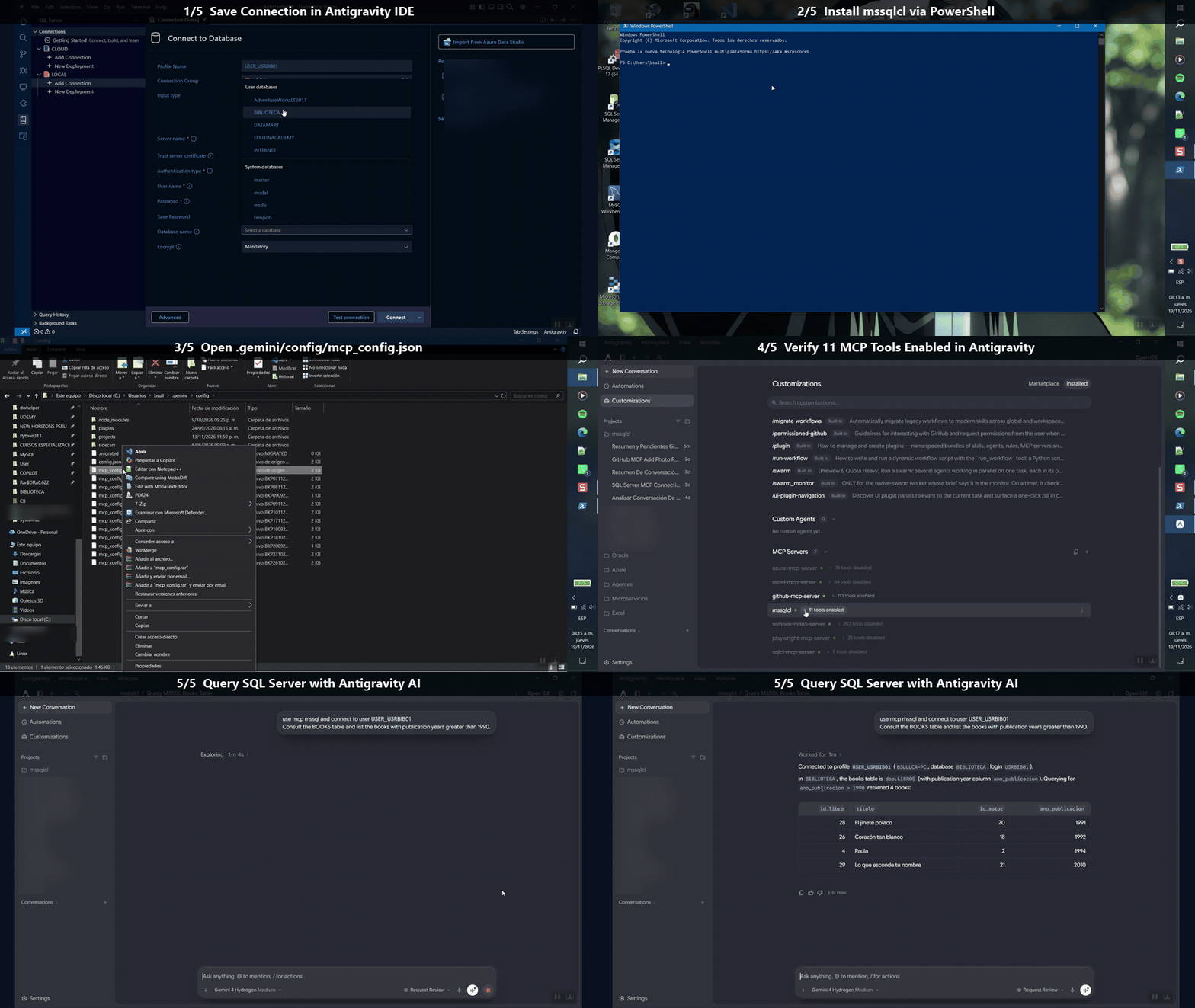
🎥 Quick Demo — End-to-End in Antigravity
✨ Features
| Capability | What it gives you |
|---|---|
| Zero-Config IDE Discovery | Automatically reads mssql.connections and mssql.connectionGroups (JSONC) from Antigravity IDE, VS Code, and %USERPROFILE%\.mssqlcl\connections.json. |
| Automatic Credential Resolution | Supports Windows Auth (Integrated), SQL Login (SqlLogin) via Electron SecretStorage (Local State DPAPI + state.vscdb AES-256-GCM) or local DPAPI vault, and Microsoft Entra ID / MFA (AzureMFA). |
| 11 Multi-Connection MCP Tools | Full server discovery, connection management, schema/object inspection, and query execution keyed by connectionId. |
| Token-Efficient Output | Compact CSV output by default (optional json) with --max-rows capping (default 500) to minimize LLM token usage. |
| Read-Only Lexical Guard | --readonly enabled by default: skips comments, string literals, and quoted identifiers while blocking DML/DDL/execution keywords (INSERT, UPDATE, DELETE, MERGE, DROP, ALTER, CREATE, TRUNCATE, EXEC, SELECT ... INTO, etc.). |
Clean stdio & Local Audit | Diagnostics go exclusively to stderr. Queries are logged locally to JSONL at %USERPROFILE%\.mssqlcl\audit.log without touching target databases or logging secrets. |
📋 Prerequisites
- Operating System: Windows 10 / 11 (
x64) — required for Windows DPAPI and ElectronSecretStoragedecryption. - Connection Source (choose one):
- Recommended (Zero-Config): VS Code or Antigravity IDE with the SQL Server (
ms-mssql.mssql) extension and your connections already saved. - Standalone (No IDE required): Manage profiles directly via
mssqlcl conn save(stored in%USERPROFILE%\.mssqlcl\encrypted with Windows DPAPI) orMSSQLCL_PWD_<PROFILE>environment variables.
- Recommended (Zero-Config): VS Code or Antigravity IDE with the SQL Server (
- Runtime:
- End users (Release ZIP / Installer): No .NET installation required (self-contained binary).
- Building from source: .NET 10 SDK.
[!TIP] If you already use the
ms-mssql.mssqlextension in VS Code or Antigravity IDE, you don't need to re-enter passwords or maintain separate connection strings—mssqlcldiscovers them automatically.
📦 Installation
Option 1: One-Command Online Installer (PowerShell, no .NET SDK required)
irm https://raw.githubusercontent.com/codevswia/mssqlcl/main/scripts/install.ps1 | iex
Downloads the latest release ZIP to %LOCALAPPDATA%\Programs\mssqlcl and adds it to your User PATH (no Administrator privileges required).
Option 2: Portable ZIP (Offline — Zero system changes or User PATH)
- Download
mssqlcl-vX.Y.Z-win-x64.zipfrom GitHub Releases. - Extract it anywhere (for example
C:\tools\mssqlcl\). - Choose how you want to run it:
- Portable (zero system changes): Point your MCP config directly to
C:\tools\mssqlcl\mssqlcl.exe(noPATHchanges). - Install to User
PATH(no Admin required): Double-clickinstall.cmd(or runpowershell -ExecutionPolicy Bypass -File .\install-local.ps1) to copymssqlcl.exeto%LOCALAPPDATA%\Programs\mssqlcland add it to your UserPATH. Restart your IDE afterwards if it was already open. - Offline via main installer:
.\scripts\install.ps1 -LocalZip path\to\mssqlcl-vX.Y.Z-win-x64.zip
- Portable (zero system changes): Point your MCP config directly to
Option 3: Build & Install from Source (requires .NET 10 SDK)
# Build & run unit tests
dotnet test

# Build and install mssqlcl.exe to %LOCALAPPDATA%\Programs\mssqlcl and add to User PATH
.\scripts\install.ps1 -FromSource

# Or build a standalone self-contained binary from source
.\scripts\install.ps1 -FromSource -SelfContained
🔌 MCP Client Configuration
Add mssqlcl to your MCP client configuration (such as Antigravity IDE mcp_config.json, Claude Desktop claude_desktop_config.json, or Cursor):
{
  "mcpServers": {
    "mssqlcl": {
      "command": "mssqlcl",
      "args": ["--mcp"]
    }
  }
}
[!NOTE] If you installed
mssqlclin portable mode without adding it toPATH, replace"mssqlcl"in"command"with the full path (e.g."C:\\tools\\mssqlcl\\mssqlcl.exe").
Optional MCP Flags
| Flag | Default | Description |
|---|---|---|
--readonly | enabled | Blocks DML/DDL/EXEC statements via lexical T-SQL inspection |
--readwrite | off | Allows write/DDL statements in mssql_run_query |
--max-rows <N> | 500 | Caps returned rows per result set |
--timeout <sec> | 30 | Default SQL command timeout in seconds |
--source <mode> | auto | auto, antigravity, vscode, or local |
--no-audit | off | Disables writing to %USERPROFILE%\.mssqlcl\audit.log |
🎬 Video Walkthroughs
🚀 Antigravity (IDE + App) — Full Walkthroughs
▶️ Guide 1: SQL Login — Save connection, install
mssqlclMCP & query SQL Server (3m 41s)https://github.com/user-attachments/assets/b5a99cef-7ed1-4fe2-acab-0bd34b7e16ae
▶️ Guide 2: Microsoft Entra ID / MFA — Save Azure SQL MFA connection, install MCP & query with AI (3m 38s)
https://github.com/user-attachments/assets/1ff4a37a-32d5-432e-9a07-061de0f1503d
💻 VS Code — Full Walkthroughs (Coming Soon)
Walkthroughs for VS Code (
ms-mssql.mssql) coming soon.
🛠️ MCP Tools Reference
mssqlcl exposes 11 database tools to your AI assistant, supporting multiple simultaneous connections via connectionId:
| Category | Tool | Description |
|---|---|---|
| Discovery | mssql_list_servers | Lists discovered SQL Server profiles from Antigravity IDE, VS Code, and local vault |
| Connection | mssql_connect | Opens a connection to a profile and returns a connectionId |
| Connection | mssql_disconnect | Closes an active connectionId session |
| Connection | mssql_get_connection_details | Returns active connection metadata (server, database, auth type, state) |
| Connection | mssql_change_database | Switches the active database context (USE <db>) for a connectionId |
| Schema | mssql_list_databases | Lists databases on the connected SQL Server instance |
| Schema | mssql_list_schemas | Lists schemas in the current database |
| Schema | mssql_list_tables | Lists tables (with schema and metadata) |
| Schema | mssql_list_views | Lists views in the current database |
| Schema | mssql_list_functions | Lists scalar/table-valued functions |
| Query | mssql_run_query | Executes T-SQL (protected by --readonly guard by default, CSV/JSON output) |
💻 CLI Usage
Use the CLI directly to verify your environment, inspect discovered IDE profiles, or manage local DPAPI credentials:
# Verify environment, IDE discovery paths, and local vault health
mssqlcl doctor

# List discovered profiles and credential resolution status
mssqlcl conn list

# Test live connectivity for a profile (prefix with antigravity: or vscode: if duplicated)
mssqlcl conn test "MyServer\MyDatabase"
mssqlcl conn test "vscode:MyServer\MyDatabase"

# Create a local profile or store a DPAPI-protected password override
mssqlcl conn save --profile "LocalDev" --server "localhost\SQLEXPRESS" --database "AppDb" --user "sa" --savepwd
mssqlcl conn save --profile "ExistingIdeProfile" --savepwd

# Delete a local profile
mssqlcl conn delete "LocalDev"
🔒 Security
[!IMPORTANT] Only pass
--readwriteagainst databases where write or DDL operations are explicitly intended.
- Zero plaintext secret leaks:
mssqlclnever writes decrypted passwords to disk,stdout,stderr, oraudit.log. - Safe IDE vault reading:
state.vscdbis copied to a temporary file in read-only mode before querying and deleted immediately afterwards, so it works safely even while VS Code or Antigravity IDE is running. - Zero target database footprint: Audit logs are stored strictly locally at
%USERPROFILE%\.mssqlcl\audit.log.
👤 Author & Organization
- Author: Brayan Raul Sullca Ccarampa
- Organization: codevswia — Human Ideas. AI-Powered Development.
- Repository: github.com/codevswia/mssqlcl
📄 License
Distributed under the MIT License — see LICENSE for details.