GX Works Agent
Windows stdio MCP server for Mitsubishi GX Works2 PLC engineering. Provides CPU-scoped manual context, project inspection and diagnostics, Ladder/FBD editing, and versioned project artifacts, using the AI model supplied by the MCP client.
Documentation
GXWorks Agent
MCP tools and an AI workbench for Mitsubishi PLC engineering.
Read project context. Build and review programs. Deliver to GX Works2.





Downloads · MCP & Web · Issues
Quick start · Ladder · ST · FBD · Web · Diagnostics
GXWorks Agent supports Ladder, Structured Text (ST), and native FBD workflows. It gives external agents project context, CPU-specific instructions, manual evidence, and engineering tools through MCP. Connect through MCP, use your own model, and save versioned engineering artifacts. The default MCP runtime works independently; the Web workbench is optional.
Ladder: from engineering context to a saved program
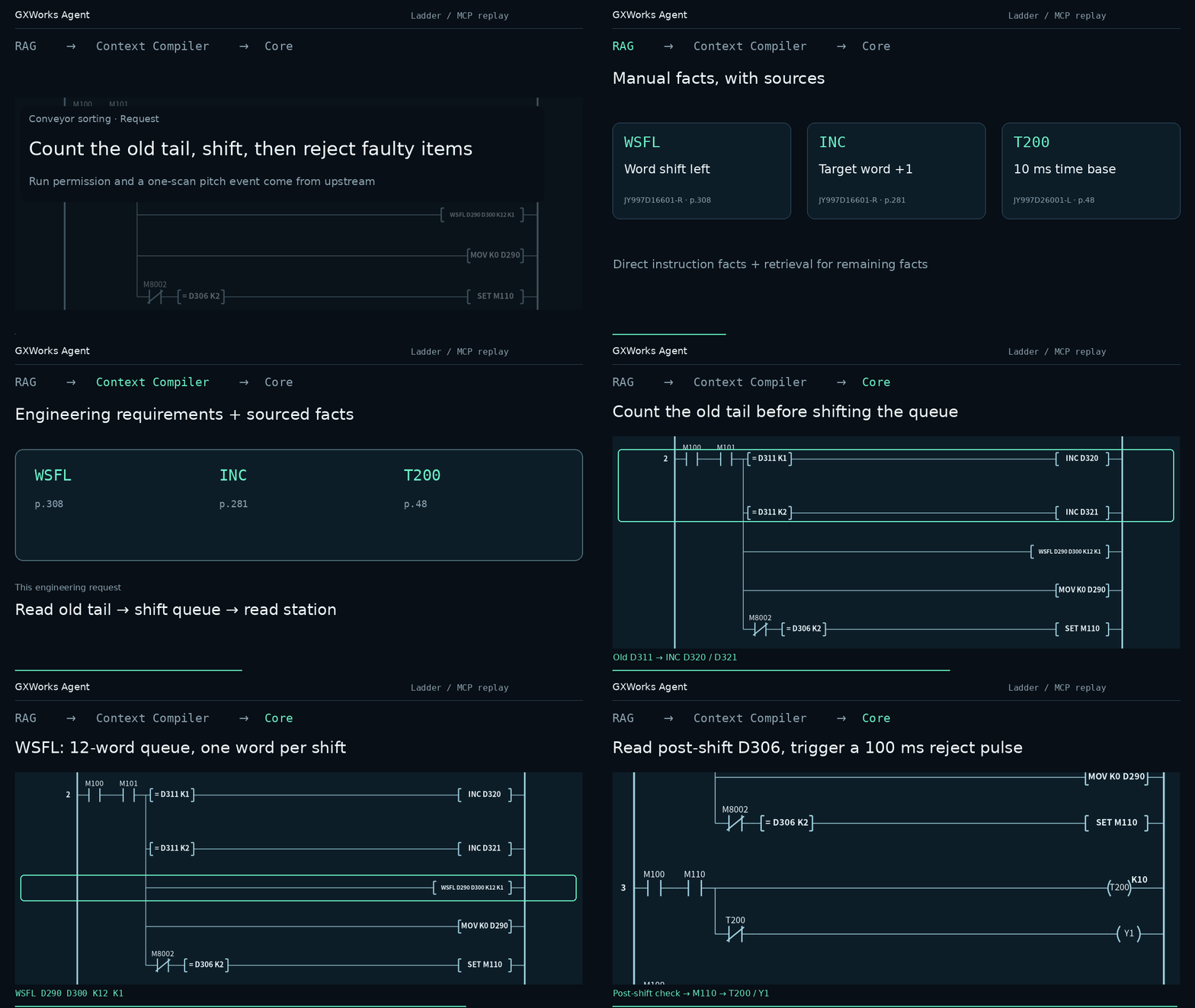
An FX3U conveyor example: retrieve context for WSFL, INC, and T200, construct a Ladder candidate, and save it through MCP. Structured instruction facts and manual evidence inform the candidate; the saved version includes Ladder JSON, IR, SVG, ST derived from IR, and GX import CSVs.
The GIF visualizes actual SDK/MCP results and generated artifacts. The assistant constructed the candidate from the returned context; this is not a recording of an embedded model running autonomously.
ST: generate and review Structured Text
ST has its own generation workflow in the Web workbench: analyze the requirement, confirm the specification, and generate program.st using the selected CPU's instruction context and ST signatures. Preview the candidate, inspect text differences between versions, and save the ST artifact. Ladder programs can also export traceable ST from their PLC IR.
Local ST inspection checks the supported syntax and semantics and reports unsupported constructs. It is a bounded parser, not the GX Works2 compiler; native compilation and PLC behavior remain separate. MCP can provide ST context and existing diagnostics, while create_program_candidate currently accepts Ladder candidates.
What the API provides
- Project-bound context. Create or select a project, read its CPU and current program, discover applicable instructions and callable interfaces, and continue from a saved version.
- Engineering RAG. CPU-scoped instruction facts and manual excerpts carry source references. The retrieval architecture combines entity, full-text, and dense/LSA retrieval with rank fusion; structured facts cover known instruction details while residual retrieval supplies supporting evidence.
- Candidate editing and artifacts. Submit Ladder or FBD changes through shared engineering tools. Core checks the supported structure and operands, prepares artifacts, and returns version-bound results. Local saving, native compilation, and behavior verification have separate outcomes.
- GX Works2 delivery. With operator-configured execution consent, import the current Ladder version's MAIN and device comments and receive the native operation result. The optional Web bridge retains workbench review.
Your client or harness supplies the model and planning loop. GXWorks Agent supplies the engineering context, tools, persistence, and operation receipts.
Web GUI: inspect and export a program
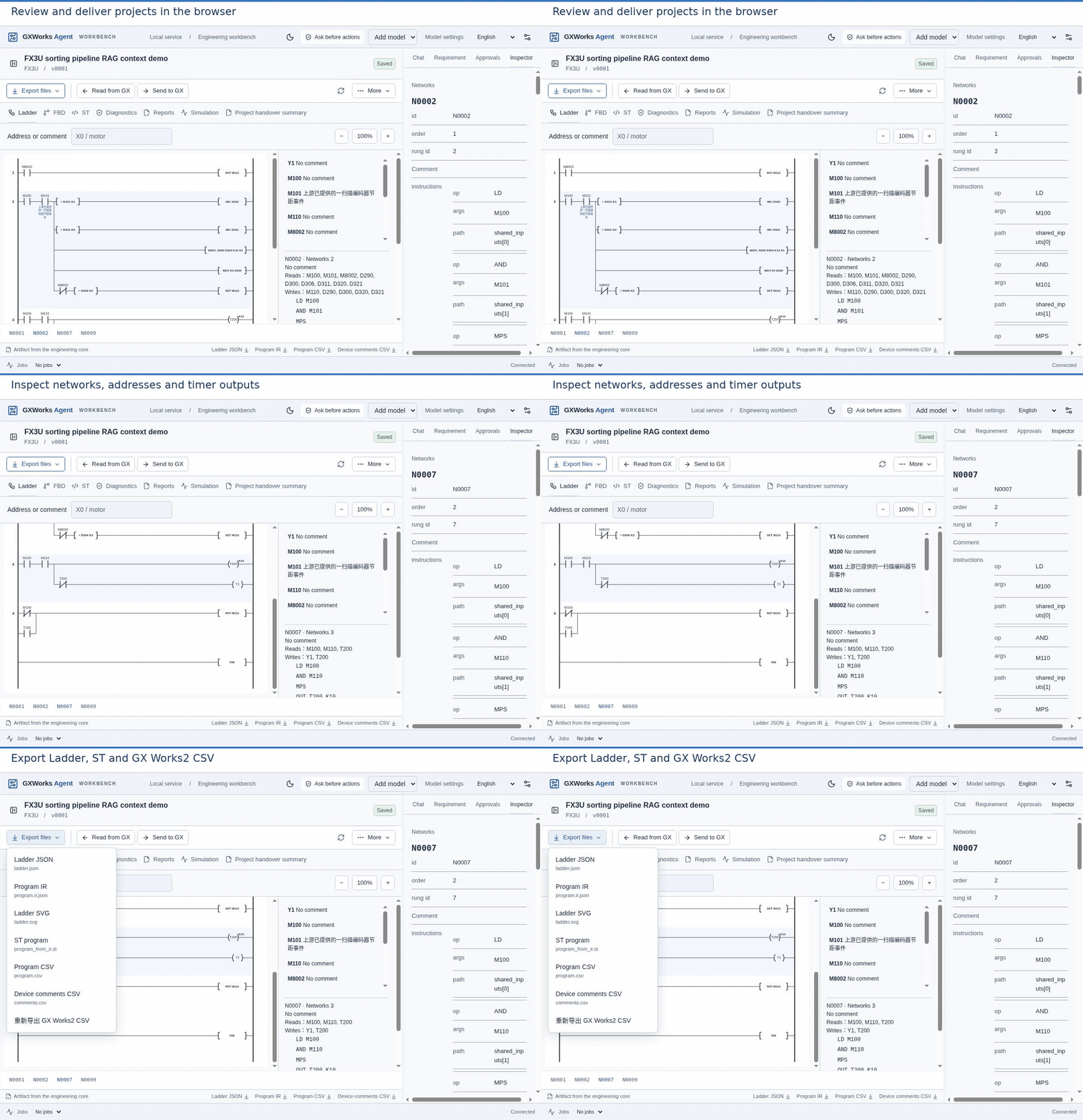
Configure a model API directly in the workbench and use the built-in Direct generation workflow, then inspect program networks, device addresses, and available exports. Direct can reduce external agent orchestration overhead; actual token use depends on the model and task. It shares the engineering context pipeline with MCP, and workbench question-answering can still involve tool loops.
FBD: edit an existing GXW project
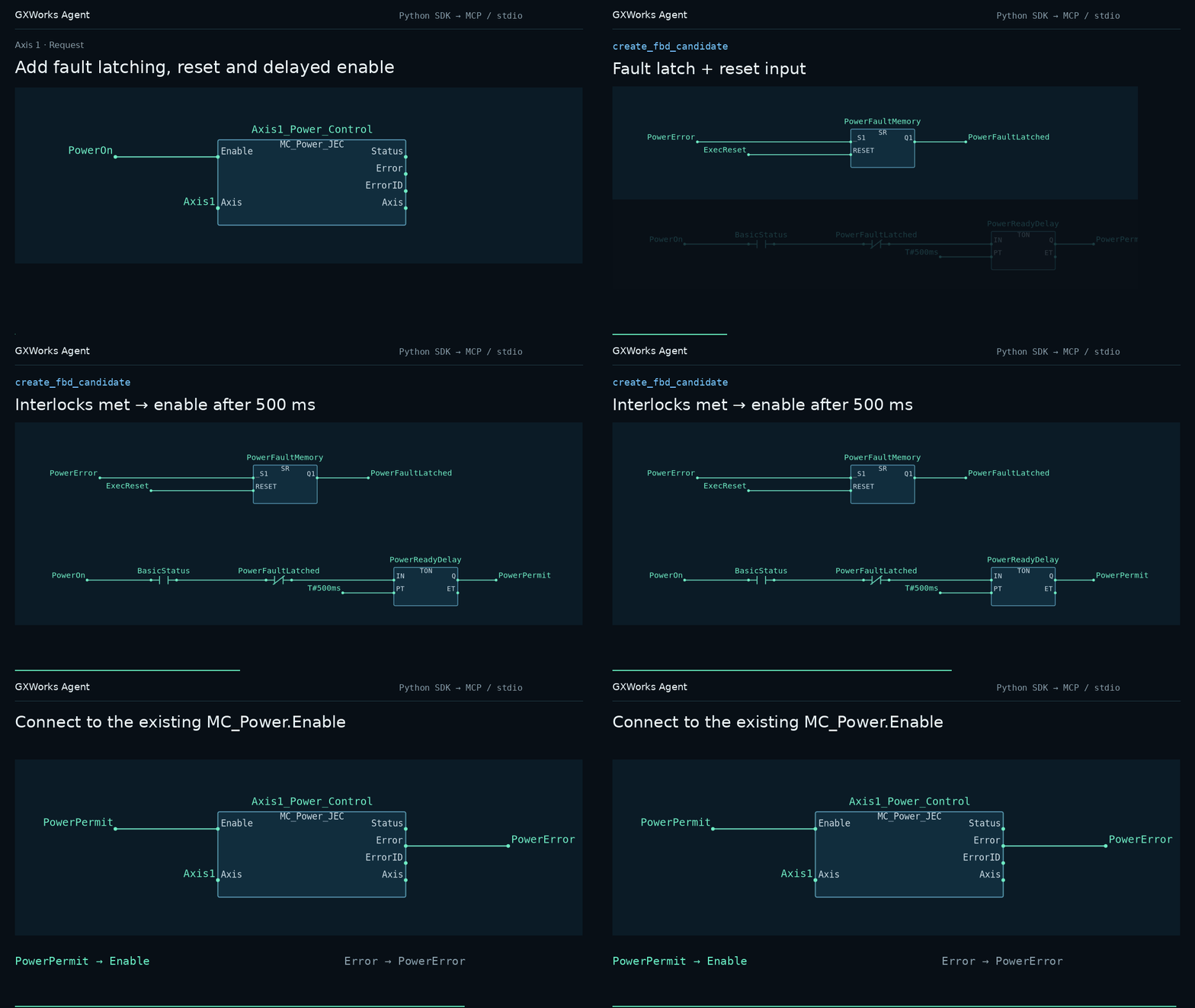
Add fault latching, reset, and a 500 ms enable delay to the first axis of Mitsubishi Electric's MotionControl JEC example. The edit preserves existing FB implementations and Axis IN_OUT wiring, adds SR/TON logic, and connects the permit to the existing power-control block.
Source: Mitsubishi Electric MotionControl JEC example.
FBD goes beyond the wiring change in the demo. Generate or edit candidates from a starting project or imported GXW; add, change, or remove objects, connections, declarations, and multiple networks; use project/library FB interfaces and IN_OUT parameters; and inspect graphical previews, version differences, and GXW artifacts.
Where the source project supports it, create FBs and Programs. A new Program can be registered in an existing task, a new task, or a new resource. Native saving, compilation, and code checking are separate operations with results tied to the corresponding project version.
Project management, diagnostics, and validation
| Feature | Available work |
|---|---|
| Projects and versions | Create or select a project by CPU and program type, manage requirements and confirmed specifications, review candidates, compare versions, and inspect or export versioned artifacts. |
| Native diagnostics | Compile and check a GXW that matches the current version. Where location information is available, associate diagnostics with ST lines, declarations, FBD networks, objects, or call instances; retain an unresolved result when the location is ambiguous. |
| Existing SFC projects | Import an existing SFC project, read its program and graph, edit existing action and transition subprograms, and change supported step action numbers and jump targets. Preview candidates and version differences; creating a complete SFC project from scratch is not supported. |
| Ladder simulation | Define test plans, device inputs, and expected results; run supported simulation backends; save and review results; and relate tests to requirements. Instruction and CPU support depend on the backend. |
| Read-only PLC monitoring | With operator approval, read selected devices through a configured MX Component logical station and view values and read records. Revocable permissions are bound to the project version, address range, and expiry; this feature does not write to the PLC. |
Quick start
On Windows 10/11 x64, choose a component from the releases page. The two packages install independently and do not require Python.
| Component | Usage | Requirements |
|---|---|---|
| GXWorks-Agent-MCP-windows-x64.zip | Connect an MCP client such as Codex and use its model | No Web or Node.js required |
| GXWorks-Agent-Web-windows-x64.zip | Generate, edit, and manage projects in a browser workbench | Node.js 22.14 or newer; no MCP required |
Independent MCP
Extract the entire MCP package and add a stdio server in your client: use the extracted gxworks-agent-mcp.exe as the command and --local as its argument. Refresh the client connection, call list_projects, then select a project or create one with its actual CPU and program type.
Try: “Create an FX3U Ladder project. Read the generation context and relevant instruction evidence. Count each press of X0, turn on Y0 after three counts, and reset with X1. Save the candidate and show its artifacts and remaining diagnostics.”
External clients use their own models without running Web. GX import follows configured execution consent. To share a Web project and its review flow, see components and optional connections.
Web workbench
Extract the entire Web package and run these commands in its directory:
npm install
npm run build
npm start
You can also clone this repository and run the same commands; the first start downloads the matching runtime. The browser opens automatically. Projects default to %LOCALAPPDATA%/GXWorks Agent/web-workspace, with no workspace selection needed.
Create a project and configure a model API under Settings → Model → Model API to generate programs. Viewing existing projects requires no model call. Extract updates into a new directory; existing projects and personal settings are retained.
Native saving, code checking, GX import, and simulation require the corresponding Mitsubishi software locally. Read-only PLC monitoring requires MX Component and a configured logical station. These Mitsubishi applications are not included in the packages.
Current scope
- GX integration requires Windows; desktop delivery needs an interactive Windows session.
- Native FBD integration is tied to GX Works2 1.635.0.1. Ladder and ST generation, editing, and export do not require this version. FBD editing uses the source project's CPU and interfaces; the built-in starting template is FX3U, and other CPUs need a matching imported project.
- CPU menu availability does not imply uniform instruction or validation coverage. Unsupported validation profiles return an unverified result.
- FBD supports objects, connections, declarations, networks, and source-bound FB/Program creation. SFC has backend/MCP editing for existing action and transition subprograms; it is not a complete graphical SFC IDE.
- A saved artifact or successful import does not establish successful compilation or correct PLC behavior.
Before operating machinery
Review generated logic against the selected CPU, wiring, motion limits, and operating modes. Back up the target GX project before import, then compile and inspect it in the intended GX Works2 environment before commissioning. Sending to GX Works2 does not download a program to a PLC.
Emergency stops, guarding, and other safety functions require an independent safety system. Generated application logic and software checks do not replace it. Sanitize diagnostics before sharing; never publish credentials or local session links.
Guides and license
Components and optional connections · Contributing · Issues · Security
The public Web interface and its accompanying public files use MPL-2.0; see the license scope. The closed Core and native adapters use the separate Runtime Free Use Agreement, including free internal commercial use. Contributors retain their copyright. Distributions under these terms must retain the applicable licenses, third-party notices and MPL source availability. Earlier releases retain their original licenses.