Memory-mcp
Persistent memory for your AI agents. Memory-MCP stores, retrieves, and semantically searches your AI agents' "memories", organized into isolated multi-tenant spaces protected by API Key — so context survives across conversations, without wasting tokens.
Документация
Memory-MCP
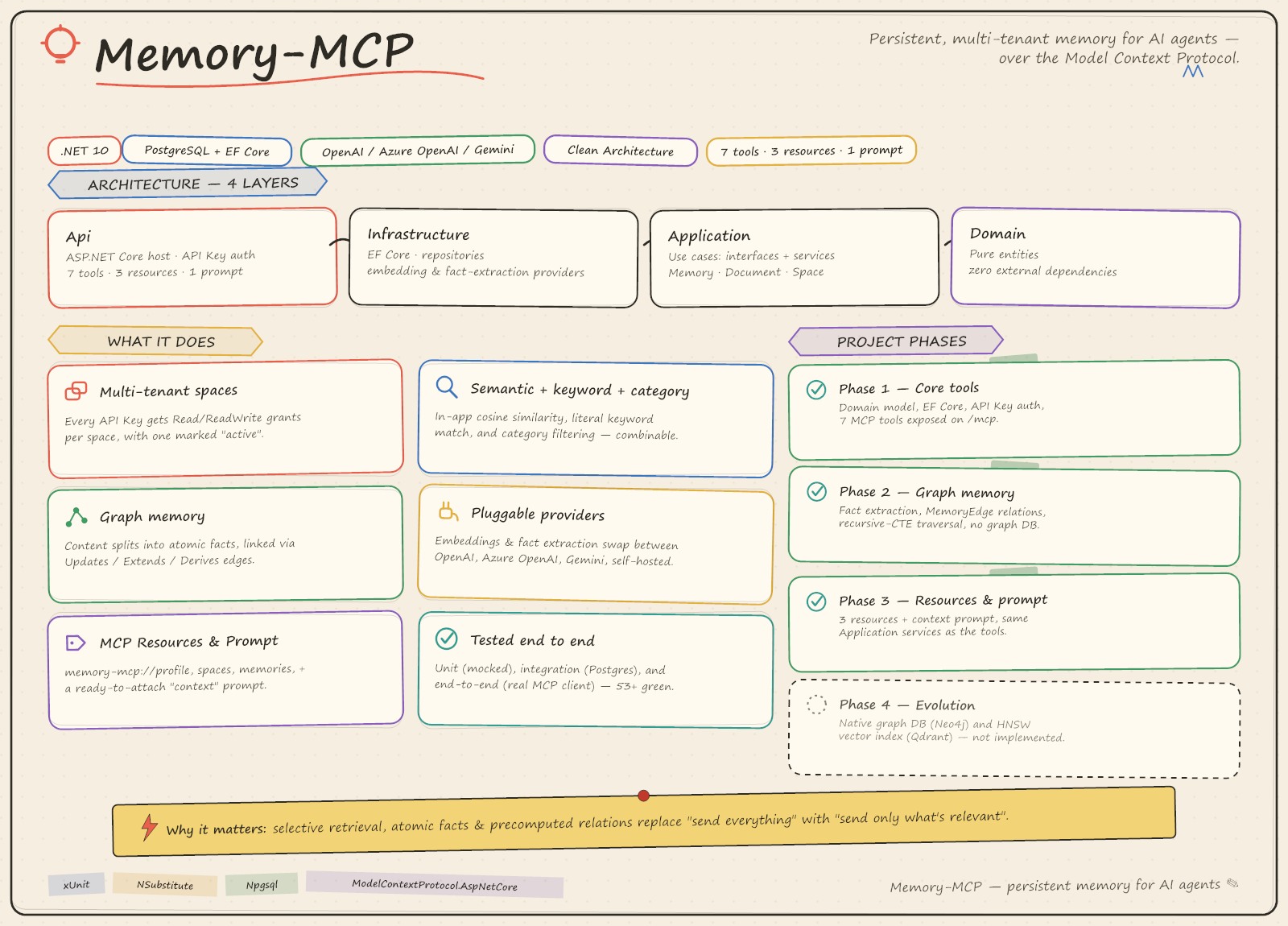
Remote MCP (Model Context Protocol) server for storing, retrieving, and semantically searching
"memories" on behalf of AI agents, organized into multi-tenant spaces and protected by API Key.
A space can be shared by several users — each a Writer or a Reader, each attributed on what
they write.
Full functional specification: CLAUDE.md.
Table of contents
- Architecture
- Technology
- Data model
- Available MCP tools
- Available MCP resources and prompts
- MCP Apps widgets
- Project phases
- Setup and startup
- Tests
- Docker
- Deploy to Fly.io
Architecture
4-layer Clean Architecture, with dependencies flowing in a single direction (Api → Infrastructure/Application → Domain):
Memory-MCP/
├── src/
│   ├── MemoryMcp.Domain/          # Pure entities (Space, ApiKey, ApiKeySpaceGrant, Document, Memory)
│   │                              # No dependency on EF/HTTP/external libraries.
│   ├── MemoryMcp.Application/     # Use cases: interfaces (IMemoryService, IDocumentService,
│   │                              # ISpaceService, IEmbeddingProvider, repositories, ICurrentAccessContext)
│   │                              # + application service implementations + DTOs.
│   ├── MemoryMcp.Infrastructure/   # EF Core (MemoryDbContext, migrations, repositories), embedding
│   │                              # provider (OpenAI/Azure OpenAI/Gemini) and fact extractor for graph memory.
│   └── MemoryMcp.Api/             # ASP.NET Core host: MCP hosting, API Key authentication,
│                                  # MCP tools/resources/prompts (thin adapters) and the MCP Apps widgets (Apps/).
└── tests/
    ├── MemoryMcp.Application.Tests/    # Unit tests for the application services (mock/NSubstitute)
    ├── MemoryMcp.Infrastructure.Tests/ # Integration tests for the repositories against a real Postgres
    └── MemoryMcp.Api.Tests/            # End-to-end tests for tools/resources/prompts/widgets via an MCP client + WebApplicationFactory
Why Clean Architecture and not Vertical Slice: all tools share the same data model
(Space/ApiKey/Memory/Document) and the same per-space authorization rules; isolating EF persistence
and the embedding provider behind interfaces in Application let the project be extended in later
phases (resources, prompts, MCP Apps widgets) with at most small, additive Application service
methods and no changes to Domain.
Every class in Api/Tools is a thin adapter: it resolves the access context (ICurrentAccessContext),
calls the application service, and formats the output — no business logic in the Api layer.
Authentication and multi-tenancy
See docs/multi-user-spaces.md for the full design of users, roles, and write attribution.
- Every API Key belongs to exactly one user and is granted one or more spaces, with an access
level (
ReadorReadWrite) per space and one space marked as "active" (IsDefault). - A user is either a
Writer(read/write) or aReader(read only). The role is a ceiling that applies everywhere; the grant is what was given on one space. The effective access level is the lower of the two, so a Reader holding aReadWritegrant is still read-only, and demoting someone to Reader removes write access on every space at once without touching a grant row. - The capping is applied once, where the access snapshot is built (
ApiKeyRepository), so every consumer — tool checks,listSpaces,whoAmI, the write-capable widgets — reads the same effective level and none of them can disagree about it. ApiKeyAuthenticationHandler(src/MemoryMcp.Api/Auth) reads the key from theX-Api-Keyheader (orAuthorization: Bearer <key>), validates it against the database (SHA-256 hash, never the plaintext key), and populatesCurrentAccessContext, a scoped service injected into the application services.- Deactivating a user (
users.IsActive) stops all of their keys from authenticating, without having to find each credential they minted. Their display name is still resolved, so what they wrote while active does not become anonymous. - The tools'
containerTagparameter corresponds to thespaces.keycolumn; if omitted, the current key's "active" space is used. - Isolation is per space: every read resolves exactly one space and filters on it, so no search or listing crosses a space boundary. A space the key holds no grant on is indistinguishable from one that does not exist. Within a space nothing is filtered by author — every member reads the whole space's knowledge.
- Authorization/space-not-found errors are translated into MCP tool results with
isError=true(never unhandled exceptions or 500s).
Write attribution
memoriesanddocumentsboth carryCreatedByUserIdandUpdatedByUserId, exposed on the tool results as ids and resolved display names (createdBy,updatedBy), so a model reading a search result can cite who wrote each fact without a second call.- The two are kept apart because in a shared space they frequently differ:
UpdatedByUserIdis the record of who deactivated a memory, whether by an explicitforgetor by a save whose extracted fact superseded it, whileCreatedByUserIdkeeps naming the original author. - A save never deactivates a colleague's memory. When extraction classifies a new fact as
Updatesan existing memory of someone else (and similarity clears the forget threshold), theUpdatesedge is still recorded but both memories stay active;add_memoryreturns the other memories incontestedMemoryIdsand says so in its message. Superseding your own memory, or one written before authorship was recorded, works as before. An explicitforgetis unchanged. - Names are resolved in one batched lookup per call, so a page of results costs one extra query rather than one per row — and none at all when nothing in the result set is attributed.
- Rows written before users existed keep NULL authorship and are reported as unattributed rather than guessed at.
Semantic search
IEmbeddingProvider is pluggable (OpenAI, Azure OpenAI, or Gemini — the same OpenAI SDK
EmbeddingClient under all three, pointed at a different base URL for Gemini, since its API is
OpenAI-compatible). Embeddings are stored in a pgvector column and ranked in the database by
cosine distance (<=>), served by an HNSW index — see
docs/pgvector-halfvec-search.md for the full design.
The column type is halfvec(3072), not vector(3072), and that choice is load-bearing: pgvector's HNSW
and IVFFlat indexes cap the vector type at 2000 dimensions, so a vector(3072) column would accept
the data and then fail at index creation. halfvec indexes up to 4000 dimensions and halves storage
(2 bytes per component instead of 4); the half-precision rounding is immaterial for cosine ranking.
MemoryRepository.SearchAsync runs the KNN as parameterized SQL that projects only ids and distances —
embeddings never cross the wire — then loads just the top-k rows as tracked entities, so ForgetAsync
can still soft-delete through change tracking without the read path tracking the whole space.
The embedding width is schema-bound, not a configuration knob: EF migrations are generated at design
time, so VectorSettings.Dimensions (3072) is the single source of truth, and startup fails if
Embeddings:Dimensions disagrees with it. Changing the width means a migration plus a re-embed of every
stored memory. This is what makes mixed-width embeddings — which previously produced silently
meaningless similarity scores — unrepresentable.
Besides semantic search, search_memory also supports literal keyword search
(keyword, matched in MemoryRepository.SearchByKeywordAsync without generating an embedding). A memory
matches if its text contains the keyword as a case-insensitive substring (ILIKE) or is a close
fuzzy/typo match per Postgres's pg_trgm word similarity (word_similarity(keyword, text) >= pg_trgm.word_similarity_threshold, the extension's default of 0.6); matches are ranked by that
similarity score. Both paths are backed by a single GIN trigram index on memories.text
(gin_trgm_ops, see MemoryConfiguration). The default threshold is intentional rather than an
oversight: for short keywords (3-5 letters) trigram similarity is noisy — e.g. word_similarity('plan', 'plant') is 0.8 and word_similarity('sky', 'skip') is 0.5 — so lowering it below the default to
catch more typos (e.g. word_similarity('recieve', 'receive') is only 0.375) trades a small amount of
typo recall for a much larger amount of unrelated-word noise. pg_trgm needs no admin-restricted native
extension (unlike pgvector, see below), so it works in this environment.
search_memory also supports filtering/listing by category (category, an optional column on
memories, assignable in add_memory). The three criteria can be combined: query/keyword can be further restricted by
category; if only category is given, MemoryRepository.ListByCategoryAsync lists the memories in that
category ordered by creation date. At least one of query, keyword, and category must be provided.
Requires
pgvector≥ 0.7.0 (the version that introducedhalfvec), on a stable PostgreSQL release. Earlier phases ran without the extension and scored cosine similarity in-app; that path has been removed. Two environment notes worth knowing before setting this up elsewhere:
- A PostgreSQL release candidate will reject the extension (
The specified procedure could not be found) — pgvector binaries are built against the released ABI, so a pre-GA server fails to load them.CREATE EXTENSION vectorneeds superuser, because pgvector is not a trusted extension. The migration runs it, so verify the permission on managed Postgres before the first deploy.
Graph memory
Saved content isn't stored verbatim as a single memory: MemoryService.SaveAsync first asks
IFactExtractor to split it into atomic facts and classify each fact's relation — Updates,
Extends, or Derives — to a handful of similar existing memories (fetched the same way
ForgetAsync finds candidates, via IMemoryRepository.SearchAsync). Each fact becomes its own
Memory, and each relation becomes a MemoryEdge row; an Updates relation also calls the existing
Memory.Forget(supersededBy:), so SupersededBy/IsActive stay in sync with the edge that
generalizes them. LlmFactExtractor asks its chat model for this via JSON Schema structured output
(strict mode) rather than parsing free text, and relations pointing at memory ids outside the supplied
candidates are dropped defensively (a hallucinated id would otherwise violate the edge's foreign key).
Every relation also carries a short rationale, stored on MemoryEdge.Note (clamped to the column width
by the entity) — the only record of why an Updates deactivated an existing memory.
There's no dedicated graph database in this environment either (same constraint as above) — traversal
(MemoryEdgeRepository.GetRelatedAsync) is a WITH RECURSIVE CTE over the plain memory_edges
table, parameterized through EF Core's Database.SqlQuery<T>, bounded by a hop count and a
visited-node path array to guarantee termination on cycles. search_memory attaches each top match's
related memories (text + relation type + hop count, plus the edge's rationale for direct relations) via
MemoryGraphService, additive to the existing MemorySearchResultDto shape.
If Extraction:ApiKey is left unconfigured, IFactExtractor throws ExtractorNotConfiguredException
and add_memory transparently falls back to saving the whole content as a single memory with zero
edges — exactly Phase 1's behavior, so nothing breaks for callers who never configure extraction.
IFactExtractor is pluggable the same way as IEmbeddingProvider (OpenAI, Azure OpenAI, Gemini, or
any other OpenAI-compatible chat endpoint such as a self-hosted Ollama/vLLM/LM Studio model) by
configuration alone.
Technology
| Layer | Technology |
|---|---|
| Runtime | .NET 10 (pinned in global.json) |
| MCP Server | ModelContextProtocol / ModelContextProtocol.AspNetCore 2.1.0 + ModelContextProtocol.Extensions.Apps (MCP Apps widgets) |
| Web host | ASP.NET Core Minimal API |
| Persistence | PostgreSQL + EF Core 10 (Npgsql.EntityFrameworkCore.PostgreSQL) |
| Vector search | pgvector ≥ 0.7.0 (halfvec + HNSW), via Pgvector.EntityFrameworkCore |
| Embedding | OpenAI / Azure.AI.OpenAI (same EmbeddingClient, selected via configuration; also backs Gemini's OpenAI-compatible endpoint) |
| Fact extraction | Same OpenAI SDK's ChatClient, JSON Schema structured output (OpenAI / Azure OpenAI / Gemini / self-hosted OpenAI-compatible) |
| PDF text extraction | PdfPig + its document layout analysis for reading order (pure managed, no native dependencies or external service) |
| Authentication | Custom AuthenticationHandler<T> scheme based on API Key (SHA-256 hash) |
| Tests | xUnit, NSubstitute, AwesomeAssertions (MIT fork of FluentAssertions), Microsoft.AspNetCore.Mvc.Testing |
| Container | Multi-stage Dockerfile + docker-compose (for environments where Docker is available) |
Data model
| Table | Description |
|---|---|
spaces | Logical space (key unique = containerTag, name, description) |
users | Person (email unique, display name, role = Writer/Reader stored as text, is_active) |
api_keys | API key belonging to one user (only the hash is stored, never the plaintext value; label says which credential — laptop, CI — not whose) |
api_key_space_grants | Read/ReadWrite permission of an API Key on a space + "active space" flag; capped at read time by the owning user's role |
documents | Source document (title, type, status, summary, raw content, created_by_user_id/updated_by_user_id) |
memories | Extracted memory (text, optional category, halfvec(3072) embedding with an HNSW cosine index, version, is_active for soft-delete/"forget", created_by_user_id/updated_by_user_id) |
memory_edges | Typed, directed graph edge between two memories (Updates/Extends/Derives), scoped to a space, with the extractor's rationale in note |
Available MCP tools
The 7 tools required by the specification are implemented in src/MemoryMcp.Api/Tools. search_memory
and add_memory are enriched by graph memory (related memories on search results, multi-fact
extraction on save) without any change to their tool contract — no new tool was added for this.
Phase 3 additionally introduced two small, additive tools (setActiveSpace, create_document) that
back the MCP Apps widgets below, plus four *_ui tools whose only job is to open a widget (see
"MCP Apps widgets"). "Access required" is the effective level — the space grant already capped by
the caller's role — so every ReadWrite row below is refused to a Reader:
| Tool | File | Access required | Description |
|---|---|---|---|
search_memory | MemoryTools.cs | Read | Searches a space's memories by semantic similarity (query), literal keyword (keyword), and/or category (category), with optional profile; top matches include relatedMemories from the graph |
add_memory | MemoryTools.cs | ReadWrite | Saves (action=save, with optional category) or removes (action=forget) a memory; saving extracts atomic facts and links them to related existing memories as graph edges |
listDocuments | DocumentTools.cs | Read | Paginated list of a space's source documents |
getDocument | DocumentTools.cs | Read | Metadata and content of a document |
create_document | DocumentTools.cs | ReadWrite | Stores content as a new document (text/Markdown/CSV/PDF in this version — PDF content is base64 bytes, extracted to text server-side) — source-of-truth storage only, does not run fact extraction |
listMemories | MemoryTools.cs | Read | Paginated list of extracted memories |
listSpaces | AccessTools.cs | — | Spaces accessible with the current API Key, with the effective access level and counts |
whoAmI | AccessTools.cs | — | Authenticated user (id, email, display name, Writer/Reader role), the key in use, accessible spaces, active space |
setActiveSpace | AccessTools.cs | — | Sets which of the current API key's accessible spaces is active (default) |
Available MCP resources and prompts
For clients that support them — implemented in src/MemoryMcp.Api/Resources and
src/MemoryMcp.Api/Prompts, both thin adapters over the same Application services the tools use:
| Kind | URI / Name | File | Description |
|---|---|---|---|
| Resource | memory-mcp://profile | MemoryResources.cs | Recent-active-memories profile context for the active space (the same set search_memory's includeProfile attaches) |
| Resource | memory-mcp://spaces | AccessResources.cs | The same compact space list as listSpaces, with the active space marked |
| Resource | memory-mcp://memories | MemoryResources.cs | First page of the active space's memories (any status), same shape as listMemories |
| Resource | memory-mcp://graph | MemoryResources.cs | Nodes (memories, any status) and typed edges for the active space, for the memory-graph widget |
| Prompt | context | ContextPrompt.cs | A ready-to-attach text message: the active space's profile, plus up to 3 other spaces ranked by their most recent memory |
These four resources are fixed (non-templated) URIs scoped to the API key's active space; none take
arguments. IMemoryService.GetProfileAsync/GetSpaceGraphAsync are small additive Application
methods — the profile one is the fetch logic already used by search_memory, extracted so it can be
called on its own instead of only alongside a search; the graph one wraps
IMemoryGraphService.GetSpaceGraphAsync behind the same RequireAccess check every other method uses.
See docs/resources-and-prompt-usage.md for how to read the
resources at the protocol level, and docs/mcp-prompt-usage.md for the
context prompt in detail — what it contains, how the space ranking works, and when to prefer it
over search_memory.
MCP Apps widgets
See docs/mcp-apps-widgets-usage.md for a protocol-level walkthrough of each widget with request/response examples.
Phase 3 also adds four interactive widgets via the ModelContextProtocol.Extensions.Apps package
(an [Experimental] API, MCPEXP003 suppressed in MemoryMcp.Api.csproj, same as the SDK's own
samples/WeatherAppServer): [McpAppUi(ResourceUri = "ui://...")] on a tool
(src/MemoryMcp.Api/Apps/AppUiTools.cs) links it to an HTML resource served with
MimeType = McpApps.HtmlMimeType (src/MemoryMcp.Api/Apps/AppUiResources.cs, markup under
Apps/ui/*.html); .WithMcpApps() is wired into both the HTTP and stdio server registrations in
Program.cs. Inside the iframe, each widget bootstraps a small window.postMessage JSON-RPC bridge
(ui/initialize handshake, then ordinary tools/call/resources/read) to drive real tools/resources
— no widget-specific business logic lives in the HTML beyond that bridge.
| Widget | Opens via tool | Backing UI resource | What it does |
|---|---|---|---|
select-space | select_space_ui | ui://select-space | Lists accessible spaces (memory-mcp://spaces) and switches the active one (setActiveSpace) |
guided-save | guided_save_ui | ui://guided-save | Editable content/category/space form that calls add_memory |
upload-file | upload_file_ui | ui://upload-file | Local file picker that calls create_document, then optionally add_memory with the extracted text |
memory-graph | memory_graph_ui | ui://memory-graph | Reads memory-mcp://graph and renders it with a small hand-rolled force-directed layout (no CDN dependency) |
upload-file fully ingests text-like formats (.txt/.md/.csv, read client-side via
FileReader.readAsText) and PDF: for PDF the widget instead reads the file as base64
(FileReader.readAsDataURL) and sends it to create_document with docType: "pdf", which decodes it
server-side and extracts the text via IPdfTextExtractor (PdfPig, pure managed, no native
dependencies or external service — see src/MemoryMcp.Infrastructure/Documents/PdfTextExtractor.cs)
before storing it as the document's RawContent; the widget then fetches that extracted text back via
getDocument if "also extract memories" is checked, since the plain text only exists server-side for
PDFs. A malformed/corrupt PDF surfaces as a normal tool error (DocumentExtractionException), not an
unhandled exception.
Extraction runs PdfPig's document layout analysis (letters → words → paragraph blocks → reading order)
rather than the raw Page.Text, which concatenates glyphs in content-stream order and interleaves
columns, tables and running headers. Since the extracted text is what gets embedded and fed to the fact
extractor, reading order is a correctness concern rather than a cosmetic one. Layout analysis is
heuristic, so a page it cannot segment falls back to Page.Text for that page alone. Scanned
(image-only) PDFs have no text layer to recover and still extract as empty — OCR is not in scope.
Note: other formats the wider spec mentions (Word, images, MP3/WAV/M4A, MP4/WebM) can still be picked in the file dialog but disable upload with an inline explanation — Word text extraction and image OCR/audio transcription are deferred to a future phase, the same way the pgvector/Docker constraints above are called out rather than worked around.
Full interactive rendering (the widget actually showing up and working inside an iframe) requires an
MCP Apps-capable host (e.g. Claude Desktop/VS Code with Apps support) — same caveat the SDK's own
WeatherAppServer sample calls out. Any MCP client can still list/call the four *_ui tools and read
the ui://* resources to confirm they're registered and serving HTML.
Project phases
Phase 1 — Completed
- Domain entities and the relational data model (Space, ApiKey, ApiKeySpaceGrant, Document, Memory)
- EF Core persistence + initial migration
- API Key authentication with per-space permissions
- Pluggable
IEmbeddingProvider(OpenAI / Azure OpenAI) - The 7 core MCP tools, exposed via
ModelContextProtocol.AspNetCoreon the/mcpHTTP endpoint - Test suite (unit, integration, end-to-end)
Phase 2 — Graph memory — Completed
See docs/graph-memory-plan.md for the full design.
-
MemoryEdge/RelationTypedomain model, generalizing the existingSupersededBy/IsActive/Versionfields - Pluggable
IFactExtractor(OpenAI / Azure OpenAI / Gemini / self-hosted OpenAI-compatible), with a strictly-additive fallback to Phase 1's single-memory save when unconfigured -
memory_edgestable +WITH RECURSIVECTE traversal (MemoryEdgeRepository, no graph DB extension) -
search_memoryenriched withrelatedMemories;add_memoryextracts and links multiple facts per save -
Embeddings:Dimensionsmade configurable (Gemini's native embedding width differs from OpenAI's) - Test suite extended (unit, integration, end-to-end)
Phase 3 — Resources, prompt, and MCP Apps widgets — Completed
- MCP Resources:
memory-mcp://profile,memory-mcp://spaces,memory-mcp://memories,memory-mcp://graph - MCP Prompt:
context - Interactive MCP Apps widgets:
select-space,guided-save,upload-file,memory-graph(via theModelContextProtocol.Extensions.Appspackage; see "MCP Apps widgets" above —upload-fileingests text-like formats and PDF (viaPdfPig); Word/image/audio parsing deferred) - Test suite extended (end-to-end, via the MCP client's resource/prompt/tool calls)
Phase 4 — Native vector index — Completed
See docs/pgvector-halfvec-search.md for the full design and rationale.
-
pgvectoradopted with a native HNSW index, replacing in-app cosine scoring — the original specification's intent, reached with pgvector rather than the separateQdrantservice originally sketched, since it keeps memories and their vectors in one transactional store -
halfvec(3072)column, working around pgvector's 2000-dimension index limit on thevectortype - KNN pushed into SQL: embeddings no longer cross the wire, and change tracking is confined to
topKrows instead of the whole space - Embedding width made schema-bound and validated at startup, making mixed-width embeddings (previously a silent source of meaningless similarity scores) unrepresentable
- Npgsql provider configuration centralized so
UseVector()can't be omitted by a second call site
Phase 5 — Multi-user spaces — Completed
See docs/multi-user-spaces.md for the full design.
-
User+UserRole(Writer/Reader) domain model;ApiKeybecomes a credential of a user (ApiKey.OwnerEmaildropped — the owner's identity lives onusers.email) - Role used as a ceiling over the per-space grant, capped once where the access snapshot is built, so no service, tool, or widget has to combine the two itself
- Deactivating a user invalidates every key they hold, in the authentication query
-
CreatedByUserId/UpdatedByUserIdon memories and documents, exposed as ids and resolved display names on every search/list/detail result, with the "who forgot whose memory" case kept distinct from authorship - Per-space isolation pinned end-to-end (an ungranted space is unreachable by semantic search, keyword search, and by naming its key), and reads left unfiltered by author within a space
-
--seedprovisions two users and two spaces;guided-save/upload-fileoffer only writable spaces andselect-spaceshows the effective level - Test suite extended (domain, application, integration, end-to-end)
Phase 6 — Not implemented (evolution)
- Review project for introducing a real graphDB (Neo4j)
- Full-precision re-ranking of HNSW candidates, if measured recall proves insufficient
- pgvector iterative index scans (0.8.0+) for highly selective filtered searches
- Word text extraction and image OCR/audio transcription for
upload-file
Setup and startup
Prerequisites
- .NET SDK 10 (version pinned in global.json)
- A reachable PostgreSQL instance (local or remote) on a stable release, with the
pgvectorextension ≥ 0.7.0 available and a database user allowed toCREATE EXTENSION(superuser — pgvector is not a trusted extension). The migration installs the extension itself; see docs/pgvector-halfvec-search.md - (Optional) an OpenAI, Azure OpenAI, or Gemini API Key, needed only for the
add_memoryandsearch_memorytools - (Optional) a second API Key (OpenAI / Azure OpenAI / Gemini / self-hosted) for fact extraction —
without it,
add_memorystill works but saves whole content as a single memory with no graph edges
1. Configure the connection string
Create/update src/MemoryMcp.Api/appsettings.Development.json (file not versioned, see
.gitignore) with your Postgres connection string:
{
  "ConnectionStrings": {
    "Default": "Host=localhost;Port=5432;Username=<user>;Password=<password>;Database=<database>"
  }
}
Alternatively, you can set the ConnectionStrings__Default environment variable without touching the
configuration files.
2. Apply migrations
dotnet tool restore # if you don't already have dotnet-ef installed: dotnet tool install --global dotnet-ef
dotnet ef database update --project src/MemoryMcp.Infrastructure --startup-project src/MemoryMcp.Api
To wipe the database and start over from a clean schema (e.g. after accumulating test/throwaway spaces), run scripts/reset-db.ps1 — destructive, it drops and recreates the database pointed at by your current connection string, then re-applies all migrations and optionally reseeds a fresh
defaultspace + API key:./scripts/reset-db.ps1
3. (Optional) Configure the embedding provider
To use add_memory/search_memory, in appsettings.Development.json:
{
  "Embeddings": {
    "Provider": "OpenAI",
    "ApiKey": "sk-...",
    "Model": "text-embedding-3-small"
  }
}
For Azure OpenAI: "Provider": "AzureOpenAI", "Endpoint": "https://<resource>.openai.azure.com",
"Model" = deployment name. For Gemini (its API is OpenAI-compatible):
{
  "Embeddings": {
    "Provider": "Gemini",
    "ApiKey": "AIza...",
    "Model": "gemini-embedding-001",
    "Dimensions": 3072
  }
}
Dimensions is forwarded as the OpenAI "dimensions" request parameter and must equal
VectorSettings.Dimensions (3072), the width baked into the halfvec column — the server refuses to
start otherwise, with a message naming both values. Changing it is a schema migration plus a re-embed of
every stored memory, not a configuration edit; 3072 is gemini-embedding-001's native width, and that
model needs manual re-normalization for truncated widths anyway.
Provider and endpoint are validated at startup too: an unrecognized Provider is rejected rather than
silently falling through to api.openai.com, and AzureOpenAI without an Endpoint fails immediately
instead of at the first tool call.
Keep provider API keys out of appsettings.Development.json. Store them with
user secrets, which the app loads
automatically in the Development environment (the project already has a UserSecretsId):
dotnet user-secrets set "Embeddings:ApiKey" "<key>" --project src/MemoryMcp.Api
dotnet user-secrets set "Extraction:ApiKey" "<key>" --project src/MemoryMcp.Api
Rate limiting and tool-call logs
/mcp is rate limited per API key (requests presented without a key share one budget per client
address); /health is not. Defaults are 300 requests per 60 seconds — one tool call is several HTTP
requests — and can be changed under RateLimiting (PermitLimit, WindowSeconds, Enabled). Rejected
requests get 429 with a Retry-After header. Behind a reverse proxy, key-less callers share the proxy's
address unless forwarded headers are trusted.
Every tool call writes one log line — tool, space, user id, role, outcome and duration — under the
MemoryMcp.ToolCalls category. Arguments (memory text, documents) are never logged.
Leaving the embedding provider entirely unconfigured is still supported: the server starts and all
other tools work normally — only add_memory/search_memory return a tool error.
4. (Optional) Configure fact extraction (graph memory)
To have add_memory split content into linked facts instead of one flat memory, configure a chat
model — same provider choices as embeddings ("OpenAI", "AzureOpenAI", or "Gemini"), plus any other
OpenAI-compatible endpoint (e.g. a self-hosted Ollama/vLLM/LM Studio model) via Endpoint:
{
  "Extraction": {
    "Provider": "Gemini",
    "ApiKey": "AIza...",
    "Model": "gemini-2.5-flash"
  }
}
Leaving Extraction:ApiKey empty is fully supported: add_memory falls back to saving the whole
content as a single memory with no graph edges, exactly like before graph memory existed.
5. Create test spaces, users, and API Keys
There isn't an administration API yet: a command-line command creates two spaces and two users — a
Writer with grants on both spaces and a Reader with a grant on one — printing both plaintext keys
once:
dotnet run --project src/MemoryMcp.Api -- --seed
# Seeded spaces 'default' and 'team'.
#   Writer (writer@memory-mcp.local) — spaces default, team — API key: mmcp_xxxxxxxx…
#   Reader (reader@memory-mcp.local) — space team (read-only by role) — API key: mmcp_yyyyyyyy…
The Reader's grant is deliberately seeded as ReadWrite: the role is what makes them read-only, so
this is the state worth exercising by hand. Use the Writer's key for normal local development.
--seed is a fixture, not provisioning: it always creates the same two fictional people. To onboard a
real one, use the three scripts below — deliberately separate, because a person outlives any single
credential they hold (so minting a second key for a laptop, CI or agent must not mean creating a second
account) and a space outlives the keys granted on it (so opening a space to one more credential must
not mean rotating that credential).
# 1. The person: email (unique, lower-cased), display name, and the role that caps them everywhere.
#    All three are prompted for when omitted, so plain ./scripts/create-user.ps1 works too; Enter takes
#    the email as display name and Writer as role.
./scripts/create-user.ps1 -Email alice@example.com -Name "Alice Rossi" -Role Writer

# 2. A credential for them, and what it can reach. Grants are '<space-key>[:Read|ReadWrite]'
#    (ReadWrite by default); -DefaultSpace picks the one used when a request names none. -Label is
#    prompted for when omitted (Enter for none) — it is what tells one person's keys apart later.
./scripts/create-api-key.ps1 -Email alice@example.com -Space default, team:Read -Label laptop
#   API key: mmcp_xxxxxxxx…    <- printed once; only the SHA-256 hash is stored
#   Spaces:
#     default: ReadWrite [default]
#     team: Read

# 3. A space, and the keys allowed into it. -GrantTo takes '<target>[:Read|ReadWrite]', where a target
#    is an owner's email (every key that person holds), a key id, or the prefix printed at mint time.
#    -Name is prompted for when omitted (Enter falls back to the key) — it is what teammates read in
#    the space selector, and it can only be set at creation.
./scripts/create-space.ps1 -Key engineering -Name "Engineering launch" -GrantTo alice@example.com
#   Grants:
#     Alice Rossi <alice@example.com> (mmcp_xxxxxxx…, laptop): ReadWrite [default]

# Opening an existing space to one more credential — the space is reused, only the grant is added.
./scripts/create-space.ps1 -Key engineering -AllowExisting -GrantTo bob@example.com:Read
All three wrap one-shot commands on the API project (--create-user, --create-api-key,
--create-space), so they read the same connection string the server does. Step 2 requires the spaces
to already exist — it lists the ones that do if a name doesn't match — so for a brand-new space either
run step 3 first, or run step 3 afterwards to grant it. The printed access level is the effective one:
a Reader handed a ReadWrite grant is shown as Read, capped by their role.
Each key has at most one default space, the one used when a request names none. create-space.ps1
assigns it when the key has no other grant, and -MakeDefault moves it to the new space; the previous
default is cleared, since two defaults would make the fallback depend on row order.
Offboarding and revocation
./scripts/revoke-key.ps1 -Key mmcp_1a2b3c4                      # one credential, by id or printed prefix
./scripts/deactivate-user.ps1 -Email alice@example.com          # a person, and with them every key they hold
./scripts/deactivate-user.ps1 -Email alice@example.com -Reactivate
Both take effect from the next request, since every request is authenticated against the database. Revoking a key is permanent and touches only that key; deactivating a user is reversible, and a key revoked on its own stays revoked after the user is reactivated. A prefix that matches several keys is refused with the candidates listed. Memories and documents keep the departed person's name.
6. Start the server
dotnet run --project src/MemoryMcp.Api
The server exposes:
GET /health— health checkPOST /mcp— MCP endpoint (Streamable HTTP), protected: requires theX-Api-Key: <key>header (orAuthorization: Bearer <key>)
Default development port: http://localhost:5004 (see
src/MemoryMcp.Api/Properties/launchSettings.json).
You can connect an MCP client (e.g. MCP Inspector)
to the http://localhost:5004/mcp endpoint, passing the X-Api-Key header with the key generated in step 5.
7. (Optional) Connect Claude Desktop
A sample file is available at claude_desktop_config.example.json, with three alternative ways to declare the server — pick one:
{
  "mcpServers": {
    "memory-mcp": {
      "url": "http://localhost:5004/mcp",
      "headers": {
        "X-Api-Key": "mmcp_xxxxxxxxxxxxxxxxxxxxxxxxxxxxxxxx"
      }
    },
    "memory-mcp-stdio": {
      "command": "dotnet",
      "args": ["C:\\path\\to\\Memory-MCP\\src\\MemoryMcp.Api\\bin\\Release\\net10.0\\MemoryMcp.Api.dll", "--", "--stdio"],
      "env": {
        "ConnectionStrings__Default": "Host=localhost;Port=5432;Username=<user>;Password=<password>;Database=<database>",
        "MEMORYMCP_API_KEY": "mmcp_xxxxxxxxxxxxxxxxxxxxxxxxxxxxxxxx"
      }
    },
    "memory-mcp-remote": {
      "command": "npx.cmd",
      "args": ["-y", "mcp-remote", "http://localhost:5004/mcp", "--header", "X-Api-Key: ${MEMORYMCP_API_KEY}"],
      "env": {
        "MEMORYMCP_API_KEY": "mmcp_xxxxxxxxxxxxxxxxxxxxxxxxxxxxxxxx"
      }
    }
  }
}
url(memory-mcp) — connects to the standalone HTTP server started in step 6; requires it to already be running (dotnet run --project src/MemoryMcp.Api), same as any other MCP client. The simplest option if your Claude Desktop version supports a nativeurlentry.command(memory-mcp-stdio) — Claude Desktop launches Memory-MCP itself as a local subprocess over stdio instead of connecting over HTTP; no separately-running server needed. Build a Release binary first (dotnet build -c Release src/MemoryMcp.Api) and pointargsat the resultingMemoryMcp.Api.dll. Usedotnet <dll path>, notdotnet run:dotnet runprints its own status lines (restore/build/launch-profile messages) to stdout, which is the same channel the MCP protocol uses in stdio mode — that output would corrupt every message and break the client. Since there's no HTTP request to carry anX-Api-Keyheader in this mode, the key is passed once via theMEMORYMCP_API_KEYenvironment variable and resolved at process startup; an invalid or missing key makes the process exit immediately with an error instead of starting.command(memory-mcp-remote) — for a Claude Desktop version/client that only supports launching local (stdio) servers and doesn't understand a nativeurlentry.mcp-remoteis a generic stdio↔HTTP bridge (vianpx, requires Node.js): it forwards to the same/mcpHTTP endpoint as the plainurloption, adding theX-Api-Keyheader itself via--header, with${MEMORYMCP_API_KEY}interpolated fromenv. Like theurloption (and unlikememory-mcp-stdio), it still requires the HTTP server from step 6 to already be running —mcp-remoteonly bridges to it, it doesn't launchMemoryMcp.Apiitself. Prefer the plainurlentry when it's supported; reach for this only as a compatibility fallback.
Troubleshooting
memory-mcp-stdio: if Claude Desktop reports something likeUnexpected token 'I', "I possibil"... is not valid JSON, theargspath doesn't resolve to a real file — whendotnet <path>can't find the target, thedotnetmuxer itself prints a "did you mean...?" message to stdout (in whatever language your OS is localized to), which lands on the exact channel the MCP protocol uses and looks like garbage to the client. This is not an app error; it happens beforeMemoryMcp.Apiever starts. Fix: replace the placeholder path with the real, absolute path to your build output, and make sure you actually built it first (dotnet build -c Release src/MemoryMcp.Api). Verify the exact command works before wiring it into Claude Desktop by running it in a terminal and feeding it a request, e.g. (PowerShell):$env:ConnectionStrings__Default = "Host=localhost;Port=5432;Username=<user>;Password=<password>;Database=<database>" $env:MEMORYMCP_API_KEY = "mmcp_xxxxxxxxxxxxxxxxxxxxxxxxxxxxxxxx" '{"jsonrpc":"2.0","id":1,"method":"initialize","params":{"protocolVersion":"2024-11-05","capabilities":{},"clientInfo":{"name":"test","version":"0"}}}' | dotnet <path-to-MemoryMcp.Api.dll> -- --stdioA correct setup prints exactly one line of JSON (the
initializeresult) to stdout and nothing else; any other text there means something upstream of the app is writing to the wrong stream.
Copy the content (replacing the key(s) with the one generated in step 5, and the dotnet args/env with
your own paths and connection string) into Claude Desktop's actual configuration file, then restart the
application:
- Windows:
%APPDATA%\Claude\claude_desktop_config.json - macOS:
~/Library/Application Support/Claude/claude_desktop_config.json
If an mcpServers section already exists with other servers, simply add the entry you picked without
overwriting the others. On restart, Memory-MCP's tools, resources, context prompt, and MCP Apps
widgets will be available in the conversation (support for resources/prompts/widgets varies by client).
Tests
# Unit tests (no external dependencies)
dotnet test tests/MemoryMcp.Application.Tests/MemoryMcp.Application.Tests.csproj

# Integration and end-to-end tests: require a reachable real Postgres.
# Set the 'Test' connection string in src/MemoryMcp.Api/appsettings.Development.json first:
#   "ConnectionStrings": {
#     "Default": "...",
#     "Test": "Host=localhost;Port=5432;Username=<user>;Password=<password>;Database=<database>"
#   }
dotnet test
The integration/E2E tests connect directly to the Postgres named by the
Testconnection string of the API's own configuration (no Testcontainers/Docker, for consistency with the company environment). That instance needspgvectortoo, since the tests apply migrations automatically.appsettings.jsononly carries a placeholder, so the real value belongs in the gitignoredappsettings.Development.json, whose entry overrides it. Point it at a dedicated test database, not your working one: every test uses random-GUID keys/spaces, so nothing collides, but rows accumulate.
McpApiFactoryreads it from the test host's configuration and overrides the connection string at the DI level, because a configuration-level override loses toappsettings.Development.json'sDefault.PostgresFixturehas no host, soMemoryMcp.Infrastructure.Tests.csprojcopies the API's two settings files next to the test assembly and the fixture reads them with aConfigurationBuilder.
Docker
Dockerfile and docker-compose.yml are ready for environments where Docker is available (e.g. CI/CD or
deployment), but have not been verified in this development environment (Docker Desktop blocked by
company policy):
docker compose up --build
Starts Postgres with pgvector preinstalled (pgvector/pgvector:pg17) and the api service, exposed on
http://localhost:8080. The plain postgres:17 image will not work: the migration runs
CREATE EXTENSION vector and fails without it.
Deploy to Fly.io
fly.toml builds the existing Dockerfile as-is and runs the API on port 8080
behind Fly's managed HTTPS. Database migrations do not run on normal HTTP startup (only --seed
and --stdio apply them), so fly.toml wires dotnet MemoryMcp.Api.dll --migrate as the
release_command, which applies pending migrations and exits before each new version starts serving.
-
Create the app (adjust the name in
fly.tomlfirst ifmemory-mcpis taken, andprimary_regionif you're not near Frankfurt):fly launch --no-deploy -
Provision Postgres — either Fly's own Managed Postgres, or an external free-tier host (e.g. Neon, Supabase). It must offer
pgvector≥ 0.7.0 and let your user runCREATE EXTENSION vector:fly mpg createConfirm before deploying, since the
release_commandin step 4 applies the migration that installs the extension — if it can't, the deploy fails:psql "<connection-string>" -c "CREATE EXTENSION IF NOT EXISTS vector; SELECT extversion FROM pg_extension WHERE extname='vector';" -
Set secrets (the connection string must be in Npgsql keyword format, not a
postgres://URL):fly secrets set \ ConnectionStrings__Default="Host=<host>;Port=5432;Database=<db>;Username=<user>;Password=<password>" \ Embeddings__Provider="OpenAI" Embeddings__ApiKey="<key>" Embeddings__Model="text-embedding-3-small" \ Extraction__Provider="OpenAI" Extraction__ApiKey="<key>" Extraction__Model="gpt-4o-mini" -
Deploy:
fly deploy -
Bootstrap the first Space + API key (there's no admin API yet — see
SeedDevDataAsyncin Program.cs). Run the seed command once via a Fly console:fly ssh console -C "dotnet MemoryMcp.Api.dll --seed"Copy the printed
mmcp_...key from the output — it's theX-Api-Keyused by MCP clients — and store it somewhere safe (it's only ever shown once).
min_machines_running = 0 in fly.toml lets the machine stop when idle to minimize cost on a personal
project; the trade-off is a cold start (few seconds) on the first request after idling. Set it to 1
if that latency is a problem for your MCP client.