Spun WhatsApp MCP
Conecte o Claude, o ChatGPT ou qualquer IA ao seu WhatsApp empresarial: leia e pesquise conversas, resumos, estatísticas da equipe e envie mensagens que você aprova.
Servidor MCP hospedado
npx add-mcp 'https://api.spun.com/api/mcp'Instala no Claude Code, Codex, Cursor e outros
Documentação
MCP for WhatsAppconnect ChatGPT and Claude
Let your AI assistant read your business WhatsApp, find who is waiting, draft the replies and keep your contacts and tasks up to date. Nothing to install, and nothing is sent until a person on your team approves it.
No card to start.
Verified end to end with
Last checked November 8, 2026
Free MCP after your trial
A free WhatsApp MCP server for ChatGPT and Claude
Everyone starts with 7 days of everything. Connect your AI app during the trial and save a card, which is never charged, and your account continues on Free MCP: a free hosted WhatsApp MCP server for your own business number, for as long as you use it.
-
100 AI calls a month from ChatGPT, Claude or another MCP client
-
Up to 200 different contacts a month
-
7 days of message history and a read-and-approve inbox
-
Every send waits for your approval
-
Contacts, pipeline boards, tasks, calendar and Circles
-
Self Proxy and the Spun Box included, as on every plan
-
For businesses only, not for personal use or for building and testing MCP software. One Free MCP account per business, card and phone number.
-
At least one AI read every 7 days keeps the number connected. We warn you on day 5.
-
One number, no scheduled workflows, automations or REST API. The AI sees that media or a voice note arrived, not what is in it.
What your assistant can do
Six jobs to hand to your AI today
Ask in plain words. Your AI picks the right Spun tools, and the answer comes from your real chats.
See who is waiting for you
Ask what needs a follow-up today and get the chats waiting for a reply, reminders that are due and overdue tasks in one answer.
Tools:get_follow_up_queue
Catch up on any chat
Search every conversation by meaning, find who asked about pricing last month, and read a summary of a long thread instead of scrolling it.
Tools:search_messages_and_contacts get_chat_summary
Draft replies you approve
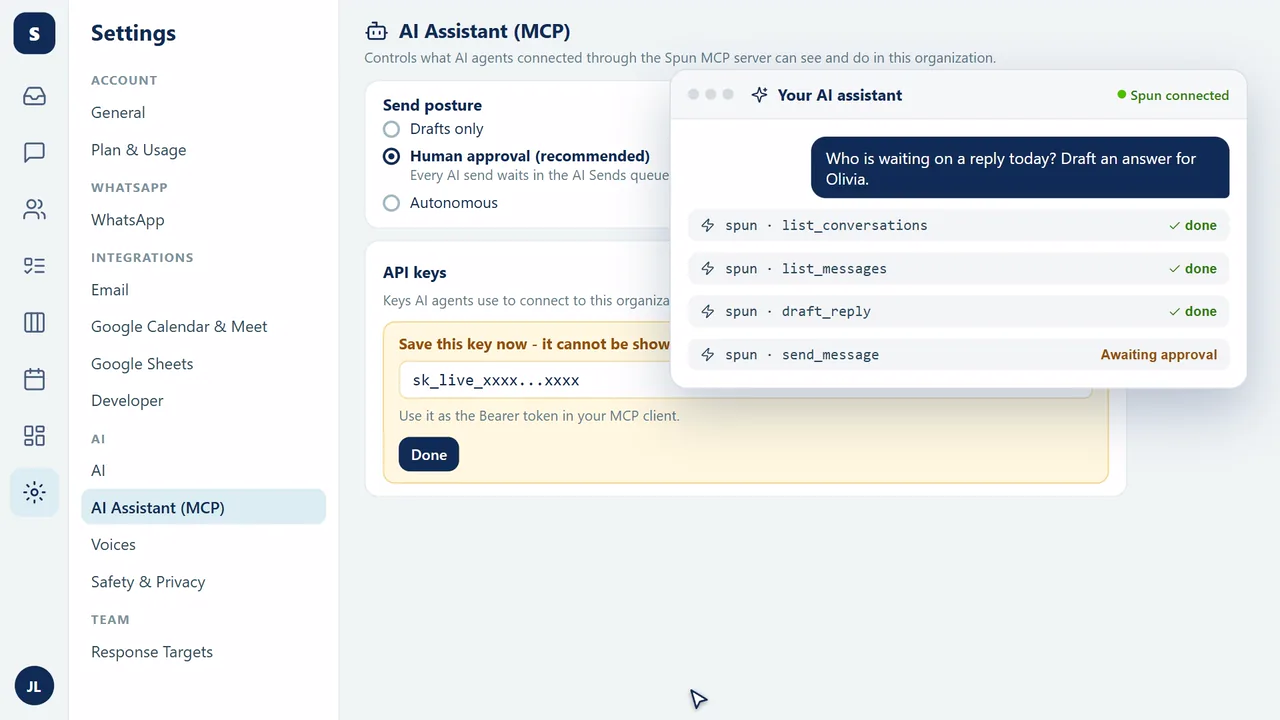
Your AI writes the reply. When it sends, the message waits in AI Sends until a teammate approves, edits or rejects it.
Tools:draft_reply send_message
Keep contacts and the pipeline tidy
Add and update contacts, label conversations and read where each deal sits on your pipeline board.
Tools:create_contact update_labels get_pipeline_board
Turn chats into tasks and meetings
Create a task for a teammate from a promise in a chat, or book the meeting a customer asked for on the team calendar.
Tools:create_task create_calendar_event
Report on the whole day
A period report reads every message of a day across your chats and counts bookings, complaints and requests, with the messages behind each number.
Tools:get_period_report
Human approval
Your AI drafts. A person approves.
By default every AI send waits in the AI Sends queue of your Spun inbox. The approval card is built by the server from what will really happen, never from the AI's description of it.
- 1 AI submits The assistant proposes a send with its reason, marked as unverified AI text.
- 2 A person approves The card shows the real number, recipient and content. If the customer replied meanwhile, the approver sees it first.
- 3 Spun sends Approval runs every check again, number state, quotas and quiet hours, then delivers the message.
Three send postures, set by your organization
- Drafts only Every AI send becomes a draft in your inbox for a person to send, edit or discard.
- Submit and approveDefault Sends wait in AI Sends until a teammate with send permission approves. Unapproved sends expire after about 24 hours.
- AutonomousManager opt-in Only an org manager can turn it on, inside Spun, with an org-wide setting plus a per-key grant. Never from the AI app, and signing in again resets it. A send the server flags still goes to the queue.
Three access levels, picked when you connect
- Read-only analyst Reads and reports. Never sends.
- Assistant, no sends Reads, drafts and organizes. Never sends.
- Assistant with sends Proposes sends, and each one waits for approval.
Photos and files sent by an AI app always wait for a person. Access levels and send postures
Intelligence
Answers prepared before you ask
Period reports count a whole day of messages, and standing questions over your chats, called digests, stay answered as new messages arrive. Your AI reads the prepared answer in one call, with links to the exact messages behind it.
MCP intelligence Reports in Spun Weave, the AI agent built into Spun, nothing to set up
Safeguards
You decide what the AI can touch
Set by an org manager inside Spun and enforced on the server, for every key and every connected app.
-
Number allowlist
Choose which of your WhatsApp numbers the AI can see at all. -
Label scoping
Labels that block AI sends, or an include-only mode where the AI sees only chats with the labels you pick. -
Groups off
One switch removes every group chat from the AI. -
Quiet hours
Outside your hours, AI sends are held or denied, then checked again before release. -
Kill switch and revoke
Turn MCP off for the whole organization, or revoke one app or key and its waiting sends at once. -
Automatic pause
If the AI messages too many different chats in a short time, AI sending pauses to protect your number. Spun shows you why, and an administrator resumes it in one click. -
Injection screening
Customer text is labeled untrusted before the AI reads it, and sends are screened for prompt injection and data leaks. -
Sending limits you set
Choose the pace: messages per minute and per day, and how many different chats at once. New numbers start on Normal, and Spun keeps a ceiling on top of your plan. -
Your own internet connection
Self Proxy runs your WhatsApp connection through your own home or office internet instead of a shared address. It is included on every plan, and it is the connection we recommend.
Scopes and label scoping in the docs
Compared
Spun next to other WhatsApp MCP servers
Most WhatsApp MCP servers hand your AI a raw WhatsApp session. Spun hands it your business, with approval built in.
| Hosting | Hosted, add one address | Docker or a local bridge you run | A local process in front of a cloud API |
|---|---|---|---|
| Human approval for sends | Built-in queue in your team inbox | None built in | None built in |
| Admin controls | Number allowlist, labels, quiet hours, kill switch | Config files on the machine | Tokens and environment variables |
| Group sender identity | Phone and contact name; hidden numbers marked hidden | Raw participant ids | Raw participant ids |
| Media access | Its own revocable permission, no open links | Handled by the local bridge | Part of the channel token |
Full comparison of WhatsApp MCP servers, with prices
Connect in minutes
Three steps. No code.
- 1
Start your trial
Create your Spun account and connect your WhatsApp number by scanning a QR code. - 2
Add Spun to your AI app
Add Spun as a connector and sign in with your Spun account. Developers can use an API key instead. - 3
Choose its permissions
An org manager picks the access level, then you start asking.
Paste this address as a custom connector in Claude or ChatGPT, or into any MCP client.
https://api.spun.com/api/mcp
Full walkthroughs:Connect ChatGPT to WhatsApp Connect Claude to WhatsApp Connection Readiness Checker Five business workflows
For developers:Client setup, every MCP client Create your first MCP key The Spun skill file
How to connect WhatsApp to Claude, ChatGPT or Cursor (MCP server) Watch on YouTube
Tools
175 tools in 12 groups
Grouped by what you would ask for. Every group works from Claude and other MCP clients.
- Read and search chats 15 toolsFree MCP, partChatGPT
- Reply, send and schedule 20 toolsFree MCP, partChatGPT
- Organize the inbox 12 toolsFree MCP, partChatGPT
- Contacts and Circles 18 toolsFree MCPChatGPT
- Sales pipeline 8 toolsFree MCP, part
- Tasks and projects 18 toolsFree MCP, partChatGPT
- Calendar and reminders 17 toolsFree MCP, part
- Groups and communities 12 toolsPaid plansChatGPT
- Status and newsletters 10 toolsPaid plans
- Summaries and reports 13 toolsPaid plansChatGPT
- Bots and knowledge base 19 toolsPaid plans
- Business overview and account 13 toolsFree MCP, partChatGPT
The full tool catalog in the docs
Honest security
What Spun blocks, and what no server can
Spun blocks unauthorized sends by design: every send passes server-side permission checks, your send posture and quotas, and everything a customer wrote is marked as untrusted before your AI reads it. What no MCP server can do is stop a tricked AI from repeating data it is allowed to read. That is why the number allowlist, label scoping and key scopes exist: give each app the least it needs, and revoke it the moment you want.
FAQ
MCP for WhatsApp, frequently asked questions
Is there a free MCP for WhatsApp?
Yes. Everyone starts with a 7-day trial of everything, no card. Connect your AI app during the trial and save a card, which is never charged, and your account continues on Free MCP: 100 AI calls a month, up to 200 contacts a month, 7 days of history, and every send waits for your approval. At least one AI read every 7 days keeps the number connected.
What is MCP for WhatsApp?
Can the AI send WhatsApp messages without a person approving them?
Which AI apps does it work with?
Do I need to install or host anything?
Can I limit what the AI can see?
Can I connect WhatsApp through my own internet?
Can I try it without letting the AI send anything?
Developer reference
The details live in the docs
Keys, scopes, postures, rate limits and prompts for builders and admins.
- Client setup, every MCP client
- Create your first MCP key
- Access levels and send postures
- Key scopes and label scoping
- Rate limits and quotas
- The full tool catalog
- Recommended system prompts
- The v1 compatibility promise
- Bots and the knowledge base over MCP
Give your AI your business WhatsApp
Connect it today, keep a person on every send, and stay on Free MCP after the trial.
No card to start. Spun Chat stays free either way.