Runway API
Gere imagens e vídeos usando a API do Runway.
Documentação
[!WARNING]
Este repositório foi arquivado.
- Se você é um desenvolvedor procurando integrar com a Runway API, veja: https://dev.runwayml.com/agents
- Para outros casos de uso, veja: https://runway.com/mcp
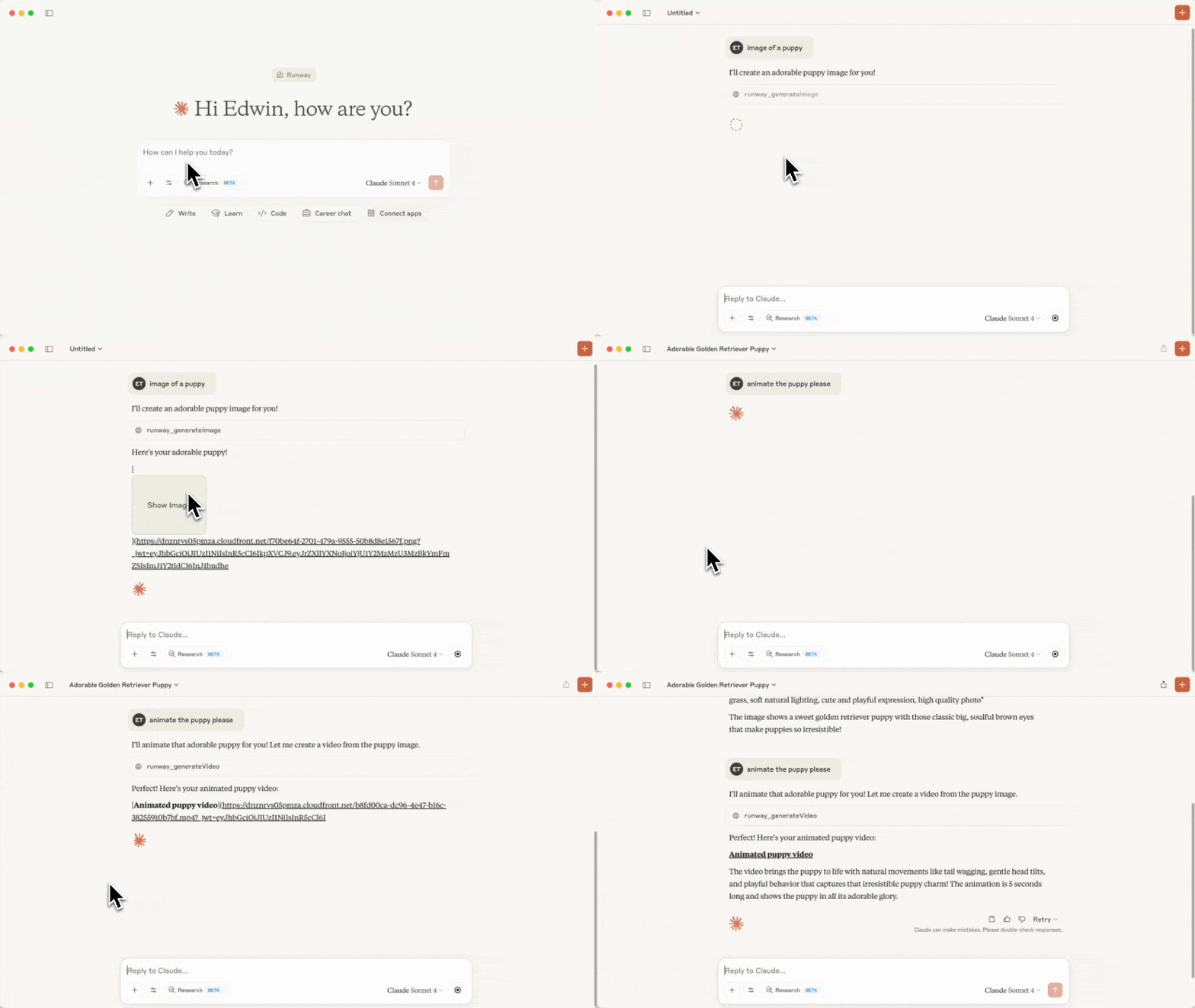
Vídeo acelerado para fins de demonstração
Runway API MCP Server
Este repositório contém o código para um servidor MCP que chama a Runway API.
Ferramentas
As seguintes ferramentas estão disponíveis neste MCP:
| Nome da Ferramenta | Descrição | Parâmetros |
|---|---|---|
runway_listModels | Lista os modelos disponíveis por capacidade e o padrão recomendado para cada um | (nenhum) |
runway_generateVideo | Gera um vídeo a partir de uma imagem e um prompt de texto | - promptImage - promptText (opcional) - ratio - duration - model (opcional) |
runway_generateImage | Gera uma imagem a partir de um prompt de texto e imagens de referência | - promptText - referenceImages (observe que imagens enviadas não funcionarão como referências, apenas as geradas anteriormente, ou URLs de imagens funcionarão.) - ratio - model (opcional) |
runway_upscaleVideo | Aumenta a resolução de um vídeo | - videoUri - model (opcional) |
runway_editVideo | Edita um vídeo, opcionalmente fornecendo imagens de referência. | - videoUri, referenceImages, promptText - model (opcional) |
runway_generateAudio | Gera áudio falado (texto para fala) a partir de texto | - promptText - voice (opcional) - model (opcional) |
runway_getTask | Obtém os detalhes de uma tarefa | - taskId |
runway_cancelTask | Cancela ou exclui uma tarefa | - taskId |
runway_getOrg | Obtém informações da organização | |
As ferramentas de geração aceitam um parâmetro opcional model para substituir o padrão
recomendado. Modelos recomendados: Nano Banana Pro (gemini_image3_pro) para imagens, Seedance
(seedance2) para vídeo e Aleph (aleph2) para edição de vídeo. Valores válidos de ratio,
duration e outros parâmetros são específicos de cada modelo, então runway_listModels retorna
os valores exatos válidos e os parâmetros obrigatórios para cada modelo — chame-o antes de escolher um
ratio/duration.
Antes de qualquer solicitação de geração ser enviada à Runway API, o servidor valida o payload contra restrições por modelo derivadas do OpenAPI (enums permitidos, intervalos numéricos, comprimentos de strings, campos obrigatórios). Payloads inválidos falham localmente com um erro legível e nunca atingem a rede.
Pré-requisitos
Antes de começar, você precisará ter configurado sua conta de Desenvolvedor na Runway API, configurado o Billing e também criado uma Chave de API.
Você também precisará ter o Node.js configurado.
Configuração
-
Clone este repositório e salve-o em uma pasta no seu computador. Lembre-se de onde salvou esta pasta, pois você precisará dela em uma etapa posterior.
-
Execute
npm installna pasta e depoisnpm run build. Você deve ver agora uma nova pasta chamadabuildcom um arquivoindex.jsdentro. Se você modificar qualquer arquivo de origem posteriormente, executenpm run buildnovamente para aplicar as alterações.
Usando o MCP como uma extensão do Claude Desktop (recomendado)
Isso instala o servidor como uma extensão não empacotada do Claude Desktop, então você não precisa editar nenhum arquivo de configuração manualmente.
-
Inicie o Claude Desktop e abra Configurações.
-
Vá para Extensões e depois Configurações Avançadas.
-
Clique em Instalar Extensão Não Empacotada e selecione a pasta que você clonou na etapa 1 (por exemplo,
/Users/edwin/runway-api-mcp-server). Clique em Instalar no prompt. -
Obtenha sua chave de API em https://dev.runwayml.com, cole-a nas configurações da extensão instalada e depois Ative a extensão.
-
Agora, tente pedir ao Claude para gerar uma imagem!
Usando o MCP com o Claude Desktop (arquivo de configuração)
Alternativamente, registre o servidor manualmente através do arquivo de configuração do Claude.
- Siga as instruções de início rápido do MCP para configurar um arquivo de configuração para o Claude. Se você já o tiver, abra-o executando:
MacOS
open ~/Library/Application\ Support/Claude/claude_desktop_config.json
Windows
notepad %APPDATA%\Claude\claude_desktop_config.json
- Adicione o
runway-api-mcp-serverà configuração, certifique-se de substituir o caminho do arquivo e a chave da Runway API.
{
  "mcpServers": {
    "runway-api-mcp-server": {
      "command": "node",
      "args": [
        "<ABSOLUTE_PATH_TO_YOUR_CLONED_REPO_FROM_STEP_1>/build/index.js"
      ],
      "env": {
        "RUNWAYML_API_SECRET": "<YOUR_RUNWAY_API_KEY_HERE>",
        "MCP_TOOL_TIMEOUT": "1000000"
      }
    }
  }
}
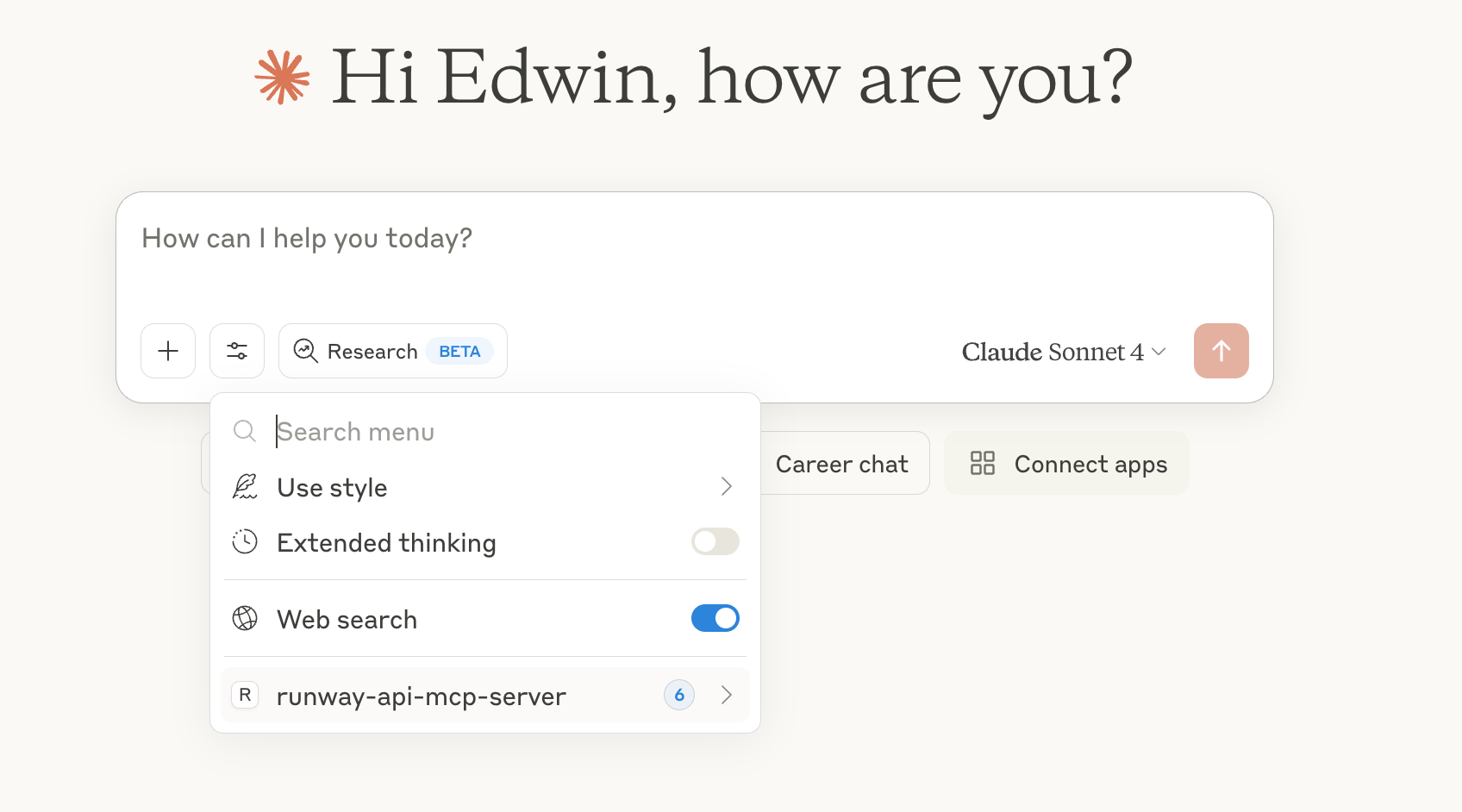
- Agora reinicie o Claude Desktop e você deve ver o
runway-api-mcp-servernas ferramentas do Claude:
- Agora, tente pedir ao Claude para gerar imagens ou vídeos!
[!NOTE]
As imagens geradas pela Runway API ficam disponíveis apenas por 24 horas no link gerado. Não há como recuperá-las após esse link expirar. Certifique-se de baixar as imagens antes que expirem.
Implantar como um servidor MCP remoto
O mesmo código pode ser executado como um servidor MCP HTTP, o que permite que clientes como claude.ai web, Cursor, Zed e Windsurf se conectem a uma única URL hospedada em vez de instalar a extensão localmente.
Desenvolvimento HTTP local
RUNWAYML_API_SECRET=key_xxx npm run start:http
# server listens on http://0.0.0.0:3000/mcp
curl http://127.0.0.1:3000/healthz   # → {"ok":true}
Para testar a partir de clientes web (claude.ai) sem implantar, use um túnel que
retorne HTTPS. O Cloudflared funciona; o ngrok está atualmente bloqueado pelo
backend de conectores da Anthropic:
cloudflared tunnel --url http://127.0.0.1:3000
Use o https://<random>.trycloudflare.com/mcp impresso como a URL do conector.
Implantando no Railway
O Railway implanta o servidor HTTP com zero configuração.
npm i -g @railway/cli           # one-time
railway login
railway init                    # create a new project, link this folder
railway up                      # builds & deploys
railway domain                  # provisions https://<your-app>.up.railway.app
Defina as variáveis de ambiente no painel do Railway (ou railway variables):
| Variável | Obrigatória | Finalidade |
|---|---|---|
RUNWAYML_API_SECRET | opcional | Chave de API do lado do servidor. Usada como fallback quando REQUIRE_AUTH=false. Não defina para implantações públicas. |
REQUIRE_AUTH | sim | Defina como true para qualquer implantação pública/multi-tenant. Força os clientes a enviarem sua chave como Authorization: Bearer <key>. |
PORT | automático | Injetada pelo Railway. O servidor lê process.env.PORT. |
Conecte-se a partir do claude.ai web:
- Configurações → Conectores → Adicionar conector personalizado
- URL:
https://<your-app>.up.railway.app/mcp - Deixe os campos OAuth em branco (fluxo de chave Bearer)
Modelo de autenticação para implantação pública
Para hospedagem pública e multi-tenant, cada usuário fornece sua própria chave da Runway API:
curl -X POST https://<your-app>.up.railway.app/mcp \
  -H "Content-Type: application/json" \
  -H "Accept: application/json, text/event-stream" \
  -H "Authorization: Bearer <user_runway_key>" \
  -d '{"jsonrpc":"2.0","id":1,"method":"tools/list"}'
Quando REQUIRE_AUTH=true, solicitações sem um cabeçalho Bearer recebem um 401.
As chaves Bearer têm prioridade sobre RUNWAYML_API_SECRET mesmo quando ambas estão definidas.