MCP Storybook Image Generator
Gere imagens de storybook para histórias infantis usando o Google Gemini AI.
Documentação
MCP Storybook Image Generator
Um servidor de nível profissional que gera belas imagens de livros de histórias com histórias infantis correspondentes usando o Google Gemini AI.
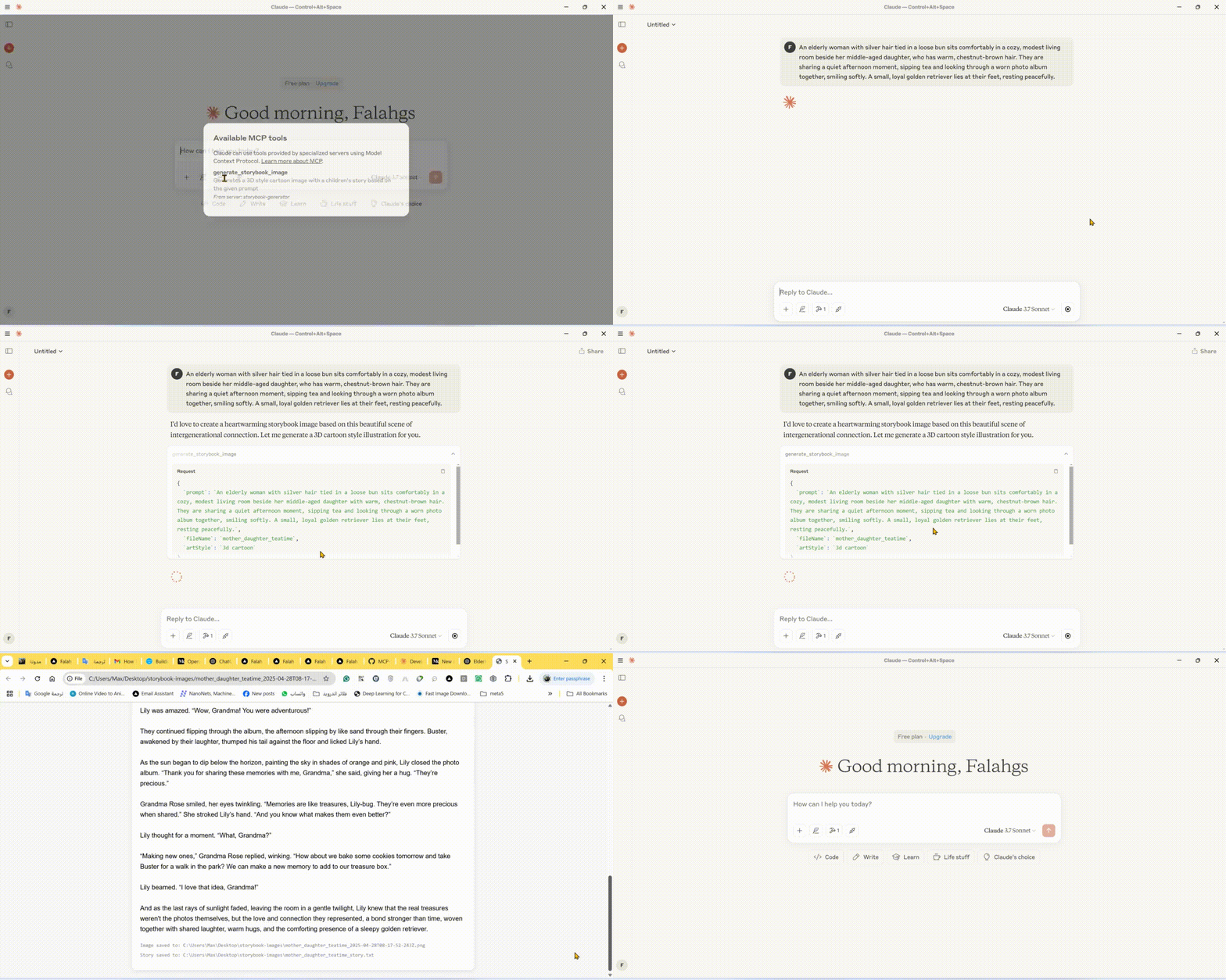
🎬 Demonstração
🌟 Recursos
- Geração de Imagens de Livros de Histórias: Cria imagens de alta qualidade em vários estilos artísticos para histórias infantis
- Criação Automática de Histórias: Gera histórias infantis envolventes para combinar com as imagens
- Múltiplos Estilos Artísticos: Escolha entre estilos 3D cartoon, watercolor, pixel art, hand drawn ou claymation
- Pré-visualização Instantânea: Abre automaticamente as imagens e histórias geradas no seu navegador
- Armazenamento Local: Salva imagens e histórias em um diretório de saída organizado
🛠️ Stack Técnica
- Framework Principal: Model Context Protocol (MCP) SDK
- Integração de IA: Google Generative AI (Gemini)
- Runtime: Node.js v14+
- Linguagem: TypeScript
- Gerenciador de Pacotes: npm
📋 Pré-requisitos
- Node.js (v14 ou superior)
- Chave de API do Google Gemini
- TypeScript
⚙️ Instalação
- Instale as dependências:
npm install
- Configure o ambiente:
Crie um arquivo
.envno diretório raiz:
GEMINI_API_KEY=your_api_key_here
- Compile o projeto:
npm run build
🚀 Usando a CLI
Você pode usar o gerador de livros de histórias diretamente da linha de comando:
# Using npx (after publishing to npm)
npx mcp-storybook-image-generator --api-key your_api_key_here --save-to-desktop

# Or run locally
node build/cli.js --api-key your_api_key_here --save-to-desktop
Opções da Linha de Comando
| Opção | Descrição |
|---|---|
--api-key <key> | Defina sua chave de API do Gemini |
--save-to-desktop | Salve os arquivos gerados na área de trabalho |
--debug | Ative o registro de depuração |
--help | Mostre informações de ajuda |
🔧 Configurando o Claude Desktop com o Servidor MCP
Para integrar este servidor com o Claude Desktop:
-
Localize o Arquivo de Configuração do Claude Desktop:
- Windows:
%APPDATA%\Claude\claude_desktop_config.json - macOS:
~/Library/Application Support/Claude/claude_desktop_config.json - Linux:
~/.config/Claude/claude_desktop_config.json
- Windows:
-
Adicione a seguinte configuração:
{
  "mcpServers": {
    "storybook-generator": {
      "command": "npx",
      "args": [
        "-y",
        "mcp-storybook-image-generator@latest",
        "--api-key",
        "your_gemini_api_key_here"
      ],
      "env": {
        "SAVE_TO_DESKTOP": "true",
        "DEBUG": "false"
      }
    }
  }
}
🚀 Ferramenta Disponível
Storybook Image Generator Tool
{
  "name": "generate_storybook_image",
  "description": "Generates a 3D style cartoon image with a children's story based on the given prompt",
  "inputSchema": {
    "type": "object",
    "properties": {
      "prompt": {
        "type": "string",
        "description": "The prompt describing the storybook scene to generate"
      },
      "fileName": {
        "type": "string",
        "description": "Base name for the output files (without extension)"
      },
      "artStyle": {
        "type": "string",
        "description": "The art style for the image (default: '3d cartoon')",
        "enum": ["3d cartoon", "watercolor", "pixel art", "hand drawn", "claymation"]
      }
    },
    "required": ["prompt", "fileName"]
  }
}
📄 Exemplo de Uso
Exemplos de Geração de Livros de Histórias
// Generate a storybook with a 3D cartoon style
{
  "name": "generate_storybook_image",
  "arguments": {
    "prompt": "A friendly dragon teaching kids how to fly",
    "fileName": "dragon_flight_lesson",
    "artStyle": "3d cartoon"
  }
}

// Generate a storybook with a watercolor style
{
  "name": "generate_storybook_image",
  "arguments": {
    "prompt": "A rabbit and turtle having a tea party in the forest",
    "fileName": "forest_tea_party",
    "artStyle": "watercolor"
  }
}

// Generate a storybook with pixel art style
{
  "name": "generate_storybook_image",
  "arguments": {
    "prompt": "A space adventure with a kid astronaut meeting friendly aliens",
    "fileName": "space_adventure",
    "artStyle": "pixel art"
  }
}
⚙️ Opções de Configuração
Variáveis de Ambiente
| Variável | Descrição | Padrão |
|---|---|---|
GEMINI_API_KEY | Chave de API do Google Gemini para geração com IA | (Obrigatório) |
SAVE_TO_DESKTOP | Força a gravação no diretório da área de trabalho | false |
DEBUG | Ativa o registro de depuração detalhado | false |
📝 Arquivos de Saída
Para cada solicitação de geração de livro de histórias, o servidor produz:
- Imagem PNG: A ilustração gerada correspondente ao seu prompt no estilo artístico solicitado
- Arquivo de Texto: A história infantil correspondente em formato de texto simples
- Pré-visualização HTML: Uma visão combinada mostrando a imagem e a história juntas
Esses arquivos são salvos em:
- Sua área de trabalho em uma pasta chamada "storybook-images" (se
SAVE_TO_DESKTOP=true) - O diretório do servidor em uma pasta chamada "storybook-images"
🤝 Contribuindo
Contribuições, issues e solicitações de recursos são bem-vindos! Sinta-se à vontade para verificar a página de issues.
📄 Licença
Este projeto é licenciado sob a Licença MIT - consulte o arquivo LICENSE para obter detalhes.