Photopea MCP Server
Crie posters, edite fotos e manipule imagens diretamente do seu terminal. Alimentado pelo Photopea — uma alternativa gratuita e baseada em navegador ao Photoshop — conectado ao seu agente de IA via MCP.
Documentação

Photopea MCP Server
Crie pôsteres, edite fotos e transforme imagens diretamente do seu terminal. Alimentado por Photopea -- uma alternativa gratuita e baseada em navegador ao Photoshop -- conectado ao seu agente de IA via MCP.



Demo
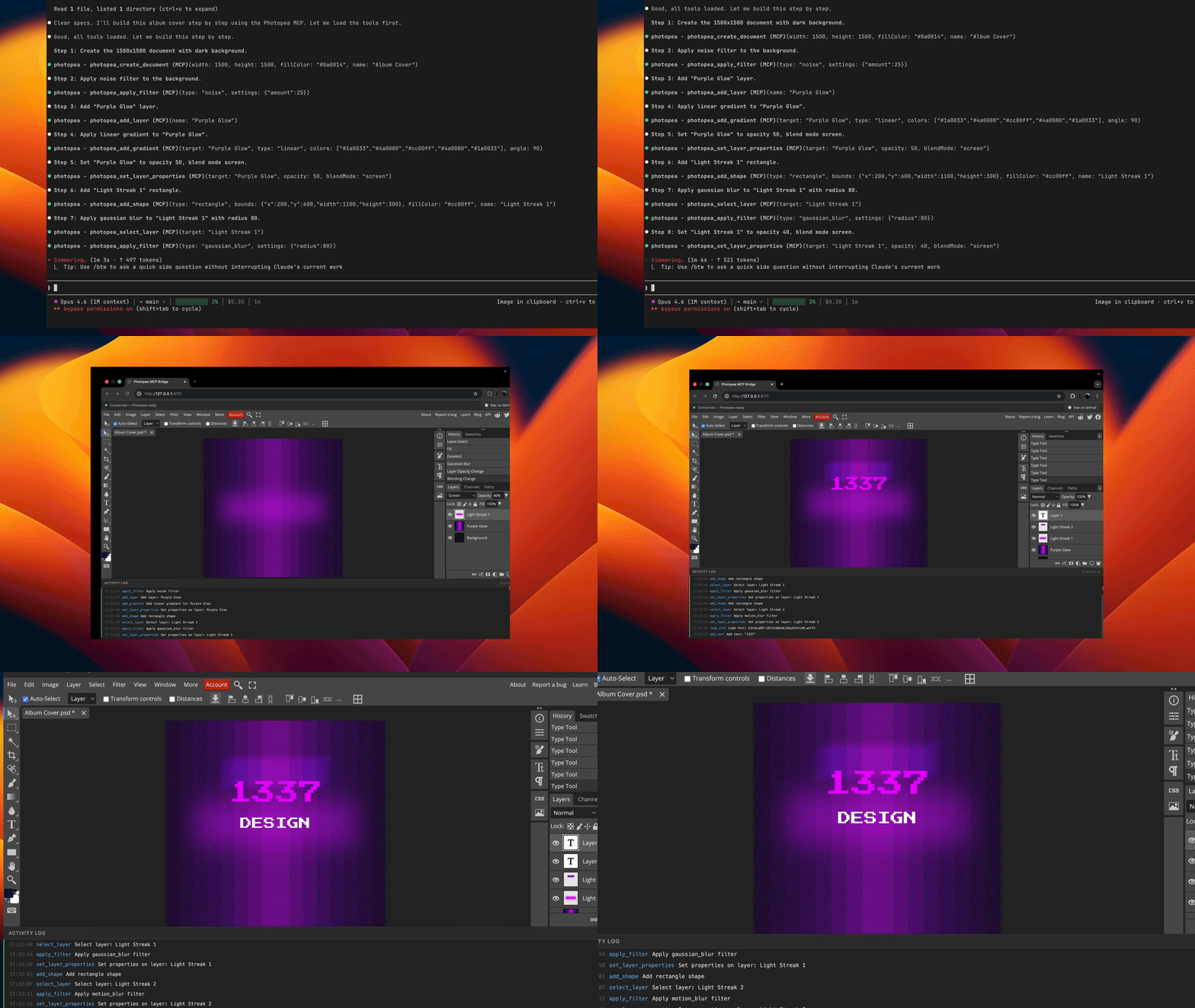
Prompt usado nesta demonstração: examples/album-cover-demo.md
Como Funciona
graph LR
    A[Agent] <-->|stdio| B[MCP Server]
    B <-->|WebSocket| C[Browser]
    C <-->|postMessage| D[Photopea]
Seu agente envia comandos de edição através do protocolo MCP. O servidor os traduz em chamadas de API JavaScript do Photopea e os executa por meio de uma ponte WebSocket para o navegador.
Nota: Uma janela do navegador será aberta automaticamente na primeira chamada de ferramenta. Isso é esperado -- o Photopea é executado inteiramente no navegador e o servidor precisa dele para realizar operações de edição de imagem.
Início Rápido
claude mcp add -s user photopea -- npx -y photopea-mcp-server
Em seguida, inicie uma nova sessão do Claude Code e peça para editar imagens. O editor do Photopea será aberto no seu navegador automaticamente na primeira chamada de ferramenta.
Instalação
Claude Code
npx (recomendado):
claude mcp add -s user photopea -- npx -y photopea-mcp-server
Instalação global:
npm install -g photopea-mcp-server
claude mcp add -s user photopea -- photopea-mcp-server
Claude Desktop
Adicione ao arquivo de configuração do Claude Desktop (~/Library/Application Support/Claude/claude_desktop_config.json no macOS):
{
  "mcpServers": {
    "photopea": {
      "command": "npx",
      "args": ["-y", "photopea-mcp-server"]
    }
  }
}
Cursor
Adicione às configurações MCP do Cursor (.cursor/mcp.json no seu projeto ou ~/.cursor/mcp.json globalmente):
{
  "mcpServers": {
    "photopea": {
      "command": "npx",
      "args": ["-y", "photopea-mcp-server"]
    }
  }
}
VS Code (Copilot)
Adicione a .vscode/mcp.json no seu projeto:
{
  "servers": {
    "photopea": {
      "command": "npx",
      "args": ["-y", "photopea-mcp-server"]
    }
  }
}
Windsurf
Adicione às configurações MCP do Windsurf (~/.windsurf/mcp.json):
{
  "mcpServers": {
    "photopea": {
      "command": "npx",
      "args": ["-y", "photopea-mcp-server"]
    }
  }
}
Ferramentas Disponíveis
Documento (5 ferramentas)
| Ferramenta | Descrição |
|---|---|
photopea_create_document | Cria um novo documento com dimensões e configurações especificadas |
photopea_open_file | Abre uma imagem de uma URL ou caminho de arquivo local |
photopea_get_document_info | Obtém informações do documento ativo (nome, dimensões, resolução, modo de cor) |
photopea_resize_document | Redimensiona o documento ativo (reamostra o conteúdo para caber) |
photopea_close_document | Fecha o documento ativo |
Camada (11 ferramentas)
| Ferramenta | Descrição |
|---|---|
photopea_add_layer | Adiciona uma nova camada de arte vazia |
photopea_add_fill_layer | Adiciona uma camada de preenchimento de cor sólida |
photopea_delete_layer | Exclui uma camada por nome ou índice |
photopea_select_layer | Torna uma camada ativa por nome ou índice |
photopea_set_layer_properties | Define opacidade, modo de mesclagem, visibilidade, nome ou estado de bloqueio |
photopea_move_layer | Translada uma camada por deslocamento x/y |
photopea_duplicate_layer | Duplica uma camada com nome novo opcional |
photopea_reorder_layer | Move uma camada na pilha (acima, abaixo, topo, base) |
photopea_group_layers | Agrupa camadas nomeadas em um grupo de camadas |
photopea_ungroup_layers | Desagrupa um grupo de camadas |
photopea_get_layers | Obtém a árvore completa de camadas como JSON |
Texto e Forma (3 ferramentas)
| Ferramenta | Descrição |
|---|---|
photopea_add_text | Adiciona uma camada de texto em coordenadas especificadas |
photopea_edit_text | Edita conteúdo ou estilo de uma camada de texto existente |
photopea_add_shape | Adiciona uma forma (retângulo ou elipse) |
Imagem e Efeitos (9 ferramentas)
| Ferramenta | Descrição |
|---|---|
photopea_place_image | Coloca uma imagem de URL ou caminho local |
photopea_apply_adjustment | Aplica brilho/contraste, matiz/saturação, níveis ou curvas |
photopea_apply_filter | Aplica desfoque gaussiano, nitidez, máscara de nitidez, ruído ou desfoque de movimento |
photopea_transform_layer | Escala, gira ou inverte uma camada |
photopea_add_gradient | Aplica um preenchimento de gradiente linear |
photopea_make_selection | Cria uma seleção retangular, elíptica ou completa |
photopea_modify_selection | Expande, contrai, suaviza ou inverte uma seleção |
photopea_fill_selection | Preenche a seleção atual com uma cor |
photopea_clear_selection | Desfaz a seleção atual |
Exportação e Utilitários (6 ferramentas)
| Ferramenta | Descrição |
|---|---|
photopea_export_image | Exporta para PNG, JPG, WebP, PSD ou SVG |
photopea_load_font | Carrega uma fonte personalizada de uma URL (TTF, OTF, WOFF2) |
photopea_list_fonts | Lista fontes disponíveis, com filtro de pesquisa opcional |
photopea_run_script | Executa JavaScript arbitrário do Photopea |
photopea_undo | Desfaz uma ou mais ações |
photopea_redo | Refaz uma ou mais ações |
Exemplos de Uso
Após a instalação, peça ao seu agente para realizar tarefas de edição de imagem:
Criar um pôster:
"Crie um documento 1920x1080 com fundo azul escuro, adicione o título 'Hello World' em Arial branco 72px e exporte como PNG para ~/Desktop/poster.png"
Editar uma foto:
"Abra ~/photos/portrait.jpg, aumente o brilho em 30, aplique um leve desfoque gaussiano de 2px e exporte como JPG para ~/Desktop/edited.jpg"
Compor imagens:
"Crie um documento 1200x630, coloque ~/assets/background.png como camada base, depois coloque ~/assets/logo.png e mova-o para o canto superior direito"
Ajustes em lote:
"Abra ~/photos/sunset.jpg, aplique matiz/saturação com +20 de saturação, aplique uma máscara de nitidez com quantidade 50 e raio 2, depois exporte como PNG"
Desenvolvimento
git clone https://github.com/attalla1/photopea-mcp-server.git
cd photopea-mcp-server
npm install
npm run build
Comandos
| Comando | Descrição |
|---|---|
npm run build | Compila TypeScript para dist/ |
npm run dev | Modo de observação com recarga automática |
npm test | Executa testes unitários e de integração |
npm start | Inicia o servidor |
Arquitetura
O servidor tem quatro componentes principais:
Servidor MCP (src/server.ts) -- Registra todas as 34 ferramentas com o SDK MCP e conecta via transporte stdio.
Ponte WebSocket (src/bridge/websocket-server.ts) -- Gerencia a conexão entre o servidor MCP e o navegador. Enfileira solicitações de execução de script e lida com respostas com tempos limite.
Construtor de Scripts (src/bridge/script-builder.ts) -- Funções puras que traduzem parâmetros de ferramentas em chamadas de API JavaScript do Photopea. Cada função construtora gera uma string de script que o Photopea pode executar.
Frontend do Navegador (src/frontend/index.html) -- Um aplicativo de página única que carrega o Photopea em um iframe, conecta-se à ponte WebSocket e transmite scripts para o Photopea via postMessage. Retorna os resultados de volta pelo WebSocket.
src/
  index.ts              # Entry point: HTTP server, browser launch, MCP startup
  server.ts             # MCP server initialization and tool registration
  bridge/
    websocket-server.ts # WebSocket bridge with request queue
    script-builder.ts   # Photopea JS code generators
    types.ts            # Protocol message types
  tools/
    document.ts         # Document operations (5 tools)
    layer.ts            # Layer operations (11 tools)
    text.ts             # Text and shape operations (3 tools)
    image.ts            # Image, adjustment, filter operations (9 tools)
    export.ts           # Export and utility operations (6 tools)
  utils/
    file-io.ts          # Local file read/write, URL fetching
    platform.ts         # Port discovery, browser launch
  frontend/
    index.html          # Browser UI with Photopea iframe
Segurança
- O servidor MCP vincula-se a
127.0.0.1(somente localhost) e não é acessível pela rede. - A ferramenta
photopea_run_scriptexecuta JavaScript arbitrário dentro do iframe isolado do Photopea. Ela é marcada como destrutiva e requer aprovação do usuário em clientes MCP que suportam anotações de ferramentas. - As operações de arquivo (
open_file,export_image,place_image) leem e gravam arquivos com as mesmas permissões do usuário que executa o servidor.
Limitações Conhecidas
- Scripts pesados (por exemplo, gradientes com muitos passos de cor) podem fazer com que a interface do navegador do Photopea fique sem resposta. As operações ainda são concluídas com sucesso em segundo plano e as exportações funcionarão conforme o esperado.
- Atualizar a página do navegador descartará todo o trabalho não salvo. Exporte seus documentos antes de atualizar.
- Apenas uma aba do navegador deve estar aberta por vez. Várias abas entrarão em conflito pela conexão WebSocket.
- A ferramenta
reorder_layerpode fazer com que a interface do Photopea fique sem resposta. Para evitar isso, crie camadas na ordem desejada em vez de reordená-las após a criação.
Requisitos
- Node.js >= 18
- Um navegador web moderno (Chrome, Firefox, Edge, Safari)
Licença
MIT