Sweet Home 3D MCP Server
Plugin do servidor MCP para o Sweet Home 3D que permite que assistentes de IA criem paredes, coloquem móveis, apliquem texturas e renderizem designs de interiores em 3D — 42 ferramentas, zero dependências externas.
Documentação
Plugin Sweet Home 3D MCP



Um plugin para Sweet Home 3D que incorpora um servidor MCP (Model Context Protocol) diretamente dentro do aplicativo. Permite que o Claude e outros assistentes de IA controlem o Sweet Home 3D via HTTP — criar paredes, colocar móveis, renderizar fotos e muito mais — sem qualquer proxy externo ou processo de servidor separado.
Claude Desktop / Claude Code
         │  HTTP (JSON-RPC 2.0)
         ▼
┌─────────────────────────────────────┐
│  Sweet Home 3D  +  MCP Plugin       │
│  Built-in HTTP server on port 9877  │
│  http://127.0.0.1:9877/mcp         │
└─────────────────────────────────────┘
O Claude Code conecta-se diretamente a este endpoint. O Claude Desktop precisa de uma pequena ponte local (mcp-remote) no meio — consulte Configuração do Claude.
Capturas de tela
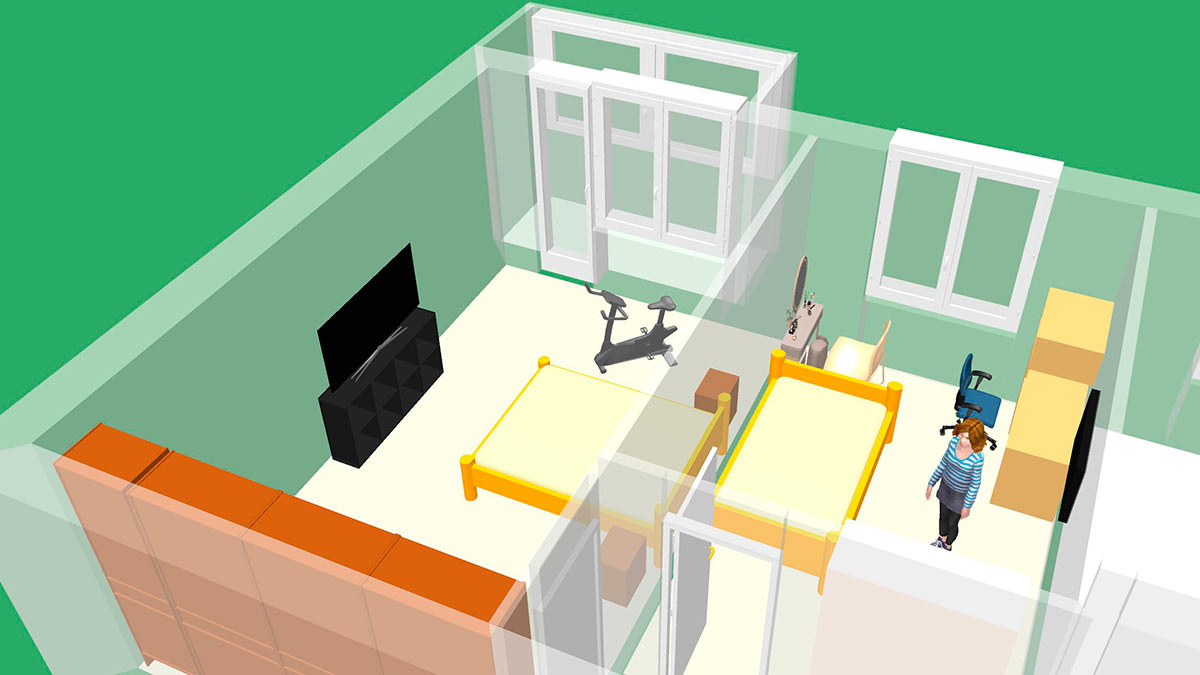
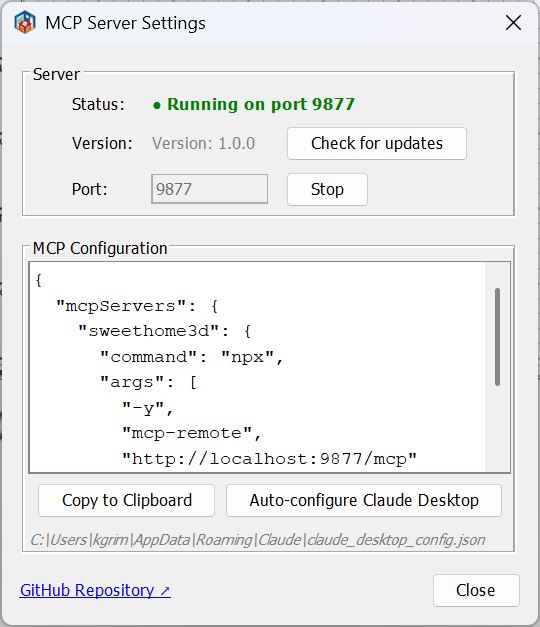
Requisitos
| Requisito | Versão |
|---|---|
| Sweet Home 3D | 6.0 ou mais recente |
| Java (incluído no SH3D ou do sistema) | 11 ou mais recente |
| Node.js | LTS atual — apenas para Claude Desktop (executa a ponte mcp-remote) |
Nota: O Sweet Home 3D acompanha um JRE incluído. Certifique-se de que seja Java 11+. Versões muito antigas do SH3D (instalador Windows 32 bits com JRE 1.8) falharão silenciosamente ao carregar o plugin devido a
UnsupportedClassVersionError.
Instalação
Passo 1. Baixe o arquivo .sh3p mais recente em Releases.
Passo 2. Instale-o.
macOS (mais fácil): clique duas vezes no arquivo .sh3p. O Sweet Home 3D abre, instala o plugin e confirma com uma caixa de diálogo. Nada para copiar manualmente. Se o Finder não abrir o arquivo com o Sweet Home 3D, clique com o botão direito e escolha Abrir com → Sweet Home 3D. Clicar duas vezes funciona da mesma forma no Windows e Linux onde a extensão .sh3p está associada ao Sweet Home 3D.
Qualquer plataforma (manual): copie o arquivo para a pasta de plugins, criando a pasta se ela não existir:
| SO | Pasta de plugins |
|---|---|
| Windows | %APPDATA%\eTeks\Sweet Home 3D\plugins\ |
| macOS | ~/Library/Application Support/eTeks/Sweet Home 3D/plugins/ |
| Linux | ~/.sweethome3d/plugins/ |
Passo 3. (Re)inicie o Sweet Home 3D. O servidor MCP inicia automaticamente na porta 9877.
Você pode verificar se está em execução: Ferramentas → Servidor MCP... mostra o status do servidor.
Solução de problemas
macOS: o servidor MCP não inicia (não é possível abrir a porta)
A versão da Mac App Store do Sweet Home 3D é sandboxed e não inclui a permissão com.apple.security.network.server, portanto não é permitido abrir um socket de escuta. Como o plugin escuta na porta 9877, o servidor MCP não pode iniciar nessa versão.
Correção: use uma versão não sandboxed do Sweet Home 3D — a versão "Java" autônoma / instalador de sweethome3d.com em vez da versão da Mac App Store.
Configuração do Claude
Inicie o Sweet Home 3D primeiro: o servidor MCP existe apenas enquanto o aplicativo está em execução.
Claude Code
Crie .mcp.json no diretório do seu projeto:
{
  "mcpServers": {
    "sweethome3d": {
      "type": "http",
      "url": "http://localhost:9877/mcp"
    }
  }
}
Claude Desktop
O Claude Desktop não carrega entradas "type": "http" de claude_desktop_config.json — essa entrada é ignorada. Ele inicia servidores MCP como comandos locais, então o plugin é alcançado através da ponte mcp-remote (requer Node.js). Adicione isso a claude_desktop_config.json:
{
  "mcpServers": {
    "sweethome3d": {
      "command": "npx",
      "args": ["-y", "mcp-remote", "http://127.0.0.1:9877/mcp"]
    }
  }
}
Em seguida, saia completamente do Claude Desktop e inicie-o novamente.
O botão "Auto-configurar Claude Desktop" em Ferramentas → Servidor MCP... escreve uma entrada equivalente para você (e mantém uma cópia
.bakda configuração anterior). Ele usalocalhostcomo host; se o Claude Desktop não conseguir conectar, substitua por127.0.0.1.
Comandos disponíveis
44 comandos em 14 categorias.
Cena
| Comando | Descrição |
|---|---|
get_state | Estado completo da cena: paredes, móveis, cômodos, câmera, rótulos, níveis |
clear_scene | Remover todos os objetos da cena |
Paredes
| Comando | Descrição |
|---|---|
create_wall | Parede única entre dois pontos |
create_walls | Cômodo retangular (4 paredes conectadas) |
modify_wall | Alterar altura, espessura, cor, arco, coordenadas |
delete_wall | Excluir parede por ID |
connect_walls | Conectar duas paredes para renderização correta de cantos |
Cômodos
| Comando | Descrição |
|---|---|
create_room_polygon | Cômodo a partir de uma matriz de pontos de polígono |
modify_room | Alterar nome, cor do piso/teto, visibilidade |
delete_room | Excluir cômodo por ID |
Móveis
| Comando | Descrição |
|---|---|
list_categories | Todas as categorias do catálogo de móveis com contagens de itens |
list_furniture_catalog | Navegar pelo catálogo; filtrar por nome, categoria ou tipo |
place_furniture | Colocar um item do catálogo na cena |
modify_furniture | Mover, girar, redimensionar, recolorir móveis por ID; definir arcos de abertura de portas/janelas (sashPreset / sashes) |
delete_furniture | Excluir móvel por ID |
duplicate_objects | Duplicar um ou mais objetos por ID |
group_furniture | Agrupar várias peças em um único objeto |
ungroup_furniture | Dividir um grupo de volta em peças individuais |
Portas e Janelas
| Comando | Descrição |
|---|---|
place_door_or_window | Colocar do catálogo em uma parede (calcula automaticamente posição e ângulo); sashPreset / sashes opcionais para o arco de abertura na planta |
Texturas e Aparência
| Comando | Descrição |
|---|---|
list_textures_catalog | Navegar pelo catálogo de texturas; filtrar por nome ou categoria |
apply_texture | Aplicar textura do catálogo ao lado da parede ou superfície do cômodo |
set_environment | Cores do chão/céu, iluminação, transparência de paredes, modo de desenho |
Formas 3D
| Comando | Descrição |
|---|---|
generate_shape | Criar geometria 3D personalizada: primitivas (caixa, esfera, cilindro, cone, cunha, arco, escadas, toro, hemisfério, tubo), extrusão, malha e operações booleanas CSG (união, subtração, interseção) |
Anotações
| Comando | Descrição |
|---|---|
add_label | Anotação de texto na planta baixa 2D |
add_dimension_line | Linha de medição com deslocamento automático |
modify_dimension_line | Mover extremidades de uma linha de dimensão ou deslocamento por ID |
delete_dimension_line | Excluir linha de dimensão por ID |
Câmera
| Comando | Descrição |
|---|---|
set_camera | Alternar para modo superior/observador; definir posição, ponto lookAt ou objeto target |
store_camera | Salvar o ponto de vista atual como marcador nomeado |
get_cameras | Listar todos os pontos de vista de câmera salvos |
Multi-nível
| Comando | Descrição |
|---|---|
add_level | Adicionar um novo nível (andar/pavimento) |
list_levels | Listar todos os níveis; mostra qual está selecionado atualmente |
set_selected_level | Alternar o nível ativo |
delete_level | Excluir um nível e todos os seus objetos |
Renderização e Exportação
| Comando | Descrição |
|---|---|
render_photo | Renderização 3D com ray tracing (Sunflow); vista padrão ou panorâmica de cima; JPEG embutido ou PNG salvo |
export_plan_image | Planta baixa 2D como PNG |
export_svg | Planta baixa 2D como SVG |
export_to_obj | Cena 3D como Wavefront OBJ (ZIP: OBJ + MTL + texturas) |
Salvar / Carregar
| Comando | Descrição |
|---|---|
save_home | Salvar a cena em um arquivo .sh3d |
load_home | Carregar um arquivo .sh3d, substituindo a cena atual |
Pontos de verificação (linha do tempo de desfazer)
| Comando | Descrição |
|---|---|
checkpoint | Salvar um snapshot em memória (descrição opcional) |
restore_checkpoint | Restaurar de um snapshot (suporta modo forçado) |
list_checkpoints | Listar todos os snapshots com a posição atual do cursor de desfazer |
Lote
| Comando | Descrição |
|---|---|
batch_commands | Executar vários comandos em uma única solicitação |
Sistema de Coordenadas
- Unidades: centímetros (500 = 5 metros)
- Eixo X: direita, eixo Y: para baixo (coordenadas de tela)
- Todos os IDs de objetos são UUIDs estáveis — seguros para uso em várias chamadas
Compilação a partir do Código Fonte
Pré-requisitos: Java 11+, Maven 3.6+ (ou use o wrapper mvnw incluído).
# 1. Clone
git clone https://github.com/grimashevich/sweethome3d-mcp-server.git
cd sweethome3d-mcp-server

# 2. Obtain SweetHome3D.jar (copies from your SH3D installation or downloads it)
./scripts/setup-dev.sh        # macOS / Linux / Git Bash on Windows
# scripts\setup-dev.bat       # Windows Command Prompt

# 3. Build
./mvnw clean package

# 4. Run tests
./mvnw test

# The plugin artifact is at:
# target/sh3d-mcp-plugin-1.0.0.sh3p
Por que o script de configuração?
SweetHome3D.jaré um binário de 46 MB excluído do git. O script primeiro verifica sua instalação local do Sweet Home 3D (mais rápido, funciona offline), depois recorre ao download do SourceForge. Os três JARs Java3D (j3dcore,j3dutils,vecmath) estão incluídos emlib/diretamente.
Arquitetura
O plugin é um único componente autocontido sem dependências externas de runtime:
plugin— Ponto de entrada (SH3DMcpPlugin), diálogo de configuraçõeshttp— Servidor MCP HTTP streamable (JSON-RPC 2.0, porta 9877)command— 44 manipuladores de comandos, auto-registrados viaCommandRegistrybridge— Wrapper thread-safe da API do Sweet Home 3D (HomeAccessorvia EDT,CheckpointManager,ObjectResolver)protocol— Parser JSON escrito à mão (zero dependências externas)config— Configurações do plugin, auto-configurador do Claude Desktop
Consulte ARCHITECTURE.md para o design completo, decisões ADR e diagramas de sequência.
Adicionando um Novo Comando
Uma única classe é suficiente — o registro a detecta automaticamente:
public class MyCommandHandler implements CommandHandler, CommandDescriptor {

    @Override
    public Response execute(Request request, HomeAccessor accessor) {
        // All Home mutations must run on the Event Dispatch Thread:
        Object result = accessor.runOnEDT(() -> {
            Home home = accessor.getHome();
            // ... do something
            return "done";
        });
        return Response.success(result);
    }

    @Override
    public String getDescription() { return "Does something useful."; }

    @Override
    public Map<String, Object> getSchema() {
        return SchemaBuilder.object()
            .prop("name", "string", "Object name")
            .required("name")
            .build();
    }
}
Em seguida, registre-a em SH3DMcpPlugin.createCommandRegistry():
registry.register("my_command", new MyCommandHandler());
Consulte CONTRIBUTING.md para o guia completo de desenvolvimento.
Licença
GNU General Public License v2.0 — consulte LICENSE para detalhes.
Este plugin usa a API de Plugin do Sweet Home 3D (GPL v2) e Java3D (licença BSD / JOGL).