DICOM MCP Server
Permite que assistentes de IA consultem, leiam e movam dados em servidores DICOM como PACS e VNA.
Documentação
Servidor MCP DICOM para Sistemas de Imagens Médicas 🏥



O servidor dicom-mcp permite que assistentes de IA consultem, leiam e movam dados em servidores DICOM (PACS, VNA, etc.).
🤝 Contribuir • 📝 Reportar Bug •
---------------------------------------------------------------------
🧑⚕️ User: "Any significant findings in John Doe's previous CT report?"
🧠 LLM → ⚙️ Tools:
query_patients → query_studies → query_series → extract_pdf_text_from_dicom
💬 LLM Response: "The report from 2025-03-26 mentions a history of splenomegaly (enlarged spleen)"
🧑⚕️ User: "What's the volume of his spleen at the last scan and the scan today?"
🧠 LLM → ⚙️ Tools:
(query_studies → query_series → move_series → query_series → extract_pdf_text_from_dicom) x2
(The move_series tool sends the latest CT to a DICOM segmentation node, which returns volume PDF report)
💬 LLM Response: "last year 2024-03-26: 412cm³, today 2025-04-10: 350cm³"
---------------------------------------------------------------------
✨ Recursos Principais
dicom-mcp fornece ferramentas para:
- 🔍 Consultar Metadados: Pesquisar pacientes, estudos, séries e instâncias usando vários critérios.
- 📄 Ler Relatórios DICOM (PDF): Recuperar instâncias DICOM contendo PDFs encapsulados (por exemplo, relatórios clínicos) e extrair o conteúdo de texto.
- 📥 Baixar Arquivos DICOM: Baixar instâncias DICOM do servidor para um diretório local usando C-GET. Recuperar séries inteiras ou instâncias específicas para análise e processamento local.
- ➡️ Enviar Imagens DICOM: Enviar séries ou estudos para outros destinos DICOM, por exemplo, endpoints de IA para segmentação de imagens, classificação, etc.
- ⚙️ Utilitários: Gerenciar conexões e entender opções de consulta.
🚀 Início Rápido
📥 Instalação
Instale usando uv ou pip:
uv tool install dicom-mcp
Ou clonando o repositório:
# Clone and set up development environment
git clone https://github.com/Y5ive9ine/dicom-mcp
cd dicom mcp

# Create and activate virtual environment
uv venv
source .venv/bin/activate

# Install with test dependencies
uv pip install -e ".[dev]"
⚙️ Configuração
dicom-mcp requer um arquivo de configuração YAML (config.yaml ou similar) definindo nós DICOM e títulos de chamada AE. Adapte a configuração ou mantenha como está para compatibilidade com o servidor ORTHANC de exemplo.
nodes:
  main:
    host: "localhost"
    port: 4242
    ae_title: "ORTHANC"
    description: "Local Orthanc DICOM server"

current_node: "main"
calling_aet: "MCPSCU"
[!AVISO] DICOM-MCP não se destina ao uso clínico e não deve ser conectado a bancos de dados hospitalares ao vivo ou bancos de dados com dados sensíveis de pacientes. Fazer isso pode levar tanto à perda de dados de pacientes quanto ao vazamento de dados de pacientes na internet. DICOM-MCP pode ser usado com LLMs de peso aberto hospedados localmente para privacidade total dos dados.
(Opcional) Servidor ORTHANC de exemplo
Se você não tiver um servidor DICOM disponível, pode executar um servidor ORTHANC local usando Docker:
Clone o repositório e instale as dependências de teste pip install -e ".[dev]
cd tests
docker ocmpose up -d
cd ..
pytest # uploads dummy pdf data to ORTHANC server
Interface em http://localhost:8042
🔌 Integração MCP
Adicione à configuração do seu cliente (por exemplo, claude_desktop_config.json):
{
  "mcpServers": {
    "dicom": {
      "command": "uv",
      "args": ["tool","dicom-mcp", "/path/to/your_config.yaml"]
    }
  }
}
Para desenvolvimento:
{
    "mcpServers": {
        "arxiv-mcp-server": {
            "command": "uv",
            "args": [
                "--directory",
                "path/to/cloned/dicom-mcp",
                "run",
                "dicom-mcp",
                "/path/to/your_config.yaml"
            ]
        }
    }
}
🛠️ Visão Geral das Ferramentas
dicom-mcp fornece quatro categorias de ferramentas para interação com servidores DICOM e dados DICOM.
🔍 Consultar Metadados
query_patients: Pesquisar pacientes com base em critérios como nome, ID ou data de nascimento.query_studies: Encontrar estudos usando ID do paciente, data, modalidade, descrição, número de acesso ou UID do estudo.query_series: Localizar séries dentro de um estudo específico usando modalidade, número/descrição da série ou UID da série.query_instances: Encontrar instâncias individuais (imagens/objetos) dentro de uma série usando número da instância ou UID da instância SOP.
📄 Ler Relatórios DICOM (PDF)
extract_pdf_text_from_dicom: Recuperar uma instância DICOM específica contendo um PDF encapsulado e extrair seu conteúdo de texto.
📥 Baixar Arquivos DICOM
retrieve_dicom_instances: Baixar instâncias DICOM do servidor para um diretório local usando C-GET. Recuperar séries inteiras ou instâncias específicas para análise e processamento local.
➡️ Enviar Imagens DICOM
move_series: Enviar uma série DICOM específica para outro nó DICOM configurado usando C-MOVE.move_study: Enviar um estudo DICOM inteiro para outro nó DICOM configurado usando C-MOVE.
⚙️ Utilitários
list_dicom_nodes: Mostrar o nó DICOM atualmente ativo e listar todos os nós configurados.switch_dicom_node: Alterar o nó DICOM ativo para operações subsequentes.verify_connection: Testar a conexão de rede DICOM com o nó atualmente ativo usando C-ECHO.get_attribute_presets: Listar os níveis de detalhe disponíveis (mínimo, padrão, estendido) para resultados de consulta de metadados.
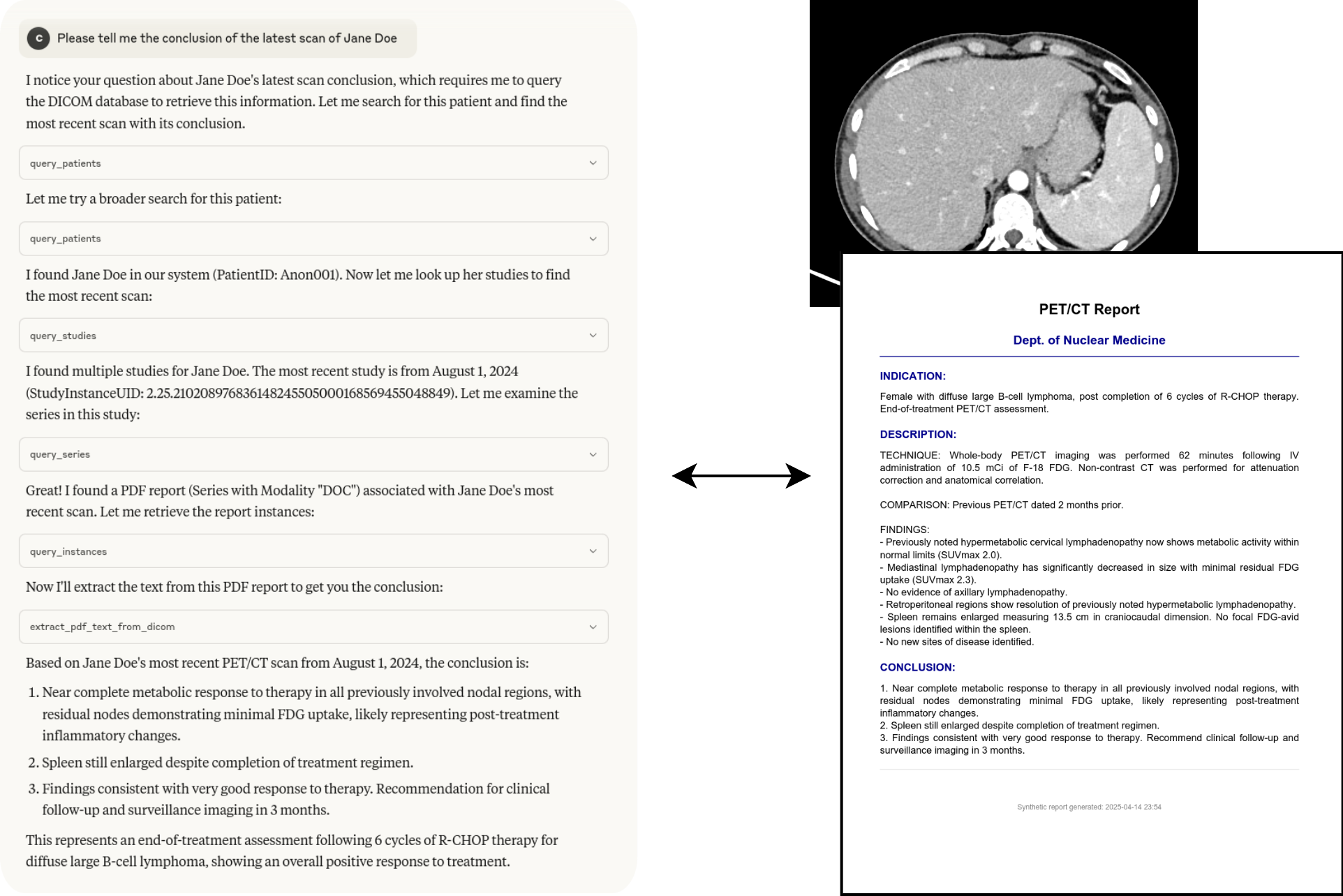
Exemplo de interação
As ferramentas podem ser encadeadas para responder perguntas complexas:
📈 Contribuindo
Executando Testes
Os testes exigem um servidor Orthanc DICOM em execução. Você pode usar Docker:
# Navigate to the directory containing docker-compose.yml (e.g., tests/)
cd tests
docker-compose up -d
Execute os testes usando pytest:
# From the project root directory
pytest
Pare o contêiner Orthanc:
cd tests
docker-compose down
Depuração
Use o MCP Inspector para depurar a comunicação do servidor:
npx @modelcontextprotocol/inspector uv run dicom-mcp /path/to/your_config.yaml --transport stdio
🙏 Agradecimentos
- Construído usando pynetdicom
- Usa PyPDF2 para extração de texto de PDF
Exemplos de Uso
Consulta Básica de Paciente
# Find all patients with name starting with "SMITH"
patients = query_patients(name_pattern="SMITH*")
Consulta de Estudo com Intervalo de Datas
# Find CT studies from January 2023
studies = query_studies(
    modality_in_study="CT",
    study_date="20230101-20230131"
)
Baixar Arquivos DICOM
# Download entire series to local directory
result = retrieve_dicom_instances(
    series_instance_uid="1.2.840.113619.2.1.1.322.1600364094.412.2005",
    output_directory="/path/to/local/dicom/files"
)

# Download specific instance only
result = retrieve_dicom_instances(
    series_instance_uid="1.2.840.113619.2.1.1.322.1600364094.412.2005",
    sop_instance_uid="1.2.840.113619.2.1.1.322.1600364094.412.3001",
    output_directory="/path/to/local/dicom/files"
)

print(f"Downloaded {result['total_files']} files ({result['total_size_mb']} MB)")
print(f"Files saved to: {result['output_directory']}")

# Files will be named with meaningful information like:
# "12345_SMITH_20230215_CT_CHEST_AXIAL_Inst001.dcm"
# "12345_SMITH_20230215_CT_CHEST_AXIAL_Inst002.dcm"
Extrair Relatórios PDF
# Extract text from a DICOM PDF report
result = extract_pdf_text_from_dicom(
    study_instance_uid="1.2.840.113619.2.1.1.322.1600364094.412.1009",
    series_instance_uid="1.2.840.113619.2.1.1.322.1600364094.412.2005",
    sop_instance_uid="1.2.840.113619.2.1.1.322.1600364094.412.3001"
)

if result["success"]:
    print("Report text:", result["text_content"])