Urlbox Full Page Screenshots
공식Urlbox 스크린샷 API용 MCP 서버입니다. 클라이언트가 웹사이트에서 스크린샷을 찍고, PDF를 생성하며, HTML/마크다운을 추출하는 등의 작업을 수행할 수 있게 해줍니다.
Urlbox Full Page Screenshots MCP(으)로 무엇을 할 수 있나요?
- 전체 페이지 스크린샷 촬영 — 광고나 쿠키 배너를 차단하는 옵션과 함께 모든 URL의 스크린샷을 요청하세요.
- PDF 및 비디오 생성 — 개요가 포함된 태그된 PDF 또는 페이지의 비디오 렌더링을 요청하고,
save_render를 통해 로컬에 저장하세요. - 페이지 콘텐츠 추출 — 모든 기사나 웹페이지를 깔끔한 마크다운, HTML 또는 일반 기사 텍스트로 변환하세요.
- 페이지 버전 비교 — 두 URL을 시각적으로 비교하거나 휴대폰 뷰포트에서 사이트가 어떻게 보이는지 캡처하도록 요청하세요.
- Urlbox 리소스 관리 — 조직 키를 사용하여 프로젝트를 생성하거나 업데이트하고, 웹훅을 검사하며, 계정 사용량을 검토하세요.
문서
Urlbox Screenshot MCP Server
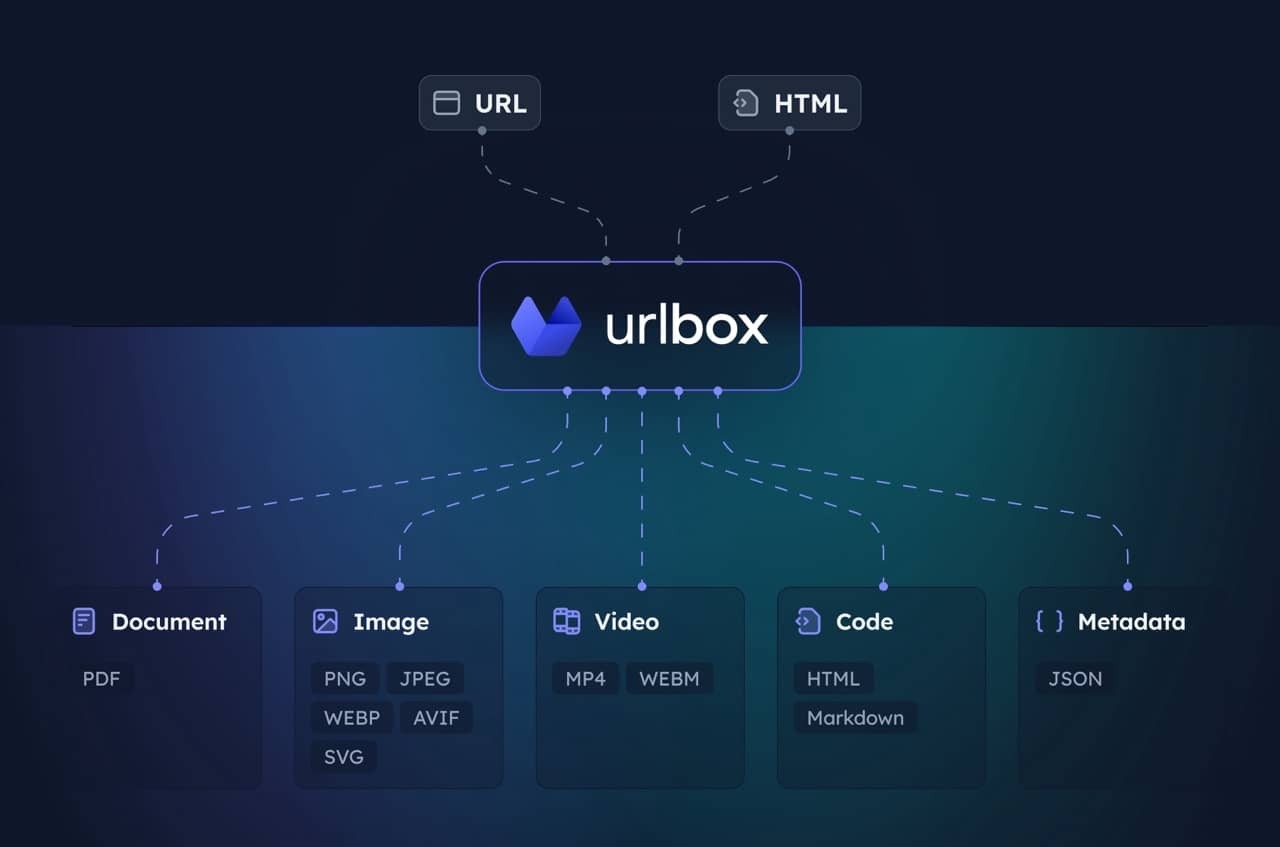
Give your AI assistant a real browser for website screenshots. The Urlbox MCP server takes screenshots, makes PDFs and videos, extracts HTML, markdown and article text, compares pages, and manages your Urlbox projects, webhooks and usage.
Use the hosted server (recommended)
Connect your client to https://api.urlbox.com/mcp. Nothing to install.
-
Claude (claude.ai and desktop): Settings, Connectors, Add custom connector, enter
https://api.urlbox.com/mcp, then sign in to Urlbox. -
ChatGPT: add a connector with the URL
https://api.urlbox.com/mcp, then sign in to Urlbox. -
Claude Code:
claude mcp add --transport http urlbox https://api.urlbox.com/mcp, then run/mcpto sign in. -
Codex:
codex mcp add urlbox --url https://api.urlbox.com/mcp, thencodex mcp login urlboxto sign in. -
Cursor: add this to
~/.cursor/mcp.json:{ "mcpServers": { "urlbox": { "url": "https://api.urlbox.com/mcp", "headers": { "Authorization": "Bearer YOUR_URLBOX_API_KEY" } } } }
Clients that can't sign in can send an API key as Authorization: Bearer <key>. An organisation API key (ubx_org_...) unlocks every tool. A project secret key works for the rendering tools only. Find your keys in the Urlbox dashboard.
Local bridge (this package)
Some clients can only start local servers. This package is a small local bridge: it runs on your machine over stdio and forwards everything to the hosted server, so you get exactly the same tools, always up to date.
{
  "mcpServers": {
    "urlbox": {
      "command": "npx",
      "args": ["-y", "@urlbox/screenshot-mcp"],
      "env": {
        "URLBOX_API_KEY": "your_api_key_here"
      }
    }
  }
}
Requires Node.js 20 or later.
| Variable | Description |
|---|---|
URLBOX_API_KEY | Your organisation API key or project secret key. |
SECRET_KEY | Also accepted, for configs written for 1.x. URLBOX_API_KEY wins if both are set. |
URLBOX_DOWNLOAD_DIR | Where save_render saves files. Defaults to ~/Downloads. |
The bridge adds one local tool, save_render, which downloads a render URL returned by any Urlbox tool and saves it to your computer. Just ask, for example "screenshot example.com and save it to my computer". Existing files are never overwritten.
Upgrading from 1.x
Your existing config keeps working: SECRET_KEY is still read and the package name and command are unchanged.
- Tools now come from the hosted server, so there are many more of them, and they keep improving without an update.
renderis still there. Itsstore_rendersoption and thedownloadtool are replaced bysave_render.- Files are saved to
~/Downloadsinstead of~/Downloads/urlbox-renders. SetURLBOX_DOWNLOAD_DIRto keep the old location. - With a project secret key you get the rendering tools. Use an organisation API key to also manage projects, webhooks and usage.
- Node.js 20 or later is required.
Example prompts
- Take a screenshot of https://example.com without ads or cookie banners.
- Save https://urlbox.com as a tagged PDF with an outline and download it to my computer.
- Turn this article into markdown: https://example.com/blog/post
- How does https://example.com look on a phone?
Development
npm install
npm test
The tests run the bridge against a local fake server, so they need no Urlbox account.
License
MIT