Skills-ContextManager
AI 에이전트의 컨텍스트를 1,000개의 스킬로 오염시키지 마세요. Skills-ContextManager는 필요할 때만 MCP를 통해 AI 에이전트에 스킬을 제공하여 AI 스킬과 워크플로우를 관리하는 자체 호스팅 웹 UI입니다. 라이브러리에 스킬을 추가하고 토글을 통해 활성화 또는 비활성화하세요. 스킬이 항상 컨텍스트에 로드되도록 하거나 AI 에이전트가 필요하다고 판단할 때 동적으로 활성화되도록 선택할 수 있습니다.
문서
Skill-ContextManager & MCP Server

A self-hosted web application for managing AI skills, workflows, and contexts with full MCP (Model Context Protocol) integration. Organize, manage, and dynamically load specialized knowledge bases into any AI Agent just by toggling your Skills On/Off in simple local hosted WEB UI.
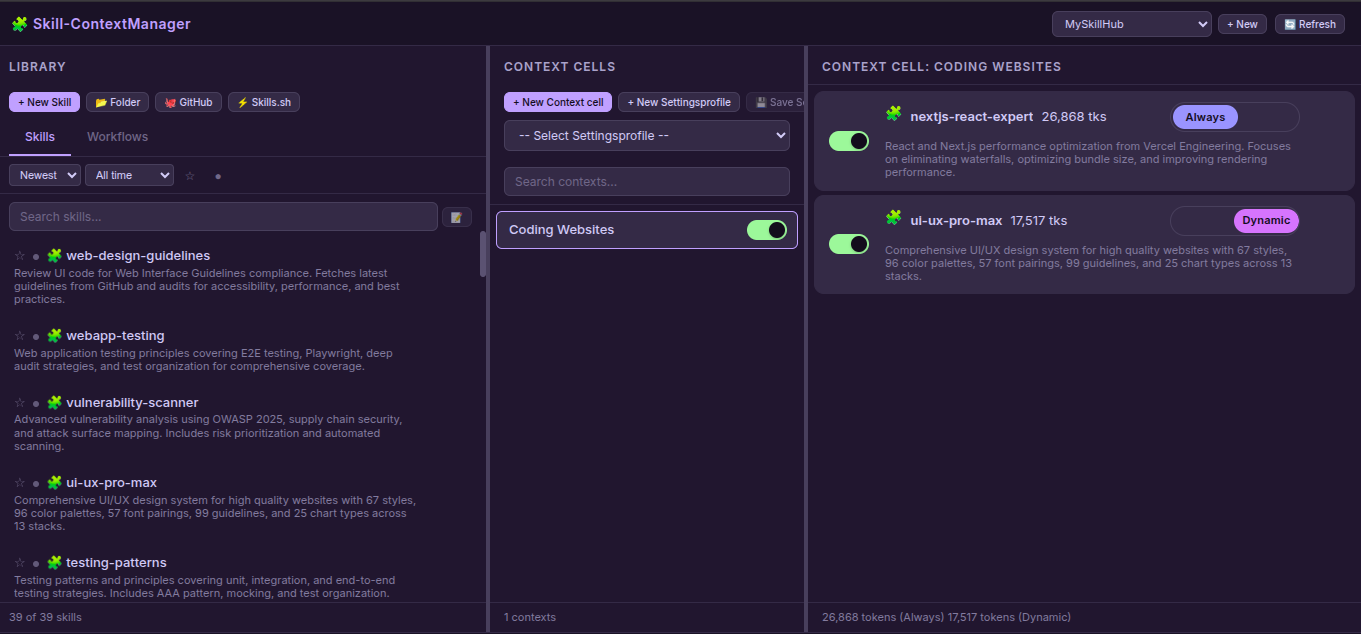
Features
Web Application
- Skill & Workflow Management: Create, edit, delete, and organize skills and workflows
- Multi-Hub Support: Create isolated workspaces with separate skills/contexts
- Context Cells: Organize skills/workflows into logical groups with enable/disable toggles
- Dual Mode: Choose Always-loaded (auto-loaded) or Dynamic (on-demand) skills by on/off toggle
- File Editor: Built-in editor with file tree, create/delete files & folders
- Import Sources:
- 📂 Folder: Upload from local filesystem
- 🐙 GitHub: Clone from GitHub repositories
- ⚡ Skills.sh: Import from Skills.sh registry
- AI Description Generation: Auto-generate skill descriptions using AI APIs
- Secure API Key Storage: API keys stored with file mode 0600 (owner-only)
- Settings Profiles: Save and load configuration presets
- Search & Filter: Smart search, sort, favorites, active/inactive filters
- Token Counting: Track context size in tokens
- Drag & Drop: Move skills/workflows to contexts
MCP Server
- 3 Essential Tools for AI Agents:
get_default_skills()- Load skills with mode"always_loaded"list_available_skills()- List all enabled skills with modesload_full_skill_context(name)- Load dynamic skill on-demand
- Hub-Aware: Works with active hub from multiple workspaces
- Mode Support:
"always_loaded"vs"dynamic"skill loading - Type Support: Both Skills and Workflows
Quick Start
# Clone the repository
git clone https://github.com/One-Man-Company/Skills-ContextManager.git
cd Skills-ContextManager

# Make setup script executable and run it
chmod +x setup.sh
./setup.sh

# Start web application
cd Skill-ContextManager && npm start
Access: http://localhost:3000
MCP configuration saved to mcp_settings.json - add this to your AI Agent's MCP settings.
⚠️ Important: Copy the content of
MCP_instructions.mdto your AI Agent's System prompt or rules configuration.
MCP Configuration
The setup.sh script generates mcp_settings.json with correct paths. Add it to your AI Agent's MCP settings file:
{
  "Skills-ContextManager": {
    "command": "/absolute/path/Skills-MCP/.venv/bin/python3",
    "args": ["-u", "/absolute/path/Skills-MCP/mcp_server.py"],
    "env": {}
  }
}
MCP Tools
AI Agents need only these 3 tools. Usage details are in MCP_instructions.md (system prompt):
| Tool | Description |
|---|---|
get_default_skills() | Load all skills with mode "always_loaded" into context |
list_available_skills() | List all enabled skills with descriptions and modes |
load_full_skill_context(name) | Load a specific skill on-demand (for mode "dynamic") |
mcpservers.org Submission
| Field | Value |
|---|---|
| Name | Skills-ContextManager |
| Description | Web UI for managing AI skills with MCP integration |
| Repository | https://github.com/One-Man-Company/Skills-ContextManager |
| Command | [path]/Skills-MCP/.venv/bin/python3 |
| Args | -u [path]/Skills-MCP/mcp_server.py |
Included Skills & Workflows
The repository includes starter content in MySkillsHUB/:
Skills (39): architecture, behavioral-modes, clean-code, code-review-checklist, documentation-templates, frontend-design, game-development, i18n-localization, mobile-design, nextjs-react-expert, nodejs-best-practices, parallel-agents, performance-profiling, python-patterns, seo-fundamentals, server-management, skill-creator, systematic-debugging, ui-ux-pro-max, vulnerability-scanner, webapp-testing, api-patterns, and more.
Workflows (3):
- best-standard-autonomous-coding
- elite-cognitive-operator-system
- plan-mode
All content is automatically copied to your library on first setup.
License
MIT License
Created: February 2026