Digma
공식코드 관찰 가능성 MCP로, OTEL/APM 데이터를 기반으로 동적 코드 분석을 가능하게 하여 코드 리뷰, 문제 식별 및 수정, 위험 코드 강조 등을 지원합니다.
Digma MCP(으)로 무엇을 할 수 있나요?
- Review PR branches for runtime issues — 어시스턴트에게 브랜치의 코드 변경 사항을 사전 프로덕션 관찰 가능성에서 발견된 문제와 대조하여 확인하도록 요청하세요.
- Surface top performance problems — 애플리케이션 전반에서 동적 코드 분석으로 감지된 가장 심각한 비효율성을 요청하세요.
- Assess impact of changing a function — 분산 추적의 런타임 사용 데이터를 기반으로 영향을 받는 다른 서비스와 코드를 식별하세요.
- Check for new issues in a specific environment — 최근 코드가 Staging과 같은 환경에서 문제를 도입했는지 질의하세요.
- Find high-impact database queries — 애플리케이션 성능에 가장 큰 영향을 미치는 데이터베이스 쿼리를 물어보세요.
문서
Digma 코드 관측 가능성 MCP 서버
에이전트가 Digma를 사용하여 코드 관측 가능성 및 동적 코드 분석을 위한 관측 가능성 인사이트에 접근할 수 있도록 하는 모델 컨텍스트 프로토콜(MCP) 서버 구현
주요 기능 🚀
- 🗣️ 관측 가능성 기반 코드 리뷰: 사전 프로덕션 관측 가능성으로 발견된 문제가 있는지 PR 브랜치를 확인합니다.
- 🔎 동적 코드 분석으로 코드 비효율성 찾기: 앱 속도를 저하시키는 코드/쿼리 내 문제를 식별합니다.
- 🔭 분산 추적의 코드 런타임 사용 데이터 활용: 주요 변경 사항을 확인하거나 관련 테스트를 생성합니다.
프롬프트 예시 💬
help me review the code changes in this branch by looking at related runtime issuesI want to improve the performance of this app. What are the three most severe issues I can fix?I'm making changes to this function, based on runtime data. What other services and code would be affected?Are there any new issues in this code based on the Staging environment?Which database queries have the most impact on the application performance?
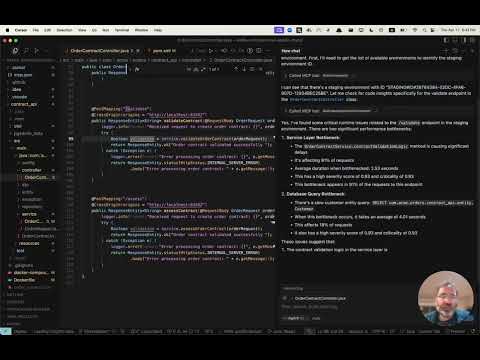
실제 작동 보기 📺
얼리 액세스 받기 👀
Digma는 동적 코드 분석을 위해 관측 가능성 데이터를 사전 처리하여 문제를 식별하고, 코드 성능 및 런타임 데이터를 추적합니다. MCP 서버 얼리 액세스에 가입하려면 MCP 페이지를 방문하세요.
설치 ⚙️
Digma MCP를 포함하도록 MCP 클라이언트(Claude, Cursor 등)를 구성하세요.
Digma 배포에는 MCP SSE 서버가 포함됩니다. 클라이언트에서 해당 URL을 사용하여 구성하거나, SuperGateway와 같은 MCP 도구를 사용하여 명령 도구로 실행할 수 있습니다.
MCP URL 경로는 다음과 같이 Digma API 키로 구성됩니다:
https://<DIGMA_API_URL>/mcp/<DIGMA_API_TOKEN>>/sse
MCP XML 예시
클라이언트가 SSE 서버를 지원하는 경우 다음 구문을 사용할 수 있습니다:
{
  "mcpServers": {
    "digma": {
    "url": "https://<DIGMA_API_URL>/mcp/DIGMA_API_TOKEN>/sse",

      }
    // ... other servers might be here ...
  }
}
MCP 서버를 명령 도구로 사용하려면 아래와 같이 SuperGateway 도구를 사용하여 URL에 브리지합니다:
{
  "digma": {
    "command": "npx",
    "args": [
      "-y",
      "supergateway",
      "--sse",
      "https://<DIGMA_API_URL>/mcp/DIGMA_API_TOKEN>/sse"
    ]
  }
}
규칙 사용 👨💼
에이전트는 자율적으로 필요에 따라 Digma가 제공하는 데이터를 사용할 시기를 선택하지만, 일부 클라이언트에서는 보다 구조화된 프로세스를 설정하기 위해 규칙과 정책을 설정할 수 있습니다.
다음은 커서 .cursor/rules 디렉토리에 추가할 수 있는 규칙 파일 예시입니다.
# Digma Memory File - Code Review Instructions

## Runtime Analysis Settings
- Environment: TEST

## Code Review Protocol
1. For any code or branch review request:
   - Get the list of changed files and methods in the current branch using `git diff`
   - Check for ALL runtime issues in TEST environment (not just for the method in context)
   - Check if any runtime issue may be related to the changed code
   - Check the runtime usage of the changed methods (based on the `git diff`)
   - Check if any of the changed methods (based on the `git diff`) have a high risk based on their performance impact
   - Synthesize the data with standard code review analysis


## Note
This file is used by the AI assistant to maintain consistent review protocols across sessions.
라이선스 📜
MIT 라이선스. LICENSE 파일을 참조하세요.