AGS Extend SDK MCP Server
공식AI 어시스턴트가 AccelByte Extend SDK 코드에 대한 질문에 답하고 더 효과적으로 생성할 수 있도록 도와주는 MCP 서버입니다.
AGS Extend SDK MCP(으)로 무엇을 할 수 있나요?
- Search Extend SDK 심볼 —
search-symbols를 사용하여 이름, 태그 또는 설명의 퍼지 매칭으로 C#, Go, Java, Python 전반의 함수와 모델을 찾습니다. - 특정 심볼 설명 —
describe-symbols를 사용하여 ID로 심볼의 전체 세부 정보(매개변수, 필드, 임포트, 반환 유형, 사용 예시, 필수 권한 포함)를 확인합니다. - 새 Extend 앱 스캐폴딩 —
create-extend-app프롬프트를 호출하여 템플릿 리포지토리를 복제하고 선택한 언어로 작동하는 샘플에서 시작합니다.
문서
AGS Extend SDK MCP Server
AI 어시스턴트(VS Code Copilot, Cursor, Claude, Gemini, Antigravity)에 AccelByte Extend SDK를 추가 컨텍스트로 제공하는 모델 컨텍스트 프로토콜(MCP) 서버로, SDK에 대한 질문에 답하고 올바른 Extend SDK 코드를 생성할 수 있도록 합니다.
기능
- 이름, 태그 또는 설명으로 Extend SDK 심볼(함수 및 모델) 검색 (퍼지 매칭)
- 특정 심볼 설명 — 매개변수, 필드, 임포트, 예제, 반환 유형, 필수 권한
create-extend-app프롬프트를 통해 템플릿 저장소에서 새 Extend 앱 스캐폴드
네 가지 언어 — C#, Go, Java, Python에 대한 SDK 참조를 제공합니다. URL 경로를 통해 연결별로 언어를 선택합니다(언어 선택 참조).
AccelByte가 Extend SDK MCP 서버를 호스팅하므로 로컬에 설치하거나 실행할 필요가 없습니다. AI 어시스턴트에 해당 언어의 호스팅된 MCP URL을 지정하기만 하면 됩니다. 로그인 불필요: 서버는 읽기 전용 SDK 참조 데이터만 노출합니다. 직접 실행하고 싶다면? 로컬 실행 및 자체 호스팅을 참조하세요.
빠른 설치
이 내용을 AI 코딩 어시스턴트에 붙여넣으면 설치 가이드를 가져와 몇 가지 질문을 하고 모든 것을 구성합니다:
Install the AGS Extend SDK MCP server for me. Fetch and follow the instructions at
https://raw.githubusercontent.com/AccelByte/ags-extend-sdk-mcp-server/refs/heads/master/INSTALL.md
VS Code Copilot, Cursor, Claude Code, Antigravity, Gemini CLI에서 작동합니다.
Claude Desktop 사용자: 가장 간단한 방법은 설정 → 커넥터 → 사용자 정의 커넥터 추가(이름:
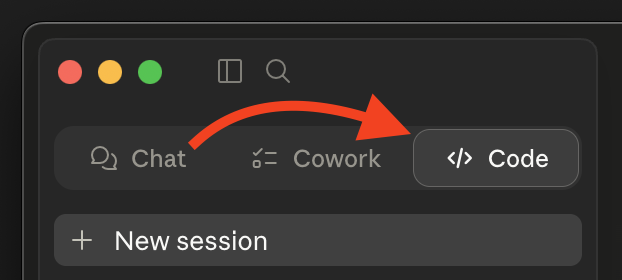
extend-sdk, URL: 사용자의 MCP URL)입니다 — AI 설치 프로그램이 필요하지 않습니다. 아래 Claude Desktop을 참조하세요.위의 빠른 설치 프롬프트를 사용하려면 먼저 코드 탭으로 전환하세요(채팅 및 Cowork는 구성 파일을 편집할 수 없습니다).
직접 구성하고 싶다면? 아래 수동 설치를 참조하세요.
수동 설치
1단계: 언어 선택 및 URL 가져오기
MCP URL은 호스팅된 서버의 기본 URL 뒤에 /extend-mcp/{language}이 붙습니다:
https://<mcp-server-host>/extend-mcp/{language}
| 언어 | URL 경로 |
|---|---|
| C# | /extend-mcp/csharp |
| Go | /extend-mcp/go |
| Java | /extend-mcp/java |
| Python | /extend-mcp/python |
<mcp-server-host>는 조직 배포의 호스트입니다 — 확실하지 않으면 AccelByte 관리자에게 문의하세요.- 하나의 호스팅 인스턴스가 모든 언어를 제공합니다. 나중에 언어를 전환하려면 후행 경로 세그먼트를 변경하기만 하면 됩니다(예:
/extend-mcp/python→/extend-mcp/go). 알 수 없는 언어를 요청하면 HTTP400가 반환됩니다. - 언어가 없는 기본 경로(
/extend-mcp)는 서버에 구성된 기본 언어를 제공합니다.
호스팅 인스턴스가 없나요? Docker로 서버를 직접 실행할 수 있습니다 — 로컬 실행 및 자체 호스팅을 참조하세요.
2단계: 클라이언트 구성
서버는 스트리밍 가능 HTTP 전송을 사용합니다. HTTP 전송을 지원하는 클라이언트는 URL에 직접 연결됩니다. stdio 전송만 지원하는 클라이언트는 mcp-remote을 브리지로 사용합니다.
mcp-remote이 필요하신가요?npx을 통해 실행되므로 Node.js 18+ 및npx사용 가능이 필요합니다 —npx --version로 확인하세요. 전역 설치가 필요하지 않습니다.
아래에서 <URL>가 보이면 1단계의 URL로 대체하세요.
Visual Studio Code (Copilot)
작업 영역(또는 사용자 settings.json)의 .vscode/mcp.json:
{
  "servers": {
    "extend-sdk": {
      "type": "http",
      "url": "<URL>"
    }
  }
}
클라이언트가 HTTP 서버에 연결할 수 없는 경우 다음으로 전환: { "command": "npx", "args": ["-y", "mcp-remote", "<URL>"] }.
VS Code MCP 문서를 참조하세요.
Cursor
작업 영역(또는 사용자 설정)의 .cursor/mcp.json:
{
  "mcpServers": {
    "extend-sdk": {
      "type": "http",
      "url": "<URL>"
    }
  }
}
클라이언트가 HTTP 서버에 연결할 수 없는 경우 다음으로 전환: { "command": "npx", "args": ["-y", "mcp-remote", "<URL>"] }.
Cursor MCP 문서를 참조하세요.
Claude Code
claude mcp add --transport http extend-sdk <URL>
대체 방법(stdio 전용 환경): claude mcp add extend-sdk -- npx -y mcp-remote <URL>.
Claude Code MCP 문서를 참조하세요.
Antigravity
프로젝트 루트의 mcp_config.json:
{
  "mcpServers": {
    "extend-sdk": {
      "type": "http",
      "url": "<URL>"
    }
  }
}
클라이언트가 HTTP 서버에 연결할 수 없는 경우 다음으로 전환: { "command": "npx", "args": ["-y", "mcp-remote", "<URL>"] }.
Antigravity MCP 문서를 참조하세요.
Gemini CLI
gemini mcp add --transport http extend-sdk <URL>
대체 방법(stdio 전용 환경): gemini mcp add extend-sdk -- npx -y mcp-remote <URL>.
Gemini CLI MCP 문서를 참조하세요.
Claude Desktop
옵션 A — 사용자 정의 커넥터 (권장)
- 설정 → 커넥터 → 사용자 정의 커넥터 추가("사용자 정의" 영역 아래)를 엽니다.
- 이름:
extend-sdk및 원격 MCP 서버 URL: 1단계의<URL>을 입력합니다. - 저장합니다.
"사용자 정의 커넥터 추가"가 보이지 않나요? 일부 팀 및 엔터프라이즈 플랜은 작업 영역 정책을 통해 사용자 정의 커넥터를 비활성화합니다. 옵션이 없거나 비활성화된 경우 옵션 B를 사용하세요.
옵션 B — mcp-remote 구성 파일 (대체 방법)
claude_desktop_config.json 편집:
- macOS:
~/Library/Application Support/Claude/claude_desktop_config.json - Windows:
%APPDATA%\Claude\claude_desktop_config.json
{
  "mcpServers": {
    "extend-sdk": {
      "command": "npx",
      "args": ["-y", "mcp-remote", "<URL>"]
    }
  }
}
저장 후 Claude Desktop을 다시 시작합니다.
도구 사용
연결되면 어시스턴트가 이러한 도구에 액세스할 수 있습니다. 어시스턴트 채팅에서 아래 예제 프롬프트를 시도해 보세요 — 요청 시 도구 실행 권한을 부여하세요.
search-symbols
퍼지 매칭을 사용하여 이름, 태그 또는 설명으로 Extend SDK 심볼을 검색합니다. 페이지 매김된 요약 목록을 반환합니다.
"사용자와 관련된 심볼 검색" · "인벤토리 심볼 찾기"
describe-symbols
ID로 특정 심볼에 대한 전체 세부 정보(필드, 매개변수, 임포트, 예제 사용법, 반환 유형 및 필수 권한)를 가져옵니다.
"
AdminCreateUser@iam및User@iam심볼 설명"
create-extend-app
Extend 앱 템플릿 저장소를 복제하고 (사용 가능한 경우 Dev Container에서) 열어 작동하는 샘플에서 시작할 수 있도록 하는 프롬프트 템플릿입니다.
create-extend-app프롬프트를 호출하고 시나리오 / 템플릿 / 언어 완성을 따릅니다.
[!TIP] 이 MCP 서버로 코딩할 때는 빈 프로젝트 대신 Extend SDK 시작하기 샘플 또는 Extend 앱 템플릿에서 시작하고, 더 나은 결과를 위해 관련 소스 파일을 컨텍스트로 추가하세요.
직접 실행
서버를 로컬(stdio)로 실행하거나 HTTP 서버를 직접 호스팅하고 싶으신가요? Docker 사용법, 환경 변수, HTTP 엔드포인트, 스모크 테스트, 소스에서 개발 및 이미지 릴리스에 대한 내용은 **로컬 실행 및 자체 호스팅**을 참조하세요.
문제 해결
도구 호출 실패 / 서버가 400 반환
URL 경로의 언어를 확인하세요. csharp, go, java 또는 python 중 하나여야 합니다(예: /extend-mcp/go). 알 수 없는 언어는 HTTP 400을 반환합니다.
클라이언트가 HTTP URL에 연결할 수 없음
일부 클라이언트는 stdio 전송만 지원합니다. 해당 클라이언트를 2단계에 표시된 mcp-remote 브리지 구성으로 전환하세요. Node.js 18+ 및 npx 사용 가능(npx --version)이 필요합니다.
"연결 거부됨" 또는 호스트에 연결할 수 없음
<mcp-server-host> 및 전체 URL이 올바른지 확인하고(AccelByte 관리자에게 문의) 네트워크에서 연결할 수 있는지 확인하세요.
문서
- 설치 가이드 — 빠른 설치 프롬프트에서 따름; 단독으로 읽을 수 있음
- 로컬 실행 및 자체 호스팅 — Docker, 환경 변수, HTTP 엔드포인트, 개발 및 이미지 릴리스
- Postman 컬렉션 —
search-symbols및describe-symbols에 대한 가져오기 및 Newman 스모크 테스트 지침
기여
이 저장소는 있는 그대로 게시됩니다. 버그 신고 및 질문은 이슈를 열어 주세요.