PlayDrop
AIエージェントからPlayDropでブラウザゲームを公開、テスト、共有できます。
ホスト型 MCP サーバー
npx add-mcp 'https://mcp.playdrop.ai/mcp'Claude Code、Codex、Cursor などにインストールできます
ドキュメント
PlayDrop
PlayDrop could not load
A required part of the page failed to download. Try loading it again.
Try again STYLESHEET_ERROR
CreatePlayTradeEarnLearnConnectorsAssetsCommunitySupport
CreatePlayTradeEarnLearnConnectorsAssetsCommunitySupport
Browse documentationAll connectors
Make and publish games from your AI app with PlayDrop (MCP)
Next stop: your friends.
Your AI buildsPlayDrop publishesFriends play
Free account · 10 games
Your game, online
Kingdom Rage@olivierPlay
playdrop.ai/@olivier/kingdom-rage
Phone or computer. Nothing to install.
Pick your app.
Set up once
Chat appsMake a game in a conversation
OpenAI
ChatGPT
Open PlayDrop in ChatGPTFull guide
- 1Press Install
- 2Sign in to PlayDropAllow
- 3New chattype @pick PlayDrop
 @PlayDrop
Anthropic
Claude
Open PlayDrop in ClaudeFull guide
- 1Press Connect
- 2Sign in to PlayDropAllow
- 3Start a chat
Then paste into your chat
Make a small game that works on phones, publish it on PlayDrop and give me the link.Your chat returns a game card with Play and a link.
Copy
Coding agentsWork from your game's folder
OpenAI
Codex
In a terminal
codex plugin marketplace add playdrop-ai/playdrop-pluginCopy
Open CodexPluginsPlayDropInstall
Sign in to PlayDrop
Anthropic
Claude Code
Inside Claude Code
/plugin marketplace add playdrop-ai/playdrop-pluginCopy
/plugin install playdrop@playdropCopy
/mcpPlayDropAuthenticate
Allow in the browser
Then ask from your game's folder
Publish this game on PlayDrop and give me the link.Claude Code also has /playdrop:publish · Your agent replies with the link.
Copy
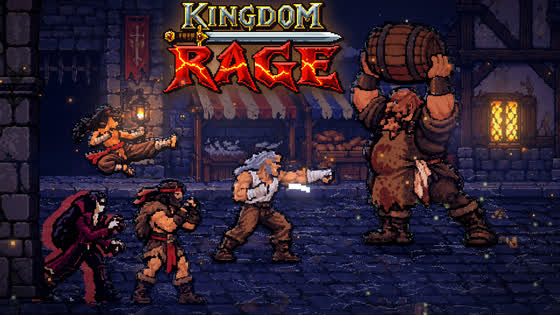
One link. Ready to play.
playdrop.ai/@olivier/kingdom-ragePlay
- Only me
- Anyone with the link
- Everyone
Ask for changes. Keep the same link.
Publishing costs nothing.
Another app?CursorGeminiAntigravityGrok BuildGrok BotGrok ChatLovableReplit
Custom MCPhttps://mcp.playdrop.ai/mcpCopy
More details
Connect it
- Open your app's guide and add PlayDrop: install the plugin, or add a custom MCP server with the PlayDrop link below.
- Sign in to your PlayDrop account when the app asks, and allow access. Never paste a password or token into a chat.
- Ask the app to read your PlayDrop account to check the connection.
textCopy
https://mcp.playdrop.ai/mcp
Ask for your first game
Start with one of these, in your own words:
Make a small game that works on phones, publish it on PlayDrop and give me the link.
Publish the game we just made on PlayDrop as unlisted, so only people with the link can play.
Add cloud saves and a leaderboard to my PlayDrop game, test it privately, then publish it.
Your AI reads PlayDrop's live guides, builds or packages the game, uploads it and replies with the link. To update a game, ask the same app again: the game keeps its link.
What your game gets
- A page and a link that last: title, art, screenshots and a trailer, rich previews when shared, and the same link through every update.
- Players everywhere: the website plus the PlayDrop apps for iOS, Android, Windows and macOS, where games play full screen. See what PlayDrop adds.
- Your choice of audience: private to test, unlisted for anyone with the link, or public for discovery on PlayDrop and in search. See who can play.
- Services PlayDrop runs for you: cloud saves, leaderboards, online parties and voice and controllers need no hosting setup, and PlayDrop hosts the realtime server code you write.
- Ways to earn: tips, in-game purchases and ads earn you credits. See monetization.
Public games get the chance to be discovered; traffic is never guaranteed.
On your phone
Claude, ChatGPT, Gemini and Grok Bot can use PlayDrop on your phone once it is connected. Set it up once, usually in a browser, then use the app on your phone with the same account.
How it works
MCP (Model Context Protocol) is the open standard AI apps use to plug into other services. PlayDrop's MCP server lets your AI app read your PlayDrop account and publish and update your games after you sign in. The PlayDrop Agent Plugin adds PlayDrop's publishing instructions to coding agents such as Claude Code, Codex and Antigravity. Any app that supports MCP servers with OAuth can connect with the link below.
Technical details
Your AI app publishes built games in one of two ways: one self-contained HTML file up to 10 MiB (simple HTML), or a folder, ZIP or .play package with catalogue.json for everything else (packaging). It keeps your source project; PlayDrop receives built output only. Games published from your AI app are updated from it, not in Studio, and Studio games stay in Studio. The full order of operations is in publish from your AI app.
If something goes wrong
Check that your app or workspace allows custom connectors, then connect again and sign in. If an upload stops halfway, ask your AI to finish the same upload rather than start a new game. Errors name their fix: see errors and recovery and troubleshooting. Your AI can report a problem with PlayDrop's feedback tool.
EnglishFrançaisDeutsch日本語한국어EspañolPortuguês (Brasil)Bahasa Indonesia繁體中文简体中文ItalianoPolskiNederlandsSvenskaNorsk bokmålSuomiTürkçeไทยTiếng Việtالعربية