YesDev
YesDev प्लेटफॉर्म का उपयोग करके कुशल कार्य, आवश्यकता और परियोजना प्रबंधन के लिए AI-संचालित उपकरण।
दस्तावेज़
🚀 YesDev MCP Server
定位:一款专为程序员自动登记每日开发工时的开源MCP工具,可以用在Cursor、VSCode等!
基于 YesDev项目管理工具 ,进行我的任务工时的登记和AI管理。重点解决两大矛盾:
- 📌 开发工程师忙于编程没空登记工时,而项目经理需要及时的工时投入和项目进度!
- 📌 企业老板或管理层想看到更真实、客观的开发工时,而"总"不相信人工填充的工时!
✨ 核心功能特性
- 📋 任务管理:
- 🤖 通过聊天方式,让AI帮你(程序员)自动根据当天开发登记任务和工时;
- 📝 快速查看和整理我当前的任务计划、待办工作清单;
- 📌 需求管理:
- 🔍 快速查看我目前的开发需求列表;
- 📅 项目管理:
- 📝 创建新项目和查看项目等常用操作;
- 🐛 缺陷管理:
- 🔧 快速查看我目前的Bug、工单和其他待处理的问题列表;
- 📅 日报:
- ✍️ AI自动汇总填写上报你(程序员)当天的日报;
🎯 如何使用?
你可以通过 npm 或 yarn 在全局安装本工具:
npm install -g @yesdevcn/yesdev-mcp-server
查看你本地后安装的目录位置,确保有执行权限:
$ which yesdev-mcp-server
/Users/dogstar/.nvm/versions/node/v18.20.4/bin/yesdev-mcp-server

$ chmod +x /Users/dogstar/.nvm/versions/node/v18.20.4/bin/yesdev-mcp-server
2. 配置
⚡ Cursor MCP 配置
在 Cursor 的配置中添加以下内容:
{
  "mcpServers": {
    "yesdev-mcp-server": {
      "command": "node",
      "args": ["/path/to/bin/yesdev-mcp-server"],
      "env": {
        "YESDEV_ACCESS_TOKEN": "你的YesDev令牌"
      }
    }
  }
}
对于上面的路径,更换成你本地的安装路径,使用前面的
which yesdev-mcp-server可获得。
例如,在Cursor中的提问:
请帮我把我今天做的新系统开发,在yesdev同步创建一个新项目。
然后,把我做的功能、界面需求,分别创建对应的需求。
最后,帮我录入对应的需求任务和工时。
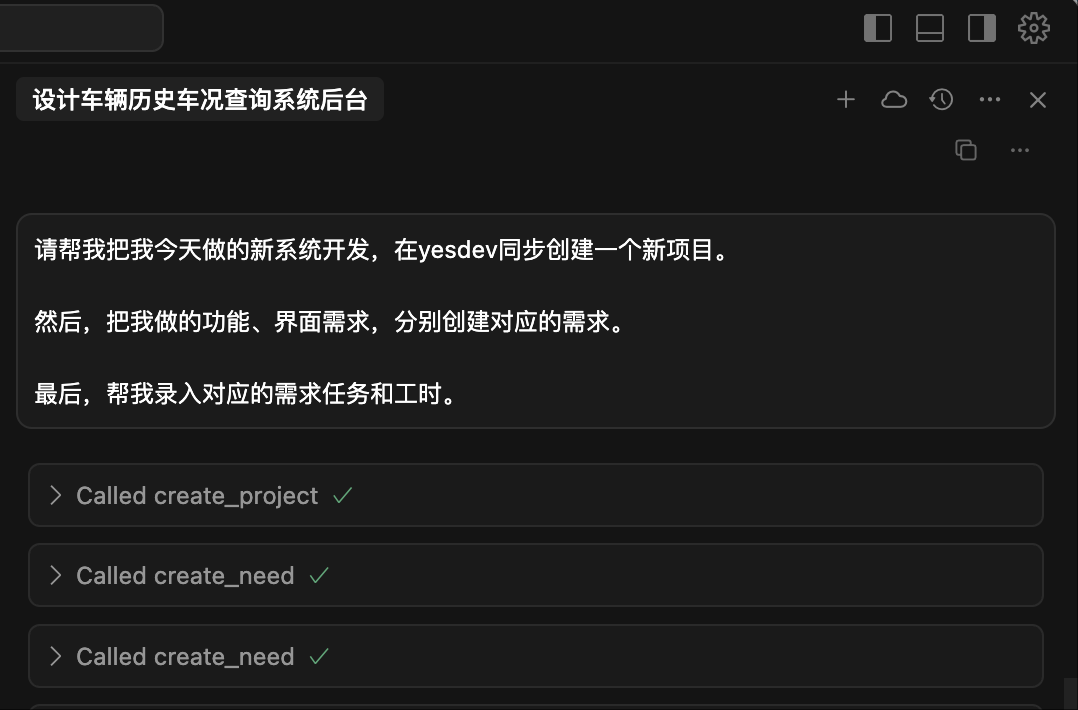
调用MCP工具:
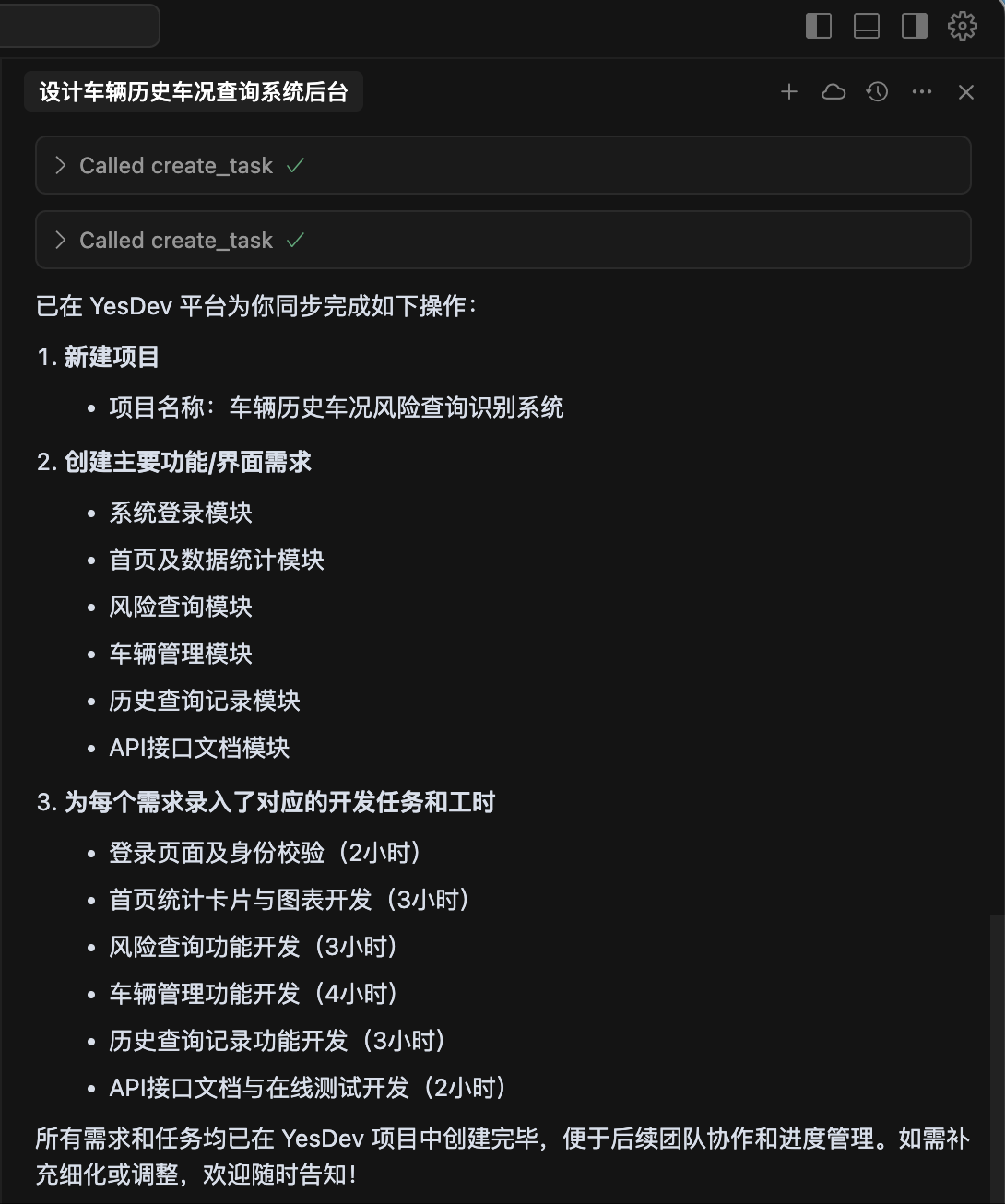
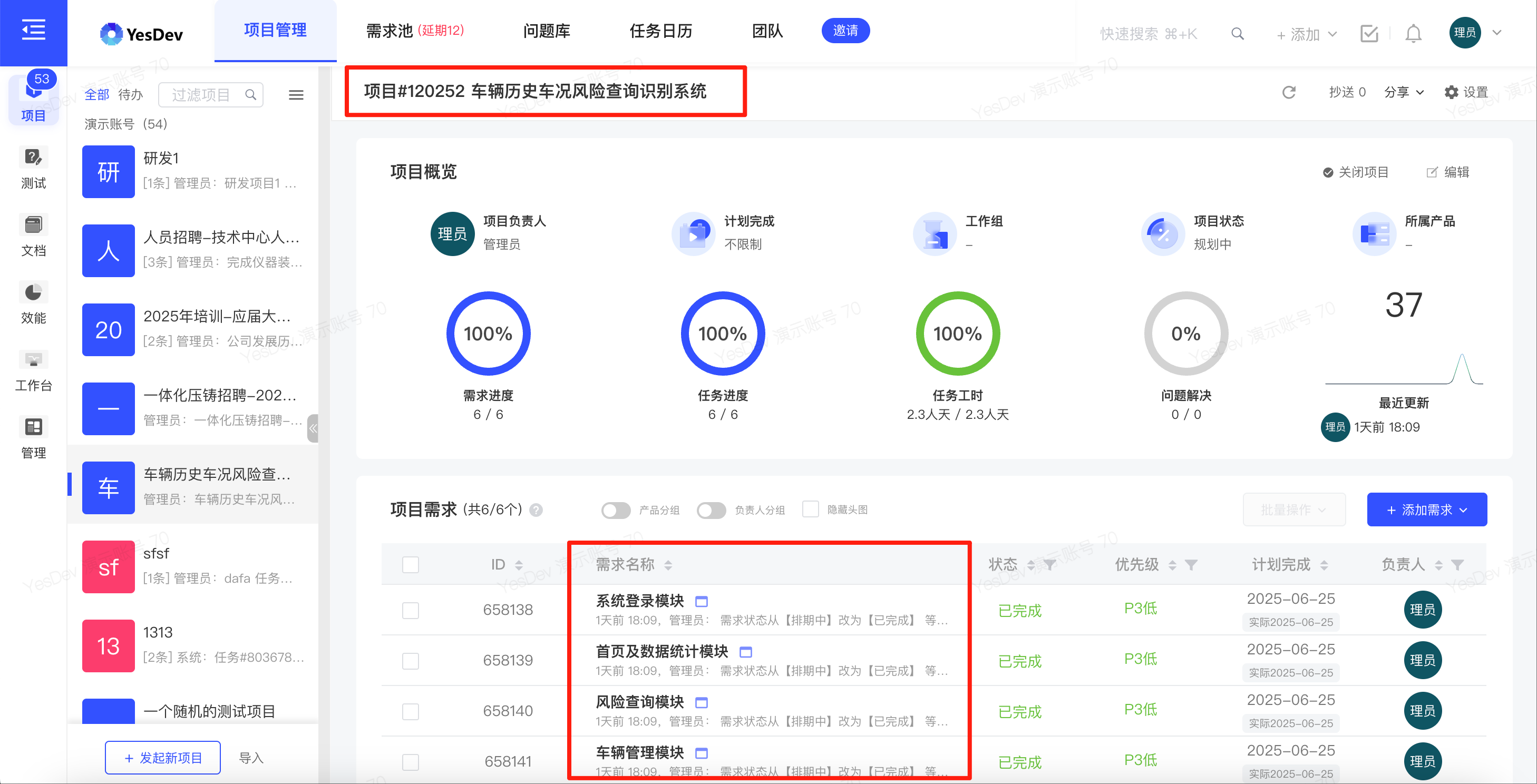
最后,AI在YesDev创建的新项目、需求、任务和工时:
💡 常用提示词
常用的提示词参考:
- 📝 请帮我创建一个新任务,并登记我今天的开发任务内容和工时到YesDev
- 📋 我今天有哪些YesDev任务?
- 📅 帮我写日报到YesDev
- 📅 请帮我把今天的开发工作,放到一个新项目,并帮我录入好对应的需求和任务工时。
🛠️ MCP开发
💻 本地开发环境要求
- Node.js >= 18.0.0
- npm 或 yarn 包管理器
🔧 安装
- 克隆仓库:
git clone https://github.com/yesdevcn/yesdev-mcp-server.git
cd yesdev-mcp-server
- 安装依赖:
npm install
⚙️ 配置
- 创建
.env文件:
cp .env.example .env
- 配置环境变量:
# 获取方式:https://www.yesdev.cn/platform/account/accountInfo
YESDEV_ACCESS_TOKEN=填写你自己的令牌
🚀 开发
启动开发服务器:
npm run dev
📦 构建和运行
- 构建项目:
npm run build
- 启动服务器:
npm start
运行效果,类似如下:
$ npm run build && npm start

> yesdev-mcp-server@1.0.0 build
> tsc && chmod 755 dist/index.js

> yesdev-mcp-server@1.0.0 start
> node dist/index.js

正在注册工具...
YesDev MCP Server 已启动
已注册的工具: [
  'search_staff',          'get_workgroup_list',
  'get_my_profile',        'create_task',
  'get_task_detail',       'update_task',
  'remove_task',           'query_tasks',
  'get_my_task_list',      'get_project_task_list',
  'get_my_project_list',   'get_project_detail',
  'update_project',        'create_project',
  'update_project_status', 'update_project_time',
  'get_project_list',      'create_need',
  'update_need',           'get_need_detail',
  'get_need_detail_lite',  'remove_need',
  'query_needs',           'get_project_needs',
  'get_sub_needs',         'submit_daily_report',
  'get_my_problems',       'update_problem'
]
🛠️ 已实现的MCP工具列表
🔗 相关项目
- 📦 YesDev MCP Server 当前项目
- 📦 MCP TS-sdk
- 📦 YesDev接口文档
- 📚 Model Context Protocol
- 📚 For Server Developers - TS
- 🌟 Awesome-MCP-ZH
反馈和贡献
如果您在使用过程中遇到任何问题,或者有任何建议,欢迎随时通过以下方式联系我们:
- 在 GitHub Issues 中提出您的问题。