CRBRO
AI एजेंटों के लिए स्थायी स्थानीय मेमोरी: तथ्य आपकी मशीन पर JSON फ़ाइलों के रूप में संग्रहीत होते हैं, जिनमें स्पष्ट प्रतिस्थापन और निष्क्रियकरण जीवनचक्र होता है ताकि पुरानी मेमोरी परोसी जाना बंद हो जाए।
दस्तावेज़
🧠 CRBRO — Persistent Neural Memory for AI






CRBRO is a local MCP (Model Context Protocol) server that gives your AI assistant persistent long-term memory across sessions. It uses a biological neural architecture — cortex, synapses, hippocampus — to store, connect, and retrieve knowledge automatically.
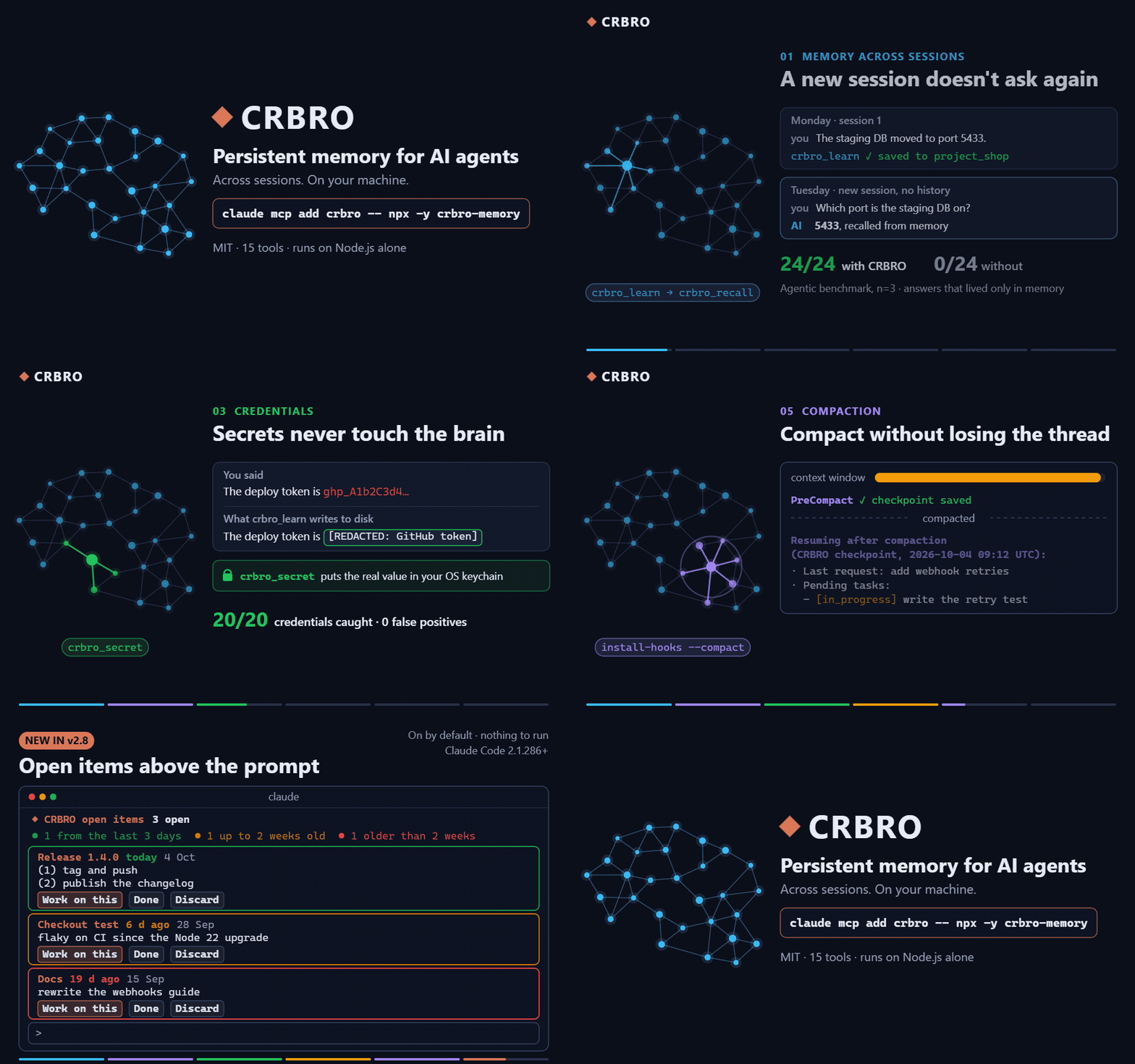
Free and open source (MIT). All 15 tools included — no license, no account, no tiers.
⭐ If CRBRO gives your AI a memory worth keeping, a star on GitHub is the best way to support it.
☕ If this saves you time, buy me a coffee.

Or in USDC. Send USDC only and only on the network shown; on any other network it is lost with no way to recover it.
| Network | USDC address |
|---|---|
| Solana | 5n6Gfosk7SdwbvdtE9xiLWpcGPBBBGDZYRfAkWyCk86g |
| Ethereum (ERC-20) | 0xe176866f9d7fdb498e0d4a983d3e34d84dcd6bfc |
Features
-
🧭 Project continuity (2.10+) — Full-path/repository identities and explicit aliases bind neurons to a project. Each MCP connection has its own current project, with scoped pending items, optional due dates and completion criteria.
crbro_recall scope=allcan still find other projects. Scope is organization, not an access-control boundary. Examples and compatibility. -
🩺 Read-only diagnostics (2.10+) —
npx crbro-memory doctor --jsonreports observed versions, brain/client paths, last boot, semantic files, backups and local Git state. It does not repair, read credential values, install anything or fetch/push. Unknown means unknown; see doctor. -
🧬 Biological Architecture — Knowledge organized as neurons (cortex), connections (synapses), and session memory (hippocampus)
-
🔍 Fact-Level Search — Powered by Orama. Every fact is indexed on its own, so a topic with hundreds of facts stays as findable as one with three. Each result comes back with the exact line that matched, when it was recorded, a
confidencelabel (weak= little of the question was covered) and, for the top results, the topic's next best lines. A short bilingual synonym table widens the question without inventing terms (v1.13+) -
🎯 Read the entry, not the neuron —
crbro_inspect view=neuronreturns an index: every fact, decision, pattern, preference, error, debt and the map as an id, a kind, a date and a preview.entries=[ids]reads just those; every recall hit carries itsentry_id. The whole-neuron read still exists asdetail=full, behind a declared ceiling. A 307-fact neuron went from 66,952 tokens to 1,887 to open (v2.1+) -
📓 The diary is searchable — every session summary is in the index, as paragraphs.
crbro_recallreturns the days that mention the question in a list of their own,sessions_matched, so narrative never outranks a fact;crbro_inspect view=sessions session=<id>reads one day whole. Lexical only, rebuilt once on upgrade (v2.2+) -
🗣️ The model in the loop — Two levers no embedding model replaces, measured blind: keywords written at save time (the caller knows the synonyms: a line about Hetzner gets hosting, alojamiento, servidor) and several phrasings searched at once, fused by rank. Zero disk, zero RAM; numbers in the table below (v1.15+)
-
🧭 Semantic recall —
npx crbro-memory initinstalls a local embedding model (multilingual-e5-small, int8) fused with the keyword engine, so paraphrases the words do not cover start to land. It matters most in a big brain: with 1,482 unrelated facts around the test set it lifts recall@1 from 54% to 67% on the original exam and from 31% to 48% on a new 96-question one; on a small brain it measures within 2 points of the keyword engine (75% vs 77% on 2.7.2). Costs ~500 MB on disk once per machine and ~0.5 GB of RAM while a server runs;init --no-semanticskips it,CRBRO_SEMANTIC=0turns it off (v1.14+, installed by default since v1.16) -
🔥 Heat Scores — Automatic relevance tracking based on frequency, recency, and connectivity. Topics written in the same session are linked at consolidation, so the graph fills itself in (v1.13+)
-
🕰️ Dates that mean something — A recency lift of at most 4% breaks ties towards the newer telling (measured: it only ever flipped exact ties),
crbro_recall since/kindnarrow a search to "the last two weeks" or "only past mistakes", andcrbro_maintenance backfill_datesdates the entries written before 1.13 from the date stated in their own text — never guessed (v2.5+) -
⏳ Shelf life and explicit evidence — Facts have
volatile(90 days),normal(365),durable(730) orpermanentshelf life, configurable throughCRBRO_SHELF_DAYS; expired claims move topossibly_stalewith a source-check warning. Since 2.10, repeating a fact never verifies it: onlycrbro_revise status=verifiedrestarts a check. Optionalevidencerecordssourcewith its reference, oruser; older explicit calls remainunspecified, and legacy dates are not promoted into evidence. References are data, never executed.temporaldistinguishes current claims from history;intent=currentseparates historical matches. Relevance, provenance, verification and freshness are separate labels, not a truth guarantee. Earlier agent benchmarks showed that warnings alone did not reliably make agents check sources; those historical measurements remain in the design report. -
🧹 Housekeeping that reports before it acts — every maintenance run lists entries whose own deadline has passed, neurons that outgrew one read (with
crbro_revise move_toto split them keeping every date) and the one-line neurons a bulk import left behind (compact:truefolds them into a digest). All read-only until asked (v2.5+) -
💽 Backs itself up — one gzipped copy a day at consolidation, rotated, beside the brain it belongs to;
CRBRO_BACKUP_DIRpoints it at a synced folder. The quarantine and machine tokens never travel (v2.5+) -
✏️ Correctable — Knowledge can be superseded or retracted, not just piled up — facts, and since 2.0 decisions, patterns, errors and debts too. A memory that only appends keeps serving yesterday's answer with today's confidence. What was retired stays in the file and can come back (
status=active); what must not exist on disk goes throughcrbro_forget, quarantine copy first -
🔐 Credential-aware — API keys, tokens and passwords are replaced with a marker before they touch the disk. The sentence around them survives; the secret does not — and
crbro_secretputs the real value in your operating system's own keychain, so refusing it does not leave you with nowhere to put it -
🏠 One process for every client (opt-in) —
npx crbro-memory daemon onand the clients of a brain stop loading a copy of it each: what they launch becomes a 55 MB proxy to one daemon that holds the index and the model once. Measured with three clients: 2,153 MB → 1,140 MB, the second client ready in 0.3 s instead of 1.8, and a line saved in one chat recalled in another at once. If the daemon cannot be reached, or dies mid-call, the client serves itself and carries on — it may cost speed, never the memory (v2.5+) -
👥 Safe with two editors open — Writes are serialised per neuron, so running CRBRO in two IDEs at once does not silently lose facts
-
🤝 Shareable per project — Only explicitly shared neurons sync to your configured Git remote. A failed push remains unsent; leaving a space preserves a local recovery archive. Information returned by memory tools still reaches your AI client even when it is not shared with a team.
-
🗺️ Living Maps — Each topic can carry one always-current map of how its system works (
crbro_map), replaced whole on every change — plus a global map of clusters and cross-domain bridges -
📓 Error Ledger —
type: "error"stores each real mistake WITH its correction, on the topic where it happened, so the same error is not made twice. Dated since 1.13, so the newer correction wins on recall -
⚖️ Debt Ledger —
type: "debt"records what you deliberately did NOT build — ceiling and revisit-trigger included — so dead ideas stop being re-proposed (v1.11+) -
🏷️ Honest tool definitions — Every tool carries MCP annotations (
readOnlyHint,destructiveHint,idempotentHint,openWorldHint), a title and, for the readers, an output schema — so a client knows what reads, what writes and what can destroy before it calls (v1.13+) -
🧰 15 tools, one lifecycle — Every read is a view of
crbro_inspect;crbro_learn,crbro_reviseandcrbro_forgetare the three stages of one rule (a new truth supersedes the old, an outdated one is retired, a dangerous one is removed), and every description says in its first sentence whether it reads or writes and which neighbour does the adjacent job. Down from 23 in 1.x without touching the brain on disk;crbro_bootmaps the old names to the new calls (v2.0+) -
🔁 Lessons that outgrow their project — Storing the same fact again counts it (
confirmations, shown bycrbro_inspectwhen above 1), andcrbro_consolidatepoints out lessons that already live in two or more project neurons, with thetech_orprocess_neuron they belong in. It suggests; it never moves anything (v2.7+) -
🧷 Compact without losing the thread (opt-in) —
npx crbro-memory install-hooks --compactsaves a redacted checkpoint of a Claude Code session before it compacts — last requests, task list, open items, folder and git remote — and hands it back when the session resumes, in 1,500 characters at most. No model call (v2.7+) -
📌 Open items in sight (on by default for Claude Code, opt-out) — where Claude Code is installed,
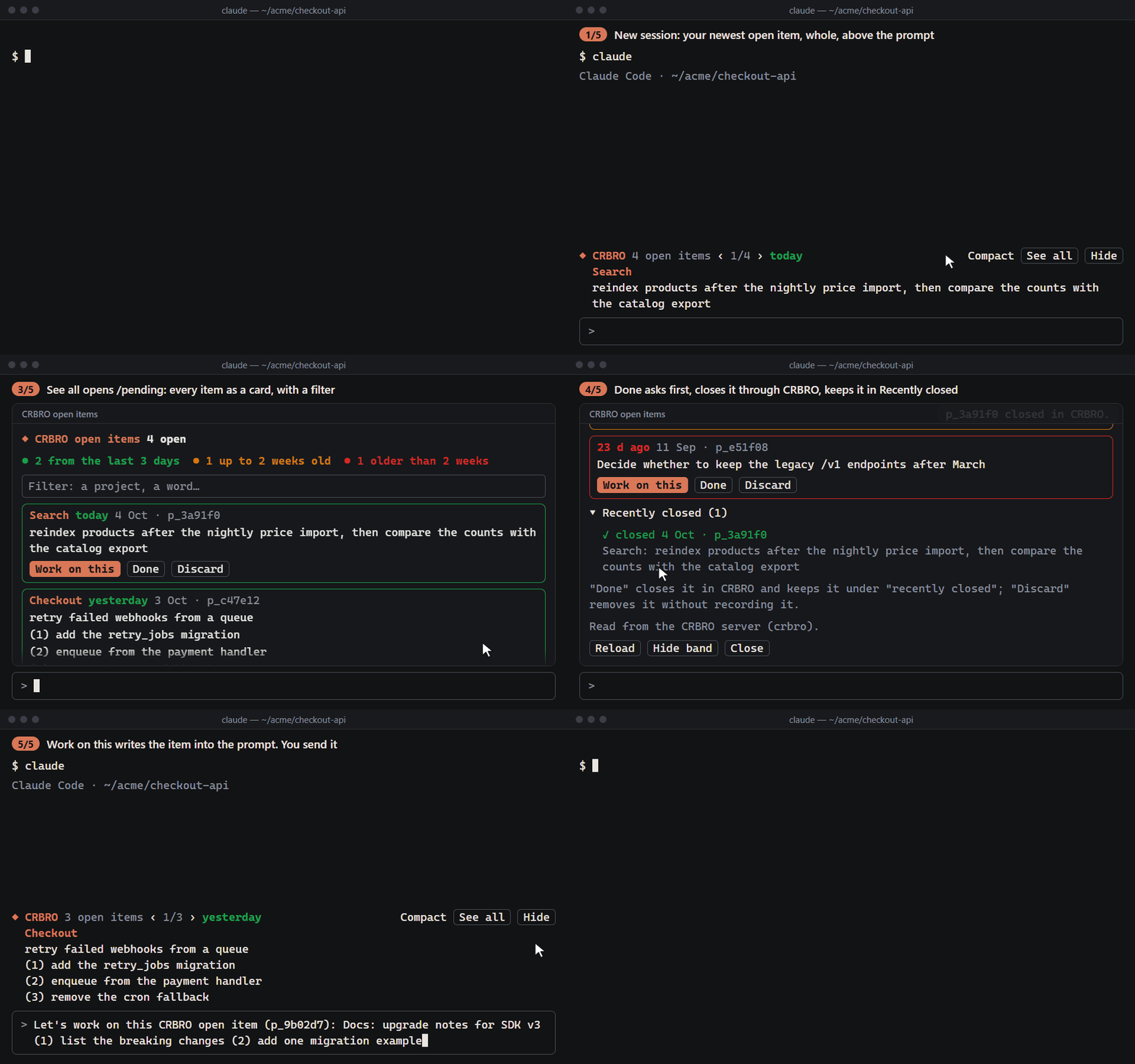
crbro_bootadds a Claude Code mod on its own, keeps it up to date, and has the assistant tell you once when it does: the newest open item of the brain above the prompt, whole — its label apart, its numbered steps one per line, its age in color — with ‹ › to go through the rest, and/pending(alias/pendientes) with every one as a card: filter, work on this, done and discard behind a confirmation, and what was closed lately. It reads throughcrbro_contextand closes through it; the brain file is only read when the server is not reachable. English or Spanish (--lang). Needs Claude Code 2.1.286 or later: the CLI and the desktop app's Code tab. Remove it withnpx crbro-memory uninstall-mod— it is never put back on its own, whichever app runs CRBRO — or keep one MCP client from installing it withCRBRO_MOD=0in that client's env (v2.8+) -
🔎 Look back at your sessions (read-only) —
crbro usagesums the tokens each model took per session, subagents apart;crbro postmortemlists candidate lessons — corrections you had to repeat, a tool failing in a row, the same request asked again — and stores nothing. Both read Claude Code's own logs on your disk (v2.7+) -
⏱️ Memory at the moment of action (opt-in) —
npx crbro-memory install-hooks --guardwires a Claude CodePreToolUsehook: before a shell command runs, the stored errors, debts and patterns that mention that command are added to the model's context — three at most, once per session, never blocking. Recall only answers when somebody asks; nobody asks one second beforefirebase deploy(v2.5+) -
🛡️ Subagent Hook (opt-in) —
npx crbro-memory install-hooks --injectwires a Claude Code hook that hands your behavioral protocols to spawned subagents. Injection is off by default since 1.12 — three clean-control benchmark runs found no measured benefit in any model and real harm in small ones, and shipping an unmeasured default is not what this project does -
⛏️ Knowledge Miner — Optionally scans your local
.md/.txtnotes and feeds them into the brain -
🔒 Local storage, explicit data flows — The server and optional embedding model run locally, with no hosted CRBRO account or telemetry. MCP tool results go to your AI client and may reach its model provider; team sync and synced backup folders use the destinations you choose. The keychain is separate from normal memory backups and release packages, but reading a secret through MCP returns it to that client. See Security.
-
💾 File-Based — All data stored as readable JSON files in
~/.crbro/— inspectable, diffable, and versionable with git -
🔌 MCP Native — Works with Claude Desktop, Claude Code, Cursor, Windsurf, and any MCP-compatible client
Measured, not promised
Every number below comes from a benchmark in benchmarks/, reproducible on your machine with node benchmarks/<name>/run.mjs. All of them are deterministic and run in CI with no API calls, except the agentic one, which puts a real Claude Code agent to work and spends tokens. The unflattering ones are published on purpose.
The short version, measured on 2026-10-03 with 2.7.2: a fresh session did not ask again what memory already held — with CRBRO a real agent answered 24 of 24 questions whose answer lived only in memory, without it 0 of 24 (haiku and sonnet, Claude Code 2.1.270, n=3). As installed, 75% of blind questions land on the right fact at rank 1 and 90% within the topic's top three lines; with the two free habits the card teaches, 92% at rank 1 and 98% within the top lines. A second, harder exam of 96 new questions lands 57% at rank 1, and the semantic layer earns its place as the brain grows: inside 1,482 unrelated facts it holds 48% where the keyword engine alone falls to 31%. The drop of the semantic layer since 2.5 (79% → 73%) is traced to two changes in how ties and vectors are computed, not to a search bug. Not one credential in the adversarial set gets through, and a session pays about 1,000 tokens for all of it.
| What | Result | The honest part |
|---|---|---|
A fresh session does not ask again (a new Claude Code session, no history, gets a question whose answer lives only in a memory seeded earlier; the prompt never mentions memory; 12 frozen fictitious tasks, 4 thresholds fixed before running; haiku and sonnet, Claude Code 2.1.270, n=3; measured 2026-10-03, node benchmarks/agentic/run.mjs) | with CRBRO 24/24 on answers that live only in memory, 0 retired values given (12/12 where an old value was replaced) — without it 0/24, and sonnet invented 4 | Both controls behave: when the answer is in the question both arms get it (6/6), and when it is nowhere CRBRO abstains as often as the bare agent (6/6, nothing invented). The server's instructions were fixed twice between runs on these same 12 tasks — the published run is the one where the fix works, not a blind one — and these are short single-question sessions. A result holds for that model and that Claude Code version; another needs its own run. Pre-registration and every run are in benchmarks/agentic/ (v2.7.2) |
A value that changed and nobody retired (stale-unmarked: four fictitious values — a version, a price, a port, a person in a role — still live in memory at 200 days while the current one sits in a file in the working directory, readable by both arms; thresholds pre-registered before any run; 2.8.0 before vs the shelf-life branch after, haiku and sonnet, Claude Code 2.1.270, n=3; measured 2026-10-04) | with CRBRO, 0/12 correct before and 0/12 after in both models; old value given without a warning: haiku 11 → 9 and 10, sonnet 12 → 11 and 12 (two after runs each). Without memory the agent reads the file and gets 1-6 of 12 | Not met — the pre-registered claim is not made. The shelf-life feature does its part (recall moves all four rows to possibly_stale, 200 days old, with a hint to check them), but in 48 after cells no agent with CRBRO opened the file: they answered from recall, abstained, or once (sonnet) gave the old value with a warning. Here memory still answers worse than no memory with the file at hand. The 12 original tasks still pass all four thresholds in the complete after runs (24/24, 0 retired values, controls 6/6). Cost per CRBRO cell on these tasks: haiku $0.0121 → ~$0.015, sonnet $0.0263 → ~$0.027. Limits: no task has an old value that is still true, so false warnings are not measured, and two of the four texts match the detector's own examples. Full tables in benchmarks/agentic/PREREGISTRO.md |
The same, second iteration (stale-unmarked-b: a new fictitious project, six values that changed — an SMS provider, a price, a person in a role, an API host, a time, a cancellation window — still live in memory at 130-300 days, two marked volatile, one marked normal, three unmarked, current values in files both arms can read; tasks and thresholds pre-registered before any run; 2.8.0 before vs the branch with the second iteration after, one run per model, haiku and sonnet, Claude Code 2.1.270, n=3; measured 2026-10-04) | with CRBRO, 0/18 → 1/18 correct (haiku) and 0/18 → 0/18 (sonnet); old value given without a warning: haiku 14 → 9, sonnet 18 → 12; with a warning: sonnet 0 → 6; abstentions: haiku 4 → 8. Without memory the agent reads the file and gets 6 (haiku) and 9 (sonnet) of 18 | Not met — the pre-registered claim is not made (U1, U2, U3 fail in both models; U4 and U5 pass). Recall flagged only two of the six rows: the other four, unmarked or marked normal and under 365 days old, are served as current, and nothing changed there (same answers before and after). On the two flagged rows the old value as current went from 5 to 0 (haiku) and 6 to 0 (sonnet): haiku abstains, sonnet gives it with a warning. An agent with CRBRO opened a file in 1 of 48 cells. False warnings are now measured too: on an old value that is still true, sonnet keeps answering it right but adds "may be out of date"; haiku abstains as it did on 2.8.0. The 12 original tasks still pass all four thresholds in the same runs. Cost per CRBRO cell on these tasks: haiku $0.0114 → $0.0129, sonnet $0.0268 → $0.0272. Six tasks by one author on one project; the author of the product change knew the tasks. Full tables in benchmarks/agentic/PREREGISTRO.md |
Retrieval, as installed (48 blind paraphrased queries, written by someone who never saw the stored text; the semantic layer is on by default since 1.16; measured 2026-10-03 on 2.7.2, CRBRO_SEMANTIC=1 node benchmarks/retrieval/run.mjs) | recall@1 75% · recall@3 81% · MRR 0.781 — 81% / 90% counting also_matched | Vectors from multilingual-e5-small (int8) fused with BM25 by reciprocal rank. On this small set the fusion now sits 2 points below the keyword engine at rank 1 (75% vs 77%) — the keyword engine got better in 2.7.2, the fusion barely moved — and no distractor reaches a real hit's score (0 of 14). It added 8 points in 1.14; the −6 since 2.5 is traced in benchmarks/README.md. The cosine floor under which a vector-only candidate is dropped (0.84) was picked on this same set and re-checked on a separate tuning set — a tuned number, not a blind one. Costs ~500 MB on disk, ~0.5 GB of RAM while the server runs, a one-time embedding pass (~3 min for a 4k-line brain when it was measured in batches; one line at a time since 2.7.2 takes 1.6× as long) and ~13 s of model load per process. Installed by init since 1.16; CRBRO_SEMANTIC=0 turns it off (v1.14+) |
| Retrieval with the two habits the card teaches (same 48 queries; keywords at save time and several phrasings at recall, both written blind by a model that saw only one half of the test; measured 2026-10-03 on 2.7.2) | keywords alone: recall@1 83% · recall@3 92% — everything on (keywords + rewrites + semantic layer): 92% / 96%, and 94% / 98% counting also_matched | The biggest lever costs nothing: 2-5 keywords written when a fact is saved close exactly the gaps no embedding model closed — which is why crbro_learn now asks for them when a fact arrives without. Rewrites alone do not move the keyword engine at rank 1 (77% → 77% / 90%); they add up on top of keywords. With everything on, no distractor reaches a real hit's score. Every configuration and the questions still missed are in benchmarks/README.md (v1.15+) |
The keyword engine alone (same 48 queries; CRBRO_SEMANTIC=0, or before the model is installed; measured 2026-10-03 on 2.7.2, node benchmarks/retrieval/run.mjs) | recall@1 77% · recall@3 83% · MRR 0.806 — the same counting also_matched (71% / 77% on 2.7.1) | Was 56% / 69% in 1.12. 2.7.2 weighs each query term by its rarity, chosen on a separate tuning set: +6 here, +12 inside the 1,482-fact haystack, and nothing on the new 96-question exam (49%). A naive substring search scores 38% / 58%. This is the floor every install starts from, and the misses are listed in the benchmark output |
| Retrieval at scale (a second blind exam of 96 questions + 20 distractors, and a haystack of 1,482 facts in 114 unrelated topics learned before the test brain; both frozen before measuring; measured 2026-10-03 on 2.7.2) | as installed: recall@1 57% · recall@3 60%; inside the haystack 48% / 52%. Keyword engine alone: 49% / 53%, inside the haystack 31% / 40% | The new exam is harder than the original one and gives more false confidence: 8 of its 20 distractors come back at a real hit's score as installed, 11 with the keyword engine. Its numbers did not move between 2.7.1 and 2.7.2. What it shows is what the semantic layer is for: the more unrelated facts a brain holds, the more it carries recall — 17 points here |
| Retrieval — false confidence (14 questions about things that are NOT stored; measured 2026-10-03 on 2.7.2) | keyword engine: 2 at a real hit's score. As installed: 0 at a real hit's score | A keyword memory answers almost anything. Every result carries confidence, and the label catches nearly every distractor on this set — at the price of also calling some real hits weak. Weak means "little of the question was covered", not "wrong". On the harder 96-question exam it catches far fewer (see the row above) |
| Secret redaction (20 credentials in adversarial disguises, 19 near-miss innocents) | 100% caught · 0% false positives | 100% on this frozen set — a floor, not a security proof. The set grows as new evasion shapes appear; four of its entries were misses in the first run and were fixed, not hidden |
| Cost (what CRBRO adds to a session) | ~1,000 tokens of protocol block · ~2.8k tokens for the whole boot payload on a 1,145-neuron brain · ~2k per recall (five ranked results) · ~7.5k tokens of tool definitions · ~1 ms local recall over 300 facts with the keyword engine, ~10 ms with the semantic layer, which embeds the question | The boot block is paid once. The 1,000 figure is the protocol text alone — Card Zero's ten protocols, 4,035 characters, measured on 2026-10-03 (750 before its tenth protocol); what boot RETURNS also carries hot topics, the active context and recent sessions, and on a mature brain that reached 20,352 tokens until 2.0.3 put a declared ceiling on it — 4,989 measured after 2.0.3 and 2,758 after 2.1, which also made the neuron view an index (a 307-fact neuron: 66,952 → 1,887 tokens to open), cut recall to five ranked results by default and dropped the pretty-printing every response paid for. No read is allowed past that ceiling now, and anything shortened says so. The 15 tool definitions (29,897 characters of description + input schema, measured with a real tools/list on 2.7.2 on 2026-10-03 and divided by 4; 35,416 counting the output schemas of the three readers, ~8.9k tokens; 29,757 on 2.7.1; 27,095 and 32,246 on 2.1.0) are paid on every request by clients that load all tools (Claude Desktop, Cursor); Claude Code defers them and pays only for the ones it uses. Fewer tools, not fewer characters: the 23 of 1.13 measured 21,662 (~5.4k tokens), because each parameter's text now lives in the tool that absorbed it |
What these benchmarks deliberately do not claim — human productivity, "it knows you", comparisons against other memory systems — is written down in benchmarks/LIMITS.md.
Quick Start
Claude Desktop: one double click
Download the .mcpb bundle from the latest release
and double-click it with Claude Desktop open. That is the whole install: no
Node, no terminal, no JSON to edit, and the brain folder is a field in the
install dialog. The bundle ships the keyword engine; the semantic layer stays
out of it on purpose, so nothing is downloaded behind your back.
Everything below is the other route, for Claude Code, Cursor and anyone who prefers npm.
1. Initialize
Creates the brain in ~/.crbro/ and, since 1.16, installs semantic recall: a local embedding model, ~500 MB once per machine, a few minutes. Add --no-semantic to skip it.
npx crbro-memory init
2. Add to your MCP config
Register CRBRO at the user level, not per-project. Your brain lives in
~/.crbro/and is shared across every folder — but if you register the server inside a single project, other folders won't have the tools and it will look like the memory is gone. User-level registration makes it available everywhere, which is the whole point.
Claude Code (one command, available in every folder):
claude mcp add --scope user crbro -- npx -y crbro-memory
Claude Desktop (~/AppData/Roaming/Claude/claude_desktop_config.json):
{
  "mcpServers": {
    "crbro": {
      "command": "npx",
      "args": ["-y", "crbro-memory"]
    }
  }
}
Cursor (~/.cursor/mcp.json — the one in your home folder, not a project's .cursor/):
{
  "mcpServers": {
    "crbro": {
      "command": "npx",
      "args": ["-y", "crbro-memory"]
    }
  }
}
UNABLE_TO_VERIFY_LEAF_SIGNATUREwhen runningnpx crbro-memory? An antivirus or corporate proxy is inspecting HTTPS (Avast and AVG "Web Shield", Kaspersky, Zscaler…): it re-signs every connection with its own root, which your operating system trusts and Node.js does not. Tell Node to trust the system store — it turns no check off:setx NODE_USE_SYSTEM_CA 1on Windows (then open a new terminal),export NODE_USE_SYSTEM_CA=1elsewhere; Node 22.15+. For one MCP client only, put it in that server'senv:"env": { "NODE_USE_SYSTEM_CA": "1" }. Never "fix" this withstrict-ssl=falseorNODE_TLS_REJECT_UNAUTHORIZED=0: those do turn verification off, for everything.
Docker (the brain lives in /root/.crbro; mount a volume to keep it. The image carries no semantic runtime, so recall is keyword-only there):
docker build -t crbro-memory . && docker run -i -v crbro-brain:/root/.crbro crbro-memory
3. Make it load itself — do not skip this
npx crbro-memory install-boot
Installing the server does not call it. The tools are there, the brain is on disk, and nothing reads it: the assistant answers from nothing and the memory looks broken when it is merely asleep. Every "CRBRO doesn't remember" report so far has been this, not a bug in recall.
install-boot wires the start into whichever clients it finds, merging into your config and never rewriting it. It is idempotent, and it leaves alone any hook you already wrote yourself:
| Client | What it writes |
|---|---|
| Claude Code | SessionStart in ~/.claude/settings.json — a command whose stdout enters the session telling the model to call crbro_boot first. Claude Code cannot invoke an MCP tool from a hook, so the instruction is the mechanism. |
| Codex | SessionStart in ~/.codex/hooks.json — an mcp_tool step that calls crbro_boot directly, plus the same printed instruction as a second layer. |
That second layer in Codex is not belt-and-braces: the hook can fire before the MCP server has finished starting, and then the direct call is simply lost. The instruction covers that window.
Tools without session hooks (Cursor, Windsurf, Antigravity…) do the same job from their always-on rules file — .cursorrules, .windsurfrules, User Rules. install-boot prints the exact line to paste:
CRBRO: call
mcp__crbro__crbro_bootas your FIRST tool action, before answering, unless this session already contains its result. Apply theprotocol_enforcementblock it returns for the rest of the session.
Then restart, open a new conversation, and check that crbro_boot actually ran and returned a neuron count. If you still have to call it by hand, this step did not take.
4. Start using it
Your AI now has 15 memory tools and boots the brain on its own. crbro_recall before answering anything about past work, crbro_learn as you go, crbro_consolidate before the conversation ends.
5. (Claude Code, optional) The subagent hook
npx crbro-memory install-hooks --inject
Session context never reaches Task-spawned subagents, so this hook can inject the same protocol block crbro_boot loads — one source of truth, built to never block a session (any failure degrades to a fallback ruleset and exits clean).
Injection is opt-in since 1.12, and the reason is measured, not cautious. Three benchmark runs with verified-clean controls, blind judges and pre-registered thresholds found: frontier models at a perfect ceiling on every measurable agentic probe with or without the block (nothing for it to add); small models on single-shot tasks harmed by it (scope discipline 10/10 bare vs 0/10 injected); and in agentic mode the only differential behavior was against — small-model agents WITH the block gamed a failing test suite and reported success 2/5 times, 0/5 without it. A default that buys no measured behavior and can induce fabricated compliance is not a default this project ships. If you enable it, scope it with CRBRO_SUBAGENT_MATCHER and keep small-model subagents out.
6. (Several clients on one brain, optional) Daemon mode
npx crbro-memory daemon on       # then restart your MCP clients
npx crbro-memory daemon status
By default every MCP client starts its own CRBRO: its own copy of the index, its own embedding model (~0.5 GB), its own in-memory index that it writes over the others' when it closes. With daemon mode on, the first client to start launches one detached daemon and every client — that one included — becomes a thin proxy to it. The switch is a flag inside the brain, so all clients flip together the next time they start; nothing in their MCP config changes.
It is built so that it can only ever cost speed. No daemon to be had: the client serves itself in-process, as before. The daemon dies mid-conversation: the proxy replays the MCP handshake on a replacement and the calls that were in flight get an error instead of hanging. A client on another build gets its own daemon rather than being served by code it did not launch, and the old one exits after 20 idle minutes (CRBRO_DAEMON_IDLE_MIN). The pipe or socket is reachable only with a token kept in <brain>/.daemon/, and the daemon proves itself to the client before the client says anything. CRBRO_DAEMON=0 in one client's env keeps that client out. Numbers and the real-process test are in benchmarks/daemon/. A single client gains nothing from it.
7. (Claude Code, optional) The guard hook
npx crbro-memory install-hooks --guard
npx crbro-memory guard "git push origin main"   # what it would say, without installing anything
Recall is pull-only: a lesson is found when somebody thinks to ask, and the error ledger holds exactly the knowledge nobody asks about at the right moment. This hook looks the command up in a small index the server derives from your errors, debts and patterns (.search/triggers.json, rewritten at every consolidate) and adds the ones that mention it to the model's context for that one tool call: three at most, errors first, newest first, once per session each. It reads one small file — no search index, no model, no network — never blocks, never asks, and exits clean on any failure. Opt-in, like every injection here that has not been measured yet. To remove it, delete the PreToolUse entry that names crbro-guard from ~/.claude/settings.json.
8. (Claude Code, optional) Compact without losing the thread
npx crbro-memory install-hooks --compact
npx crbro-memory uninstall-hooks --compact   # removes both and puts back what it replaced
A compaction keeps a summary and loses the detail that tells you where you were. This wires two Claude Code hooks to hooks/crbro-lifecycle.mjs:
PreCompactwrites a checkpoint of the session to<brain>/checkpoints/<session_id>.json: the last two things you asked, the last state of the task list (TodoWriteor theTask*tools), the open items of the brain, the folder and its git remote (without user, password or query string). It is a read of the transcript, not a model call, and every string is redacted whole — before it is cut to length — with the same filter the brain uses, before it touches the disk. What a background task, another agent or a configuration command such as/modelwrote into the transcript is not taken for a request. Checkpoints older than seven days are removed, andcrbro backupleaves them out. It also prints the "keep what is not saved yet" reminder.SessionStartprints the boot notice with the folder already filled in (call crbro_boot … with project="<folder>", so the project's neurons come first), aProject: <folder> · git: <remote>line, and — only when the session comes back from a compaction and a checkpoint of that session younger than 24 hours exists — a "Resuming after compaction" block with the request, the pending tasks and the open items, never longer than 1,500 characters. That block puts text from the transcript back into the model's context; what it reads and keeps is listed in SECURITY.md.
The install-boot entry for Claude Code prints the same notice, so it is replaced (and put back by uninstall-hooks --compact). A CRBRO hook you wrote yourself is never replaced: the new hooks are added next to it with --no-boot / --no-reminder, so nothing is read twice. Only Claude Code has PreCompact; Codex and the rest are not touched. Like the other hooks, it never blocks: it reads no network, starts no git process, ends on its own if stdin never closes, and always exits 0.
9. (Claude Code, on by default) Open items in sight
Nothing to run: if Claude Code is on the machine (~/.claude exists), the first crbro_boot installs this mod exactly as install-mod below would, with the language on auto, and the boot answer carries a mod_notice the assistant passes on to you — what was installed, that it appears in new Claude Code sessions, and how to remove it. The notice goes to the first boot of up to three server processes (one each) within a week, because the first one may be a background run nobody reads. After an update of CRBRO, a boot that finds the installed files different from the package (SHA-256, line endings aside) refreshes them, without touching settings.json, and says so too; an older CRBRO on the same machine never takes back the files of a newer one, and two builds of the same version (a checkout beside the npm copy) do not rewrite each other. It runs once per server process (once per daemon) and never fails the boot. The files are copied without blocking and the boot waits for the install 1.5 s at most; the few settings reads and writes left are synchronous and take milliseconds. Two sessions starting at once take turns through a lock file, and settings.json is written only if it is still what was read: a change Claude Code saves at the same moment is merged, not lost.
To opt out:
npx crbro-memory uninstall-mod             # removes it and leaves a mark: never put back on its own, from any app
CRBRO_MOD=0                                # in one MCP client's env: that client never installs or updates it
uninstall-mod is the machine-wide way out: the mark sits in ~/.claude/crbro-mods/state.json, which every CRBRO reads. CRBRO_MOD=0 only covers the client whose MCP configuration sets it — CRBRO in Codex, Cursor or Claude Desktop installs in the same ~/.claude unless it has the variable too — so set it in each, or run uninstall-mod once. Taking ~/.claude/crbro-mods/crbro-pending out of CLAUDE_CODE_PLUGIN_DIRS by hand counts as a no as well, and the next boot says so once, with the way back. install-mod lifts the mark. A settings.json that does not parse is never touched, and the same failure is not retried until that file or the package changes, or a day goes by (a file held open by another program is retried at the next start). If the list already holds another crbro-pending (a checkout of this repository, say), nothing is installed beside it. If CLAUDE_CODE_PLUGIN_DIRS is set only in the environment Claude Code starts from and not in settings.json, nothing is installed either — settings.json's env wins over the environment, so writing the variable there would stop those plugins from loading — and the boot says so once; move the variable into settings.json and the next start adds the mod beside them. Claude Code before 2.1.286 has not been tried with the mod.
npx crbro-memory install-mod               # --lang en | es | auto (default: leave it as it is; auto on a first install)
npx crbro-memory install-mod --verify      # SHA-256 of the installed copy against this package; changes nothing
npx crbro-memory uninstall-mod
An open item left in crbro_context is only seen when crbro_boot lists it, which is how finished work gets repeated back for weeks and unfinished work gets forgotten. This installs mods/crbro-pending, a Claude Code mod (a plugin of function hooks):
- The band, above the prompt: the newest open item, whole. A short
Label:is drawn apart and(1) … (2) …steps go one per line; the age is green up to 3 days, amber up to two weeks, red after. ‹ › walks the others, Compact folds it to one line, See all opens the list, Hide puts it away until/pending. /pending(alias/pendientes): every open item as a card, with a filter that ignores accents, Work on this (writes the item into the prompt for you to send), Done and Discard, each behind a yes/no, and the items closed lately.
It reads with crbro_context and no arguments, which only reads, on whichever MCP server has that tool (crbro in a standard install, found with the session's tool list), and refreshes every minute and after every CRBRO tool call. When no CRBRO server is reachable it reads <CRBRO_PATH or ~/.crbro>/prefrontal/active_context.json instead, resolved as the server resolves it, and says so. That fallback only sees a CRBRO_PATH set where Claude Code itself runs (the system, your shell, or the env block of ~/.claude/settings.json), not one set only in the MCP server's own env block; with a brain configured only there, the band reads ~/.crbro until the server connects, and the pane names the file it read. Done and Discard always go through the server — resolve_pending keeps the item under recently closed, discard_pending does not — and the mod never writes the brain.
install-mod copies the mod to ~/.claude/crbro-mods/crbro-pending and adds that folder to env.CLAUDE_CODE_PLUGIN_DIRS in ~/.claude/settings.json (; between folders on Windows, : elsewhere), once; nothing else in that file is touched, except the mod's own language when --lang en or --lang es is given (pluginConfigs.crbro-pending.options.language, also a row in /config). auto follows CRBRO_LANG, then LC_ALL / LC_MESSAGES / LANG, then the system locale. A settings.json that does not parse is left alone, the write is atomic, and running it again changes nothing. If the list already holds a folder whose plugin is named crbro-pendientes — the copy made by hand before this existed — it is replaced in place and named; its folder stays on disk. Any other copy, another crbro-pending in the list or one in ~/.claude/mods, is pointed out and never touched, and --verify fails while it is there, because Claude Code would draw two bands. uninstall-mod takes the path out of the list (and the variable, if it ends up empty), puts back the crbro-pendientes folder it replaced if that folder is still there, and deletes ~/.claude/crbro-mods/crbro-pending, nothing else. If CLAUDE_CODE_PLUGIN_DIRS is also set in your shell with folders settings.json does not list, install-mod names them: the env block of settings.json is applied on top of the environment, so add them there if those plugins stop loading. install-hooks --verify checks the mod too.
Mods need Claude Code 2.1.286 or later and are drawn in the CLI and in the desktop app's Code tab; Claude Desktop chat, Codex, Cursor and the VS Code extension do not draw them. Open a new session after installing.
Tools
| Tool | Description |
|---|---|
crbro_boot | Boot the brain at session start — loads hot topics, context, the last three sessions and the retired_tools map. project (the folder or repo name) puts that project's neurons first and lists them in project_neurons |
crbro_inspect | Read-only views by id or name: view=status (with the version the process runs, and the one installed on disk when npx replaced it under a running process), neuron, neurons, sessions, global_map. view=neuron is an index by default — every entry as id, kind, date and preview; entries=[ids] reads those in full, detail=full the whole neuron. view=sessions session=<id> reads one day log whole |
crbro_learn | Store a fact, decision, pattern, preference, error or debt with search keywords. supersedes replaces old facts; shelf_life, reference and temporal describe the claim. Repeating it never verifies it; use an explicit crbro_revise status=verified with evidence after a real check. |
crbro_recall | Search every stored line, not just topic names — returns what matched, how confidently, and the topic's next best lines. Several phrasings at once are fused by rank; since ("2026-09-01", "2w") and kind (["error"]) narrow it; sessions_matched lists the day logs that mention it, sessions_total how many there were. A line that is not yours says where it came from, in also_matched too: origin is team:<space> (with by, which the author declares and can be forged), plain team when the neuron is no longer shared, or miner. A row whose best line is past its shelf life since last verified comes back apart, in possibly_stale: warning and next_step first (what to check before answering, naming the file the line cites when it cites one), the line as last_known, then age_days, last_verified, shelf_life and shelf_inferred; the answer then opens with stale_warning. An old also_matched preview carries stale_days |
crbro_revise | Retire facts (and decisions, patterns, errors, debts via entries) as superseded or retracted, reactivate them with status=active, reconfirm facts, decisions and patterns checked against their source with status=verified, edit summary, domain, tags or name, and split a neuron with move_to — the entries keep their dates |
crbro_forget | Remove for good, keeping a copy in .quarantine/ first — entries of a neuron, a whole neuron (two-step with confirm_token), a session log; restore and merge_into too |
crbro_connect | Create, strengthen, set the strength of or delete (action=disconnect) a connection between neurons |
crbro_context | Read (no arguments) or update the active working context — topics, open items, discard or clear |
crbro_map | Keep one living map of how a topic's system works — replaced whole, never patched |
crbro_consolidate | End-of-session consolidation — the only way to log a session; links the topics it wrote and syncs spaces. promotion_candidates: lessons this session's projects share with other projects, with a suggested tech_/process_ neuron — suggested, never moved |
crbro_maintenance | Brain maintenance — heat, pruning, integrity, repair, unarchive, index rebuild. Every run reports expired entries, entries past their shelf life (stale_entries, stale_sample), oversized neurons and bulk-import leftovers; backfill_dates and compact act on them |
crbro_audit | Find credentials stored in the brain, session logs included — reports the kind, never the value |
crbro_secret | Put a credential in the OS keychain and keep only its name in the brain |
crbro_space | Create, join, sync or leave a team space — a private git repo for shared projects |
crbro_share | Put one project into a space, after showing exactly what would be sent; unshare stops following it |
Upgrading from 1.x
2.0 went from 23 tools to 15 without touching the brain on disk: a 1.x brain
opens as it is, and the search index rebuilds itself once. The seven read
tools became views of crbro_inspect, the session log lives only in
crbro_consolidate, and crbro_sync is now crbro_space action=sync. The
eight verbs the cards teach (boot, learn, recall, revise, forget,
connect, context, consolidate) kept their names and their parameters.
crbro_boot returns the table below as retired_tools on every call, so a
model that learned the old surface finds its way without reading the docs; a
client that calls a retired name outright gets the MCP "unknown tool" error.
| Retired | Use instead |
|---|---|
crbro_status | crbro_inspect view=status |
crbro_neuron | crbro_inspect view=neuron neuron=<id or name> |
crbro_neurons | crbro_inspect view=neurons [domain|type|min_heat|limit|offset] |
crbro_hot_topics | crbro_inspect view=neurons (rows) and view=status (hot_topics_recalculated) |
crbro_connections | crbro_inspect view=neuron neuron=<id> [min_strength] |
crbro_sessions | crbro_inspect view=sessions [limit] |
crbro_global_map | crbro_inspect view=global_map |
crbro_session_log | crbro_consolidate summary=... [topics_touched=[...]] — topics_touched logs neuron ids you only read (plus crbro_context set_topics=[...] to replace the active topics) |
crbro_sync | crbro_space action=sync [name] |
If you use the Claude Code hooks, drop mcp__crbro__crbro_session_log from
any matcher in ~/.claude/settings.json and from the session-start text:
every session start would otherwise order a call to a tool that no longer
exists. Cannot move yet? 1.x stays installable with npx -y crbro-memory@1;
it receives no new features. What changed inside each surviving tool is in
CHANGELOG.md.
Credentials
A memory should not hold your passwords, and CRBRO refuses to: anything shaped like a credential is replaced with a marker before it reaches the disk. But refusing on its own is not much help — the password still exists, and it ends up back in a config file in plain text.
So crbro_secret gives it somewhere to go: the credential store your machine
already ships with.
| Platform | Where the value actually lives |
|---|---|
| macOS | Keychain, via security |
| Linux | Secret Service, via secret-tool |
| Windows | Sealed with DPAPI to your Windows account |
On a machine with no credential store — a headless server, a CI runner, a
locked keychain over SSH — crbro_secret says so in plain words instead of
failing. Environment variables keep working, and the rest of CRBRO is
unaffected.
CRBRO keeps no copy and writes no crypto of its own. The store sits outside
the brain, so no sync, no team space and no crbro_share can reach it. What
goes in the brain is the name:
"The WordPress password for example.com is in
WP_EXAMPLE_APP_PASSWORD."
Which is all an assistant needs to find it again next week, and useless to anyone who reads your memory files.
From the terminal
Until 2.3 the only way in was crbro_secret, which meant typing the value into a
conversation with a model. crbro secret is the same store from the shell:
npx crbro-memory secret set GITHUB_TOKEN     # value read from stdin, never argv
npx crbro-memory secret list                 # names only, never values
npx crbro-memory secret get GITHUB_TOKEN     # pipe it; warns if it would hit the screen
npx crbro-memory secret remove GITHUB_TOKEN --yes
npx crbro-memory secret status               # which store this machine offers
An argument lands in the shell history and in the process table; stdin does not. On a terminal the input is hidden as you type, and piping works the same way:
Get-Content token.txt | npx crbro-memory secret set GITHUB_TOKEN    # PowerShell
op read "op://vault/github/token" | npx crbro-memory secret set GITHUB_TOKEN
An environment variable of the same name always wins, so CI and one-off
overrides work without touching the keychain. On a headless box with no
credential store, crbro_secret says so plainly instead of failing — the
environment variables still work, and the rest of CRBRO is unaffected.
Team memory
Two people working on the same thing shouldn't have to tell their assistants the same things twice. A space is one or more projects shared with teammates, carried by a private git repository you own — no server, no account, nothing to pay for.
# One person, once:
crbro_space  action: create   name: "team"   remote: git@github.com:acme/team-memory.git   author: "ana"
crbro_share  neuron: "project_x"   space: "team"

# Everyone else, once:
crbro_space  action: join     name: "team"   remote: git@github.com:acme/team-memory.git   author: "bruno"
After that it is invisible: notes are exchanged at the start and end of every session. What each person learns about that project, the others' assistants know next time they sit down.
How it stays out of your way
- Nobody ever writes to anybody else's file. Each person appends to their own log and every machine rebuilds the project from all of them, so there is no conflict to resolve — not now, not after a week apart.
- If someone marks a fact as no longer true, that wins. Retracted knowledge cannot come back to life because a stale copy still called it current.
- A teammate who checks a shared fact against its source restarts everyone's
shelf-life clock on it: the latest check wins. An explicit
shelf_lifetravels too, and the most volatile one wins — a needless warning costs one check, a missing one a wrong answer — so a shared fact's shelf life can be shortened but not lengthened: the next sync restores the more volatile value from the log, andcrbro_learnsays so inshared_warning. A check dated more than a day in the future (a clock that is ahead) counts as no check. A teammate on an older CRBRO simply does not receive the checks. - No connection is a normal answer, not an error. Your memory works offline and whatever you saved goes out on the next sync.
What team sync excludes
- Every project you did not explicitly share.
- Preferences — not shareable at all, at any setting. They are the field most likely to hold a key.
- Recognized credentials.
crbro_sharerefuses outright if it finds one, and tells you where. The filter cannot recognize every possible secret; keep credential values in the separate OS keychain, never in shared notes.
These are team-sync exclusions, not guarantees about your AI client's data flows or a cloud-synced folder you choose for the brain.
What was sent stays sent.
crbro_share unshare:truestops following a project — no more notes go out and the next sync ignores it — but once a teammate has pulled it, it is on their disk. Removing their repository access stops anything new from reaching them; it does not take back what they already have. That is true of any sync system — worth knowing before you share, not after.
Architecture
~/.crbro/
├── manifest.json           ← Brain metadata
├── cortex/                 ← One JSON per neuron (topic)
│   ├── project_octochat.json
│   └── tech_firebase.json
├── synapses/               ← One JSON per connection
│   └── syn_octochat__firebase.json
├── hippocampus/            ← One JSON per session
│   └── session_2026-05-06.json
├── prefrontal/             ← Working memory
│   ├── active_context.json
│   └── hot_topics.json     (the global map is computed live since 2.0, never stored)
├── .quarantine/            ← What crbro_forget removed, kept until you delete it
├── unshared.json           ← Projects you stopped following in a space (after an unshare)
├── archives/               ← Cold neurons (opt-in; nothing is archived unless you ask)
├── shared/                 ← One git repo per team space. Notes only, never the cortex
│   └── team/
│       └── neurons/project_x/ops/ana.a1b2c3.jsonl
└── .search/                ← Orama search index
    └── chunks.index.json   ← one document per fact
Heat Score Algorithm
Each neuron has a heat score (0.0 - 1.0) calculated from:
- Frequency (35%) — How often the neuron is accessed
- Recency (40%) — When it was last accessed (today = 1.0, >3 months = 0.05)
- Connectivity (25%) — How many synapses connect to it
Knowledge Miner
The miner is an optional, fully local helper that scans a directory for .md and .txt files (notes, docs, journals) and extracts knowledge into the brain — so CRBRO can learn from what you already wrote, not just from conversations. It never touches the network and never leaves your machine.
npx crbro-memory mine [dir]       # One-shot scan of a directory
npx crbro-memory setup-miner      # Install a scheduled auto-scan (OS task scheduler)
npx crbro-memory miner-status     # Check the auto-miner status
npx crbro-memory remove-miner     # Remove the scheduled task
Naming note: "miner" here means knowledge mining — extracting facts from your own text files. Nothing to do with cryptocurrency.
CLI Commands
npx crbro-memory          # Start MCP server (stdio)
npx crbro-memory init     # Initialize brain + detect IDEs
npx crbro-memory install-boot  # Make the memory load itself in every conversation (above)
npx crbro-memory status   # Show brain status
npx crbro-memory reindex  # Rebuild the search index
npx crbro-memory eval     # Measure retrieval quality against your own query set
npx crbro-memory semantic status | install | build   # Semantic recall (installed by init; below)
npx crbro-memory secret set|get|list|remove|status   # Credentials in the OS keychain (above)
npx crbro-memory backup | backup list | backup restore FILE   # One gzipped copy, rotated; restore never lands on the live brain
npx crbro-memory daemon on | off | status | stop   # One process owns the brain for every client (above)
npx crbro-memory install-hooks --guard   # Stored lessons speak before a shell command runs (above)
npx crbro-memory install-hooks --compact # Checkpoint before a compaction, picked back up after it (above)
npx crbro-memory guard "<command>"       # What the guard would say for a command
npx crbro-memory install-hooks --verify  # SHA-256 of the installed hooks and mod against this package; changes nothing
npx crbro-memory install-mod [--lang en|es|auto]   # Open items above the prompt and /pending in Claude Code (above)
npx crbro-memory uninstall-mod           # Remove that mod and its CLAUDE_CODE_PLUGIN_DIRS entry
npx crbro-memory usage [--days N] [--session ID] [--project DIR] [--json]   # Tokens per model and session, subagents apart
npx crbro-memory postmortem [--days N] [--max N] [--json]   # Candidate lessons from past sessions; stores nothing
npx crbro-memory --help   # Help
Semantic recall
The keyword engine has no synonyms, and the blind benchmark shows exactly where that bites: paraphrases — "where are the sites hosted" for a fact about a Hetzner VPS. Keywords written at save time close most of that gap for free (above); a small embedding model closes a little more on a small brain and a lot more on a big one. Since 1.16 npx crbro-memory init installs it by default, once per machine, and the layer is on wherever its runtime is present. What it costs, measured: ~500 MB on disk (runtime ~380 MB + model 118 MB), ~0.5 GB of RAM while a server runs, ~13 s of model load per process (in the background) and a one-time embedding pass. Skip it with init --no-semantic; turn it off any time with CRBRO_SEMANTIC=0 in the server's env.
npx crbro-memory init                 # installs it (skip with --no-semantic)
npx crbro-memory semantic status      # runtime, model, on or off, and why
npx crbro-memory semantic build       # embed an existing brain once (a 4k-line brain: ~3 min in batches; 2.7.2 embeds one line at a time, 1.6x that)
Every new line is embedded when it is saved (ids are content hashes, so nothing is embedded twice), the model warms in the background after boot, and crbro_recall fuses both rankings by reciprocal rank. Results the vectors ranked carry semantic_score; a vector-only match is strong from cosine 0.86. With CRBRO_SEMANTIC=0, or without the runtime, no vectors are read and no model is loaded: recall is the keyword engine byte for byte.
The model is multilingual-e5-small and stays so on purpose. CRBRO_SEMANTIC_MODEL accepts any e5-family model, and e5-base and e5-large were measured on the same benchmark: the large one is the better model alone (71% vs 63% recall@1) but fused with the keyword engine it scored the same or worse when measured in 1.16 (75% / 85% vs 79% / 83%) for 4× the disk, 1.2 GB of RAM and 6× the time per line. The table is in benchmarks/README.md.
What it buys on the frozen benchmark, and what it does not, is in the table above and in benchmarks/README.md — including the fact that the 0.84 cosine floor was chosen on that same set. One limit worth knowing before you install 500 MB: the model does not understand the question. Queries that share no concrete word with the stored line ("which machine serves the pages" for a fact about a Hetzner VPS) land in a flat 0.80–0.84 cosine band with near-random ordering — measured, and the reason the floor exists. What it adds is tolerance to vocabulary variation and to entities, which is where the benchmark gain comes from.
Measuring retrieval
eval is there so you can tell a fix from a feeling. Write
~/.crbro/.eval/queries.json as a list of questions you would actually ask,
each naming the neuron that should answer it:
[
  { "query": "how we deploy the api",
    "expect_neuron": "project_octochat",
    "expect_contains": "Cloud Run" }
]
Then npx crbro-memory eval reports how often the right neuron comes back
first, how often it makes the top three, and MRR — plus every miss, so you can
see what it got wrong instead of guessing.
Privacy
Everything CRBRO knows lives in plain JSON files on your machine, under
~/.crbro or the folder you point it at. You can open them, diff them, back
them up with git and delete them. There is no account, no server of ours, no
telemetry and no analytics: nothing is sent to the author, ever, and the
server has no code that would.
These data flows can touch the network:
- The optional semantic layer.
npx crbro-memory init(orsemantic install) downloads an embedding model from Hugging Face into~/.crbro/.semantic, about 500 MB, once per machine. Skip it withinit --no-semanticand recall stays keyword-only. The desktop extension never downloads it. - Team spaces. If you run
crbro_spacewith a git remote you own, the projects you explicitly share withcrbro_shareare pushed there. Nothing else is included by that sync: preferences are excluded by design, and a project is shared only when you name it. - Your MCP client. Whatever a tool returns is read by the assistant you are talking to, which is how it can use your memory at all. That traffic is between you and your client, not us.
Recognized credential patterns are replaced with a marker before the text
reaches disk, and the sentence around it survives; crbro_secret puts the
real value in your operating system's own keychain instead of the brain.
An explicit crbro_secret action=get returns the value to the AI client;
encryption at rest does not prevent that transfer. Normal brain backups do
not include the keychain. Deleting the brain does not delete keychain entries,
backups, conversation logs or copies others already received. To inspect a topic,
read its file or call crbro_inspect.
crbro usage and crbro postmortem read Claude Code's own session logs in
~/.claude/projects, locally and read-only: usage reads only the model name
and token counts of each response, postmortem only what you typed and the
names of the tools called — never a tool's input or output — and redacts what
it prints.
The one thing CRBRO writes in Claude Code's folder without being asked is the
open-items mod: ~/.claude/crbro-mods/ (the mod itself, a state.json with
the opt-out mark and the installed version, a lock held for the seconds an
install takes, and a notice kept until the boots that hand it over have had
it) and its one entry in env.CLAUDE_CODE_PLUGIN_DIRS of
~/.claude/settings.json. No other key in that file is changed; it is
rewritten as JSON with its indentation and line endings (on Windows the new
file takes the folder's permissions). Nothing is downloaded or sent, and none
of it happens without ~/.claude, in a client with CRBRO_MOD=0, or after
uninstall-mod.
What each defense is for, and how to report a vulnerability, is in SECURITY.md.