Needt
रिमोट MCP सर्वर (streamable HTTP, OAuth) जो Claude और ChatGPT जैसे AI सहायकों को Needt में कार्य, कैलेंडर ईवेंट और दस्तावेज़ पढ़ने और बनाने देता है, जो एक AI एजेंट वाला प्लानर है।
होस्ट किया गया MCP सर्वर
npx add-mcp 'https://mcp.needt.app/mcp'Claude Code, Codex, Cursor और अन्य में इंस्टॉल होता है
दस्तावेज़
Server address
Needt runs a remote MCP server over Streamable HTTP — nothing to install. The address is the same for everyone; copy it from Connections → AI tools in Needt. MCP is part of Pro and Lifetime, and of the 14-day trial.
https://mcp.needt.app/mcp copy it from Needt → Connections
Signing in
There are two ways to prove it’s you. Use the first wherever the client offers it.
- Sign in with Needt (OAuth). The client opens a Needt window, you approve, done. Nothing to copy, and you can revoke access at any time.
- Personal token. For clients that send a header instead. In Needt open Settings → Data → Personal API, create a token and copy it. Send it as
Authorization: Bearer <your-token>. Treat it like a password: one token per client, revoke the ones you no longer use.
What the AI can reach The connection uses your workspace and your plan. It sees what you can see in Needt, and nothing in your account that the tools below don’t touch.
Pick your client
Each guide shows the exact steps, with screenshots of where to click in Needt.
Where it lives in Needt
Everything starts in Connections → AI tools. Each client has a card; Connect shows the steps and the address to copy, and Check connection confirms it works.
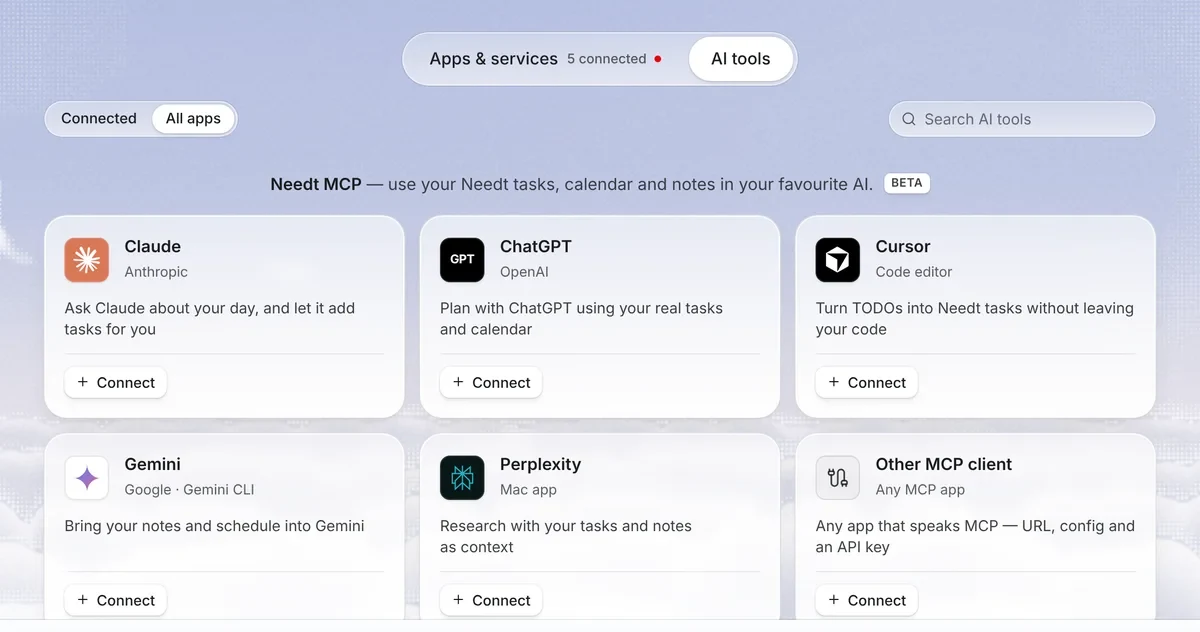
Needt Connections, AI tools: Claude, ChatGPT, Cursor, Gemini, Perplexity and other MCP clients
What it can do
32 tools, read and write. What each one may do depends on the permissions you approve when you connect: read, write and mail.
| Tools | What they do |
|---|---|
needt_whoami | Who you are, which workspaces you have and what the connection may do. |
needt_search · needt_list · needt_get | Find and read tasks, projects, events, pages, habits, goals, moodboards, personal time and mail (mail is metadata only, never the body, and needs its own consent). |
needt_create_task · needt_update_task | Add or change a task: estimate, deadline, priority, energy, project, goal, ordered subtasks. Give it a start time to put it there and pin it, or hand it back to the scheduler. |
needt_add_subtasks · needt_complete_subtask · needt_complete_task | Add steps, tick them off, close the task. |
needt_schedule · needt_reschedule | Run the scheduler over open tasks, preview it, or re-plan after something moved and see what changed; spread an overloaded day across the week. |
needt_control | The rest of the operations: workspace overview, projects, calendars, undo. Deleting needs an explicit confirmation. |
needt_create_event | Add an event to a Needt calendar. |
needt_create_personal_time · needt_update_personal_time · needt_delete_personal_time · needt_mark_event_personal | Keep lunch, a walk or a break free of tasks; turn an existing event into personal time. |
needt_create_page · needt_append_page | Write a page or add to one you can edit. Private pages are out of reach. |
needt_log_habit | Mark a habit kept for a day. |
needt_create_goal · needt_update_goal · needt_convert_task_to_goal | Goals with progress and a weekly check-in (Pro). |
needt_reminders | List, set, update, snooze or delete reminders on a task, an event or on their own. |
needt_blocking · needt_blocking_profile | See what Focus blocking is holding back now, and manage the profiles (Pro). |
needt_attach_file · needt_remove_attachment | Attach an image or PDF to a task (up to 4 MB, ten per task), or remove one. |
needt_list_memories · needt_remember · needt_update_memory · needt_forget_memory | See, add, edit or delete what Needt has learned about you. Works only while “Let Needt learn about me” is on. |
Prompts to try
- “What’s overdue, and what can wait until next week?”
- “My 2 pm moved to 4. Re-plan the afternoon and tell me what moved.”
- “Add a 90-minute block for the Spanish homework before Thursday, low energy.”
- “Create a project called Launch with these six tasks, each with an estimate.”
- “Plan my week around three deep-work mornings.”
Safety
- Deleting asks twice. A delete only goes through when the assistant sends an explicit confirmation, and deleted items land in Needt’s trash, where you can restore them.
- Read freely, write deliberately. Most clients show each tool call before it runs. Keep confirmations on for anything that changes your plan.
- Revoke in one place. Settings → Data → Personal API lists every token and connected app. Removing one cuts it off immediately.
- Watch what you paste. An assistant follows text it reads. Don’t let it act on instructions that came from an email or a web page you didn’t write.
Troubleshooting
- 401 Unauthorized. The token is missing, mistyped or revoked, or the header lacks the
Bearerprefix. Create a fresh token and try again. - No tools show up. Remove the server, add it again, and make sure the address has no trailing path. Restart the client after editing a config file.
- The sign-in window doesn’t open. Allow pop-ups for the client, or use a token instead.
- Still stuck? Write to hello@needt.app with the client name and what it says.
Client steps checked against each vendor’s documentation on 11 October 2026. Menus in these apps change often.