AGS Extend SDK MCP Server
आधिकारिकएक MCP सर्वर जो AI सहायकों को प्रश्नों के उत्तर देने और AccelByte Extend SDK कोड को अधिक प्रभावी ढंग से उत्पन्न करने में मदद करता है।
AGS Extend SDK MCP के साथ आप क्या कर सकते हैं?
- Search Extend SDK symbols — C#, Go, Java या Python में फ़ंक्शन और मॉडल को नाम, टैग या विवरण द्वारा फ़ज़ी मैचिंग का उपयोग करके
search-symbolsसे खोजें। - Describe specific symbols — किसी सिंबल का ID द्वारा पूरा विवरण प्राप्त करें, जिसमें पैरामीटर, फ़ील्ड, इम्पोर्ट, रिटर्न टाइप, उपयोग का उदाहरण और
describe-symbolsसे आवश्यक अनुमतियाँ शामिल हों। - Scaffold a new Extend app —
create-extend-appप्रॉम्प्ट को लागू करके एक टेम्पलेट रिपॉजिटरी क्लोन करें और अपनी चुनी हुई भाषा में कार्यशील नमूने से शुरुआत करें।
दस्तावेज़
AGS Extend SDK MCP सर्वर
एक मॉडल कॉन्टेक्स्ट प्रोटोकॉल (MCP) सर्वर जो AI सहायकों (VS Code Copilot, Cursor, Claude, Gemini, Antigravity) को AccelByte Extend SDK को अतिरिक्त संदर्भ के रूप में देता है — ताकि वे SDK के बारे में प्रश्नों का उत्तर दे सकें और सही Extend SDK कोड उत्पन्न कर सकें।
यह क्या करता है
- खोजें Extend SDK प्रतीकों (फ़ंक्शन और मॉडल) को नाम, टैग या विवरण द्वारा (अस्पष्ट मिलान)
- वर्णन करें विशिष्ट प्रतीकों का — पैरामीटर, फ़ील्ड, आयात, उदाहरण, रिटर्न प्रकार, आवश्यक अनुमतियाँ
- स्कैफोल्ड एक टेम्पलेट रिपॉजिटरी से एक नया Extend ऐप
create-extend-appप्रॉम्प्ट के माध्यम से
यह चार भाषाओं — C#, Go, Java, और Python के लिए SDK संदर्भ प्रदान करता है। आप URL पथ के माध्यम से प्रति कनेक्शन भाषा चुनते हैं (देखें अपनी भाषा चुनें)।
AccelByte आपके लिए Extend SDK MCP सर्वर होस्ट करता है — आपको स्थानीय रूप से कुछ भी इंस्टॉल या चलाने की आवश्यकता नहीं है। बस अपने AI सहायक को अपनी भाषा के लिए होस्ट किए गए MCP URL पर इंगित करें। कोई साइन-इन नहीं है: सर्वर केवल रीड-ओनली SDK संदर्भ डेटा उजागर करता है। इसे स्वयं चलाना पसंद करते हैं? देखें स्थानीय रूप से चलाना और स्व-होस्टिंग।
त्वरित इंस्टॉल
इसे अपने AI कोडिंग सहायक में पेस्ट करें — यह इंस्टॉल गाइड प्राप्त करेगा, आपसे कुछ प्रश्न पूछेगा, और आपके लिए सब कुछ कॉन्फ़िगर करेगा:
Install the AGS Extend SDK MCP server for me. Fetch and follow the instructions at
https://raw.githubusercontent.com/AccelByte/ags-extend-sdk-mcp-server/refs/heads/master/INSTALL.md
VS Code Copilot, Cursor, Claude Code, Antigravity, और Gemini CLI में काम करता है।
Claude Desktop उपयोगकर्ता: सबसे सरल तरीका है Settings → Connectors → Add custom connector (नाम:
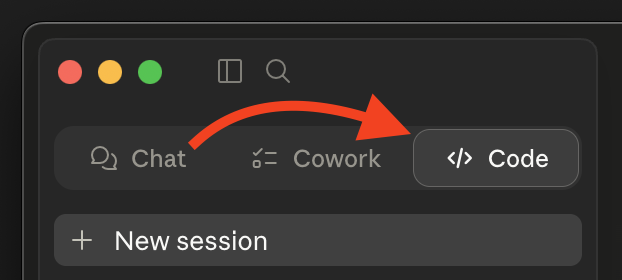
extend-sdk, URL: आपका MCP URL) — किसी AI इंस्टॉलर की आवश्यकता नहीं है। नीचे Claude Desktop देखें।यदि आप ऊपर दिए गए त्वरित इंस्टॉल प्रॉम्प्ट का उपयोग करना चाहते हैं, तो पहले Code टैब पर स्विच करें (Chat और Cowork आपकी कॉन्फ़िग फ़ाइल को संपादित नहीं कर सकते)।
इसे स्वयं करना पसंद करते हैं? नीचे मैन्युअल इंस्टॉल देखें।
मैन्युअल इंस्टॉल
चरण 1: अपनी भाषा चुनें और अपना URL प्राप्त करें
MCP URL होस्ट किए गए सर्वर का आधार URL है जिसके बाद /extend-mcp/{language} है:
https://<mcp-server-host>/extend-mcp/{language}
| भाषा | URL पथ |
|---|---|
| C# | /extend-mcp/csharp |
| Go | /extend-mcp/go |
| Java | /extend-mcp/java |
| Python | /extend-mcp/python |
<mcp-server-host>आपके संगठन की तैनाती का होस्ट है — यदि आप सुनिश्चित नहीं हैं तो अपने AccelByte व्यवस्थापक से पूछें।- एक होस्ट किया गया इंस्टेंस हर भाषा प्रदान करता है। बाद में भाषा बदलने के लिए, बस अनुगामी पथ खंड बदलें (जैसे
/extend-mcp/python→/extend-mcp/go)। किसी अज्ञात भाषा का अनुरोध करने पर HTTP400लौटाता है। - बिना किसी भाषा के आधार पथ (
/extend-mcp) सर्वर की कॉन्फ़िगर की गई डिफ़ॉल्ट भाषा प्रदान करता है।
कोई होस्ट किया गया इंस्टेंस नहीं है? आप Docker के साथ सर्वर स्वयं चला सकते हैं — देखें स्थानीय रूप से चलाना और स्व-होस्टिंग।
चरण 2: अपने क्लाइंट को कॉन्फ़िगर करें
सर्वर स्ट्रीमेबल HTTP ट्रांसपोर्ट का उपयोग करता है। HTTP ट्रांसपोर्ट का समर्थन करने वाले क्लाइंट सीधे URL से कनेक्ट होते हैं। केवल stdio ट्रांसपोर्ट का समर्थन करने वाले क्लाइंट एक सेतु के रूप में mcp-remote का उपयोग करते हैं।
mcp-remoteकी आवश्यकता है? यहnpxके माध्यम से चलता है, इसलिए आपको Node.js 18+ के साथnpxउपलब्ध चाहिए —npx --versionसे सत्यापित करें। किसी वैश्विक इंस्टॉल की आवश्यकता नहीं है।
जहाँ भी आप नीचे <URL> देखें, वहाँ चरण 1 से अपना URL प्रतिस्थापित करें।
Visual Studio Code (Copilot)
अपने कार्यक्षेत्र (या उपयोगकर्ता settings.json) में .vscode/mcp.json:
{
  "servers": {
    "extend-sdk": {
      "type": "http",
      "url": "<URL>"
    }
  }
}
यदि आपका क्लाइंट HTTP सर्वर तक नहीं पहुँच सकता है, तो इस पर स्विच करें: { "command": "npx", "args": ["-y", "mcp-remote", "<URL>"] }।
VS Code MCP दस्तावेज़ीकरण देखें।
Cursor
अपने कार्यक्षेत्र (या उपयोगकर्ता सेटिंग्स) में .cursor/mcp.json:
{
  "mcpServers": {
    "extend-sdk": {
      "type": "http",
      "url": "<URL>"
    }
  }
}
यदि आपका क्लाइंट HTTP सर्वर तक नहीं पहुँच सकता है, तो इस पर स्विच करें: { "command": "npx", "args": ["-y", "mcp-remote", "<URL>"] }।
Cursor MCP दस्तावेज़ीकरण देखें।
Claude Code
claude mcp add --transport http extend-sdk <URL>
फ़ॉलबैक (केवल-stdio वातावरण): claude mcp add extend-sdk -- npx -y mcp-remote <URL>।
Claude Code MCP दस्तावेज़ीकरण देखें।
Antigravity
अपने प्रोजेक्ट रूट में mcp_config.json:
{
  "mcpServers": {
    "extend-sdk": {
      "type": "http",
      "url": "<URL>"
    }
  }
}
यदि आपका क्लाइंट HTTP सर्वर तक नहीं पहुँच सकता है, तो इस पर स्विच करें: { "command": "npx", "args": ["-y", "mcp-remote", "<URL>"] }।
Antigravity MCP दस्तावेज़ीकरण देखें।
Gemini CLI
gemini mcp add --transport http extend-sdk <URL>
फ़ॉलबैक (केवल-stdio वातावरण): gemini mcp add extend-sdk -- npx -y mcp-remote <URL>।
Gemini CLI MCP दस्तावेज़ीकरण देखें।
Claude Desktop
विकल्प A — कस्टम कनेक्टर (अनुशंसित)
- Settings → Connectors → Add custom connector ("Customize" क्षेत्र के अंतर्गत) खोलें।
- Name:
extend-sdkऔर Remote MCP server URL: चरण 1 से अपना<URL>भरें। - सहेजें।
"Add custom connector" नहीं दिख रहा है? कुछ टीम और एंटरप्राइज़ योजनाएँ कार्यक्षेत्र नीति के माध्यम से कस्टम कनेक्टर्स को अक्षम करती हैं। यदि विकल्प गायब है या धूसर है, तो विकल्प B का उपयोग करें।
विकल्प B — mcp-remote कॉन्फ़िग फ़ाइल (फ़ॉलबैक)
claude_desktop_config.json संपादित करें:
- macOS:
~/Library/Application Support/Claude/claude_desktop_config.json - Windows:
%APPDATA%\Claude\claude_desktop_config.json
{
  "mcpServers": {
    "extend-sdk": {
      "command": "npx",
      "args": ["-y", "mcp-remote", "<URL>"]
    }
  }
}
सहेजने के बाद Claude Desktop को पुनरारंभ करें।
उपकरणों का उपयोग करना
एक बार कनेक्ट होने पर, आपके सहायक के पास इन उपकरणों तक पहुँच होती है। अपने सहायक की चैट में, नीचे दिए गए उदाहरण प्रॉम्प्ट आज़माएँ — अनुरोध किए जाने पर उपकरणों को चलाने की अनुमति दें।
search-symbols
Extend SDK प्रतीकों को नाम, टैग या विवरण द्वारा खोजें, अस्पष्ट मिलान के साथ। सारांशों की एक पृष्ठांकित सूची लौटाता है।
"उपयोगकर्ता से संबंधित प्रतीकों की खोज करें" · "इन्वेंट्री के लिए प्रतीक खोजें"
describe-symbols
ID द्वारा विशिष्ट प्रतीकों के लिए पूर्ण विवरण प्राप्त करें — फ़ील्ड, पैरामीटर, आयात, उदाहरण उपयोग, रिटर्न प्रकार, और आवश्यक अनुमतियाँ।
"
AdminCreateUser@iamऔरUser@iamप्रतीकों का वर्णन करें"
create-extend-app
एक प्रॉम्प्ट टेम्पलेट जो एक Extend ऐप टेम्पलेट रिपॉजिटरी को क्लोन करता है और इसे खोलता है (जब उपलब्ध हो तो Dev Container में) ताकि आप एक कार्यशील नमूने से शुरू कर सकें।
create-extend-appप्रॉम्प्ट को आमंत्रित करें और परिदृश्य / टेम्पलेट / भाषा पूर्णताओं का पालन करें।
[!TIP] इस MCP सर्वर के साथ कोडिंग करते समय, एक खाली प्रोजेक्ट के बजाय Extend SDK गेटिंग-स्टार्टेड नमूने या Extend ऐप टेम्पलेट से शुरू करें, और बेहतर परिणामों के लिए प्रासंगिक स्रोत फ़ाइलों को संदर्भ के रूप में जोड़ें।
इसे स्वयं चलाना
सर्वर को स्थानीय रूप से (stdio) चलाना या HTTP सर्वर को स्वयं होस्ट करना पसंद करते हैं? Docker उपयोग, पर्यावरण चर, HTTP एंडपॉइंट, स्मोक टेस्ट, स्रोत से विकसित करना, और इमेज जारी करने के लिए स्थानीय रूप से चलाना और स्व-होस्टिंग देखें।
समस्या निवारण
उपकरण कॉल विफल / सर्वर 400 लौटाता है
अपने URL पथ में भाषा की जाँच करें। यह csharp, go, java, या python में से एक होनी चाहिए (जैसे /extend-mcp/go)। एक अज्ञात भाषा HTTP 400 लौटाती है।
क्लाइंट HTTP URL से कनेक्ट नहीं हो सकता
कुछ क्लाइंट केवल stdio ट्रांसपोर्ट का समर्थन करते हैं। उस क्लाइंट को चरण 2 में दिखाए गए mcp-remote सेतु कॉन्फ़िग पर स्विच करें। इसके लिए Node.js 18+ के साथ npx उपलब्ध होना चाहिए (npx --version)।
"कनेक्शन अस्वीकृत" या होस्ट पहुँच योग्य नहीं है
पुष्टि करें कि <mcp-server-host> और पूर्ण URL सही हैं (अपने AccelByte व्यवस्थापक से पूछें), और यह कि आपका नेटवर्क उस तक पहुँच सकता है।
दस्तावेज़ीकरण
- इंस्टॉलेशन गाइड — त्वरित इंस्टॉल प्रॉम्प्ट द्वारा अनुसरण किया गया; अपने आप पढ़ने योग्य
- स्थानीय रूप से चलाना और स्व-होस्टिंग — Docker, पर्यावरण चर, HTTP एंडपॉइंट, विकास, और इमेज जारी करना
- Postman संग्रह —
search-symbolsऔरdescribe-symbolsके लिए आयात और Newman स्मोक-टेस्ट निर्देश
योगदान
यह रिपॉजिटरी जैसी है वैसे ही प्रकाशित की गई है। बग रिपोर्ट और प्रश्नों के लिए, कृपया एक मुद्दा खोलें।