IDA Pro MCP
Serveur MCP déterministe de rétro-ingénierie pour IDA Pro/Home avec 109 opérations à schéma strict, exécution locale en premier, résultats fondés sur des preuves et mutations IDB contrôlées par politique.
Documentation
IDA Pro MCP
⚠️ Archived — superseded by the official Hex-Rays IDA MCP server
This project is no longer maintained. On 2026-09-27 Hex-Rays SA released the Official IDA MCP Server and IDA Nexus. Development stopped the same day at
1.0.0a4.For current use, install theirs:
uvx ida-hcli mcp install. It requires IDA 9.4+ withidaliband works fully headless; the GUI plugin is optional.This repository is kept for its test suite, documentation, and architectural record. See ARCHIVE.md for the full closing account: what the project was, why it lost, which parts were scaffolding, and which parts are still worth something. The rest of this README describes a system that is no longer recommended for use.
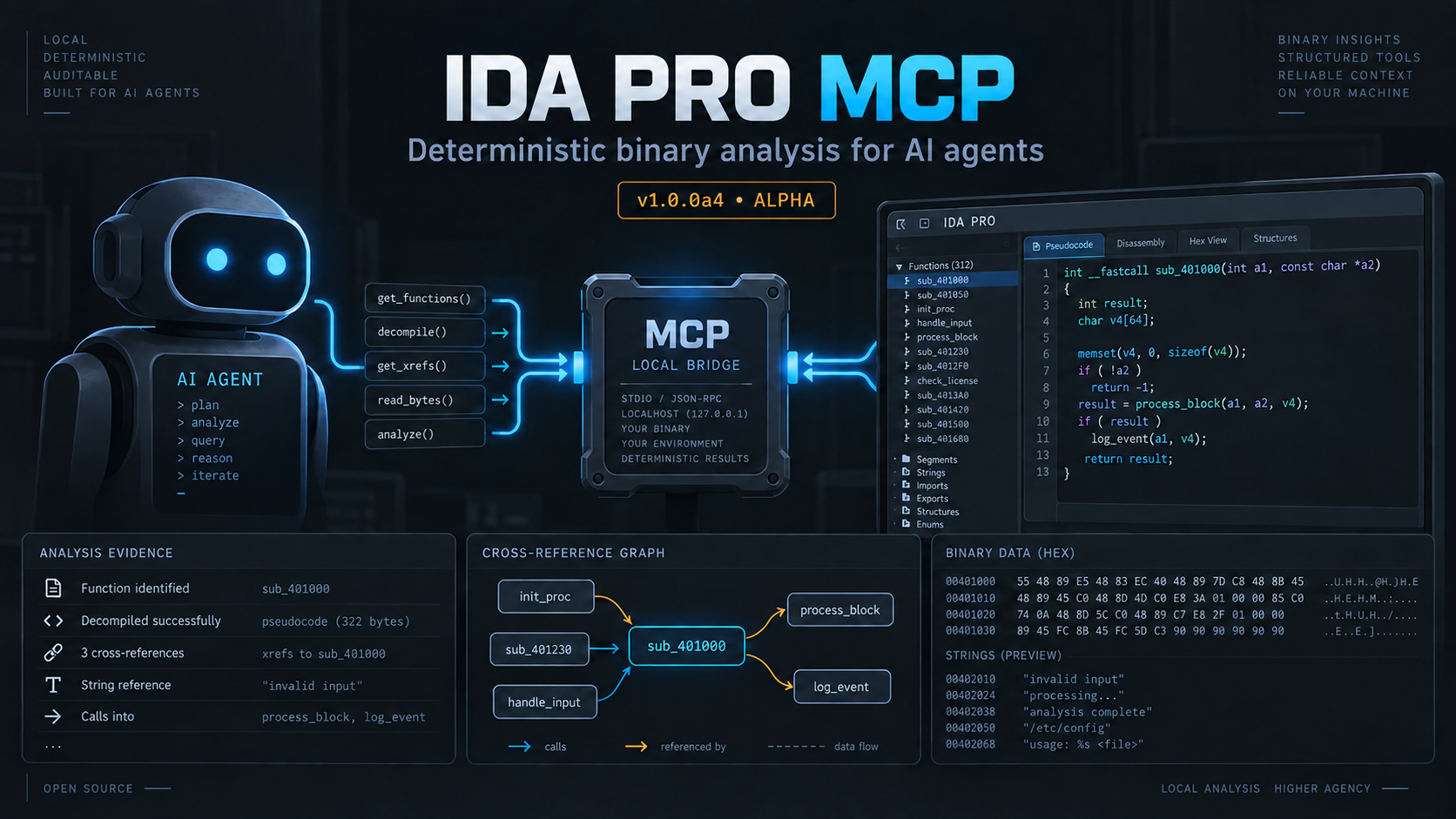
IDA Pro MCP is a local Model Context Protocol server for IDA Pro. It lets an MCP client inspect an IDB, ask IDA for deterministic analysis results, and, when explicitly allowed, write annotations or other changes back to the IDB. The host process runs outside IDA and starts a separate IDA headless process for each session by default.
Why this implementation
- Deterministic agent surface: 102 strict-schema
ida_*operations with live discovery throughtools/listandida_help. - Local-first architecture: the host and IDA runtime communicate over a token-protected loopback bridge; no hidden LLM service sits in the analysis path.
- Evidence, not just chat: durable findings preserve provenance, confidence, lifecycle state, conflicts, and audit history outside the IDB.
- Guarded mutations: IDB-changing operations remain behind explicit policy and risk-acknowledgement controls.
- Broad client support: the installer understands more than 22 agent environments and their JSON, JSON5, TOML, and YAML configuration shapes.
The current version is 1.0.0a4. This is alpha software. The public
ida_* operation names, schemas, and workspace format may change before a
stable 1.0.0 release. The default client surface contains 102 exact-schema operations.
Use live discovery for the complete contract: tools/list enumerates every
operation with its schema, and ida_help(topic="...") returns the exact
arguments and example for one operation.
Before you install
You need:
- IDA Pro or IDA Home 9.2 or newer, with a usable
idat/idat64executable. The repository’s live test evidence covers IDA 9.3 and 9.4; 9.2 is the declared compatibility floor. - Python 3.11 or newer for the host and installer.
- Permission to run IDA on the binaries you plan to inspect, and enough disk space for a managed Python environment, session files, and IDB copies.
- An MCP client that supports a local stdio server, such as Claude Code, Codex, OpenCode, Claude Desktop, Cursor, VS Code/Copilot, Windsurf, Cline, Roo Code, Gemini CLI, or Antigravity.
Normal analysis does not require an intelligence provider. The explicit
intelligence modes are jev, custom, and disabled; disabled mode keeps
deterministic lexical search available and there is no local, Gemini, or
native-model fallback.
The default runtime is idat: one headless IDA process per session. The
idalib backend is experimental, requires an IDA 9.3-or-newer installation
with the idapro package activated, and is not needed for a first install.
Install from the source checkout
The installer creates a managed environment under the install root, installs a frozen copy of the checkout into it, and writes client configuration for the supported client locations. From the repository root, run:
python3 install.py
For a known IDA installation, pass it explicitly:
python3 install.py --ida-dir /path/to/ida-pro-9.3
For a non-interactive run:
python3 install.py --yes --no-ida-prompt --ida-dir /path/to/ida-pro-9.3
The installer can also find IDA through IDADIR, IDA_DIR, the IDA
executables on PATH, and common installation directories. --ida-version
selects a version when more than one installation is present. Use
--dry-run to inspect the planned changes first.
The installer never downloads a provider model or runtime. It may create
or update configuration files for every client
location in its built-in client map, including clients that are not installed
on your machine. Check install-report.json in the install root and remove
unused entries if necessary. Existing regular configuration files are backed
up before they are changed; malformed, symlinked, or non-regular files are
refused rather than overwritten.
Restart the MCP client after installation so it reloads its configuration.
Agent harnesses discover the tool surface live: tools/list enumerates every
operation with its schema, and ida_help(topic="...") returns exact arguments
and an example. No static skill files are installed.
The default install root is:
- Linux and macOS:
~/.local/share/ida-pro-mcp - Windows:
%LOCALAPPDATA%/ida-pro-mcp
Set IDA_PRO_MCP_HOME or pass --install-root to choose another location.
Install from a release artifact
Alpha releases are built by GitHub Actions and published manually as
prereleases. When a release is available, download the bundle.zip or
bundle.tar.gz asset and its SHA256SUMS file from the
releases page. Verify the
checksum, extract the bundle, and run the installer from its top-level
directory:
python3 install.py --yes --no-ida-prompt --ida-dir /path/to/ida-pro-9.3
The release also contains a wheel and source distribution for scripted Python installations. The bundle is the simplest route because it includes the installer and all project files needed to configure an MCP client. Releases are alpha quality; keep the original binary and IDB and read the release notes before upgrading.
Connect an MCP client
The installer writes the server entry for the client configuration paths it knows. It supports Gemini CLI, Antigravity, Antigravity IDE, Antigravity CLI, Claude Code, Codex, Copilot CLI, OpenCode, Claude Desktop, Cursor, VS Code, Windsurf, Cline, and Roo Code. OpenCode and Copilot-family clients use different configuration shapes; let the installer write those files or follow the OpenCode setup guide.
For a client that uses the common JSON format, the entry is equivalent to:
{
  "mcpServers": {
    "ida-pro-mcp": {
      "command": "/path/to/ida-pro-mcp/.venv/bin/python",
      "args": ["-u", "-m", "ida_pro_mcp.host.server"],
      "env": {
        "IDA_PRO_MCP_HOME": "/path/to/ida-pro-mcp",
        "IDADIR": "/path/to/ida-pro-9.3",
        "IDA_MCP_TOOL_SURFACE": "agent"
      }
    }
  }
}
On Windows, use the managed interpreter at
<install-root>/.venv/Scripts/python.exe. The important details are the
managed interpreter, -u -m ida_pro_mcp.host.server, the selected IDA
directory, and IDA_MCP_TOOL_SURFACE=agent. Do not point the client at
install.py; that file is the installer, not the MCP server.
After changing a client configuration, fully restart the client and check that
ida_help appears in its available operations. If the client shows only a
legacy broad tool(action=...) interface, check that the environment selects
the default agent surface rather than
IDA_MCP_TOOL_SURFACE=legacy.
A first useful session
Use an absolute path to a test binary first. Opening a binary normally waits for IDA’s initial analysis to finish; a large binary can take time.
ida_open_binary(binary_path="/absolute/path/to/sample")
ida_session_status()
ida_overview()
ida_list_imports(limit=30)
ida_list_strings(query="http", limit=30)
ida_find(query="main", limit=20)
ida_decompile(address="<address returned by IDA>")
ida_xrefs_to(address="<same address>")
Use ida_help(topic="ida_decompile") whenever you need the exact argument
schema. Public operation schemas are strict: unknown arguments are rejected.
Addresses may be accepted as integers or strings according to the individual
operation contract; use the form shown by ida_help for the operation in
your client.
For a small investigation record, the workspace findings operations are:
ida_write_finding(title="Input reaches parser", address="<address returned by IDA>", kind="finding", status="confirmed", confidence=0.8, evidence=[{"type":"call", "value":"recv", "address":"<evidence address>"}])
ida_analysis_brief()
ida_next_target()
ida_export_findings(format="markdown")
Workspace findings are kept separately from IDB edits. If the active policy
permits the workspace write, ida_write_finding records a finding locally;
otherwise the server returns a policy error. ida_publish_findings(dry_run=true)
previews IDB changes. Publishing, renaming, patching, and other IDB mutations
are policy-gated and require the operation’s documented acknowledgement where
the operation exposes one.
Operations at a glance
The front page stays task-oriented, but this compact index keeps the public
surface easy to scan. Each name below is prefixed with ida_ when called. The
complete schemas and examples are available live via tools/list and
ida_help(topic="...").
| Group | Operations |
|---|---|
| Session | open_binary, open_background, session_state, session_status, session_health, close_session, session_get, session_list, sso_activate, agent_login, agent_logout, session_switch |
| Discovery | overview, find, semantic_search, intelligence_status, usage_status, usage_report, reranker_status, index_functions, index_status, cancel_index, list_functions, list_strings, list_imports, list_types, list_segments, list_sigs, sreg_get, sreg_list, auto_wait, events, registers, search_data_value, search_query_lang |
| Intelligence | intelligence_status, usage_status, usage_report |
| Code | decompile, disassemble, compare_functions, diff_sessions, xrefs_to, callers, callees, read_bytes, get_type, callgraph, emulate |
| Findings | write_finding, mark_examined, list_findings, search_findings, update_finding, export_findings, publish_findings, import_annotations, analysis_brief, next_target |
| Edit | create_function, change_function, rename, comment, patch_bytes, save_idb, make_code, undefine, rename_local, declare_type, apply_type, add_segment, set_segment_attrs, apply_sig, sreg_set, create_data, create_strlit, undo_begin, undo_end, add_entry, idb_snapshot, idb_restore_snapshot, struct_member_add, struct_member_del, struct_member_rename, struct_member_set_type, enum_member_add, enum_member_rename, enum_member_revalue, til_delete, til_export, til_import, import_system_map, mark_dangerous |
| Calculation | calc_eval, calc_offset, calc_convert, calc_resolve, calc_deref, calc_chain, calc_align, calc_bitops |
| Support | python, continue, help |
| Workflow | batch |
What is safe, and what is not
The server’s baseline policy is assist. A session may tighten the operator’s
baseline policy but cannot relax it. The policy is deterministic; it does not
decide that a risky operation is safe because a client asks for it.
Read-only inspection is the normal starting point. Examples include
ida_overview, ida_find, ida_list_functions, ida_list_strings,
ida_list_imports, ida_decompile, ida_disassemble, ida_xrefs_to,
ida_callers, ida_callees, ida_callgraph, ida_read_bytes, and the
calculation operations. These still consume local files and IDA resources,
and the MCP client receives their results.
The following actions change durable state or execute code and should be treated as high impact:
ida_rename,ida_comment,ida_patch_bytes, function/type/segment/data changes, signature application,ida_save_idb, snapshots, and undo/restore operations can change the IDB or related state.ida_publish_findingswrites findings into the IDB. Run its dry-run form first; the non-dry-run form is gated.ida_close_sessiontears down the live IDA runtime and is destructive from the session’s point of view.ida_pythonexecutes arbitrary Python in the active IDA process. It is blocked in safe mode and requires an explicit risk acknowledgement under the normal policy.ida_emulateis useful for controlled checks, but mutating emulator actions require the corresponding acknowledgement.ida_til_exportandida_til_importaccess the filesystem and are gated. Filesystem paths are constrained by the configured memory root where that guard applies.
Do not use --disable-policy as a convenience flag. It sets
IDA_MCP_POLICY_MODE=off and disables all policy gates, including write
acknowledgements and other workflow controls. If a call is denied, read the
operation’s ida_help entry and supply the exact acknowledged argument only
when that operation’s schema supports it.
While IDA is still performing initial analysis, safe mode blocks some
full-binary analysis, indexing, and script operations. It is intended to keep
early-session calls narrow; poll ida_session_status or
ida_session_health rather than bypassing the guard.
The bridge listens on loopback and uses a per-session token. It is not a network service: do not expose or forward the bridge port to an untrusted network. Treat imported scripts, traces, binaries, corpus data, and client requests as untrusted input.
Privacy and data handling
The normal host-to-IDA path is local. The project does not run a built-in LLM service in the analysis path. Intelligence is explicit Jev, custom BYOK, or disabled; disabled mode is fully offline. A configured remote provider still makes the selected advisory requests network-visible:
- The connected MCP client receives paths, symbols, strings, bytes, decompilation, findings, and other results. The client or its model provider may transmit that context according to its own account, model, and retention settings. IDA Pro MCP cannot control those transfers.
- Jev and custom providers receive only bounded typed-question state (
choice/noul/score) over host-side HTTP: metadata, bytes/disassembly samples, and compact signatures. Raw decompilation, prompts, completions, and credentials are not logged or persisted. Answers cannot authorize mutations, satisfyrisk_ack, or write blackboard findings; failures fail closed to lexical order. The shared advisor stage can assess a bounded function neighborhood in one request and suggest a next deterministicida_*call; the caller decides whether to run it. Jev remains optional and provider-neutral tools stay usable in disabled mode; see Intelligence. - Custom cloud origins require an explicit HTTPS allowlist. Plain HTTP is accepted only for loopback endpoints when explicitly enabled.
- Installer dependency downloads and optional threat-corpus downloads can make network requests when enabled.
- Local cache, logs, session metadata, managed IDBs, and the blackboard may contain paths, analysis metadata, and findings. Protect the install/data directories. Credentials are read at request time and are never written to generated client configuration.
For a local-only setup, select --intelligence-mode disabled. Deterministic
IDA analysis, lexical indexing/search, storage, and policy controls remain
available without a provider.
Common troubleshooting
The installer cannot find IDA
Pass the installation directory explicitly:
python3 install.py --ida-dir /path/to/ida-pro-9.3
You can also set IDADIR or IDA_DIR. If several installations are found,
use --ida-version 9.3 or --no-ida-prompt to control selection. Confirm
that the selected directory contains a runnable idat or idat64.
The client does not show IDA Pro MCP
Restart the client and inspect its configuration entry. Confirm that its
command uses the managed venv Python and -u -m ida_pro_mcp.host.server, and
that the env block contains the correct IDADIR. Review
install-report.json; the installer records client update failures and keeps
backups next to modified files. OpenCode and Copilot-family configuration
shapes differ from the common JSON example.
Opening a binary takes a long time or appears stuck
The normal ida_open_binary call waits for initial analysis. Check
ida_session_status and ida_session_health, allow more time for a large
binary, and check the per-session logs under the install/data directory. The
background-open operation is available, but it is intended for cases where
you understand its asynchronous behavior and safe-mode restrictions.
A write operation is denied
This is usually the policy working as configured. Use ida_help to inspect the
operation’s exact schema and its acknowledgement requirement. Do not add
arbitrary arguments: schemas are strict. Review IDA_MCP_POLICY_MODE and the
operator policy file before changing policy. Disabling all policy gates is a
separate, deliberately unsafe choice.
Intelligence or semantic search is unavailable
Semantic search uses deterministic lexical signatures and does not require a
provider. Optional Jev/custom scoring is advisory; a missing key,
provider outage, malformed response, or exhausted budget returns a structured
provider error while lexical results remain available. Configure Jev or custom
explicitly with --intelligence-mode and the documented IDA_MCP_* variables;
there is no local-model fallback.
The installer refuses a client configuration
Fix the reported JSON, JSONC, or TOML syntax and rerun the installer. It also refuses symlinked and non-regular configuration paths to avoid overwriting an unexpected target. Existing regular files are backed up; the installer’s default rollback behavior can restore those backups if a later phase fails.
An IDA session or runtime fails
Check ida_session_health, the session log, and the bridge log. Confirm that
the client is using the same install root and IDADIR that the installer
recorded. The default idat backend gives each session its own process; do not
switch to experimental idalib while diagnosing a basic installation.
Tests and coverage (offline)
The offline suite (pytest --ignore=tests/integration) is the default gate.
As of 2026-09-27 EEST: 5491 passed / 6 skipped (~4m04s); offline src/ line
coverage 95.88% (56,110 stmts / 2,309 miss) — >=90% src/ target met. The
suite also passes clean with -W error::DeprecationWarning, so the gate does not
rest on deprecated import behavior. The Survey Phase 0 figure of 64.27% is
historical only (PROJECT.md). Live IDA and optional Jev remote checks stay
opt-in; see AGENTS.md and
Live IDA testing.
Reference material
- Project wiki — task-oriented installation, investigation, editing, and troubleshooting guides.
- Local wiki pages — the same hand-authored material shipped for the built-in wiki tool.
- Live operation discovery —
tools/listandida_helpexpose every public operation, schema, and example. - Safety model — trust boundaries, policy modes, loopback transport, session ownership, and filesystem guards.
- Investigation workspace — findings, evidence, targets, and exports.
- Intelligence and providers — Jev, custom BYOK, disabled mode, usage budgets, lexical retrieval, and shared investigation advisories.
- OpenCode setup — OpenCode configuration.
- Architecture — host, IDA runtime, and data flow for readers who need implementation detail.
- Security policy — reporting and security guidance.
- Live IDA testing — what the repository’s tests do and do not prove about a real IDA installation.
- Versioning and release checklist and the changelog — alpha status and release history.
- Documentation index — the full map of maintained guides, references, wiki pages, and research notes.
For exact operation names, use the generated reference or ask the running
server with ida_help. The older tool(action=...) backend remains available
for compatibility and is selected with IDA_MCP_TOOL_SURFACE=legacy; new
integrations should use the exact-schema ida_* surface.