rostrum
Clean up talk recordings locally: find redos, retakes and dead air with speech-to-text, review every cut, then render with ffmpeg and verify A/V sync.
Documentación
rostrum
Clean up talk recordings, from one video to a whole event, by hand or through your agent. rostrum finds redos, retakes, repeats and dead air, shows you every cut with its reason, then renders with ffmpeg and checks the result. Everything runs on your machine.
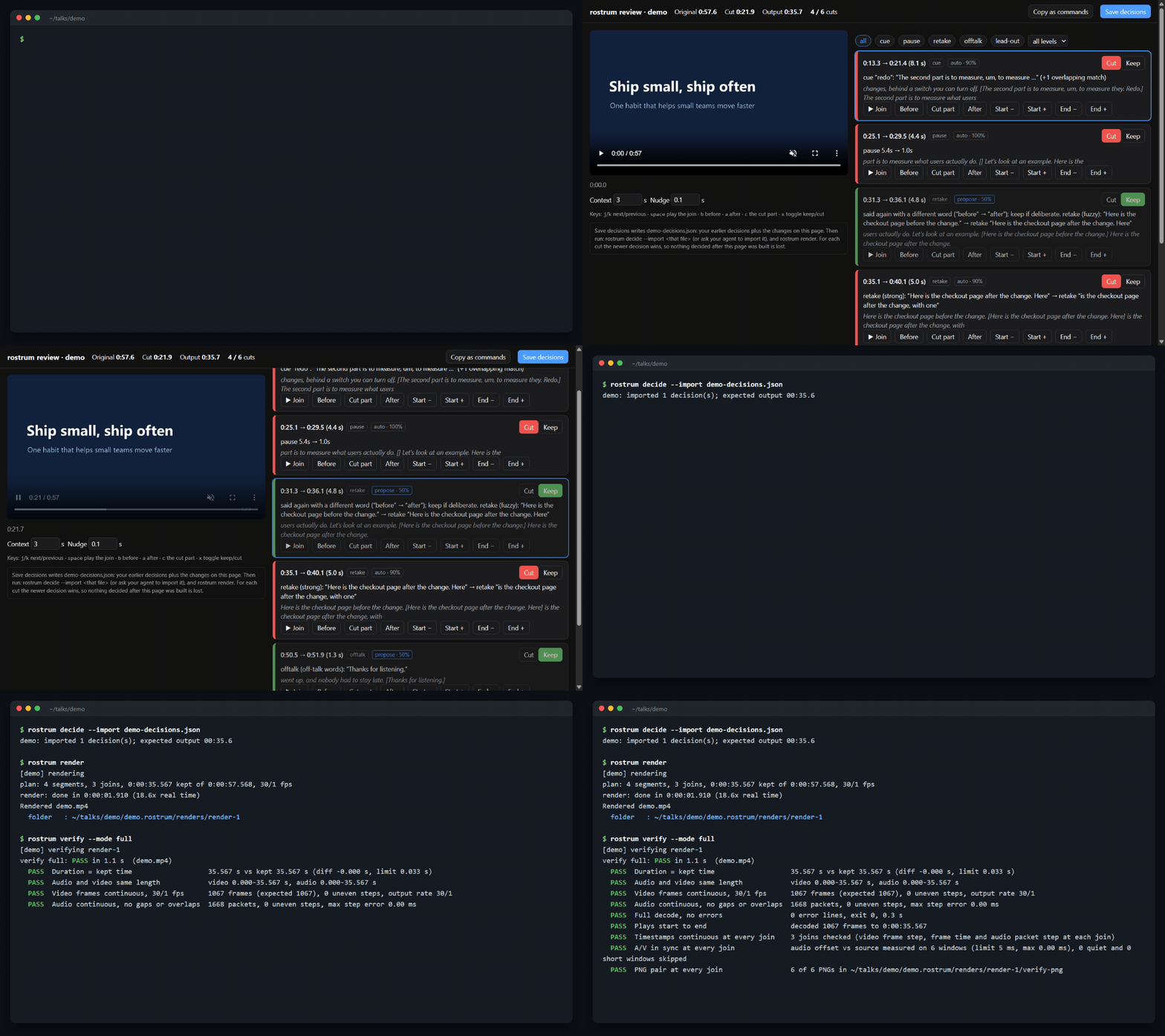
A 58-second synthetic demo talk. The terminal shows the real output, trimmed to the main lines.
Recording a talk in one take means restarting sentences, slides and clicks. Cutting those by hand takes hours, and one bad join ruins a clip. rostrum proposes each cut with the evidence behind it, you approve or adjust it, and it renders frame-accurate joins and then verifies sync at every join.
Quick start
uv tool install rostrum
rostrum init talk.mp4
pipx install rostrum works too.
You also need ffmpeg (winget install Gyan.FFmpeg, brew install ffmpeg, apt install ffmpeg).
init does the whole first pass:
- probes the file (or files) and writes
rostrum.jsonwith defaults, - transcribes with a local speech engine (the first run downloads the model, about 480 MB),
- finds cuts: spoken cues ("redo", "stop", "restart"), retakes, repeats, long pauses, dead air at the start and end, and garbled or untranscribed speech for you to listen to,
- writes
review.html, where you can play each join, flip keep/cut and nudge edges.
Nothing is cut before you see it.
rostrum planlists every cut and the expected length.renderrefuses until the cuts are reviewed: withrostrum decide, or by saving from the page and importing that file.--yesskips that check.- The page saves
<talk>-decisions.json. Importing it never undoes a newer decision: for each cut, the newer one wins. - Sources are never modified and outputs are never overwritten.
rostrum plan                       # every cut, its reason, and the expected output length
rostrum decide <cut-id> keep       # or: cut, with --start/--end to move its edges
rostrum decide --import talk-decisions.json   # apply what you saved from review.html
rostrum render                     # frame-accurate render into <talk>.rostrum/renders/render-N/
rostrum verify --mode full         # checks the newest render: frames, audio, decode, A/V sync at every join
rostrum map 23:30 --from render-1  # a time in the edited video -> the source time
Bare rostrum shows the project status, and rostrum doctor checks your setup.
What to expect
These numbers come from one 60-minute single-take talk, run on CPU only (8 cores, small.en):
- Speed:
- first pass: about 11 minutes;
- render: about 4 minutes;
- full verify: about 1.5 minutes.
- Accuracy: against the speaker's final edit, cuts marked
autocovered 69% of the removed time, and 95% of what they removed was right to remove. Adding the proposals raised coverage to 90%. Review closes the rest of the gap, which is why it is the default.
Recording for it
- When you fumble, say "redo" (or "stop", "restart"), pause for a second, and restart from the start of the sentence.
- Restarting a slide or a click is fine: the bad attempt and your restart look like any other retake.
- Keep recording. The fewer separate files, the easier the review; several files work as well.
One talk, many files, or a whole event
rostrum init talk-part1.mp4 talk-part2.mp4   # one talk recorded in parts: one timeline, one output
rostrum init talks/                          # one talk per file; *-part1/*-part2 files are grouped
Files join into one talk when their names end in -part1, -part2 and so on (_ or a space
works too; set init.partPattern to change it). Every other file is a talk of its own.
Parts are analyzed as one timeline, so a redo that starts at the end of one file and is said again in the next is still caught. An event shares one settings block (engine, cue words, render settings, loudness target, naming) and any talk can override any of it.
Configure everything
Settings are plain JSON in layers, where later wins:
- built-in defaults;
~/.rostrum/config.json, your defaults;rostrum.json, the event or talk file;- command-line flags.
Every threshold, word list, engine and render option is a key, and the published schema gives
your editor autocomplete. rostrum config prints the effective value of every key and where it
came from. See examples/rostrum.example.json.
{
  "$schema": "https://raw.githubusercontent.com/girishkvs/rostrum/main/src/rostrum/schema/rostrum.schema.json",
  "defaults": {
    "cues":   { "words": ["redo", "stop", "restart"] },
    "pauses": { "maxSec": 2.0, "keepSec": 0.5 },
    "render": { "crf": 18, "name": "{speaker}-{title}" }
  },
  "talks": [
    { "id": "keynote", "speaker": "Jane Doe", "title": "Keynote", "sources": ["part1.mp4", "part2.mp4"] }
  ]
}
Each detector has a level:
auto: shown with cut pre-selected.propose: shown with keep pre-selected.off: not run.
| Detector | Finds | Default |
|---|---|---|
| Spoken cues | "redo", "stop", "restart"; cuts back to where you restarted | auto |
| Retakes | a sentence said again soon after; "said again with a different word" is only proposed | auto when the match is strong, otherwise propose |
| Repeats | "now, now", or a restarted phrase | propose |
| Pauses | dead air over maxSec, trimmed to keepSec on each side | auto |
| Lead-in and lead-out | dead air at the start and end | auto |
| Off-talk | "is this recording?" and similar asides | propose |
| Unclear | garbled, hallucinated or untranscribed speech | propose |
| Fillers | "um", "uh" | off |
Slide-aware checks from your deck are planned for 0.2.
Speech engines
| Engine | Use |
|---|---|
faster-whisper | The default. Local, on CPU or GPU. |
command | Any program that prints words JSON, SRT or VTT, such as whisper.cpp or a vendor CLI. |
import | A transcript you already have. |
The command and import engines work without any extra setup. Third-party engines can register
through the rostrum.engines entry point, naming a rostrum.engines.SpeechEngine subclass; rostrum
builds it as Engine(settings, tools, report). Speech workers size themselves to your CPU and memory
(speech.workers: "auto"); set a number to override.
Defaults are English: the small.en model and the cue, filler and off-talk word lists. For
another language, set speech.model to a multilingual model such as small, set
speech.language, and replace the word lists.
Use it from an agent
Every command except mcp takes --json. rostrum mcp runs an MCP server over stdio; long steps run as jobs
that your agent polls.
One-step installs (the MCP server plus the agent skill):
| Host | Install |
|---|---|
| Claude Code | /plugin marketplace add girishkvs/rostrum, then /plugin install rostrum@rostrum |
| Copilot CLI | copilot plugin install girishkvs/rostrum |
| Gemini CLI | gemini extensions install https://github.com/girishkvs/rostrum |
| Claude Desktop | Open rostrum-<version>.mcpb from the latest release |
| Cursor |  |
Or add the server by hand. uvx runs the PyPI package, so there is nothing else to install:
| Host | Add the server |
|---|---|
| Copilot CLI | /mcp add, then name rostrum, command uvx, arguments rostrum mcp |
| Claude Code | claude mcp add rostrum -- uvx rostrum mcp |
| VS Code | MCP: Add Server, then Command (stdio), then uvx rostrum mcp |
| Codex CLI | ~/.codex/config.toml: [mcp_servers.rostrum] with command = "uvx" and args = ["rostrum", "mcp"] |
| Gemini CLI, Cursor | "mcpServers": { "rostrum": { "command": "uvx", "args": ["rostrum", "mcp"] } } in ~/.gemini/settings.json or ~/.cursor/mcp.json |
The first start downloads rostrum's dependencies, which can take longer than a host waits for a
server to start. Run uvx rostrum doctor once first.
Then ask: "Clean up talk.mp4 and show me anything you're unsure about."
skills/rostrum/SKILL.md tells the agent the rules:
- show the cuts before rendering;
- ask about the uncertain ones;
- import what you saved from the review page when you say so (
import_decisions); - render only after you say so (the agent then passes
confirmed).
mcp-pacemaker can host the server and keep it warm
across sessions. Add this entry to ~/.mcp-pacemaker/servers.json; pacemaker reloads the file when
it is saved:
{ "rostrum": { "command": "uvx", "args": ["rostrum", "mcp"] } }
What verify checks
- Duration: output length equals the kept time to within one frame.
- Video: frames are continuous at a constant step.
- Audio: packets are continuous, with no gaps or overlaps.
- Decode: a full decode completes with no errors.
- Joins: timestamps are continuous at every join.
- A/V offset: measured against the source at the joins, sampled in
fastmode and at every join infullmode.
Requirements
- Python 3.11+ and ffmpeg/ffprobe 6.1 or newer (CI runs 6.1 and 9.0). If they aren't on PATH, set
ROSTRUM_FFMPEG/ROSTRUM_FFPROBE, ordefaults.tools.ffmpeg/defaults.tools.ffprobeinrostrum.json. - Windows, macOS and Linux.
License
MIT