Tradingview MCP Server
El kit de herramientas de trading impulsado por IA más completo para Claude y clientes MCP. Backtesting + Sentimiento en vivo + Yahoo Finance + más de 30 herramientas de análisis técnico, todo en un solo servidor MCP.
Documentación
TradingView MCP Market Data & Technical Analysis for AI Assistants
TradingView MCP server — datos de mercado en tiempo real, indicadores técnicos, screener y backtesting para Claude, ChatGPT, Cursor, Copilot y cualquier cliente MCP. Acciones, criptomonedas, forex y futuros en bolsas globales. Backtesting + sentimiento en vivo + Yahoo Finance + 37 herramientas de análisis técnico — el kit de herramientas TradingView MCP más completo, todo en un solo servidor.

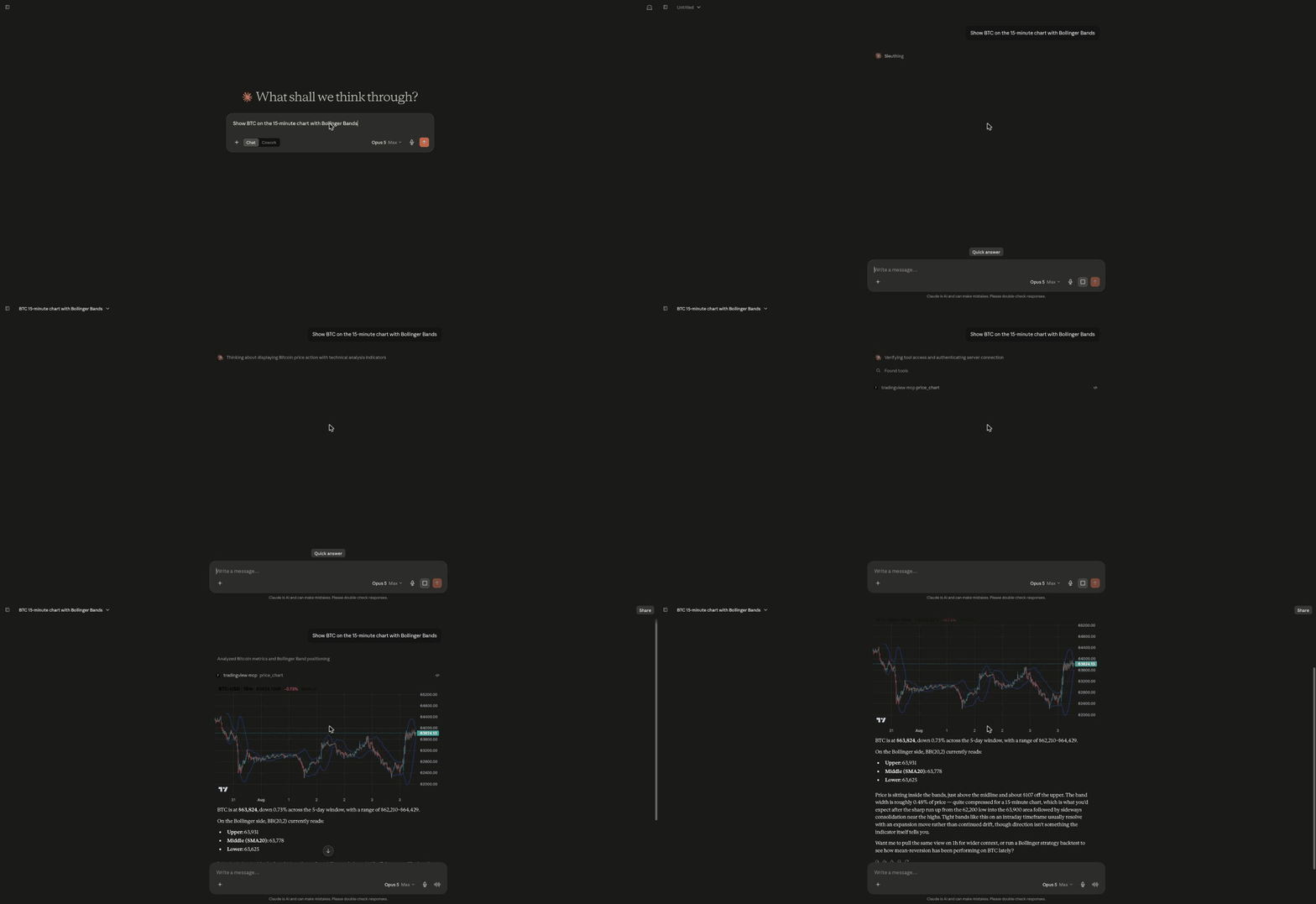
🆕 El servidor alojado ahora dibuja. Pide un gráfico y una vista interactiva de velas (1d / 1h / 15m, con superposición opcional de Bollinger) se renderiza en vivo dentro de la conversación mediante MCP Apps — y la IA lee los valores de las bandas de vuelta:
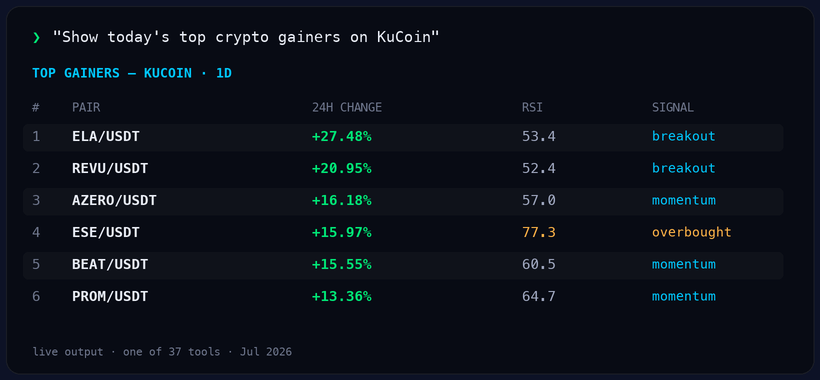
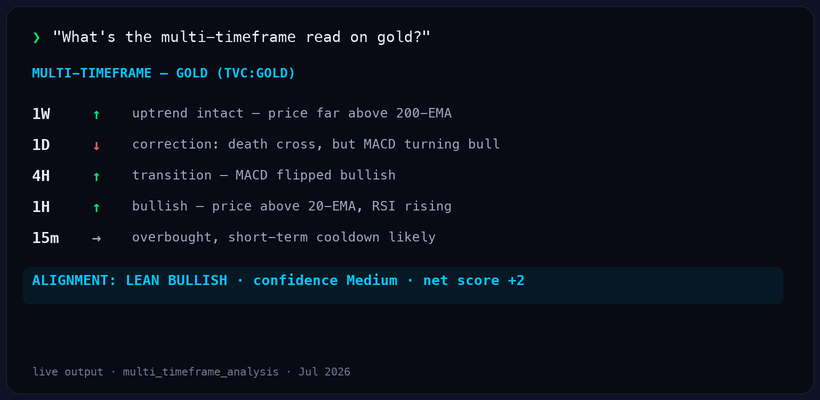
Pega una URL (o pip install), y luego solo pregunta. Salida real, directamente desde el servidor en vivo:
Prueba estos primero — funcionan en Claude, ChatGPT, Cursor o cualquier cliente MCP:
Show today's top crypto gainers on Binance
Run a full technical analysis of NVDA
What's the multi-timeframe read on gold?
Backtest an RSI strategy on BTC on the daily timeframe
[!NOTE] Proyecto independiente de código abierto — no afiliado, respaldado ni asociado con TradingView Inc. "TradingView" es una marca comercial de su respectivo propietario; este proyecto consume datos de mercado de terceros y no es un producto de TradingView.
[!NOTE] ¿Necesita — o arriesga — tu cuenta de TradingView? No. Este servidor no inicia sesión, extrae ni automatiza una sesión de TradingView, y no requiere cuenta de TradingView ni clave API. Los datos de mercado se obtienen del lado del servidor desde endpoints públicos, por lo que no hay ninguna cuenta tuya en el proceso ni automatización de navegador/interfaz. (Esto es diferente de los servidores MCP que controlan la aplicación de escritorio TradingView mediante Chrome DevTools.) Eres responsable de asegurar que tu propio uso cumpla con los términos de cualquier fuente de datos a la que lo apuntes.
Cómo se compara esto con los MCP de TradingView de automatización de escritorio (los que controlan remotamente TradingView Desktop)
"TradingView MCP" ahora significa dos tipos muy diferentes de proyectos. Ambos son útiles — para trabajos diferentes:
| Este proyecto — API de datos y análisis | MCP de automatización de escritorio | |
|---|---|---|
| Lo que necesitas | Nada — datos de mercado públicos | TradingView Desktop, generalmente con un plan de pago de TradingView |
| Dónde funciona | Claude.ai, Claude Code, ChatGPT, Cursor, Copilot — cualquier cliente MCP | Principalmente Claude Code, en tu propia máquina |
| Cuando tu máquina está apagada | La versión alojada sigue respondiendo, 24/7 | Se detiene |
| Screeners y backtesting | Integrados (37 herramientas, multi-bolsa) | Lo que ofrezca la interfaz de TradingView |
| Gráficos | Gráficos interactivos en la conversación (MCP Apps, alojado) | Los propios gráficos de TradingView |
| Tu cuenta de TradingView | No necesaria, nunca se toca | Controla tu sesión iniciada |
Si quieres una IA haciendo clic en tu TradingView Desktop — editando Pine Script, dibujando en gráficos, usando replay — mira tradesdontlie/tradingview-mcp. Si quieres datos de mercado headless, screeners y backtesting disponibles para cualquier cliente de IA, sin instalar nada y sin cuenta de TradingView en el proceso — ese es este proyecto.
[!IMPORTANT] No es asesoramiento financiero. Nada producido por este software es consejo de inversión, financiero, legal, fiscal o contable. tradingview-mcp es una herramienta de análisis informativo y educativo. Sus resultados, incluidos indicadores, puntuaciones, señales, "configuraciones de trading", entradas, stop losses y objetivos, se calculan a partir de datos de mercado de terceros y no son recomendaciones para comprar, vender o mantener ningún activo. No ejecuta operaciones, gestiona dinero ni garantiza ningún resultado. El trading y la inversión conllevan un riesgo sustancial de pérdida, y puedes perder parte o la totalidad de tu capital. Siempre haz tu propia investigación y consulta a un profesional autorizado antes de tomar cualquier decisión financiera. Eres el único responsable de tus propias decisiones y de cumplir con las leyes y regulaciones que te aplican. Los datos de mercado pueden estar retrasados, ser inexactos o incompletos, y se proporcionan sin garantía.
[!TIP] ¿Prefieres cero configuración? Usa la versión alojada. pro.cryptosieve.com sirve las 37 herramientas como una única URL de conector para Claude.ai, ChatGPT, Copilot y Cursor — sin
uv,pandasni Python que manejar. Desde $9/mes (Pro) o $29/mes (Pro+ — límites más altos), con prueba gratuita de 3 días. El autoalojamiento sigue siendo gratis para siempre; el alojado es solo para quienes prefieren saltarse las operaciones. (Comparación completa autoalojado vs alojado en Inicio Rápido abajo.)







⭐ Si esta herramienta mejora tu flujo de trabajo, por favor da estrella al repositorio y considera patrocinar — ¡mantiene el proyecto vivo y creciendo!
-Sponsor-orange?style=for-the-badge&logo=github-sponsors)
-Sponsor-blueviolet?style=for-the-badge&logo=github-sponsors)
-Sponsor-gold?style=for-the-badge&logo=github-sponsors)
🎥 Demostración del Framework
🆕 Novedades
Expansión de Estabilidad y Estrategias (Mayo 2026)
- Herramientas async de ruta rápida — 7 herramientas de alto tráfico (
yahoo_price,stock_extended_hours,top_gainers,volume_breakout_scanner,multi_timeframe_analysis,financial_news,combined_analysis) convertidas aasync def. FastMCP ejecuta herramientas síncronas serializadas en el bucle de eventos — async desbloquea paralelismo real dentro del servidor para que las llamadas concurrentes a herramientas realmente se superpongan.combined_analysisademás distribuye sus 3 sub-llamadas medianteasyncio.gatherpara una mejora de ~3× en tiempo de pared en la herramienta potente.yahoo_price/stock_extended_hoursusanhttpx.AsyncClientpara E/S verdaderamente no bloqueante; las herramientas de bibliotecas síncronas (tradingview_ta,tradingview-screener,feedparser) se descargan medianteasyncio.to_thread. (PR — abierto) - 9 estrategias de backtest (antes 6) — se añadieron
rsi_pullback,keltner_breakoutytriple_ema, cubriendo retroceso de tendencia, ruptura normalizada por ATR y cruce de EMA filtrado por SMA200.compare_strategiesahora clasifica las 9 completas. - Capa de resiliencia — reintento automático + caché TTL de 60 segundos en el proveedor de screener de TradingView, eliminando errores transitorios de
"Expecting value"encombined_analysisymulti_timeframe_analysis. (PR #32 — fusionado) - Reconstrucción del servicio de noticias financieras — reemplaza los endpoints RSS obsoletos de Reuters con Yahoo Finance, MarketWatch y CNBC. Corrige el error de larga duración
count: 0enfinancial_news. (PR #33 — fusionado) - Limitador de TA — limita llamadas concurrentes de
tradingview_ta(predeterminado 4) + espaciado mínimo de 0.8s entre inicios. Evita ráfagas paralelas decombined_analysis/multi_timeframe_analysisque golpeen el límite de tasa de cuerpo vacío de TradingView. Ajustable mediante variables de entorno. (PR #34 — fusionado) - Backtesting walk-forward (
walk_forward_backtest_strategy) — división entrenamiento/prueba con veredicto de sobreajuste (ROBUST / MODERATE / WEAK / OVERFITTED). - Soporte de marco temporal horario (1h) en
backtest_strategy,compare_strategiesywalk_forward_backtest_strategy. - Registro completo de operaciones + curva de capital como salidas (
include_trade_log=True,include_equity_curve=True).
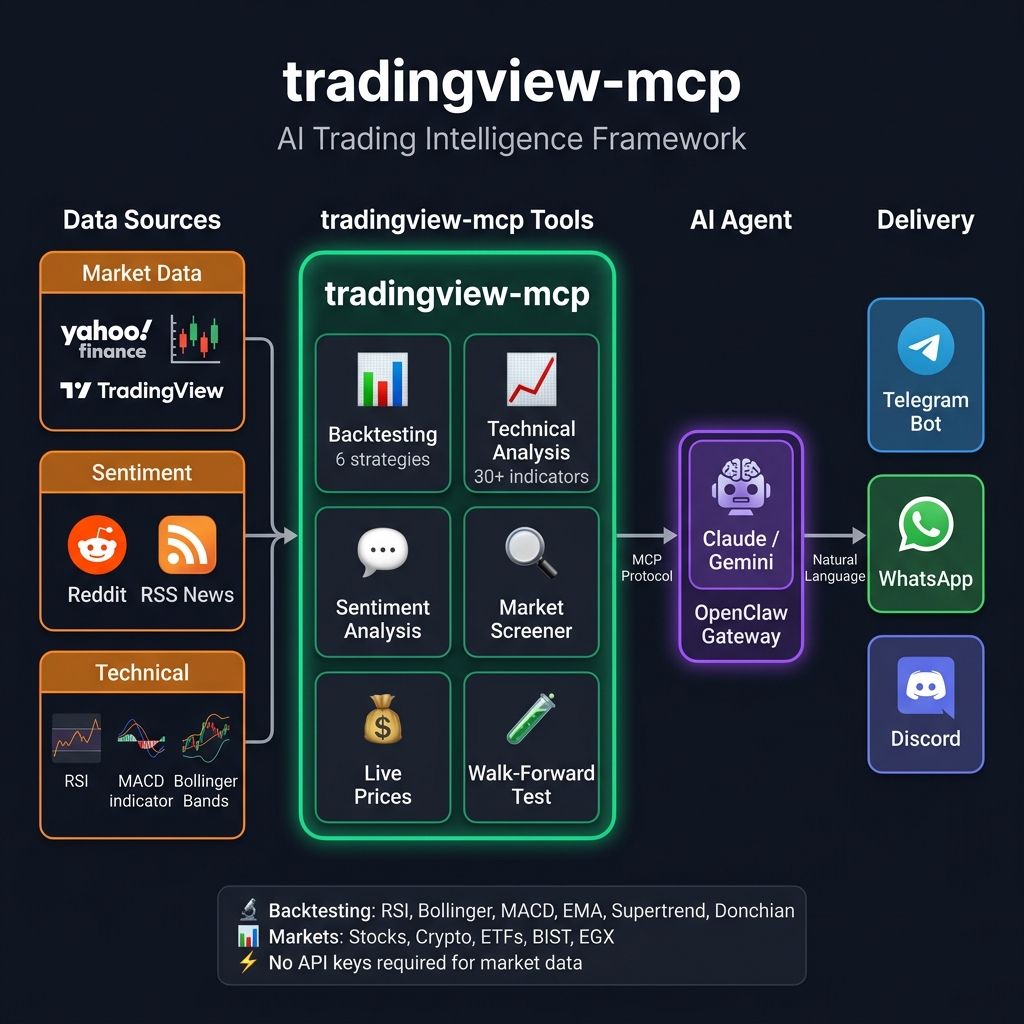
🏗️ Arquitectura
✨ ¿Por qué tradingview-mcp?
| Característica | tradingview-mcp | Configuraciones Tradicionales | Bloomberg Terminal |
|---|---|---|---|
| Tiempo de Configuración | 5 minutos | Horas (Docker, Conda...) | Semanas (Contratos) |
| Costo | Gratis y Código Abierto | Variable | $30k+/año |
| Backtesting | ✅ 9 estrategias + Walk-forward + Sharpe | ❌ Scripting manual | ✅ Propietario |
| Sentimiento en Vivo | ✅ Reddit + noticias RSS | ❌ Configuración separada | ✅ Terminal |
| Datos de Mercado | ✅ En Vivo / Tiempo Real | Históricos / Retrasados | En Vivo |
| Claves API | Ninguna requerida | Múltiples (OpenAI, etc.) | N/A |
🚀 Inicio Rápido (5 Minutos)
Dos formas de ejecutarlo — las mismas 37 herramientas de cualquier manera:
| 🧑💻 Autoalojado (este repositorio) | ☁️ Alojado — pro.cryptosieve.com | |
|---|---|---|
| Precio | Gratis para siempre (MIT) | $9/mes Pro · $29/mes Pro+ · prueba de 3 días |
| Tiempo hasta la primera llamada | ~5 minutos (Python + uv) | ~60 segundos (pega una URL) |
| Actualizaciones y operaciones | Tú lo ejecutas y actualizas | Gestionado — siempre en la última versión |
| Se ejecuta en | Tu máquina o VPS | Alojado, transmitido desde el borde |
| Límites | Tu hardware | 2,500/mes · 60/min (Pro) → 10,000/mes · 150/min (Pro+) |
| Mejor para | Curiosos, forks, control total | Quienes prefieren saltarse las operaciones |
☁️ Cero configuración: pega una URL de conector en Claude.ai, ChatGPT, Copilot o Cursor → inicia una prueba gratuita de 3 días. Todo lo siguiente es para autoalojamiento.
Instalar mediante pip
pip install tradingview-mcp-server
Opcional: noticias y sentimiento (clave Marketaux gratuita)
financial_news y market_sentiment (además de las partes de noticias/sentimiento de
combined_analysis) funcionan con Marketaux —
noticias de mercado con licencia y sentimiento por entidad. Obtén una clave API gratuita
(100 solicitudes/día; el servidor almacena en caché durante 4h y comparte una sola obtención entre noticias
y sentimiento, por lo que el nivel gratuito rinde mucho) y configura:
export MARKETAUX_API_TOKEN=your_token_here # optional
Sin un token, esas dos herramientas devuelven una nota amigable de "no configurado" — todas las demás herramientas funcionan normalmente.
Configuración de Claude Desktop (claude_desktop_config.json)
Nota: En macOS, las aplicaciones GUI como Claude Desktop pueden no tener
~/.local/binen su PATH. Usa la ruta completa auvxpara evitar errores de "comando no encontrado".
{
  "mcpServers": {
    "tradingview": {
      "command": "/Users/YOUR_USERNAME/.local/bin/uvx",
      "args": ["--from", "tradingview-mcp-server", "tradingview-mcp"]
    }
  }
}
En Linux, reemplaza /Users/YOUR_USERNAME con /home/YOUR_USERNAME. En Windows, usa %USERPROFILE%\.local\bin\uvx.exe.
Configuración del Plugin Codex
Este repositorio también incluye metadatos de plugin Codex solo-MCP:
.codex-plugin/plugin.json.codex-mcp.json
El plugin usa el mismo punto de entrada del paquete PyPI:
{
  "mcpServers": {
    "tradingview": {
      "command": "uvx",
      "args": ["--from", "tradingview-mcp-server", "tradingview-mcp"]
    }
  }
}
Después de instalar o habilitar el plugin Codex, reinicia Codex para que el servidor MCP se cargue en la próxima sesión. Dependiendo de tu versión de Codex, codex mcp list puede mostrar los servidores MCP registrados, pero la disponibilidad de herramientas debe verificarse en una sesión nueva de Codex.
O ejecutar desde el código fuente
git clone https://github.com/atilaahmettaner/tradingview-mcp
cd tradingview-mcp
uv run tradingview-mcp
🛠️ Solución de Problemas
🪟 Windows: MCP error -32001: Request timed out en el primer lanzamiento
Síntoma — ves esto en los registros de Claude Desktop poco después de agregar la configuración:
[tradingview] Server started and connected successfully
[tradingview] Message from client: initialize ...
[60 seconds later]
[tradingview] notifications/cancelled — reason: "MCP error -32001: Request timed out"
Por qué ocurre: Python 3.14 aún no es compatible. uvx descarga tradingview-mcp-server, crea un virtualenv nuevo e instala dependencias la primera vez que se ejecuta. Algunas dependencias nativas en el stack MCP no publican actualmente wheels compatibles con Python 3.14, por lo que la instalación puede recurrir a compilaciones desde el código fuente o fallar antes de que Claude Desktop termine de inicializar el servidor.
Solución — fija Python 3.13 (tiene wheels precompilados de pandas):
{
  "mcpServers": {
    "tradingview": {
      "command": "uvx",
      "args": ["--python", "3.13", "--from", "tradingview-mcp-server", "tradingview-mcp"]
    }
  }
}
En macOS usa la ruta completa a uvx (ver la nota en Inicio Rápido). En Windows, uvx es típicamente %USERPROFILE%\.local\bin\uvx.exe.
Alternativa — preinstala una vez, luego deja que Claude Desktop reutilice el caché:
# Run in a terminal before launching Claude Desktop
uv tool install --python 3.13 tradingview-mcp-server
Después de que termine la instalación, inicia Claude Desktop con la configuración normal y el servidor aparecerá al instante (el caché ya está caliente).
⚠️ Formato de Envoltura de Errores
Las herramientas que han adoptado el formato de error estructurado devuelven su carga útil normal o una envoltura de error:
{"error": {"code": "ALL_BATCHES_FAILED", "message": "All 5 batches failed; first error: JSONDecodeError(...)", "batches_attempted": 5, "batches_failed": 5, "first_error": "...", "retryable": true}}
Por qué: las cadenas anteriores de [] / {"error": "Analysis failed: ..."} hacían imposible distinguir "sin coincidencias hoy" de "límite de tasa del proveedor." La nueva envoltura es ramificable programáticamente mediante code, y retryable le dice al llamador si esperar y reintentar puede ayudar (las tormentas del proveedor pasan; una dependencia faltante no se arregla sola).
Cobertura completa (cada modo de fallo — caída del servicio upstream, lista de símbolos vacía, dependencia faltante, excepción inesperada — devuelve un envoltorio, nunca una cadena/traceback crudo): top_gainers, top_losers, bollinger_scan, rating_filter, volume_breakout_scanner, smart_volume_scanner.
Adopción parcial (las rutas de error principales devuelven envoltorios): coin_analysis, volume_confirmation_analysis, consecutive_candles_scan, futures_market_overview, futures_top_movers, stock_prices, y las guardas de entrada del backtest. Las herramientas restantes migran en lotes — rastreado en #76.
Detección de un error:
result = volume_breakout_scanner(exchange="KUCOIN")
if isinstance(result, dict) and "error" in result:
    code = result["error"]["code"]
    if result["error"].get("retryable"):
        # Wait + retry, raise alert, fall back to single-batch call, etc.
        ...
else:
    for row in result:
        ...
Los códigos estables están definidos en core/errors.py.
📱 Uso vía Telegram, WhatsApp y más (OpenClaw)
Conecta este servidor a Telegram, WhatsApp, Discord y más de 20 plataformas de mensajería usando OpenClaw — una puerta de enlace de IA autoalojada. Probado y verificado en VPS de Hetzner (Ubuntu 24.04).
Cómo funciona
OpenClaw enruta los mensajes de Telegram a un agente de IA. El agente usa
trading.py— un envoltorio ligero de Python — para llamar a las funciones detradingview-mcpy devolver resultados formateados. No se necesita el protocolo MCP entre OpenClaw y el servidor; es una importación directa de Python.
Telegram → OpenClaw agent (AI model) → trading.py (bash) → tradingview-mcp → Yahoo Finance
Configuración rápida
# 1. Install UV and tradingview-mcp
curl -LsSf https://astral.sh/uv/install.sh | sh && source ~/.bashrc
uv tool install tradingview-mcp-server

# 2. Configure OpenClaw channels
cat > ~/.openclaw/openclaw.json << 'EOF'
{
  channels: {
    telegram: {
      botToken: "YOUR_BOT_TOKEN_HERE",
    },
  },
}
EOF

# 3. Configure gateway + agent
openclaw config set gateway.mode local
openclaw config set acp.defaultAgent main

# 4. Set your AI model (choose ONE option below)
openclaw configure --section model

# 5. Install the skill + tool wrapper
mkdir -p ~/.agents/skills/tradingview-mcp ~/.openclaw/tools
curl -fsSL https://raw.githubusercontent.com/atilaahmettaner/tradingview-mcp/main/openclaw/SKILL.md \
  -o ~/.agents/skills/tradingview-mcp/SKILL.md
curl -fsSL https://raw.githubusercontent.com/atilaahmettaner/tradingview-mcp/main/openclaw/trading.py \
  -o ~/.openclaw/tools/trading.py && chmod +x ~/.openclaw/tools/trading.py

# 6. Start the gateway
openclaw gateway install
systemctl --user start openclaw-gateway.service
Elige tu modelo de IA
OpenRouter no es obligatorio — usa cualquier proveedor del que tengas clave:
| Proveedor | ID de modelo para OpenClaw | Obtener clave |
|---|---|---|
| OpenRouter (agregador — acceso a todos los modelos) | openrouter/google/gemini-3-flash-preview | openrouter.ai/keys |
| Anthropic (Claude directo) | anthropic/claude-sonnet-4-5 | console.anthropic.com |
| Google (Gemini directo) | google/gemini-2.5-flash | aistudio.google.com |
| OpenAI (GPT directo) | openai/gpt-4o-mini | platform.openai.com |
# Examples — set your chosen model:
openclaw config set agents.defaults.model "openrouter/google/gemini-3-flash-preview"  # via OpenRouter
openclaw config set agents.defaults.model "anthropic/claude-sonnet-4-5"               # Anthropic direct
openclaw config set agents.defaults.model "google/gemini-2.5-flash"                   # Google direct
⚠️ Importante: El prefijo debe coincidir con tu proveedor.
google/...necesita una clave de API de Google.openrouter/...necesita una clave de OpenRouter.
⚠️ Errores comunes
| Síntoma | Causa | Solución |
|---|---|---|
Unrecognized keys: mcpServers | mcpServers no compatible en esta versión | Eliminar de la configuración, usar envoltorio bash |
No API key for provider "google" | Usó google/model pero solo tiene clave de OpenRouter | Use openrouter/google/model en su lugar |
Bucle de which agent? | acp.defaultAgent no configurado | openclaw config set acp.defaultAgent main |
| La puerta de enlace no arranca | Falta gateway.mode | openclaw config set gateway.mode local |
Prueba tu bot
Una vez en ejecución, envía a tu bot de Telegram:
market snapshot
backtest RSI strategy for AAPL, 1 year
compare all strategies for BTC-USD
👉 Guía completa de configuración de OpenClaw →
A diferencia de los screener básicos, este framework despliega agentes de IA especializados que debaten hallazgos en tiempo real:
- 🛠️ Analista técnico — Bandas de Bollinger (calificación propietaria ±3), RSI, MACD
- 🌊 Analista de sentimiento y momentum — Sentimiento de la comunidad de Reddit + momentum de precio
- 🛡️ Gestor de riesgo — Volatilidad, riesgo de drawdown, señales de reversión a la media
Salida: STRONG BUY / BUY / HOLD / SELL / STRONG SELL con puntuación de confianza
🔧 Las 37 herramientas MCP
📊 Motor de backtesting
| Herramienta | Descripción |
|---|---|
backtest_strategy | Backtest de 1 de 9 estrategias con métricas institucionales (Sharpe, Calmar, Expectancy). Soporta marcos temporales 1d y 1h; registro de operaciones completo opcional + curva de capital. |
compare_strategies | Ejecuta las 9 estrategias sobre el mismo símbolo y clasifícalas por rendimiento. |
walk_forward_backtest_strategy | Validación walk-forward con división entrenamiento/prueba y veredicto de sobreajuste (ROBUST / MODERATE / WEAK / OVERFITTED). |
9 estrategias para probar:
rsi— Reversión a la media por RSI sobrevendido/sobrecompradobollinger— Reversión a la media con Bandas de Bollingermacd— Cruce dorado/de la muerte MACDema_cross— Cruce dorado/de la muerte EMA 20/50supertrend— Seguimiento de tendencia Supertrend basado en ATR 🔥donchian— Ruptura del canal de Donchian (estilo Turtle Trader)rsi_pullback— Compra en caídas con tendencia alcista confirmada (SMA50>SMA200 + entrada RSI<40) 🆕keltner_breakout— Ruptura normalizada por ATR (EMA20 + banda superior 2·ATR) 🆕triple_ema— Cruce EMA 20/50 filtrado por tendencia SMA200 🆕
Las estrategias 🆕 requieren
period='1y'o'2y'para que el filtro de tendencia SMA200 complete su calentamiento.
Métricas que obtienes: Tasa de aciertos, retorno total, ratio Sharpe, ratio Calmar, drawdown máximo, factor de beneficio, expectancy, mejor/peor operación, vs comprar y mantener, con simulación realista de comisiones y deslizamiento.
Example prompt: "Compare all 9 strategies on MSFT for 2 years"
→ #1 triple_ema:        +15.1% | Sharpe:  0.0 | WR: 100%
→ #2 keltner_breakout:  +14.3% | Sharpe:  4.7 | WR:  40%
→ #3 bollinger:         +12.2% | Sharpe:  4.1 | WR:  64%
→ Buy & Hold:            -2.1%
💰 Yahoo Finance — Precios en tiempo real (Nuevo en v0.6.0)
| Herramienta | Descripción |
|---|---|
yahoo_price | Cotización en tiempo real: precio, cambio %, máximo/mínimo 52 semanas, estado del mercado |
market_snapshot | Panorama global: S&P500, NASDAQ, VIX, BTC, ETH, EUR/USD, SPY, GLD |
Soporta: Acciones (AAPL, TSLA, NVDA), Cripto (BTC-USD, ETH-USD, SOL-USD), ETFs (SPY, QQQ, GLD), Índices (^GSPC, ^DJI, ^IXIC, ^VIX), FX (EURUSD=X), Turcas (THYAO.IS, SASA.IS)
🌍 Screener global de acciones — Acciones comunes y preferentes
| Herramienta | Descripción |
|---|---|
stock_screener | Lista acciones comunes o preferentes para cualquier mercado de país de TradingView (america, korea, germany, brazil, …) con precio, moneda, cambio %, rendimiento por dividendo — clasificadas por capitalización de mercado. El gemelo API del filtro de búsqueda de símbolos "Common stock" / "Preferred stock" de TradingView. |
stock_prices | Consulta de precio directa para símbolos específicos (EXCHANGE:SYMBOL separados por comas, p. ej. NASDAQ:NVDA, KRX:005930) — precio, moneda, cambio % diario, con tickers no reconocidos nombrados en not_found. |
🧠 Sentimiento e inteligencia de IA
| Herramienta | Descripción |
|---|---|
market_sentiment | Sentimiento de Reddit en comunidades financieras (puntuación alcista/bajista, publicaciones principales) |
financial_news | Titulares RSS en vivo de Yahoo Finance, MarketWatch, CNBC, CoinDesk, CoinTelegraph |
combined_analysis | Herramienta potente: técnicos de TradingView + sentimiento de Reddit + noticias en vivo → decisión de confluencia. Ahora respaldada por reintento + caché de 60s para resiliencia ante errores transitorios del screener. |
📈 Núcleo de análisis técnico
| Herramienta | Descripción |
|---|---|
get_technical_analysis | AT completo: RSI, MACD, Bollinger, 23 indicadores con COMPRAR/VENDER/MANTENER |
get_multiple_analysis | AT masivo para múltiples símbolos a la vez |
get_bollinger_band_analysis | Sistema de calificación propietario ±3 BB |
get_stock_decision | Motor de decisión de 3 capas (clasificación + configuración de operación + puntuación de calidad) |
screen_stocks | Screener multi-exchange con más de 20 criterios de filtro |
scan_by_signal | Escaneo por tipo de señal (sobrevendido, tendencia, ruptura...) |
get_candlestick_patterns | Detector de 15 patrones de velas japonesas |
get_multi_timeframe_analysis | Análisis de alineación Semanal→Diario→4H→1H→15m |
🌍 Soporte multi-exchange
| Exchange | Herramientas |
|---|---|
| Binance | Screener de cripto, todos los pares |
| KuCoin / Bybit+ | Screener de cripto |
| NASDAQ / NYSE | Acciones de EE. UU. (AAPL, TSLA, NVDA...) |
| EGX (Egipto) | egx_market_overview, egx_stock_screener, egx_trade_plan, egx_fibonacci_retracement |
| Turco (BIST) | Vía screener de TradingView |
💬 Ejemplos de conversaciones con IA
You: "Give me a full market snapshot right now"
AI: [market_snapshot] → S&P500 -3.4%, BTC +0.1%, VIX 31 (+13%), EUR/USD 1.15

You: "What is Reddit saying about NVDA?"
AI: [market_sentiment] → Strongly Bullish (0.41) | 23 posts | 18 bullish

You: "Backtest RSI strategy on BTC-USD for 2 years"
AI: [backtest_strategy] → +31.5% return | 100% win rate | 2 trades | B&H: -5%

You: "Which of the 9 strategies worked best on MSFT in the last 2 years?"
AI: [compare_strategies] → triple_ema #1 (+15.1%, WR 100%), keltner_breakout #2 (+14.3%), macd last (-23.4%)

You: "Run walk-forward backtest on supertrend for SPY"
AI: [walk_forward_backtest_strategy] → Verdict: ROBUST (avg robustness 0.92) | OOS return +8.5%

You: "Analyze TSLA with all signals: technical + sentiment + news"
AI: [combined_analysis] → BUY (Technical STRONG BUY + Bullish Reddit + Positive news)
💖 Apoya el proyecto
Este framework es gratuito y de código abierto, construido en tiempo libre. Si te ahorra horas de investigación o te ayuda a tomar mejores decisiones, considera patrocinar:
| Nivel | Mensual | Lo que obtienes |
|---|---|---|
| ☕ Café | $5 | Gratitud sincera + nombre en el README |
| 🚀 Partidario | $15 | Lo anterior + correcciones de errores prioritarias |
| 💎 Pro | $30 | Lo anterior + solicitudes de funciones prioritarias |

Cada patrocinador financia directamente nuevas funciones como Walk-Forward Backtesting, sentimiento de Twitter/X y alojamiento en la nube gestionado.
📋 Hoja de ruta
- Análisis técnico de TradingView (más de 30 indicadores)
- Screener multi-exchange (Binance, KuCoin, MEXC, EGX, acciones de EE. UU.)
- Análisis de sentimiento de Reddit
- Noticias financieras en vivo (Yahoo / MarketWatch / CNBC / CoinDesk / CoinTelegraph)
- Precios en tiempo real de Yahoo Finance
- Motor de backtesting (9 estrategias + Sharpe / Calmar / Expectancy)
- Backtesting walk-forward (detección de sobreajuste)
- Capa de resiliencia (reintento + caché TTL) en el proveedor del screener
- Marco temporal de backtesting por hora (1h)
- Sentimiento de mercado de Twitter/X
- Simulación de paper trading
- Alojamiento en la nube gestionado (sin configuración local)
📄 Licencia
Licencia MIT — consulta LICENSE para más detalles.
Descargo de responsabilidad: Esta herramienta es solo para fines educativos y de investigación. No constituye asesoramiento financiero. Siempre haz tu propia investigación antes de tomar decisiones de inversión.