Gitee
offiziellGitee-API-Integration, Verwaltung von Repositorys, Issues und Pull-Requests und mehr.
Was kann man mit Gitee MCP machen?
- Repository-Probleme verwalten — Bitten Sie Ihren Assistenten, Probleme in einem Repository aufzulisten, zu erstellen oder zu aktualisieren, mithilfe von
list_repo_issues,create_issueundupdate_issue. - Pull-Requests bearbeiten — Lassen Sie Ihren Assistenten Pull-Requests auflisten, erstellen, zusammenführen oder überprüfen, mit Tools wie
list_repo_pulls,create_pull,merge_pullundmanage_pull_review. - Repository-Inhalte erkunden — Dateiinhalte abrufen, Branches oder Tags vergleichen und Dateien nach Inhalt durchsuchen mit
get_file_content,compare_branches_tagsundsearch_files_by_content. - Releases und Forks verwalten — Releases erstellen, vorhandene auflisten oder ein Repository forken über
create_release,list_releasesundfork_repository. - Suchen und entdecken — Open-Source-Repositories oder Benutzer auf Gitee finden mit
search_open_source_repositoriesundsearch_users. - Benachrichtigungen verfolgen — Ihre neuesten Benachrichtigungen mit
list_user_notificationsüberprüfen.
Dokumentation
Gitee MCP Server
Gitee MCP Server ist eine Implementierung des Model Context Protocol (MCP) für Gitee. Es bietet eine Reihe von Werkzeugen für die Interaktion mit der Gitee-API und ermöglicht KI-Assistenten die Verwaltung von Repositories, Issues, Pull Requests und mehr.

Funktionen
- Interaktion mit Gitee-Repositories, Issues, Pull Requests und Benachrichtigungen
- Konfigurierbare API-Basis-URL zur Unterstützung verschiedener Gitee-Instanzen
- Befehlszeilenoptionen für eine einfache Konfiguration
- Unterstützt sowohl persönliche, Organisations- als auch Unternehmensoperationen
- Dynamisches Aktivieren/Deaktivieren von Werkzeugsätzen
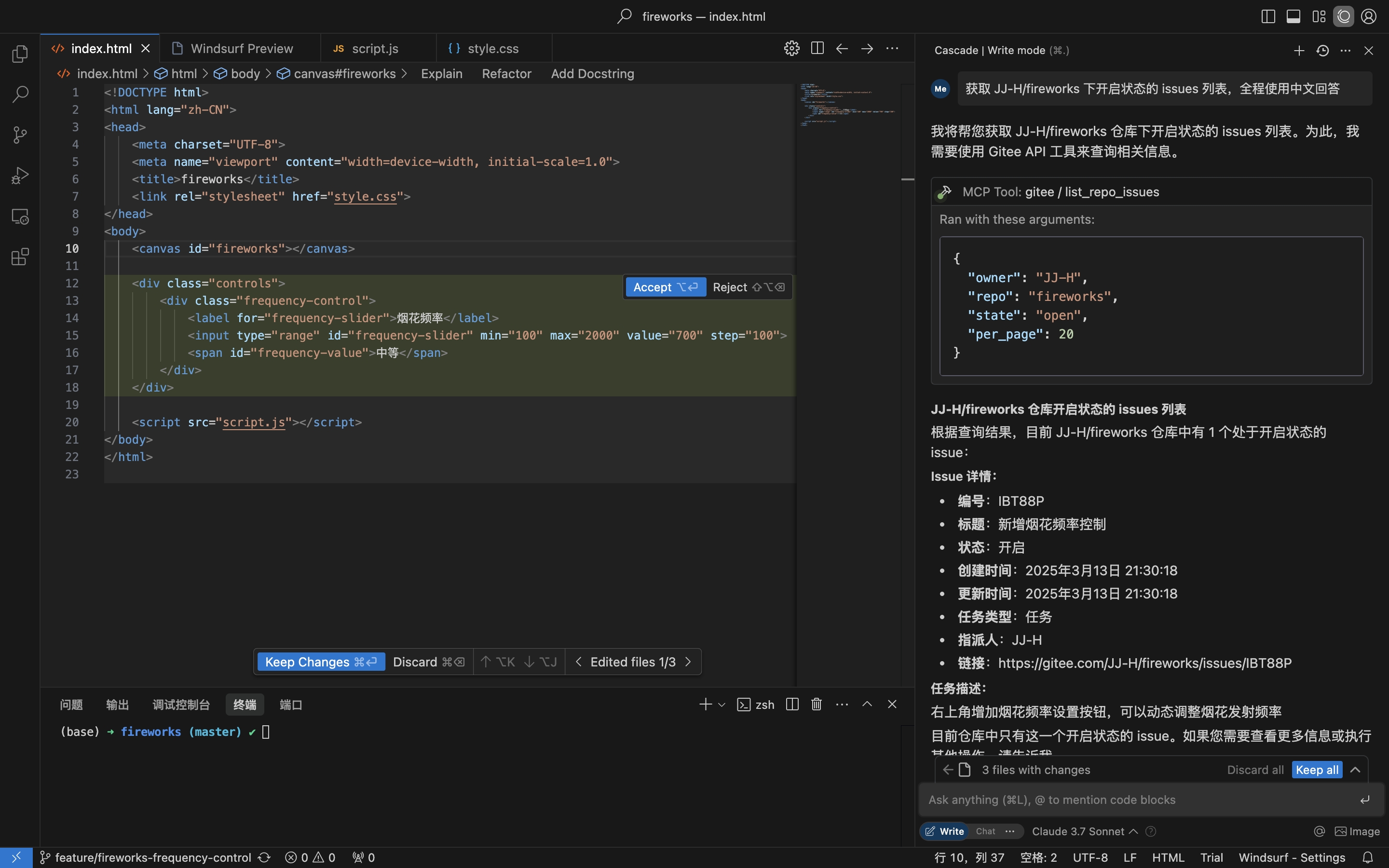
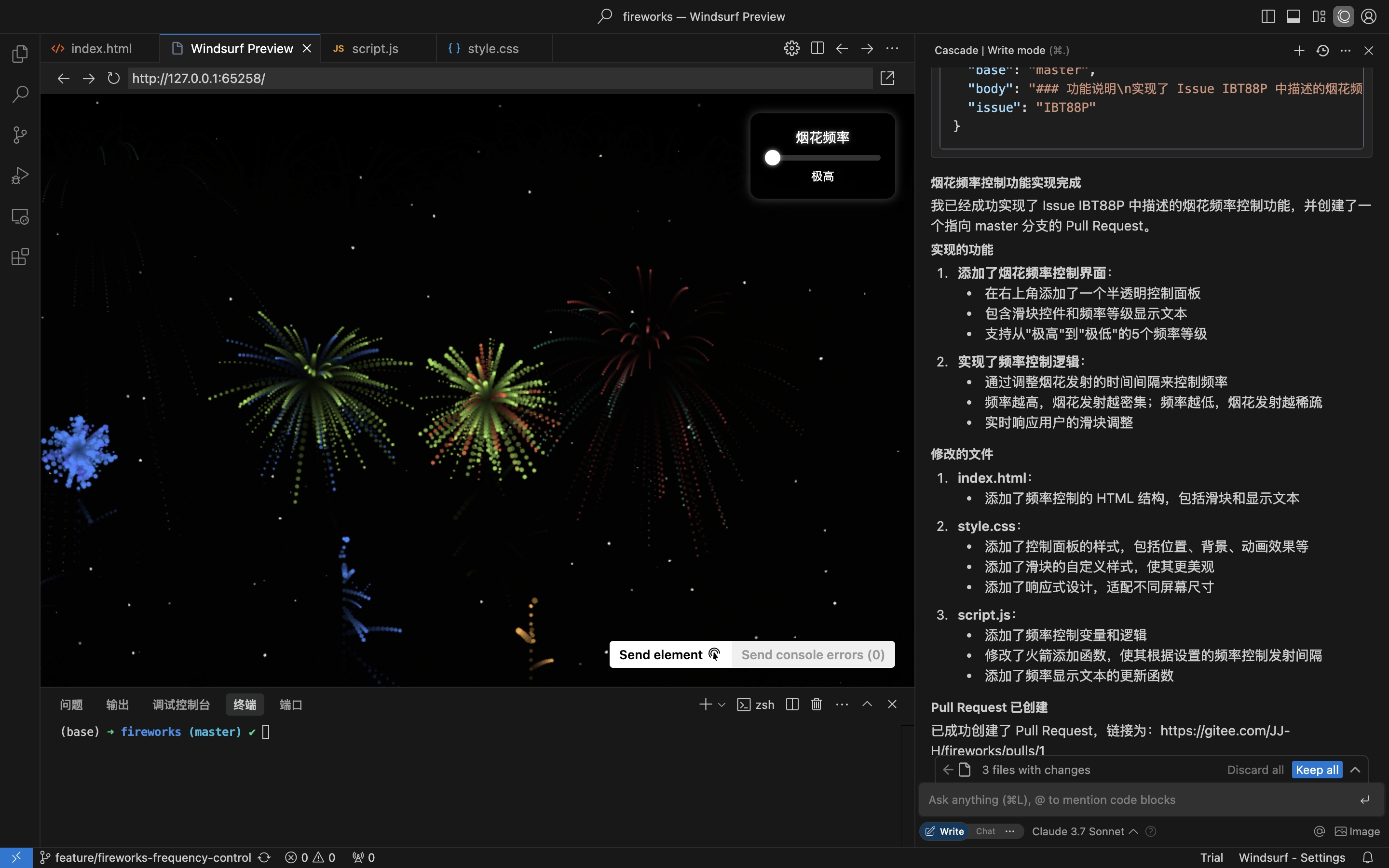
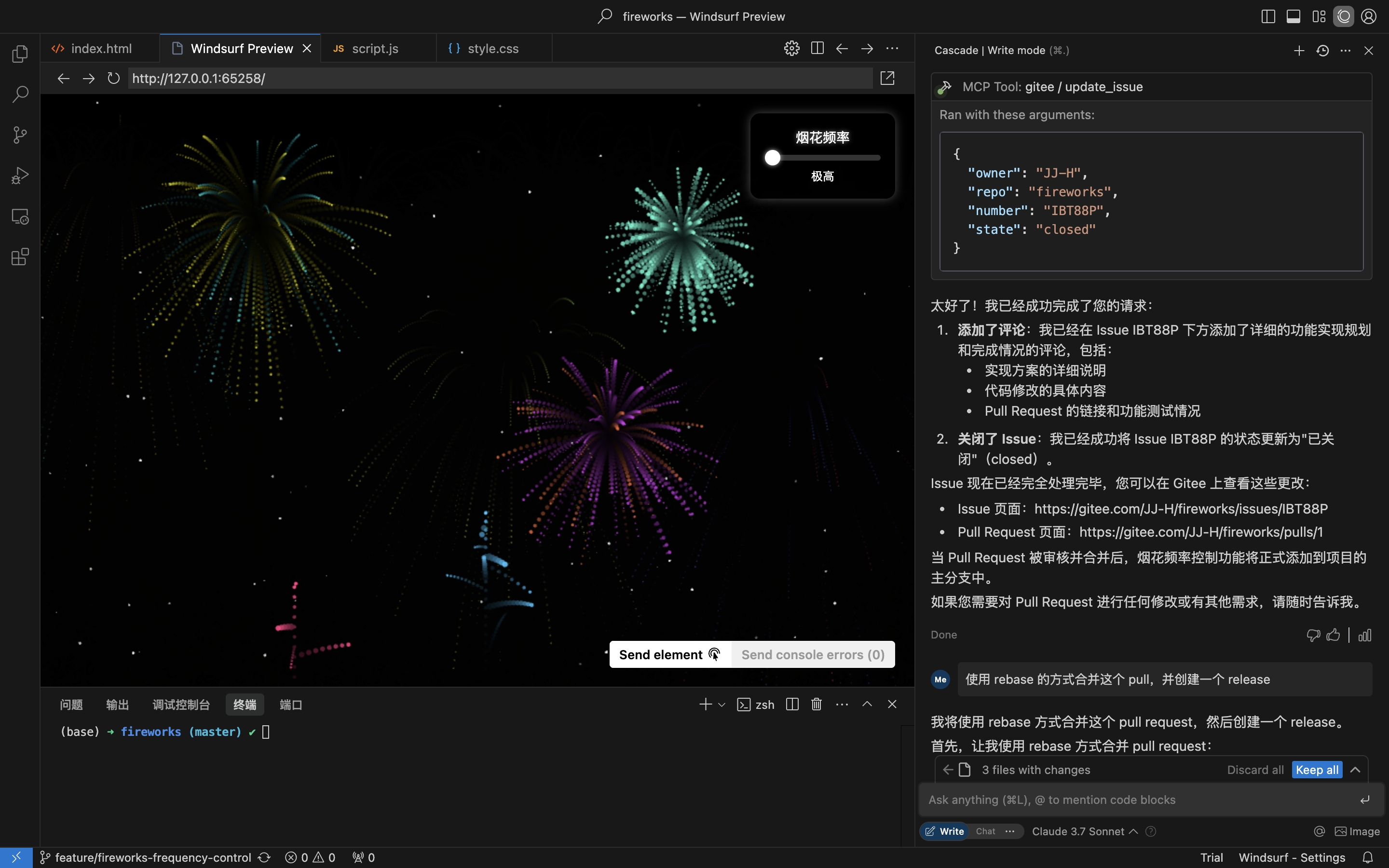
Praktisches Szenario: Issue aus dem Repository abrufen, implementieren und einen Pull Request erstellen
- Repository-Issues abrufen
- Codierung implementieren und Pull Request basierend auf den Issue-Details erstellen
- Issue kommentieren und schließen
Installation
Der Remote-MCP-Server erfordert keine Installation und funktioniert sofort. Um mcp-gitee lokal (stdio) auszuführen, wählen Sie eine der folgenden Optionen.
Remote-MCP-Server (empfohlen)
Fügen Sie Folgendes zum Abschnitt mcpServers Ihrer Host-Konfiguration hinzu und ersetzen Sie <your personal access token> durch ein Token von hier:
{
  "mcpServers": {
    "gitee": {
      "url": "https://api.gitee.com/mcp",
      "headers": {
        "Authorization": "Bearer <your personal access token>"
      }
    }
  }
}
Für client-spezifische Konfigurationsdateipfade und -formate (Claude Code, Codex, Cursor, Trae, Cline, Continue, opencode) folgen Sie den Anleitungen im Abschnitt MCP-Hosts-Konfiguration unten.
Lokal (stdio)
Vorgefertigte Binärdateien herunterladen
Holen Sie sich das Archiv für Ihre Plattform (linux-amd64 / linux-arm / darwin-amd64 / darwin-arm64 / windows-amd64) von Releases, extrahieren Sie es und legen Sie mcp-gitee in Ihren PATH (unter Windows heißt die ausführbare Datei mcp-gitee.exe).
npx verwenden
Keine Installation erforderlich; die vorgefertigte Binärdatei für Ihre Plattform wird beim Start automatisch heruntergeladen:
{
  "mcpServers": {
    "gitee": {
      "command": "npx",
      "args": [
        "-y",
        "@gitee/mcp-gitee@latest"
      ],
      "env": {
        "GITEE_API_BASE": "https://gitee.com/api/v5",
        "GITEE_ACCESS_TOKEN": "<your personal access token>"
      }
    }
  }
}
Aus dem Quellcode erstellen
Erfordert Go 1.23.0 oder höher.
-
Repository klonen:
git clone https://gitee.com/oschina/mcp-gitee.git cd mcp-gitee -
Projekt erstellen:
make buildVerschieben Sie ./bin/mcp-gitee in die PATH-Umgebungsvariable
go install verwenden
go install gitee.com/oschina/mcp-gitee@latest
Die installierte ausführbare Datei verwenden
Sobald mcp-gitee in Ihrem PATH verfügbar ist (über Releases, Quellcode-Erstellung oder go install):
{
  "mcpServers": {
    "gitee": {
      "command": "mcp-gitee",
      "env": {
        "GITEE_API_BASE": "https://gitee.com/api/v5",
        "GITEE_ACCESS_TOKEN": "<your personal access token>"
      }
    }
  }
}
Windows: Die ausführbare Datei muss das Suffix
.exeenthalten, und der Pfad incommandsollte Schrägstriche verwenden/(Windows akzeptiert diese und vermeidet JSON-Backslash-Escape-Fehler):{ "mcpServers": { "gitee": { "command": "C:/Users/<you>/bin/mcp-gitee.exe", "env": { "GITEE_ACCESS_TOKEN": "<your personal access token>" } } } }
MCP-Hosts-Konfiguration




Konfigurationsbeispiele: Klicken Sie hier, um weitere Anwendungskonfigurationen anzuzeigen
Befehlszeilenoptionen
--token: Gitee-Zugriffstoken--api-base: Gitee-API-Basis-URL (Standard: https://gitee.com/api/v5)--version: Versionsinformationen anzeigen--transport: Transporttyp (stdio, sse oder http, Standard: stdio)--address: Host und Port, auf dem der Server gestartet werden soll (Standard: localhost:8000)--enabled-toolsets: Kommagetrennte Liste der zu aktivierenden Werkzeuge (falls angegeben, werden nur diese Werkzeuge aktiviert)--disabled-toolsets: Kommagetrennte Liste der zu deaktivierenden Werkzeuge
Umgebungsvariablen
Sie können den Server auch über Umgebungsvariablen konfigurieren:
GITEE_ACCESS_TOKEN: Gitee-ZugriffstokenGITEE_API_BASE: Gitee-API-Basis-URLENABLED_TOOLSETS: Kommagetrennte Liste der zu aktivierenden WerkzeugeDISABLED_TOOLSETS: Kommagetrennte Liste der zu deaktivierenden Werkzeuge
Werkzeugsatzverwaltung
Die Werkzeugsatzverwaltung unterstützt zwei Modi:
-
Bestimmte Werkzeuge aktivieren (Whitelist-Modus):
- Verwenden Sie den Parameter
--enabled-toolsetsoder die UmgebungsvariableENABLED_TOOLSETS - Nach der Angabe werden nur die aufgeführten Werkzeuge aktiviert, andere werden deaktiviert
- Beispiel:
--enabled-toolsets="list_user_repos,get_file_content"
- Verwenden Sie den Parameter
-
Bestimmte Werkzeuge deaktivieren (Blacklist-Modus):
- Verwenden Sie den Parameter
--disabled-toolsetsoder die UmgebungsvariableDISABLED_TOOLSETS - Nach der Angabe werden die aufgeführten Werkzeuge deaktiviert, andere werden aktiviert
- Beispiel:
--disabled-toolsets="list_user_repos,get_file_content"
- Verwenden Sie den Parameter
Hinweis:
- Wenn sowohl
enabled-toolsetsals auchdisabled-toolsetsangegeben sind, hatenabled-toolsetsVorrang - Werkzeugnamen sind case-sensitiv
Pro-Anfrage-Werkzeugfilterung (HTTP-Header)
Bei Verwendung des Remote-MCP-Servers (HTTP/SSE-Transport) können Sie verfügbare Werkzeuge pro Anfrage dynamisch über HTTP-Header filtern. Dies ist nützlich für Clients, die eine feingranulare Kontrolle über die Werkzeugfreigabe benötigen, ohne den Server neu zu starten.
-
Bestimmte Werkzeuge über Header aktivieren (Whitelist):
- Verwenden Sie den Header
X-MCP-Enabled-Tools - Nur die aufgeführten Werkzeuge werden für diese Anfrage aktiviert
- Beispiel:
X-MCP-Enabled-Tools: list_user_repos,get_file_content
- Verwenden Sie den Header
-
Bestimmte Werkzeuge über Header deaktivieren (Blacklist):
- Verwenden Sie den Header
X-MCP-Disabled-Tools - Die aufgeführten Werkzeuge werden für diese Anfrage deaktiviert
- Beispiel:
X-MCP-Disabled-Tools: create_repo,delete_repo
- Verwenden Sie den Header
Prioritätsregeln:
- Wenn sowohl
X-MCP-Enabled-Toolsals auchX-MCP-Disabled-Toolsin derselben Anfrage vorhanden sind, hat die Whitelist (X-MCP-Enabled-Tools) Vorrang - Werkzeugnamen sind case-sensitiv
Beispielkonfiguration für Cursor/Claude:
{
  "mcpServers": {
    "gitee": {
      "url": "https://api.gitee.com/mcp",
      "headers": {
        "Authorization": "Bearer <your personal access token>",
        "X-MCP-Enabled-Tools": "list_user_repos,get_file_content,list_repo_issues"
      }
    }
  }
}
Lizenz
Dieses Projekt ist unter der MIT-Lizenz lizenziert. Weitere Details finden Sie in der Datei LICENSE.
Verfügbare Werkzeuge
Der Server bietet verschiedene Werkzeuge für die Interaktion mit Gitee:
| Werkzeug | Kategorie | Beschreibung |
|---|---|---|
| list_user_repos | Repository | Vom Benutzer autorisierte Repositories auflisten |
| get_file_content | Repository | Inhalt einer Datei in einem Repository abrufen |
| create_repo | Repository | Ein Repository erstellen (Benutzer, Organisation oder Unternehmen) |
| fork_repository | Repository | Ein Repository forken |
| create_release | Repository | Eine Version für ein Repository erstellen |
| list_releases | Repository | Repository-Versionen auflisten |
| search_open_source_repositories | Repository | Open-Source-Repositories auf Gitee durchsuchen |
| search_files_by_content | Repository | Dateien nach Inhalt in einem Repository durchsuchen |
| compare_branches_tags | Repository | Zwei Branches, Tags oder Commits in einem Repository vergleichen |
| list_repo_pulls | Pull Request | Pull Requests in einem Repository auflisten |
| merge_pull | Pull Request | Einen Pull Request zusammenführen |
| create_pull | Pull Request | Einen Pull Request erstellen |
| update_pull | Pull Request | Einen Pull Request aktualisieren |
| get_pull_detail | Pull Request | Details eines Pull Requests abrufen |
| get_diff_files | Pull Request | Diff-Dateien eines Pull Requests abrufen |
| manage_pull_review | Pull Request | Eine Pull-Request-Überprüfung verwalten (genehmigen oder abbrechen) |
| create_comment | Kommentar | Einen Kommentar zu einem Issue oder Pull Request erstellen |
| list_comments | Kommentar | Alle Kommentare für ein Issue oder einen Pull Request auflisten |
| create_issue | Issue | Ein Issue erstellen |
| update_issue | Issue | Ein Issue aktualisieren |
| get_repo_issue_detail | Issue | Details eines Repository-Issues abrufen |
| list_repo_issues | Issue | Repository-Issues auflisten |
| get_user_info | Benutzer | Informationen zum aktuell authentifizierten Benutzer abrufen |
| search_users | Benutzer | Nach Benutzern suchen |
| list_user_notifications | Benachrichtigung | Benutzerbenachrichtigungen auflisten |
Beitrag
Wir begrüßen Beiträge aus der Open-Source-Community! Wenn Sie zu diesem Projekt beitragen möchten, befolgen Sie bitte diese Richtlinien:
- Forken Sie das Repository.
- Erstellen Sie einen neuen Branch für Ihre Funktion oder Fehlerbehebung.
- Nehmen Sie Ihre Änderungen vor und stellen Sie sicher, dass der Code gut dokumentiert ist.
- Reichen Sie einen Pull Request mit einer klaren Beschreibung Ihrer Änderungen ein.
Weitere Informationen finden Sie in der Datei CONTRIBUTING.