Local Commander (hosted)
Fernsteuerung aller deiner Windows-, Mac- und Linux-Computer aus einem einzigen ChatGPT-, Claude- oder Cursor-Chat – sogar von deinem Telefon aus.
Gehosteter MCP-Server
npx add-mcp 'https://localcmd.app/mcp'Installiert in Claude Code, Codex, Cursor und mehr
Dokumentation
Connect any AI.
Listed in its marketplace or not — any AI app with remote MCP and OAuth support can connect. Setup takes a couple of minutes.
Local Commander is the connection, not the AI. Use the model you like today and switch tomorrow — your computers stay connected.
ChatGPT
Work with your real files and terminal from ChatGPT.
Directory review pending — connect now via custom MCP.
Claude
Reach your computer from claude.ai or the Claude app.
Directory review pending — connect now via custom MCP.
Cursor, Claude Code, Codex
Agents on the same computer can connect directly.
Any MCP client
Open WebUI, OpenHands, LangChain, or a client we haven't listed yet. Add https://localcmd.app/mcp as a remote MCP server and sign in with your Local Commander account. The client needs remote MCP and OAuth support.
What would you ask your computers?
Give each computer its own job. Get the answers in the AI chat you already use.
Work PC
- Review your latest task notes
- Prepare a defect report
- Summarize this week's work
Home PC
- Find the dates in your holiday plans
- Check the notes for a family event
- Find a saved booking confirmation
Grandma's PC
- Check why her VPN won't connect
- Read connection errors
- Help apply an agreed fix
Your own projects
- Fix a bug in your repository
- Run the relevant checks
- Review changes before you push
Real recordings from a phone
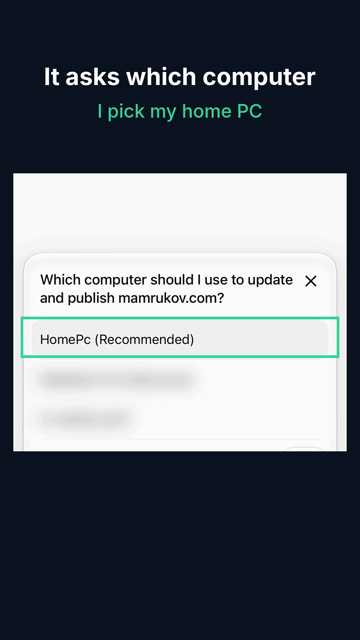
Update my site and ship it. One message from my phone. It asked which computer, I picked my home PC. 13 minutes later the page was live.
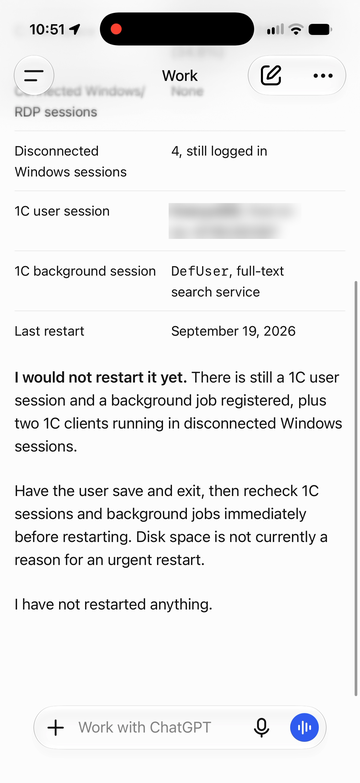
Is it safe to restart the server? It found someone still working and said wait. Nothing was restarted.
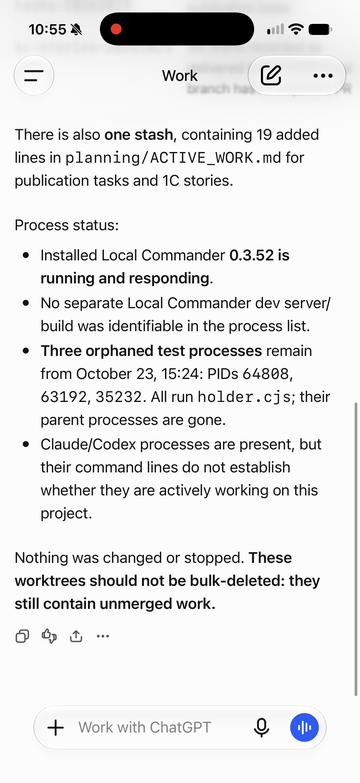
What's unfinished on my dev PC? Worktrees, uncommitted changes, a stash, leftover test processes. Nothing was touched.
Unedited answers. Waiting is sped up; a user name and other computer names are blurred.
“Practical, powerful, and genuinely useful in our daily development workflow. We’re building SKASC Cloud with it.”
Sergey, SKASC Cloud
Why Local Commander
See what actually happened.
Every request your AI sends through localcmd.app shows which computer ran it and how it ended: done, failed or unknown.
Parallel work without collisions.
Independent tasks run side by side. Work on the same folder waits its turn.
Unknown stays unknown.
If a computer drops mid-task, the work is never re-run on a guess. It waits for you in Needs attention.
You choose the access.
Full access to your user account or only the folders you pick. Block commands, revoke a computer or an AI client any time.
Set it up once. Then just ask.
Two minutes at the computer. After that, it works for you from wherever you are.
-
Install
One command on each computer you want to reach.npx local-commander-agent@latestCopy -
Approve
Confirm in your browser. Full access, or only the folders you pick. -
Connect your AI
Addlocalcmd.app/mcpto ChatGPT, Claude or any AI that speaks MCP.
Your chat, on your phoneHome PC online
Fix the broken signup button and ship it.
on Home PCFound it: the form was sending to an old address. Fixed, all tests pass.It's live on your site.
You were on the train. Your code, keys and logins never left your home computer.
Try asking
- Fix the typo on the pricing page and deploy it.
- Run the tests on my laptop and tell me what broke.
- Why is my home PC freezing? Find the cause.
- Publish this article on my site. I'm logged in there.
- On Mom's PC: turn on her VPN and open the Zoom link.
Tap a line to copy it.
Free for your own computers. Pay for more of them.
Same controls on both plans.
Free
Personal use on your own computers.
$0/ month
5 computers Unlimited executions 8 parallel slots*
No card. No trial countdown.
Team PER PACK
For a team's machines or a small fleet.
$15USD / month per pack
15 computers with one pack Unlimited executions 24 parallel slots*
PayPal on our website. Cancel renewal anytime. Need more than one pack? Write to us.
A pack adds 10 computers to the 5 included free.
*Parallel slots: how many requests can run at once across your computers.
Before you install
Can I use this from my phone while I'm away?
Yes, through a supported AI app or website connected to Local Commander. Send a request while you're a passenger, on a train or on a flight with internet access. The computer you ask to work must be awake, online and running the paired agent.
Can it find my work tasks or family plans?
Your AI can work with notes and files available on the computer you choose. If the information lives in a calendar, email or task service, your AI needs a separate connection to that service or a saved export. Connecting a PC does not automatically connect those accounts.
Can I help someone else with their computer?
Yes, with their permission and the agent installed and paired with your Local Commander account. For example, ask your AI to investigate a VPN problem and help with a fix. The computer needs a working internet connection; if it is offline, someone there must reconnect it first.
What can my AI touch?
What you choose at setup: full access to your user account, or only the folders you pick. You can block specific commands and remove access at any time.
Can I stop it?
Yes. Ask your AI to cancel the request; Local Commander passes the cancel to that computer. You can also stop Local Commander there. Removing a computer’s access blocks new work, but doesn’t stop work that is already running.
Does my data go through your servers?
Commands and their results pass through our service to reach your AI. The privacy policy explains what is kept and for how long.
Does it open a port on my computer?
No. Nothing on your computer waits for connections from the internet, and your router stays as it is. Local Commander on your computer connects out over an encrypted line, and only AI apps you signed in with your account can send it work. How it stays yours.
Is it a sandbox?
No. Work runs with the permissions of your user account on that computer. For stronger isolation, run the agent under a separate user account.
What do I need to install?
Windows 11 x64, macOS 14 or later on Apple Silicon, or Linux with a systemd user session (Ubuntu 24.04 x64 or arm64), plus Node.js 20 or later. No Docker, WSL or Git checkout. Tools your projects use, such as Git or Python, are installed separately.