Iris
offiziellMCP-nativer Agenten-Evaluierungs- und Observability-Server mit Trace-Logging, Ausgabequalitätsbewertung, Kostenverfolgung, 12 integrierten Evaluierungsregeln, Echtzeit-Dashboard und PII-Erkennung
Was kann man mit Iris MCP machen?
- Agent-Ausführungen protokollieren und bewerten – Bitten Sie Ihren Assistenten, eine Aufgabe bei Iris zu protokollieren, und erhalten Sie deterministische Qualitäts-, Sicherheits- und Kostenbewertungen für die Ausgabe.
- Trace-Verlauf abfragen – Rufen Sie gespeicherte Agent-Ausführungen mit Filterung, Paginierung und Zeitbereichsunterstützung ab, um die bisherige Leistung zu überprüfen.
- Ausführungen über die Zeit vergleichen – Analysieren Sie zwei Ausführungen zu denselben Fragen nebeneinander, um Regressionen oder Verbesserungen im Agentenverhalten zu erkennen.
- Ausgabequalität bewerten – Bewerten Sie beliebigen Text anhand von 25 integrierten Regeln, die Vollständigkeit, Relevanz, Sicherheit und Kosten abdecken, einschließlich PII- und Prompt-Injection-Erkennung.
- Demo-Dashboard ausführen – Starten Sie eine vorab befüllte Demo-Datenbank mit Beispiel-Fehlern und -Urteilen, um die Bewertungs-Engine von Iris lokal zu erkunden.
Dokumentation
Iris — Schluss mit Agenten nach Bauchgefühl








Iris bewertet jeden Agentenlauf nach Qualität, Sicherheit und Kosten – auf deinem Rechner, ohne SDK und ohne Konto. Die meisten Agent-Projekte prüfen die Qualität, indem sie ein paar gespeicherte Prompts ausführen und die Ausgabe überfliegen. Iris ersetzt das durch Zahlen, die du prüfen kannst: Die Läufe deines Agenten landen in einer SQLite-Datenbank auf deiner Festplatte, 25 eingebaute Regeln bewerten sie deterministisch – PII, Prompt-Injection, Halluzinationsmarker, Kostenschwellen und die eigenen Tool-Aufrufe des Agenten – kostenlos, ohne LLM-Aufrufe, und ein optionaler LLM-Richter mit einer harten Kostenobergrenze pro Bewertung übernimmt die semantischen Fragen. Jede Regel ist einsehbar und bearbeitbar, denn ein Richter, den du nicht prüfen kannst, ist nur Bauchgefühl mit einer Zahl darauf. MIT-lizenziert, keine Telemetrie. Nichts verlässt deinen Rechner, es sei denn, du aktivierst eine dieser Optionen: einen OpenTelemetry-Endpunkt (IRIS_OTEL_ENDPOINT), der Traces an den von dir benannten Collector exportiert; den LLM-Richter mit deinem eigenen Schlüssel, der den zu bewertenden Text an diesen Anbieter sendet und dessen Zitatprüfung die Seiten abruft, die eine Ausgabe zitiert; oder einen Webhook, der IDs, das Urteil und Regelnamen – niemals den Text – an die von dir festgelegte Adresse sendet.
Erfordert Node.js 22.13 oder neuer. Überprüfen mit node --version.
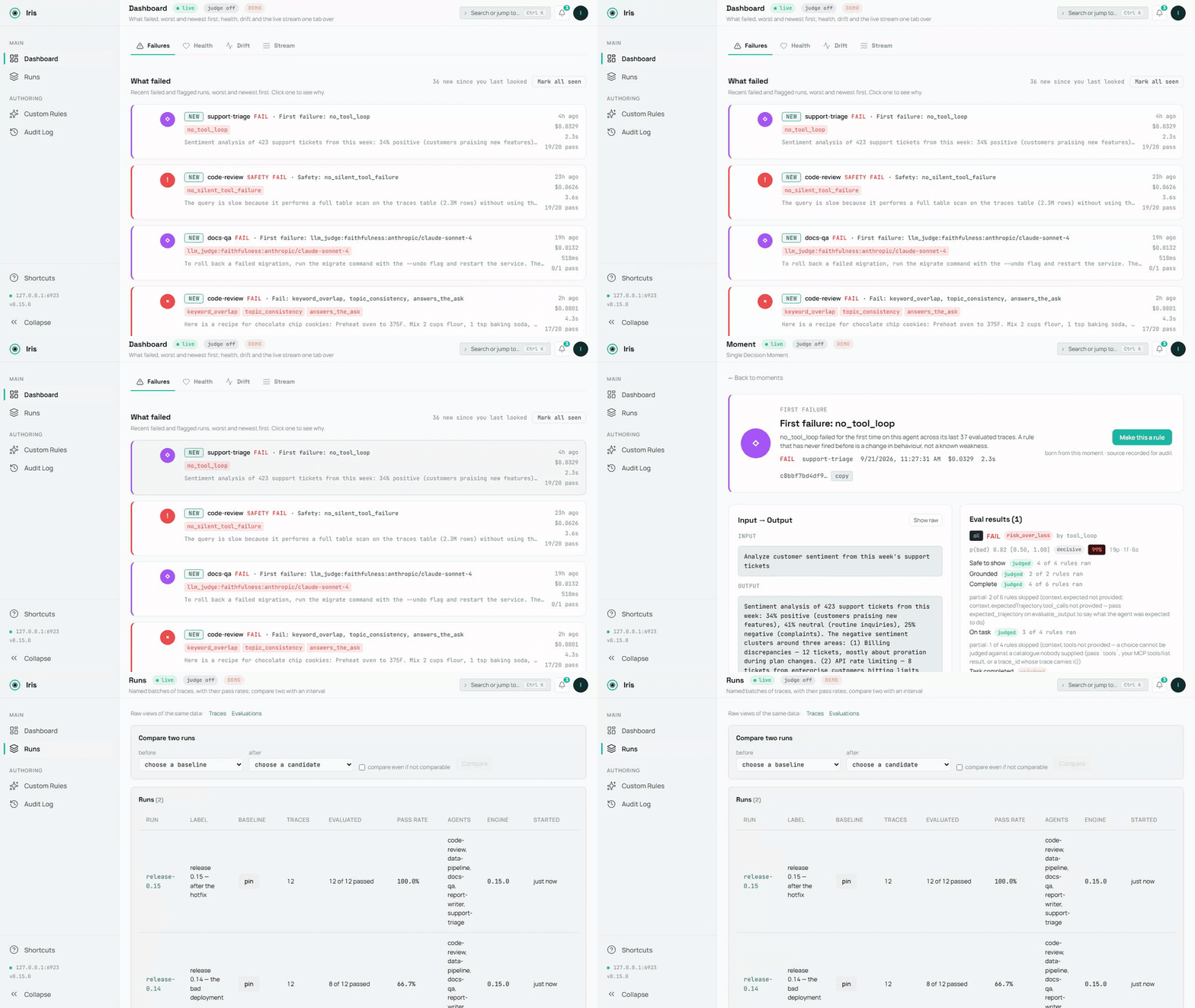
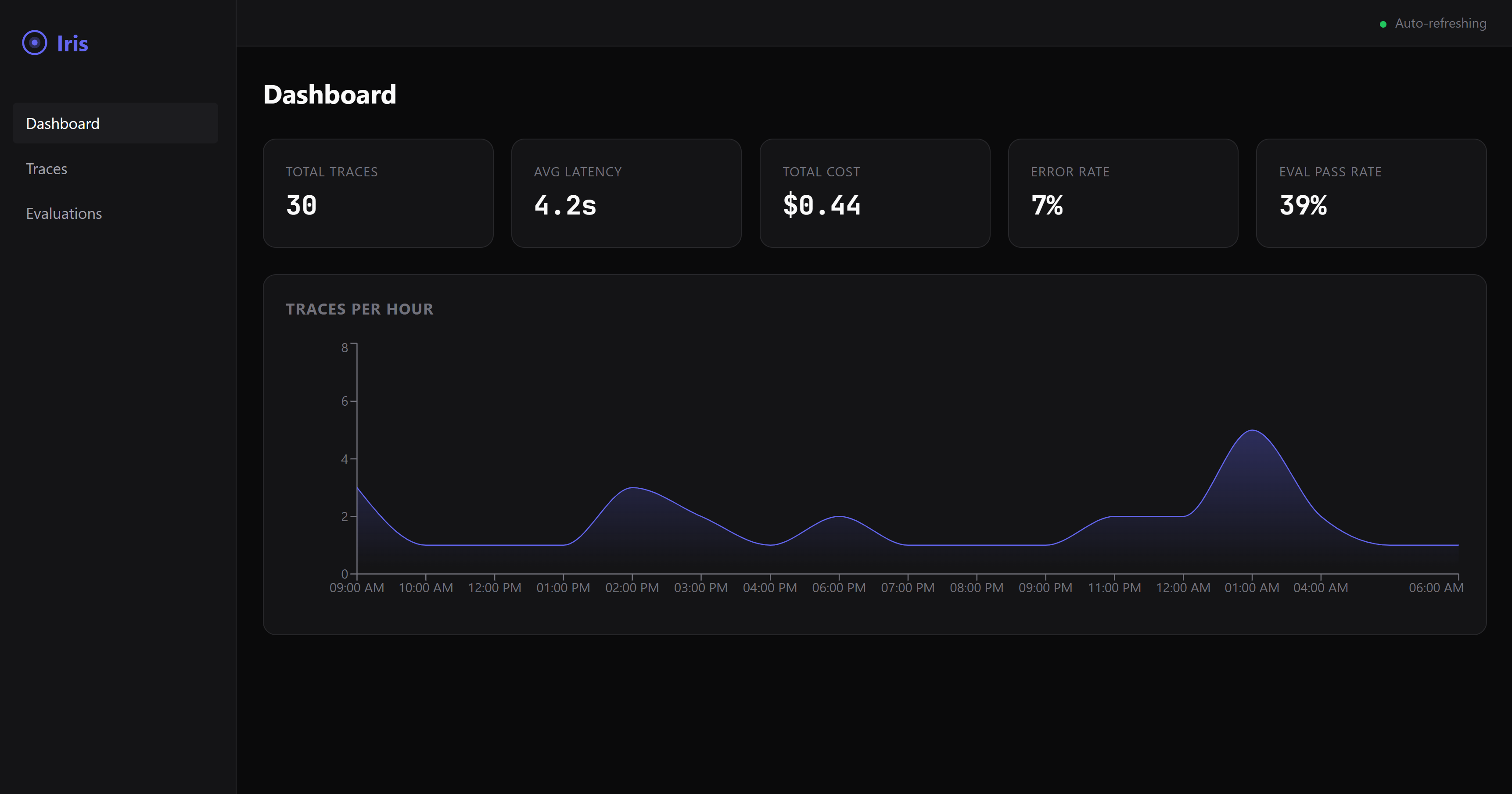
Die Demo-Datenbank, aufgezeichnet von scripts/demo-media.mts; die Quelle ist demo.mp4. Ein Standbild: dashboard-overview.png.
Ein Fehler in 60 Sekunden auf dem Bildschirm
Keine Agent-Verdrahtung, keine Konfiguration – ein Befehl:
npx @iris-eval/mcp-server --demo
Dies erzeugt eine Demo-Datenbank – fünf kleine Agenten, zwei Wochen Läufe, jedes Urteil von der Engine selbst – und stellt das Dashboard dagegen unter http://localhost:6920 (dein Browser öffnet sich beim ersten Lauf automatisch). Das Dashboard landet auf Failures: Was fehlgeschlagen ist, zuerst die schlimmsten und neuesten, jede Karte nennt die Regel und ihre Belege. Es lohnt sich, hineinzuklicken – ein PII-Leck, das von den Sicherheitsregeln erfasst wurde, eine versteckte Anweisung in einem Forenbeitrag, der der Zusammenfasser befolgt hat, eine Zahl, die das Quelldokument nie genannt hat, zwei Läufe mit denselben zwölf Fragen, verglichen mit einem Intervall (Runs), eine bereitgestellte benutzerdefinierte Regel und eine pausierte mit ihren Prüfzeilen sowie eine fehlgeschlagene LLM-Richter-Bewertung mit ihrer Begründung.
Die Demo-Daten leben in einer eigenen Datenbank (demo.db in deinem Iris-Home-Verzeichnis – ~/.iris auf macOS/Linux, %USERPROFILE%\.iris auf Windows) und vermischen sich nie mit deinen echten Traces. Entferne alles mit einem Befehl:
npx @iris-eval/mcp-server --demo-clear
Schließe deinen eigenen Agenten an
Prüfe zuerst, ob die Installation auf diesem Rechner funktioniert – sie läuft offline und öffnet nichts von dir:
npx @iris-eval/mcp-server --self-test # exit 0 = healthy
Füge dann Iris zu deinem MCP-Client hinzu. Ein Befehl schreibt die eigene Konfigurationsdatei des Clients, behält jeden anderen Server darin und pinnt die Version, die du ausgeführt hast:
npx -y @iris-eval/mcp-server install claude-code
Die Clients: claude-code, claude-desktop, cursor, windsurf, continue, vscode, cline, zed, codex, gemini. install --list zeigt die auf diesem Rechner gefundenen, das Iris, das jeder ausführt, und die Datei, die er liest; install <client> --uninstall entfernt Iris wieder. Alle Clients teilen sich eine Datenbank, also verschiebe sie nach einem Upgrade alle auf einmal mit install --upgrade (Aktualisieren). Starte den Client neu, um ihn zu laden.
Claude Desktop: ein Klick. Jedes Release ab 0.20.0 enthält iris-eval.mcpb, ein MCP-Bundle: Lade das neueste herunter, öffne es, und Claude Desktop zeigt einen Installationsdialog. Nichts davon ist erforderlich – ein Anthropic- oder OpenAI-Schlüssel für den LLM-Richter ist optional, und das Dashboard ist ein Schalter, der ausgeschaltet startet. Das Bundle enthält das npm-Paket und seine Abhängigkeiten, sodass nichts anderes installiert werden muss: Claude Desktop führt es unter dem mitgelieferten Node aus, wenn dieser Node 22.13 oder neuer ist (Claude Desktop 1.1.6679 enthält 24.13), und Iris speichert Traces mit dem integrierten SQLite von Node, im selben ~/.iris, das jede andere Installation verwendet. Die Release-Notizen zeigen, wie du seine Signatur und Build-Attestierung überprüfen kannst.
Es läuft in jedem MCP-Client, und jeder Client, den es nennt, hat eine Zeile mit dem, was tatsächlich geprüft wurde. Verifiziert bei jedem CI-Lauf: Claude Code, Gemini CLI – der echte Client startet Iris aus der vom Installer geschriebenen Konfiguration und meldet, dass es verbunden ist (claude mcp list, gemini mcp list), auf Linux, macOS und Windows; die Capture-Plugin-Hooks von Claude Code werden ebenfalls über die echten Skripte gesteuert. Behauptet aus der eigenen MCP-Dokumentation jedes Clients – der Installer schreibt die Konfigurationsform, die der Client dokumentiert, und dieser Writer wird auf der Form getestet; niemand auf der Iris-Seite hat gesehen, wie es sich verbindet: Claude Desktop, Cursor, Devin Desktop (Windsurf), Continue, VS Code, Cline, Zed, OpenAI Codex CLI. Jede Zeile mit ihrer Quelle und dem Datum, an dem sie gelesen wurde: https://iris-eval.com/clients. Stattdessen von Hand, ein Block, Dashboard inklusive:
{
  "mcpServers": {
    "iris-eval": {
      "command": "npx",
      "args": ["-y", "@iris-eval/mcp-server", "--dashboard"]
    }
  }
}
Dein Client listet beim Verbinden die zwölf Tools von Iris auf, und das Dashboard wird unter http://localhost:6920. bereitgestellt. Füge jetzt Folgendes in deinen Agenten ein:
Protokolliere die letzte Aufgabe in Iris und bewerte die Ausgabe.
Der Trace landet mit seinen Bewertungen auf dem Dashboard. Bevorzugst du den MCP-Server ohne Kopf? Entferne --dashboard aus den Argumenten – du kannst dasselbe Dashboard jederzeit mit npx @iris-eval/mcp-server --dashboard öffnen.
Eine Sache, die du vorab wissen solltest: MCP-Tools werden aufgerufen, wenn das Modell entscheidet, sie aufzurufen. Iris greift nicht in deinen Agenten ein, also werden Traces protokolliert, wenn dein Agent darum bittet, sie zu protokollieren – entweder weil du es ihm gesagt hast oder weil dein Code die Tools direkt aufruft. Bitte deinen Agenten, „dies in Iris zu protokollieren und zu bewerten“, und er wird es tun. Wenn du eine Erfassung möchtest, die nicht davon abhängt, dass das Modell sich entscheidet, macht POST /api/v1/traces genau das – dein Code sendet den Trace über einfaches HTTP, ohne Modell in der Schleife (siehe docs/http-ingest.md). Die CLI- und Host-Hooks auf der Roadmap werden dünne Clients über denselben Endpunkt sein.
Erfassung über HTTP (ohne Modell in der Schleife)
Der Ingest-Endpunkt liegt auf dem Dashboard-Port – 6920 standardmäßig, nicht auf dem MCP-Transport-Port – und existiert nur, während das Dashboard läuft. Übergib --dashboard (oder setze IRIS_DASHBOARD=true); --transport http allein startet es nicht, und eine Anfrage an den Transport-Port gibt 404 zurück. Wenn das Dashboard läuft, kann alles, was eine HTTP-Anfrage senden kann, einen Trace protokollieren – und optional die deterministischen Bewertungen in derselben Anfrage ausführen. GET /api/v1/capabilities auf demselben Port sagt, was dieser Server bewerten kann, was jede Regel benötigt, den Richterstatus mit den Schritten, die ihn aktivieren, und die Grenzen – dasselbe Objekt, das die MCP-Ressource iris://capabilities bereitstellt –, sodass ein HTTP-Aufrufer den Rahmen erhält, den ein MCP-Client bei der Initialisierung bekommt:
curl -s -X POST "http://127.0.0.1:6920/api/v1/traces" \
  -H "Content-Type: application/json" \
  -d '{
    "agent_name": "support-bot",
    "input": "What is the refund policy?",
    "output": "Refunds are available within 30 days of purchase.",
    "evaluate": true,
    "eval_type": "safety"
  }'
Gibt 201 mit der gespeicherten trace_id und dem Bewertungsergebnis zurück (im --demo-Modus verweigert der Endpunkt Schreibvorgänge mit 403, damit sich Demo-Daten nie mit deinen vermischen). Der Endpunkt akzeptiert denselben Body wie das log_trace-Tool und sitzt hinter demselben Middleware-Stack wie der Rest des Dashboards: Loopback-Bindung und der DNS-Rebinding-Schutz standardmäßig, plus Bearer-Auth, wenn du eine festlegst. Zwei einfache Fakten dazu: Er akzeptiert unauthentifizierte Schreibvorgänge, es sei denn, Iris wurde mit --api-key (oder IRIS_API_KEY) gestartet – die Loopback-Bindung hält ihn standardmäßig auf deinem Rechner, also setze einen Schlüssel, bevor du über Loopback hinaus bindest; und was er speichert, ist wörtlich – input und output landen in iris.db genau wie gesendet, einschließlich jeglichen Textes, den no_pii anschließend markiert. Vollständiger Vertrag, Feldreferenz und Fehlersemantik: docs/http-ingest.md.
Jede Claude-Code-Runde erfassen (optional)
/plugin marketplace add iris-eval/mcp-server
/plugin install iris-eval-capture@iris-eval
Ein zweites, separat installiertes Plugin: Drei Hooks zeichnen den Prompt, die Tool-Aufrufe und die endgültige Antwort jeder Runde auf und übergeben sie an iris-eval ingest, abgetrennt, mit kritischen Spannen im gespeicherten Bewertungstext geschwärzt – Erfassung, die nicht davon abhängt, dass das Modell sich entscheidet, ein Tool aufzurufen. Es protokolliert nie eine Runde, die das Modell bereits protokolliert hat, druckt nie, blockiert nie, sendet nie etwas irgendwohin. Die Installation von iris-eval allein ändert nichts an deiner Runden-Schleife. Grenzen und Entfernung: claude-plugin-capture/README.md.
Python
pip install iris-eval
from iris_eval import IrisClient
iris = IrisClient()                       # IRIS_URL, or the running dashboard's runtime.json
iris.evaluate_output("…", input="…", agent_name="support-bot")["verdict"]   # {"state": "pass", "basis": "clean", "by": []}
Ein dünner Client über die HTTP-API von Server 0.16.0 und später, eigenständig versioniert – iris_eval.__version__ und die PyPI-Seite tragen seine Nummer, die nicht die des Servers ist: log_trace(), evaluate_output(), get_traces(), get_trace(), health(), capabilities(), synchron und asynchron, typisierte Antworten, der eigene Satz des Servers bei einer Ablehnung – und ein pytest-Plugin: eine iris-Fixture und assert_iris(output, expect="pass"), das auf den Zustand des Urteils prüft. packages/python/README.md.
Jeden OpenAI- und Anthropic-Aufruf aufzeichnen
from iris_eval import wrap_openai
client = wrap_openai(OpenAI(), agent_name="support-bot")   # every call: a GenAI span to POST /v1/traces, scored
import { wrapOpenAI } from '@iris-eval/sdk';
const openai = wrapOpenAI(new OpenAI(), { agentName: 'support-bot' });
Umschließe den Provider-Client einmal, und jeder Modellaufruf wird zu einem OpenTelemetry-GenAI-Span, der an die OTLP-Tür gesendet, mit Eingabe, Ausgabe, Token-Nutzung und Tool-Aufrufen gespeichert und bewertet wird: Erfassung, die nicht davon abhängt, dass das Modell ein Tool aufruft. wrap_openai / wrap_anthropic im Python-Client; wrapOpenAI, wrapAnthropic und irisMiddleware für das Vercel AI SDK in @iris-eval/sdk. Beide sind noch nicht veröffentlicht (das nächste iris-eval-Release auf PyPI; @iris-eval/sdk wird aus dem Quellcode gebaut, bis sein erstes npm-Release). Streams, die Stream-Helfer der SDKs und Tool-Aufrufe sind abgedeckt, der ursprüngliche Client wird nicht geändert, und ein Ausfall von Iris unterbricht nie einen Aufruf – packages/sdk/README.md, packages/python/README.md.
Jeden LangChain- und LangGraph-Lauf bewerten
from iris_eval.langchain import IrisCallbackHandler
graph.invoke(inputs, config={"callbacks": [IrisCallbackHandler(agent_name="support-bot")]})
Jeder Top-Level-Lauf wird zu einem Trace (der Lauf, seine Modellaufrufe, seine Tool-Aufrufe und seine Graph-Knoten als GenAI-Spans) mit Eingabe, Ausgabe, Tool-Aufrufen, Token-Nutzung und einem Urteil. Python im Client (nächstes Release, noch nicht auf PyPI veröffentlicht), JavaScript als @iris-eval/langchain (noch nicht auf npm veröffentlicht). Beide sind in CI gegen eine echte LangGraph-App mit einem skriptgesteuerten Modell bewiesen; der eigene OpenTelemetry-Export von LangSmith ist auf dieselbe Weise bewiesen – docs/otel-recipes.md.
Ein CI-Gate, kein Server nötig
npx -y @iris-eval/mcp-server ingest --file traces.ndjson --evaluate --fail-on detector_veto
Oder die GitHub Action (0.16.0), die den Job bei den von dir benannten Urteilen fehlschlagen lässt, die Quittung in die Job-Zusammenfassung schreibt und sie als einen an Ort und Stelle aktualisierten Pull-Request-Kommentar postet: uses: iris-eval/mcp-server/.github/actions/gate@v0.19.0 mit traces: traces.ndjson – docs/ci-gate.md.
Eine vierte Tür (0.15.0): POST /v1/traces auf dem Dashboard-Port nimmt das OTLP/HTTP-JSON oder -Protobuf entgegen, das Ihre OpenTelemetry-Instrumentierung bereits emittiert (der Exporter des Python-SDK spricht nur Protobuf, also ist dies auch die Python-Tür), und jede OTLP-Spur wird zu einer Iris-Spur mit ihren Spans — docs/otel-integration.md; ein Rezept pro Framework (Pydantic AI, Google ADK, LangGraph über LangSmith, CrewAI, das OpenAI Agents SDK in Python und JavaScript, LlamaIndex, AutoGen, Microsoft Agent Framework, Semantic Kernel, das Vercel AI SDK und Mastra), jedes durch eine Fixture belegt, in docs/otel-recipes.md. ingest liest eine JSON-Spur (oder NDJSON, eine pro Zeile) von stdin oder einer Datei, speichert sie, bewertet sie unter genau den Regeln, die evaluate_output ausführt, gibt eine JSON-Zeile pro Spur mit dem Urteil und seiner Grundlage aus und beendet sich mit 1, wenn ein Urteil mit --fail-on übereinstimmt. --dataset <id|label> beschränkt dieses Tor auf die Fallschlüssel in einem Datensatz (POST /api/v1/datasets befördert die Fallschlüssel eines Laufs in einen), sodass ein Job nur bei den von Ihnen gewählten Fällen fehlschlägt. Das vollständige Rezept, die Exit-Codes und die acht Grundlagen finden Sie in docs/ci-gate.md.
Eine Regel als Code schreiben
eval.plugins in config.json lädt Regeln, die Sie geschrieben haben — ein ES-Modul, dessen Standardexport { name, kind, mechanism, version, needs, evaluate(ctx) } ist — fixiert durch den sha256 der Datei, sodass eine Datei, die sich seit der Fixierung geändert hat, den Start verweigert, anstatt zu laufen. Ein geladenes Plugin feuert wie ein eingebautes und erscheint auf list_rules unter plugins. Der Vertrag, das Hash-Rezept und was ein Plugin zurückgeben darf: docs/plugins.md.
Die Engine im eigenen Prozess verwenden
Die Bewertungs-Engine ist importierbar — kein Server, keine Datenbank, kein Modell:
import { EvalEngine, defaultConfig } from '@iris-eval/mcp-server/engine';

const engine = new EvalEngine(defaultConfig.eval.defaultThreshold, defaultConfig.eval.ruleThresholds, defaultConfig.eval);
const result = await engine.evaluateAll({ output: answer, input: prompt, toolCalls, costUsd });
result.verdict.state;       // 'pass' | 'fail' | 'unknown', with result.verdict.basis and result.interpretations
Dieselbe Engine, dieselben Regeln und derselbe Composer, den der Server ausführt; builtInRules(), createCustomRule(), compose() und die Leser für die veröffentlichte Genauigkeit werden daneben exportiert.
Ein typisierter Client für die HTTP-Route
import { createClient } from '@iris-eval/mcp-server/client';

const iris = createClient({ baseUrl: 'http://127.0.0.1:6920', apiKey: process.env.IRIS_API_KEY });
const { trace_id, evaluation } = await iris.logTrace({ agent_name: 'support-bot', input, output, tool_calls, evaluate: true });
evaluation?.verdict?.state;  // the same object evaluate_output returns
Ein Body auf jeder Tür: Es ist das, was log_trace und iris-eval ingest akzeptieren. Eine Ablehnung wirft IrisClientError mit dem eigenen Satz und Status des Servers. Beide Unterpfade werden bei jedem Build aus einem gepackten Tarball geprüft.
Ihre Installation verifizieren
npx @iris-eval/mcp-server --self-test   # offline diagnostic; exit 0 = healthy, 1 = a check failed
npx @iris-eval/mcp-server --version     # prints the bare version, e.g. 1.2.3
--self-test erstellt zuerst Ihr Iris-Home, falls es fehlt, und prüft, ob es beschreibbar ist (Exit 1, mit Nennung des Pfads, wenn nicht), meldet, wo sich der Suchindex Ihrer Datenbank befindet (vollständig, wie viele Spuren ein Hintergrund-Build bisher indexiert hat, oder kein FTS5 auf diesem SQLite), liest das Schema Ihrer Datenbank (Exit 1, mit der Lösung, wenn diese Version oder ein MCP-Client, der auf eine ältere Version fixiert ist, sie nicht öffnen kann), und führt dann seine Prüfungen aus — Speicher-Roundtrip, eine gepflanzte SSN und eine gepflanzte Injektion, die von den Sicherheitsregeln erkannt werden, Dashboard-Start, der DNS-Rebinding-Schutz — in einem isolierten temporären Home. Ihre echte Datenbank wird nur gelesen, nie geändert. Alles, was Iris schreibt, lebt unter einem Verzeichnis, Ihrem Iris-Home: ~/.iris standardmäßig (%USERPROFILE%\.iris unter Windows) oder wo auch immer IRIS_HOME zeigt. Dort liegen iris.db, config.json, custom-rules.json, audit.log, preferences.json und die Demo-Dateien; zeigen Sie IRIS_HOME auf ein Scratch-Verzeichnis, um Iris auszuprobieren, ohne Ihre echten Daten anzufassen.
Setup nach Tool
| Client | Status | Was das bedeutet | Lesen |
|---|---|---|---|
| Claude Code | verifiziert | ein Test fährt den echten Client bei jedem CI-Lauf | 2026-09-25 |
| Claude Desktop | beansprucht | der Installer schreibt die Form, die der Client dokumentiert, und dieser Schreiber wird auf die Form getestet; niemand auf der Iris-Seite hat die Verbindung beobachtet | 2026-09-25 |
| Cursor | beansprucht | der Installer schreibt die Form, die der Client dokumentiert, und dieser Schreiber wird auf die Form getestet; niemand auf der Iris-Seite hat die Verbindung beobachtet | 2026-09-25 |
| Devin Desktop (Windsurf) | beansprucht | der Installer schreibt die Form, die der Client dokumentiert, und dieser Schreiber wird auf die Form getestet; niemand auf der Iris-Seite hat die Verbindung beobachtet | 2026-09-25 |
| Continue | beansprucht | der Installer schreibt die Form, die der Client dokumentiert, und dieser Schreiber wird auf die Form getestet; niemand auf der Iris-Seite hat die Verbindung beobachtet | 2026-09-25 |
| VS Code | beansprucht | der Installer schreibt die Form, die der Client dokumentiert, und dieser Schreiber wird auf die Form getestet; niemand auf der Iris-Seite hat die Verbindung beobachtet | 2026-09-25 |
| Cline | beansprucht | der Installer schreibt die Form, die der Client dokumentiert, und dieser Schreiber wird auf die Form getestet; niemand auf der Iris-Seite hat die Verbindung beobachtet | 2026-09-25 |
| Zed | beansprucht | der Installer schreibt die Form, die der Client dokumentiert, und dieser Schreiber wird auf die Form getestet; niemand auf der Iris-Seite hat die Verbindung beobachtet | 2026-09-25 |
| OpenAI Codex CLI | beansprucht | der Installer schreibt die Form, die der Client dokumentiert, und dieser Schreiber wird auf die Form getestet; niemand auf der Iris-Seite hat die Verbindung beobachtet | 2026-09-25 |
| Gemini CLI | verifiziert | ein Test fährt den echten Client bei jedem CI-Lauf | 2026-09-25 |
Jede Zeile mit dem, was geprüft wurde: iris-eval.com/clients. Kein Client wird als unterstützt bezeichnet ohne eine Zeile.
npx -y @iris-eval/mcp-server install <client> schreibt jede dieser Konfigurationen für Sie. Von Hand, pro Client:
Claude Desktop
Bearbeiten Sie Ihre MCP-Konfigurationsdatei:
- macOS:
~/Library/Application Support/Claude/claude_desktop_config.json - Windows:
%APPDATA%\Claude\claude_desktop_config.json
Fügen Sie die obige JSON-Konfiguration hinzu und starten Sie dann Claude Desktop neu.
Claude Code
claude mcp add --transport stdio iris-eval -- npx -y @iris-eval/mcp-server
Starten Sie dann die Sitzung neu (/clear oder neu starten), damit die Tools geladen werden.
Windows-Hinweis: Verwenden Sie nicht den
cmd /c-Wrapper — er verursacht Probleme bei der Pfadanalyse. Dernpx-Befehl funktioniert direkt.
Cursor
Fügen Sie die obige JSON-Konfiguration zu ~/.cursor/mcp.json (jedes Projekt) oder .cursor/mcp.json in einem Workspace hinzu, mit "type": "stdio" im iris-eval-Eintrag — die Cursor-Dokumentation markiert ihn als erforderlich.
Devin Desktop (Windsurf)
Fügen Sie die obige JSON-Konfiguration zu mcp_config.json hinzu: ~/.config/devin/mcp_config.json unter macOS und Linux, %APPDATA%\devin\mcp_config.json unter Windows.
Continue
Speichern Sie die obige JSON-Konfiguration als eigene Datei im mcpServers-Ordner von Continue: ~/.continue/mcpServers/iris-eval.json (jeder Workspace) oder .continue/mcpServers/iris-eval.json in einem.
VS Code (natives MCP)
Fügen Sie zu .vscode/mcp.json in Ihrem Workspace hinzu (Hinweis: VS Code verwendet servers, nicht mcpServers):
{
  "servers": {
    "iris-eval": {
      "command": "npx",
      "args": ["-y", "@iris-eval/mcp-server"]
    }
  }
}
Cline
Öffnen Sie das MCP-Server-Panel von Cline → MCP-Server konfigurieren, und fügen Sie die obige mcpServers-JSON-Konfiguration zu cline_mcp_settings.json hinzu (~/.cline/data/settings/cline_mcp_settings.json, gemeinsam von Cline in VS Code, JetBrains und der CLI genutzt).
Zed
Fügen Sie zu Zeds settings.json hinzu:
{
  "context_servers": {
    "iris-eval": {
      "command": "npx",
      "args": ["-y", "@iris-eval/mcp-server"],
      "env": {}
    }
  }
}
OpenAI Codex CLI
Fügen Sie zu ~/.codex/config.toml hinzu:
[mcp_servers.iris-eval]
command = "npx"
args = ["-y", "@iris-eval/mcp-server"]
Gemini CLI
Fügen Sie die obige mcpServers-JSON-Konfiguration zu ~/.gemini/settings.json hinzu. Gemini CLI verbindet sich nur in Ordnern, denen es vertraut, mit MCP-Servern: Wenn gemini mcp list iris-eval als Deaktiviert anzeigt, führen Sie /permissions in diesem Ordner aus.
Alles andere, das MCP spricht
Iris ist ein Standard-Stdio-MCP-Server — ein npx @iris-eval/mcp-server-Befehl, kein SDK, keine Codeänderungen. Wenn Ihr Client MCP unterstützt, unterstützt er Iris. Client-Konfigurationsformate ändern sich; im Zweifelsfall prüfen Sie die MCP-Dokumentation Ihres Clients und zeigen Sie auf diesen Befehl.
Andere Installationsmethoden
# Global install (recommended for persistent data and faster startup)
npm install -g @iris-eval/mcp-server
iris-eval --dashboard

# Docker — two servers, two ports: 3000 = MCP HTTP transport,
# 6920 = dashboard (which also serves the POST /api/v1/traces ingest endpoint).
# The image binds 0.0.0.0 inside the container, so a key is required (see Production).
# The volume is the Iris home: the database, deployed rules and audit log persist in it.
docker run -p 3000:3000 -p 6920:6920 -v iris-data:/data \
  -e IRIS_API_KEY="$(openssl rand -hex 32)" ghcr.io/iris-eval/mcp-server
Tipp: Globale Installation (
npm install -g) speichert Spuren dauerhaft unter~/.iris/iris.db. Mitnpxbleiben Spuren am selben Ort erhalten, aber der Start ist aufgrund der Paketauflösung langsamer.
Was Sie erhalten
| Spurprotokollierung | Hierarchische Span-Bäume mit Latenz pro Tool-Aufruf, Token-Nutzung und Kosten in USD. In SQLite gespeichert, sofort abfragbar. |
| Ausgabebewertung | 25 eingebaute Regeln in 4 Kategorien: Vollständigkeit, Relevanz, Sicherheit, Kosten. PII-Erkennung (21 Muster: SSN, Kreditkarte, Telefon, E-Mail, IBAN, DOB, MRN, IP, API-Schlüssel, Reisepass, plus AWS/Slack/SendGrid/GitHub/Google/npm/DigitalOcean-Tokens, Anmeldedaten in URLs, geheim benannte Zuweisungen, PEM-Private-Key-Blöcke und Seed-Phrasen; Geburtsdatum, medizinische Aktennummer, Reisepass und Seed-Phrase feuern nur neben ihrem Label, by design), Prompt-Injektion (38 Muster, Phrase + strukturell), Erkennung von Platzhalter-Ausgaben, Halluzinationserkennung (25 kontextbasierte Fabrikations-/Widerspruchssignale — übergeben Sie input, um sie gegen das Quellmaterial des Agenten zu verankern), und sechs Trajektorien-Regeln, die lesen, was der Agent GETAN hat: ein nicht bestätigter fehlgeschlagener Tool-Aufruf, ein wiederholter (nach Aufruf, nach wiederholter Sequenz oder nach Ziel, sobald Sie tools senden), ein Aufruf, dessen Argumente das eigene JSON-Schema des Tools ablehnt und den der Agent nie erneut versucht hat, eine Datei, ein Verzeichnis oder eine URL, die die Antwort zitiert, die in nichts erscheint, was der Agent gelesen hat, eine Anweisung, die in einem TOOL-RESULT ankam und dann von einem späteren Aufruf befolgt wurde, und eine Aufgabe, die mehr Tool-Aufrufe benötigte als Ihr Schrittbudget. Eine Trajektorie kann als tool_calls oder als OpenTelemetry-TOOL-Spans ankommen. Fügen Sie benutzerdefinierte Regeln mit Zod-Schemas hinzu. |
| LLM-als-Richter | Optionale semantische Bewertung über Anthropic oder OpenAI — bringen Sie Ihren eigenen API-Schlüssel mit. Sieben Vorlagen. Mit gesetztem IRIS_RELEVANCE_JUDGE_MODEL fragt answers_the_ask den relevance-Richter und lässt eine themenfremde Antwort durchfallen; ohne ihn liest die Regel die Anfrage lexikalisch und berät. Harte Kostenobergrenze pro Bewertung (IRIS_LLM_JUDGE_MAX_COST_USD_PER_EVAL, Standard $0,25), Preise pro Bewertung im Ergebnis offengelegt. |
| Kostentransparenz | Aggregierte Kosten über alle Agenten in jedem Zeitfenster. Budgetschwellen festlegen. Flaggen erhalten, wenn Agenten überziehen. Eine Spur, die Token-Anzahlen und ein Modell, aber keine Kosten sendet (die meisten OpenTelemetry- und Framework-Spuren), wird zum Listenpreis des Modells bewertet und überall, wo sie erscheint, als geschätzt markiert; pricing.models in config.json bewertet Modelle, die die eingebaute Tabelle nicht kennt — docs/cost.md. |
| Web-Dashboard | Echtzeit-Dark-Mode-UI, die auf den Fehlern landet, zuerst die schlimmsten und neuesten — Spurvisualisierung mit Volltextsuche über den Text jeder Spur, Bewertungsergebnisse, Kostenaufschlüsselungen und eine Befehlspalette (⌘K), die Ihre eigenen Regeln, Spuren und Bewertungen durchsucht. |
| Lokal zuerst | Alles lebt in SQLite auf Ihrer Festplatte. Kein Konto, keine Anmeldung, keine Telemetrie. Ausgehendes HTTP passiert nur dort, wo Sie sich anmelden: Ihr eigener LLM-Richter-Schlüssel, Zitatabruf, ein OTel-Exporter, den Sie konfigurieren, oder ein Webhook, den Sie festlegen. |
Wohin das als Nächstes geht: die Fähigkeitskarte — jede Frage, die Iris zu jedem Thema gestellt werden kann, mit dem, was es hat und was ihm fehlt — und die drei Spuren.
Gemessen, nicht behauptet
Jede eingebaute Regel hat eine veröffentlichte Präzision, einen Recall und einen F1-Wert mit 95%-Konfidenzintervallen, gemessen an einem beschrifteten Korpus, der in diesem Repository liegt (proof/corpus/) und mit einem einzigen Befehl — npm run proof — offline neu generiert wird, ohne Schlüssel und ohne Modell im Prozess. Diese Zahlen sind von zwei verschiedenen Arten, und die Seite addiert sie nie: Einige Regeln werden gegen Beschriftungen gemessen, die ein Modell durch das Lesen des Fehlers selbst vergeben hat, was die Erkennung misst; die übrigen werden gegen ihre eigene dokumentierte Definition geprüft, die unabhängig angewendet wird, was zeigt, dass der Code seine Formel implementiert, aber nichts darüber aussagt, ob die Formel den Fehler erfasst. proof/RESULTS.md und die Beweisseite markieren jede Regel. CI führt die Messung bei jedem Pull-Request erneut aus und schlägt fehl, wenn die festgeschriebenen Zahlen von dem abweichen, was der Code produziert, sodass eine Regel sich nicht ändern kann, ohne dass sich ihre Zahlen mitändern. Die Zahlen stehen auf iris-eval.com/proof und in proof/RESULTS.md; wie der Korpus erstellt wurde, was er nicht ist und wie man ein Intervall liest, steht in docs/proof.md. Der Korpus ist synthetisch und modellbeschriftet — eine menschliche Blindbeschriftung steht aus, und die Seite sagt das; node proof/blind-sample.mjs zieht die reproduzierbare Stichprobe, die das klären wird.
MCP-Tools
Iris registriert zwölf Tools, die jeder MCP-kompatible Agent aufrufen kann — Trace- und Regel-Lebenszyklus, Vergleich über Läufe hinweg, LLM-als-Richter und semantische Zitatprüfung:
log_trace— Protokolliert eine Agent-Ausführung mit Spans, Tool-Aufrufen, Token-Nutzung und Kosten; übergebeevaluate: true, um sie im selben Aufruf zu bewertenevaluate_output— Bewertet die Ausgabequalität anhand von Vollständigkeits-, Relevanz-, Sicherheits- und Kostenregeln (heuristisch, deterministisch, kostenlos)get_traces— Fragt gespeicherte Traces mit Filtern, Paginierung und Zeitbereichsunterstützung ab und findet den Lauf, in dem der Agent etwas mitqgesagt hat: Volltextsuche über Eingabe, Ausgabe, Tool-Aufrufwerte und Metadaten, sortiert, mit markierten Treffernlist_rules— Listet bereitgestellte benutzerdefinierte Bewertungsregeln auf (schreibgeschützt)deploy_rule— Registriert eine neue benutzerdefinierte Bewertungsregel, sodass sie bei jedemevaluate_outputdieser Kategorie ausgelöst wirddelete_rule— Entfernt eine bereitgestellte benutzerdefinierte Regel (destruktiv, idempotent)delete_trace— Entfernt einen einzelnen gespeicherten Trace anhand der ID (destruktiv, mandantenbezogen)evaluate_with_llm_judge— Semantische Bewertung über LLM (Anthropic oder OpenAI). Sieben Vorlagen: Genauigkeit, Hilfsbereitschaft, Sicherheit, Korrektheit, Treue, Aufgabe_abgeschlossen, Relevanz. Kostenobergrenze, Preise pro Bewertung offengelegt. Eigenen API-Schlüssel mitbringen (IRIS_ANTHROPIC_API_KEYoderIRIS_OPENAI_API_KEY) — Iris leitet LLM-Aufrufe weder weiter noch vermittelt sie sie.verify_citations— Extrahiert Zitate aus der Ausgabe (nummeriert, Autor-Jahr, URLs, DOIs), ruft Quellen über einen SSRF-geschützten und domain-zugelassenen Resolver ab und nutzt einen LLM-Richter, um zu prüfen, ob jede Quelle die zitierte Behauptung tatsächlich stützt. Opt-in ausgehender HTTP-Verkehr. Gleiche BYOK-Anforderung wieevaluate_with_llm_judge.compare_runs— Hat eine Änderung den Agenten verschlechtert? Vergleicht zwei Läufe gespeicherter Bewertungen: ein gepaarter exakter Test, wenn die Läufe Fallschlüssel teilen, ein Intervall für die Differenz sonst, ein ehrliches „kann nicht sagen“ mit der Anzahl der Fälle, die es bräuchte, oder „äquivalent innerhalb einer Marge“. Jede Regel trägt ihren eigenen einseitigen Test, gemeinsam korrigiert (Benjamini–Hochberg), sodass zwanzig Regeln keine Regression erzeugen könnencompare_traces— Wie zuverlässig beantwortet der Agent dieselbe Frage? Fallweise Bestehensquoten mit Intervallen, instabile Fälle zuerst, und eine Gesamtquote, die Wiederholungen berücksichtigtevaluate_runs— Bewertet jeden Trace in einem Lauf unter den heutigen Regeln in einem neuen Lauf neu, sodass eine Regeländerung nie als Agentenänderung gelesen wird
LLM-Richter aktivieren (optional; die deterministischen Regeln brauchen ihn nie)
- Besorge einen API-Schlüssel von Anthropic oder OpenAI.
- Lege ihn in der Umgebung des Prozesses ab, der Iris ausführt, nicht nur in deiner Shell. Claude Code, Claude Desktop, Cursor und die meisten MCP-Clients: der „env“-Block des iris-eval-Eintrags in deiner MCP-Konfiguration — „iris-eval“: { „command“: „npx“, „args“: [„-y“, „@iris-eval/mcp-server“], „env“: { „IRIS_ANTHROPIC_API_KEY“: „sk-ant-...“ } } (IRIS_OPENAI_API_KEY für einen OpenAI-Schlüssel). Docker: -e IRIS_ANTHROPIC_API_KEY=... im run-Befehl. HTTP oder CI: exportiere ihn, bevor du iris-eval startest.
- Starte die MCP-Sitzung neu. Ein laufender Prozess sieht nie eine Variable, die nach seinem Start gesetzt wurde.
- Bestätige aus deinem Client heraus: lies iris://capabilities — judge.enabled muss dort true sein. Ein in deiner Shell exportierter Schlüssel wird nicht an den Prozess übergeben, den dein Client startet, es sei denn, seine Konfiguration listet ihn. Auf einem Rechner gibt
npx @iris-eval/mcp-server --self-testdie Richterzeile für diese Shell aus, und GET /api/v1/health meldet judge.enabled auf einem laufenden Dashboard. - Ausgabenschutz: Jeder Aufruf ist durch IRIS_LLM_JUDGE_MAX_COST_USD_PER_EVAL begrenzt (Standard 0,25 USD) und wird vor jeder Ausgabe verweigert, wenn der schlechteste Fall ihn überschreiten würde. Iris ruft den Anbieter direkt mit deinem Schlüssel auf und leitet ihn nie weiter.
- Optional: Setze IRIS_RELEVANCE_JUDGE_MODEL auf eine bepreiste Modell-ID (z. B. claude-haiku-4-5), damit answers_the_ask den Richter fragt, ob jede Antwort ihre Frage adressiert, und eine themenfremde Antwort durchfällt. Das ist ein Richteraufruf pro Bewertung mit Eingabe, auf deinem Schlüssel und unter der obigen Obergrenze; der Schlüssel allein aktiviert das nie. Jeder Aufruf sendet diese Eingabe und Ausgabe an den Anbieter des Modells, wobei die persönlichen Daten und Anmeldedaten der no_pii-Flags zuerst ersetzt werden (IRIS_RELEVANCE_JUDGE_REDACT=off sendet sie unverändert). Es gibt höchstens IRIS_RELEVANCE_JUDGE_DAILY_BUDGET_USD pro UTC-Tag aus (Standard 1 USD) und macht höchstens IRIS_RELEVANCE_JUDGE_MAX_CALLS_PER_REQUEST Aufrufe pro Anfrage (Standard 20); danach liest answers_the_ask die Frage lexikalisch und sagt warum.
Wenn IRIS_OTEL_ENDPOINT konfiguriert ist, geben log_trace-Aufrufe auch einen Best-Effort-OTLP/HTTP-JSON-Export an jeden OpenTelemetry-Kollektor aus (Jaeger, Grafana Tempo, Datadog OTLP, Honeycomb usw.). Siehe docs/otel-integration.md.
Wie passed entschieden wird
evaluate_output gibt sowohl ein score als auch ein passed-Flag zurück — sie beantworten verschiedene Fragen:
score(0..1) ist der gewichtete Durchschnitt über die Regeln, die liefen — ein Qualitätsgradient.passedist das Verdict „ausliefern/nicht ausliefern“, und die Punktzahl wird dafür nie herangezogen. Ein Komponist liest jede Regel nach der Art ihrer Behauptung: eine Richtlinie, die du konfiguriert hast, blockt; ein kritischer Detektor legt ein Veto ein; eine kritische Prüfung, die angefragt wurde und nicht antworten konnte, macht das Verdict unbekannt (passed: false) statt sauber; jede verbleibende Detektorregel kombiniert sich zu einer Wahrscheinlichkeit, dass die Ausgabe schlecht ist, abgewogen gegen das Verlustverhältnis, das du ineval.falsePassCostangibst (Standard 1, also liegt der Schnitt bei 0,5).verdict.basisnennt die Ebene, die entschieden hat, undverdict.bydie Regeln, undverdict.alsolistet jede spätere Ebene, die ebenfalls entschieden hätte;interpretations[]sagt, warum eine fehlgeschlagene Regel nicht entschieden hat und welche Einstellung das ändern würde, und nennt jede Frage, die nicht beurteilt wurde, und die Eingabe, die das ermöglichen würde.
Echte Sicherheitsverletzungen scheitern hart. Standardmäßig sind no_pii, no_injection_patterns und no_blocklist_words kritische Regeln: Wenn eine fehlschlägt, meldet die Bewertung passed: false, egal wie gut die anderen Regeln abschneiden, und die Antwort nennt die Verursacher in critical_failures. Ein durchgesickertes SSN kann nicht weggemittelt werden. Welche eingebauten Regeln kritisch sind, ist eine Bereitstellungseinstellung (eval.criticalRules / eval.nonCriticalRules); jedes Regelergebnis trägt das effektive critical-Flag und criticalSource, und list_rules meldet die Liste, die dieser Server anwendet. Benutzerdefinierte Regeln, die mit severity: "high" oder "critical" bereitgestellt werden, scheitern auf dieselbe Weise hart; die Schweregrade low/medium wirken sich nur auf die Punktzahl aus. Eine Grenze, die man kennen sollte, auf jeder Oberfläche gleich formuliert: Eine kritische Regel, die übersprungen wurde (fehlender Kontext, eine defekte Definition oder ein Regex, der im Sandbox-Budget abgebrochen wurde), hat die Ausgabe nicht beurteilt und legt kein Veto ein — jede solche Regel wird in critical_skipped genannt. Ein Gate, das fail-closed sein muss, behandelt ein nicht-leeres critical_skipped als unbekannt, nicht als sauber, und kann jeden budgetExceeded-Skip in rule_results genauso behandeln.
Für CI-Gates: Wenn du eval_type weglässt, läuft jedes Bündel — Vollständigkeit, Relevanz, Sicherheit, Kosten und alle benutzerdefinierten Regeln — und die Antwort sagt eval_type: "all" mit einem note, dass der Standard lief, plus einer categories-Karte pro Bündel. Ein Bündel ohne zu Beurteilendes (Kosten ohne cost_usd, Relevanz ohne input) meldet dort passed: null — nicht bewertet, nicht fehlgeschlagen — und zählt nie zum Verdict. Die Antwort gibt immer das eval_type zurück, das lief, damit dein Gate die Abdeckung prüfen kann; orientiere dich für das Verdict an passed und nenne ein Bündel nur, wenn du einen engeren Lauf willst.
Eine benutzerdefinierte Regel erstellen
Zwei Wege, eine Regel hinzuzufügen. Inline-Regeln fahren auf einem evaluate_output-Aufruf mit (custom_rules, bis zu 10 pro Aufruf); sie feuern neben dem eval_type-Bündel deiner Wahl oder allein mit eval_type: "custom". Bereitgestellte Regeln werden einmal mit deploy_rule registriert, bleiben in custom-rules.json unter deinem Iris-Home erhalten und feuern bei jedem zukünftigen evaluate_output ihres evalType. Die Definition hat in beiden Fällen dieselbe Form:
| Feld | Erforderlich | Was es ist |
|---|---|---|
name | ja | 1–80 Zeichen; erscheint als ruleName in Ergebnissen |
type | ja | eines von regex_match · regex_no_match · min_length · max_length · contains_keywords · excludes_keywords · json_schema · cost_threshold |
config | ja | die Schlüssel für diesen Typ: pattern (+ optional flags) für die zwei Regex-Typen · min_length / max_length (eine Zeichenanzahl) · keywords (+ optional threshold, 0–1, Standard 1 = alle müssen vorkommen) für die zwei Schlüsselworttypen · {} für json_schema · max_cost in USD für cost_threshold |
weight | nein | Gewicht in der Punktzahl; Standard 1 |
deploy_rule umhüllt die Definition mit name, einem optionalen description, evalType (completeness · relevance · safety · cost · custom) und severity. Der Schweregrad sagt, was ein Fehlschlag bedeutet: low/medium senken nur die Punktzahl; high/critical lassen die Bewertung hart fehlschlagen — passed: false, die Regel in critical_failures genannt — egal was die gewichtete Punktzahl sagt. Eine Regel, die überspringt (eine cost_threshold-Regel ohne cost_usd oder ein Regex, der im 100-ms-Sandbox-Budget abgebrochen wurde), hat die Ausgabe nicht beurteilt und wird stattdessen in critical_skipped aufgelistet. Stelle eine kritische Regel bereit, die interne Hostnamen in allem verbietet, was der Agent sagt:
{
  "name": "no_internal_hostnames",
  "description": "Output must not mention internal hostnames.",
  "evalType": "safety",
  "severity": "critical",
  "definition": {
    "name": "no_internal_hostnames",
    "type": "regex_no_match",
    "config": { "pattern": "\\b[a-z0-9-]+\\.internal\\.example\\b", "flags": "i" }
  }
}
Die Antwort ist die gespeicherte Regel — behalte die id für delete_rule:
{ "rule": { "id": "rule-588823d0", "name": "no_internal_hostnames", "evalType": "safety", "severity": "critical", "enabled": true, "version": 1, "definition": { "…": "…" } } }
Ab dem allerersten evaluate_output mit eval_type: "safety" kommt eine Ausgabe, die db-primary.internal.example erwähnt, als passed: false mit critical_failures: ["no_internal_hostnames"] zurück — obwohl alle fünf eingebauten Sicherheitsregeln bestanden haben und die gewichtete Punktzahl 0,895 beträgt. Regex-Muster müssen beim Bereitstellen einen ReDoS-Check bestehen und laufen immer in einem Sandbox-Worker unter einer harten 100-ms-Frist. list_rules zeigt, was bereitgestellt ist; der Regel-Komponist des Dashboards baut dieselbe Form aus einem Fehler, auf den du geklickt hast. Vollständige Referenz, Bewertung pro Typ und ausgearbeitete Beispiele: docs/custom-rules.md.
Vollständige Tool-Schemas und Konfiguration: iris-eval.com
Gehostete Funktionen
Iris läuft heute vollständig auf deinem Rechner, und alles, was es tut, ist kostenlos und MIT-lizenziert, ohne Limits und ohne Konto. Gehosteter Speicher, gemeinsamer Team-Verlauf und Benachrichtigungen sind in Prüfung, nicht im Bau. Es gibt keine Preisgestaltung und nichts zu kaufen. Wenn ein gemeinsamer Verlauf für Sie nützlich wäre, erfahren wir über die Warteliste, ob sich der Aufbau lohnt – sie verpflichtet Sie zu nichts.
Zwei Zusagen gelten unabhängig davon: nichts, was heute kostenlos ist, wird hinter eine Bezahlschranke verschoben, und keine Compliance-Zertifizierung wird beansprucht, bevor sie erworben wurde.
Beispiele
- Claude-Desktop-Einrichtung — MCP-Konfiguration für Stdio- und HTTP-Modi
- TypeScript — MCP-SDK-Client — Tools verbinden und aufrufen
- HTTP-Transport (TS + Python) — vollständiger Client-Code für REST-artige Integration
- Ein LangGraph-Agent, Lauf für Lauf bewertet (Python) —
IrisCallbackHandlerin den Callbacks des Graphen; CI führt denselben Graphen mit einem skriptgesteuerten Modell aus - Eine CrewAI-Crew über OpenTelemetry (Python) — der OpenInference-Instrumentor direkt an Iris' OTLP-Tür, das CrewAI-Rezept als Skript
- Ein OpenAI-Agents-SDK-Agent über OpenTelemetry (Python) und (JavaScript), sowie ein LlamaIndex-Agent — jedes Rezept als das Skript, das CI gegen einen echten Iris-Server ausführt
Community
- GitHub-Issues — Fehlerberichte und Feature-Anfragen
- GitHub-Diskussionen — Fragen und Ideen
- Beitragsleitfaden — So tragen Sie bei
- HTTP-Ingest — Deterministische Trace-Erfassung über
POST /api/v1/traces - Fähigkeitsübersicht — Jede Frage, die Iris gestellt werden kann, und was ihm fehlt
- Versionierungsrichtlinie — Was jede Versionsnummer verspricht und was vor 1.0 wahr sein muss
Konfiguration & Sicherheit
CLI-Argumente
| Flag | Standard | Beschreibung |
|---|---|---|
--transport | stdio | Transporttyp: stdio oder http |
--port | 3000 | HTTP-Transport-Port |
--db-path | ~/.iris/iris.db | SQLite-Datenbankpfad |
--config | ~/.iris/config.json | Konfigurationsdateipfad |
--api-key | — | API-Schlüssel für HTTP-Authentifizierung (Transport und Dashboard, einschließlich POST /api/v1/traces) |
--dashboard | false | Web-Dashboard aktivieren. Auch der einzige Weg, wie der POST /api/v1/traces-Ingest-Endpunkt startet – er startet nie implizit mit --transport http |
--dashboard-port | 6920 | Dashboard-Port |
--dashboard-host | 127.0.0.1 | Dashboard-Bind-Adresse. Standardmäßig Loopback – das Dashboard ist ohne Authentifizierung, es sei denn, --api-key ist gesetzt. Ein Binden über Loopback hinaus legt Ihren vollständigen Trace-Verlauf offen |
--demo | false | Eine Demo-Datenbank seeden (getrennt von Ihren echten Traces) und das Dashboard dagegen bedienen |
--demo-clear | false | Die Demo-Datenbank löschen und beenden |
--self-test | false | Die Offline-Installationsdiagnose in einem isolierten temporären Home ausführen und dann beenden (0 = gesund, 1 = eine Prüfung fehlgeschlagen). Sie liest auch die konfigurierte Datenbank, schreibgeschützt, und schlägt fehl, wenn diese Version oder ein gepinnter MCP-Client sie nicht öffnen kann |
--purge | false | Jeden gespeicherten Trace, Span und jede Auswertung aus der konfigurierten Datenbank löschen, die Datei kompaktieren und das Write-Ahead-Protokoll kürzen, damit der gelöschte Text nicht auf der Festplatte verbleibt, dann beenden. Bereitgestellte Regeln, das Audit-Protokoll und Einstellungen bleiben erhalten. Nicht umkehrbar. Stoppen Sie zuerst einen laufenden Iris-Server – die Datei wird an Ort und Stelle kompaktiert. Weigert sich, mit --demo, --demo-clear oder --self-test kombiniert zu werden |
--version | — | Die nackte Version ausgeben (z. B. 1.2.3) auf stdout und mit 0 beenden. Liest nichts unter Ihrem Iris-Home |
Drei Befehle nehmen eigene Argumente und beenden: iris-eval ingest lädt Traces aus einer Datei oder stdin (Ein CI-Gate, kein Server nötig), iris-eval export traces|evaluations --format csv|jsonl schreibt, was gespeichert ist, gefiltert wie die Listen des Dashboards, auf stdout oder --out (docs/api-reference.md), und iris-eval install <client> schreibt Iris in die Konfiguration eines MCP-Clients – --uninstall entfernt es, --list zeigt die auf diesem Rechner gefundenen Clients und das Iris, das jeder ausführt, --upgrade verschiebt jeden Client, der Iris ausführt, auf diese Version (Eigenen Agenten anbinden, Aktualisieren). Keiner startet einen Server.
config.json wird beim Start von Iris validiert. Ein Schlüssel, den Iris nicht liest – ein Tippfehler wie eval.critcalRules, ein Schlüssel von einem anderen Tool – oder ein Wert des falschen Typs verweigert den Start mit einem Satz, der den vollständigen Schlüssel, den Schlüssel, den es höchstwahrscheinlich meinte, oder den gewünschten Typ nennt. Nichts in der Datei wird stillschweigend ignoriert.
Umgebungsvariablen
Jede Variable --help dokumentiert. CLI-Flags haben Vorrang vor Umgebungsvariablen, wenn beide gesetzt sind.
| Variable | Beschreibung |
|---|---|
IRIS_TRANSPORT | Transporttyp (stdio oder http) |
IRIS_HOST | HTTP-Transport-Bind-Adresse (Standard 127.0.0.1) |
IRIS_PORT | HTTP-Transport-Port (1-65535, Standard 3000) |
IRIS_HOME | Verzeichnis für alle benutzerspezifischen Dateien: config.json, iris.db, custom-rules.json, audit.log, preferences.json (Standard ~/.iris) |
IRIS_DB_PATH | SQLite-Datenbankpfad (überschreibt IRIS_HOME nur für die Datenbank) |
IRIS_SQLITE_DRIVER | Welcher SQLite-Treiber die Datenbank hält: native (better-sqlite3, der Standard) oder node (Node's eingebautes node:sqlite, Node 22.13+). Nicht gesetzt: nativ, und wenn das native Modul nicht geladen werden kann (oder ein Build ist, der auf diesem Node abbrechen würde), warnt Iris einmal und fällt auf das eingebaute zurück |
IRIS_SEARCH_BUDGET_MS | Wie lange eine Trace-Suche (q) lesen darf, bevor sie mit den bisher gefundenen Übereinstimmungen und search.complete: false antwortet, in Millisekunden (50 bis 60000, Standard 1000). Eine Suche hält andere Anfragen, während sie liest, also ist dies auch die längste Zeit, die sie sie warten lassen kann. Auch storage.searchBudgetMs in config.json |
IRIS_SEARCH_INDEX | on (der Standard) oder off. off führt keinen Volltextindex der Traces: Ein Schreiben speichert den Trace und nichts weiter, und eine Trace-Suche (q) liest die Traces selbst innerhalb von IRIS_SEARCH_BUDGET_MS, neueste zuerst, sodass sie bei einem großen Speicher mit einem Teil der Übereinstimmungen antworten kann (search.complete: false). Das Ausschalten löscht den Index, den die Datenbank führte; das Einschalten baut einen neuen im Hintergrund auf. Auch storage.searchIndex in config.json |
IRIS_LOG_LEVEL | Protokollebene: debug, info, warn, error |
IRIS_DASHBOARD | true/1/yes/on aktiviert das Web-Dashboard; false/0/no/off deaktiviert es (überschreibt auch dashboard.enabled in config.json) |
IRIS_DASHBOARD_PORT | Dashboard-Port (1-65535, Standard 6920) |
IRIS_WEBHOOK_URL | Der Empfänger des Webhooks, der bei einem Moment ausgelöst wird – zusammengeführt über notify.webhook in config.json (docs/webhooks.md) |
IRIS_WEBHOOK_SECRET | Der Signaturschlüssel des Webhooks (beliebige Zeichenfolge oder whsec_ + base64); das iris-Format weigert sich, ohne einen zu laufen |
IRIS_DASHBOARD_HOST | Dashboard-Bind-Adresse (Standard 127.0.0.1) |
IRIS_API_KEY | API-Schlüssel für HTTP-Authentifizierung. Erforderlich, um den HTTP-Transport oder das Dashboard über Loopback hinaus zu binden (0.0.0.0, eine LAN-Adresse, ein Container): ohne ihn weigert sich der Server zu starten |
IRIS_API_KEY_FILE | Pfad zu einer Datei, deren getrimmter Inhalt der API-Schlüssel ist – das Secret-File-Muster, das Docker und Kubernetes einhängen, sodass der Schlüssel nie in einem Umgebungsblock sitzt. Setzen Sie dies oder IRIS_API_KEY, nicht beides |
IRIS_ALLOW_UNAUTHENTICATED | Auf 1 setzen, um ein Nicht-Loopback-Bind mit keinem Schlüssel absichtlich auszuführen (hebt die Verweigerung auf; das Netzwerk ist dann Ihre Grenze) |
IRIS_ALLOWED_ORIGINS | Kommagetrennte Origin-Allowlist. Dashboard: CORS-Header (unterstützt Globs, z. B. http://localhost:*). HTTP-Transport: Exakt-Match-Origin-Allowlist für DNS-Rebinding-Schutz (Globs ignoriert; die eigenen Loopback-Origins des Servers sind immer erlaubt) |
IRIS_NO_AUTO_LAUNCH | Auf 1 setzen, um den Auto-Start des Dashboards beim ersten Lauf zu deaktivieren |
IRIS_ANTHROPIC_API_KEY | Erforderlich von evaluate_with_llm_judge + verify_citations mit provider=anthropic |
IRIS_OPENAI_API_KEY | Erforderlich von evaluate_with_llm_judge + verify_citations mit provider=openai |
IRIS_LLM_JUDGE_MAX_COST_USD_PER_EVAL | Harte Kostenobergrenze pro LLM-Judge-Aufruf (Standard 0.25) |
IRIS_RELEVANCE_JUDGE_MODEL | Eine bepreiste Judge-Modell-ID (z. B. claude-haiku-4-5). Wenn gesetzt, mit dem Schlüssel dieses Anbieters, fragt answers_the_ask diesen LLM-Judge bei jeder Auswertung, die eine Eingabe trägt, und begrenzt auf dessen Relevanzurteil – ein Judge-Aufruf pro Auswertung, unter der Kostenobergrenze oben und den beiden Grenzen unten. Die Eingabe und Ausgabe jeder solchen Auswertung werden an den Anbieter dieses Modells (Anthropic oder OpenAI) auf Ihrem Schlüssel gesendet, wobei die persönlichen Daten und Anmeldeinformationen, die no_pii kennzeichnet, zuerst ersetzt werden. Nicht gesetzt (der Standard), liest answers_the_ask die Anfrage lexikalisch und berät, und nichts wird gesendet (docs/llm-as-judge.md) |
IRIS_RELEVANCE_JUDGE_DAILY_BUDGET_USD | Was der Relevanz-Judge pro UTC-Tag und Mandant ausgeben darf (Standard 1). In der Datenbank gehalten, sodass ein Neustart es nicht zurücksetzt. Ein Aufruf wird nur gemacht, wenn sein schlechtester Fall in das passt, was übrig ist; darüber hinaus liest answers_the_ask die Anfrage lexikalisch und judge.withheld ist daily_budget. 0 stoppt jeden Aufruf |
IRIS_RELEVANCE_JUDGE_MAX_CALLS_PER_REQUEST | Relevanz-Judge-Aufrufe, die eine Anfrage machen darf (Standard 20): Ein OTLP-Batch oder eine evaluate_runs-Neubewertung beurteilt seine ersten 20 Traces und liest den Rest lexikalisch, mit judge.withheld: "request_cap" |
IRIS_RELEVANCE_JUDGE_REDACT | on (Standard): Jeder Span, den no_pii kennzeichnet (persönliche Daten und Anmeldeinformationen) in der Eingabe und Ausgabe, wird durch einen [REDACTED:<kind>#<n>]-Marker ersetzt, bevor sie an den Relevanz-Judge gesendet werden. off sendet sie, wie sie sind |
IRIS_CITATION_ALLOW_FETCH | Auf 1 setzen, um ausgehendes HTTP in verify_citations zu erlauben (standardmäßig aus) |
IRIS_CITATION_DOMAINS | Kommagetrennte Hostname-Allowlist für verify_citations (Suffix-Match) |
IRIS_OTEL_ENDPOINT | Best-Effort-OTLP/HTTP-JSON-Trace-Export an diese Collector-URL aktivieren |
IRIS_OTEL_SERVICE_NAME | service.name-Ressourcenattribut für OTel-Export (Standard iris-eval) |
IRIS_OTEL_HEADERS | Kommagetrennte k=v-Header für OTel-Export (z. B. authorization=Bearer abc) |
IRIS_OTEL_TIMEOUT_MS | Timeout pro Export (Standard 15000) |
RATE_LIMIT_SALT | Nur Website-Wartelisten-API – erforderlich, wenn die iris-eval.com-Site bereitgestellt ist; der Server liest sie nie |
Sicherheit
Bei Verwendung des HTTP-Transports umfasst Iris:
- API-Schlüssel-Authentifizierung mit timing-sicherem Vergleich (Bearer für API-Clients; Browser-Anmeldung am Dashboard über
?key=) - CORS standardmäßig auf localhost beschränkt
- Ratenbegrenzung pro Client-Adresse und Minute: 600 Anfragen an die Dashboard-API (
security.rateLimit.api) und 20 an den MCP-Endpunkt (security.rateLimit.mcp), beide inconfig.jsongesetzt; eine MCP-Anfrage über dem Limit erhält einen JSON-RPC-Fehler, der den Schlüssel nennt - Helmet-Sicherheitsheader
- Zod-Eingabevalidierung auf allen Routen
- ReDoS-sichere Regex für benutzerdefinierte Auswertungsregeln
- Ein 1-MB-Anfragegrößenlimit auf jedem Transport (
security.requestSizeLimit): HTTP antwortet413, stdio antwortet mit einem JSON-RPC-Fehler und hält die Sitzung offen
# Production deployment
iris-eval --transport http --port 3000 --api-key "$(openssl rand -hex 32)" --dashboard
Mit gesetztem Schlüssel senden API-Clients — MCP-Clients, Capture-SDKs, POST /api/v1/traces — Authorization: Bearer <key>. Um das Dashboard im Browser zu öffnen, hängen Sie den Schlüssel einmal an eine beliebige Dashboard-URL an, http://localhost:6920/?key=<api key>: Iris tauscht ihn gegen ein HttpOnly-, SameSite=Lax-Sitzungscookie aus und leitet auf dieselbe Seite um, wobei der Schlüssel aus der Adressleiste entfernt wird. Eine ohne Sitzung geöffnete Seite zeigt ein Anmeldeformular, das denselben Austausch durchführt. Der Schlüssel wird nie im Browser gespeichert, und Sitzungen leben nur im Serverprozess (höchstens 256 gleichzeitig; eine Anmeldung, die alle belegt vorfindet, wird abgelehnt, statt eine zu verdrängen).
Produktion
Mehrere Schlüssel und Rotation ohne Lücke. security.apiKeys in config.json enthält beliebig viele weitere Schlüssel, jeweils mit einer id und genau einem von keyFile (eine Datei, deren getrimmter Inhalt der Schlüssel ist) oder keyHash (das sha256-Hex des Schlüssels, sodass die Konfigurationsdatei kein Geheimnis enthält — printf %s "$KEY" | openssl dgst -sha256), sowie optional eine expiresAt (ISO 8601), nach der er in diesem Augenblick nicht mehr matcht. Zur Rotation: neuen Schlüssel hinzufügen, Clients umstellen, alten Schlüssel entfernen. Schlüssel in config.json und in Schlüsseldateien werden ohne Neustart wirksam (0.20.0): Bei jeder Anfrage prüft der Server, ob sich config.json oder eine darin benannte Schlüsseldatei geändert hat, und liest die Schlüssel gegebenenfalls neu, bevor er antwortet. Das Entfernen eines Schlüssels aus security.apiKeys oder das Löschen seiner Schlüsseldatei widerruft ihn bei der nächsten Anfrage: Diese Anfrage wird abgelehnt, und jede damit geöffnete Browsersitzung wird abgemeldet. Eine config.json, die nicht gelesen werden kann (zum Beispiel halb geschrieben), schlägt fehl, und bis sie repariert ist, wird nur ein Schlüssel aus IRIS_API_KEY oder --api-key akzeptiert. Der Schlüssel in IRIS_API_KEY oder --api-key selbst und ob die Authentifizierung überhaupt aktiv ist, ändern sich weiterhin nur bei einem Neustart. Jeder Schlüssel authentifiziert, bis er entfernt wird oder abläuft, gleichermaßen auf dem Bearer-Pfad und bei der Browser-Anmeldung; das Startprotokoll nennt die IDs. security.rateLimit.mcpKeyBy: "apiKey" zählt das Pro-Minuten-Budget des MCP-Endpunkts pro Schlüssel statt pro Client-Adresse, sodass mehrere Agents hinter einer Adresse jeweils ihre eigene Minute erhalten.
Iris weigert sich zu starten, wenn der HTTP-Transport oder das Dashboard über Loopback hinaus gebunden ist — 0.0.0.0, eine LAN-Adresse, ein Container — ohne API-Schlüssel, und sagt dies in einem Satz, der IRIS_API_KEY nennt. Das schließt ein bloßes docker run des Images ein, das 0.0.0.0 im Container bindet, weil Loopback über einen veröffentlichten Port nicht erreichbar ist. Loopback ohne Schlüssel funktioniert weiterhin (mit einer Warnung am HTTP-Transport): Die Maschinengrenze ist dort die Expositionskontrolle.
# The image: pass a key
docker run -p 3000:3000 -p 6920:6920 -v iris-data:/data \
  -e IRIS_API_KEY="$(openssl rand -hex 32)" ghcr.io/iris-eval/mcp-server

# Compose: the file requires the variable and refuses before the container starts
IRIS_API_KEY="$(openssl rand -hex 32)" docker compose up

# A network you have already fenced some other way: run open, on purpose
IRIS_ALLOW_UNAUTHENTICATED=1 iris-eval --transport http --dashboard
Von Natur aus offen, auf einem Server mit Schlüssel: GET /health am Transport und GET /api/v1/health am Dashboard antworten ohne Schlüssel und außerhalb jeder Ratenbegrenzung, in einer Form: Status, Version, Uptime, der SQLite-Treiber, checks für die Speicherung, die Datei der bereitgestellten Regeln und die Migrationen (angewendet gegen bekannte), der Zustand des Suchindex (search: bereit oder wie weit ein Aufbau als Anteil der Traces fortgeschritten ist) und ob ein Judge-Schlüssel vorhanden ist — niemals der Schlüssel, niemals ein Trace, niemals eine Anzahl davon. status ist ok nur, wenn jede Prüfung es ist; andernfalls ist es degraded mit HTTP 503, was der eigene HEALTHCHECK des Docker-Images liest. Alles andere benötigt Authorization: Bearer <key> oder eine Browsersitzung. Aufbewahrung läuft auf jedem Server: Traces und Auswertungen, die älter als retention.days sind (Standard 30), werden beim Start gelöscht, sobald der Server antwortet, und danach alle retention.sweepIntervalHours, in kurzen Schritten, die keine Anfrage lange warten lassen; --self-test gibt diese Richtlinie dieser Installation aus, und iris://capabilities / GET /api/v1/capabilities tragen sie als retention.
Ein Webhook feuert in einem Moment (0.16.0): notify.webhook in config.json (oder IRIS_WEBHOOK_URL und IRIS_WEBHOOK_SECRET) benennt einen Empfänger, und Iris sendet eine signierte Nachricht, wenn ein Urteil fehlschlägt, eine kritische Erkennung ein Veto einlegt, eine Kosten ein Ausreißer ist, die Fehlerrate einer Regel sich verschiebt oder ein Fall zum ersten Mal auf beide Arten beantwortet wird — IDs, das Urteil, die Regeln und die Zahlen, niemals den Text des Agents. Signiert auf die Standard-Webhooks-Weise und die GitHub-Weise zugleich, mit Backoff erneut versucht, pro Agent und Regel abgekühlt, niemals im Weg der Auswertung; Slack- und Discord-Körper eingebaut. docs/webhooks.md.
Ihre Daten auf der Festplatte
Alles, was Iris speichert, liegt unter Ihrem Iris-Home (~/.iris oder IRIS_HOME). iris.db hält jeden Trace-input und output wörtlich — einschließlich jedes Textes, den no_pii anschließend markiert; die Erkennung schwärzt nicht, außer Sie verlangen es: storage.redact: "critical_spans" in config.json speichert die Ausgabe jeder Auswertung, wobei die Spans, die eine kritische Erkennung markiert hat, durch [REDACTED:<pattern>] ersetzt werden (standardmäßig aus; die Beweis-Offsets indizieren weiterhin den Text, den der Aufrufer gesehen hat). storage.synchronous legt fest, wann ein Schreiben die Festplatte erreicht: normal (die Standardeinstellung) synchronisiert das Write-Ahead-Protokoll bei jedem Checkpoint, sodass ein Absturz von Iris nichts verliert und die Datei nicht beschädigt werden kann, aber ein Stromausfall oder ein Betriebssystemabsturz die Schreibvorgänge seit der letzten Synchronisierung rückgängig machen kann; full synchronisiert jeden Commit und hält sie durch beides, bei etwa 1,5 ms mehr pro Schreibvorgang. Beim Start und danach alle retention.sweepIntervalHours (Standard 24, 0 deaktiviert den Timer) werden Traces und Auswertungen, die älter als retention.days sind (Standard 30, 0 deaktiviert, festgelegt in config.json), gelöscht und das Write-Ahead-Protokoll wird checkpointiert. Das Löschen eines Traces — per delete_trace oder durch die Bereinigung — löscht den Text jeder damit verknüpften Auswertung (die Ausgabe, den erwarteten Text und die Regelmeldungen) und stempelt erased_at; das Urteil, die Bewertungen und die Beweis-Offsets bleiben. Jedes Löschen checkpointiert das Write-Ahead-Protokoll, bevor es zurückkehrt, sodass der gelöschte Text nicht in iris.db oder iris.db-wal lesbar bleibt (wenn eine Suche die Datei in diesem Moment liest oder ein anderer Prozess sie liest oder schreibt, kehrt das Löschen ohne Warten zurück und der Text verlässt die Datei, sobald dieser fertig ist). Um jetzt alles zu entfernen, stoppen Sie den Server und führen Sie --purge aus: Es löscht jeden gespeicherten Trace, Span und jede Auswertung, kompaktiert die Datenbank und kürzt das Write-Ahead-Protokoll, sodass der Text von der Festplatte verschwindet, und behält Ihre bereitgestellten Regeln, das Audit-Protokoll und die Einstellungen. Bevor ein Release eine Migration auf eine bestehende iris.db anwendet, kopiert es die Datei daneben (iris.db.<from>-to-<to>.<time>.bak, nur für den Eigentümer, die neuesten drei werden behalten; Downgrading): Die Kopie hält die Traces, wie sie waren, sodass die Aufbewahrungsbereinigung einen älteren als retention.days löscht und --purge sie alle löscht. Der Server führt die Kopie und die Migrationen aus, nachdem er seinen Client beantwortet hat, in einem eigenen Thread: Tool-Aufrufe, Ressourcen-Lesevorgänge und HTTP-Anfragen, die in der Zwischenzeit eintreffen, warten darauf, höchstens 30 s jeweils, und werden dann mit einem Satz abgelehnt, der sagt, was der Server tut (IRIS_STORAGE_ERROR, wiederholbar; HTTP 503 mit Retry-After). Health antwortet durchgehend und sagt, was das Upgrade tut. Ab 0.19.0 bei 100.000 Traces, die jeweils eine Agent-Schleife sind, dauerten die Kopie und die Migrationen etwa 6 s. iris-eval ingest, --purge und --self-test aktualisieren weiterhin, bevor sie etwas anderes tun.
Iris verschlüsselt seine Daten im Ruhezustand nicht. iris.db und seine Write-Ahead-Protokoll-Dateien werden nur für den Eigentümer erstellt (Modus 600), und das Iris-Home-Verzeichnis wird im Modus 700 erstellt (unter Windows gelten stattdessen Datei-ACLs). Die Datenbank speichert keine LLM-Anbieter-Schlüssel: IRIS_ANTHROPIC_API_KEY und IRIS_OPENAI_API_KEY werden aus der Umgebung gelesen und nie auf die Festplatte geschrieben. Sie speichert jedoch Trace-Eingaben und -Ausgaben wörtlich, also legen Sie das Iris-Home auf eine verschlüsselte Festplatte oder ein verschlüsseltes Volume (FileVault, BitLocker, LUKS oder ein verschlüsseltes Cloud-Volume für den /data-Mount des Docker-Images).
Ein Export — die Schaltfläche Export auf den Seiten Traces und Auswertungen des Dashboards, GET /api/v1/traces/export und /api/v1/evaluations/export oder iris-eval export — trägt diesen gespeicherten Text, wie er ist, genauso, wie das Dashboard ihn zeigt: Trace-Eingabe und -Ausgabe wörtlich, Auswertungsausgabe mit angewendetem storage.redact. Behandeln Sie eine exportierte Datei wie die Datenbank, aus der sie stammt.
Fehlerbehebung
Erster Schritt: Selbsttest ausführen
npx @iris-eval/mcp-server --self-test
Er prüft Speicherung, die deterministischen Auswertungen und das Dashboard in einem isolierten temporären Home und gibt ein Urteil pro Schritt aus — die Fehlerausgabe benennt den fehlgeschlagenen Schritt. Exit-Code 0 bedeutet, dass die Installation gesund ist.
Iris startet nicht / ERR_MODULE_NOT_FOUND
Möglicherweise haben Sie eine gecachte ältere Version. Leeren Sie den npx-Cache und versuchen Sie es erneut:
npx --yes @iris-eval/mcp-server@latest
Oder installieren Sie global, um Cache-Probleme ganz zu vermeiden:
npm install -g @iris-eval/mcp-server@latest
npm install --ignore-scripts hat die SQLite-Bindung beschädigt
Iris speichert Traces mit better-sqlite3, einem nativen Modul, das seine Bindung in einem Installationsskript abruft oder kompiliert. Wenn dieses Skript übersprungen wurde — --ignore-scripts in der Befehlszeile, ignore-scripts=true in einer .npmrc (häufig auf Unternehmensrechnern) oder ein Registry-Spiegel, der Postinstall entfernt — schlägt der Start mit einem langen „Could not locate the bindings file"-Dump fehl, der ein Dutzend versuchter Pfade auflistet. Bauen Sie dieses eine Modul neu:
npm rebuild better-sqlite3
# for a global install:
npm rebuild -g better-sqlite3
Tools werden in Claude Code nicht angezeigt
MCP-Tools werden nur beim Sitzungsstart geladen. Nach dem Hinzufügen von iris-eval starten Sie die Sitzung mit /clear neu oder starten Sie das Terminal neu.
Versionsprüfung
npx @iris-eval/mcp-server --version
Die erste Startprotokollzeile trägt sie ebenfalls (Starting Iris MCP server vX.Y.Z), und --self-test gibt sie in seiner Zusammenfassung aus. Für eine globale Installation zeigt npm ls -g @iris-eval/mcp-server die installierte Version.
Aktualisieren
Jeder MCP-Client auf einer Maschine teilt sich eine Datenbank, ~/.iris/iris.db, und install pinnt jeden Client auf das Release, das seine Konfiguration geschrieben hat. Wenn ein Release das Schema der Datenbank ändert, aktualisiert der erste Prozess dieses Releases, der die Datei öffnet, sie, und von da an weigert sich ein Client, der weiterhin auf ein älteres Release gepinnt ist, zu starten. Bewegen Sie also jeden Client in einem Schritt, vor oder direkt nach dem Upgrade:
npx -y @iris-eval/mcp-server@latest install --upgrade
Es findet jede Client-Konfiguration auf dieser Maschine, die Iris ausführt, verschiebt jeden Pin auf dieses Release (unter Beibehaltung dessen, was Sie zum Eintrag hinzugefügt haben, wie --dashboard oder einen env-Block), lässt einen Pin auf ein neueres Release und einen Eintrag, der etwas anderes als das npm-Paket ausführt, unangetastet und listet auf, was es getan hat. Starten Sie die Clients neu, die es benennt. install --list zeigt, welches Iris jeder Client ausführt.
Zwei Installationen leben außerhalb dieser Dateien: die Claude-Desktop-Erweiterung (iris-eval.mcpb) verschiebt sich, wenn Sie ein neueres Bundle öffnen, und die Claude-Code-Plugins mit claude plugin marketplace update iris-eval und dann claude plugin update iris-eval@iris-eval (und claude plugin update iris-eval-capture@iris-eval für das Capture-Plugin).
Upgrade von 0.19.x auf 0.20.0. 0.20.0 fügt den Suchindex und andere Ergänzungen zur Datenbank hinzu (Migrationen 015 und später). Sobald ein 0.20.0-Prozess ~/.iris/iris.db geöffnet hat (die Claude-Desktop-Erweiterung, npx iris-eval oder npx @iris-eval/mcp-server ohne Version), stoppt ein Client, der auf 0.19.x gepinnt ist, mit This database was migrated by a newer Iris (…) — migration(s) 015-trace-search, … are unknown to v0.19.0. Upgrade Iris, …. Diese Meldung stammt von 0.19.x und kann sich nicht ändern; die Lösung ist der obige Befehl. Vor dem Upgrade kopiert 0.20.0 die Datei daneben, sodass auch ein Zurückgehen möglich ist (unten).
Ein Start, der die Datenbank aktualisiert, gibt auf stderr aus, was es getan hat: die Kopie, die es erstellt hat, welche älteren Releases die Datei nicht mehr öffnen können, und jeden Client auf dieser Maschine, der auf eines davon gepinnt ist, mit dem Befehl. --self-test liest die Datenbank, ohne sie zu ändern, und sagt dasselbe, bevor Sie etwas starten.
Für eine globale Installation: npm update -g @iris-eval/mcp-server, dann iris-eval install --upgrade.
Downgrading
Eine Version, die die Datenbank aktualisiert hat, kopiert sie zuerst daneben: iris.db.<from>-to-<to>.<time>.bak in Ihrem Iris-Home (<from> ist die Version, die zuletzt das Schema der Datei geändert hat, <to> diejenige, die sie aktualisiert hat; die Startzeile hat den genauen Pfad ausgegeben). Um zurückzugehen:
- Stoppen Sie jeden MCP-Client und jeden anderen Iris-Prozess, der die Datenbank verwendet.
- Behalten Sie die aktualisierte Datei, falls Sie zurückkommen: Benennen Sie
iris.dbiniris.db.upgradedum und löschen Sieiris.db-walundiris.db-shm, falls sie vorhanden sind. - Kopieren Sie das Backup nach
iris.db:cp ~/.iris/iris.db.0.19.0-to-0.20.0.<time>.bak ~/.iris/iris.db. - Setzen Sie jeden Client zurück auf die ältere Version:
npx -y @iris-eval/mcp-server@0.19.0 install <client>für jeden (install --upgradebewegt einen Client nie zurück).
Nach der Aktualisierung gespeicherte Traces befinden sich in iris.db.upgraded, nicht im Backup. Wenn keine Kopie erstellt wurde (die Startzeile erklärt warum, z. B. voller Datenträger), kann die ältere Version die aktualisierte Datei nicht öffnen, und der Weg nach vorne ist install --upgrade.
Der Speichertreiber
Auf einer Plattform ohne vorgebautes better-sqlite3 gelingt die Installation trotzdem. better-sqlite3 ist eine optionale Abhängigkeit: Wenn npm weder eine vorgebaute Binärdatei für Ihre Node- und Plattform-Version herunterladen noch eine kompilieren kann (Kompilieren benötigt Python und eine C++-Toolchain — Visual Studios C++-Build-Tools unter Windows), gibt npm den Build-Fehler aus, überspringt das Modul und beendet die Installation. Iris läuft dann auf dem eingebauten SQLite von Node und sagt das auch: Der Start gibt eine Zeile auf stderr aus, die den Grund nennt, und --self-test zeigt driver node: better-sqlite3 is not installed …. Um den nativen Treiber zurückzubekommen, installieren Sie ihn dort, wo ein Prebuild oder eine Toolchain existiert (npm install better-sqlite3 im Projekt; für eine globale Installation installieren Sie Iris erneut mit npm install -g @iris-eval/mcp-server, sobald eine Toolchain verfügbar ist). CI installiert das gepackte Server-Paket mit dem nativen Build, der bei jeder Änderung absichtlich fehlschlägt, und verlangt, dass die Installation abgeschlossen wird und der Selbsttest einen Trace auf dem eingebauten Treiber speichert und liest.
Iris hält alles in einer einzigen SQLite-Datei, geöffnet durch better-sqlite3 — ein natives Addon, das für Ihre Node- und Plattform-Version heruntergeladen oder kompiliert wird. Wenn dieses Modul nicht geladen werden kann, fällt Iris auf das eingebaute SQLite von Node zurück (node:sqlite, Node 22.13 oder später) mit einer Warnung auf stderr, sodass ein fehlender Prebuild ein langsamerer Start statt eines toten ist. Es macht dasselbe, bevor es geladen wird, für ein better-sqlite3, das auf Ihrer Maschine gegen Node-24.19-oder-neuere-Header kompiliert wurde: Bei jeder bisherigen 24.x-Version bricht eine solche Binärdatei den gesamten Prozess ab, wenn sie zum ersten Mal eine Anweisung freigibt (Assertion failed: (env) != nullptr, nodejs/node#65446), und npm rebuild better-sqlite3 ersetzt sie durch die vorgebaute Binärdatei, die sicher ist. IRIS_SQLITE_DRIVER=node wählt absichtlich das eingebaute, native verbietet den Fallback. Das eingebaute wird mit deaktivierter Erweiterungsladung und deaktiviertem trusted_schema geöffnet; Node gibt seine eigene ExperimentalWarning: SQLite is an experimental feature-Zeile auf stderr aus, wenn es lädt, und Iris unterdrückt sie nicht. --self-test und GET /health benennen den verwendeten Treiber; jede Zahl auf der Beweisseite wurde auf dem nativen Treiber gemessen, und die Testsuite läuft in CI auf beiden.
Node.js-Version
Iris erfordert Node.js 22.13 oder später. Node 20 hat am 2026-04-30 sein Lebensende erreicht und wird nicht unterstützt; Node 18 ging im April 2025.
Die Untergrenze ist 22.13 statt 22.0, weil 22.13.0 die erste Version ist, die node:sqlite ausliefert. Das macht sie zur ersten Version, auf der jede unterstützte Iris-Installation einen zweiten Speichertreiber hat: Wenn das native better-sqlite3-Addon nicht geladen werden kann, fällt Iris auf das eingebaute SQLite von Node zurück, statt nicht zu starten. Unter 22.13 — und auf Node 20, für sein ganzes Leben — gab es nur einen Treiber, und ein fehlender Prebuild war ein toter Start.
node --version # Must be v22.13.0 or newer
Windows: cmd /c nicht benötigt
Claude Codes /doctor könnte vorschlagen, npx mit cmd /c zu umschließen. Das ist nicht nötig und verursacht Pfad-Parsing-Probleme. Verwenden Sie npx direkt:
# Correct
claude mcp add --transport stdio iris-eval -- npx -y @iris-eval/mcp-server

# Wrong (causes /c to be parsed as a path)
claude mcp add --transport stdio iris-eval -- cmd /c "npx -y @iris-eval/mcp-server"
Wenn Iris für Sie nützlich ist, erwägen Sie, das Repo zu starren — es hilft anderen, es zu finden.
MIT-lizenziert.