Teradata
offiziellEine Sammlung von Werkzeugen zur Verwaltung der Plattform, zur Adressierung der Datenqualität sowie zum Lesen und Schreiben in die Teradata-Datenbank.
Was kann man mit Teradata MCP machen?
- Daten abfragen und analysieren — Stellen Sie natürliche Sprachfragen, um Tabellen zu erkunden, Daten zu profilieren und Muster zu visualisieren, ohne SQL zu schreiben.
- Semantische Ebenen generieren — Erstellen Sie benutzerdefinierte domänenspezifische Tools, Prompts und Cubes aus YAML-Definitionen über den Anpassungsleitfaden.
- KI- und RAG-Pipelines ausführen — Führen Sie semantische Suche, retrieval-gestützte Generierung und Vektorspeicherung mit den Tools
rag,tdvsundfsdurch. - Datenbankadministration verwalten — Behandeln Sie Sicherheit, überwachen Sie Kapazität und automatisieren Sie Backups über die Tool-Suiten
dba,secundbar. - Langlaufende Analysen ausführen — Starten Sie
tdml_*-Analysefunktionen als Hintergrundaufgaben und fragen Sie Ergebnisse ab, anstatt zu blockieren. - Vor destruktiven Aktionen schützen — Verwenden Sie den Guard-Modus für mehrstufige Bestätigungsabläufe bei
bar_*- undsec_*-Operationen.
Dokumentation
Teradata MCP Server



Verbinden Sie KI-Agenten direkt mit Teradata – mit Unternehmenssicherheit und Erweiterbarkeit.
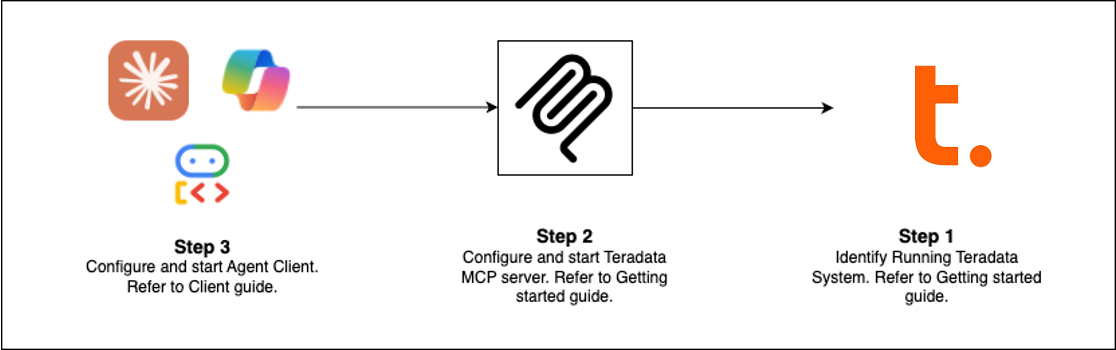
Schnellstart (Wählen Sie Ihren Weg)
| Client | Am besten geeignet für | Einrichtungszeit |
|---|---|---|
| Claude Desktop | Explorative Analyse, Plattform-Administration | 5 Min. |
| VS Code + Copilot | Data Engineering, Agent-Entwicklung | 5 Min. |
| Open WebUI | Testen neuer LLMs lokal | 5 Min. |
| Code-Beispiele | Eigene Clients erstellen | variiert |
| Flowise | Visueller Agent-Builder | 10 Min. |
Voraussetzungen: Teradata-Datenbank (oder kostenlose Sandbox) + uv
Claude Desktop Einrichtung (Ohne Installation)
Fügen Sie dies zu claude_desktop_config.json hinzu (Einstellungen > Entwickler > Konfiguration bearbeiten):
{
  "mcpServers": {
    "teradata": {
      "command": "uvx",
      "args": ["teradata-mcp-server"],
      "env": {
        "DATABASE_URI": "teradata://<USERNAME>:<PASSWORD>@<HOST_URL>:1025/<USERNAME>"
      }
    }
  }
}
Was Sie tun können
| Anwendungsfall | Funktionen | Tools |
|---|---|---|
| Abfragen & Analysieren | Tabellen erkunden, Daten profilieren, Ergebnisse erklären, Muster visualisieren – ohne SQL | base, dba, qlty, plot |
| Semantische Ebene | Benutzerdefinierte semantische Ebenen und Tools aus YAML oder mit unserer Agent-Skill generieren | Mehr erfahren → |
| KI- & RAG-Pipelines | Semantische Suche, Retrieval-Augmented Generation, Vektorspeicher | rag, tdvs, fs |
| Datenbank-Administration | Sicherheit verwalten, Kapazität überwachen, Backups automatisieren | dba, sec, bar |
Neuigkeiten (Neueste Version)
- FastMCP v4 – Sitzungsloses Protokoll, Hintergrundaufgaben für langlaufende Analysen, Argumentvervollständigung
- Antwort-Caching – 5-Minuten-TTL-Signale reduzieren redundante Datenbankabfragen in mehrteiligen Gesprächen
- Guard-Modus – Mehrstufige Bestätigungsabläufe für destruktive Operationen (bar_, sec_)
- Hintergrundaufgaben –
tdml_*analytische Funktionen geben Aufgaben-IDs für Polling zurück, statt zu blockieren - Argumentvervollständigung – Automatische Vorschläge für Tabellen- und Spaltennamen aus dem Schema während der Eingabe
- Hooks-Fähigkeit – Tool-Aufrufe für benutzerdefinierte Überwachung, Audit oder Ratenbegrenzung abfangen
- Zeilenlimit-Schutz – Konfigurierbare Obergrenzen (
DEFAULT_ROW_LIMIT,MAX_ROW_LIMIT) verhindern LLM-Token-Überlauf - Erweiterte Sicherheit – VX-Ansichten für feingranulare Zugriffskontrolle auf Zeilenebene
Erweitern & Bereitstellen
Benutzerdefinierte Logik hinzufügen
Verwenden Sie Hooks, um Tool-Aufrufe für Überwachung, Audit-Trails oder Validierung abzufangen → Hooks-Leitfaden
Semantische Ebenen definieren
Erstellen Sie domänenspezifische Tools, Prompts und Cubes in YAML → Anpassungsleitfaden
Überall bereitstellen
Als CLI (uv), HTTP-Server, Docker-Container oder Cloud-Dienst ausführen → Installationsleitfaden
In Aktion sehen
- Sprachagent – Echtzeit-bidirektionales Audio mit Amazon Nova Sonic
- Web-Agent – Interaktive Chat-Oberfläche mit dem Google ADK-Framework
- Flowise-Builder – Visuelle Drag-and-Drop-Workflows
- Benutzerdefinierte Middleware – Muster für Leistungsüberwachung
Mehr erfahren
- Vollständige Dokumentation – Installation, Konfiguration, Architektur, Sicherheit
- Video-Tutorials – Schritt-für-Schritt-Anleitungen
- Entwicklerleitfaden – Erweitern und beitragen
- Architektur – Wie Komponenten zusammenarbeiten
Mitwirken
Wir freuen uns über Beiträge! Siehe unseren Beitragsleitfaden und Entwicklerleitfaden, um loszulegen.