Lampo
幀級精確的影片審查,專為AI代理設計。透過MCP讀取筆記與繪圖,追蹤新版本,並將修正檢查與核准留給人員處理。可本地部署或託管。
文件
Lampo



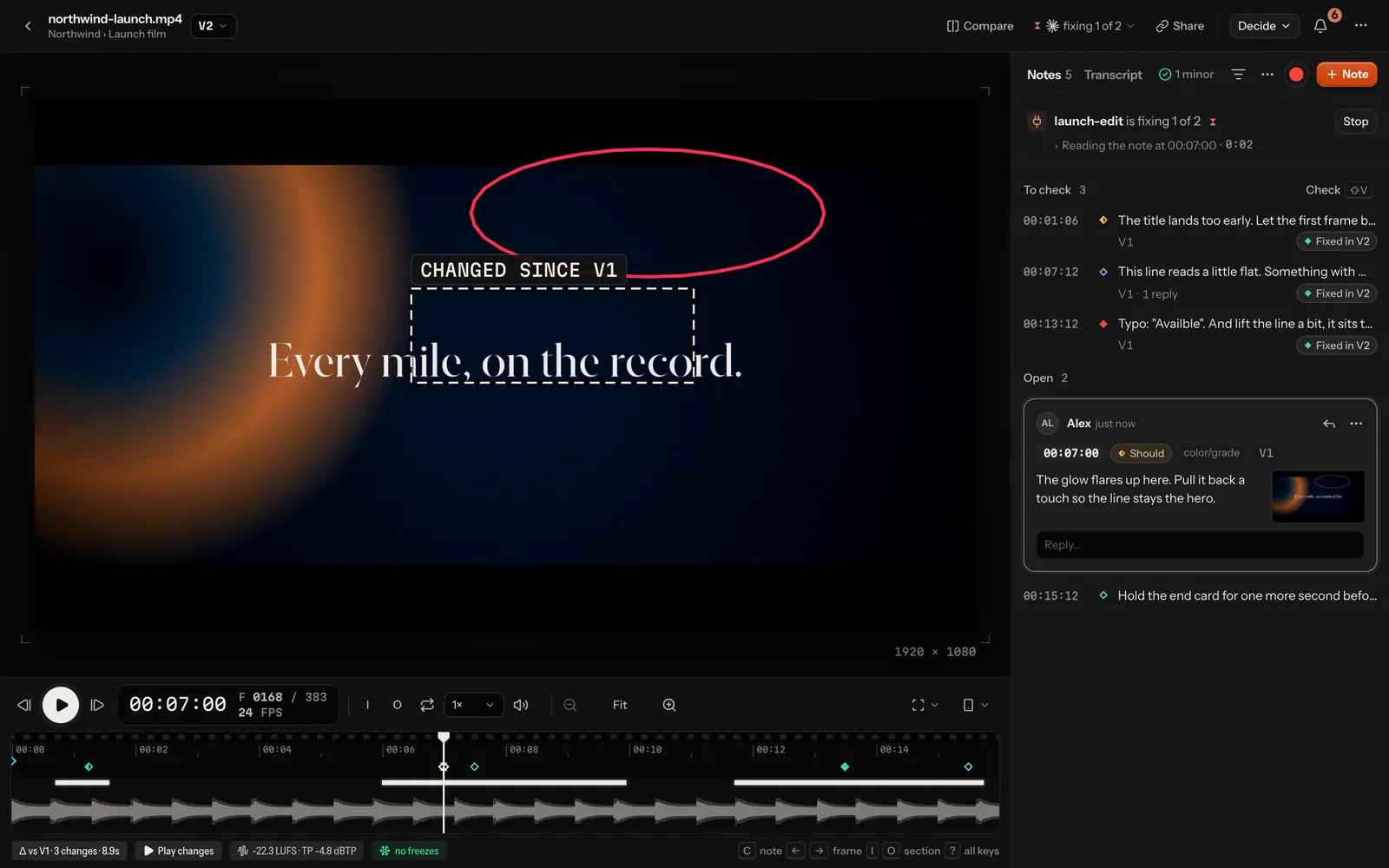
Frame-exact video review for AI video agents. Watch a render, pin notes to exact frames: draw on the frame, tag it, set a severity, or just talk. The agent that made the render (Claude Code, or anything that speaks MCP) gets the notes as plain files with frame numbers, timecodes and the marked screenshot. It fixes, re-renders, and says what it changed. You see exactly what changed on screen and check every fix before and after, one key each.
It runs on your machine (no sign-up, no telemetry) or as a server for a team and its clients. On your machine, nothing
leaves it unless a feature you use needs to: the speech model downloads once from Hugging Face, and so does footage
search's model (about 213 MB) when the first video is indexed (LAMPO_FOOTAGE=off or lampo footage off prevents it);
phone notifications travel end-to-end encrypted through Apple's, Google's, Mozilla's or Microsoft's push service, and
the public tunnel for review links goes through Cloudflare.
AGPL-3.0 · Node ≥ 22.18 · ffmpeg · macOS and Linux (Windows through WSL2)
The product is called Lampo, and so is everything people and agents type: the repository (lampo-vr/lampo), the
lampo command (and lampo-mcp), the LAMPO_* settings, the MCP server's key lampo, the lampo:// resources and the
npm package @lampo-vr/lampo. Setups from before keep working: vr and vr-mcp run the same commands, VR_*
settings are still read, and vr:// addresses and the key video-review still answer. The data folders
(~/.video-review, data/) and file formats keep their names. The logo and its rules are in docs/brand/.
Why
AI agents now cut, grade and caption video. What they can't do is watch it the way you do. The usual feedback loop ("the title at around 0:12 feels early, and there's a typo near the end") loses the one thing an agent needs most: the exact frame and what's on it. Lampo turns review into data an agent can act on without guessing:
- a note is a frame number (and a range, if you want) at the file's real frame rate, plus a drawing in video pixels, plus the exact frame as a clean and a marked PNG;
- every re-render becomes a new version, and open notes carry forward until someone checks them again;
- the agent answers per note (fixed, won't fix, or a question pinned to a frame), and you check the fix.
Features
- Frame-exact everything. The frame the browser shows is the frame ffmpeg decodes, and screenshots come from ffmpeg too: tests compare both with ffmpeg's decoded frame (the player in Chrome and WebKit, screenshots at 23.976, 25 and 30 fps). Formats the browser can't decode play through a proxy that keeps every frame's timestamp.
- Instant scrubbing. Renders with long keyframe intervals get a short-keyframe scrub copy in the background, so stepping and jumping take one display frame.
- Notes that say exactly what you mean: boxes, arrows and freehand drawings; tags (cut, timing, text/typo, layout/overlap, color/grade, audio/music, …); must / should / nice, and idea for optional suggestions that never count as work; frame ranges; pictures, clips, links and moments of other videos that show what you mean.
- Talk instead of typing. Hold T and talk while it plays: the note is pinned where you started, written down by a speech engine running where Lampo runs (transcribe.cpp) and auto-tagged. Or press ⇧R and record feedback while you watch, point and draw: every thing you say becomes a draft note on the frame that was on screen (speech-to-text).
- What is said, as a transcript. Each version's voice-over and dialogue, line by line on its frames: select words and Change the words writes the note, and captions download as SRT or WebVTT.
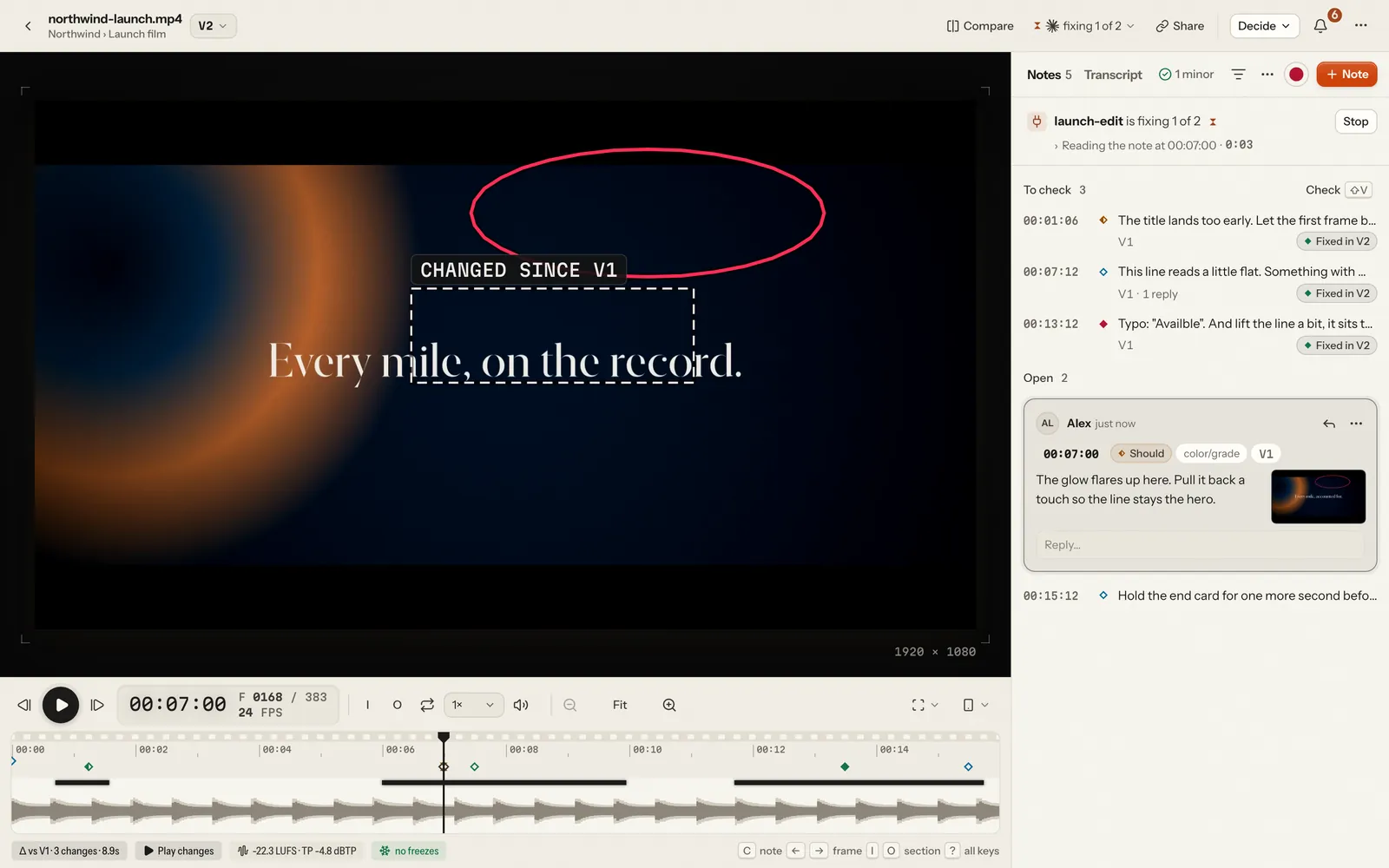
- What changed. Each new render is compared with the previous one, frame by frame: changed regions are outlined on the frame, audio changes and moved cuts are marked on the timeline, and Play changes plays only those parts.
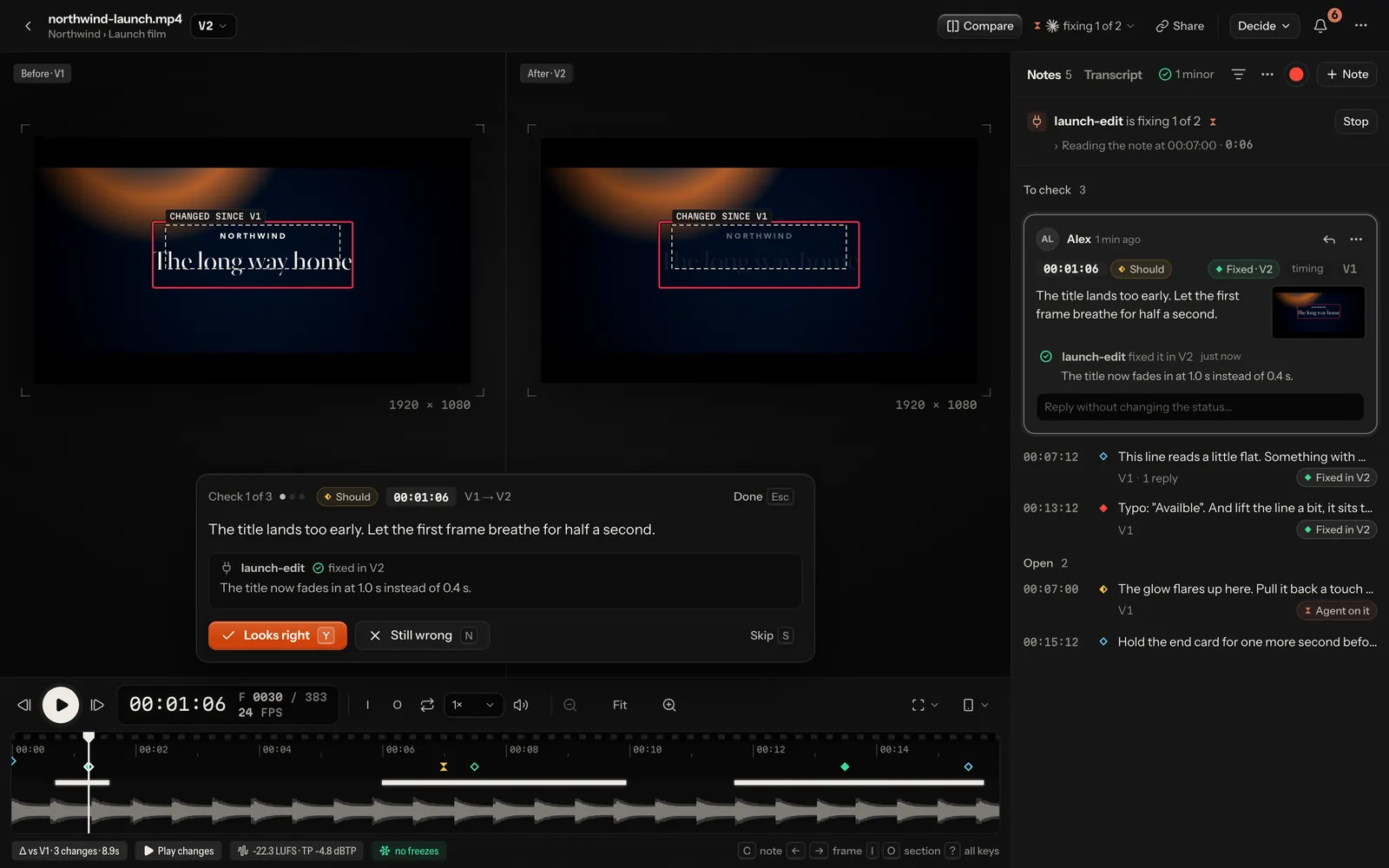
- Check mode (⇧V) walks through every fix side by side, V(N-1) and VN at the same frame: Y looks right, N still wrong.
- Save, then send. Keep notes as drafts only you see, then send them together: the agent gets them as one batch, not one at a time while you are still writing. On a video with an agent, Save is the main button (⌘↵) and ⇧⌘↵ sends; without one, ⌘↵ sends and ⌘S saves.
- Quick check. A note can let the agent render only the shots it is about. The part plays as the whole video, its seams are checked, and it can't be final (docs/workflow.md).
- Auto-check. Before you watch, every render is checked automatically. It reads burned-in text and flags probable typos, text under Instagram's Reels interface, flash frames and dips to black, freezes, clipping, silence gaps and off-target loudness, each with a marker on the timeline; one chip in the notes panel says where it stands and opens the findings. Every finding says what it is, where (a picture of the frame; a click plays the stretch), why it was flagged and whether it looks intended — a freeze inside a pause, motion easing to a rest or an end card — or like a problem: motion that stops dead or jumps ahead while the sound goes on. Ask the agent turns it into a note; That's intended puts it away on that video, in later versions too.
- Safe zones, phone view, compare. Overlays for Reels, TikTok, Shorts, Stories and title/action safe. A real-size phone (iPhone, SE, Pixel) showing the video full height or inside each app's interface, with or without the zones over it. Compare any two versions (B) side by side, with a wipe, or one over the other as a difference or onion skin, locked to the frame.
- Review mode (N) steps through the open notes, each on its exact frame, for going through a cut with someone watching. Notes read as threads: replies with their authors, status changes as one line each.
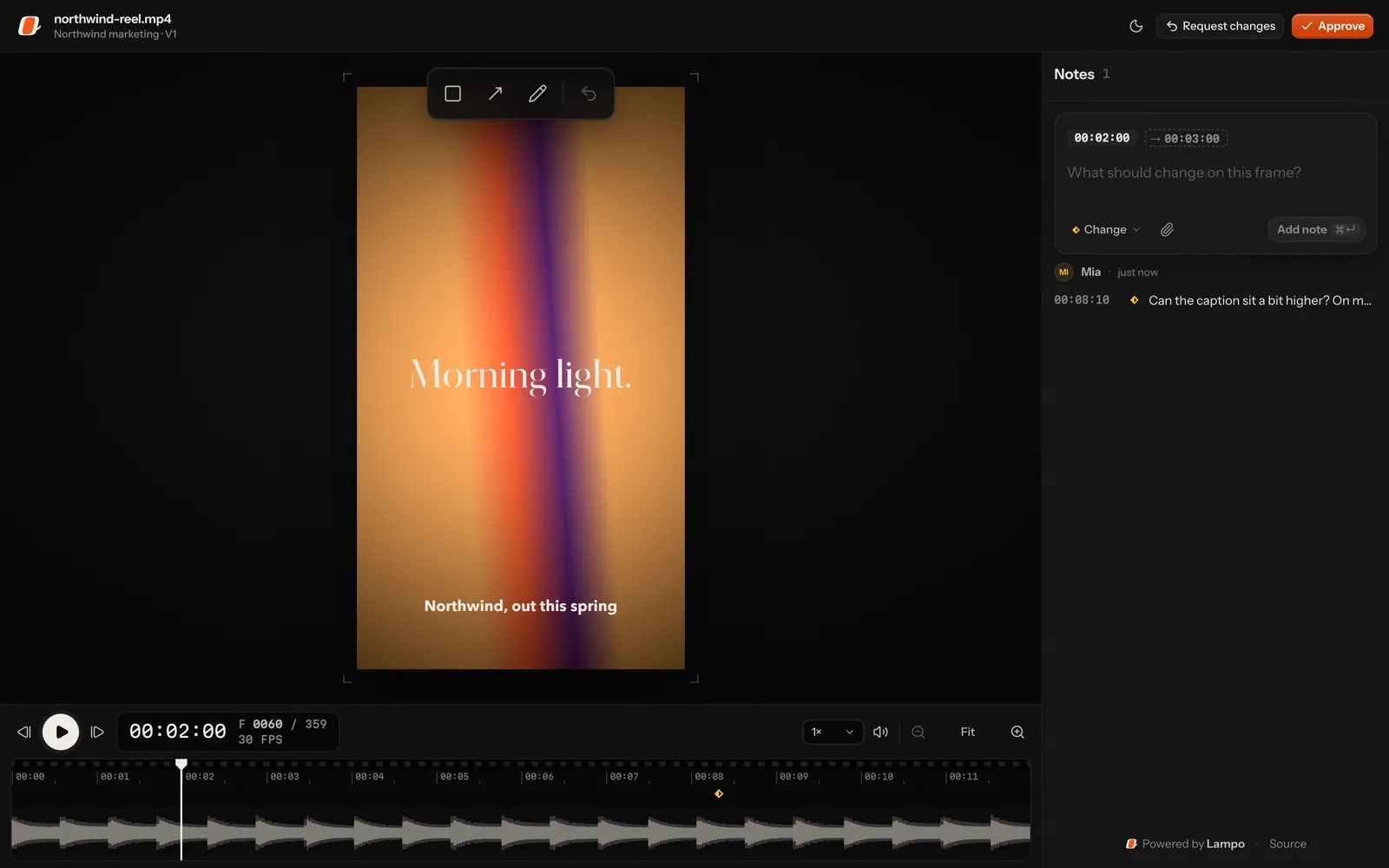
- Review links. Share a video or a whole folder: clients, producers and colleagues review without an account, on
any screen. They draw on the frame, reply, check fixes and approve; you decide what each link allows (watch only,
versions, downloads, expiry, a password) and see who opened it and how far they watched. Their notes reach the agent
tagged
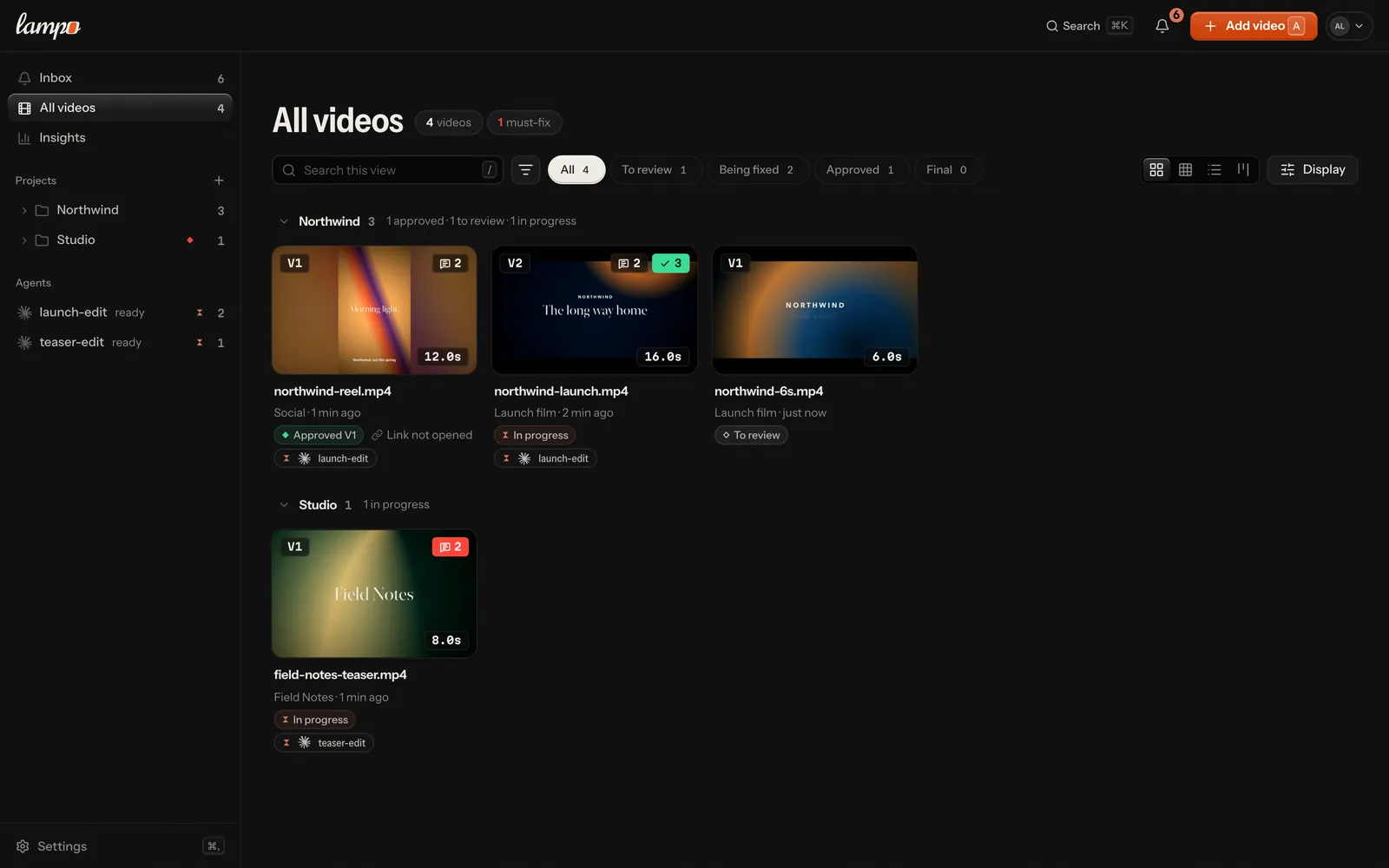
guest:<name>, your internal notes stay hidden, and webhooks tell Slack or Discord right away (docs/sharing.md). An Embed link plays one video on your own site in the same frame-exact player, with no notes and no cookie (embedding). - Where everything stands. Every video is in one stage, from To review through Check fixes, Approved and Approved via link to Final. The library's cards, list and board and the player show the same one. Approvals are kept per version and per party (the team, and whoever decides through a review link); final locks a video for agents (docs/workflow.md). Members, admins and owners download any version as it was rendered, from its ⋯ menu, and a project that is done can be archived: out of sight and read only until it is restored, in one click.
- See what your agent is doing. One line under the notes says where the video's agent is — fixing 3 of 6,
rendering V4 at 42 % with the time left (when it renders through
lampo render), needs you with Answer, or not heard from — and pressing it opens the Agent view beside Notes and Transcript: your notes as its plan, what it is doing now, the steps it took, and Stop, at once. The library's cards, the board and the sidebar's Agents say the same in a word or two, and an agent shows there the moment it connects. A version an agent made says who made it, in how long and what it fixed. When an agent fails, waits for a permission or goes quiet, the inbox (and your phone, if you like) says so, with Try again or Nudge (docs/agents.md). - Publish the final. Post a final version to YouTube, Instagram and Facebook with your own keys, or download the publish kit (each platform's encode, captions, cover, copy). Agents draft the posts; a person publishes (docs/publishing.md). New: tested against stand-ins, not yet against the real services.
- The inbox, also on your phone. The inbox collects what waits for you across all videos: agents' questions (answer them right there), fixes to check, new versions to review, notes and approvals from review links, replies. It reads like a mail client (Inbox in the sidebar: the list beside a frame-exact preview of each item), and on every screen the bell opens it over the page, so you answer, check a fix or approve without leaving where you are. Lampo installs as an app, and notifications bring the inbox to the lock screen, bundled so a render with six fixes is one ping (docs/mobile.md).
- Light or dark. Light · Dark · System, per device and per account. Light is paper and ink; the picture keeps its dark surround either way.
- English, and German on request. The UI is English; German can be chosen in Settings → Appearance (kept on your account, so your other devices follow). Clients on review links see English for now. Agents always get English (docs/configuration.md).
- Playbooks. What the team decided before anyone watched a render — the brief, the rules, references and skills (the open SKILL.md format) — for the whole studio and per project and folder, inherited down the tree. Agents read it first and suggest changes; a person accepts or rejects them, and every render is stamped with the revisions it was made under (docs/playbooks.md).
- The taste file. Every note is a data point. Per project, Lampo distills them into one page the agent reads before it renders: what you keep asking for, what you love, decisions that stand (docs/taste.md).
- Files for every project. A Files tab on every project and folder, and the House's in Settings → Files, keeps what the work is made from: footage, music, fonts, logos, After Effects, Cinema 4D and Photoshop files, LUTs, briefs. Drop files and folders on it: before a byte moves, one sheet says what will happen — what is already in Lampo, which files become a new version, what is left out, whether it fits the plan. Big drops resume where they stopped, and a file someone changed meanwhile is never overwritten. Every file keeps its versions (an agent's marked as such) with Restore, the trash keeps it up to 30 days, and pictures, video, sound, PDF and text open right there. Files count toward the plan's storage; reviewers and review links never see them. The agents' own commands for files come next (docs/files.md).
- One app, on your machine or hosted. The same accounts, invites, API tokens, uploads and review links in both
places (docs/server-mode.md). On your machine you're signed in automatically, renders can
stay where they are, and Claude Code sessions, Apple's text recognition and plain files come on top. Hosted, renders
live on disk, Bunny Storage + CDN or an S3-compatible bucket, and agents connect with
lampo loginor OAuth.
| Library | Check mode |
|---|---|
 |  |
| Review link | Hosted sign-in |
 | 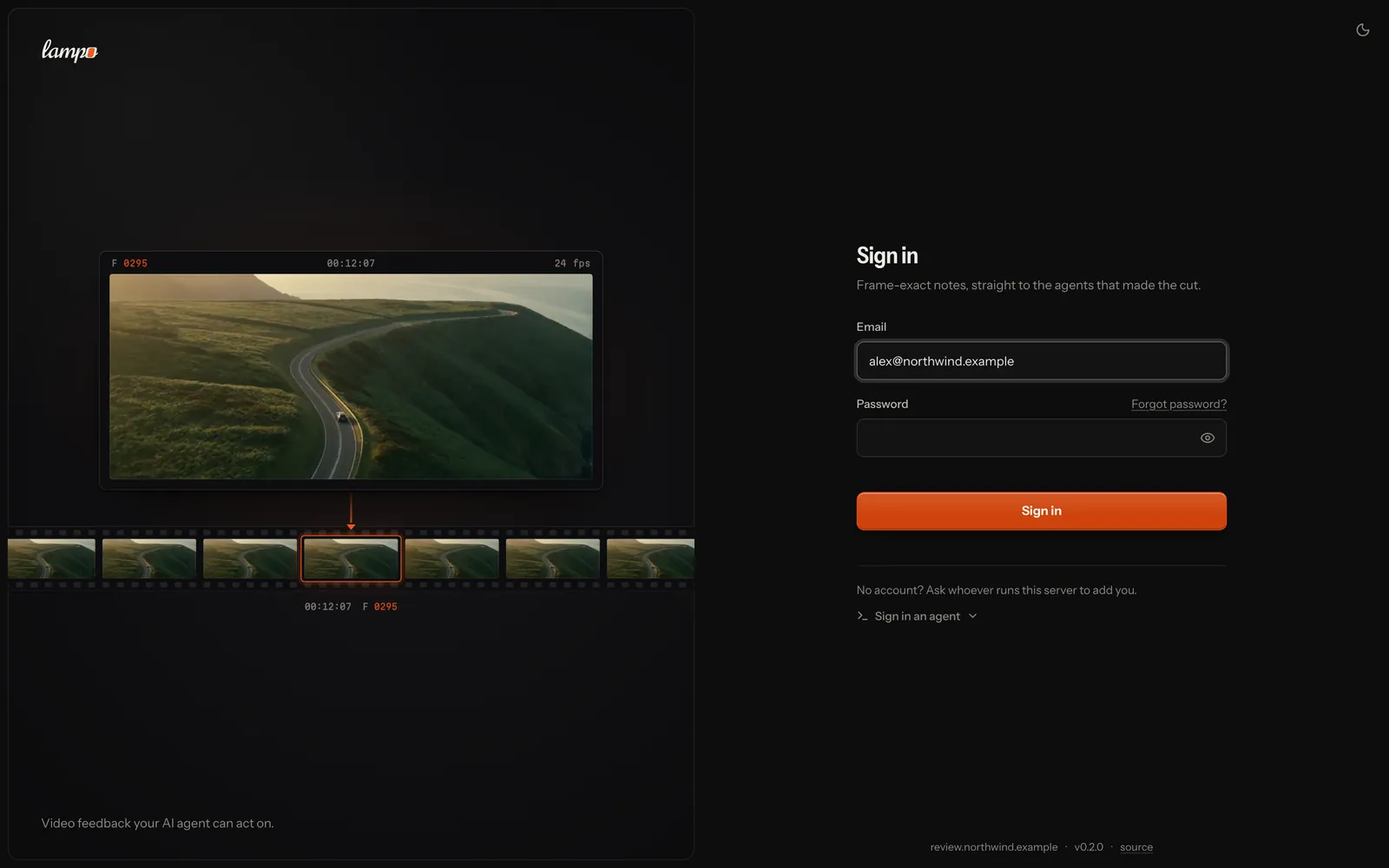 |
| An agent at work | Files |
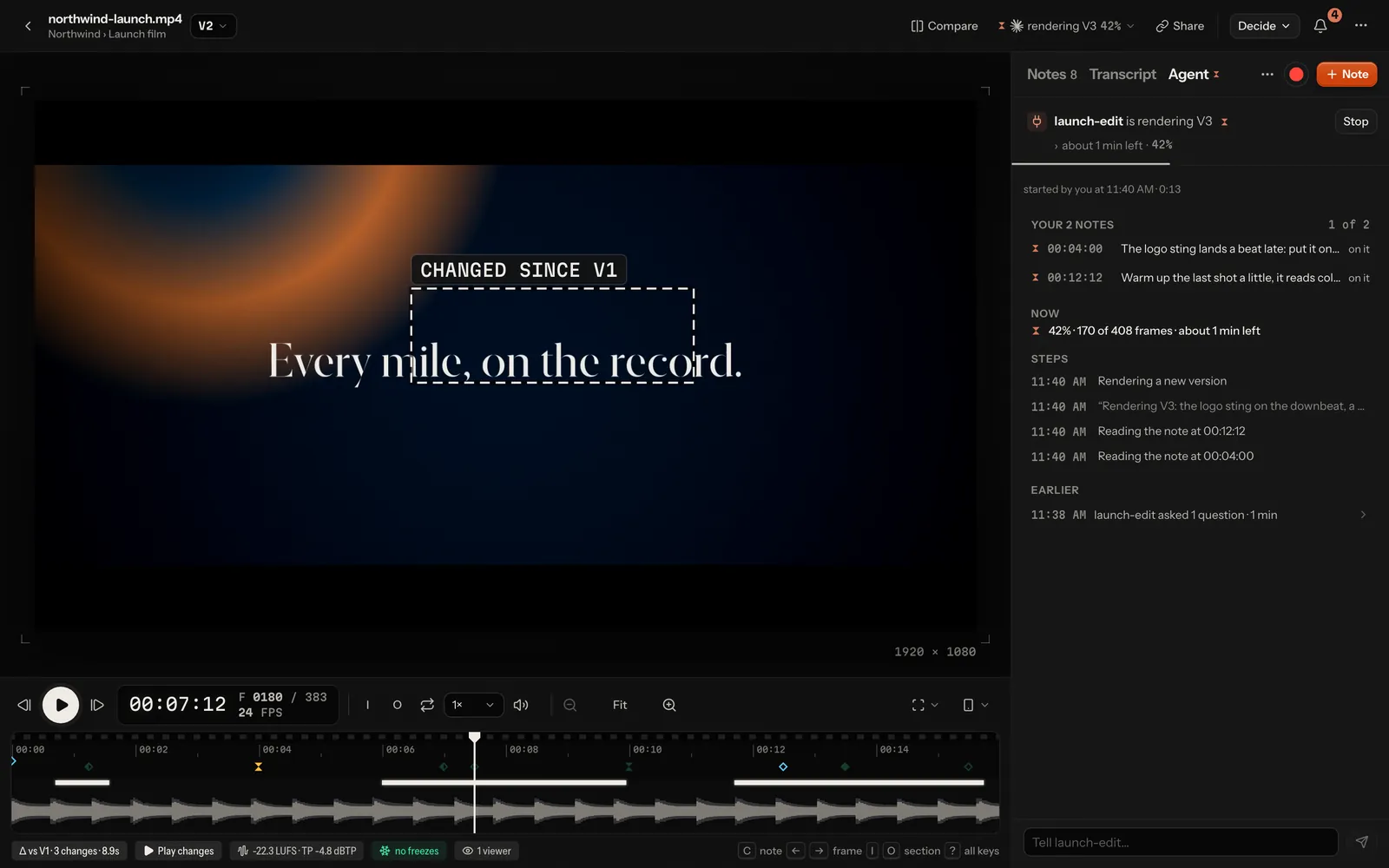 | 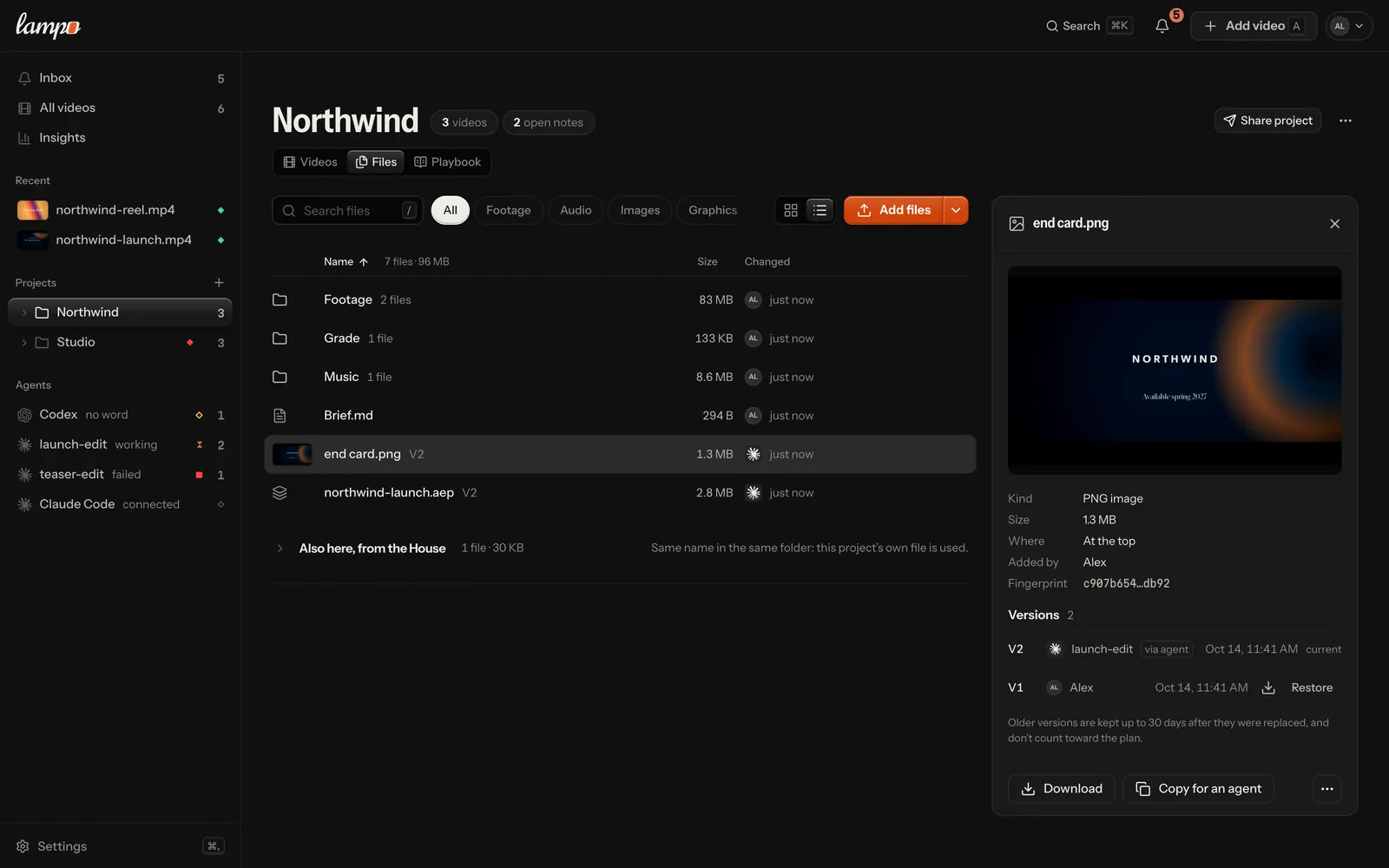 |
| Light: library | Light: player |
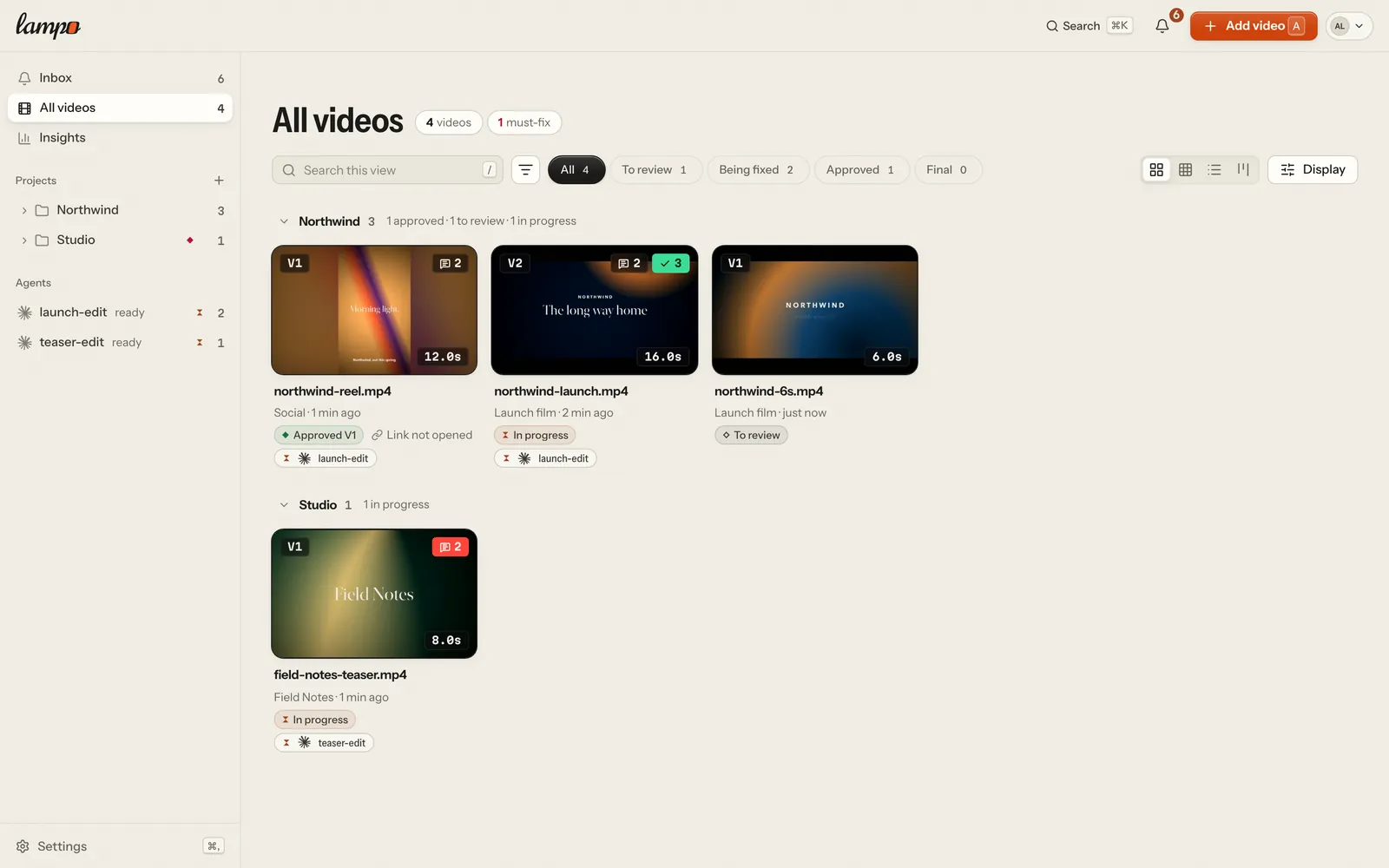 |  |
Quick start
You need Node ≥ 22.18 and ffmpeg with ffprobe on your PATH (macOS: brew install ffmpeg node).
git clone https://github.com/lampo-vr/lampo.git && cd lampo
npm install
npm start          # http://localhost:4747, signed in as you (builds the UI on first start)
npm run link       # puts lampo in ~/.local/bin (and says if that is not on your PATH)
Press A (Add video) to add a render: drop or choose files to upload a copy, or Link a file on this machine to review it where it lives (rendering again to the same path adds the next version), then pick its project and the agent that should act on the notes. Nothing is scanned; the tool only reads the files you add. Your owner account is created on first start; set an email and a password in Settings → Profile to sign in from your phone or another computer.
Working with an agent? The empty library leads with Copy prompt for your agent: paste it into Claude Code, Codex, Cursor, ChatGPT or Claude, and it connects itself to Lampo, tells you what only you can do (signing in, a restart), asks how the work starts (from scratch, your footage or a project you have) and puts up V1 (docs/mcp.md). The prompt holds no token. By hand: Settings → Connect an agent, then tell it Use Lampo for "" (For agents).
No footage at hand? npm run demo renders synthetic clips and builds a review history on a throwaway store:
notes, an agent's fixes, a re-render with its diff, a review link and an approval. Ctrl+C deletes it again.
More ways to run it:
npm run dev        # the same with hot reload, for UI work
npm run lan        # also on your Wi-Fi (prints a link with an access token for your phone)
Where things live, and every setting: docs/configuration.md. In short, a fresh install keeps
its store in ~/.video-review/:
data/holds the reviews;versions/holds every render and can't be regenerated;cache/is rebuilt on demand and safe to delete while the app is stopped, exceptcache/uploads/(uploads in flight).
Voice notes are transcribed on your machine by transcribe.cpp
(installed with npm install, no Python): Whisper large-v3-turbo when there is a GPU (Apple Silicon, CUDA, Vulkan),
Parakeet v3 on CPU-only machines. The model downloads once, on the first voice note. Details and an
OpenAI-compatible server option: docs/speech.md.
Run it as a server
A server is for a team, or for sharing reviews with clients without a tunnel. This repository is the whole app: self-hosted, it is complete and has no limits, except that hiding the Powered by Lampo badge on review links is a feature of Lampo Cloud's paid plans. The maintainers also run it as a hosted service, Lampo Cloud (lampo.video), for those who'd rather not run their own; its plans and billing come from a separate module that is not part of this repository and that a self-hosted server doesn't need (docs/server-mode.md):
cp .env.example .env      # set LAMPO_DOMAIN and LAMPO_PUBLIC_URL (LAMPO_TRUST_PROXY=uniquelocal
                          # is already set), and storage for Bunny or S3 (.env is gitignored)
docker compose up -d      # the app behind Caddy, with automatic HTTPS
docker compose logs       # the first start prints a one-time setup token
Open your URL, enter the token and create the owner account. Then invite people, upload renders (drop them on the
library, or lampo push), keep each project's material in its Files tab, and connect agents: through Settings →
Connect an agent (a chat app by its connector address, signing in once), or lampo login, which signs in through the
browser and gives lampo and the stdio MCP server an API token:
lampo login https://review.example.com
lampo push render.mp4 --folder "Acme/Reels"   # the same name again becomes V2, V3, …
lampo render --to render.mp4 --out out/v3.mp4 -- \
  npx remotion render src/index.ts Main out/v3.mp4   # the progress shows in Lampo, then V3
docs/docker.md covers the image, volumes, upgrades and backups.
docs/server-mode.md covers configuration, the reverse proxy, accounts and workspaces, storage
(Bunny, S3) and the security model. Going live for real: docs/go-live.md, the runbook for one server
(DNS, TLS, backups with a restore drill, monitoring, updates), with node scripts/smoke.ts https://review.example.com
to check a running instance.
Keys
| Key | |
|---|---|
| Space · J K L | play/pause · reverse, pause, play (press again: faster) |
| ← → (⇧ ×10) · Home End | frame step · first/last frame |
| I O · Esc X · R · M | mark a section's start or end, also while playing (⇧ jumps there) · clear it · loop it · mute |
| drag | on the timeline's notes lane (⇧ anywhere on it): mark a section, and its note opens; drag its ends to adjust |
| C ↵ | note on this frame, or on the marked section; in the note, ⌘↵ presses the main button (Send, or Save on a video with an agent) and ⌘S keeps it as a draft; ⇧⌘↵ sends every note not sent yet |
| hold T · ⇧R | voice note · record feedback while you watch (⇧R again: done) |
| D · ⇧D | next / previous change since the previous version |
| ⇧V | check mode: every fix, before and after |
| [ ] · N ⇧N | previous / next note · review mode (step through the open notes) |
| G · V · B | safe zones · phone view · compare (side by side, wipe, overlay; Esc closes) |
| = − 0 · Z ⇧Z | timeline zoom (or ⌘ + scroll; far in, every frame is a cell) · to the section or around the playhead · the whole video |
| ⌘K (Ctrl K) · ⌘, | find a video, folder or note anywhere, or run an action · Settings |
| A · 1–4 · / · F | library: add video · grid, compact, list, board · search this view · filter |
| ⌘-click · ⇧-click · ⌘A · X · Esc | library (List, Grid): tick a video · the run from the last one · every video in view · the one the keys are on · none; the bar moves or archives them all |
| ↑ ↓ (⇧ picks) · ↵ · Space · ⌫ | Files tab: move through the list · open · look · trash (with Undo); ⌘A picks all, ⌘↑ goes up a folder, / searches |
| ? | every key |
For agents
Connect your agent, then tell it one sentence: "Use Lampo for ". That is the whole loop: Lampo's MCP server tells every agent that connects what to do, in its first read. The full reference is docs/agents.md (every command, the MCP tools, the data format).
Install as a plugin
With Lampo Cloud, the Lampo plugin brings both pieces at once: the connector
(https://app.lampo.video/mcp) and the Agent Skill that teaches the loop.
- Claude Code:
claude plugin install lampo --marketplace lampo-vr/lampo(or/plugin install lampo --marketplace lampo-vr/lampoin a session), then sign in when the connector asks. - claude.ai, Cowork, ChatGPT and Codex: add Lampo from the app's plugin directory once it is listed there.
With a Lampo server of your own, connect it by its address instead (docs/mcp.md).
The loop
- The project:
list_folders, the one the person named or the work belongs to (none: a new name becomes the project with V1; several fit: ask once, with options). - V1: no version there yet, the agent puts it up itself. It is its video from then on.
- Read the playbook and the taste (
get_playbook,get_taste), then the open notes (get_open_notes; drawn notes come with their frame, cropped). - Fix, put up the next version,
mark_fixedeach note with what changed. Never verify: people do. - Wait in
wait_for_feedbackwith the last cursor, again after every answer, until the person approves (sign-off is theirs) or says stop.
Every answer says what comes next: a hand-off ends with Now call wait_for_feedback with since "<cursor>"…, a read
that leaves nothing to do with Nothing waiting for you: …. The person sees the agent from its first call, in the
sidebar's Agents and in Settings → Connect an agent, and its work on a video as one line with the Agent view behind it,
built from the calls it makes anyway (no status calls needed, no tokens spent). If the person presses Stop, the agent's
next Lampo answer says so, once: it stops there. Claude Code's /lampo:watch is a shortcut for the same loop.
One way per kind of agent
| The agent | Lampo through | A version goes up with |
|---|---|---|
| Claude, ChatGPT, Cursor's chat, any MCP client | MCP only | request_upload (one PUT) |
| Claude Code, Codex | MCP | lampo render --to <video> --out <file> -- <render command> (--folder <project> for V1): the person sees the progress |
| the agent on the machine Lampo runs on | MCP (stdio or the app) | track_video, then re-renders to the same path |
| scripts without MCP | lampo (npm run link; --json on every read) | lampo render, lampo push |
-
Connect: one prompt the person copies from the app and pastes into their agent sets it up (it connects itself, then asks how the work starts); Settings → Connect an agent gives each client its one snippet (or a chat app its connector address);
lampo mcp config <client>prints the same (docs/mcp.md): stdio (bin/lampo-mcp) or Streamable HTTP at/mcp(the local app, or a hosted server by signing in or with an API token).claude mcp add --scope user lampo -- /path/to/lampo/bin/lampo-mcp lampo mcp config codex # or claude, cursor, vscode, antigravity, windsurf, gemini, zed, json -
Few tokens: pictures only for notes with a drawing, cropped to it; only what changed when an agent hands back what it was told (
since,known); a lean tool set on request (LAMPO_MCP_TOOLS=lean). Measured in bench/tokens. -
An Agent Skill teaches the same loop to agents that load skills.
-
A hosted server:
lampo login <url>once, then everylampocommand and the stdio MCP server work against it. Screenshots are downloaded, so the printed paths still open like local files.show_reviewshows the review inline in hosts that render MCP Apps.
On your machine, data/INBOX.md is the one file for "what did the reviewer say since last time": the newest 150
events from people, newest first, tagged → <session>. lampo inbox --mine [--since <iso>] gives the same as lines,
also against a hosted server.
The data contract
data/
  INBOX.md                  newest human feedback across all videos
  events.jsonl              append-only log of every event (what `lampo watch` tails)
  <slug>/review.json        source of truth for one video: versions, notes, replies, approvals
  <slug>/review.md          the same, readable
  <slug>/<id>_clean.png     the exact frame, full resolution
  <slug>/<id>_marked.png    the same frame with the drawing burned in
versions/<slug>/vN.<ext>    the bytes of every registered render
slug is the video's absolute path with every / replaced by __ (shortened with a hash when that would exceed
255 bytes, see data-format.md). Frames are 0-based at the render's fps,
timecodes mm:ss:ff, drawings in video pixels. lampo and the MCP server lock and write atomically, so don't
hand-edit review.json, and never move or modify the renders under review: the tool only reads them. Field by
field: docs/data-format.md.
How it works

One TypeScript codebase that Node runs directly: lib/ is the store and the domain (versions, notes, diffs,
Auto-check, taste), server/ exposes it over HTTP, web/ is the React UI, and bin/lampo / mcp/ are the agent
interfaces. docs/architecture.md goes deeper: modes, storage, job priorities, and how frame
accuracy is kept end to end. The HTTP API is in docs/api.md.
Documentation
| docs/agents.md | CLI reference, the review loop, remote agents |
| docs/mcp.md | MCP server setup and tools |
| docs/data-format.md | review.json, events.jsonl, the files in data/ |
| docs/playbooks.md | playbooks: brief, rules, references and skills per studio and folder; agents' suggestions; trust |
| docs/taste.md | the taste file: what the notes taught, for agents to read before they render |
| docs/files.md | project files: footage, music, fonts and project files per House, project and folder; versions, the trash, the plan, the Files tab, lampo files and the agents' tools, the API |
| docs/sharing.md | review links for clients and colleagues, what they record, webhooks |
| docs/workflow.md | where a video stands: stages, approvals per party, final, who can do what |
| docs/publishing.md | posting a final video to YouTube, Instagram and Facebook; the publish kit; what to set up first |
| docs/mobile.md | the inbox, the app on your phone, notifications |
| docs/configuration.md | every setting and environment variable, where data lives |
| docs/server-mode.md | hosting: accounts and workspaces, uploads, storage, reverse proxy, security model |
| docs/docker.md | the Docker image and compose setup |
| docs/go-live.md | the first production deploy on one server: DNS, TLS, env, backups and restore, monitoring, updates |
| docs/moving.md | moving your machine's reviews to a server: lampo export, lampo admin import, what moves and what stays |
| docs/email.md | the emails a hosted server sends (invites, confirmations, password resets, notices), sign-up, the mail relay |
| docs/onboarding.md | the first run: what someone new sees, the steps per role, the sample video |
| docs/speech.md | speech-to-text: voice notes, recorded feedback, transcripts |
| docs/footage.md | footage search: B-roll from your videos as shots with exact in and out frames |
| docs/architecture.md | how the pieces fit together |
| docs/api.md | the HTTP API |
| docs/brand/ | the Lampo logo, the icons and how to use them |
| bench/stt/RESULTS.md | how the speech engines were chosen |
Contributing
Issues and pull requests are welcome. Please read CONTRIBUTING.md (setup, tests, the data contract) first. Contributions are accepted under a Contributor License Agreement, which you sign once with a comment on your first pull request (the CLA check says which), and everyone involved follows the Code of Conduct. Found a security problem? See SECURITY.md and please don't open a public issue.
License
Copyright © 2026 nprompt UG (haftungsbeschränkt), Stuttgart, Germany.
Lampo is free software under the GNU Affero General Public License v3.0 only. You may use,
study, modify and self-host it. If you run a modified version as a network service, you must offer its users the
source of your changes under the same license (set LAMPO_SOURCE_URL to your fork; the app links to it). If the AGPL
doesn't work for your organisation, a commercial license is available from the maintainers: hello@lampo.video.
To be plain about what the CLA means: contributors keep their copyright and grant the maintainers the right to license their contributions under other terms too, including proprietary ones (Harmony CLA, "any license" option). That is what makes the commercial license possible. In return, every contribution stays available under the AGPL-3.0 as well.
Third-party components and model licenses are listed in NOTICE.md. The name and logo are not covered by the code license; see TRADEMARKS.md.