JCR Partition Table
基于ShowJCR数据提供最新的期刊分区表查询。
文档
JCR分区表MCP服务器
简体中文 | English

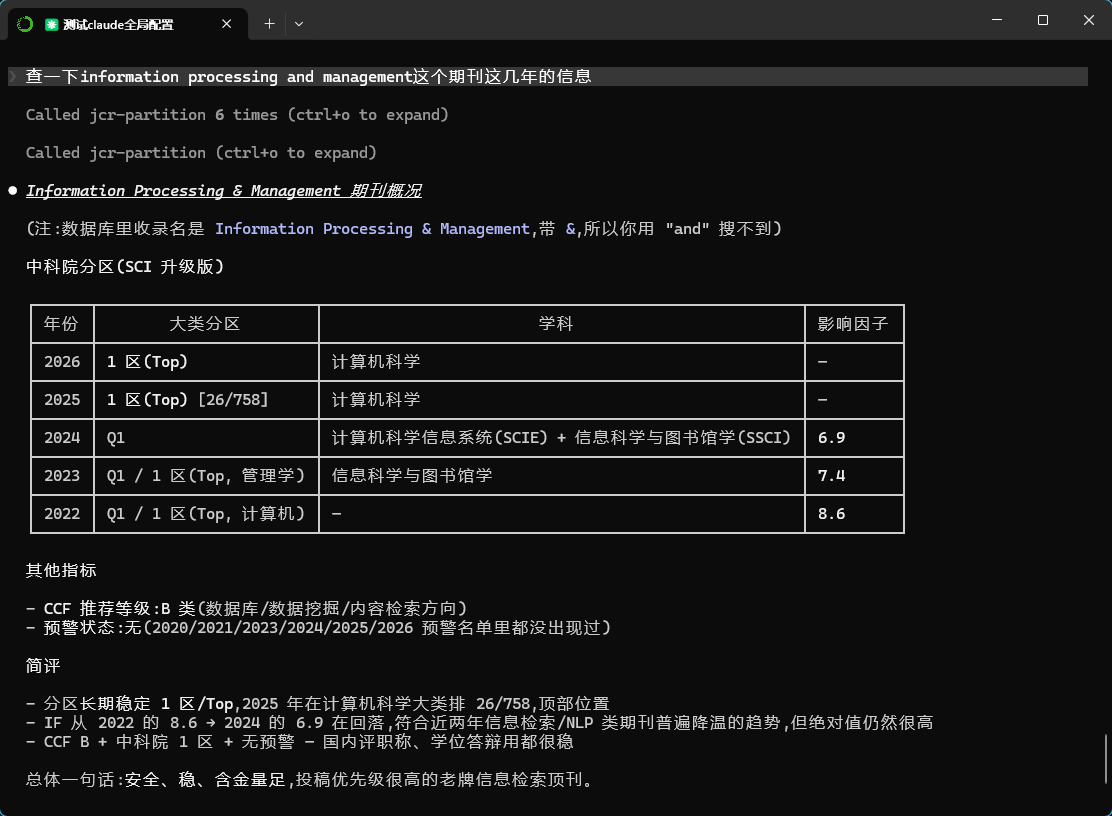
基于ShowJCR仓库数据的Model Context Protocol (MCP) 服务器,为大语言模型提供最新的期刊分区表查询功能。
功能特性
🔧 工具 (Tools)
- search_journal - 搜索期刊信息,包括影响因子、分区、预警状态等
- get_partition_trends - 获取期刊分区变化趋势分析
- check_warning_journals - 查询国际期刊预警名单
- compare_journals - 对比多个期刊的综合信息
📋 资源 (Resources)
- jcr://database-info - 数据库基本信息和统计
💡 提示词 (Prompts)
- journal_analysis_prompt - 期刊分析专用提示词模板
数据来源
本项目基于 ShowJCR 仓库的数据,包括:
- 新锐期刊分区表 (2026年版,22299 种期刊 + 15 种计算机领域重要会议;自该版起预警信息以「预警标记: Under Review」内嵌)
- 中科院分区表升级版 (2025、2023、2022年)
- JCR期刊影响因子 (2024、2023、2022年)
- 国际期刊预警名单 (2025、2024、2023、2021、2020年;上游自 2026 起不再单独发布)
- CCF推荐国际学术会议和期刊目录 (2026、2022年)
- 计算领域高质量科技期刊分级目录 (2025、2022年)
2026 版本说明:
check_warning_journals工具会同时扫描传统GJQKYJMD*预警表与XR2026.预警标记字段,覆盖新旧两套预警来源。
安装部署
1. 环境要求
- Python 3.10+(
mcpSDK 的硬性要求) - SQLite3(通常随 Python 内置)
2. 安装依赖
pip install -r requirements.txt
3. 数据同步
首次运行前需要同步数据:
python data_sync.py
选择"1"同步所有数据,等待下载和导入完成。
4. 启动服务器
python jcr_mcp_server.py
客户端测试
独立测试
python test_client.py
选择模式:
- 模式1:自动测试所有功能
- 模式2:交互式查询模式
Claude Desktop 集成
在 Claude Desktop 配置文件(%APPDATA%\Claude\claude_desktop_config.json 或 macOS 的 ~/Library/Application Support/Claude/claude_desktop_config.json)中添加:
{
  "mcpServers": {
    "jcr-partition": {
      "command": "/path/to/python",
      "args": ["/path/to/jcr_mcp_server.py"],
      "cwd": "/path/to/project"
    }
  }
}
仓库里的 claude_desktop_config.json 可作参考模板。
Claude Code 集成
使用 CLI 一行注册(作用域 user 代表全局可用):
claude mcp add -s user jcr-partition -- /path/to/python /path/to/jcr_mcp_server.py
注册后可通过 claude mcp list 确认状态,应显示 ✓ Connected。
使用示例
1. 期刊搜索
# 搜索Nature期刊
result = await session.call_tool("search_journal", {
    "journal_name": "Nature"
})
2. 分区趋势分析
# 获取Science期刊分区变化趋势
result = await session.call_tool("get_partition_trends", {
    "journal_name": "Science"
})
3. 期刊对比
# 对比三个顶级期刊
result = await session.call_tool("compare_journals", {
    "journal_list": "Nature,Science,Cell"
})
4. 预警期刊查询
# 查询预警期刊
result = await session.call_tool("check_warning_journals", {
    "keywords": "MDPI"
})
输出示例
期刊搜索结果
📚 期刊名称: NATURE

【2024年】(JCR)
  📊 影响因子: 48.5
  🏆 分区: Q1
  📖 学科类别: MULTIDISCIPLINARY SCIENCES(SCIE)

【2025年】(中科院升级版)
  🏆 分区: 1 [1/118](Top)
  📖 学科类别: 综合性期刊

【2026年】(新锐期刊分区表)
  🏆 分区: 1 区(Top)
  📖 学科类别: 综合性期刊
期刊对比结果
📊 期刊对比分析结果

期刊名称                    最新影响因子      最新分区        预警状态
----------------------------------------
Nature                    64.8           Q1             正常
Science                   56.9           Q1             正常
Cell                      64.5           Q1             正常

💡 投稿建议:
  ⭐ Nature: 顶级期刊,强烈推荐
  ⭐ Science: 顶级期刊,强烈推荐
  ⭐ Cell: 顶级期刊,强烈推荐
技术架构
数据层
- SQLite数据库存储所有分区表数据
- 支持多个年份的历史数据
- 自动数据同步和验证机制
服务层
- FastMCP框架构建MCP服务器
- 异步处理提高性能
- 完善的错误处理和日志记录
接口层
- 标准MCP协议接口
- 支持工具、资源、提示词三种类型
- 兼容各种MCP客户端
扩展说明
添加新数据源
- 在
data_sync.py中的data_sources字典添加新数据源 - 运行数据同步更新数据库
- 在
jcr_mcp_server.py中更新解析逻辑
添加新工具
- 在
jcr_mcp_server.py中使用@app.tool()装饰器 - 实现具体的查询逻辑
- 添加合适的文档字符串
部署到云端
可以将服务器部署到云平台,支持HTTP传输:
app.run(transport="streamable-http", host="0.0.0.0", port=8080)
相关链接
许可证
本项目基于MIT许可证开源。
贡献
欢迎提交Issue和Pull Request来改进这个项目!