taxtrace
本地美国税务工作区的只读脱敏视图:文档、表格检查和待办事项,不向代理显示任何金额、姓名或 ID。
文档
taxtrace
Prepare a US federal and state return from your own documents, on your own machine, with every number traced to the page it came from.
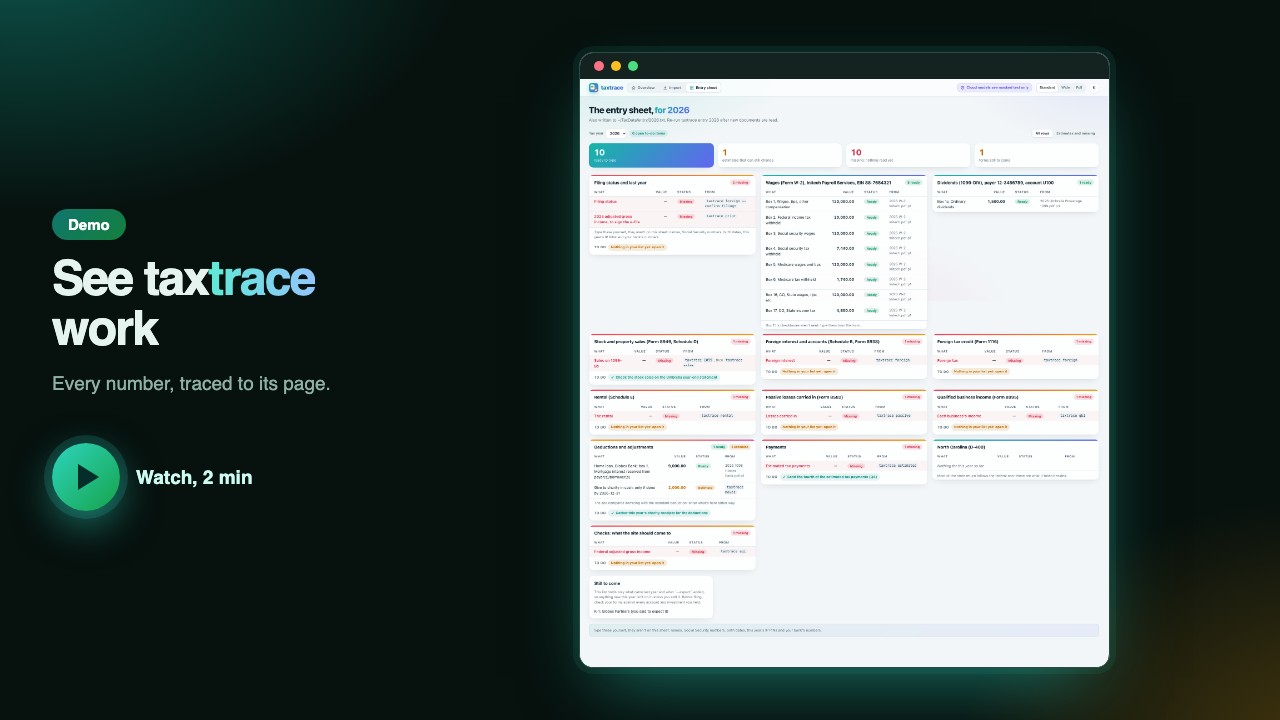
taxtrace does not file anything. You point it at a folder of your documents (W-2s, 1099s, 1098 mortgage statements, partnership K-1s, property manager statements, foreign bank statements, last year's return). It reads them and writes an entry sheet to type into consumer tax software, an FBAR (foreign bank account report) account list, and a list of questions for you: anything it could not settle from the documents alone.
Three rules hold everywhere:
- Nothing is guessed. Every value carries the file, the page and the exact text it was read from, and a check rejects a value whose text is not on that page.
- Your documents never leave your machine. Reading them is plain code and text recognition, not an AI model; the only model that sees your real values is a local one on your Mac (Apple's MLX, for example). The optional chat can use a cloud model, which only ever sees masked text: digits become
#, and words outside the IRS's own vocabulary become*. - Nothing is decided silently. A receipt that could be a repair or an improvement, a missing 1099, a rate choice: each is a question with the evidence next to it.
What the demo shows
The two-minute demo uses made-up documents only: it opens taxtrace in the browser on a household's workspace (the to-do list, the tax-saving moves), imports a second batch of documents on the Import screen, shows the Entry sheet screen with each value's document and page, then the chat, what a cloud model is sent, and a question with an amount in it staying on the Mac. Every video is filmed in the page, never in a terminal. Every value arrives with its source and a status: ready, estimate or missing. Illustrative output for an invented Initech employee in Boulder, CO, with round figures:
| Entry sheet line | Value | Status | Read from |
|---|---|---|---|
| Wages (W-2 box 1) | 120,000 | ready | 2026 W-2 Initech.pdf, p1 |
| Federal tax withheld (box 2) | 20,000 | ready | 2026 W-2 Initech.pdf, p1 |
| Mortgage interest (1098 box 1) | 9,000 | ready | 2026 1098 Globex Bank.pdf, p1 |
| Dividends (1099-DIV box 1a) | 1,500 | estimate | 2026 Umbrella Brokerage 1099.pdf, p3, year not over |
| Estimated tax payments | missing | run taxtrace estimates |
The real sheet is a plain text file, entry/<year>.txt, with one such row per line. The terminal shows counts and pass/fail results, never amounts.
How well does it work
More than 500 tests (pytest), run by CI on Python 3.10 and 3.13. Every fixture is invented, and a test builds a workspace full of made-up amounts and names and checks that none of them appear in any MCP tool's output. This is not a measured accuracy rate against real returns. A filed return, when you have one, is the cross-check: agi, tax and d400 compare each line with it and say which way and roughly how far it differs.
Install
taxtrace needs Python 3.10 or newer. uv brings its own Python, so install uv first, then taxtrace:
curl -LsSf https://astral.sh/uv/install.sh | sh      # installs uv (or: brew install uv)
uv tool install taxtrace
Already have Python? pipx install taxtrace works too. Extras: taxtrace[chat] (cloud chat), taxtrace[mcp] (MCP server).
Use
taxtrace import ~/Downloads/portal-export.zip   # sort a preparer's export into ~/TaxData by tax year
taxtrace prior                                  # carryforwards from last year's filed return
taxtrace k1 2026                                # every K-1 in the 2026 folder
taxtrace w2 "2026 W-2 Initech.pdf"              # a W-2, every box
taxtrace entry --year 2026                      # the entry sheet, plus what is still to come
taxtrace agi --year 2026                        # adjusted gross income, against the filed return if any
taxtrace ui                                     # the workspace and a chat in the browser
taxtrace --help                                 # every command
Start by putting your documents in a workspace folder, one subfolder per tax year (~/TaxData/2026, or under $TAXTRACE_HOME): import does that for a preparer's export, or copy the files in yourself. taxtrace refuses to place the workspace inside a git repository.
Limits
- Not tax advice, and not a filing tool: you type the entry sheet into your own tax software, and a preparer should review the result.
- Federal tax tables are built in for 2025 and 2026, for single and joint returns. The alternative minimum tax and Form 8995-A (the long form of the business-income deduction) are not worked out, and the output says so.
- The only state return is North Carolina's Form D-400 (full-year residents).
- Readers are written for the layouts seen so far: printouts from Drake (a tax preparer's software), common broker and lender forms, and some Indian bank statements. An unfamiliar layout becomes a question, not a guess.
- macOS is the best-supported system: the Keychain password handling (for locked PDFs), the always-on service and local MLX models are macOS only.
- Local-only: nothing is sent anywhere unless you turn on the chat's cloud models, and those see masked text. The only other outside lookup is public exchange rates for foreign amounts (a currency and a date, nothing about you). The MCP server (the way an AI assistant such as Claude calls taxtrace's tools) returns masked text only and is read-only.
Documentation
Everything else is in docs, one page per topic:
- Commands: every command in one line each
- Install, workspace and documents: import, OCR, locked PDFs, the Keychain
- Forms, K-1s, carryforwards and passive activities
- Planning: estimated tax, IRAs, a job change, stock sales
- The return: entry sheet, AGI, total tax, North Carolina
- Foreign side: India's return, bank statements, FBAR, Form 1116
- Chat and the MCP server and agent skill: masked, read-only views of your workspace for Claude or another AI assistant (MCP is the protocol they use to call tools)
- Development
Support and listings
If taxtrace helps with your return, a ⭐ on GitHub is how I know: taxtrace has no usage tracking, so stars are the only count of who uses it. If it saved you a preparer's fee, a $1 coffee says so too.


MIT licensed.