Forge MCP Server
使用符合MCP规范的工具,与Laravel Forge API集成,以管理服务器和部署。
文档
Forge MCP Server
This is a Model Context Protocol (MCP) server for Laravel Forge integration. It provides comprehensive access to Laravel Forge's official API through MCP-compliant tools, enabling seamless server and site management.
For more information about the Laravel Forge API, see the official API documentation.
Features
- MCP-compliant server
- Comprehensive Laravel Forge API integration
- Health check tool:
test_connection - Extensive tool coverage for server and site management
- Built on Laravel Forge's official API
Prerequisites
- Node.js (v18+ recommended)
- npm (v9+ recommended)
Configuration & Usage
A Forge API key is required for all Forge tool invocations. You must provide it as either:
- the
FORGE_API_KEYenvironment variable, or - the
--api-keycommand-line argument
Usage with Claude Desktop
Add the following to your claude_desktop_config.json. See here for more details.
Option 1: Using npx (Recommended)
Using environment variable:
{
  "mcpServers": {
    "forge-mcp": {
      "command": "npx",
      "args": [
        "-y",
        "@ranium/forge-mcp"
      ],
      "env": {
        "FORGE_API_KEY": "your_forge_api_key_here"
      }
    }
  }
}
Using command-line argument:
{
  "mcpServers": {
    "forge-mcp": {
      "command": "npx",
      "args": [
        "-y",
        "@ranium/forge-mcp",
        "--api-key=your_forge_api_key_here"
      ]
    }
  }
}
Option 2: Using node directly
First, clone the repository and build the project:
git clone https://github.com/ranium/forge-mcp-server
cd forge_mcp
npm install
npm run build
Then add the following to your claude_desktop_config.json:
Using environment variable:
{
  "mcpServers": {
    "forge-mcp": {
      "command": "node",
      "args": [
        "/path/to/forge_mcp/dist/server.js"
      ],
      "env": {
        "FORGE_API_KEY": "your_forge_api_key_here"
      }
    }
  }
}
Using command-line argument:
{
  "mcpServers": {
    "forge-mcp": {
      "command": "node",
      "args": [
        "/path/to/forge_mcp/dist/server.js",
        "--api-key=your_forge_api_key_here"
      ]
    }
  }
}
Note: You can use either the FORGE_API_KEY environment variable or the --api-key argument. If both are provided, the command-line argument takes precedence. Never commit your real API keys to version control. Use environment variables or secrets management in production.
Tool Categories & Access Control
All tools are grouped into two categories:
- Readonly: Safe, non-modifying operations (e.g., listing, viewing, status checks).
- Write: Operations that create or modify resources (e.g., create, update, reboot, enable/disable features).
By default, only readonly tools are enabled. To enable write tools, use the --tools flag:
--tools=readonly(default)--tools=readonly,write(enables readonly and write tools)
Example:
npx -y @ranium/forge-mcp --api-key=your_forge_api_key_here --tools=readonly,write
Or in claude_desktop_config.json:
{
  "mcpServers": {
    "forge-mcp": {
      "command": "npx",
      "args": [
        "-y",
        "@ranium/forge-mcp",
        "--api-key=your_forge_api_key_here",
        "--tools=readonly,write"
      ]
    }
  }
}
Available Tools (by Category)
Readonly Tools
list_servers- List all serverslist_static_php_versions- List static PHP versionslist_php_versions- List PHP versionsget_user- Get user informationshow_server- Get detailed information about a specific serverlist_sites- List all sites on a servershow_site- Get detailed information about a specific sitelist_daemons- List daemonsshow_daemon- Get daemon detailslist_deployments- List deploymentsget_deployment_log- Get deployment logsget_deployment- Get deployment detailsget_deployment_output- Get deployment outputget_server_logs- Get server logslist_providers- List cloud providerslist_database_types- List database typeslist_credentials- List credentialslist_regions- List available regionslist_ubuntu_versions- List Ubuntu versionsget_composer_packages_auth- Get Composer authenticationcheck_laravel_maintenance_status- Check Laravel maintenance modecheck_pulse_daemon_status- Check Pulse daemon statuscheck_inertia_daemon_status- Check Inertia daemon statuscheck_laravel_scheduler_status- Check Laravel scheduler statuslist_sizes- List server sizeslist_project_types- List project typeslist_databases- List all databasesget_database- Get database detailslist_database_users- List database usersget_database_user- Get database user detailslist_certificates- List SSL certificatesget_certificate- Get certificate detailsget_site_env- Get site environment file (.env)get_site_log- Get site logs
Write Tools
create_server- Create a new servercreate_database- Create a new databasesync_database- Sync databasecreate_database_user- Create a new database userreboot_server- Reboot a serverreboot_nginx- Reboot Nginx servicereboot_php- Reboot PHP servicereboot_mysql- Reboot MySQL servicereboot_postgres- Reboot PostgreSQL servicecreate_site- Create a new siteinstall_or_update_site_git- Install or update Git repositoryenable_quick_deployment- Enable quick deploymentdisable_quick_deployment- Disable quick deploymentdeploy_now- Deploy immediatelychange_site_php_version- Change site PHP versionadd_site_aliases- Add site aliasesclear_site_log- Clear site logscreate_lets_encrypt_certificate- Create Let's Encrypt certificateactivate_certificate- Activate a certificate
Screenshots
Creating a Server
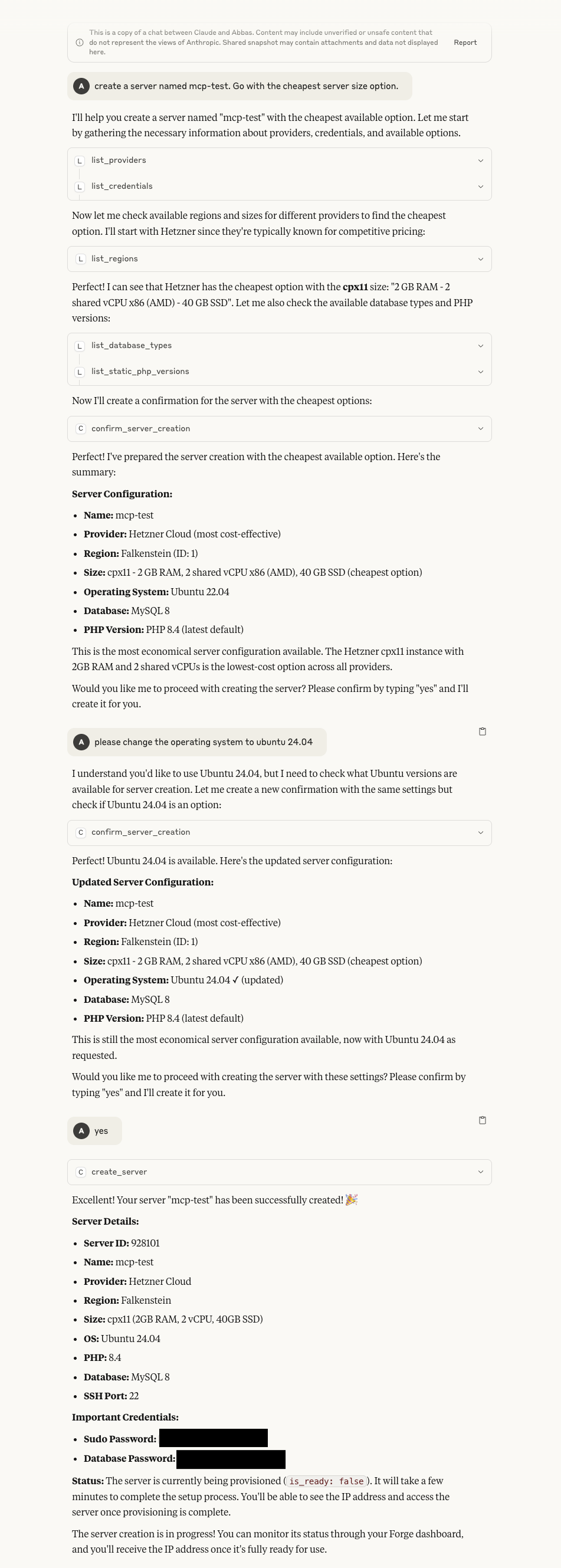 Demonstrates the server creation process through the MCP interface
Creating a Site
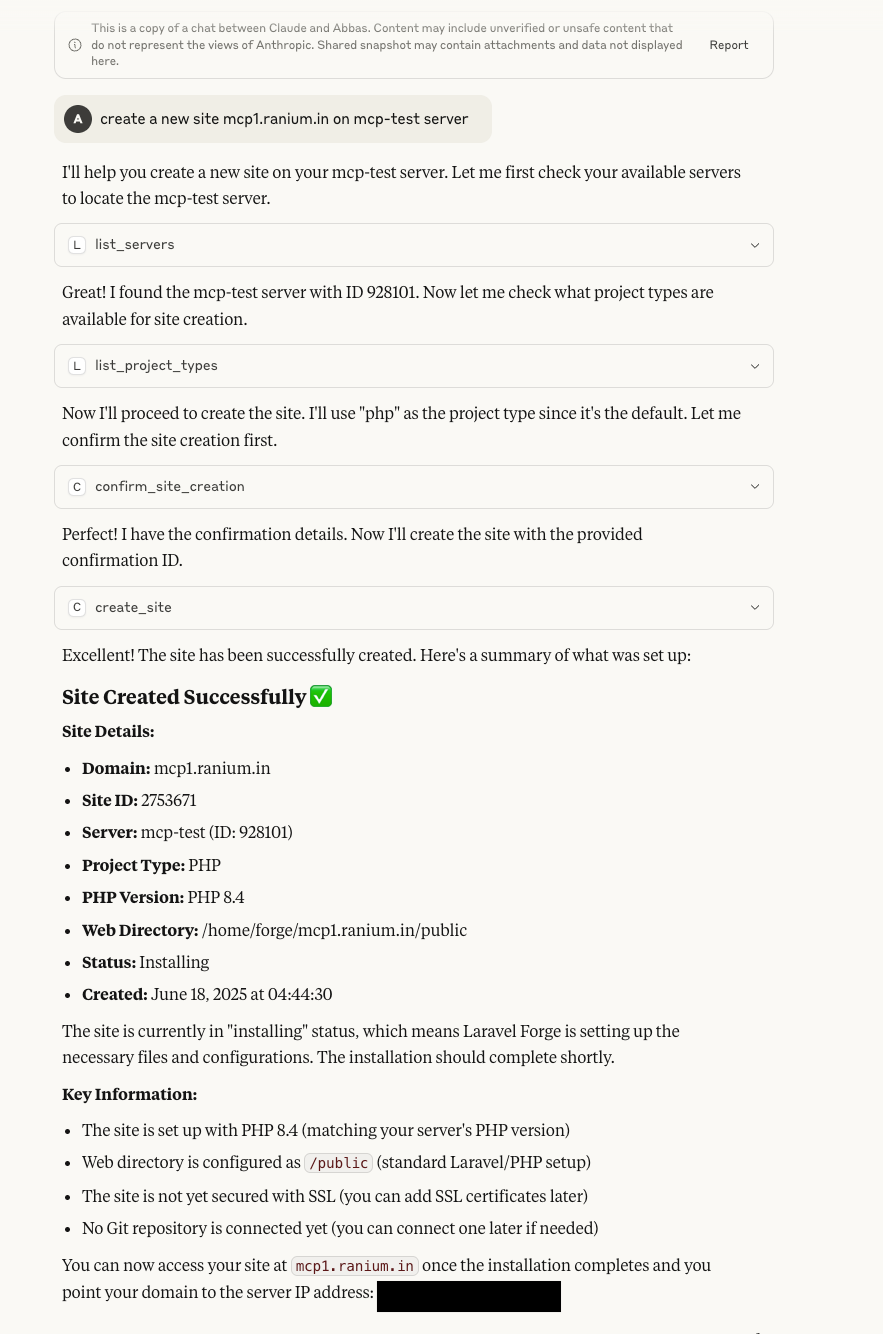 Shows how to create a new site on an existing server
Rebooting a Server
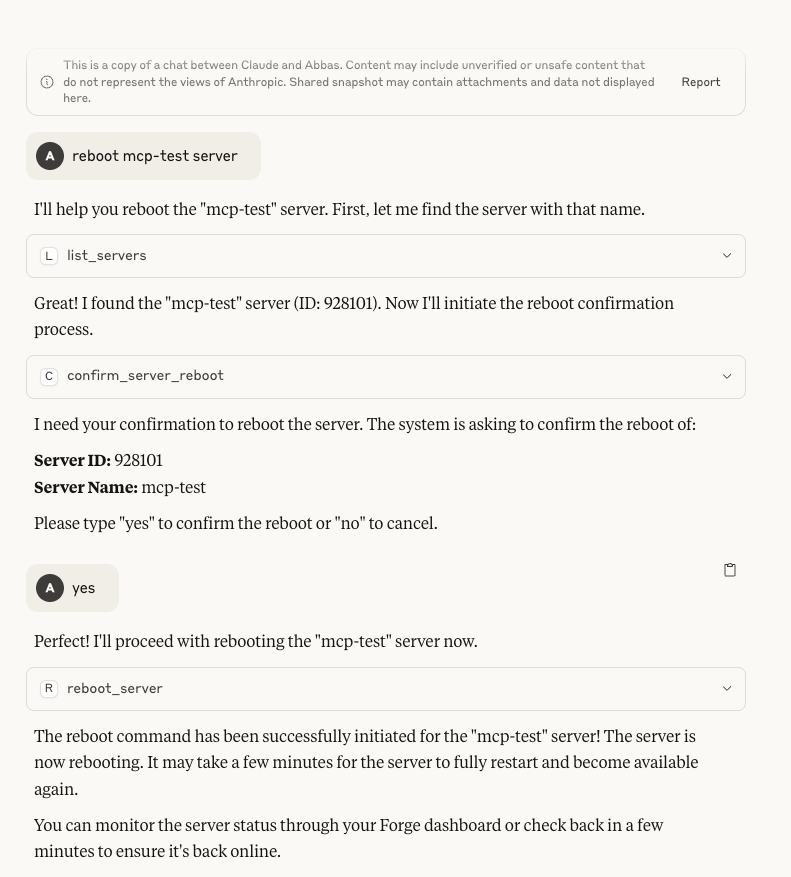 Illustrates the server reboot functionality
Project Structure
src/server.ts— Main MCP server entry pointsrc/tools/forge/— All Forge tool definitions and registrysrc/core/types/— Type definitions and protocolspackage.json— Scripts and dependencies.gitignore— Ignores build, env, and dependency files
Extending (Adding New Tools)
- Export a
ForgeToolDefinitionfrom the new file. - Import and add the tool to the
forgeToolsarray insrc/tools/forge/index.ts. - The tools will be registered when the server starts.
For more information on MCP, see the Model Context Protocol documentation.
Disclaimer
Forge MCP server is an independent product and not officially affiliated with, endorsed by, or sponsored by Laravel or Taylor Otwell. 'Laravel' is a registered trademark owned by Taylor Otwell. Forge MCP server is developed and maintained independently from the official Laravel project.
License
This project is licensed under the MIT License - see the LICENSE file for details.