Skills-ContextManager
不要让AI代理的上下文被1000个技能污染。使用Skills-ContextManager,这是一个自托管的Web界面,用于管理AI技能和工作流,仅在需要时通过MCP向AI代理提供技能。只需将技能添加到库中,并通过开关启用或禁用它们。选择技能是始终加载到上下文中,还是在AI代理确定需要时动态激活。
文档
Skill-ContextManager & MCP Server

A self-hosted web application for managing AI skills, workflows, and contexts with full MCP (Model Context Protocol) integration. Organize, manage, and dynamically load specialized knowledge bases into any AI Agent just by toggling your Skills On/Off in simple local hosted WEB UI.
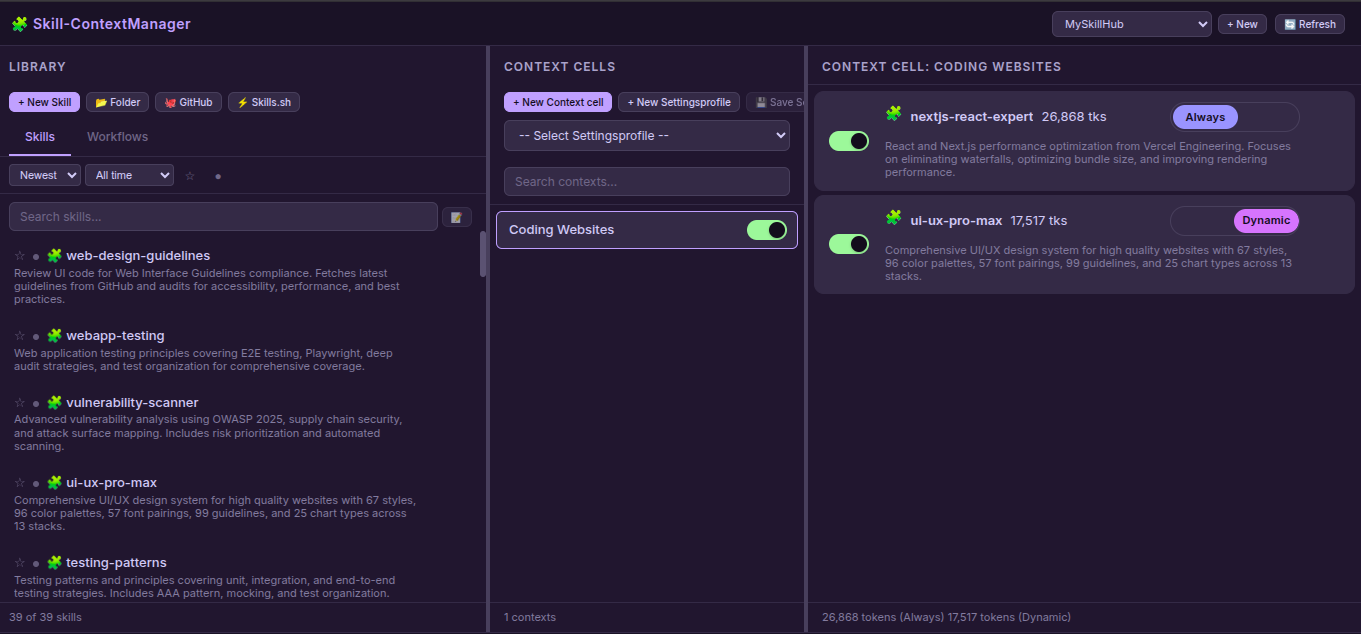
Features
Web Application
- Skill & Workflow Management: Create, edit, delete, and organize skills and workflows
- Multi-Hub Support: Create isolated workspaces with separate skills/contexts
- Context Cells: Organize skills/workflows into logical groups with enable/disable toggles
- Dual Mode: Choose Always-loaded (auto-loaded) or Dynamic (on-demand) skills by on/off toggle
- File Editor: Built-in editor with file tree, create/delete files & folders
- Import Sources:
- 📂 Folder: Upload from local filesystem
- 🐙 GitHub: Clone from GitHub repositories
- ⚡ Skills.sh: Import from Skills.sh registry
- AI Description Generation: Auto-generate skill descriptions using AI APIs
- Secure API Key Storage: API keys stored with file mode 0600 (owner-only)
- Settings Profiles: Save and load configuration presets
- Search & Filter: Smart search, sort, favorites, active/inactive filters
- Token Counting: Track context size in tokens
- Drag & Drop: Move skills/workflows to contexts
MCP Server
- 3 Essential Tools for AI Agents:
get_default_skills()- Load skills with mode"always_loaded"list_available_skills()- List all enabled skills with modesload_full_skill_context(name)- Load dynamic skill on-demand
- Hub-Aware: Works with active hub from multiple workspaces
- Mode Support:
"always_loaded"vs"dynamic"skill loading - Type Support: Both Skills and Workflows
Quick Start
# Clone the repository
git clone https://github.com/One-Man-Company/Skills-ContextManager.git
cd Skills-ContextManager

# Make setup script executable and run it
chmod +x setup.sh
./setup.sh

# Start web application
cd Skill-ContextManager && npm start
Access: http://localhost:3000
MCP configuration saved to mcp_settings.json - add this to your AI Agent's MCP settings.
⚠️ Important: Copy the content of
MCP_instructions.mdto your AI Agent's System prompt or rules configuration.
MCP Configuration
The setup.sh script generates mcp_settings.json with correct paths. Add it to your AI Agent's MCP settings file:
{
  "Skills-ContextManager": {
    "command": "/absolute/path/Skills-MCP/.venv/bin/python3",
    "args": ["-u", "/absolute/path/Skills-MCP/mcp_server.py"],
    "env": {}
  }
}
MCP Tools
AI Agents need only these 3 tools. Usage details are in MCP_instructions.md (system prompt):
| Tool | Description |
|---|---|
get_default_skills() | Load all skills with mode "always_loaded" into context |
list_available_skills() | List all enabled skills with descriptions and modes |
load_full_skill_context(name) | Load a specific skill on-demand (for mode "dynamic") |
mcpservers.org Submission
| Field | Value |
|---|---|
| Name | Skills-ContextManager |
| Description | Web UI for managing AI skills with MCP integration |
| Repository | https://github.com/One-Man-Company/Skills-ContextManager |
| Command | [path]/Skills-MCP/.venv/bin/python3 |
| Args | -u [path]/Skills-MCP/mcp_server.py |
Included Skills & Workflows
The repository includes starter content in MySkillsHUB/:
Skills (39): architecture, behavioral-modes, clean-code, code-review-checklist, documentation-templates, frontend-design, game-development, i18n-localization, mobile-design, nextjs-react-expert, nodejs-best-practices, parallel-agents, performance-profiling, python-patterns, seo-fundamentals, server-management, skill-creator, systematic-debugging, ui-ux-pro-max, vulnerability-scanner, webapp-testing, api-patterns, and more.
Workflows (3):
- best-standard-autonomous-coding
- elite-cognitive-operator-system
- plan-mode
All content is automatically copied to your library on first setup.
License
MIT License
Created: February 2026