Musikalis
使用你的 Musikalis 账户,根据描述或你自己的歌词创作包含人声的完整歌曲。通过 OAuth 登录。
托管 MCP 服务器
npx add-mcp 'https://musikalis.com/api/mcp'可安装到 Claude Code、Codex、Cursor 等客户端
文档
On this page
How it works
Three steps, about a minute. You only sign in once.
-
Add the server URL
Paste the server URL into your assistant as a custom connector or MCP server. -
Ask for a song
Describe the song you want. The assistant starts it, checks progress and gives you two versions with MP3 links.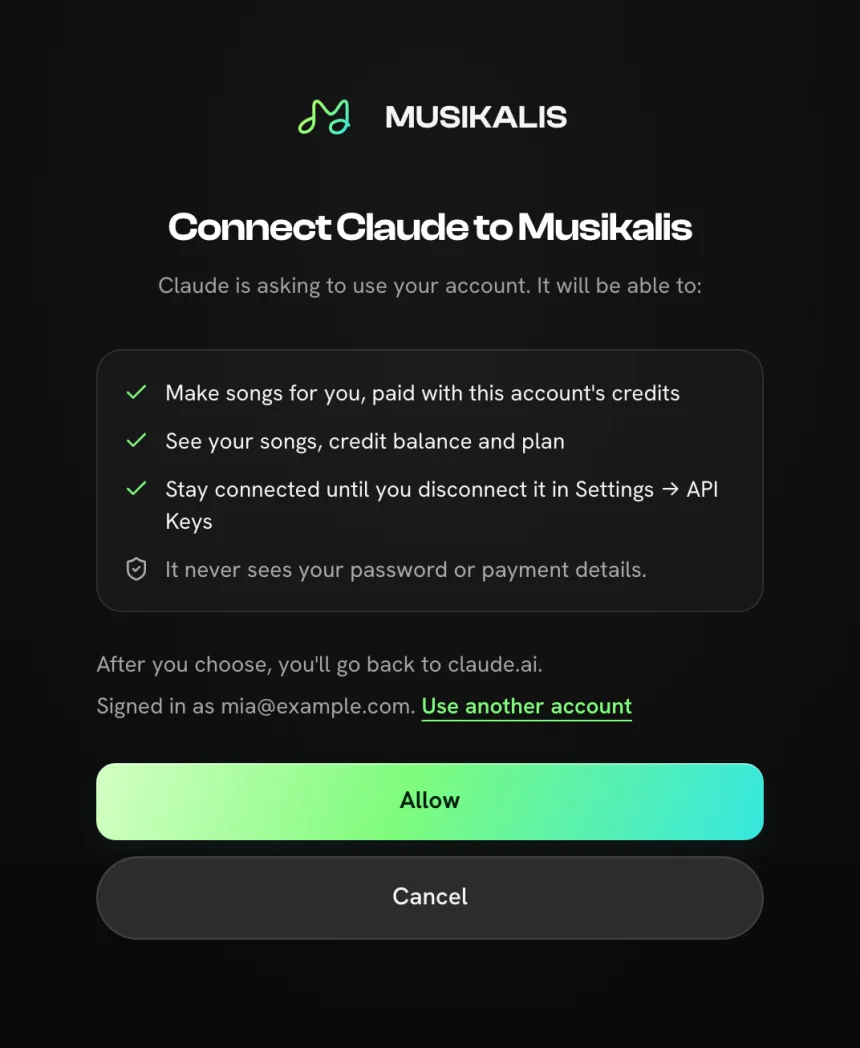
Step 2: the permission screen lists what the assistant may do and where you will be sent back to.
Connect your assistant
Pick your assistant. Menu names in these apps change from time to time; the server URL stays the same.
- In claude.ai or the Claude desktop app, open Settings → Connectors.
- Choose Add custom connector, name it Musikalis and paste the server URL.
https://musikalis.com/api/mcp
What your assistant can do
Musikalis gives your assistant four tools. Only create_song spends credits.
create_songUses creditsMake a song
Starts a song from a description, or from your lyrics with a title and style. Choose standard, fast or creative quality, an instrumental, a vocal gender and a length. The same request sent again within ten minutes returns the first song instead of charging twice.get_songRead-onlyCheck a song
Reports progress. When the song is ready, returns both versions with MP3 links, cover art, lyrics and length.list_songsRead-onlyList my songs
Shows your most recent songs with their links.get_accountRead-onlyAccount and credits
Shows your credit balance, your plan, what one song costs and whether songs made now can be used commercially.
Things to ask for
Talk to your assistant the way you would describe a song to a friend. A few to start with:

A home music studio desk at night with headphones, a vinyl record and a glowing laptop
- “Write a cheerful birthday song for my sister Mia, acoustic pop with a female vocal.”Copy prompt
- “Make a calm lo-fi instrumental for studying, about two minutes long.”Copy prompt
- “Turn these lyrics into an upbeat pop-punk song called Monday Again: …”Copy prompt
- “How many Musikalis credits do I have, and can I use new songs commercially?”Copy prompt
- “Show me my latest songs with their MP3 links.”Copy prompt
Credits and commercial use
Same credits as the website
Each song request costs 10 credits and returns two versions. Songs made from your assistant appear in your Musikalis library. New accounts get free credits when they sign up.
Commercial use
Songs made while your account has an active paid subscription may be used commercially, and that stays valid after the subscription ends. Songs made with free credits or credit packs are for personal, non-commercial use.
Questions
Do I need an API key?
Not for ChatGPT, Claude and other apps that support OAuth: add the server URL and sign in. An API key is only for clients that can only send headers; create one in Settings → API Keys.
How much does it cost?
It uses the same credits as the website: 10 credits per song request, which returns two versions. New accounts get free credits on sign-up, so you can try it without paying.
Which assistants work with Musikalis?
Assistants that support remote MCP servers over Streamable HTTP, including ChatGPT, Claude on the web and desktop, Claude Code and Cursor.
Can the assistant spend my credits without asking?
Only create_song spends credits, and it is marked as a tool that changes data, so assistants such as ChatGPT and Claude usually ask you to confirm first. The same request sent again within ten minutes returns the first song instead of charging twice.
Where do the songs go?
Every song is saved to your Musikalis library, the same as songs made on the website. The assistant also gives you the MP3 links.
How do I disconnect an assistant?
On Musikalis, open Settings → API Keys and choose Disconnect next to the app under Connected apps. Its access ends immediately.