Code Reasoning
通过结构化、逐步思考的方式,增强Claude解决复杂编程任务的能力。
文档
Code Reasoning MCP Server
A Model Context Protocol (MCP) server that enhances Claude's ability to solve complex programming tasks through structured, step-by-step thinking.


Quick Installation
-
Configure Claude Desktop by editing:
- macOS:
~/Library/Application Support/Claude/claude_desktop_config.json - Windows:
%APPDATA%\Claude\claude_desktop_config.json - Linux:
~/.config/Claude/claude_desktop_config.json
{ "mcpServers": { "code-reasoning": { "command": "npx", "args": ["-y", "@mettamatt/code-reasoning"] } } } - macOS:
-
Configure VS Code:
{
  "mcp": {
    "servers": {
      "code-reasoning": {
        "command": "npx",
        "args": ["-y", "@mettamatt/code-reasoning"]
      }
    }
  }
}
Usage
-
To trigger this MCP, append this to your chat messages:
Use sequential thinking to reason about this. -
Use ready-to-go prompts that trigger Code-Reasoning:
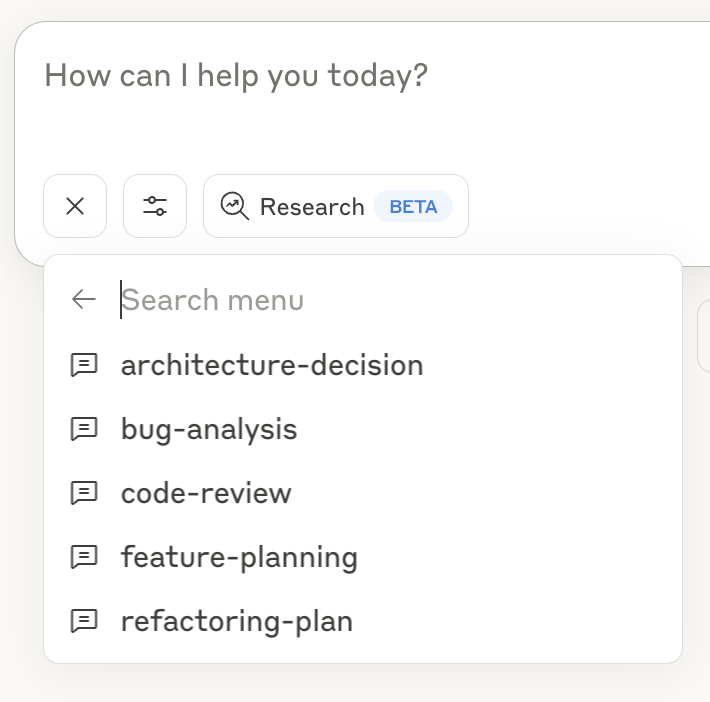
- Click the "+" icon in the Claude Desktop chat window, or in Claude Code type
/helpto see the specific commands. - Select "Add from Code Reasoning" from the available tools
- Choose a prompt template and fill in the required information
- Submit the form to add the prompt to your chat message and hit return
See the Prompts Guide for details on using the prompt templates.
Command Line Options
--debug: Enable detailed logging--helpor-h: Show help information
Key Features
- Programming Focus: Optimized for coding tasks and problem-solving
- Structured Thinking: Break down complex problems into manageable steps
- Thought Branching: Explore multiple solution paths in parallel
- Thought Revision: Refine earlier reasoning as understanding improves
- Safety Limits: Automatically stops after 20 thought steps to prevent loops
- Ready-to-Use Prompts: Pre-defined templates for common development tasks
Documentation
Detailed documentation available in the docs directory:
- Usage Examples: Examples of sequential thinking with the MCP server
- Configuration Guide: All configuration options for the MCP server
- Prompts Guide: Using and customizing prompts with the MCP server
- Testing Framework: Testing information
Project Structure
├── index.ts                  # Entry point
├── src/                      # Implementation source files
└── test/                     # Placeholder for future test utilities
License
This project is licensed under the MIT License. See the LICENSE file for details.