Excalidraw MCP
使用自然语言生成25种以上图表类型(流程图、时序图、ER图、思维导图、架构图等)并保存为Excalidraw文件。支持中日韩文字、30多种科技品牌配色、Sugiyama自动布局。
文档
excalidraw-mcp



Generate 25+ types of beautiful hand-drawn diagrams with AI — flowcharts, sequence, architecture, mind maps, ER, class, state, timeline, pie/bar/line/radar charts, kanban, wireframes, decision trees, and more — with Sugiyama hierarchical layout, CJK support, and zero learning curve.
By Maaker.AI
Showcase
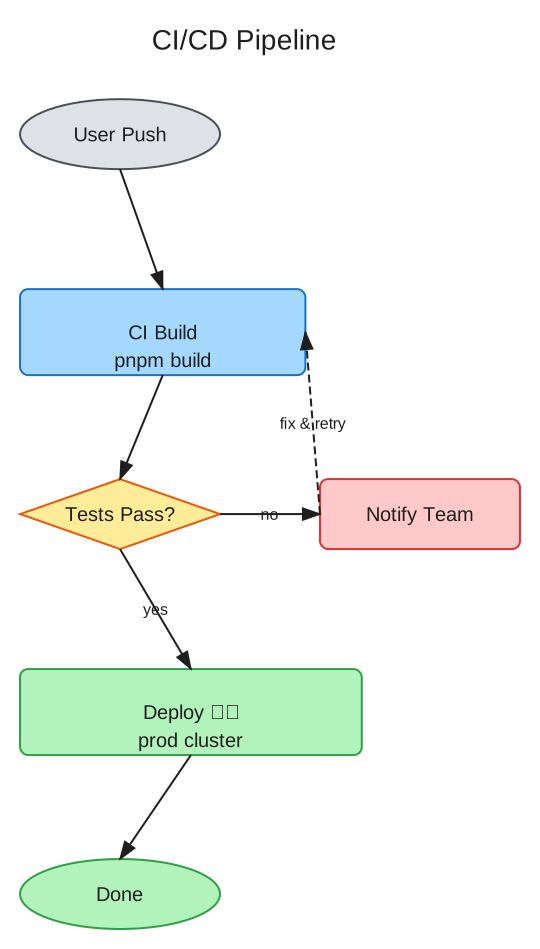
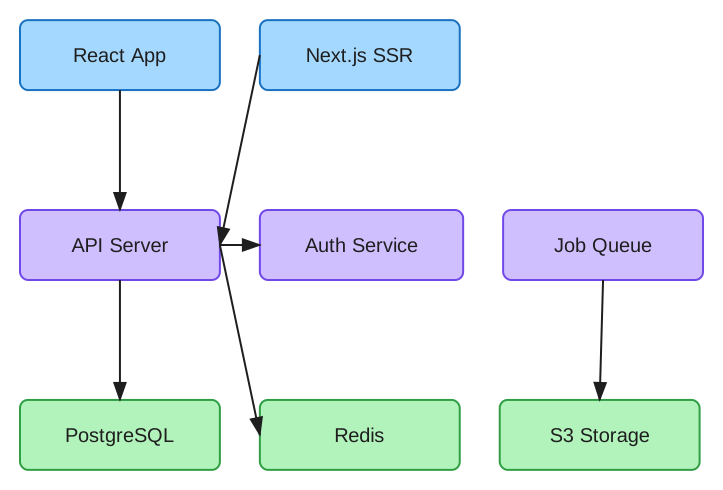
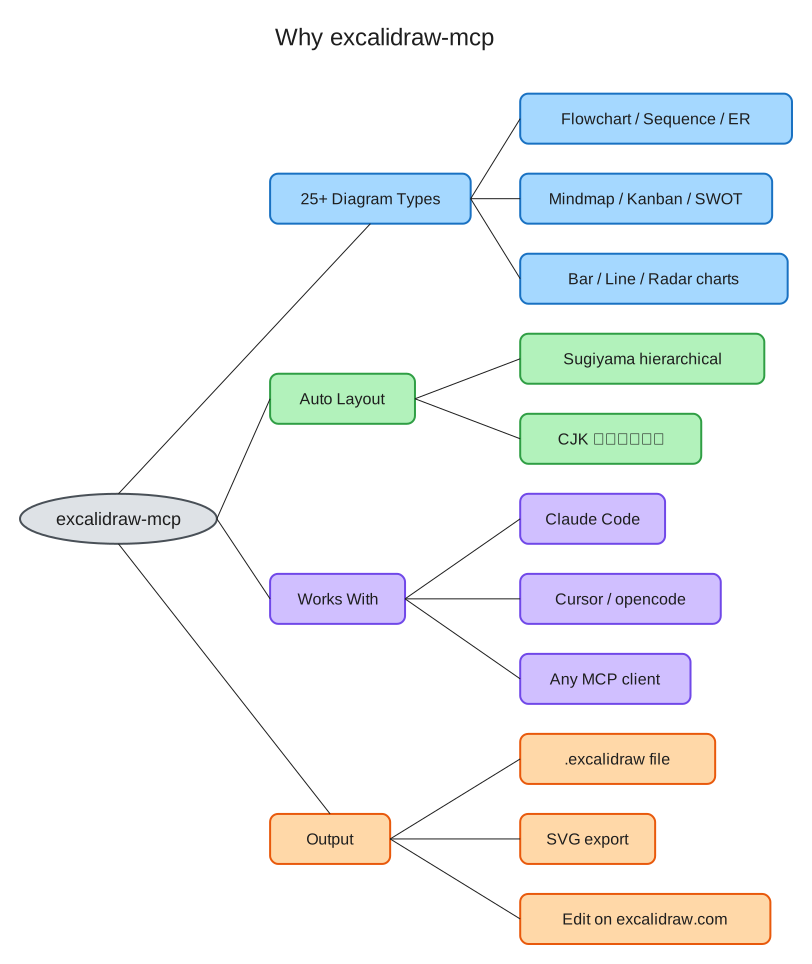
Every image below was generated by a single tool call — no coordinates, no manual layout. The .excalidraw sources live in docs/showcase/; drag any of them onto excalidraw.com to keep editing.
| Flowchart (branches + cycle + CJK) | Layered architecture |
|---|---|
 |  |
Install
Claude Code (recommended)
claude mcp add excalidraw -- uvx maaker-excalidraw-mcp
Claude Desktop
Add to your MCP config (~/Library/Application Support/Claude/claude_desktop_config.json):
{
  "mcpServers": {
    "excalidraw": {
      "command": "uvx",
      "args": ["maaker-excalidraw-mcp"]
    }
  }
}
opencode / Cursor / any MCP client
{
  "mcp": {
    "excalidraw": {
      "type": "local",
      "command": ["uvx", "maaker-excalidraw-mcp"],
      "enabled": true
    }
  }
}
(opencode shown; Cursor and other clients use the same uvx maaker-excalidraw-mcp command in their MCP config format.)
pip
pip install maaker-excalidraw-mcp
Tools
| Tool | Description |
|---|---|
create_flowchart | Flowcharts with Sugiyama layout — branches, merges, cycles, groups |
create_architecture_diagram | Layered architecture diagrams with connections |
create_sequence_diagram | UML sequence diagrams with lifelines and messages |
create_class_diagram | UML class diagrams with attributes, methods, relationships |
create_state_diagram | UML state machines with initial/final states |
create_er_diagram | Entity-Relationship diagrams with cardinality |
create_mindmap | Tree-style mind maps with auto-colored branches |
create_timeline | Timeline/Gantt charts with overlapping event handling |
create_pie_chart | Pie charts with labeled slices and percentages |
create_kanban_board | Kanban boards with columns and cards |
create_network_diagram | Network topology with typed nodes (server, DB, etc.) |
create_quadrant_chart | 2x2 priority/positioning matrices |
create_user_journey | User journey maps with emotion indicators |
create_wireframe | UI wireframe mockups with device frames |
create_org_chart | Organizational charts (top-down hierarchy) |
create_swot_analysis | SWOT analysis 2x2 color-coded matrices |
create_table | Grid tables with auto-sized columns and alternating row colors |
create_bar_chart | Vertical bar charts with auto-scaled bars and labels |
create_line_chart | Line charts with multi-series support |
create_radar_chart | Radar/spider charts with multi-series overlay |
create_decision_tree | Decision trees with diamond decisions and rectangular outcomes |
import_mermaid | Import Mermaid syntax (flowchart, sequence, class, state) |
list_diagram_types | List all available diagram types |
modify_diagram | Add/remove nodes and connections in existing diagrams |
read_diagram | Analyze existing .excalidraw files |
export_diagram | Export diagrams to SVG format |
Quick Examples
Flowchart
Just tell your AI assistant:
"Create a flowchart: User Request → Load Balancer → API Server → Database"
The AI will call create_flowchart with structured data, and you'll get a .excalidraw file with:
- Sugiyama hierarchical layout — proper handling of branches, merges, cycles, and disconnected subgraphs
- Auto-calculated box sizes based on text content
- Perfectly centered text (including Chinese/CJK characters)
- Smart arrow routing with proper edge binding
- Hand-drawn style that looks great in docs and presentations
- 4 directions: LR (left-to-right), RL, TB (top-to-bottom), BT
Architecture Diagram
"Create an architecture diagram with Frontend (React, Next.js), Backend (API Server, Auth Service), and Database (PostgreSQL, Redis) layers"
Generates a layered diagram with components organized by tier, automatic sizing, and connections between layers.
Read & Modify
"Read the diagram at ./my-system.excalidraw and add a 'Cache' node connected to the API Server"
Works with existing .excalidraw files — read their structure, add/remove nodes, add connections.
Why excalidraw-mcp?
vs Official Excalidraw MCP (excalidraw/excalidraw-mcp)
| Feature | Official MCP | excalidraw-mcp |
|---|---|---|
| Approach | Raw JSON — AI manually places every element | Structured input — say what you want, get a diagram |
| Layout | AI calculates coordinates | Sugiyama hierarchical auto-layout |
| Branches/Merges | AI must figure out positioning | Automatic — handled by layout engine |
| CJK text | No width estimation | Accurate CJK/mixed-script width calculation |
| Text centering | AI must calculate x/y offsets | Automatic centering in containers |
| Arrow binding | AI must manage bindings | Automatic fixedPoint + orbit binding |
| Local files | Cannot read/write local files | Full read, modify, save support |
| Distribution | Remote URL / .mcpb | uvx / pip (standard Python) |
| Token usage | Needs read_me call to learn format | Format knowledge built-in |
vs Mermaid-based tools
- Free layout: Not constrained by Mermaid syntax limitations
- Hand-drawn style: Native Excalidraw look, not rendered code blocks
- Editable output: Drag the
.excalidrawfile to excalidraw.com to continue editing
Tool Reference
create_flowchart
Input:
  nodes: [{label: "Step 1", color?: "blue", shape?: "rectangle"}]
  edges: [{from: "Step 1", to: "Step 2", label?: "next"}]
  direction?: "LR" | "RL" | "TB" | "BT"  (default: "LR")
  title?: "My Flowchart"
  output_path?: "/path/to/output.excalidraw"

Output: Path to generated .excalidraw file
Colors: blue, green, purple, yellow, red, gray, orange, pink
Shapes: rectangle (default), diamond (decisions), ellipse (start/end)
create_architecture_diagram
Input:
  layers: [{
    name: "Frontend",
    color?: "blue",
    components: [{label: "React"}, {label: "Next.js"}]
  }]
  connections?: [{from: "React", to: "API Server"}]
  output_path?: "/path/to/output.excalidraw"

Output: Path to generated .excalidraw file
modify_diagram
Input:
  file_path: "/path/to/existing.excalidraw"
  add_nodes?: [{label: "New Node", color?: "green", x?: 100, y?: 100}]
  remove_labels?: ["Old Node"]
  add_connections?: [{from: "A", to: "B"}]
  output_path?: "/path/to/output.excalidraw"

Output: Path to modified file
read_diagram
Input:
  file_path: "/path/to/diagram.excalidraw"

Output: Structured description (shapes, connections, colors)
export_diagram
Input:
  file_path: "/path/to/diagram.excalidraw"
  format: "svg"

Output: Path to exported SVG file
Technical Details
Sugiyama Hierarchical Layout
Uses the grandalf library for proper directed graph layout:
- Layer assignment: Nodes placed in layers based on graph topology
- Crossing minimization: Multi-pass optimization to reduce edge crossings
- Coordinate assignment: Balanced positioning within layers
- Cycle handling: Feedback edge detection for cyclic graphs
- Disconnected subgraphs: Automatic side-by-side placement
CJK Width Estimation
Accurate text width calculation for mixed Chinese/English text:
| Character Type | Width (at fontSize=20) |
|---|---|
| CJK characters | ~22px per character |
| ASCII letters/digits | ~11px per character |
| Spaces | ~5px |
Arrow Binding
Uses Excalidraw's modern fixedPoint + orbit binding (not the deprecated focus/gap format):
{
  "startBinding": {
    "elementId": "box1",
    "fixedPoint": [1.0, 0.5001],
    "mode": "orbit"
  }
}
Arrows automatically connect at the correct edge based on relative positions.
Development
git clone https://github.com/maaker-ai/excalidraw-mcp.git
cd excalidraw-mcp
uv sync --dev
uv run pytest
License
MIT