Iris
官方MCP原生代理评估与可观测性服务器,具备追踪日志、输出质量评估、成本追踪、12条内置评估规则、实时仪表盘及PII检测功能
你可以用 Iris MCP 做什么?
- Log and evaluate agent runs — Ask your assistant to log a task to Iris and get deterministic quality, safety, and cost scores on the output.
- Query trace history — Retrieve stored agent executions with filtering, pagination, and time-range support to review past performance.
- Compare runs across time — Analyze two runs on the same questions side-by-side to spot regressions or improvements in agent behavior.
- Score output quality — Evaluate any text against 25 built-in rules covering completeness, relevance, safety, and cost, with PII and prompt-injection detection.
- Run the demo dashboard — Launch a seeded demo database with sample failures and verdicts to explore Iris's scoring engine locally.
文档
Iris — stop shipping agents on vibes








Iris scores every agent run for quality, safety, and cost — on your machine, with no SDK and no account. Most agent projects check quality by running a few remembered prompts and eyeballing the output. Iris replaces that with numbers you can audit: your agent's runs land in a SQLite database on your disk, 25 built-in rules score them deterministically — PII, prompt injection, hallucination markers, cost thresholds, and the agent's own tool calls — free, with no LLM calls, and an optional LLM judge with a hard per-eval cost cap handles the semantic questions. Every rule is inspectable and editable, because a judge you can't audit is just vibes with a number on it. MIT licensed, no telemetry. Nothing leaves your machine unless you turn one of these on: an OpenTelemetry endpoint (IRIS_OTEL_ENDPOINT), which exports traces to the collector you name; the LLM judge with your own key, which sends the text it judges to that provider, and whose citation check fetches the pages an output cites; or a webhook, which posts ids, the verdict and rule names, never the text, to the address you set.
Requires Node.js 22.13 or later. Check with node --version.
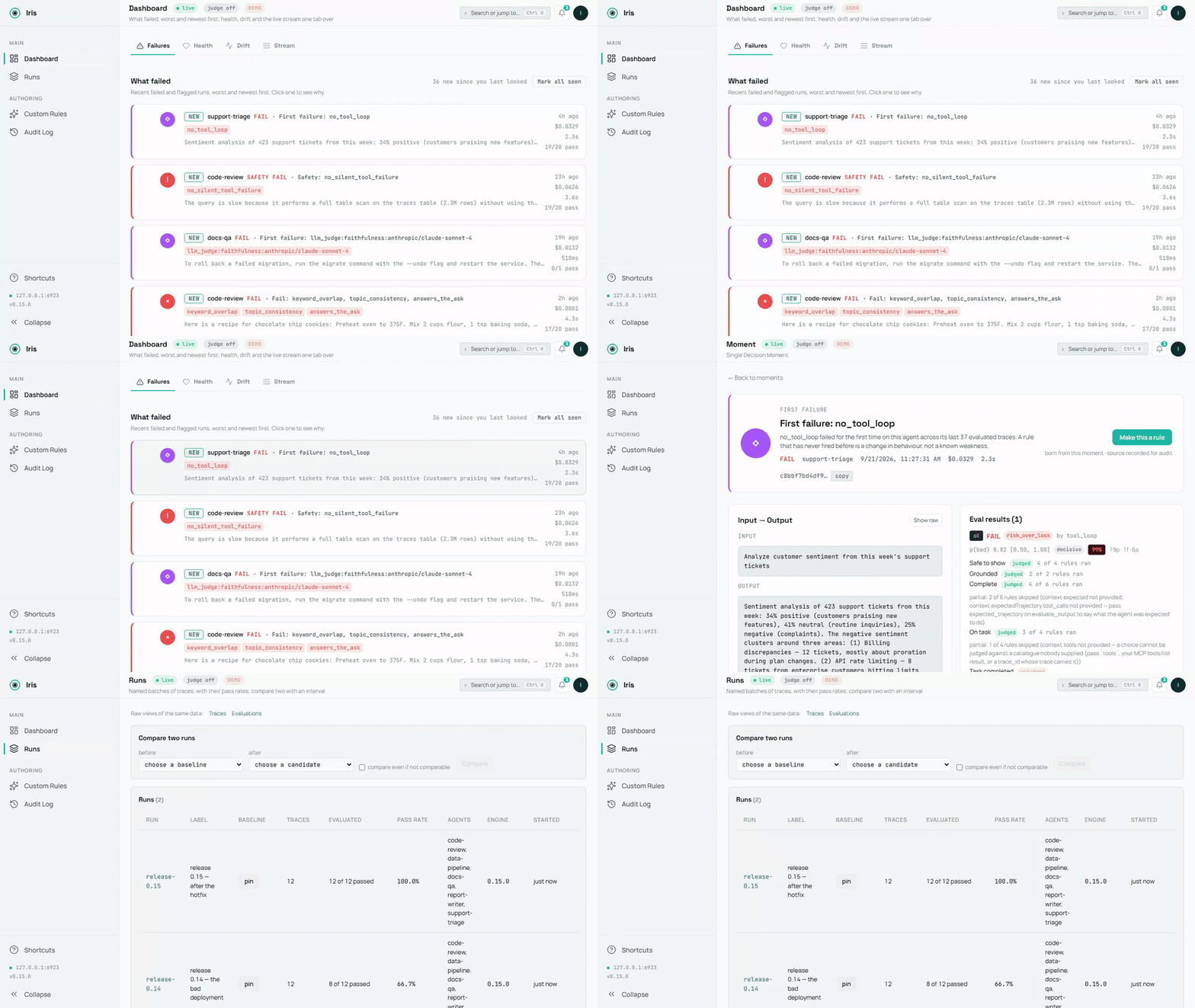
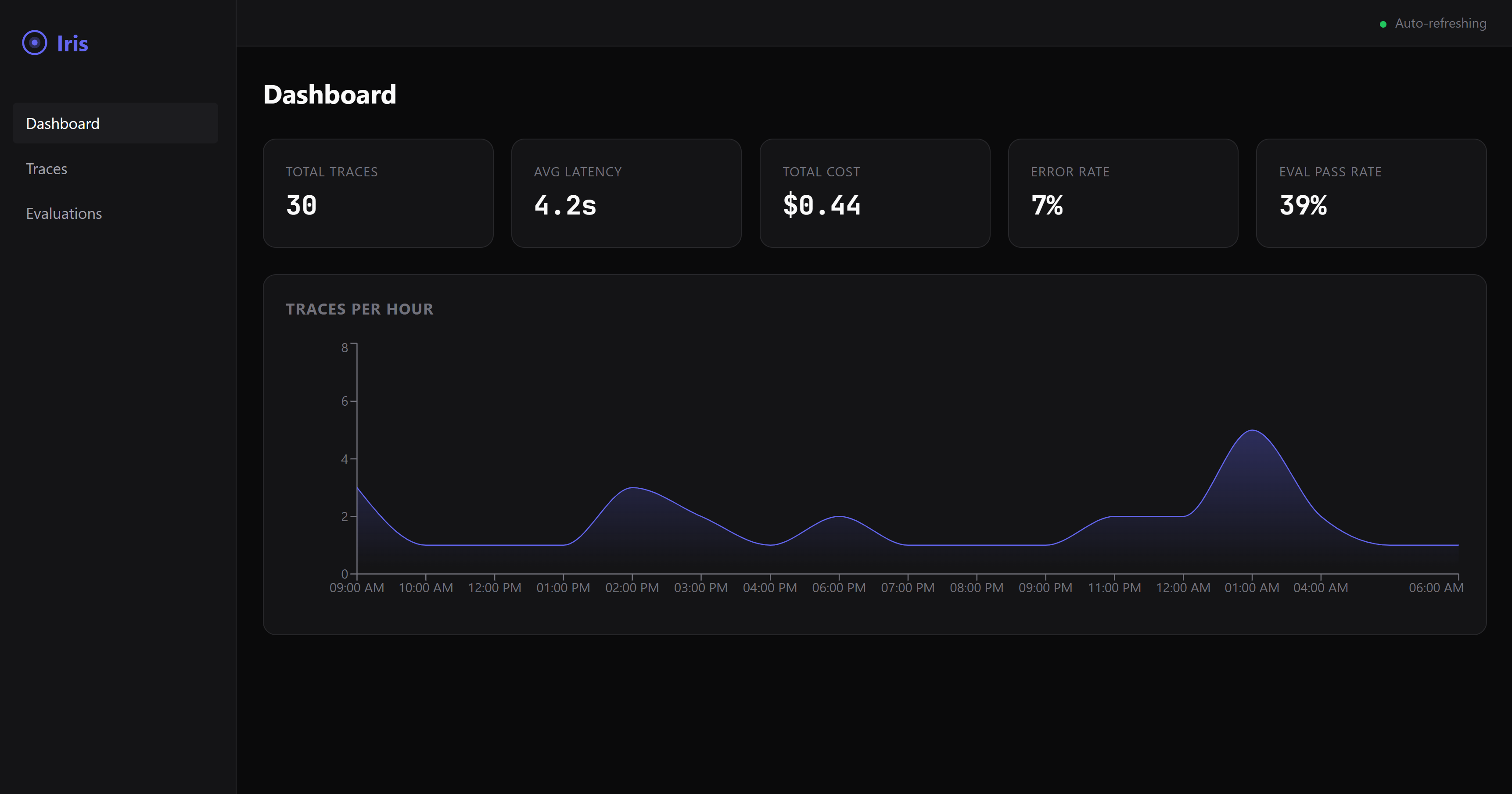
The demo database, recorded by scripts/demo-media.mts; the source is demo.mp4. A still: dashboard-overview.png.
A failure on screen in 60 seconds
No agent wiring, no config — one command:
npx @iris-eval/mcp-server --demo
This seeds a demo database — five small agents, two weeks of runs, every verdict the engine's own — and serves the dashboard against it at http://localhost:6920 (your browser opens automatically on first run). The dashboard lands on Failures: what failed, worst and newest first, each card naming the rule and its evidence. Worth clicking into — a PII leak caught by the safety rules, a hidden directive in a forum post that the summarizer complied with, a number the source document never said, two runs on the same twelve questions compared with an interval (Runs), a deployed custom rule and a paused one with their audit rows, and a failed LLM-judge score with its rationale.
Demo data lives in its own database (demo.db in your Iris home directory — ~/.iris on macOS/Linux, %USERPROFILE%\.iris on Windows) and never mixes with your real traces. Remove all of it with one command:
npx @iris-eval/mcp-server --demo-clear
Hook up your own agent
First, prove the install works on this machine — it runs offline and opens nothing of yours:
npx @iris-eval/mcp-server --self-test # exit 0 = healthy
Then add Iris to your MCP client. One command writes the client's own config file, keeps every other server in it, and pins the version you ran:
npx -y @iris-eval/mcp-server install claude-code
The clients: claude-code, claude-desktop, cursor, windsurf, continue, vscode, cline, zed, codex, gemini. install --list shows the ones found on this machine, the Iris each one runs and the file it reads; install <client> --uninstall takes Iris out again. Every client shares one database, so after an upgrade move them all at once with install --upgrade (Updating). Restart the client to load it.
Claude Desktop: one click. Each release from 0.20.0 on attaches iris-eval.mcpb, an MCP Bundle: download the latest, open it, and Claude Desktop shows an install dialog. Nothing on it is required — an Anthropic or OpenAI key for the LLM judge is optional, and the dashboard is a switch that starts off. The bundle holds the npm package and its dependencies, so nothing else needs installing: Claude Desktop runs it under the Node it ships when that Node is 22.13 or newer (Claude Desktop 1.1.6679 ships 24.13), and Iris stores traces with Node's built-in SQLite, in the same ~/.iris every other install uses. The release notes show how to verify its signature and build attestation.
It runs in any MCP client, and every client it names has a row with what was actually checked. Verified on every CI run: Claude Code, Gemini CLI — the real client starts Iris from the config the installer wrote and reports it connected (claude mcp list, gemini mcp list), on Linux, macOS and Windows; Claude Code's capture plugin hooks are driven through the real scripts too. Claimed from each client's own MCP documentation — the installer writes the configuration shape the client documents, and that writer is tested on the shape; nobody on the Iris side has watched it connect: Claude Desktop, Cursor, Devin Desktop (Windsurf), Continue, VS Code, Cline, Zed, OpenAI Codex CLI. Every row with its source and the date it was read: https://iris-eval.com/clients. By hand instead, one block, dashboard included:
{
  "mcpServers": {
    "iris-eval": {
      "command": "npx",
      "args": ["-y", "@iris-eval/mcp-server", "--dashboard"]
    }
  }
}
Your client lists Iris's twelve tools on connect, and the dashboard serves at http://localhost:6920. Now paste this to your agent:
Log that last task to Iris and evaluate the output.
The trace lands on the dashboard with its scores. Prefer the MCP server headless? Drop --dashboard from the args — you can open the same dashboard any time with npx @iris-eval/mcp-server --dashboard.
One thing worth knowing up front: MCP tools are called when the model decides to call them. Iris doesn't intercept your agent, so traces are logged when your agent asks it to log them — either because you told it to, or because your code calls the tools directly. Ask your agent to "log this to Iris and evaluate it" and it will. If you want capture that doesn't depend on the model choosing, POST /api/v1/traces does exactly that — your code sends the trace over plain HTTP, no model in the loop (see docs/http-ingest.md). The CLI and host hooks on the roadmap will be thin clients over the same endpoint.
Capture over HTTP (no model in the loop)
The ingest endpoint lives on the dashboard port — 6920 by default, not the MCP transport port — and it exists only while the dashboard is running. Pass --dashboard (or set IRIS_DASHBOARD=true); --transport http on its own does not start it, and a request to the transport port returns 404. With the dashboard up, anything that can send an HTTP request can log a trace — and optionally run the deterministic evals in the same request. GET /api/v1/capabilities on the same port says what this server can judge, what each rule needs, the judge state with the steps that enable it, and the limits — the same object the MCP resource iris://capabilities serves — so an HTTP caller has the frame an MCP client gets at initialize:
curl -s -X POST "http://127.0.0.1:6920/api/v1/traces" \
  -H "Content-Type: application/json" \
  -d '{
    "agent_name": "support-bot",
    "input": "What is the refund policy?",
    "output": "Refunds are available within 30 days of purchase.",
    "evaluate": true,
    "eval_type": "safety"
  }'
Returns 201 with the stored trace_id and the evaluation result (in --demo mode the endpoint refuses writes with 403, so demo data never mixes with yours). The endpoint accepts the same body as the log_trace tool and sits behind the same middleware stack as the rest of the dashboard: loopback bind and the DNS-rebinding guard by default, plus Bearer auth when you set one. Two plain facts about it: it accepts unauthenticated writes unless Iris was started with --api-key (or IRIS_API_KEY) — the loopback bind is what keeps it to your machine by default, so set a key before binding beyond loopback; and what it stores is verbatim — input and output land in iris.db exactly as sent, including any text no_pii goes on to flag. Full contract, field reference, and error semantics: docs/http-ingest.md.
Capture every Claude Code turn (optional)
/plugin marketplace add iris-eval/mcp-server
/plugin install iris-eval-capture@iris-eval
A second, separately installed plugin: three hooks record each turn's prompt, tool calls and final answer and hand them to iris-eval ingest, detached, with critical spans redacted in the stored evaluation text — capture that does not depend on the model deciding to call a tool. It never logs a turn the model already logged, never prints, never blocks, never sends anything anywhere. Installing iris-eval alone changes nothing about your turn loop. Limits and removal: claude-plugin-capture/README.md.
Python
pip install iris-eval
from iris_eval import IrisClient
iris = IrisClient()                       # IRIS_URL, or the running dashboard's runtime.json
iris.evaluate_output("…", input="…", agent_name="support-bot")["verdict"]   # {"state": "pass", "basis": "clean", "by": []}
A thin client over the HTTP API of server 0.16.0 and later, versioned on its own — iris_eval.__version__ and the PyPI page carry its number, which is not the server's: log_trace(), evaluate_output(), get_traces(), get_trace(), health(), capabilities(), sync and async, typed answers, the server's own sentence on a refusal — and a pytest plugin: an iris fixture and assert_iris(output, expect="pass") that asserts on the verdict's state. packages/python/README.md.
Record every OpenAI and Anthropic call
from iris_eval import wrap_openai
client = wrap_openai(OpenAI(), agent_name="support-bot")   # every call: a GenAI span to POST /v1/traces, scored
import { wrapOpenAI } from '@iris-eval/sdk';
const openai = wrapOpenAI(new OpenAI(), { agentName: 'support-bot' });
Wrap the provider client once and each model call becomes one OpenTelemetry GenAI span sent to the OTLP door, stored with its input, output, token usage and tool calls, and scored: capture that does not depend on the model calling a tool. wrap_openai / wrap_anthropic in the Python client; wrapOpenAI, wrapAnthropic and irisMiddleware for the Vercel AI SDK in @iris-eval/sdk. Both are not yet published (the next iris-eval release on PyPI; @iris-eval/sdk is built from source until its first npm release). Streams, the SDKs' stream helpers and tool calls are covered, the original client is not changed, and Iris being down never breaks a call — packages/sdk/README.md, packages/python/README.md.
Score every LangChain and LangGraph run
from iris_eval.langchain import IrisCallbackHandler
graph.invoke(inputs, config={"callbacks": [IrisCallbackHandler(agent_name="support-bot")]})
Each top-level run becomes one trace (the run, its model calls, its tool calls and its graph nodes as GenAI spans) with its input, output, tool calls, token usage and a verdict. Python in the client (next release, not yet published to PyPI), JavaScript as @iris-eval/langchain (not yet published to npm). Both are proven in CI against a real LangGraph app with a scripted model; LangSmith's own OpenTelemetry export is proven the same way — docs/otel-recipes.md.
A CI gate, no server needed
npx -y @iris-eval/mcp-server ingest --file traces.ndjson --evaluate --fail-on detector_veto
Or the GitHub Action (0.16.0), which fails the job on the verdicts you name, writes the receipt to the job summary and posts it as one pull-request comment updated in place: uses: iris-eval/mcp-server/.github/actions/gate@v0.19.0 with traces: traces.ndjson — docs/ci-gate.md.
A fourth door (0.15.0): POST /v1/traces on the dashboard port takes the OTLP/HTTP JSON or protobuf your OpenTelemetry instrumentation already emits (the Python SDK's exporter speaks protobuf only, so this is the Python door too), and each OTLP trace becomes an Iris trace with its spans — docs/otel-integration.md; one recipe per framework (Pydantic AI, Google ADK, LangGraph via LangSmith, CrewAI, the OpenAI Agents SDK in Python and JavaScript, LlamaIndex, AutoGen, Microsoft Agent Framework, Semantic Kernel, the Vercel AI SDK and Mastra), each proved by a fixture, in docs/otel-recipes.md. ingest reads one JSON trace (or NDJSON, one per line) from stdin or a file, stores it, evaluates it under exactly the rules evaluate_output runs, prints one JSON line per trace with the verdict and its basis, and exits 1 when a verdict matches --fail-on. --dataset <id|label> restricts that gate to the case keys in a dataset (POST /api/v1/datasets promotes a run's case keys into one), so a job fails only on the cases you chose. The full recipe, the exit codes and the eight bases are in docs/ci-gate.md.
Write a rule as code
eval.plugins in config.json loads rules you wrote — an ES module whose default export is { name, kind, mechanism, version, needs, evaluate(ctx) } — pinned by the sha256 of the file, so a file that changed since you pinned it refuses startup rather than running. A loaded plugin fires like a built-in and shows on list_rules under plugins. The contract, the hash recipe and what a plugin may return: docs/plugins.md.
Use the engine in your own process
The evaluation engine is importable — no server, no database, no model:
import { EvalEngine, defaultConfig } from '@iris-eval/mcp-server/engine';

const engine = new EvalEngine(defaultConfig.eval.defaultThreshold, defaultConfig.eval.ruleThresholds, defaultConfig.eval);
const result = await engine.evaluateAll({ output: answer, input: prompt, toolCalls, costUsd });
result.verdict.state;       // 'pass' | 'fail' | 'unknown', with result.verdict.basis and result.interpretations
The same engine, the same rules and the same composer the server runs; builtInRules(), createCustomRule(), compose() and the published-accuracy readers are exported beside it.
A typed client for the HTTP route
import { createClient } from '@iris-eval/mcp-server/client';

const iris = createClient({ baseUrl: 'http://127.0.0.1:6920', apiKey: process.env.IRIS_API_KEY });
const { trace_id, evaluation } = await iris.logTrace({ agent_name: 'support-bot', input, output, tool_calls, evaluate: true });
evaluation?.verdict?.state;  // the same object evaluate_output returns
One body on every door: it is what log_trace and iris-eval ingest accept. A refusal throws IrisClientError with the server's own sentence and status. Both subpaths are checked from a packed tarball on every build.
Verify your install
npx @iris-eval/mcp-server --self-test   # offline diagnostic; exit 0 = healthy, 1 = a check failed
npx @iris-eval/mcp-server --version     # prints the bare version, e.g. 1.2.3
--self-test first creates your Iris home if it is missing and checks that it is writable (exit 1, naming the path, if it is not), reports where your database's search index is (whole, how many traces a background build has indexed so far, or no FTS5 on this SQLite), reads your database's schema (exit 1, with the fix, when this version or an MCP client pinned to an older release cannot open it), then runs its checks — storage round-trip, a planted SSN and a planted injection caught by the safety rules, dashboard boot, the DNS-rebinding guard — inside an isolated temp home. Your real database is only read, never changed. Everything Iris writes lives under one directory, your Iris home: ~/.iris by default (%USERPROFILE%\.iris on Windows), or wherever IRIS_HOME points. That is where iris.db, config.json, custom-rules.json, audit.log, preferences.json and the demo files live; point IRIS_HOME at a scratch directory to try Iris without touching your real data.
Setup by tool
| Client | Status | What that means | Read |
|---|---|---|---|
| Claude Code | verified | a test drives the real client on every CI run | 2026-09-25 |
| Claude Desktop | claimed | the installer writes the shape the client documents, and that writer is tested on the shape; nobody on the Iris side has watched it connect | 2026-09-25 |
| Cursor | claimed | the installer writes the shape the client documents, and that writer is tested on the shape; nobody on the Iris side has watched it connect | 2026-09-25 |
| Devin Desktop (Windsurf) | claimed | the installer writes the shape the client documents, and that writer is tested on the shape; nobody on the Iris side has watched it connect | 2026-09-25 |
| Continue | claimed | the installer writes the shape the client documents, and that writer is tested on the shape; nobody on the Iris side has watched it connect | 2026-09-25 |
| VS Code | claimed | the installer writes the shape the client documents, and that writer is tested on the shape; nobody on the Iris side has watched it connect | 2026-09-25 |
| Cline | claimed | the installer writes the shape the client documents, and that writer is tested on the shape; nobody on the Iris side has watched it connect | 2026-09-25 |
| Zed | claimed | the installer writes the shape the client documents, and that writer is tested on the shape; nobody on the Iris side has watched it connect | 2026-09-25 |
| OpenAI Codex CLI | claimed | the installer writes the shape the client documents, and that writer is tested on the shape; nobody on the Iris side has watched it connect | 2026-09-25 |
| Gemini CLI | verified | a test drives the real client on every CI run | 2026-09-25 |
Every row with what was checked: iris-eval.com/clients. No client is called supported without a row.
npx -y @iris-eval/mcp-server install <client> writes each of these for you. By hand, per client:
Claude Desktop
Edit your MCP config file:
- macOS:
~/Library/Application Support/Claude/claude_desktop_config.json - Windows:
%APPDATA%\Claude\claude_desktop_config.json
Add the JSON config above, then restart Claude Desktop.
Claude Code
claude mcp add --transport stdio iris-eval -- npx -y @iris-eval/mcp-server
Then restart the session (/clear or relaunch) for tools to load.
Windows note: Do not use
cmd /cwrapper — it causes path parsing issues. Thenpxcommand works directly.
Cursor
Add the JSON config above to ~/.cursor/mcp.json (every project) or .cursor/mcp.json in a workspace, with "type": "stdio" in the iris-eval entry — Cursor's docs mark it required.
Devin Desktop (Windsurf)
Add the JSON config above to mcp_config.json: ~/.config/devin/mcp_config.json on macOS and Linux, %APPDATA%\devin\mcp_config.json on Windows.
Continue
Save the JSON config above as its own file in Continue's mcpServers folder: ~/.continue/mcpServers/iris-eval.json (every workspace) or .continue/mcpServers/iris-eval.json in one.
VS Code (native MCP)
Add to .vscode/mcp.json in your workspace (note: VS Code uses servers, not mcpServers):
{
  "servers": {
    "iris-eval": {
      "command": "npx",
      "args": ["-y", "@iris-eval/mcp-server"]
    }
  }
}
Cline
Open Cline's MCP Servers panel → Configure MCP Servers, and add the mcpServers JSON config above to cline_mcp_settings.json (~/.cline/data/settings/cline_mcp_settings.json, shared by Cline in VS Code, JetBrains and the CLI).
Zed
Add to Zed settings.json:
{
  "context_servers": {
    "iris-eval": {
      "command": "npx",
      "args": ["-y", "@iris-eval/mcp-server"],
      "env": {}
    }
  }
}
OpenAI Codex CLI
Add to ~/.codex/config.toml:
[mcp_servers.iris-eval]
command = "npx"
args = ["-y", "@iris-eval/mcp-server"]
Gemini CLI
Add the mcpServers JSON config above to ~/.gemini/settings.json. Gemini CLI connects to MCP servers only in folders it trusts: if gemini mcp list shows iris-eval as Disabled, run /permissions in that folder.
Anything else that speaks MCP
Iris is a standard stdio MCP server — one npx @iris-eval/mcp-server command, no SDK, no code changes. If your client supports MCP, it supports Iris. Client config formats change; when in doubt, check your client's MCP docs and point it at that command.
Other Install Methods
# Global install (recommended for persistent data and faster startup)
npm install -g @iris-eval/mcp-server
iris-eval --dashboard

# Docker — two servers, two ports: 3000 = MCP HTTP transport,
# 6920 = dashboard (which also serves the POST /api/v1/traces ingest endpoint).
# The image binds 0.0.0.0 inside the container, so a key is required (see Production).
# The volume is the Iris home: the database, deployed rules and audit log persist in it.
docker run -p 3000:3000 -p 6920:6920 -v iris-data:/data \
  -e IRIS_API_KEY="$(openssl rand -hex 32)" ghcr.io/iris-eval/mcp-server
Tip: Global install (
npm install -g) stores traces persistently at~/.iris/iris.db. Withnpx, traces persist in the same location, but startup is slower due to package resolution.
What You Get
| Trace Logging | Hierarchical span trees with per-tool-call latency, token usage, and cost in USD. Stored in SQLite, queryable instantly. |
| Output Evaluation | 25 built-in rules across 4 categories: completeness, relevance, safety, cost. PII detection (21 patterns: SSN, credit card, phone, email, IBAN, DOB, MRN, IP, API key, passport, plus AWS/Slack/SendGrid/GitHub/Google/npm/DigitalOcean tokens, credentials inside URLs, secret-named assignments, PEM private-key blocks and seed phrases; date of birth, medical record number, passport and seed phrase fire only beside their label, by design), prompt injection (38 patterns, phrase + structural), stub-output detection, hallucination detection (25 context-grounded fabrication/contradiction signals — pass input to ground them against the agent's source material), and six trajectory rules that read what the agent DID: an unacknowledged failed tool call, a repeated one (by call, by repeated sequence, or by target once you send tools), a call whose arguments the tool's own JSON Schema rejects and the agent never retried, a file, directory or URL the answer cites that appears in nothing the agent read, an instruction that arrived inside a TOOL RESULT and was then obeyed by a later call, and a task that took more tool calls than your step budget. A trajectory can arrive as tool_calls or as OpenTelemetry TOOL spans. Add custom rules with Zod schemas. |
| LLM-as-Judge | Optional semantic scoring via Anthropic or OpenAI — bring your own API key. Seven templates. With IRIS_RELEVANCE_JUDGE_MODEL set, answers_the_ask asks the relevance judge and fails an off-topic answer; without it the rule reads the ask lexically and advises. Hard per-eval cost cap (IRIS_LLM_JUDGE_MAX_COST_USD_PER_EVAL, default $0.25), per-eval pricing disclosed in the result. |
| Cost Visibility | Aggregate cost across all agents over any time window. Set budget thresholds. Get flagged when agents overspend. A trace that sends token counts and a model but no cost (most OpenTelemetry and framework traces) is priced at the model's list price and marked estimated everywhere it shows; pricing.models in config.json prices models the built-in table does not — docs/cost.md. |
| Web Dashboard | Real-time dark-mode UI that lands on the failures, worst and newest first — trace visualization with full-text search over every trace's text, eval results, cost breakdowns, and a command palette (⌘K) that searches your own rules, traces, and evals. |
| Local-first | Everything lives in SQLite on your disk. No account, no sign-up, no telemetry. Outbound HTTP happens only where you opt in: your own LLM-judge key, citation fetching, an OTel exporter you configure, or a webhook you set. |
Where this is going next: the capability map — every question Iris can be asked about every subject, with what it has and what it lacks — and the three tracks.
Measured, not claimed
Every built-in rule has a published precision, recall and F1 with 95% confidence intervals, measured on a labelled corpus that lives in this repository (proof/corpus/) and regenerates with one command — npm run proof — offline, with no key and no model in the loop. Those numbers are two different kinds, and the page never adds them together: some rules are measured against labels a model gave by reading the failure itself, which measures detection; the rest are checked against their own documented definition, applied independently, which shows the code implements its formula and says nothing about whether the formula catches the failure. proof/RESULTS.md and the proof page mark each rule. CI re-runs the measurement on every pull request and fails if the committed numbers differ from what the code produces, so a rule cannot change without its numbers changing with it. The numbers are on iris-eval.com/proof and in proof/RESULTS.md; how the corpus was made, what it is not, and how to read an interval are in docs/proof.md. The corpus is synthetic and model-labelled — a human blind label is pending, and the page says so; node proof/blind-sample.mjs draws the reproducible sample that will settle it.
MCP Tools
Iris registers twelve tools that any MCP-compatible agent can invoke — trace and rule lifecycle, comparison across runs, LLM-as-judge and semantic citation verification:
log_trace— Log an agent execution with spans, tool calls, token usage, and cost; passevaluate: trueto score it in the same callevaluate_output— Score output quality against completeness, relevance, safety, and cost rules (heuristic, deterministic, free)get_traces— Query stored traces with filtering, pagination, and time-range support, and find the run where the agent said something withq: full-text search over input, output, tool-call values and metadata, ranked, with the matched words markedlist_rules— Enumerate deployed custom eval rules (read-only)deploy_rule— Register a new custom eval rule so it fires on everyevaluate_outputof that categorydelete_rule— Remove a deployed custom rule (destructive, idempotent)delete_trace— Remove a single stored trace by ID (destructive, tenant-scoped)evaluate_with_llm_judge— Semantic eval via LLM (Anthropic or OpenAI). Seven templates: accuracy, helpfulness, safety, correctness, faithfulness, task_completed, relevance. Cost-capped, per-eval pricing disclosed. Bring your own API key (IRIS_ANTHROPIC_API_KEYorIRIS_OPENAI_API_KEY) — Iris doesn't proxy or relay LLM calls.verify_citations— Extract citations from output (numbered, author-year, URLs, DOIs), fetch sources behind an SSRF-guarded + domain-allowlisted resolver, and use an LLM judge to check whether each source actually supports the cited claim. Opt-in outbound HTTP. Same BYOK requirement asevaluate_with_llm_judge.compare_runs— Did a change make the agent worse? Compares two runs of stored evaluations: a paired exact test when the runs share case keys, an interval on the difference otherwise, an honest "cannot tell" with the number of cases it would take, or "equivalent within a margin". Every rule carries its own one-sided test, corrected together (Benjamini–Hochberg) so twenty rules cannot manufacture a regressioncompare_traces— How reliably does the agent answer the same question? Per-case pass rates with intervals, flaky cases first, and an overall rate that respects repeatsevaluate_runs— Re-score every trace in a run under today's rules into a new run, so a rules change is never read as an agent change
Enable the LLM judge (optional; the deterministic rules never need it)
- Get an API key from Anthropic or OpenAI.
- Put it in the environment of the process that runs Iris, not only your shell. Claude Code, Claude Desktop, Cursor and most MCP clients: the "env" block of the iris-eval entry in your MCP config — "iris-eval": { "command": "npx", "args": ["-y", "@iris-eval/mcp-server"], "env": { "IRIS_ANTHROPIC_API_KEY": "sk-ant-..." } } (IRIS_OPENAI_API_KEY for an OpenAI key). Docker: -e IRIS_ANTHROPIC_API_KEY=... on the run command. HTTP or CI: export it before starting iris-eval.
- Restart the MCP session. A running process never sees a variable set after it started.
- Confirm from inside your client: read iris://capabilities — judge.enabled must be true there. A key exported in your shell is not passed to the process your client spawns unless its config lists it. On a machine,
npx @iris-eval/mcp-server --self-testprints the judge line for that shell, and GET /api/v1/health reports judge.enabled on a running dashboard. - Spend guard: each call is capped by IRIS_LLM_JUDGE_MAX_COST_USD_PER_EVAL (default 0.25 USD) and refused before any spend if the worst case would exceed it. Iris calls the provider directly with your key and never proxies it.
- Optional: set IRIS_RELEVANCE_JUDGE_MODEL to a priced model id (claude-haiku-4-5, for example) to have answers_the_ask ask the judge whether each answer addresses its ask, and fail an off-topic one. That is one judge call per evaluation that carries an input, on your key and under the cap above; the key alone never turns it on. Each call sends that input and output to the model's provider, with the personal data and credentials no_pii flags replaced first (IRIS_RELEVANCE_JUDGE_REDACT=off sends them as they are). It spends at most IRIS_RELEVANCE_JUDGE_DAILY_BUDGET_USD per UTC day (default 1 USD) and makes at most IRIS_RELEVANCE_JUDGE_MAX_CALLS_PER_REQUEST calls per request (default 20); past either, answers_the_ask reads the ask lexically and says why.
When IRIS_OTEL_ENDPOINT is configured, log_trace calls also emit a best-effort OTLP/HTTP JSON export to any OpenTelemetry collector (Jaeger, Grafana Tempo, Datadog OTLP, Honeycomb, etc). See docs/otel-integration.md.
How passed is decided
evaluate_output returns both a score and a passed flag — they answer different questions:
score(0..1) is the weighted average across the rules that ran — a quality gradient.passedis the ship/no-ship verdict, and the score is never consulted for it. A composer reads each rule by the kind of claim it makes: a policy you configured gates; a critical detector vetoes; a critical check that was asked and could not answer makes the verdict unknown (passed: false) rather than clean; every remaining detector combines into one probability that the output is bad, weighed against the loss ratio you state ineval.falsePassCost(default 1, so the cut is 0.5).verdict.basisnames the layer that decided andverdict.bythe rules, andverdict.alsolists every later layer that would have decided it too;interpretations[]says why a rule that failed did not decide and which setting would change that, and names any question that was not judged and the input that would let it be.
Genuine safety violations hard-fail. By default no_pii, no_injection_patterns, and no_blocklist_words are critical rules: if one fails, the eval reports passed: false no matter how well the other rules scored, and the response names the culprits in critical_failures. A leaked SSN can't be averaged away. Which built-in rules are critical is a deployment setting (eval.criticalRules / eval.nonCriticalRules); every rule result carries the effective critical flag and criticalSource, and list_rules reports the roster this server applies. Custom rules deployed with severity: "high" or "critical" hard-fail the same way; low/medium severities only affect the score. One boundary to know, stated the same way on every surface: a critical rule that skipped (missing context, a broken definition, or a regex killed at the sandbox budget) has not judged the output and does not veto — every such rule is named in critical_skipped. A gate that must fail closed treats a non-empty critical_skipped as unknown, not clean, and may treat any budgetExceeded skip in rule_results the same way.
For CI gates: if you omit eval_type, every bundle runs — completeness, relevance, safety, cost and any custom rules — and the response says eval_type: "all" with a note that the default ran, plus a per-bundle categories map. A bundle with nothing to judge (cost without cost_usd, relevance without input) reports passed: null there — not evaluated, not failing — and never counts toward the verdict. The response always echoes the eval_type that ran, so your gate can verify coverage; key on passed for the verdict and name a bundle only when you want a narrower run.
Authoring a custom rule
Two ways to add a rule. Inline rules ride along on one evaluate_output call (custom_rules, up to 10 per call); they fire alongside whatever eval_type bundle you chose, or alone with eval_type: "custom". Deployed rules are registered once with deploy_rule, persist in custom-rules.json under your Iris home, and fire on every future evaluate_output of their evalType. The definition is the same shape either way:
| Field | Required | What it is |
|---|---|---|
name | yes | 1–80 characters; appears as ruleName in results |
type | yes | one of regex_match · regex_no_match · min_length · max_length · contains_keywords · excludes_keywords · json_schema · cost_threshold |
config | yes | the keys for that type: pattern (+ optional flags) for the two regex types · min_length / max_length (a character count) · keywords (+ optional threshold, 0–1, default 1 = all must appear) for the two keyword types · {} for json_schema · max_cost in USD for cost_threshold |
weight | no | weight in the score; default 1 |
deploy_rule wraps the definition with name, an optional description, evalType (completeness · relevance · safety · cost · custom) and severity. Severity says what a failure means: low/medium only lower the score; high/critical hard-fail the evaluation — passed: false, the rule named in critical_failures — whatever the weighted score says. A rule that skips (a cost_threshold rule with no cost_usd, or a regex killed at the 100 ms sandbox budget) has not judged the output and is listed in critical_skipped instead. Deploy a critical rule that forbids internal hostnames in anything the agent says:
{
  "name": "no_internal_hostnames",
  "description": "Output must not mention internal hostnames.",
  "evalType": "safety",
  "severity": "critical",
  "definition": {
    "name": "no_internal_hostnames",
    "type": "regex_no_match",
    "config": { "pattern": "\\b[a-z0-9-]+\\.internal\\.example\\b", "flags": "i" }
  }
}
The response is the persisted rule — keep the id for delete_rule:
{ "rule": { "id": "rule-588823d0", "name": "no_internal_hostnames", "evalType": "safety", "severity": "critical", "enabled": true, "version": 1, "definition": { "…": "…" } } }
From the very next evaluate_output with eval_type: "safety", an output that mentions db-primary.internal.example comes back passed: false with critical_failures: ["no_internal_hostnames"] — even though all five built-in safety rules passed and the weighted score is 0.895. Regex patterns must pass a ReDoS check at deploy time and always run in a sandbox worker under a hard 100 ms deadline. list_rules shows what is deployed; the dashboard's rule composer builds the same shape from a failure you clicked on. Full reference, scoring per type, and worked examples: docs/custom-rules.md.
Full tool schemas and configuration: iris-eval.com
Hosted features
Iris runs entirely on your machine today, and everything it does is free and MIT licensed with no limits and no account.
Hosted storage, shared team history and alerting are under consideration, not under construction. There is no pricing, and nothing to buy. If shared history would be useful to you, the waitlist is how we find out whether it's worth building — it commits you to nothing.
Two commitments hold regardless: nothing that is free today will move behind a paywall, and no compliance certification will be claimed before it is held.
Examples
- Claude Desktop setup — MCP config for stdio and HTTP modes
- TypeScript — MCP SDK client — connect and invoke tools
- HTTP transport (TS + Python) — full client code for REST-style integration
- A LangGraph agent, scored run by run (Python) —
IrisCallbackHandlerin the graph's callbacks; CI runs the same graph with a scripted model - A CrewAI crew over OpenTelemetry (Python) — the OpenInference instrumentor straight to Iris's OTLP door, the CrewAI recipe as a script
- An OpenAI Agents SDK agent over OpenTelemetry (Python) and (JavaScript), and a LlamaIndex agent — each recipe as the script CI runs against a real Iris server
Community
- GitHub Issues — Bug reports and feature requests
- GitHub Discussions — Questions and ideas
- Contributing Guide — How to contribute
- HTTP Ingest — Deterministic trace capture via
POST /api/v1/traces - Capability map — Every question Iris can be asked, and what it lacks
- Versioning policy — What each version number promises, and what has to be true before 1.0
Configuration & Security
CLI Arguments
| Flag | Default | Description |
|---|---|---|
--transport | stdio | Transport type: stdio or http |
--port | 3000 | HTTP transport port |
--db-path | ~/.iris/iris.db | SQLite database path |
--config | ~/.iris/config.json | Config file path |
--api-key | — | API key for HTTP authentication (transport and dashboard, including POST /api/v1/traces) |
--dashboard | false | Enable web dashboard. Also the only way the POST /api/v1/traces ingest endpoint starts — it never starts implicitly with --transport http |
--dashboard-port | 6920 | Dashboard port |
--dashboard-host | 127.0.0.1 | Dashboard bind address. Loopback by default — the dashboard is unauthenticated unless --api-key is set, so binding beyond loopback exposes your full trace history |
--demo | false | Seed a demo database (separate from your real traces) and serve the dashboard against it |
--demo-clear | false | Delete the demo database and exit |
--self-test | false | Run the offline install diagnostic in an isolated temp home, then exit (0 = healthy, 1 = a check failed). It also reads the configured database, read-only, and fails when this version or a pinned MCP client cannot open it |
--purge | false | Delete every stored trace, span and evaluation from the configured database, compact the file and truncate the write-ahead log so the deleted text does not linger on disk, then exit. Deployed rules, the audit log and preferences are kept. Not reversible. Stop any running Iris server first — the file is compacted in place. Refuses to combine with --demo, --demo-clear or --self-test |
--version | — | Print the bare version (e.g. 1.2.3) to stdout and exit 0. Reads nothing under your Iris home |
Three commands take their own arguments and exit: iris-eval ingest loads traces from a file or stdin (A CI gate, no server needed), iris-eval export traces|evaluations --format csv|jsonl writes what is stored, filtered like the dashboard's lists, to stdout or --out (docs/api-reference.md), and iris-eval install <client> writes Iris into an MCP client's config — --uninstall takes it out, --list shows the clients found on this machine and the Iris each runs, --upgrade moves every client that runs Iris to this version (Hook up your own agent, Updating). None starts a server.
config.json is validated when Iris starts. A key Iris does not read — a typo such as eval.critcalRules, a key from another tool — or a value of the wrong type refuses startup with one sentence naming the full key, the key it most likely meant, or the type it wanted. Nothing in the file is silently ignored.
Environment Variables
Every variable --help documents. CLI flags take precedence over environment variables when both are set.
| Variable | Description |
|---|---|
IRIS_TRANSPORT | Transport type (stdio or http) |
IRIS_HOST | HTTP transport bind address (default 127.0.0.1) |
IRIS_PORT | HTTP transport port (1-65535, default 3000) |
IRIS_HOME | Directory for all per-user files: config.json, iris.db, custom-rules.json, audit.log, preferences.json (default ~/.iris) |
IRIS_DB_PATH | SQLite database path (overrides IRIS_HOME for the DB only) |
IRIS_SQLITE_DRIVER | Which SQLite driver holds the database: native (better-sqlite3, the default) or node (Node's built-in node:sqlite, Node 22.13+). Unset: native, and when the native module cannot load (or is a build that would abort on this Node) Iris warns once and falls back to the built-in |
IRIS_SEARCH_BUDGET_MS | How long one trace search (q) may read before it answers with the matches it found so far and search.complete: false, in milliseconds (50 to 60000, default 1000). A search holds other requests while it reads, so this is also the longest it can make them wait. Also storage.searchBudgetMs in config.json |
IRIS_SEARCH_INDEX | on (the default) or off. off keeps no full-text index of the traces: a write stores the trace and nothing more, and a trace search (q) reads the traces themselves within IRIS_SEARCH_BUDGET_MS, newest first, so on a large store it can answer with part of the matches (search.complete: false). Turning it off erases the index the database kept; turning it on again builds a new one in the background. Also storage.searchIndex in config.json |
IRIS_LOG_LEVEL | Log level: debug, info, warn, error |
IRIS_DASHBOARD | true/1/yes/on enables the web dashboard; false/0/no/off disables it (also overrides dashboard.enabled in config.json) |
IRIS_DASHBOARD_PORT | Dashboard port (1-65535, default 6920) |
IRIS_WEBHOOK_URL | The receiver of the webhook that fires on a moment — merged over notify.webhook in config.json (docs/webhooks.md) |
IRIS_WEBHOOK_SECRET | The webhook's signing key (any string, or whsec_ + base64); the iris format refuses to run without one |
IRIS_DASHBOARD_HOST | Dashboard bind address (default 127.0.0.1) |
IRIS_API_KEY | API key for HTTP authentication. Required to bind the HTTP transport or the dashboard beyond loopback (0.0.0.0, a LAN address, a container): without it the server refuses to start |
IRIS_API_KEY_FILE | Path to a file whose trimmed contents are the API key — the secret-file pattern Docker and Kubernetes mount, so the key never sits in an environment block. Set this or IRIS_API_KEY, not both |
IRIS_ALLOW_UNAUTHENTICATED | Set to 1 to run a non-loopback bind with no key on purpose (lifts the refusal; the network is then your boundary) |
IRIS_ALLOWED_ORIGINS | Comma-separated origin allowlist. Dashboard: CORS headers (supports globs, e.g. http://localhost:*). HTTP transport: exact-match Origin allowlist for DNS-rebinding protection (globs ignored; the server's own loopback origins are always allowed) |
IRIS_NO_AUTO_LAUNCH | Set to 1 to disable the first-run dashboard auto-launch |
IRIS_ANTHROPIC_API_KEY | Required by evaluate_with_llm_judge + verify_citations with provider=anthropic |
IRIS_OPENAI_API_KEY | Required by evaluate_with_llm_judge + verify_citations with provider=openai |
IRIS_LLM_JUDGE_MAX_COST_USD_PER_EVAL | Hard cost cap per LLM judge call (default 0.25) |
IRIS_RELEVANCE_JUDGE_MODEL | A priced judge model id (e.g. claude-haiku-4-5). When set, with that provider's key, answers_the_ask asks this LLM judge on every evaluation that carries an input and gates on its relevance verdict — one judge call per evaluation, under the cost cap above and the two limits below. Each such evaluation's input and output are sent to that model's provider (Anthropic or OpenAI) on your key, with the personal data and credentials no_pii flags replaced first. Unset (the default), answers_the_ask reads the ask lexically and advises, and nothing is sent (docs/llm-as-judge.md) |
IRIS_RELEVANCE_JUDGE_DAILY_BUDGET_USD | What the relevance judge may spend per UTC day, per tenant (default 1). Kept in the database, so a restart does not reset it. A call is made only if its worst case fits in what is left; past that, answers_the_ask reads the ask lexically and judge.withheld is daily_budget. 0 stops every call |
IRIS_RELEVANCE_JUDGE_MAX_CALLS_PER_REQUEST | Relevance judge calls one request may make (default 20): an OTLP batch or an evaluate_runs re-score judges its first 20 traces and reads the rest lexically, with judge.withheld: "request_cap" |
IRIS_RELEVANCE_JUDGE_REDACT | on (default): every span no_pii flags (personal data and credentials) in the input and output is replaced by a [REDACTED:<kind>#<n>] marker before they are sent to the relevance judge. off sends them as they are |
IRIS_CITATION_ALLOW_FETCH | Set to 1 to permit outbound HTTP in verify_citations (off by default) |
IRIS_CITATION_DOMAINS | Comma-separated hostname allowlist for verify_citations (suffix match) |
IRIS_OTEL_ENDPOINT | Enable best-effort OTLP/HTTP JSON trace export to this collector URL |
IRIS_OTEL_SERVICE_NAME | service.name resource attribute for OTel export (default iris-eval) |
IRIS_OTEL_HEADERS | Comma-separated k=v headers for OTel export (e.g. authorization=Bearer abc) |
IRIS_OTEL_TIMEOUT_MS | Per-export timeout (default 15000) |
RATE_LIMIT_SALT | Website waitlist API only — required when the iris-eval.com site is deployed; the server never reads it |
Security
When using HTTP transport, Iris includes:
- API key authentication with timing-safe comparison (Bearer for API clients; browser sign-in to the dashboard via
?key=) - CORS restricted to localhost by default
- Rate limiting per client address and minute: 600 requests to the dashboard API (
security.rateLimit.api) and 20 to the MCP endpoint (security.rateLimit.mcp), both set inconfig.json; an MCP request over the limit gets a JSON-RPC error that names the key - Helmet security headers
- Zod input validation on all routes
- ReDoS-safe regex for custom eval rules
- One 1MB request size limit on every transport (
security.requestSizeLimit): HTTP answers413, stdio answers a JSON-RPC error and keeps the session open
# Production deployment
iris-eval --transport http --port 3000 --api-key "$(openssl rand -hex 32)" --dashboard
With a key set, API clients — MCP clients, capture SDKs, POST /api/v1/traces — send Authorization: Bearer <key>. To open the dashboard in a browser, append the key once to any dashboard URL, http://localhost:6920/?key=<api key>: Iris exchanges it for an HttpOnly, SameSite=Lax session cookie and redirects to the same page with the key removed from the address bar. A page opened without a session shows a sign-in form that does the same exchange. The key is never stored in the browser, and sessions live only in the server process (at most 256 live at a time; a sign-in that finds them all live is refused rather than evicting one).
Production
Several keys, and rotation without a gap. security.apiKeys in config.json holds any number of further keys, each with an id and exactly one of keyFile (a file whose trimmed contents are the key) or keyHash (the sha256 hex of the key, so the config file holds no secret — printf %s "$KEY" | openssl dgst -sha256), and an optional expiresAt (ISO 8601) after which it stops matching at that instant. To rotate: add the new key, move your clients, remove the old key. Keys in config.json and in key files take effect without a restart (0.20.0): on each request the server checks whether config.json or a key file it names has changed, and if so re-reads the keys before answering. Removing a key from security.apiKeys, or deleting its key file, revokes it on the next request: that request is refused, and every browser session opened with it is signed out. A config.json that cannot be read (for example, half-written) fails closed, and until it is fixed only a key from IRIS_API_KEY or --api-key is accepted. The key in IRIS_API_KEY or --api-key itself, and whether authentication is on at all, still change only on a restart. Every key authenticates until it is removed or expires, on the Bearer path and on the browser sign-in alike; the startup log names the ids. security.rateLimit.mcpKeyBy: "apiKey" counts the MCP endpoint's per-minute budget per key instead of per client address, so several agents behind one address each get their own minute.
Iris refuses to start when the HTTP transport or the dashboard is bound beyond loopback — 0.0.0.0, a LAN address, a container — with no API key, and says so in one sentence naming IRIS_API_KEY. That includes a bare docker run of the image, which binds 0.0.0.0 inside the container because loopback is unreachable through a published port. Loopback without a key keeps working (with a warning on the HTTP transport): the machine boundary is the exposure control there.
# The image: pass a key
docker run -p 3000:3000 -p 6920:6920 -v iris-data:/data \
  -e IRIS_API_KEY="$(openssl rand -hex 32)" ghcr.io/iris-eval/mcp-server

# Compose: the file requires the variable and refuses before the container starts
IRIS_API_KEY="$(openssl rand -hex 32)" docker compose up

# A network you have already fenced some other way: run open, on purpose
IRIS_ALLOW_UNAUTHENTICATED=1 iris-eval --transport http --dashboard
Open by design, on a keyed server: GET /health on the transport and GET /api/v1/health on the dashboard answer without a key and outside every rate limit, in one shape: status, version, uptime, the SQLite driver, checks for storage, the deployed-rules file and the migrations (applied against known), the search index's state (search: ready, or how far a build has got as a share of the traces), and whether a judge key is present — never the key, never a trace, never a count of them. status is ok only when every check is; otherwise it is degraded with HTTP 503, which the Docker image's own HEALTHCHECK reads. Everything else needs Authorization: Bearer <key> or a browser session. Retention runs on every server: traces and evaluations older than retention.days (default 30) are deleted at startup, once the server is answering, and every retention.sweepIntervalHours, in short steps that never make a request wait long; --self-test prints this install's policy, and iris://capabilities / GET /api/v1/capabilities carry it as retention.
A webhook fires on a moment (0.16.0): notify.webhook in config.json (or IRIS_WEBHOOK_URL and IRIS_WEBHOOK_SECRET) names a receiver, and Iris posts one signed message when a verdict fails, a critical detection vetoes, a cost is an outlier, a rule's fail rate shifts, or a case is answered both ways for the first time — ids, the verdict, the rules and the numbers, never the agent's text. Signed the Standard Webhooks way and the GitHub way at once, retried with backoff, cooled down per agent and rule, never in the way of the evaluation; Slack and Discord bodies built in. docs/webhooks.md.
Your data on disk
Everything Iris stores lives under your Iris home (~/.iris, or IRIS_HOME). iris.db keeps every trace's input and output verbatim — including any text no_pii goes on to flag; detection does not redact unless you ask it to: storage.redact: "critical_spans" in config.json stores each evaluation's output with the spans a critical detector flagged replaced by [REDACTED:<pattern>] (off by default; the evidence offsets still index the text the caller saw). storage.synchronous sets when a write reaches the disk: normal (the default) syncs the write-ahead log at each checkpoint, so a crash of Iris loses nothing and the file cannot be corrupted, but a power cut or an operating-system crash can undo the writes since the last sync; full syncs every commit and keeps them through both, at about 1.5 ms more per write. At startup, and every retention.sweepIntervalHours (default 24, 0 disables the timer) after that, traces and evaluations older than retention.days (default 30, 0 disables, set in config.json) are deleted and the write-ahead log is checkpointed. Deleting a trace — by delete_trace or by the sweep — erases the text of every evaluation linked to it (the output, the expected text, and the rule messages) and stamps erased_at; the verdict, the scores and the evidence offsets stay. Each delete checkpoints the write-ahead log before it returns, so the deleted text is not left readable in iris.db or iris.db-wal (if a search is reading the file at that moment, or another process is reading or writing it, the delete returns without waiting and the text leaves the file as soon as it finishes). To remove everything now, stop the server and run --purge: it deletes every stored trace, span and evaluation, compacts the database and truncates the write-ahead log so the text is gone from disk, and keeps your deployed rules, audit log and preferences. Before a release applies a migration to an existing iris.db, it copies the file next to it (iris.db.<from>-to-<to>.<time>.bak, owner-only, the newest three kept; Downgrading): the copy holds the traces as they were, so the retention sweep deletes one older than retention.days and --purge deletes them all. The server does the copy and the migrations after it has answered its client, on a thread of its own: tool calls, resource reads and HTTP requests that arrive meanwhile wait for them, at most 30 s each, and are then refused with a sentence saying what the server is doing (IRIS_STORAGE_ERROR, retryable; HTTP 503 with Retry-After). Health answers throughout and says what the upgrade is doing. From 0.19.0 at 100,000 traces that are each an agent loop, the copy and the migrations took about 6 s. iris-eval ingest, --purge and --self-test still upgrade before they do anything else.
Iris does not encrypt its data at rest. iris.db and its write-ahead-log files are created owner-only (mode 600), and the Iris home directory is created mode 700 (on Windows, file ACLs govern instead). The database stores no LLM provider keys: IRIS_ANTHROPIC_API_KEY and IRIS_OPENAI_API_KEY are read from the environment and never written to disk. It does store trace inputs and outputs verbatim, so put the Iris home on an encrypted disk or volume (FileVault, BitLocker, LUKS, or an encrypted cloud volume for the Docker image's /data mount).
An export — the Export button on the dashboard's Traces and Evaluations pages, GET /api/v1/traces/export and /api/v1/evaluations/export, or iris-eval export — carries this stored text as it is, the same as the dashboard shows it: trace input and output verbatim, evaluation output with storage.redact applied. Treat an exported file like the database it came from.
Troubleshooting
First move: run the self-test
npx @iris-eval/mcp-server --self-test
It checks storage, the deterministic evals, and the dashboard in an isolated temp home and prints a per-step verdict — the failure output names the broken step. Exit code 0 means the install is healthy.
Iris won't start / ERR_MODULE_NOT_FOUND
You may have a cached older version. Clear the npx cache and retry:
npx --yes @iris-eval/mcp-server@latest
Or install globally to avoid cache issues entirely:
npm install -g @iris-eval/mcp-server@latest
npm install --ignore-scripts broke the SQLite binding
Iris stores traces with better-sqlite3, a native module that fetches or compiles its binding in an install script. If that script was skipped — --ignore-scripts on the command line, ignore-scripts=true in an .npmrc (common on corporate machines), or a registry mirror that strips postinstall — startup fails with a long "Could not locate the bindings file" dump listing a dozen paths it tried. Rebuild that one module:
npm rebuild better-sqlite3
# for a global install:
npm rebuild -g better-sqlite3
Tools not showing up in Claude Code
MCP tools only load at session start. After adding iris-eval, restart the session with /clear or relaunch the terminal.
Version check
npx @iris-eval/mcp-server --version
The first startup log line also carries it (Starting Iris MCP server vX.Y.Z), and --self-test prints it in its summary. For a global install, npm ls -g @iris-eval/mcp-server shows the installed version.
Updating
Every MCP client on a machine shares one database, ~/.iris/iris.db, and install pins each client to the release that wrote its config. When a release changes the database's schema, the first process of that release to open the file upgrades it, and from then on a client still pinned to an older release refuses to start. So move every client in one step, before or right after you upgrade:
npx -y @iris-eval/mcp-server@latest install --upgrade
It finds every client config on this machine that runs Iris, moves each pin to that release (keeping anything you added to the entry, such as --dashboard or an env block), leaves alone a pin to a newer release and an entry that runs something other than the npm package, and lists what it did. Restart the clients it names. install --list shows which Iris each client runs.
Two installs live outside those files: the Claude Desktop extension (iris-eval.mcpb) moves when you open a newer bundle, and the Claude Code plugins with claude plugin marketplace update iris-eval and then claude plugin update iris-eval@iris-eval (and claude plugin update iris-eval-capture@iris-eval for the capture plugin).
Upgrading from 0.19.x to 0.20.0. 0.20.0 adds the search index and other additions to the database (migrations 015 and later). Once any 0.20.0 process has opened ~/.iris/iris.db (the Claude Desktop extension, npx iris-eval, or npx @iris-eval/mcp-server with no version), a client pinned to 0.19.x stops with This database was migrated by a newer Iris (…) — migration(s) 015-trace-search, … are unknown to v0.19.0. Upgrade Iris, …. That message comes from 0.19.x and cannot change; the fix is the command above. Before the upgrade, 0.20.0 copies the file next to it, so going back is possible too (below).
A start that upgrades the database prints what it did on stderr: the copy it took, which older releases can no longer open the file, and any client on this machine pinned to one of them, with the command. --self-test reads the database without changing it and says the same before you start anything.
For a global install, npm update -g @iris-eval/mcp-server, then iris-eval install --upgrade.
Downgrading
A release that upgraded the database copies it first, next to it: iris.db.<from>-to-<to>.<time>.bak in your Iris home (<from> is the release that last changed the file's schema, <to> the one that upgraded it; the startup line printed the exact path). To go back:
- Stop every MCP client and any other Iris process that uses the database.
- Keep the upgraded file, in case you come back: rename
iris.dbtoiris.db.upgraded, and deleteiris.db-walandiris.db-shmif they are there. - Copy the backup to
iris.db:cp ~/.iris/iris.db.0.19.0-to-0.20.0.<time>.bak ~/.iris/iris.db. - Pin every client back to the older release:
npx -y @iris-eval/mcp-server@0.19.0 install <client>for each one (install --upgradenever moves a client back).
Traces stored after the upgrade are in iris.db.upgraded, not in the backup. If no copy was taken (the startup line says why, for example a full disk), the older release cannot open the upgraded file, and the way forward is install --upgrade.
The storage driver
On a platform with no prebuilt better-sqlite3, the install still succeeds. better-sqlite3 is an optional dependency: when npm can neither download a prebuilt binary for your Node and platform nor compile one (compiling needs Python and a C++ toolchain — Visual Studio's C++ build tools on Windows), npm prints the build error, skips the module, and finishes the install. Iris then runs on Node's built-in SQLite, and says so: startup prints one line on stderr naming why, and --self-test shows driver node: better-sqlite3 is not installed …. To get the native driver back, install it where a prebuild or a toolchain exists (npm install better-sqlite3 in the project; for a global install, install Iris again with npm install -g @iris-eval/mcp-server once a toolchain is available). CI installs the packed server with the native build forced to fail on every change, and requires the install to finish and the self-test to store and read a trace on the built-in.
Iris keeps everything in one SQLite file, opened by better-sqlite3 — a native addon that is downloaded or compiled for your Node and platform. When that module cannot load, Iris falls back to Node's built-in SQLite (node:sqlite, Node 22.13 or later) with one warning on stderr, so a missing prebuild is a slower start rather than a dead one. It does the same, before loading it, for a better-sqlite3 compiled on your machine against Node 24.19 or later headers: on every 24.x release so far such a binary aborts the whole process the first time it frees a statement (Assertion failed: (env) != nullptr, nodejs/node#65446), and npm rebuild better-sqlite3 replaces it with the prebuilt binary, which is safe. IRIS_SQLITE_DRIVER=node chooses the built-in on purpose, native forbids the fallback. The built-in is opened with extension loading off and trusted_schema off; Node prints its own ExperimentalWarning: SQLite is an experimental feature line on stderr when it loads, and Iris does not silence it. --self-test and GET /health name the driver in use; every number on the proof page was measured on the native driver, and the test suite runs on both in CI.
Node.js version
Iris requires Node.js 22.13 or later. Node 20 reached end of life on 2026-04-30 and is not supported; Node 18 went in April 2025.
The floor is 22.13 rather than 22.0 because 22.13.0 is the first release that ships node:sqlite. That makes it the first version on which every supported Iris install has a second storage driver: when the native better-sqlite3 addon will not load, Iris falls back to Node's built-in SQLite instead of failing to start. Below 22.13 — and on Node 20, for its whole life — there was only ever one driver, and a missing prebuild was a dead start.
node --version # Must be v22.13.0 or newer
Windows: cmd /c not needed
Claude Code's /doctor may suggest wrapping npx with cmd /c. This is not needed and causes path parsing issues. Use npx directly:
# Correct
claude mcp add --transport stdio iris-eval -- npx -y @iris-eval/mcp-server

# Wrong (causes /c to be parsed as a path)
claude mcp add --transport stdio iris-eval -- cmd /c "npx -y @iris-eval/mcp-server"
If Iris is useful to you, consider starring the repo — it helps others find it.
MIT Licensed.