SlimAtlas
一个使用Lightpanda浏览器提供极轻量级浏览器自动化能力的MCP服务器。该服务器使LLM能够通过浏览器自动化与网页进行交互。
文档

SlimAtlas AI
An extremely lightweight standalone MCP server for token-efficient browser automation for AI agents, designed to run on servers.
~5x less memory than Chromium. ~25x smaller snapshots than raw HTML.
Works with Linux and macOS.
Built on Bun, Puppeteer and Lightpanda.


Features
- Browser Automation: Navigate, click, type, fill forms, and evaluate JavaScript
- Lightweight by Default: ~5x less memory than Chromium, ~25x smaller snapshots than raw HTML
- Page Snapshots: Get compact YAML accessibility tree snapshots with unique node IDs for precise element targeting
- LLM-Optimized Context: Snapshots are stripped to semantic essentials, keeping context usage tiny so you can fit more pages and longer sessions into the same window
- Configurable Fallback Browser: Two-level model — lightweight browser first, then escalate to headful Chrome, Browserless or Browserbase cloud browsers only when the default is bot-detected, crashes, or times out.
- Rate Limiting: Stay under the radar. Enforce a configurable minimum delay between requests to specific domains with wildcard patterns (
*,*.reddit.com) plus optional jitter, so your agent paces itself instead of hammering a site and tripping its bot defenses. - Proxy Support: Route every request through an HTTP proxy with a single
PROXY_SERVERsetting — applied automatically to both browser layers, so your real IP never touches the target. Supports inline basic auth (http://user:pass@host:port). - Robust Session Management: Per-session serialization, optional session cap (
MAX_SESSIONS), mid-session crash recovery with history replay, and graceful shutdown. - Session Management: Reuse sessions across multiple operations with unique session IDs
- Cross-Platform: Works on Linux and macOS, with a configurable real-browser fallback when needed
Benchmark
SlimAtlas was benchmarked against Playwright MCP (headless and headful Chromium) using slim-atlas-bench — 25 real-world sites across 5 categories, 3 runs each (225 total), all running in Docker on localhost.
Setup: Each service runs as an MCP server in its own Docker container. The benchmark harness measures per-tool-call latency (navigate + snapshot) via langchain-mcp-adapters, and captures container RAM via the Docker stats API. Snapshots are token-estimated at ~4 chars/token (same methodology as the raw HTML baseline).
| Metric (median) | SlimAtlas | Playwright Headless | Playwright Headful |
|---|---|---|---|
| Navigate + Snapshot (ms) | 1,383 | 1,116 | 687 |
| Container RAM (MB) | 124 | 635 | 815 |
| Snapshot Tokens | 414 | 940 | 1,843 |
SlimAtlas trades navigation speed for dramatically lower resource usage. Chromium is faster on page load, but uses 5–6x more RAM and produces 2–4x more tokens per snapshot — the two costs that dominate at scale in agent workflows.
Results
Snapshot Tokens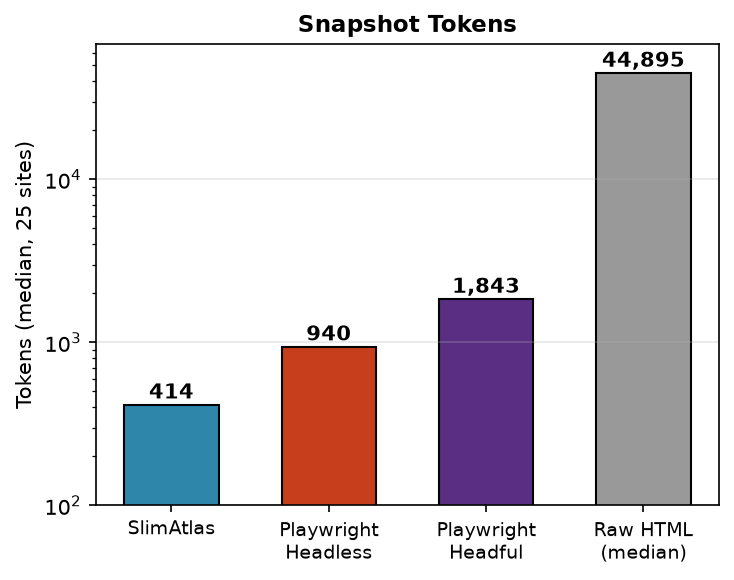 | Memory Usage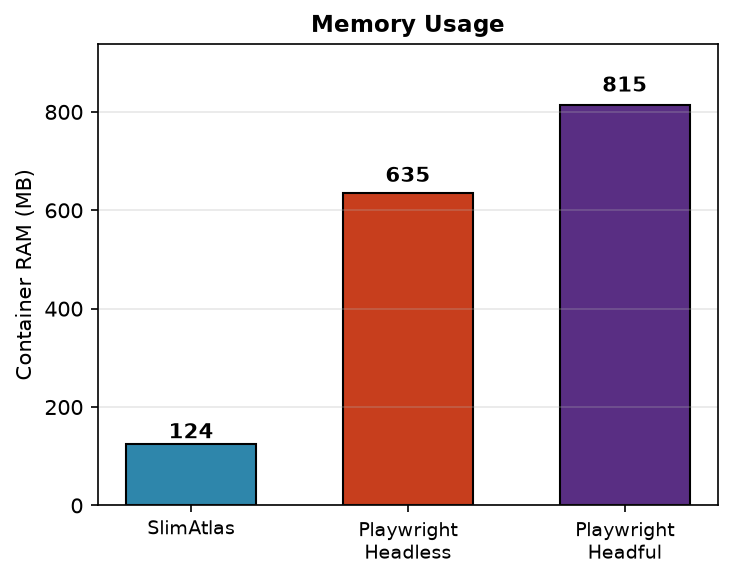 |
Installation
Requires Bun ≥1.1.
# Install dependencies
bun install
Browser binary is downloaded automatically on first run.
Fallback browser: Level 1 is always the lightweight browser. Level 2 is FALLBACK_BROWSER — one of headful (headful Chrome), browserbase (cloud), browserless (cloud), or none (default, no fallback). When the default crashes, times out, or is bot-detected, the session switches once to the configured fallback. Chrome is bundled by Puppeteer; Browserbase/Browserless require API credentials (see below).
Usage
Run the MCP Server
# Standalone HTTP server (default)
bun run src/index.ts --port=8080

# Remote, authenticated
MCP_AUTH_TOKEN=s3cret bun run src/index.ts --host=0.0.0.0 --port=8080
SlimAtlas exposes a single Streamable HTTP /mcp endpoint. Each client gets its own session via the mcp-session-id header; MAX_SESSIONS bounds concurrency. Point your MCP client at it:
{
  "mcpServers": {
    "slimatlas": {
      "url": "http://localhost:8080/mcp",
      "transport": "http"
    }
  }
}
With authentication:
{
  "mcpServers": {
    "slimatlas": {
      "url": "http://your-host:8080/mcp",
      "transport": "http",
      "headers": { "Authorization": "Bearer s3cret" }
    }
  }
}
Tip: Use --host=0.0.0.0 to expose remotely, but always set MCP_AUTH_TOKEN when doing so. The server speaks plain HTTP only — terminate TLS in front (Caddy/nginx) or the Bearer token travels the network in cleartext.
Docker
The image bundles the Lightpanda binary at build time, so the container starts self-contained and never re-downloads:
docker build -t slimatlas .
docker run -p 8080:8080 -e MCP_AUTH_TOKEN=s3cret slimatlas
# -> http://localhost:8080/mcp
Pin a Lightpanda release for reproducible builds (any lightpanda-io/browser tag — default nightly):
docker build --build-arg LIGHTPANDA_VERSION=0.3.3 -t slimatlas:0.3.3 .
Multi-arch is handled automatically — the build detects the container's arch via uname -m (x86_64 → lightpanda-x86_64-linux, aarch64 → lightpanda-aarch64-linux), so the binary always matches the platform being built.
Apple Silicon (M-series Macs): pass
--platform linux/arm64to build/run natively. Without it, Docker Desktop may default toamd64and run the container under Rosetta, which fails to launch the Lightpanda binary (rosetta error: failed to open elf …).docker build --platform linux/arm64 --build-arg FALLBACK_BROWSER=headful -t slimatlas . docker run --platform linux/arm64 --name slimatlas -p 8080:8080 -e MCP_AUTH_TOKEN=s3cret -e PLUGINS=document-export -e LIGHTPANDA_POOL_SIZE=20 -e CHROME_POOL_SIZE=10 -e SKIP_LIGHTPANDA_DOMAINS=reddit.com -e RATE_LIMIT_DOMAINS=reddit.com -e RATE_LIMIT_MIN_DELAY_MS=10000 slimatlasNote on bot-checked sites (Reddit, Cloudflare-fronted sites): on
linux/arm64the image falls back to Debian Chromium, which current bot walls (e.g. Reddit's "Prove your humanity", Cloudflare "Just a moment...") serve an interactive challenge to regardless of stealth settings. Verified against Reddit: the same container onlinux/amd64— which pins Chrome-for-Testing (default131.0.6778.204; current-generation stable builds get walled) — renders threads fine. Prefer the amd64 image for bot-checked targets (on M-series Macs it runs under Rosetta; Lightpanda works there since the x86_64 binary is bundled at build time).Engine choice / proxy: BOTH browser layers route through
PROXY_SERVER(same credentials; Lightpanda via inline-auth--http-proxy, Chrome via--proxy-server+page.authenticate). Reddit renders through proxied Lightpanda directly; when a session hits a challenge, the bot-detection layer escalates it to the Chrome 131 fallback. Add-e SKIP_LIGHTPANDA_DOMAINS=reddit.comto force threads straight onto Chrome instead.Proxy notes:
PROXY_SERVERacceptshttp://user:pass@host:portor thehost:port:user:passdashboard form (normalized internally). Sticky sessions (gate.<provider>:port:user-sessid-xxx:passform) work through the same env var.-e PROXY_BYPASS_DOMAINS=a.com,b.comroutes listed domains DIRECT on Chrome (for sites whose Cloudflare dislikes your proxy exits more than your own IP).Full worked example — production config verified against Reddit and a parallel stat-page burst:
docker build --platform linux/amd64 --build-arg FALLBACK_BROWSER=headful -t slimatlas .
docker rm -f slimatlas
docker run -d --name slimatlas -p 8080:8080 \
  -e MCP_AUTH_TOKEN=s3cret \
  -e PLUGINS=document-export \
  -e CHROME_POOL_SIZE=6 \
  -e RATE_LIMIT_DOMAINS=reddit.com \
  -e RATE_LIMIT_MIN_DELAY_MS=10000 \
  -e TZ=America/New_York \
  -e PROXY_SERVER="http://user:pass@proxy-host:port" \
  -e PROXY_BYPASS_DOMAINS=cloudflare-heavy-site.com \
  slimatlas
Omit
PROXY_SERVER,PROXY_BYPASS_DOMAINS, andTZif you don't use a proxy.CHROME_POOL_SIZEmatters: the default of 1 serializes every challenge-escalated session and causes client timeouts once a session leaks. The pinned Chrome version is overridable at build time with--build-arg CHROME_CFT_VERSION=<version>if a site's wall ever starts flagging it.
Headful fallback variant. The default image runs Lightpanda only (FALLBACK_BROWSER=none). To enable the headful Chrome fallback (needed only if you set FALLBACK_BROWSER=headful at runtime), build the headful variant — it adds the Chrome runtime libraries + Xvfb (~150MB) and presets FALLBACK_BROWSER=headful:
docker build --build-arg LIGHTPANDA_VERSION=0.3.3 FALLBACK_BROWSER=headful -t slimatlas:headful .
docker run -p 8080:8080 -e MCP_AUTH_TOKEN=s3cret -e PLUGINS=document-export slimatlas:headful
Xvfb is started lazily inside the container on the first session that escalates to headful Chrome — no entrypoint or manual xvfb-run needed.
Document export (PDF/PPTX) plugin. browser_print_pdf and browser_export_pptx ship in the document-export plugin and are disabled by default — enable with -e PLUGINS=document-export (or the --plugins=document-export flag). Both tools force the real-Chrome fallback, so they need an image that actually has one: use the headful variant above. On the Lightpanda-only default image the tools list but every call fails (No fallback browser configured). Plugin authoring guide: docs/plugins.md.
Stdio Mode
For MCP clients that spawn the server as a subprocess (local, single-client), use stdio transport:
bun run src/index.ts
{
  "mcpServers": {
    "slimatlas": {
      "command": "bun",
      "args": ["run", "path/to/mcp/src/index.ts"]
    }
  }
}
Configuration
Add to your MCP client configuration:
{
  "mcpServers": {
    "slimatlas": {
      "command": "bun",
      "args": ["run", "path/to/mcp/src/index.ts"]
    }
  }
}
Tip: Set FALLBACK_BROWSER=none to use the lightweight browser only and propagate errors honestly. Use headful or browserbase to enable a real-browser fallback.
See docs/configs.md for all environment variables and CLI flags.
Fallback browser
FALLBACK_BROWSER | Level 2 browser | Notes |
|---|---|---|
none (default) | — | Lightweight browser only; errors propagate honestly |
headful | Headful Chrome | Real window on macOS; needs xvfb on headless Linux |
browserbase | Browserbase cloud | Requires BROWSERBASE_API_KEY + BROWSERBASE_PROJECT_ID |
Skip the default browser for known-hard domains with SKIP_LIGHTPANDA_DOMAINS (comma-separated, subdomain-aware). Matched hosts start directly on the fallback browser. Requires FALLBACK_BROWSER != none (otherwise the list is ignored with a warning).
Rate limiting
Polite, anti-detection pacing for your agent. RateLimiter enforces a server-wide minimum delay between browser_navigate calls to the domains you list, with optional random jitter so the cadence isn't a fixed, fingerprintable interval. Buckets are keyed per host across all sessions (because the target site sees your IP, not your sessions), and patterns support wildcards:
| Pattern | Matches | Bucket |
|---|---|---|
* | Every host | Each host throttled independently |
*.reddit.com | Subdomains only (www.reddit.com, old.reddit.com) — not reddit.com | All matching subdomains share one bucket |
g2.com | g2.com + its subdomains | Apex + subdomains share one bucket |
Disabled by default. Enable with a non-empty domain list and a non-zero delay:
# Via CLI flags
bun run src/index.ts --rate-limit-domains=*.reddit.com,g2.com --rate-limit-min-delay-ms=2000 --rate-limit-jitter-ms=1500

# Or via environment / .env
RATE_LIMIT_DOMAINS=*.reddit.com,g2.com
RATE_LIMIT_MIN_DELAY_MS=2000
RATE_LIMIT_JITTER_MS=1500
Proxy
Keep your real IP off the target. Set a single PROXY_SERVER and SlimAtlas routes all HTTP traffic from both browser layers through it — no per-browser wiring needed:
- Lightweight browser (level 1) — forwarded via its native
--http-proxyflag. - Chrome fallback (level 2) — applied via
--proxy-serverat launch.
# Via CLI flag
bun run src/index.ts --proxy-server=http://host:8080

# Or via environment / .env
PROXY_SERVER=http://user:pass@host:8080
Inline basic auth (http://user:pass@host:port) is supported on the lightweight browser layer. For IP-allowlisted proxies (no credentials) it just works on both layers. (Per-page Chrome authentication via page.authenticate is on the roadmap.)
CLI Flags
Every environment variable can also be passed as a lower-case CLI flag in --flag=value form. CLI flags override environment variables. Unknown flags cause the server to exit at startup. See docs/configs.md for the full list.
bun run src/index.ts --fallback-browser=headful --lightpanda-pool-size=3 --skip-lightpanda-domains=g2.com --navigate-timeout=60000
To use flags from an MCP client, append them to the args array:
{
  "mcpServers": {
    "slimatlas": {
      "command": "bun",
      "args": [
        "run",
        "path/to/mcp/src/index.ts",
        "--fallback-browser=headful",
        "--skip-lightpanda-domains=g2.com,linkedin.com",
        "--chrome-pool-size=3"
      ]
    }
  }
}
Usage Workflow
# Example: Navigate, snapshot, and interact with a page

# 1. Navigate to a URL (creates a new session automatically)
result = mcp.call("browser_navigate", {"url": "https://example.com"})
# Returns: session_id: abc1, result: Navigated to https://example.com. Title: Example Domain

# 2. Take a snapshot to see the page structure
snapshot = mcp.call("browser_snapshot", {"session_id": "abc1"})
# Returns YAML with node IDs like: 0: {type: div, children: ...}

# 3. Click a node by ID (from the snapshot)
mcp.call("browser_click", {"session_id": "abc1", "nodeId": 2})

# 4. Type into a search box
mcp.call("browser_type", {"session_id": "abc1", "nodeId": 5, "text": "search query"})

# 5. Close the session when done
mcp.call("browser_close", {"session_id": "abc1"})
Available Tools
The core browser_* tools below are always available. Two additional pipeline tools — browser_print_pdf and browser_export_pptx — ship in the document-export plugin and are disabled by default (-e PLUGINS=document-export / --plugins=document-export); see docs/plugins.md.
| Tool | Description | Value |
|---|---|---|
browser_navigate | Navigate to a URL with configurable wait strategy | Entry point for all web interactions. Supports load, domcontentloaded, networkidle0, networkidle2 |
browser_snapshot | Get YAML accessibility tree with unique node IDs | Structured page representation ideal for LLM understanding. Node IDs enable precise targeting for clicks/types |
browser_view_node | View specific node content by ID (text or image) | Inspect individual elements without full page re-read. Returns images as base64 for visual verification |
browser_click | Click element by node ID or CSS selector | Node ID (from snapshot) is recommended over CSS selectors for reliability and simplicity |
browser_type | Type text into an element with optional keystroke delay | Simulates human typing. Use for search boxes, forms, and text inputs |
browser_fill | Fill an input element with a value instantly | Faster than browser_type for form fields. Clears existing value before typing |
browser_go_back | Navigate back in browser history | Essential for multi-step workflows and correcting navigation mistakes |
browser_go_forward | Navigate forward in browser history | Complements browser_go_back for bidirectional navigation |
browser_reload | Reload current page | Refresh dynamic content or recover from stale page state |
browser_get_page_info | Get current page URL and title | Quick way to verify navigation success and current context |
browser_close | Close browser session and free resources | Important for cleanup. Sessions auto-close on timeout, but explicit closing is recommended |
Plugin tools (only with PLUGINS=document-export):
| Tool | Description | Value |
|---|---|---|
browser_print_pdf | Print current page or a provided HTML document to a base64 PDF | For document/report generation pipelines only — NOT for agent research/browsing. Forces the real-Chrome fallback (FALLBACK_BROWSER); accepts a caller-supplied session_id (create → print → browser_close) |
browser_export_pptx | Convert current page or a provided HTML document to a base64 .pptx via dom-to-pptx | For deck generation pipelines only. Slides are the elements matching selector (default .slide) at final pixel size (e.g. 1920x1080); with_previews=true also returns per-slide PNGs. Forces the real-Chrome fallback; caller closes the session with browser_close |
Running Tests
# Run all tests
bun test

# Run tests in watch mode
bun test --watch
Requirements
- Bun ≥1.1
- Linux or macOS (downloads automatically) or Chrome/Chromium (fallback)
License
MIT