stella-mcp
用于创建和操作Stella系统动力学模型(XMILE格式的.stmx文件)的MCP服务器
文档
Stella MCP Server
A vendor-neutral Model Context Protocol (MCP)
server for creating and manipulating Stella
system dynamics models. Any compliant MCP client can build, read, validate, and
save .stmx files in the XMILE format; optional host features still vary.
What is this for?
Stella is a system dynamics modeling tool used for simulating complex systems in fields like ecology, biogeochemistry, economics, and engineering. This MCP server allows AI assistants to:
- Create models from scratch - Build stock-and-flow diagrams programmatically
- Read existing models - Parse and understand .stmx files
- Validate models - Check for errors like undefined variables or missing connections
- Modify models - Add stocks, flows, auxiliaries, and connectors
- Save models - Export valid XMILE files that open in Stella Professional
This is particularly useful for:
- Teaching system dynamics modeling
- Rapid prototyping of models through natural language
- Batch creation or modification of models
- Documenting and explaining existing models
Installation
From PyPI
pip install stella-mcp
From source
git clone https://github.com/bradleylab/stella-mcp.git
cd stella-mcp
pip install -e .
Requirements
- Python 3.10+
mcp>=2.0.0,<3
Configuration
Via uvx (no install required)
If you have uv installed, the lowest-friction configuration runs the published package directly:
{
  "mcpServers": {
    "stella": {
      "command": "uvx",
      "args": ["stella-mcp"]
    }
  }
}
Claude Desktop
Add to your claude_desktop_config.json:
{
  "mcpServers": {
    "stella": {
      "command": "stella-mcp"
    }
  }
}
Claude Code
Add to your .claude/settings.json:
{
  "mcpServers": {
    "stella": {
      "command": "stella-mcp"
    }
  }
}
Development mode
If running from source:
{
  "mcpServers": {
    "stella": {
      "command": "python",
      "args": ["-m", "stella_mcp.server"],
      "cwd": "/path/to/stella-mcp"
    }
  }
}
Recommended Agent Workflow
For a new model:
- On MCP 2026-07-28, call
create_workspaceand carry the returnedworkspace_idthrough stateful calls. Legacy stdio clients may omit it. build_modelwith a stablemodel_idand the full set of stocks, auxiliaries, and flows in one call (connector sync and validation run by default, so the response doubles as an inspection).- Fix validation errors with
update_*,rename_variable, ordelete_variable. - Extend incrementally with
add_variables(batch) or the single-add tools. simulateto sanity-check behavior (requires thesimextra).- Save with
save_model.
For imported models:
read_modelwithcompat_mode="permissive"to inspect warnings.- Run
inspect_modelto understand model structure. - Use
compat_mode="strict"before final save when round-trip fidelity matters.
Available Tools
Model Creation & I/O
| Tool | Description |
|---|---|
create_model | Create a new model with name and time settings (start, stop, dt, method) |
set_sim_specs | Update simulation time settings on an existing model |
read_model | Load an existing .stmx file |
save_model | Save model to a .stmx file |
delete_model | Remove a model from the workspace (saved files untouched) |
Templates
| Tool | Description |
|---|---|
list_templates | List built-in and user-defined templates (supports source/query/tag filters) |
get_template_info | Get detailed metadata for one template |
load_template | Load a template as a model in the current workspace |
save_as_template | Save the current model as a reusable user template (optional description/tags) |
Model Building
| Tool | Description |
|---|---|
build_model | Create and populate a model in one call (atomic batch) |
add_variables | Add multiple variables/connectors/modules to an existing model (atomic batch) |
add_stock | Add a stock (reservoir) with initial value and units |
add_flow | Add a flow between stocks with an equation |
add_aux | Add an auxiliary variable (parameter or calculation) |
update_stock | Update stock fields while preserving relationships |
update_flow | Update flow fields while preserving stock links |
update_aux | Update auxiliary variable fields |
add_connector | Add a dependency connector between variables |
sync_connectors_from_equations | Add missing dependency connectors inferred from equations |
set_connector_routing | Set connector angle and explicit waypoint routing metadata |
rename_variable | Rename a stock/flow/aux and update references in equations/connectors/modules |
delete_variable | Delete a stock/flow/aux with consistency checks and cleanup |
create_module | Create a logical module/group of variables |
add_to_module | Add variables to an existing module/group |
remove_from_module | Remove variables from a module/group |
rename_module | Rename a module/group |
delete_module | Delete a module/group |
set_module_view | Set explicit module box position/size on the diagram |
set_module_style | Set module box style (border/background/font/label side) on the diagram |
auto_place_module_boxes | Auto-place module boxes around their members |
Notes:
- MCP 2026-07-28 clients call
create_workspaceonce and include its returnedworkspace_idin stateful calls. Modern tool discovery marks that field as required on stateful tools. The ID routes application state; it is not an authorization credential. - Supported legacy stdio clients may omit
workspace_idand use one process-local compatibility workspace; legacy discovery keeps the field optional. - Tools accept optional
model_idso one workspace can manage multiple models safely. create_modelandread_modelset the workspace's currentmodel_idand return it.add_flowandadd_auxsupport optionalgraphical_functionpayloads (yptsplus exactly one ofxscaleorxpts).add_stock/add_flow/add_auxreject duplicate variable names across variable types;add_connectorrequires both variables to exist.set_connector_routingcan target a connector byconnector_uidor byfrom_var+to_var.save_modelandget_model_xmlacceptauto_layout(defaulttrue) andresolve_layout_violations(defaultfalse).save_model,get_model_xml, andrender_diagramreturn the latest layout viewport, metrics, and warnings in structured content. Their text result names any non-clean layout warning codes.read_model,save_model, andget_model_xmlacceptcompat_mode:permissive(default): continue with warningsstrict: fail on compatibility issues
set_module_styleupdates module view styling and persists those attributes in XMILE view<group .../>elements.save_as_templatewrites user templates to~/.stella-mcp/templatesby default (override viaSTELLA_MCP_TEMPLATE_DIR) and stores metadata in a.meta.jsonsidecar.- Tool failures return structured MCP errors with
error.code,error.category, anderror.message. - Every successful tool result retains readable text and supplies schema-validated
structuredContentdescribed by its JSON Schema 2020-12outputSchema.
Workspace Lifecycle
| Tool | Description |
|---|---|
create_workspace | Create an isolated workspace, optionally with a caller-selected lifetime |
revoke_workspace | Revoke a workspace and discard its in-memory models |
Model Inspection
| Tool | Description |
|---|---|
list_models | List available workspace model IDs and indicate the current model |
inspect_model | Return a structured model summary for agent inspection |
list_modules | List modules/groups in the current model |
list_connectors | List connector IDs, endpoints, angles, and routing metadata |
list_variables | List all stocks, flows, and auxiliaries |
validate_model | Check for errors (undefined variables, missing connections, etc.) |
get_model_xml | Preview the XMILE XML output |
render_diagram | Render the model as an SVG stock-and-flow diagram |
simulate | Run the model via PySD and return time series + summaries (sim extra) |
compare_scenarios | Run named what-if override sets against a baseline and report deltas (sim extra) |
sensitivity_analysis | Sweep parameters one-at-a-time and rank their effect on an output metric (sim extra) |
calibrate | Fit constant parameters to an observed time-series (inverse of simulate) (sim extra) |
Batch Building
build_model creates and populates a model in one call. Items apply in the
order stocks → auxs → flows → connectors → modules; the whole batch is
all-or-nothing, and on failure the error names the failing item
(error.stage + error.index). The same item arrays work on an existing
model via add_variables.
{
  "name": "build_model",
  "arguments": {
    "name": "SIR",
    "model_id": "sir",
    "sim_specs": {"start": 0, "stop": 100, "dt": 0.125, "time_units": "Days"},
    "stocks": [
      {"name": "Susceptible", "initial_value": "9999", "units": "people"},
      {"name": "Infected", "initial_value": "1", "units": "people"},
      {"name": "Recovered", "initial_value": "0", "units": "people"}
    ],
    "auxs": [
      {"name": "contact_rate", "equation": "6"},
      {"name": "infectivity", "equation": "0.25"},
      {"name": "recovery_time", "equation": "2", "units": "days"},
      {"name": "total_population", "equation": "Susceptible + Infected + Recovered"}
    ],
    "flows": [
      {"name": "infection", "equation": "Susceptible * contact_rate * infectivity * Infected / total_population", "from_stock": "Susceptible", "to_stock": "Infected"},
      {"name": "recovery", "equation": "Infected / recovery_time", "from_stock": "Infected", "to_stock": "Recovered"}
    ],
    "modules": [
      {"name": "Disease Dynamics", "members": ["Susceptible", "Infected", "Recovered"]}
    ]
  }
}
Connector sync and validation run by default (disable with
"sync_connectors": false / "validate": false); the response includes the
full structured model summary, so no follow-up inspect_model call is needed.
Tool Payload Examples
Create and switch between workspace models:
{"name":"create_model","arguments":{"name":"Population","model_id":"pop_v1"}}
{"name":"create_model","arguments":{"name":"Carbon","model_id":"carbon_v1"}}
{"name":"list_models","arguments":{}}
{"name":"delete_model","arguments":{"model_id":"pop_v1"}}
{"name":"inspect_model","arguments":{"model_id":"sir_baseline","include_validation":true}}
List and load templates:
{"name":"list_templates","arguments":{}}
{"name":"list_templates","arguments":{"source":"builtin","query":"epidem","tags":["epidemiology"]}}
{"name":"get_template_info","arguments":{"template_name":"sir"}}
{"name":"load_template","arguments":{"template_name":"sir","model_id":"sir_baseline"}}
Save current model as a user template:
{"name":"save_as_template","arguments":{"model_id":"pop_v1","template_name":"my_population_template","description":"Baseline single-stock growth starter","tags":["intro","population"]}}
Create and manage modules:
{"name":"create_module","arguments":{"model_id":"sir_baseline","name":"Disease Dynamics","members":["Susceptible","Infected","Recovered"]}}
{"name":"add_to_module","arguments":{"model_id":"sir_baseline","module_name":"Disease Dynamics","members":["infection","recovery"]}}
{"name":"list_modules","arguments":{"model_id":"sir_baseline"}}
{"name":"remove_from_module","arguments":{"model_id":"sir_baseline","module_name":"Disease Dynamics","members":["recovery"]}}
{"name":"rename_module","arguments":{"model_id":"sir_baseline","module_name":"Disease Dynamics","new_name":"Disease Core"}}
{"name":"delete_module","arguments":{"model_id":"sir_baseline","module_name":"Disease Core"}}
Rename and delete variables safely:
{"name":"rename_variable","arguments":{"model_id":"sir_baseline","old_name":"population_total","new_name":"total_population"}}
{"name":"delete_variable","arguments":{"model_id":"sir_baseline","name":"recovery"}}
{"name":"delete_variable","arguments":{"model_id":"sir_baseline","name":"Susceptible","force":true}}
Update an existing variable:
{"name":"update_flow","arguments":{"model_id":"pop_v1","name":"growth","equation":"Population * growth_rate * stress_modifier"}}
Infer missing connectors from equations:
{"name":"sync_connectors_from_equations","arguments":{"model_id":"pop_v1"}}
Set module view geometry directly:
{"name":"set_module_view","arguments":{"model_id":"sir_baseline","module_name":"Disease Dynamics","x":420,"y":280,"width":420,"height":240}}
Set module view style:
{"name":"set_module_style","arguments":{"model_id":"sir_baseline","module_name":"Disease Dynamics","border_color":"#666666","background":"#FFF7E6","font_color":"#333333","font_size":"10pt","label_side":"top"}}
Auto-place module boxes from current member positions:
{"name":"auto_place_module_boxes","arguments":{"model_id":"sir_baseline","padding":40,"only_missing":true}}
Target a specific model in later calls:
{"name":"add_stock","arguments":{"model_id":"pop_v1","name":"Population","initial_value":"100"}}
Read with strict compatibility checks:
{"name":"read_model","arguments":{"filepath":"./external_model.stmx","model_id":"imported","compat_mode":"strict"}}
Preview XML in permissive mode (default) and return compatibility warnings when present:
{"name":"get_model_xml","arguments":{"model_id":"imported","compat_mode":"permissive"}}
Valid graphical function payload:
{
  "name": "add_aux",
  "arguments": {
    "model_id": "pop_v1",
    "name": "lookup_rate",
    "equation": "GRAPH(Time)",
    "graphical_function": {
      "xscale": {"min": 0, "max": 100},
      "ypts": [0.1, 0.2, 0.4, 0.6],
      "type": "continuous"
    }
  }
}
Invalid graphical function payload (rejected):
{
  "name": "add_aux",
  "arguments": {
    "name": "bad_lookup",
    "equation": "GRAPH(Time)",
    "graphical_function": {
      "xscale": {"min": 0, "max": 100},
      "xpts": [0, 10, 20, 30],
      "ypts": [0.1, 0.2, 0.4, 0.6]
    }
  }
}
Example Usage
Creating a simple population model
User: Create a simple exponential growth model with a population starting at 100
      and a growth rate of 0.1 per year

Claude: [Uses create_model, add_stock, add_aux, add_flow, add_connector, save_model]
        Creates population_growth.stmx with:
        - Stock: Population (initial=100)
        - Aux: growth_rate (0.1)
        - Flow: growth (Population * growth_rate) into Population
Reading and analyzing an existing model
User: Read the carbon cycle model and explain what it does

Claude: [Uses read_model, list_variables]
        This model has 3 stocks (Atmosphere, Land Biota, Soil) and 6 flows
        representing carbon exchange through photosynthesis, respiration...
Building a biogeochemical model
User: Create a two-box ocean model with surface and deep nutrients

Claude: [Uses create_model, add_stock (x4), add_aux (x8), add_flow (x6), save_model]
        Creates a model with nutrient cycling between surface and deep ocean
        including upwelling, downwelling, biological uptake, and remineralization
Diagram Preview
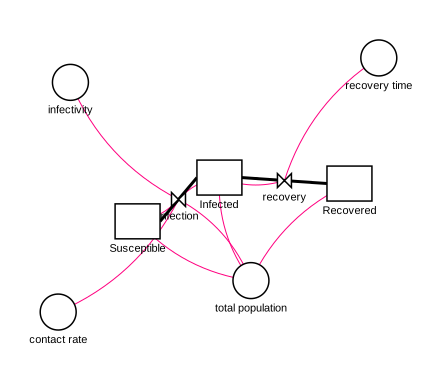
The render_diagram tool renders the model as an SVG stock-and-flow diagram
— stocks as rectangles, auxiliaries as circles, flows as valved pipes
(clouds mark sources/sinks), and dependency connectors as routed polylines. The SVG is
returned inline so an agent can inspect the layout, and optionally written
to a file you can open in any browser. It runs auto-layout first by default,
so a freshly built model renders without manual positioning.
{"name":"render_diagram","arguments":{"model_id":"sir_baseline","filepath":"./sir.svg"}}
The diagram below is the built-in sir template rendered by render_diagram
(no manual positioning):
Simulation
The simulate tool runs the current model and returns downsampled time
series plus per-variable summaries (initial/final/min/max), closing the
build→verify loop without opening Stella. It requires the optional
PySD dependency:
pip install 'stella-mcp[sim]'
{"name":"simulate","arguments":{"model_id":"pop_v1","overrides":{"growth_rate":0.05},"include":["Population"],"max_points":50}}
Notes and caveats:
- PySD integrates with Euler only — models whose
methodis RK4 simulate with Euler and the response carries a warning. Every PySD-backed response identifies the installed PySD version, actual method, declared method, unsupported-feature preflight, and warnings. - Arrays, compositional module instances, and additional top-level models are
preserved-only in 0.14. They fail before PySD with a structured
unsupported_model_featureerror rather than being silently scalarized or flattened. - PySD and Stella do not have identical output semantics in every supported scalar case. In the retained Lotka-Volterra fixture, Stella caps an outflow to enforce a non-negative stock while PySD reports the uncapped flow equation. The stock trajectories still reach zero together at the next model time.
overridesaccepts variable names in display ("growth rate") or underscore (growth_rate) form and replaces the variable with a constant.save_results_csvwrites the full-resolution results table with atimecolumn.- The workspace model is never modified by simulation (the run uses a throwaway copy).
Scenario Comparison
The compare_scenarios tool answers "what happens under these alternative
assumptions?" — it runs several named override sets against a baseline (the
unmodified model by default) and reports how each diverges. Also requires the
sim extra.
{"name":"compare_scenarios","arguments":{"model_id":"pop_v1","include":["Population"],"scenarios":[{"name":"low growth","overrides":{"growth_rate":0.02}},{"name":"high growth","overrides":{"growth_rate":0.08}}]}}
Each scenario reports its own downsampled series plus delta_vs_baseline per
variable: final_abs, final_pct (percent change of the final value), and
max_abs. Notes:
- Every override name across all scenarios is validated before any run, so a typo fails fast and atomically — no scenario runs half-applied.
- A scenario whose run produces NaN/inf reports the warning in that scenario's
warningswithout aborting the others;final_pctisnullwhen the baseline final is zero (no divide-by-zero). baselineis optional — pass an override set to measure deltas against, or omit it to compare against the unmodified model.save_comparison_csvwrites a wide table with one column pervariable__scenario(andvariable__baseline).- The compiled model is reused across every scenario in one call, so a comparison is roughly as cheap as a single simulation plus one run per scenario.
Sensitivity Analysis
The sensitivity_analysis tool answers "which parameters actually move the
outcome?" — it sweeps each parameter one at a time across a range (holding the
others at their baseline) and reports how a single chosen output metric
responds. Also requires the sim extra.
{"name":"sensitivity_analysis","arguments":{"model_id":"pop_v1","parameters":[{"name":"growth_rate","start":0.02,"stop":0.08,"steps":7}],"output":{"variable":"Population","metric":"final"}}}
For each parameter it returns the metric at every swept value, a
range_sensitivity (the metric's average slope across the swept range), and a
baseline-normalized elasticity (≈ Δoutput% / Δparam%) so parameters can be
ranked by influence. Notes:
- One-at-a-time only.
modeaccepts"oat"; full-factorial (grid) and Monte-Carlo sampling are reserved for a future release. metricis one offinal,max,min,mean, ortime_to_threshold(which needs anoutput.thresholdand reports the first time the series crosses it). max/min/mean cover finite values only; a non-finite or never-crossing run reportsnullfor that point with a warning.- A parameter spec is either
start/stop/steps(evenly spaced,steps≥ 2) or an explicitvalueslist (≥ 2 entries). max_runs(default 200) caps the total swept runs; an oversized sweep errors rather than silently truncating. OAT runs are a sum across parameters, not a product, so the cap only trips on genuinely large sweeps.elasticityisnullwhen it cannot be defined (a non-constant parameter, or a zero baseline metric/parameter);range_sensitivityis still reported.save_sweep_csvwrites a longparameter, value, metrictable.- Like scenario comparison, the model is compiled once and reused across the whole sweep.
Calibration
The calibrate tool is the inverse of simulate: given an observed
time-series, it fits constant parameters so the model reproduces the data. Also
requires the sim extra.
{"name":"calibrate","arguments":{"model_id":"pop_v1","observations":{"time":[0,2,4,6,8,10],"targets":{"Population":[100,122,149,182,222,271]}},"parameters":[{"name":"growth_rate","initial":0.05,"min":0,"max":0.3}]}}
It returns the fitted parameters (each with its bounds, an at_bound flag, and
a linearized std_error), the weighted objective trajectory
(initial/final weighted_sse and weighted_rmse), native-unit error
metrics for each target, optimizer status/configuration, and warnings. Notes:
- Only constant auxiliaries and flows are calibratable. Stocks are rejected: PySD's parameter override pins a stock to a constant for the whole run rather than setting its initial value, which would silently flatten a dynamic model. Fitting stock initial conditions is not supported.
- Two optimizers.
least_squares(default) is local and fast and reports astd_error;differential_evolutionis global, stochastic, seeded for reproducibility, and requiresmin/maxbounds on every parameter. Itsmaxitergeneration cap defaults to 100. - Each parameter's
initialdefaults to the model's current constant value. Bounds are optional forleast_squares, required fordifferential_evolution. std_erroris a linearized approximation, not a posterior: it is the covarianceσ²·(JᵀJ)⁻¹and is reported only when there are more observations than parameters, the Jacobian is well-conditioned, and no parameter sits on a bound; otherwise it isnullwith a warning.differential_evolutionreturnsnull(no Jacobian). Under non-defaultweights, the standard-error interpretation holds only for inverse-σ weights.- Alignment. The model runs over its native
[start, stop]window and the simulation is linearly interpolated onto the observation times. Observation times outside the window are rejected (no extrapolation). All targets share one strictly-increasing time grid; observations are loaded inline or from acsv_path(first column time, the rest targets). - Optional per-target
weightsare residual multipliers: the optimizer usesweight * (simulated - observed). Inverse measurement-standard-deviation values give normalized residuals. Because weighted errors may mix units,target_metricsreports an unweighted SSE and RMSE in each target's native units; no aggregate native-unit RMSE is reported.save_fit_csvwrites a longtime, target, observed, fittedtable;return_fit_seriesattaches the best-fit series. The model is compiled once and reused across the whole fit.
MCP Resources & Prompts
Beyond tools, the server exposes MCP-native affordances:
- Tool annotations. Every tool carries hints (
readOnlyHint,destructiveHint,idempotentHint) so clients can manage permissions and parallelize read-only calls. Inspection tools (inspect_model,validate_model,list_*,get_model_xml) are read-only;delete_*are marked destructive. - Resources. Templates and workspace models are readable as resources:
stella://templates/{name}— a built-in or user template's.stmxstella://workspaces/{workspace_id}/models/{model_id}— an explicit workspace model's current XMILE exportstella://models/{model_id}— the legacy stdio compatibility workspace only
- Prompt. A
build-stella-modelprompt (argument:description) encodes the recommended build → validate → simulate → render → save workflow, so it is discoverable inside MCP clients.
Validation
The validate_model tool checks for:
- Undefined variables - References to variables that don't exist
- Mass balance issues - Stocks without flows, flows referencing non-existent stocks
- Missing connections - Equations using variables without connectors (warning)
- Connector endpoint integrity - Connectors pointing at missing variables (error)
- Orphan flows - Flows not connected to any stock
- Circular dependencies - Infinite loops in auxiliary calculations
- Module integrity - Empty modules (warning) and modules referencing missing members (error)
- Units present - A stock or flow missing units while others define them (warning)
- Units consistency - A flow whose units don't read as
stock-units/time-unitwhen every attached stock shares the same units (warning; conservative — stays silent on conversion flows and anything it can't confidently parse) - Unused auxiliaries - An auxiliary referenced by no equation or connector (warning); stocks and flows are never flagged
XMILE Compatibility
- Output files use the XMILE standard
- Compatible with Stella Professional 1.9+ and Stella Architect
permissiveimport/export preserves supported content and the selected unsupported XML fragments where practical, while returning explicit warnings. Editing supported variables does not guarantee references inside preserved-only fragments are updated.strictimport/export rejects arrays, compositional module instances, additional top-level models, and confirmed Stella/XMILE reserved identifiers. Arrays and nested models are not implemented features in 0.14.- Reserved names such as
betaandgammaare preserved with warnings in permissive mode and rejected in strict mode. The built-in SIR template usestransmission_rateandrecovery_rateso Stella does not rename them on save. - Auto-layout uses a deterministic directed stock-flow backbone, distinct stock ports, obstacle-aware flow and connector routes, label collision checks, and page-grid sizing from complete visual bounds.
- Authored coordinates, including coordinates supplied through update tools, and locked route points remain fixed. Auto-generated coordinates are recomputed on later exports so incrementally extended models can be ranked again instead of freezing after their first save.
- Locked paths are reserved before unlocked routes, labels are selected in normalized-name order, and imported view-font sizes control label geometry in both analysis and SVG previews.
- Information connectors use direct boundary-to-boundary segments whenever the complete diagram leaves them unobstructed and unshared. Stock-flow pipes stay orthogonal because Stella rewrites diagonal flow segments on save.
- Clean planar benchmark layouts have no glyph, label, or route crossings. A
graph that cannot be drawn cleanly is still exported and reports a stable
layout.*warning; zero crossings are not promised for arbitrary non-planar graphs. - Variable names with spaces are converted to underscores internally
- Parser normalizes imported stock inflow/outflow and connector endpoint references
- Time-step export avoids lossy reciprocal rounding (non-exact reciprocals are exported as plain
dt) - Import/export preserves unknown attrs/elements on supported sections (header, sim_specs, variables, views/model extras) to reduce round-trip data loss
- Compatibility corpus regression tests live in
tests/fixtures/compat_corpus/. A pinned, attributed subset of SDXorg test-models lives intests/fixtures/external_corpus/; both run offline in CI. - Maintainer helper:
python scripts/sync_compat_corpus_manifest.py --checkvalidates corpus manifest sync
Testing
The repository test suite covers the MCP stdio protocol, workspace isolation, model construction, validation, SVG rendering, XMILE import/export, simulation, scenario analysis, sensitivity analysis, calibration, and package installation. Run it from a source checkout with:
uv sync --locked --extra dev --extra sim
uv run python -m pytest
Pinned Stella-saved and external XMILE fixtures live under tests/fixtures/ and
run offline in CI. Generated reports, local planning files, and manual review
artifacts are intentionally not committed to the source tree.
Project Structure
See docs/architecture.md for dependency boundaries,
module ownership, workspace lifecycle, and compatibility contracts.
stella-mcp/
├── CHANGELOG.md
├── CITATION.cff
├── README.md
├── LICENSE
├── pyproject.toml
└── stella_mcp/
    ├── __init__.py
    ├── server.py         # MCP server lifecycle and protocol wiring
    ├── tool_handlers.py  # Compatibility facade for domain handlers
    ├── tool_schemas.py   # Compatibility facade for the tool catalog
    ├── tools/            # Domain schemas and handlers
    ├── mcp_resources.py  # MCP resources and prompts
    ├── session_store.py  # Explicit application workspace state
    ├── simulate.py       # PySD-backed simulation
    ├── analysis.py       # Scenario comparison and sensitivity analysis
    ├── calibrate.py      # Parameter fitting and native-unit error metrics
    ├── render_svg.py     # Stock-and-flow SVG rendering
    ├── model_types.py     # Model records and XMILE constants
    ├── model.py           # StellaModel lifecycle and compatibility delegates
    ├── model_layout.py    # Layout compatibility delegates and stock sizing
    ├── layout_graph.py    # Directed graph ranking and component packing
    ├── layout_router.py   # Boundary ports and obstacle-aware routing
    ├── layout_quality.py  # Geometry analysis, metrics, and warnings
    ├── layout_pipeline.py # Staged deterministic layout orchestration
    ├── xmile.py           # Public model compatibility facade
    ├── xmile_io.py        # XMILE I/O compatibility facade
    ├── xmile_features.py  # XMILE feature classification and typed errors
    ├── xmile_parse.py     # XMILE parser and compatibility warnings
    ├── xmile_export.py    # XMILE serialization and fragment retention
    └── validator.py      # Model validation logic
Contributing
Contributions are welcome! Please feel free to submit issues or pull requests.
Maintainer Release
PyPI publishing is handled by .github/workflows/publish.yml using PyPI Trusted
Publishing. To release a new version:
- Synchronize the version in
pyproject.toml,stella_mcp/__init__.py,CITATION.cff, andCHANGELOG.md; keep the citation and changelog release dates identical. - Run
uv lock --check, the core and simulation test suites, the MCP-floor suite, and the package job. Prepare the draft GitHub release notes from the matchingCHANGELOG.mdentry. - Before pushing the release branch, verify the protected
mainandv*tag rules, thepypienvironment's protected-tag policy, and the configured PyPI Trusted Publisher. - Open a draft pull request so every release-critical check runs, require those exact checks, obtain review, and separately approve the merge.
- Wait for a fresh
mainCI run at the exact merge commit. If the Chicago release date has changed, correct the metadata through another reviewed pull request before continuing. - With separate approval, create the lightweight version tag at that audited merge commit. With another approval, create and inspect the draft GitHub release from the matching notes file.
- With final publication approval, publish the draft. The release event builds
and validates the source distribution and wheel without OIDC authority; the
pypijob's configured deployment policy accepts only tags matching the protectedv*release-tag policy before Trusted Publishing can upload the verified artifacts.
Tagging, draft creation, and publication are distinct approval gates. Do not move or replace a public tag or uploaded distribution to repair a release.
License
MIT License - see LICENSE for details.
Acknowledgments
- Model Context Protocol by Anthropic
- ISEE Systems for Stella and the XMILE format