Pepys
Pepys是一款按需付费的AI转录软件,可将音频和视频转换为带说话人标签和时间戳的转录文本。它支持多语言转录、AI驱动的转录搜索与聊天、摘要、翻译、导出、开发者API及MCP访问。
文档

Pepys – Transcribe anything
Pay-once AI transcription for audio and video. Fast, accurate speech-to-text with no subscription.







Pepys is a web app that turns any recording into clean, editable text. Named after the diarist Samuel Pepys, it is built for people who just want an accurate transcript without a monthly bill: upload a file or paste a link, get text back, then edit, summarize, translate, or export it however you need. There is nothing to install – it runs at pepys.co.
This README doubles as a short, practical guide to transcription – how to do it, which export format to reach for, and the vocabulary worth knowing.
Contents
- How to transcribe (the quick way)
- Transcribe straight from a link
- For AI agents (MCP)
- Features
- Export-format cheat-sheet
- Transcription glossary
- Find the right tool for the job
- Who it is for
- Clean or verbatim, in any language
- Pricing
- FAQ
- The Talk Type podcast
- Links
How to transcribe audio or video (the quick way)
In short: Open pepys.co, drop in an audio or video file, and Pepys auto-detects the language and transcribes it. Then review, ask questions, translate, or export. Your first 60 minutes are free, no credit card.
- Open pepys.co and add a file – or paste a link. Audio or video, a short clip or a long recording, or a URL from YouTube, TikTok, Instagram, or a podcast.
- Pepys detects the language and transcribes. 99+ languages with automatic detection – nothing to configure.
- Review in the workspace. Speaker labels ("who said what"), clean or verbatim text, and optional word-level timestamps.
- Summarize, ask, or translate. Get an AI summary, chat with your transcript via Ask, or deliver it in another language with subtitles preserved.
- Export the format you need. TXT, Markdown, DOCX, PDF, SRT, VTT, or JSON.

The transcript workspace: speaker labels, clean or verbatim text, and one-click exports.
Transcribe straight from a link
No file to hunt down. Paste a URL and Pepys pulls the audio and transcribes it – ideal for social clips and podcast episodes you never had a file for.
| Paste a link from… | Go straight to |
|---|---|
| YouTube (videos and Shorts) | YouTube transcript |
| TikTok | TikTok transcript |
| Instagram (Reels and video) | Instagram reel transcript |
| Facebook (videos and Reels) | Facebook video transcript |
| Apple Podcasts | Apple Podcasts transcript |
| Spotify and any podcast RSS feed | Podcast transcript |
You can also paste a direct link to an audio or video file. Prefer to upload? That works too – drop in any file instead.
For AI agents (MCP)
Pepys runs an MCP server, so AI agents – Claude, ChatGPT, Cursor, and any Model Context Protocol client – can transcribe on their own. Point a connector at https://pepys.co/api/mcp (OAuth sign-in, no API key), or run npx pepys-mcp locally with an API key.
The agent gets the same capabilities as the app: transcribe a file or a pasted link, speaker diarization, correctly-timed SRT/VTT export, whole-podcast-feed batch, and search across a transcript. See the MCP server page or the developer docs.
Features
Everything below is live today.
- 99+ languages with automatic language detection.
- Translation – deliver the finished transcript in another language, with timestamps and subtitles preserved.
- Speaker diarization – "who said what," resilient through cross-talk and interruptions.
- AI summaries and Ask – get the gist in seconds, then query your transcript in plain language.
- Structured analysis frameworks – use-case-specific insight cards that pull out what matters.
- Clean vs verbatim modes – a readable edit, or every "um" exactly as spoken.
- Word-level timestamps (opt-in) for precise editing and captioning.
- Seven export formats – TXT, Markdown, DOCX, PDF, SRT, VTT, and JSON.
- Long files welcome – both audio and video.

Export-format cheat-sheet
Not sure which download to pick? Match the format to where the text is going.
| Format | File | Reach for it when you want to… |
|---|---|---|
| Plain text | .txt | Read, quote, or paste plain text fast – just the words |
| Markdown | .md | Drop the transcript into notes, docs, or a blog (keeps headings and speaker labels) |
| Word | .docx | Keep editing in a word processor and share for review |
.pdf | Send a final, fixed copy that looks the same everywhere | |
| SubRip | .srt | Add subtitles in most video editors and players |
| WebVTT | .vtt | Caption web video (HTML5 <track>) |
| JSON | .json | Build your own pipeline around structured segments and timestamps |
Rule of thumb: SRT for video editing, VTT for the web, DOCX or Markdown for editing prose, PDF to hand off, JSON to build on.
Transcription glossary
Plain-language definitions for the terms you will meet.
- Diarization ("who said what"). Labels each speaker turn (Speaker 1, Speaker 2 …) so a two-person interview reads as a dialogue instead of a wall of text. Pepys diarization holds up through cross-talk and interruptions.
- Verbatim vs clean. Verbatim keeps every "um," false start, and repetition exactly as spoken. Clean (readable) mode removes filler and tidies the text for a smooth read. Pepys does both.
- Word-level timestamps. A time code on every word, not just each line, so you can jump to the exact moment a phrase was said. Opt-in.
- Automatic language detection. Pepys identifies the spoken language for you across 99+ languages, with no manual setting.
- Translation. Deliver the finished transcript in another language with timestamps and subtitles preserved.
- Summaries and Ask. An AI recap of the recording, plus a chat you can query against the transcript – for example, "What did they decide about the budget?"
- Structured analysis. Use-case-specific insight cards that pull the key points into a ready-made framework.
Find the right tool for the job
Pepys has task-specific tools so you land on exactly the right workflow. Browse them all at the tools hub, or jump straight in:
| If you want to… | Start here |
|---|---|
| Turn a YouTube video into text | YouTube transcript |
| Make subtitles or captions for a video | Subtitle generator |
| Get notes and action items from a meeting | Meeting summarizer |
| Convert an audio file to text | Audio to text |
| Transcribe a Zoom recording | Zoom meeting transcription |
| Pull text out of an MP4 | MP4 to text |
Working in a specific field? The by-industry pages tailor the flow, and step-by-step guides walk through common tasks. For deeper insight cards, see Analyze.

Who it is for
| 🎙️ Podcasters – show notes, chapters, and shareable quotes. | 📰 Journalists – interviews you can search and cite. |
| 🔬 Researchers – clean data from every recorded session. | 🎓 Students – lectures turned into notes you can study. |
| 👥 Meetings & teams – summaries and action items that stick. | 🎬 Video creators – captions and subtitles in minutes. |
| ⚖️ Legal – careful, verbatim records when accuracy is the point. | ♿ Accessibility – captions and transcripts for everyone. |
Clean or verbatim, in any language
Choose a smooth, readable transcript or a word-for-word verbatim record – then deliver it in another language when you need to, timestamps and subtitles intact.
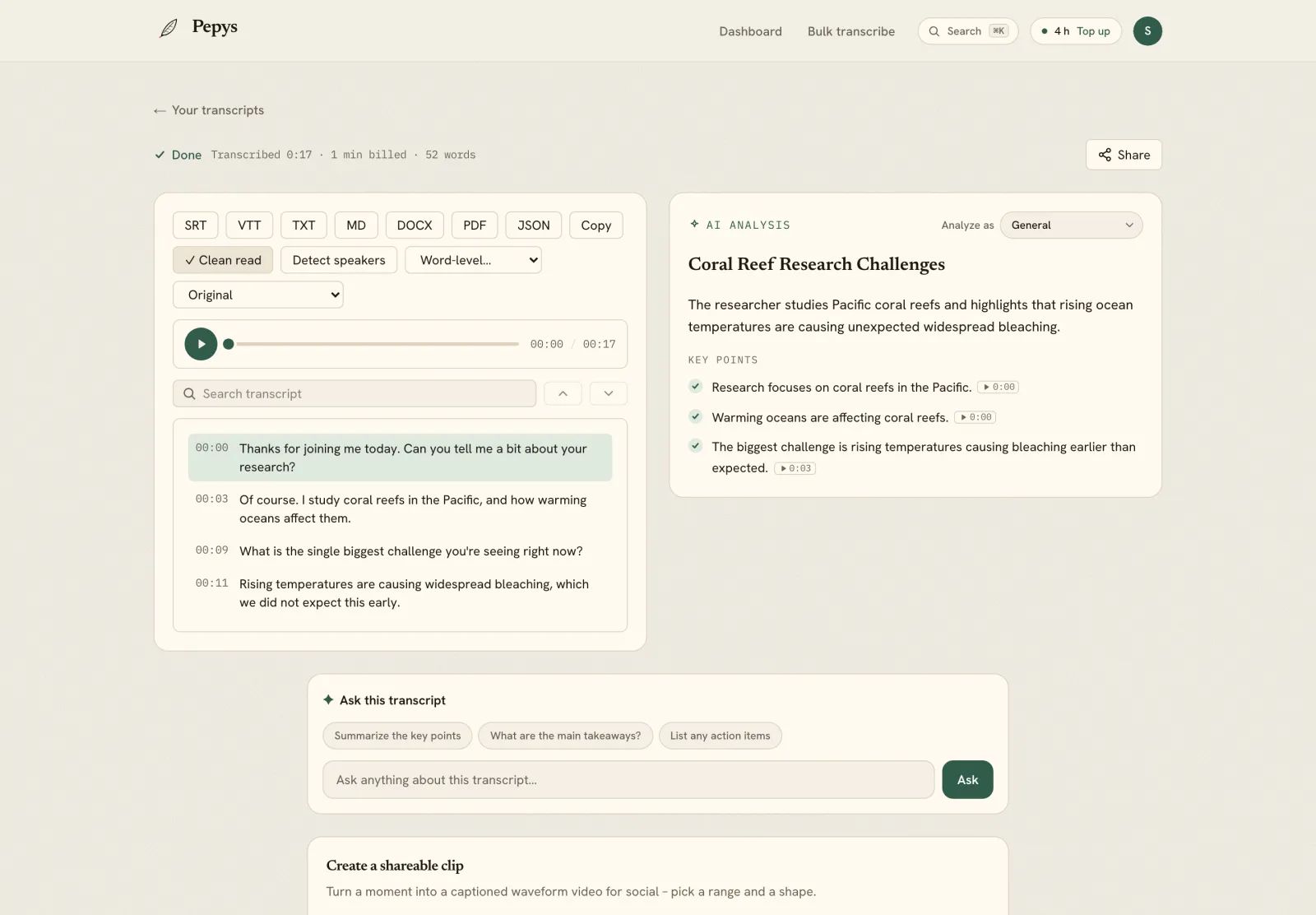
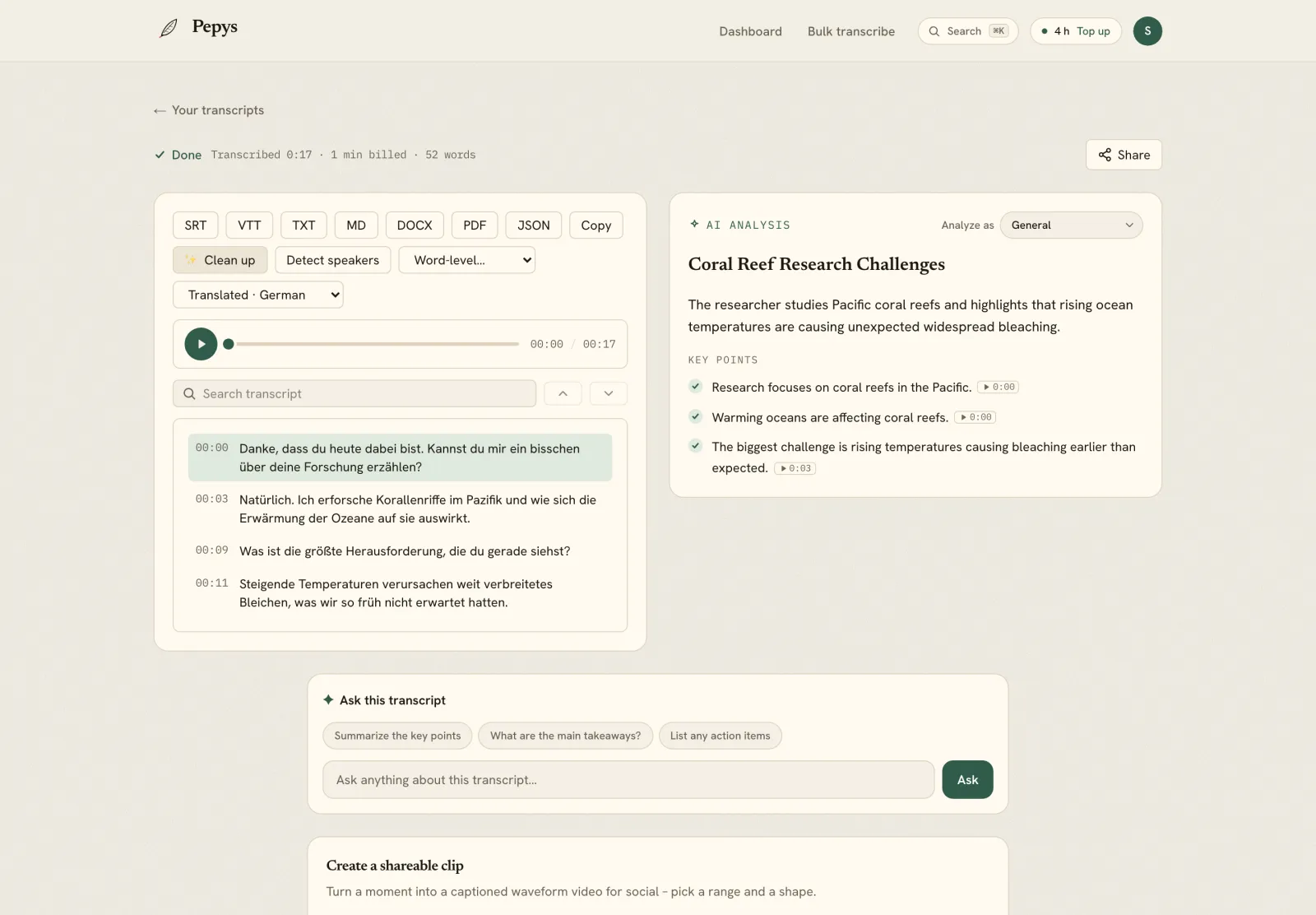
The marketing site is localized in 15+ languages, so international users land in their own – for example 日本語 and 한국어, alongside German, French, Spanish, Thai, Vietnamese, and more.
Pricing – pay once, use anytime
1 credit = 1 minute. Credits never expire. No subscription. Start with 60 free minutes, no credit card. Packs get cheaper per hour as they grow.
| Pack | One-time price | Per hour |
|---|---|---|
| Free start (60 min) | $0 – no card | – |
| 10 hours | $12.50 | $1.25 |
| 20 hours ⭐ Recommended | $20 | $1.00 |
| 30 hours | $30 | $1.00 |
| 50 hours | $50 | $1.00 |
| 75 hours | $75 | $1.00 |
| 100 hours | $85 | $0.85 |
| 200 hours | $170 | $0.85 |
The more you buy, the less each hour costs – from $0.85/hr at volume. Buy once, transcribe whenever, nothing expires.

FAQ
How much does Pepys cost? Pepys is pay-once: 1 credit equals 1 minute, and credits never expire. Start free with 60 minutes (no credit card). Packs scale down with volume – from $1.25/hr, to 20 hours for $20 (the Recommended pack), down to $0.85/hr at higher volumes. There is no subscription.
Do credits expire? No. You buy minutes once and use them whenever you like.
Is there a subscription? No. Pepys is pay-once. Buy a pack, and the balance is yours until you spend it.
What languages can Pepys transcribe? 99+ languages, with automatic language detection. You can also translate a finished transcript into another language while keeping the timestamps and subtitles intact.
Can Pepys tell speakers apart? Yes. Speaker diarization labels who said what and holds up through cross-talk and interruptions.
What can I export? TXT, Markdown, DOCX, PDF, SRT, VTT, and JSON.
What files can I transcribe? Both audio and video, including long recordings.
Can I transcribe from a YouTube or podcast link? Yes. Paste a URL from YouTube, TikTok, Instagram, Facebook, Apple Podcasts, or Spotify (and podcast RSS feeds), and Pepys fetches the audio and transcribes it – no download needed.
Is there an app to install? No. Pepys is a web app – it runs at pepys.co, with nothing to install.
Does Pepys have an MCP server?
Yes. Connect Claude, ChatGPT, or Cursor to https://pepys.co/api/mcp (OAuth, no API key) or run npx pepys-mcp, and the agent transcribes on its own. See pepys.co/mcp.
The Talk Type podcast
Pepys makes a podcast too: Talk Type – short episodes on transcription, audio, and getting the spoken word onto the page. Listen on Apple Podcasts or Spotify, or read the time-synced transcripts at pepys.co/podcast.
Links
- Try it: pepys.co
- Pricing: pepys.co/pricing
- Tools hub: pepys.co/tools
- How-to guides: pepys.co/how-to
- Transcribe by industry: pepys.co/transcribe
- Ask your transcript: pepys.co/ask
- Analyze: pepys.co/analyze
- MCP for AI agents: pepys.co/mcp
- Developer API: pepys.co/developers
- Podcast (Talk Type): pepys.co/podcast · Apple · Spotify